
Arduino Uno REV3
4.8Editor score
Classic reliable ATmega328P
Full IDE compatibility
Great for beginners
This guide compares the top Arduino Uno Q boards and kits for AI robotics and IoT projects helping you choose the best hybrid development platform for your
The Arduino Uno Q represents a major leap in embedded development by combining real-time microcontroller power with high-performance computing capabilities for modern projects.
We evaluated ten top-rated boards and kits focusing on processing power AI capabilities connectivity options and ease of use for makers and professionals alike.
Each pick highlights specific strengths and ideal use cases so you can find the right fit while noting that prices and availability may change over time.
4.8Editor score

4.4Editor score
3.7Editor score
The following table provides a side-by-side overview of all ten products highlighting their key specifications and primary use cases for quick comparison.


The Arduino® UNO™ Q 4GB stands out as the premier choice for developers needing both real-time control and high-performance computing in a single board.
We may earn a commission when you buy through this link, at no additional cost to you.
Its hybrid architecture combines a Qualcomm Dragonwing QRB2210 MPU for AI tasks with an STM32U585 MCU for precise real-time operations enabling complex robotics and IoT solutions.
While the higher price reflects its advanced capabilities users may need some familiarity with Linux environments to fully leverage its Debian OS support and Python scripting.
This board is ideal for professionals and serious hobbyists building sophisticated AI vision voice or edge computing projects that demand powerful processing within a familiar form factor.
The combination of a quad-core ARM processor and a dedicated microcontroller allows for efficient multitasking between heavy AI workloads and precise hardware control.
Running Debian OS unlocks access to Python and full Linux tools making it easy to deploy complex models and manage logs without external hardware.
We may earn a commission when you buy through this link, at no additional cost to you.
This bundle offers the powerful Arduino UNO Q 4GB board paired with a dedicated 45W USB-C power supply ensuring stable operation for demanding robotics and automation tasks.
We may earn a commission when you buy through this link, at no additional cost to you.
The hybrid processing power combines Qualcomm MPU and STM32 MCU capabilities making it suitable for scalable AI industrial IoT systems requiring reliable real-time control.
While the included power supply enhances reliability it may add to the overall setup size and users should verify power requirements for their specific peripherals.
Engineers and developers building complex industrial systems will appreciate the stable power delivery and high-performance computing capabilities this complete kit provides.
With 4GB RAM this board enables advanced AI models and multitasking capabilities essential for edge AI applications and real-time data processing.
The 45W USB-C power supply ensures reliable operation during heavy workloads and peripheral usage without needing separate power adapters.
We may earn a commission when you buy through this link, at no additional cost to you.
The GeeekPi Starter Kit provides a complete environment for AI and embedded development with the UNO Q board protected by a rugged aluminum case and essential accessories.
We may earn a commission when you buy through this link, at no additional cost to you.
It supports dual operating modes allowing the board to function as a standalone single-board computer with a monitor or connect to a PC via USB-C for familiar Arduino experiences.
While the 2GB RAM is slightly lower than the 4GB variant it still handles demanding embedded projects well and the included hub expands connectivity significantly for professional use.
Developers needing a ready-to-go kit with physical protection and expanded connectivity options will find this comprehensive package valuable for prototyping and deployment.
Includes the official UNO Q with sufficient RAM and storage for demanding AI embedded projects without needing to purchase components separately.
The sturdy aluminum housing protects the board from dust impacts and static electricity while ensuring efficient heat dissipation during heavy workloads.
We may earn a commission when you buy through this link, at no additional cost to you.
The Arduino Uno REV3 remains a standard choice for beginners and educators offering reliable performance with the trusted ATmega328P microcontroller and full IDE compatibility.
We may earn a commission when you buy through this link, at no additional cost to you.
Its 14 digital I/O pins and 6 analog inputs provide flexible connectivity for a wide range of sensors motors and components making it perfect for basic to advanced electronics projects.
Lacking modern wireless features it is less suited for IoT compared to newer boards but offers unmatched simplicity and community support for learning and prototyping.
For anyone starting out or needing a cost-effective reliable controller for DIY projects this board delivers excellent value and long-term support from the Arduino community.
Powered by the reliable ATmega328P at 16MHz with ample flash and SRAM resources for a wide range of basic to advanced electronics projects.
A standard in educational environments widely used for learning and teaching electronics and programming making it accessible for all skill levels.
We may earn a commission when you buy through this link, at no additional cost to you.
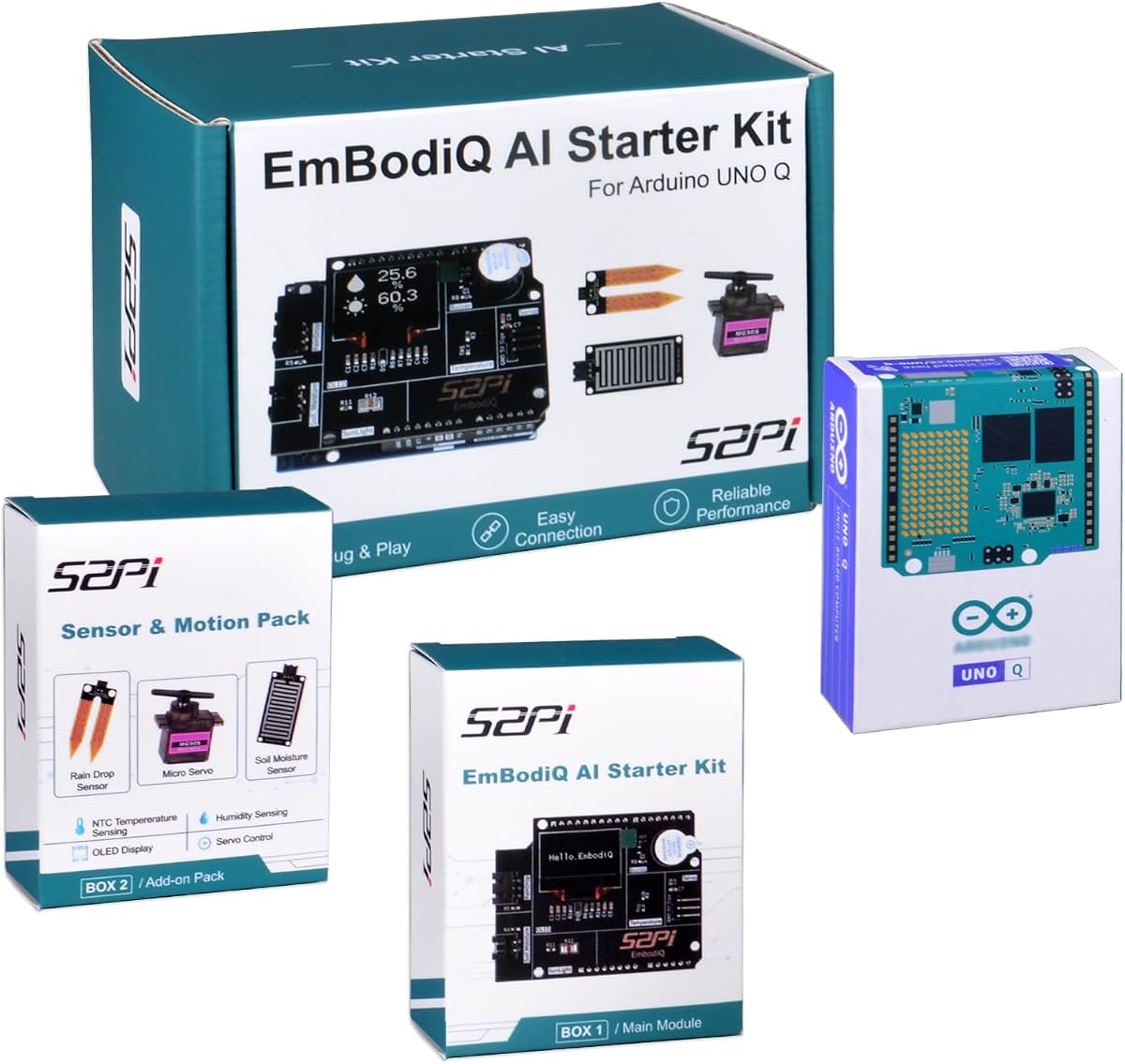
This unique kit enables natural language control of hardware allowing users to command sensors and motors using voice or text without writing complex code.
We may earn a commission when you buy through this link, at no additional cost to you.
Built around the UNO Q it includes an EmbodiQ AI Agent HAT that supports real-time reasoning and multi-step task execution with conditional logic for smarter automation.
While the rating is lower possibly due to API dependencies this innovative approach to interacting with hardware makes it a compelling choice for accessible smart gardening or automation.
Makers and educators seeking an intuitive way to introduce AI concepts into hardware projects will appreciate the ability to control physical devices through simple commands.
Control sensors servos and displays using natural language without complex coding so you can simply tell the AI what you want to do.
Built around UNO Q with 4GB RAM and 32GB eMMC storage running the EmbodiQ AI Agent HAT enabling real-time reasoning and execution.
We may earn a commission when you buy through this link, at no additional cost to you.
The Arduino UNO R4 WiFi combines Renesas and ESP32 chips to deliver powerful dual-core processing ideal for wireless IoT projects requiring stable high-speed connectivity.
We may earn a commission when you buy through this link, at no additional cost to you.
With built-in Wi-Fi and Bluetooth along with modern USB-C and CAN support it offers robust communication capabilities for remote sensors and industrial systems.
Although not a Q-series hybrid board its advanced features like a 12-bit DAC and LED matrix make it a versatile choice for modern embedded and audio projects.
Developers needing reliable wireless communication and precise analog output in a familiar Uno form factor will find this board a significant upgrade over previous models.
Combines Renesas RA4M1 and ESP32-S3 for powerful dual-core processing delivering flexibility for high-speed communications and real-time data processing.
The 12×8 LED Matrix enables users to display dynamic visuals or real-time data on the board itself making it perfect for status indicators.
We may earn a commission when you buy through this link, at no additional cost to you.
This comprehensive kit transforms code into real-world results with guided lessons covering LEDs sensors motors and displays making it ideal for homeschool or coding clubs.
We may earn a commission when you buy through this link, at no additional cost to you.
The organized package includes a UNO R3 controller LCD breadboard power module and sensors allowing beginners to focus on wiring code and testing without soldering.
While not a Q-series board it remains the gold standard for learning logic before creating custom projects with its clear tutorials and accessible component variety.
Young learners or those new to electronics will find this kit an excellent entry point offering clear support and plenty of components to explore creativity.
Follow 22+ guided lessons to make LEDs blink read sensors and control motors perfect for family builds or classroom STEM units.
Plug-in modules solderless breadboard and pre-soldered LCD help beginners focus on wiring code and testing immediately.
We may earn a commission when you buy through this link, at no additional cost to you.
This standalone board lets you start coding immediately by connecting a USB cable and uploading your first sketch for sensor motor or automation projects.
We may earn a commission when you buy through this link, at no additional cost to you.
It features the reliable ATmega328P core with 16 MHz clock and 14 digital I/O pins providing a versatile foundation for LEDs buttons and displays.
The ATmega16U2 USB interface ensures reliable programming and clear headers simplify connections though additional components are not included in the box.
For those who already have sensors or need an extra controller at a lower cost this board offers excellent value and reliability for maker desks.
Connect the included USB cable upload your first sketch and build sensor motor display and automation projects immediately.
The ATmega16U2 USB interface supports sketch uploads and serial communication while clearly labeled headers help simplify connections.
We may earn a commission when you buy through this link, at no additional cost to you.
This core version features the ATmega328P microcontroller at 16MHz with ample flash and SRAM providing a solid foundation for robotics and smart home projects.
We may earn a commission when you buy through this link, at no additional cost to you.
It offers extensive I/O options with 14 digital and 6 analog pins along with standard communication interfaces like UART SPI and I2C for peripheral connections.
The lower rating may reflect simpler packaging or shipping issues but the board itself remains fully compatible with the ecosystem and various shields.
Users needing a straightforward reliable controller with all essential features included at a basic price point will find this board adequate for many tasks.
Features the ATmega328P microcontroller unit operating at a 16MHz clock speed with solid foundation for novice and expert projects.
Provides 14 digital input/output pins and 6 analog input pins for versatile connectivity with actuators and sensors.
We may earn a commission when you buy through this link, at no additional cost to you.
This versatile board unlocks creativity with its user-friendly development environment and extensive pins making it suitable for endless possibilities in electronics projects.
We may earn a commission when you buy through this link, at no additional cost to you.
It boasts a high-performance ATmega328P microcontroller with ample flash and SRAM perfect for both beginners and advanced users seeking innovative applications.
Its open-source design allows for customization while broad compatibility ensures seamless integration with various sensors modules and libraries for interactive systems.
Whether a hobbyist or professional this board offers robust interfaces and reliable performance allowing users to prototype and realize their electronic dreams.
Explore endless possibilities in electronics projects with its user-friendly development environment and extensive digital and analog I/O pins.
This feature-packed development board boasts a high-performance ATmega328P microcontroller 32KB flash memory and 2KB of SRAM.
We may earn a commission when you buy through this link, at no additional cost to you.
Selecting the right Arduino Uno Q or compatible board requires evaluating several key factors to match your project requirements and skill level.
Modern hybrid boards like the Uno Q combine a powerful processor with a microcontroller for AI and real-time tasks. Ensure the board supports the necessary computational load for your specific application.
Look for dual-architectures if you need both Linux-based AI and precise real-time control simultaneously.
Projects involving AI or complex logging require more RAM and storage. The 4GB variants offer significant advantages over 2GB options for multitasking and model deployment.
Choose higher RAM and eMMC storage if you plan to run multiple applications or store extensive datasets locally.
Wireless communication is essential for IoT projects. Check for built-in Wi-Fi Bluetooth or Ethernet support depending on your network needs.
Boards with USB-C provide modern power delivery and faster data transfer for programming and peripheral connections.
Some boards run Linux Debian allowing Python scripting and advanced software tools while others stick to microcontroller-only environments.
If you need full OS capabilities for AI or complex logic select a board that explicitly supports Linux and Python.
The classic Uno form factor ensures compatibility with existing shields and accessories which can save time and cost in prototyping.
Verify pin layouts and headers match your current peripherals before purchasing a new board.
Higher performance boards often require more robust power supplies than basic models. Ensure your power source matches the voltage and current needs.
Some kits include specific power adapters which can simplify setup but add to the overall bulk.
Price varies significantly from basic controllers to premium AI kits. Determine how much you are willing to invest based on project complexity.
Consider starter kits that bundle accessories if you need immediate setup without sourcing components separately.
Official boards typically have extensive documentation and community support compared to third-party alternatives. This can be crucial for troubleshooting.
Check for available libraries tutorials and user forums before making your final decision.
Always connect your board via USB-C or an appropriate power source before opening the IDE to ensure stable communication during programming.
Keep the board in a dry environment and avoid exposing it to excessive heat or static electricity which can damage sensitive components.
Regularly update your software libraries and check for firmware updates to maintain compatibility and security for your projects.
Yes, the Uno Q maintains the classic UNO form factor which ensures physical compatibility with standard shields. However, you should verify voltage levels and pin functions before connecting high-power peripherals.
Yes, the Uno Q runs Debian Linux which allows you to write and execute Python scripts. This is ideal for complex logic and AI tasks beyond what C++ sketches usually support.
The Q features a hybrid ARM microcontroller for Linux and AI while the R4 WiFi uses a Renesas controller with ESP32 for wireless connectivity. The Q is better for complex AI while R4 is great for IoT.
While USB-C can power basic tasks, high-performance AI or multiple peripherals often require the included 45W supply. Always check your specific project's power draw.
Yes, but beginners may find the Linux setup and advanced features challenging. The Uno Q is more suited for developers or advanced hobbyists ready for edge computing tasks.
Some kits like the EmbodiQ include sensors such as soil moisture or raindrop sensors. Standard Q boards usually require you to purchase sensors separately.
Our top picks highlight the versatility of the Uno Q series alongside classic options for every skill level and project requirement.
Prioritize processing power and connectivity options based on whether you need AI capabilities or simple real-time control.
Remember to check current prices and availability as these details can change frequently on the marketplace.