
California JOS GPU Support Bracket
4.7Editor score
Universal height adjustable fit
Durable all aluminum build
Prevents GPU sag damage
This guide compares the best GPU backplates for cooling and protection helping you choose the right heatsink and support bracket for your graphics card.
GPU backplates serve as essential components for modern graphics cards providing structural support and enhanced thermal performance. These metal plates attach to the rear of the PCB helping to prevent sagging and dissipating heat from memory modules and VRMs effectively.
We evaluated ten top-rated products focusing on material quality thermal design compatibility and ease of installation. Each option was assessed for its ability to protect your hardware while maintaining optimal airflow within your PC case without obstructing key components.
Each pick highlights unique strengths whether you need passive cooling active fan support or simple anti-sag protection. Prices and availability change frequently so check current listings before purchasing to ensure you get the best value for your specific build needs.
4.7Editor score

4.0Editor score

4.2Editor score
This side by side comparison breaks down the key specifications and features of each product to help you make an informed decision based on your specific GPU model and cooling requirements.


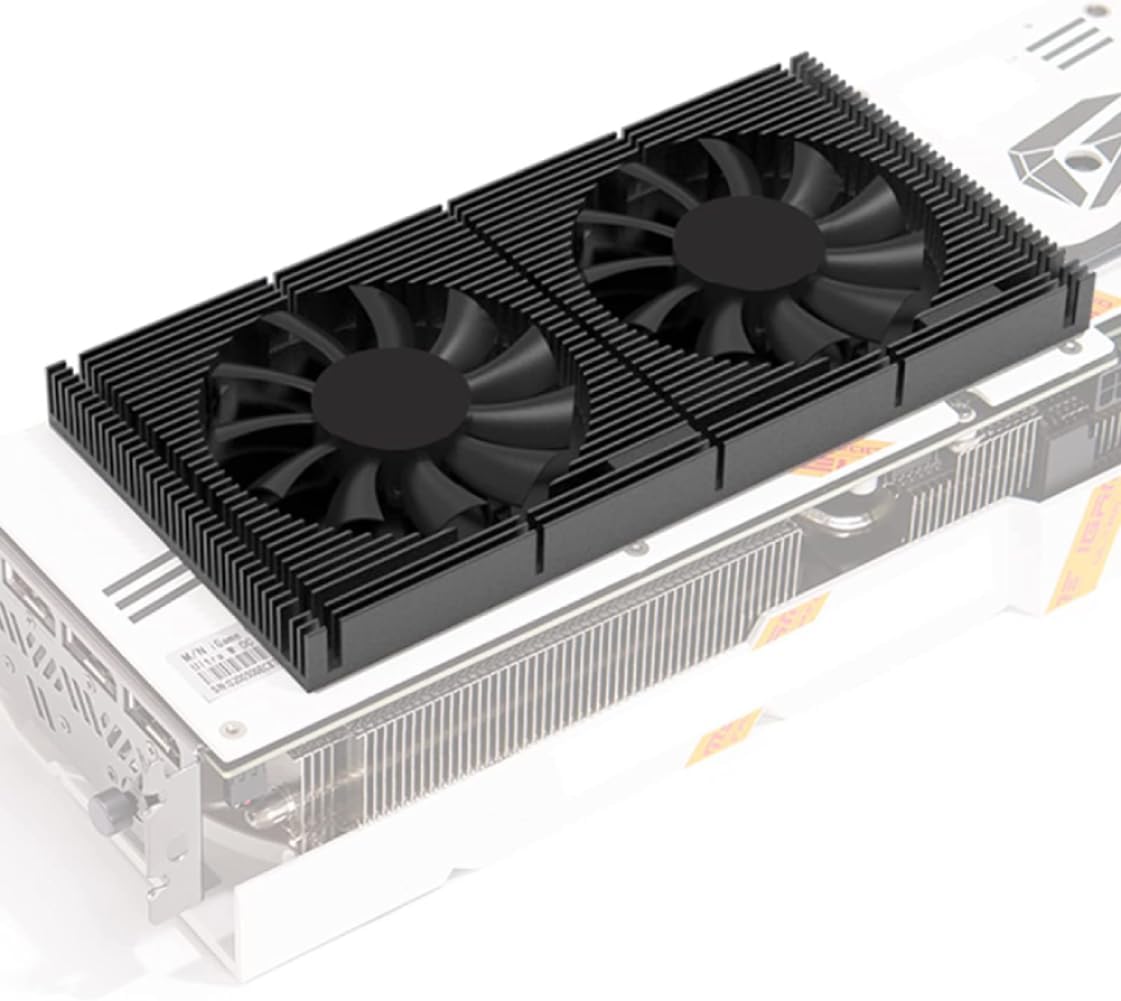


The GOWENIC GPU Backplate Memory Radiator stands out as a comprehensive cooling solution for high-end graphics cards. With a solid 4.0 rating from users it offers a blend of passive and active cooling features that address heat buildup effectively. Its aluminum alloy construction ensures durability while the included 4 pin fan connector adds versatility for custom cooling setups.
We may earn a commission when you buy through this link, at no additional cost to you.
This radiator is designed specifically for RTX 3090 3080 and 3070 models making it a precise fit for popular high-performance cards. The 15mm thickness provides ample space for heat dissipation and the included thermal pad ensures efficient heat transfer from the memory modules to the aluminum backplate. The CNC machining process results in a smooth anodized black finish that looks professional inside any PC case.
While it offers excellent cooling potential users should note that it requires a free fan header on the motherboard for the integrated fan to operate. Additionally the fixed dimensions might limit compatibility with cases that have very tight vertical clearance. These trade-offs are acceptable considering the enhanced thermal performance and structural protection it provides against GPU sag.
If you prioritize thermal performance and structural integrity this backplate is an ideal choice for enthusiasts building a custom PC. It suits gamers and workstation users who run intensive loads and need reliable cooling for memory and VRM components. We recommend this product for those seeking a balance between passive protection and active cooling enhancement.
The combination of aluminum alloy and thermal pads efficiently transfers heat away from critical components preventing thermal throttling during extended use.
The rigid aluminum construction reinforces the PCB reducing the risk of bending and protecting sensitive rear components from physical stress.
We may earn a commission when you buy through this link, at no additional cost to you.
This premium GPU backplate memory heatsink delivers superior cooling performance with dual 70mm PWM fans. Rated 4.2 by users it offers a robust solution for managing heat in high-end GPUs like the RTX 3090. The aviation aluminum 6061 construction ensures a lightweight yet sturdy design that resists oxidation and provides excellent heat dissipation capabilities.
We may earn a commission when you buy through this link, at no additional cost to you.
The standout feature is the dual fan setup which offers greater cooling capacity than single fan alternatives. Fans operate silently between 1500 RPM and 2800 RPM based on internal temperature thanks to the 4 pin connector. The upgraded elastic latch mechanism simplifies installation making it accessible even for beginners. The included 1.2mm thermal pad enhances contact with memory modules for efficient heat transfer.
Users should be aware that this unit requires two fan headers and might not fit in cases with severe height constraints. The price reflects the premium components and advanced cooling design which may be a consideration for budget builds. These factors are justified by the significant thermal benefits and durable build quality offered.
For users running demanding workloads or overclocking their GPUs this heatsink provides the best thermal management among the options reviewed. It is ideal for professionals and enthusiasts who need maximum cooling efficiency without compromising on build quality. We highly recommend this for those who want top tier protection and performance.
Dual fans create consistent airflow across the backplate reducing hotspots and maintaining lower temperatures during intensive gaming sessions.
Aviation aluminum ensures longevity and resistance to corrosion while maintaining a lightweight profile that does not stress the GPU.
We may earn a commission when you buy through this link, at no additional cost to you.
The California JOS GPU Support Bracket offers an affordable and effective solution to prevent graphics card sagging. With a 4.7 rating users appreciate its simple yet robust design that supports heavy GPUs without adding complexity. Made from all aluminum it provides durability and strength that plastic alternatives often lack.
We may earn a commission when you buy through this link, at no additional cost to you.
Its height adjustable feature ensures compatibility with most ATX M ATX and ITX cases allowing for a custom fit. The stand securely supports the GPU from below reducing stress on the PCIe slot and motherboard. Installation is tool free making it accessible for all skill levels. It does not require fan headers or complex modifications.
While it does not provide active cooling or full backplate coverage it effectively addresses structural sag issues that can lead to hardware failure. It is a standalone support rather than a integrated backplate which limits thermal benefits. These limitations are acceptable given the low cost and focused utility for structural protection.
This bracket is ideal for budget conscious builders who need to prevent GPU sag on heavy cards. It suits standard PC builds where active backplate cooling is not required. We recommend it for anyone seeking reliable structural support without breaking the bank.
The sturdy aluminum base provides strong support preventing long term damage to the motherboard caused by heavy graphics cards.
Adjustable height allows it to fit various case types and GPU sizes ensuring broad usability across different builds.
We may earn a commission when you buy through this link, at no additional cost to you.
This Large Aluminum Heat Sink provides effective passive cooling for GPU backplates with its high fin count design. Rated 4.7 users value its robust construction and ready-to-use thermal adhesive tape. The aluminum material ensures excellent heat dissipation without the need for additional power or fans.
We may earn a commission when you buy through this link, at no additional cost to you.
With 294 fins and a thickness of 15mm it offers a large surface area for heat transfer. The dimensions match standard GPU PCBs making it suitable for DIY modifications. The adhesive tape simplifies installation reducing the need for screws. It also reduces risks of hardware failure by preventing overheating.
The lack of active cooling means it relies solely on case airflow which may not suffice in very hot environments. Generic dimensions require careful alignment to avoid obstructing ports. These issues are minor compared to the cost effectiveness and simplicity it offers for passive cooling.
Ideal for users seeking a simple passive cooling solution this heatsink works well in well-ventilated cases. It suits those who want to upgrade cooling without adding fans or complexity. We recommend it for DIY enthusiasts building custom GPU cooling systems.
The high fin density increases surface area allowing effective heat dissipation through natural convection and case airflow.
Pre-applied thermal adhesive tape ensures secure mounting without screws saving time and reducing installation complexity.
We may earn a commission when you buy through this link, at no additional cost to you.
This High Power Large Aluminum Heat Sink Plate delivers effective passive cooling for GPU PCBs. With a 4.6 rating it features 294 fins and a 15mm thickness to maximize heat transfer. The aluminum construction and black anodized finish ensure durability and aesthetics inside the PC case.
We may earn a commission when you buy through this link, at no additional cost to you.
It includes pre-applied thermal adhesive tape for easy mounting on GPU backplates. The design reduces hardware failure risks by lowering operating temperatures. It is versatile for use on various electronics. Its dimensions are tailored to match standard GPU layouts closely.
Since it lacks a fan it relies on airflow to move heat away from the surface. Alignment is critical to avoid blocking I/O ports or mounting points. These constraints are balanced by the cost efficiency and simplicity of passive cooling.
This heatsink is great for budget builds needing improved cooling without fans. It suits cases with strong airflow to support passive dissipation. We recommend it for users upgrading thermal management economically.
The extensive fin array and aluminum material work together to draw heat away from sensitive components efficiently.
Thermal adhesive tape allows for secure attachment without screws reducing installation time and complexity.
We may earn a commission when you buy through this link, at no additional cost to you.
The Hilitand GPU Backplate Radiator combines passive and active cooling for RTX 30 series GPUs. Rated 4.0 it offers a reliable solution to reduce memory temperatures. The aluminum alloy build ensures durability and the included thermal pad optimizes heat transfer.
We may earn a commission when you buy through this link, at no additional cost to you.
Its 4 pin fan interface connects to motherboard headers for active cooling when needed. This flexibility helps manage heat during heavy workloads. The 15mm thickness provides enough space for efficient dissipation. It is designed to fit RTX 3090 3080 and 3070 cards.
Users need available fan headers to utilize the fan feature. The model is specific to RTX 30 limiting broader compatibility. These factors are acceptable considering the targeted performance benefits and reasonable price.
This radiator is ideal for RTX 30 users seeking a balanced cooling solution. It works well for gaming and workstation tasks requiring stable temperatures. We recommend it for builders wanting active cooling on a budget.
The 4 pin connector allows users to add a fan for enhanced cooling when passive methods are insufficient.
Designed specifically for RTX 30 cards ensuring precise fit and optimal performance for popular GPU models.
We may earn a commission when you buy through this link, at no additional cost to you.
This GPU Backplate Radiator Alloy offers a compact active cooling solution for RTX 30 series cards. With a 4.5 rating it balances performance and size effectively. The aluminum alloy construction ensures sturdiness and the 4 pin fan interface supports active cooling options.
We may earn a commission when you buy through this link, at no additional cost to you.
The 15mm thickness keeps the backplate compact while maintaining adequate thermal dissipation. An included thermal pad ensures good contact with memory modules. It supports vertical mounting and fits RTX 3090 3080 and 3070 GPUs. Installation is straightforward and the fan helps reduce noise by sharing load.
Users must have available motherboard fan headers for the fan feature. Compatibility is limited to RTX 30 models which may restrict broader use. These are reasonable trade-offs for a dedicated cooling solution at this price point.
This backplate is suitable for gamers and creators using RTX 30 cards needing extra cooling. It fits well in cases where space is limited. We recommend it for users wanting efficient cooling in a compact package.
The thin profile ensures it does not obstruct case airflow while still offering active cooling capabilities when needed.
Included thermal pad enhances heat conduction from memory to the backplate improving overall cooling performance.
We may earn a commission when you buy through this link, at no additional cost to you.
This Aluminum GPU Backplate is engineered for ZOTAC RTX 5060 and 5050 Solo 8GB cards. It holds a perfect 5.0 rating highlighting exceptional quality. The CNC aluminum construction provides rigidity and a clean aesthetic fit. It includes strategic ventilation cutouts to assist airflow.
We may earn a commission when you buy through this link, at no additional cost to you.
The anti-sag support reinforces the GPU structure preventing long term bending. Installation is easy with pre drilled holes aligning with PCB points. It does not block ports or interfere with brackets ensuring seamless integration. The finish enhances the card look while providing protection.
It is specific to ZOTAC Solo models limiting compatibility for other brands. Lack of active cooling means it relies on case airflow for thermal management. These are minor drawbacks given the precise fit and protective features.
Ideal for ZOTAC Solo owners seeking protection and aesthetics this backplate is top tier. It suits builders valuing durability and precise fit. We highly recommend it for compatible GPU models.
CNC machining ensures exact alignment with mounting holes and ports providing a factory-like seamless appearance.
Anti-sag design prevents structural bending over time extending the lifespan of your graphics card and motherboard.
We may earn a commission when you buy through this link, at no additional cost to you.
This Aluminum GPU Backplate is designed specifically for GIGABYTE RTX 5060 and 5050 Low Profile cards. It ensures precise fit without blocking ports. The reinforced aluminum provides structural rigidity and reduces PCB flex. Anti-sag support is included to prevent bending over time.
We may earn a commission when you buy through this link, at no additional cost to you.
CNC cut design aligns with original mounting points for easy installation. It acts as a passive heat spreader helping to distribute heat evenly. The package includes necessary hardware for DIY setup requiring no modding. It is ideal for small form factor builds needing structural support.
It is limited to GIGABYTE Low Profile models and lacks active cooling. These constraints are acceptable considering its targeted design and structural benefits. Installation remains simple for most users.
This backplate suits GIGABYTE LP users seeking structural reinforcement and thermal spread. It is great for compact cases. We recommend it for those needing reliable fit and stability.
Thick aluminum construction prevents PCB bending and provides strong rear protection against physical stress.
Acts as a heat spreader to help balance temperatures across the card during sustained usage.
We may earn a commission when you buy through this link, at no additional cost to you.
This I/O IO Shield Backplate GPU Bracket is an external slot cover designed for EVGA RTX 3060ti 3070 3080 and 3090 FTW3 XC3 cards. It provides a sturdy zinc alloy finish that looks clean and professional. The design covers the GPU slot preventing dust entry.
We may earn a commission when you buy through this link, at no additional cost to you.
It is precisely sized at 12×3.8cm to fit specific EVGA models. Installation requires only screws and is hassle free. It enhances the look of your PC by covering unused slots. The material is sturdy and durable for long term use.
Note that it is a slot cover rather than a backplate for cooling. Compatibility is limited to EVGA models mentioned. These are acceptable limitations for users seeking slot protection and aesthetic improvement.
This bracket is ideal for EVGA RTX users wanting slot protection. It suits builds where appearance and dust protection are priorities. We recommend it for those needing a secure and clean slot cover.
Covers unused GPU slots to prevent dust accumulation and improve case aesthetics with a solid finish.
Precision engineered for EVGA FTW3 and XC3 series ensuring a perfect fit without gaps.
We may earn a commission when you buy through this link, at no additional cost to you.
Selecting the right GPU backplate involves considering cooling needs compatibility material quality and installation requirements.
GPU backplates can be passive or active. Passive options rely on case airflow and fins to dissipate heat which works well in well ventilated cases. Active models include fans for enhanced cooling but require motherboard fan headers and more case space.
Choose passive for simplicity and cost or active if your GPU runs hot and you have header availability.
Aluminum and aluminum alloy are common materials offering good thermal conductivity and durability. Some premium models use aviation aluminum for lighter weight and better resistance to oxidation.
Look for high grade materials to ensure the backplate does not bend easily and provides long term protection.
Ensure the backplate fits your GPU model and size. Many products list specific compatible cards like RTX 3070 3080 or 3090. Some are designed for specific brands like GIGABYTE or ZOTAC.
Verify dimensions and mounting holes match your PCB layout to avoid obstruction or installation issues.
Thickness affects cooling performance and case clearance. Standard backplates are around 15mm thick providing a balance between heat dissipation and space.
Check your case vertical clearance especially when using fans to ensure the backplate fits without blocking airflow or cables.
Most backplates include screws and hardware for easy installation. Some use thermal adhesive tape for mounting to simplify the process further.
Pre drilled holes aligned with PCB points make installation straightforward without requiring modding or drilling.
Many backplates offer structural reinforcement to prevent GPU sag. This is crucial for heavier graphics cards to avoid motherboard damage over time.
Look for stiff materials or dedicated anti-sag brackets that add rigidity to the backplate design.
Thermal pads improve heat transfer from memory modules to the backplate. Some products include pads pre-installed or separately.
Ensure the pad thickness matches the gap between the memory and backplate to maximize cooling efficiency.
Prices vary based on materials fan integration and brand. Passive models are usually cheaper while active ones cost more due to fans and complex design.
Determine if active cooling is necessary for your use case to choose the right value for your budget.
First ensure your PC is powered off and unplugged. Open the case and locate the back of your GPU. Check that your new backplate matches your PCB mounting points and dimensions.
Apply the thermal pad to the backplate if it is not pre installed. Align the backplate with the PCB and secure it using the provided screws or adhesive tape. Connect any fan cables to available motherboard headers.
Close the case and power on. Monitor GPU temperatures and fan speeds to ensure proper operation. Periodically check the backplate for dust buildup and clean with compressed air as needed to maintain performance.
Yes they help by dissipating heat from memory and VRM components. Passive backplates improve surface area for heat transfer while active models with fans offer greater cooling capacity.
Most are DIY friendly with pre-drilled holes and included hardware. Some use thermal adhesive for simpler mounting without screws requiring no modding skills.
No compatibility depends on PCB size and layout. Always check that the model supports your specific GPU card and mounting points to avoid fit issues.
Yes integrated fans need motherboard fan headers to operate. Ensure your board has free headers or use adapters if needed for proper cooling.
If your GPU is heavy you are experiencing sag or you want extra structural support then an anti-sag backplate helps protect the motherboard.
Yes passive backplates have no fans so they operate silently. Active models add noise but provide better cooling for high thermal loads.
The top picks include active cooling options like the GOWENIC and dual fan models and budget structural solutions like the California JOS bracket. Each offers distinct benefits based on your cooling needs and build type.
Prioritize compatibility material quality and cooling type when selecting a backplate. Ensure your case supports the thickness and fan requirements if choosing active cooling for best results.
Always verify current prices and availability before purchasing as listings can change. This guide helps you find the right balance between protection thermal performance and value.