
Nektar SE49
4.5Editor score
Affordable price point
DAW integration included
Compact and lightweight
This guide compares the top 49 Key MIDI Keyboards for producers and musicians in October 2026, evaluating features integration and value.
Finding the right keyboard controller can transform your music production workflow significantly. A 49 key MIDI keyboard offers the perfect balance between portability and playability for most studios. It provides enough range for chords and melodies without taking up excessive desk space in your home setup.
We have analyzed the leading models available in the market based on user feedback and technical specifications. Our comparison focuses on build quality, software integration, and the range of controls offered. Each product selected meets specific criteria for reliability and performance in modern digital audio workstations.
Every pick in this list highlights unique strengths that cater to different needs and budgets. We include detailed breakdowns of key features and included software bundles to help you decide. Please note that availability and pricing can change frequently so check the latest details before purchasing.
4.5Editor score

4.7Editor score

4.4Editor score
This section provides a side-by-side look at the specifications and key features of each model listed. It helps you quickly identify which controller aligns best with your specific production requirements and budget constraints.




This controller stands out as a top choice for producers seeking deep integration with their digital audio workstation. It holds a strong user rating and offers a comprehensive set of tools for modern music creation. The build quality is robust and the controls are designed for quick access to essential functions.
We may earn a commission when you buy through this link, at no additional cost to you.
The seamless integration with major DAWs like Ableton Live and Logic Pro allows for immediate control over tracks and parameters. The FSR drum pads are responsive and support polyphonic aftertouch which adds expression to your performances. Features like Scale Mode help ensure musical accuracy without complex setup.
While it is a significant investment the value comes from the reduced time spent managing software manually. Some users might find the unit heavier than entry level models which could be a factor for mobile performers. The premium price reflects the advanced features and durable construction provided.
It is ideal for producers who want a single controller to manage their entire studio workflow efficiently. The included software packages add substantial value for those starting out or upgrading from basic models. This model is recommended for anyone serious about expanding their production capabilities.
The controller allows you to keep your hands on the gear rather than searching through menus constantly.
Features like chord triggers and arpeggio mutation open up new ways to generate musical ideas quickly.
We may earn a commission when you buy through this link, at no additional cost to you.
This high-end controller offers a premium experience with a focus on tactile feedback and visual clarity. It is rated well for its solid construction and the inclusion of advanced features like aftertouch. The white finish provides a distinct look for those who prefer a lighter aesthetic in their studio.
We may earn a commission when you buy through this link, at no additional cost to you.
The 9 encoders and performance pads give you granular control over synthesis and effects parameters. Users appreciate the clear LCD screen which provides real-time feedback on your current settings and patches. The keybed is designed to feel responsive and natural during extended playing sessions.
The main drawback is the cost which places it in a higher price bracket compared to standard models. Setting up the full software ecosystem can require some initial configuration and account creation. These factors are offset by the quality of hardware and the professional look of the device.
It is best suited for professional producers or enthusiasts who value build quality and visual feedback highly. The design is timeless and functional making it a centerpiece for any serious music setup. Consider this if you need a reliable tool that feels like a professional instrument.
The screen helps you see parameter changes instantly without needing to look at your computer screen.
The knobs and pads are built to withstand heavy use and provide precise adjustments for your sounds.
We may earn a commission when you buy through this link, at no additional cost to you.
This model delivers incredible value for beginners or those on a tight budget who need essential MIDI features. It has a solid user rating and is praised for being ready to work with major software out of the box. The design is compact and does not weigh down your desk or travel bag.
We may earn a commission when you buy through this link, at no additional cost to you.
Nektar integration allows you to control your digital audio workstation functions directly from the keyboard surface. It works seamlessly with Mac and PC systems and includes a DAW package to get you started immediately. The keys are full size which ensures you learn the proper layout for future upgrades.
The trade-off is in the build materials which are lighter and less durable than premium alternatives. The key feel might not satisfy advanced pianists but it is sufficient for triggering virtual instruments. For the price you get a reliable controller that covers all the basics without extra cost.
It is the perfect choice for students or hobbyists starting their journey into music production. If you want a no-fuss entry point that works well with your existing computer setup this is a strong option. It provides the fundamentals needed to create music without breaking the bank.
You can start making music immediately with the included software and simple connection process.
Its compatibility with multiple operating systems ensures it works with whatever computer you own.
We may earn a commission when you buy through this link, at no additional cost to you.
This controller is designed for users who prioritize a direct and simple connection to their music software. It offers velocity sensitive keys that respond well to touch and include basic transport buttons for playback. It is a sturdy unit that fits well on most desks without cluttering the space.
We may earn a commission when you buy through this link, at no additional cost to you.
The plug and play connectivity means you do not need to install drivers to get started quickly. It includes a suite of software tools that provide a complete starting point for recording and production. The physical controls are laid out logically for quick access during a session.
Some users may find the lack of assignable knobs or faders limiting for detailed mixing tasks. However for recording melodic parts it provides exactly what is needed without distraction. The simplicity is a feature for those who want to focus on the music rather than setup.
It is recommended for home studios where space is limited and basic control is sufficient. The included lessons help new users understand how to use the hardware effectively with their computer. This model is a dependable workhorse for consistent performance in a home environment.
With minimal controls it reduces complexity and lets you focus on playing the music.
Free lessons included help you get the most out of the controller quickly.
We may earn a commission when you buy through this link, at no additional cost to you.
This unit is a feature-rich controller that offers extensive physical control over your music software parameters. It includes a full set of faders and knobs that allow you to mix without touching a mouse. The NKS integration allows for deep control over sound libraries from a major manufacturer.
We may earn a commission when you buy through this link, at no additional cost to you.
The Smart Chord and Scale modes make it easier to compose melodies without worrying about wrong notes. You can select from multiple sound bundles to expand your palette of available instruments. The pads and auto-mapping features streamline the process of triggering clips and samples.
The physical footprint is quite large and may require a dedicated desk space. It also requires external power which adds a cable to your connection setup. These factors should be considered if you have a small workspace or need to move the unit often.
It is ideal for producers who want a complete mixing surface in addition to a keyboard. The ability to map controls directly to plugins saves time during the production process. This model is a strong contender for home studio mixing and sound design tasks.
The dedicated knobs let you tweak synthesis parameters without looking at your monitor constantly.
Automatic mapping reduces the setup time required for getting started with new projects.
We may earn a commission when you buy through this link, at no additional cost to you.
This model balances price and features well by including a robust software suite with the hardware. It offers a modern interface with backlit pads that provide visual feedback during performance. The control is updated with new modes that help composers generate ideas quickly.
We may earn a commission when you buy through this link, at no additional cost to you.
Analog Lab V provides a large collection of sounds that are accessible directly from the controller. The integration with DAWs is smooth and allows you to adjust effects and track levels easily. The pads are responsive and add a tactile element to your production workflow.
The controller can be heavier than some competitors which may affect portability. Navigating the features might take some time to learn due to the depth of options. However the utility of the included tools justifies the learning curve for most users.
It is recommended for producers who want a high-quality instrument with a strong software foundation. The visual feedback helps you stay engaged with your music while performing. This model offers a compelling package for those upgrading from older basic controllers.
With thousands of presets you have instant access to a wide variety of sounds.
The screen and lights help you see what is happening without needing to look at your screen.
We may earn a commission when you buy through this link, at no additional cost to you.
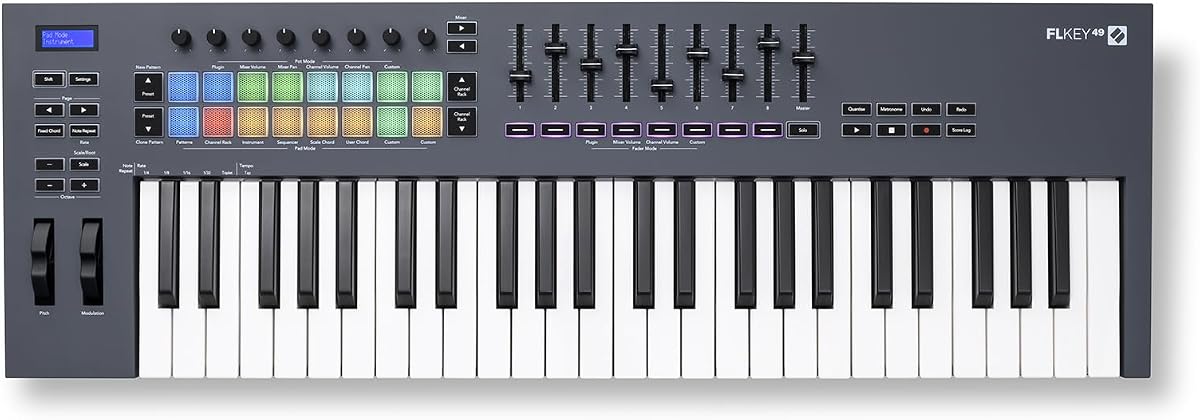
This controller is specifically designed to work seamlessly with FL Studio for a streamlined production experience. It allows you to control mixers and racks directly without needing to reach for the mouse. The design focuses on workflow efficiency and keeping your hands on the hardware.
We may earn a commission when you buy through this link, at no additional cost to you.
The pads are mapped to the step sequencer for easy programming of beats and patterns. You can trigger instruments and manipulate sounds with dedicated controls that match the software layout. Transport and navigation buttons ensure you can keep your rhythm and flow uninterrupted.
If you do not use FL Studio regularly this unit is less versatile than other options. It might be a niche choice for those committed to that specific software environment. For others it may not offer the same level of broad compatibility as general controllers.
It is the best option for dedicated FL Studio users who want to optimize their setup. The physical control over mix and sequencer functions speeds up the creation process significantly. Consider this if you use FL Studio as your main tool for music production.
Pads allow you to program beats without dragging clips in the software interface.
Faders give you instant access to volume levels and panning for your tracks.
We may earn a commission when you buy through this link, at no additional cost to you.
This professional controller offers advanced features like aftertouch and full MIDI input output options. It is designed for experienced users who need deep control over their instruments and software. The build is solid and the keys provide a weighted feel that is comfortable to play.
We may earn a commission when you buy through this link, at no additional cost to you.
The 16 pads and multiple knobs provide ample surface area for complex productions. You can utilize the arpeggiator and smart modes to generate patterns quickly. The included software expansion packs add value for those looking to expand their sound options.
The sheer number of controls can be overwhelming for someone just starting out. It also takes up a significant amount of desk space which might be an issue in smaller rooms. The learning curve is higher but the capabilities are extensive for those who need them.
It is a solid choice for professional setups where detailed control is a priority. The inclusion of MIDI out allows for connection to other hardware synthesizers easily. This model suits producers who want a complete command center for their studio.
The MIDI out port allows you to connect and control external gear as well.
Aftertouch allows you to add expression to notes after they are played for more dynamic sound.
We may earn a commission when you buy through this link, at no additional cost to you.
This is a straightforward controller that focuses on essential functions without extra bells and whistles. It offers velocity sensitive keys and standard wheels for pitch and modulation adjustments. The design is utilitarian and provides the basics needed to connect to a computer.
We may earn a commission when you buy through this link, at no additional cost to you.
The MIDI out jack allows for connection to hardware devices which adds some flexibility. It is easy to set up and does not require complex software to function. The keys are standard size which is helpful for those transitioning from acoustic pianos.
The build is simple which might not appeal to those looking for a more robust feel. There are few assignable controls which limits its ability to control software parameters deeply. It is best viewed as a tool for input rather than a comprehensive studio controller.
It is suitable for beginners who need a reliable device for typing in melodies. If you want a no-fuss keyboard that just works this is a practical solution. Consider this if you need a basic interface for your music software.
Provides all the standard inputs needed to communicate with your music software.
MIDI out support allows for connection to external synthesizers and devices.
We may earn a commission when you buy through this link, at no additional cost to you.
This controller is marketed as a practical option for music practice and basic composition. It is made with durable materials and is compact enough to fit on smaller desks. The design is simple and fits well with most studio aesthetics without drawing too much attention.
We may earn a commission when you buy through this link, at no additional cost to you.
It is positioned as a simple solution for users who need a 49-key keyboard without extra features. The construction is designed for regular handling and organization in a workspace. It serves as an accessible entry point for those looking to test their interest in MIDI.
There is limited information available regarding software integration or detailed specifications. This makes it less predictable than established brands with clear support lines. It may lack the features needed for more advanced production workflows.
It is a potential option for those who need a cheap and simple controller for specific tasks. The size makes it suitable for desktop use where space is limited. Check current specs before buying to ensure it meets your specific needs.
Measures roughly 66cm in length making it ideal for smaller workspaces.
Built for regular use it fits well into home studios and practice areas.
We may earn a commission when you buy through this link, at no additional cost to you.
Selecting the right MIDI controller requires considering several key factors that align with your production style and budget.
The type of keys significantly affects your playing experience and comfort over time. Look for velocity sensitivity to ensure dynamic expression in your recordings. Semi weighted or piano style keys are preferred by those coming from acoustic instruments.
Prioritize a keybed that feels natural to your fingers for better performance.
Software integration determines how well your controller communicates with your production software. Some controllers offer custom scripts for specific Digital Audio Workstations like Ableton or Logic. Check compatibility to ensure you can control volume transport and track selection easily.
Choose a model that supports your primary software to save setup time.
Beyond keys consider what other physical controls you need for your workflow. Knobs and faders allow you to manipulate parameters without switching windows on your computer. Pads are essential for drumming and launching clips in modern production environments.
Ensure the layout of controls matches your production needs.
Many controllers come with included software such as DAWs and virtual instruments. These bundles can save money and provide a complete start to your music journey. Review the list of included tools to see if they meet your creative requirements.
Value is higher when useful software is included.
Durability is key if you plan to move your equipment or use it heavily. ABS or metal construction offers better longevity than cheap plastic components. Check the weight of the unit to ensure it is portable enough for your needs.
Invest in a sturdy build to ensure long term reliability.
Connection types determine how you link the controller to your computer and other gear. USB MIDI is standard but some units also offer traditional MIDI out for hardware synths. Ensure the ports match your existing setup to avoid buying extra adapters.
Verify connectivity matches your system before buying.
Price varies widely based on features and brand reputation. Entry-level models are affordable while pro models offer advanced features. Balance the cost against the features you need to avoid overbuying.
Set a budget to find the best value.
Physical dimensions matter if you work in a small space or travel often. A 49 key unit is compact compared to 88 keys but check depth and height. Consider the weight if you plan to transport it regularly.
Ensure it fits your workspace physically.
Connect your controller via USB to your computer and install any required drivers or software. Most units are plug and play and will be recognized automatically by your operating system.
Keep the keys clean by dusting them regularly with a soft dry cloth. Avoid liquid cleaners and remove caps to prevent residue buildup in the mechanisms.
Store the unit in a cool dry place away from direct sunlight. Use a protective cover to prevent dust and accidental spills from damaging the electronics.
Yes they are perfect for beginners as they offer a balance of playability and space efficiency. They provide enough keys for chords and melodies without overwhelming the user. Most models come with software to help you get started immediately.
Most modern models are class compliant and do not require drivers to work with a computer. However some manufacturers provide software for enhanced features and custom mapping. Check the product manual to confirm if your OS requires specific drivers.
Absolutely you can use these keyboards with laptops as they draw power via USB. Ensure your laptop has a USB port and you are running compatible audio software. Many artists prefer them for mobile setups due to their size.
Most include a starter package with DAWs like Ableton Live Lite and virtual instruments. This helps users begin creating music right out of the box. Always download the latest versions from the manufacturer website after purchase.
If your controller has a MIDI out port connect it to the MIDI in on your synth. Use a standard MIDI cable for this connection. Some controllers only have USB so you may need an adapter for hardware compatibility.
Many models support iOS but you may need an Apple USB Camera Adapter. Check the specific product details for iOS compatibility before buying. This allows you to use your mobile device for music production.
This guide highlights the top 49 key MIDI keyboards available for production and performance in 2026. Each model offers unique strengths from beginner-friendly pricing to advanced control surfaces.
Prioritize features that align with your production workflow such as software integration and key quality. A controller that feels right and matches your needs will enhance your creative experience.
Always check the latest prices and availability on official retailer sites before purchasing. This ensures you get the best deal and support for your chosen controller.