
G650-04686-01 Coral M.2 Accelerator
5.0Editor score
4 TOPS peak performance
Works with Debian Linux
Supports TensorFlow Lite
This guide compares the top M2 Accelerator Cards for AI and edge computing, evaluating performance, power efficiency, and compatibility to help you choose the
M2 Accelerator Cards are specialized hardware modules designed to offload machine learning tasks from general-purpose CPUs. They enable faster inference for computer vision and natural language processing on edge devices. Choosing the right card depends on your specific workload and system constraints.
We evaluated ten top models based on peak performance, power efficiency, and software support. Each product was reviewed for compatibility with common platforms like Raspberry Pi and standard PCs. Our analysis focuses on real-world use cases for developers and enterprise users.
Each pick highlights key strengths and trade-offs to help you make an informed decision. Please note that pricing and availability can change frequently due to market dynamics. We recommend checking the latest details before finalizing your purchase order.
5.0Editor score

4.3Editor score

4.6Editor score
This table provides a side-by-side comparison of all ten M2 Accelerator Cards reviewed in this guide. It highlights key specifications and performance metrics to help you quickly identify the best fit for your project requirements.


The MX3 M.2 AI Accelerator stands out as a powerful solution for handling demanding AI computer vision workloads. With a 4.3 rating from users, it delivers exceptional performance while maintaining energy efficiency. Its M.2 M-key form factor makes it easy to integrate into existing systems.
We may earn a commission when you buy through this link, at no additional cost to you.
This accelerator is designed to handle the most demanding AI tasks efficiently. It comes with a comprehensive SDK that simplifies development and deployment processes. The card is compatible with the PCI-SIG M.2 M-key 2280 Specification, ensuring broad hardware compatibility.
While the MX3 offers high performance, users should note that software documentation is accessed via the MemryX developer website. This means you may need to rely on online resources for setup and troubleshooting. However, the SDK is robust for most deployment scenarios.
Developers looking for a versatile AI accelerator for Linux systems will find the MX3 well-suited. It is particularly useful for projects requiring high throughput without excessive power consumption. For most edge computing needs, this card provides a strong balance of performance and efficiency.
The MX3 is engineered to handle complex AI vision tasks efficiently, making it ideal for real-time applications.
Its M.2 M-key form factor allows for easy integration into existing systems, simplifying hardware setup.
We may earn a commission when you buy through this link, at no additional cost to you.
This M.2 Accelerator features dual Edge TPU chips, offering a total peak performance of 8 TOPS at int8 precision. With a 4.1 rating, it is a solid choice for developers needing multiple TPUs in a compact form. The card operates efficiently with 2 TOPS per watt.
We may earn a commission when you buy through this link, at no additional cost to you.
The dual TPU design allows for parallel processing of machine learning models. It uses a 2x PCIe Gen2 x1 interface, one per Edge TPU. The M.2 2230 D3 E KEY form factor ensures it fits in compatible slots. This makes it suitable for multi-model inference tasks.
While the performance is strong, the card is limited to int8 precision. Users working with models requiring higher precision may need to adjust their workflows. The E-key requirement also limits compatibility to systems with specific slot types.
For projects requiring dual TPU capabilities, this adapter provides excellent value. It allows for simultaneous processing of multiple models or streams. Developers focusing on image classification or object detection will benefit from its specialized hardware support.
Features two Google Edge TPU chips for parallel processing, enhancing throughput for complex tasks.
Delivers 2 TOPS per watt, ensuring low power consumption even during intensive inference operations.
We may earn a commission when you buy through this link, at no additional cost to you.
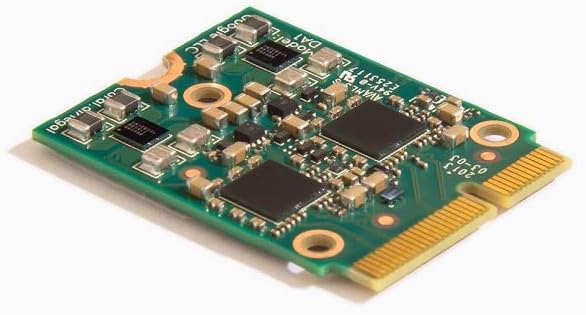
The G650-04686-01 Coral M.2 Accelerator is a top budget choice with a perfect 5.0 rating. It performs high-speed ML inferencing using an on-board Edge TPU coprocessor capable of 4 TOPS. The card integrates well with Debian-based Linux systems.
We may earn a commission when you buy through this link, at no additional cost to you.
This accelerator supports TensorFlow Lite, eliminating the need to build models from the ground up. It also supports AutoML Vision Edge for building custom image classification models. The B+M Key interface ensures flexibility in slot compatibility.
While it works seamlessly with Debian Linux, users on other operating systems may face compatibility challenges. The card is optimized for Linux-based environments. For those focused on Debian or Ubuntu, this device offers exceptional value and performance.
Budget-conscious developers will appreciate the combination of performance and cost. It is ideal for projects requiring fast, energy-efficient AI inference. The perfect rating reflects high user satisfaction with its reliability and ease of use.
The Edge TPU coprocessor delivers 4 TOPS, enabling rapid execution of vision models like MobileNet v2.
Easily compile TensorFlow Lite models to run on the Edge TPU without building from scratch.
We may earn a commission when you buy through this link, at no additional cost to you.
The QNAP QM2-2P10G1TB is an expansion card designed to enhance storage and networking performance in QNAP systems. With a 4.4 rating, it offers two M.2 NVMe SSD slots and a 10GbE port. It supports PCIe Gen 3 x8 for high bandwidth.
We may earn a commission when you buy through this link, at no additional cost to you.
This card is equipped with Marvell's AQtion AQC113C Ethernet Controller for reliable networking. It is compatible with QNAP's QTS, QuTS hero, Windows, and Linux OS. A low-profile bracket is included for flexibility in chassis installation.
While it excels at storage and networking, it is not an AI accelerator. Users seeking machine learning capabilities should consider other options. However, for NAS performance enhancement, this card provides significant value.
IT professionals managing QNAP NAS devices will find this expansion card useful. It allows for high-speed caching or storage using M.2 SSDs. The 10GbE port ensures rapid data transfer between storage and network devices.
Connects two M.2 NVMe SSDs for caching or storage, boosting overall system speed.
Allows connecting to high-speed networking devices, enabling faster data transfer rates.
We may earn a commission when you buy through this link, at no additional cost to you.
The Rocket 1604L is a high-end expansion card supporting PCIe Gen5 x16 with four M.2 NVMe ports. It offers dedicated x4 lanes per port for maximum throughput. While it has no rating yet, it supports mainstream operating systems and multiple platforms.
We may earn a commission when you buy through this link, at no additional cost to you.
This card allows up to four M.2 NVMe devices to be connected simultaneously. It is natively supported by mainstream operating systems and supports x86 Intel/AMD and ARM platforms. The PCIe 5.0 interface ensures future-ready performance.
Users should verify their motherboard supports PCIe Gen5 before purchasing. The high-speed interface is ideal for data-intensive applications. However, without user ratings, long-term reliability remains to be proven in the field.
For users building next-generation workstations, this card offers extensive storage expansion. It is suitable for RAID configurations or large-scale data storage. Developers needing high bandwidth for AI training or data processing may benefit from its specs.
Leverages PCIe 5.0 x16 interface for ultra-fast data transfer rates and future-ready capability.
Compatible with x86 Intel/AMD and ARM platforms, offering flexibility across different hardware.
We may earn a commission when you buy through this link, at no additional cost to you.
This adapter transforms your system into a dual-TPU machine learning workstation using two Coral M.2 Accelerator Cards. It uses a PCIe Gen3 x4 to 4X Gen2 x1 lane splitter design. The heatsink ensures efficient thermal management for the cards.
We may earn a commission when you buy through this link, at no additional cost to you.
Designed for AI edge computing, this adapter is developer-friendly and perfect for TensorFlow Lite models. It offers a future-proof design with room to grow as projects scale. The space-efficient layout allows for dual performance without multiple PCIe slots.
While it lacks a user rating, the design supports high-volume inference tasks. It maximizes existing hardware investment by enabling dual TPU setups. Users should ensure they have compatible Coral M.2 accelerators to utilize this adapter fully.
Teams needing high throughput for video analytics or object detection will find this adapter useful. It is cost-effective compared to buying entirely new systems. For developers scaling edge AI, this solution provides significant flexibility.
Transforms your system into a dual-TPU workstation for faster object detection and real-time video analytics.
Get dual TPU performance without requiring multiple PCIe slots, optimizing rack or desktop space.
We may earn a commission when you buy through this link, at no additional cost to you.
The ASUS Hyper M.2 x16 Gen5 Card supports up to four PCIe 5.0/4.0 M.2 drives with high bandwidth. With a 4.2 rating, it features server-grade PCB and active fan cooling. It supports RAID functions across different platforms.
We may earn a commission when you buy through this link, at no additional cost to you.
This card adapts up to four M.2 drives with up to 512 Gbps bandwidth for smooth transfers. A large heatsink and active fan reduce SSD temperatures, ensuring unthrottled speeds. It includes a 6-pin PCIe Power connector for stable power supply.
The cooling solution is a standout feature, protecting drives from overheating during intensive use. However, it requires a PCIe x16 slot and additional power. For systems needing reliable high-speed storage, this card offers robust features.
Enterprise users needing RAID arrays will appreciate the platform support. It creates bootable RAID arrays with up to four M.2 SSDs. Developers prioritizing thermal stability and performance should consider this option for storage expansion.
Adapted server-grade PCB supports up to four drives, ensuring stability under high loads.
Large heatsink and active fan reduce SSD temperatures, preventing throttling during sustained use.
We may earn a commission when you buy through this link, at no additional cost to you.
The waveshare Hailo-8 M.2 AI Accelerator Module delivers 26 TOPS performance on the Hailo-8 AI Processor. With a 4.6 rating, it supports simultaneous processing of multi-streams and multi-models. It consumes only 2.5W typically, making it highly efficient.
We may earn a commission when you buy through this link, at no additional cost to you.
This module supports multiple frameworks including TensorFlow, ONNX, Keras, and Pytorch. It works with Linux and Windows systems and supports a wide temperature range. Official Wiki resources are available for guidance during development.
While the price is higher than some options, the raw performance justifies the investment for demanding tasks. The module-only configuration means you need a compatible carrier board. However, the rich support resources simplify the setup process.
Professionals building scalable edge AI solutions will find this module powerful. It enables real-time, low-latency inference on edge devices. For projects needing maximum throughput in a compact form, this accelerator is an excellent choice.
Powered by a 26 TOPS processor, delivering high performance for complex AI models.
Enables simultaneous processing of multiple streams and models, ideal for multi-camera setups.
We may earn a commission when you buy through this link, at no additional cost to you.
The Coral M.2 Accelerator A+E Key delivers 4 TOPS peak performance using the Edge TPU ML Compute Accelerator. With a 4.2 rating, it offers strong compatibility with M.2 A+E key interfaces. It provides low power design with 2 TOPS per watt.
We may earn a commission when you buy through this link, at no additional cost to you.
This accelerator is compatible with Linux, Debian, Ubuntu, and Windows 10. It operates in temperatures from -20°C to +85°C, suitable for harsh environments. The industrial-grade reliability ensures consistent performance in demanding conditions.
While it is limited to int8 precision, it excels in embedded and energy-efficient applications. The A+E key interface allows integration into systems with corresponding slots. Users should verify slot compatibility before purchasing.
Developers needing a reliable accelerator for embedded systems will find this a good choice. It supports a wide range of OS and environments. For industrial or outdoor applications, its temperature range and efficiency are notable advantages.
Integrates Edge TPU to deliver 4 TOPS for efficient machine learning inference tasks.
Compatible with Linux and Windows systems, simplifying deployment across different environments.
We may earn a commission when you buy through this link, at no additional cost to you.
The Coral Dual Edge TPU Adapter is designed exclusively for Coral M.2 Accelerator with Dual Edge TPU modules. It features a 5.0 rating for compatibility with standard M.2 2280 B-key or M-key slots. It provides bidirectional Gen2 bandwidth for optimal performance.
We may earn a commission when you buy through this link, at no additional cost to you.
This adapter maximizes AI inference performance by supporting dual TPU modules. It includes a stainless steel mounting screw for vibration-resistant PCB fixation. The adapter explicitly prevents buyer errors by being incompatible with Raspberry Pi CM4 enclosures.
While it is PCIe only and not compatible with SATA M.2, it ensures reliable connections for dual TPU setups. The bidirectional bandwidth supports efficient data transfer. Users must ensure they have the correct key slots for compatibility.
Projects requiring dual TPU capabilities will benefit from this adapter's robust design. It is a practical solution for scaling AI inference without complex wiring. For developers using Coral modules, this board simplifies hardware integration.
Optimized to maximize AI inference performance when used with Coral M.2 Accelerator modules.
Provides dual TPU performance without requiring multiple PCIe slots or complex cabling.
We may earn a commission when you buy through this link, at no additional cost to you.
Selecting the right M2 Accelerator Card requires considering performance, compatibility, and software support. This guide outlines key factors to help you evaluate options effectively.
Evaluate peak performance measured in TOPS (Tera Operations Per Second) to match your workload requirements. Higher TOPS generally indicate faster inference for complex models.
Prioritize models with sufficient TOPS for your specific AI tasks to avoid bottlenecks.
Look for cards offering high TOPS per watt to ensure energy efficiency. This is crucial for battery-powered or heat-constrained edge devices.
Choose options with low power consumption to extend device runtime and reduce cooling needs.
Verify the M.2 key type (e.g., M-key, E-key, B+M Key) matches your system slot. Mismatched keys will prevent physical installation.
Confirm the card size (2280, 2230) fits your chassis constraints before purchasing.
Ensure the card supports your OS, such as Linux (Debian/Ubuntu) or Windows. Some models are limited to specific distributions.
Check for available drivers and support documentation for your target operating system.
Assess the availability and quality of the Software Development Kit (SDK) provided. Comprehensive SDKs simplify model deployment and development.
Opt for cards with active communities and regular SDK updates for long-term support.
Some accelerators are optimized for int8 precision while others support mixed precision. Confirm compatibility with your models frameworks like TensorFlow or PyTorch.
Ensure the card supports the specific AI frameworks you use in your development workflow.
Consider whether the card requires active cooling or has passive thermal solutions. Intensive tasks may cause throttling without proper heat dissipation.
Choose cards with adequate cooling mechanisms to maintain performance during sustained workloads.
Balance the cost with expected performance gains. Adapters may allow scaling to multiple TPU modules without buying new systems.
Plan for future needs by selecting options that allow hardware expansion or upgrades.
Install the card into a compatible M.2 slot, ensuring the key alignment is correct before securing with screws. Verify the slot provides the required bandwidth for the accelerator.
Install necessary drivers and SDKs from the manufacturer website following provided documentation. Ensure your OS is updated to support the required hardware interfaces.
Monitor temperatures during use to prevent overheating, especially during intensive AI tasks. Keep vents clear and use cooling solutions if necessary to maintain reliability.
M2 Accelerator Cards are specialized hardware modules designed to offload machine learning inference tasks from general-purpose CPUs. They enable faster computer vision and natural language processing on edge devices like Raspberry Pi.
Yes, most require specific SDKs and drivers provided by the manufacturer. These tools allow you to compile and deploy models optimized for the accelerator hardware.
Some models support Windows 10, while others are optimized for Linux. Always check product specifications for OS compatibility before purchasing.
Check your motherboard or carrier board documentation for supported key types (M-key, E-key, B+M Key). Matching the physical interface is essential for installation.
Some systems support multiple cards if there are enough PCIe slots and bandwidth. Adapters exist that allow dual TPU setups in single slot configurations.
TOPS stands for Tera Operations Per Second and measures the computational power of the accelerator. Higher TOPS indicate faster processing for complex AI models.
Many accelerators are designed for low power consumption, often providing several TOPS per watt. This efficiency is crucial for battery-powered and portable devices.
Exceeding recommended operating temperatures can lead to throttling or hardware damage. Use active cooling or place the device in well-ventilated areas.
We reviewed ten M2 Accelerator Cards ranging from budget-friendly Coral options to high-performance Hailo-8 solutions. The MX3 leads for balanced AI processing, while the waveshare Hailo-8 offers the highest throughput.
Prioritize cards that match your specific OS and slot compatibility requirements. Consider long-term support and SDK quality to ensure your project remains sustainable over time.
Always check current prices and availability before purchasing as these vary frequently. Choosing the right accelerator depends on your unique workload and hardware constraints.