
TP-Link ER605
4.4Editor score
Five Gigabit Ports
Supports up to 20 VPN
Advanced Security Features
This guide compares the top 10 load balancing routers for businesses and power users, evaluating WAN ports, failover, and security features.
Load balancing routers are essential for modern networks that demand reliability and speed. They distribute traffic across multiple internet connections to prevent bottlenecks and ensure uninterrupted service.
We evaluated ten top models based on port flexibility, security protocols, and management tools. Our analysis focuses on real-world performance for small offices and advanced home labs.
Each pick highlights unique strengths like OpenWRT support or 10G speeds. Prices and availability fluctuate, so verify current listings before purchasing your next network backbone.
4.4Editor score

4.4Editor score

4.0Editor score
The table below summarizes key specifications for each router to help you identify the best fit for your network needs.




The Cudy R700 stands out as a versatile load balancing router with OpenWRT readiness. It earns high marks for offering enterprise-grade control without a premium price tag.
We may earn a commission when you buy through this link, at no additional cost to you.
Its five Gigabit ports support multi-WAN setups that automatically failover. The built-in VPN suite including WireGuard and OpenVPN ensures secure remote access.
While it lacks Wi-Fi radios, this keeps costs low for wired networks. The web interface is functional but lacks some advanced visualization tools.
Tech-savvy users will appreciate the OpenWRT flexibility. It is an excellent choice for small businesses needing reliable redundancy.
Full OpenWRT support allows custom firmware and VLANs.
Automatic failover keeps your network online if one link drops.
We may earn a commission when you buy through this link, at no additional cost to you.
The Alta Labs Route10 delivers high-performance 10 Gigabit routing for demanding networks. Its Qualcomm quad-core processor ensures consistent speeds under heavy load.
We may earn a commission when you buy through this link, at no additional cost to you.
Integrated PoE+ lets you power access points directly from the router. Real-time statistics help admins optimize traffic flow instantly.
This device is not a Wi-Fi router so you need separate access points. The cost is significant but justified for enterprise-grade throughput.
Power users needing 10G wired backbone will find this ideal. It balances speed and manageability in a sleek desktop form.
Hardware acceleration handles VPN and firewall without slowing speed.
Ports provide PoE+ to reduce external power adapters.
We may earn a commission when you buy through this link, at no additional cost to you.
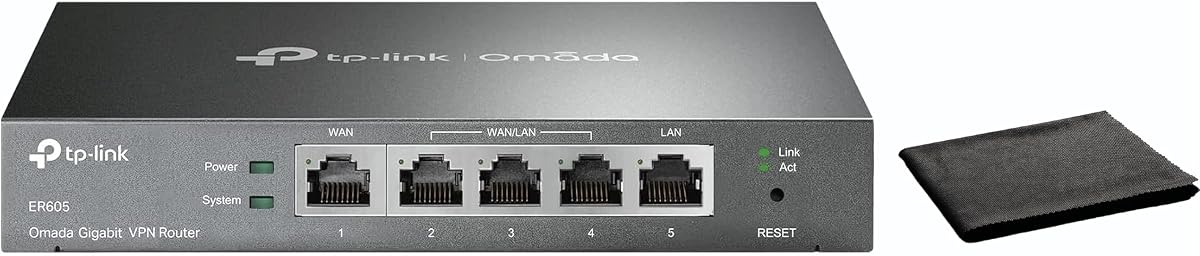
The TP-Link ER605 is a budget-friendly option that offers solid load balancing. It handles multiple WAN connections efficiently to maximize bandwidth.
We may earn a commission when you buy through this link, at no additional cost to you.
A USB port allows 4G backup which is crucial for remote sites. Omada Cloud monitoring simplifies setup for non-technical users.
It lacks advanced throughput capabilities but covers essential business needs. The compact size fits easily on any office desk.
Small offices looking for reliability without high costs should choose this. It provides the fundamentals of a secure redundant network.
Multiple ports and USB allow versatile internet redundancy options.
Omada app provides remote access to network status.
We may earn a commission when you buy through this link, at no additional cost to you.
The TP-Link ER7206 is designed for large networks needing massive capacity. It supports up to 150,000 associated client devices reliably.
We may earn a commission when you buy through this link, at no additional cost to you.
Integration with Omada SDN allows seamless control across switches and APs. An SFP WAN port enables fiber connectivity directly.
The system is most powerful within the full Omada ecosystem. Standalone use is possible but misses some automation benefits.
IT managers overseeing growing networks will value the scalability. It is a robust choice for enterprises using TP-Link infrastructure.
Designed to handle hundreds of devices without lag.
Works with SDN controllers for unified network management.
We may earn a commission when you buy through this link, at no additional cost to you.
The Omada ER7412-M2 offers Multi-Gigabit throughput for high-speed internet. It supports 2.5G ports to handle modern broadband connections.
We may earn a commission when you buy through this link, at no additional cost to you.
Deep packet inspection enhances security by analyzing traffic deeply. WireGuard support ensures fast and secure remote connections.
Advanced users need to navigate complex menus for configuration. It is priced higher but delivers professional network protection.
Businesses needing speed and deep security will find this useful. It balances throughput with advanced threat prevention features.
DPI and IPS protect against advanced network threats.
2.5G ports enable high throughput for local networks.
We may earn a commission when you buy through this link, at no additional cost to you.
The TP-Link TL-R470T+ is a classic option for small offices. It offers four WAN ports for reliable internet redundancy.
We may earn a commission when you buy through this link, at no additional cost to you.
A built-in PPPoE server helps manage client authentication. It is designed for environments needing simple load balancing.
Speed is limited to 100 Mbps which may be slow today. It suits basic connectivity needs where budget is the priority.
Cafes or small shops needing multiple lines can use this. It is a simple workhorse for legacy network setups.
Supports portal authentication for guest access management.
Four WAN ports allow multiple ISP connections easily.
We may earn a commission when you buy through this link, at no additional cost to you.
The TP-Link TL-R480T+ is a compact load balance router. It offers three configurable WAN/LAN ports for basic flexibility.
We may earn a commission when you buy through this link, at no additional cost to you.
The small case fits on crowded desks without taking space. It provides standard features needed for simple offices.
Advanced features are limited compared to modern models. It is ideal for basic connectivity without high throughput needs.
Budget-conscious users needing basic failover should consider this. It serves as a reliable bridge for multiple internet lines.
Small case fits easily on any office workspace.
We may earn a commission when you buy through this link, at no additional cost to you.
The TP-Link ER-605 provides a modern compact load balancing solution. Dual WAN ports enable failover and speed aggregation.
We may earn a commission when you buy through this link, at no additional cost to you.
Bandwidth management allows QoS settings for critical apps. Cloud monitoring gives real-time visibility via mobile app.
The interface is intuitive but lacks deep configuration options. It fits smaller offices needing simple security and control.
Startups and small offices benefit from its ease of use. It balances performance with accessibility for non-experts.
Bandwidth optimization ensures critical apps run smoothly.
We may earn a commission when you buy through this link, at no additional cost to you.
The Ubiquiti EdgeRouter 4 is a professional-grade router known for reliability. It features three Gigabit ports and an SFP port.
We may earn a commission when you buy through this link, at no additional cost to you.
Its fanless design ensures silent operation in offices. Wall mounting options help save valuable desk space.
The learning curve is steeper than consumer routers. Expert users will appreciate the granular control over routing.
Network enthusiasts and pros value this device highly. It is a robust choice for stable wired networks.
Fanless design keeps noise levels very low.
We may earn a commission when you buy through this link, at no additional cost to you.
The Omada Fusion 2.5G features 2.5G ports for high speed. It comes with a touchscreen for easy local monitoring.
We may earn a commission when you buy through this link, at no additional cost to you.
Bluetooth setup and Omada app adoption simplify deployment. The quad-core CPU ensures fast traffic processing.
The touchscreen aids troubleshooting but requires careful handling. It offers a modern approach to wired network management.
Tech-forward businesses needing speed and ease should pick this. It balances performance with user-friendly on-device tools.
Touchscreen provides instant traffic insights locally.
We may earn a commission when you buy through this link, at no additional cost to you.
Choosing the right load balancing router requires evaluating your network size and specific needs. This guide outlines the critical factors to consider.
The number of WAN ports determines how many internet connections you can aggregate. Modern needs often require at least two or three ports for redundancy.
Always check for Gigabit or 2.5G ports to ensure they match your ISP speed.
Failover is essential for business continuity. Look for automatic switching that reroutes traffic immediately when a line drops.
Testing this feature during setup ensures your network remains online during internet outages.
A good router must include firewalls and intrusion detection. Advanced models offer Deep Packet Inspection to block threats.
Prioritize devices with regular firmware updates to stay protected against vulnerabilities.
Secure remote access is vital for modern work. Check for supported protocols like WireGuard, OpenVPN, or IPsec.
High tunnel limits ensure you can connect all remote offices securely.
Ease of management varies. Cloud management allows remote access while local interfaces offer control.
Choose a system that fits your team's technical expertise.
As your business grows, your network should expand too. Ensure the router supports high client counts.
Future-proofing saves costs by avoiding premature replacements.
Start by connecting your modems to the WAN ports on the router. Configure each WAN connection with the IP settings provided by your ISP.
Enable failover settings in the web interface to ensure traffic switches automatically if a connection drops.
Keep firmware updated regularly to maintain security and performance. Place the router in a cool area to ensure longevity.
Load balancing distributes network traffic across multiple internet connections. This prevents bottlenecks and ensures better performance for all users.
Yes, multiple ISPs are typically required to utilize load balancing. However, some routers allow combining a cable and a cellular connection.
These are wired routers and do not broadcast Wi-Fi. You must pair them with separate access points or use a Wi-Fi router.
The router automatically switches all traffic to the remaining active lines. This keeps your network running without manual intervention.
Some models like Omada offer guided setup via apps. Others require technical knowledge to configure protocols and firewall rules.
Yes, many users utilize them for home labs or gaming. They provide better uptime than standard consumer routers.
Some brands like TP-Link offer cloud controllers. Others require a physical controller installed in the network.
Not exactly. It improves total throughput but individual speeds depend on how the router distributes the traffic.
We recommend the Cudy R700 for most users due to its flexibility. The TP-Link ER605 is ideal for those on a strict budget.
For high-performance needs, the Alta Labs Route10 offers 10G speeds that future-proof your network.
Always check current availability and prices before buying. Your network backbone depends on choosing the right fit.