
ASUS Vivobook Go 15.6” FHD Slim Laptop
4.3Editor score
AMD Ryzen 3 7320U Processor
8GB DDR5 RAM and 128GB SSD
15.6 inch FHD NanoEdge Display
Finding a portable computer that balances power and weight is essential for modern professionals and students. ASUS offers a wide range of slim devices designed to fit easily into backpacks while delivering reliable performance for daily tasks.
We evaluated ten top models based on processor speed, display quality, battery longevity, and overall build durability. Our analysis focuses on real-world usability, ensuring each recommendation meets the needs of users seeking mobility without sacrificing functionality.
Each pick highlights specific strengths like AI capabilities, long battery life, or budget-friendly specs. Remember that availability and configurations change frequently, so verify current details before making your final decision to ensure you get the best deal available.
4.3Editor score

4.8Editor score
3.7Editor score
As an Amazon Associate we earn from qualifying purchases.
This side-by-side comparison highlights the key specifications and features of the top ten lightweight ASUS laptops available in 2026. Use this table to quickly identify which model aligns best with your specific performance and portability requirements.





The ASUS Vivobook Go 15.6” FHD Slim Laptop stands out as a highly accessible option for users seeking mobility without breaking the bank. With a solid rating of 4.3 stars, it offers a reliable balance of performance and portability for everyday computing tasks.
We may earn a commission when you buy through this link, at no additional cost to you.
Powered by the AMD Ryzen 3 7320U processor and 8GB of DDR5 RAM, this device handles web browsing, document editing, and streaming with ease. The 15.6-inch NanoEdge display provides a comfortable viewing area, while the integrated AMD Radeon Graphics ensure smooth video playback.
While the 128GB SSD might feel tight for large media libraries, it is sufficient for cloud-reliant users. The laptop features military-grade durability, meaning it can withstand the rigors of daily commuting and accidental bumps better than many competitors in this price range.
This model is ideal for students or casual users who need a lightweight machine for schoolwork or entertainment. Its fast charging capability and webcam shield add practical touches that enhance both convenience and privacy during virtual meetings or classes.
The AMD Ryzen 3 processor ensures smooth multitasking across multiple browser tabs and productivity apps without lag.
Military-grade certification means the chassis is tested to withstand shocks, vibrations, and temperature variations effectively.
We may earn a commission when you buy through this link, at no additional cost to you.
The second Vivobook Go model improves upon the base offering by providing a more robust AMD Ryzen 5 processor and significantly more storage space. This makes it a better fit for users who need to store more files locally while maintaining a slim profile.
We may earn a commission when you buy through this link, at no additional cost to you.
With 512GB of SSD storage, you no longer need to worry about external drives for common documents and media. The Ryzen 5 chip offers faster performance for light gaming and more demanding applications compared to the Ryzen 3 variant in the first pick.
The design remains consistent with the rest of the Vivobook Go series, featuring military-grade durability and fast charging support. The Cool Silver finish adds a touch of professionalism suitable for office environments or college campuses.
If you need more space for your projects but do not want to increase your budget significantly, this version is a strong contender. It balances speed and storage well, making it a versatile choice for general productivity on the go.
The Ryzen 5 processor provides better multitasking capabilities and faster response times for everyday applications.
512GB SSD allows for installation of more software and storage of large media files without constant cleanup.
We may earn a commission when you buy through this link, at no additional cost to you.
The ASUS Vivobook 14 represents a leap forward in laptop architecture with its Snapdragon X processor and Copilot+ PC capabilities. This model earns our Editor's Choice badge due to its exceptional performance and efficiency metrics that stand out in the lineup.
We may earn a commission when you buy through this link, at no additional cost to you.
Equipped with 16GB of RAM and a 512GB SSD, this laptop handles heavy multitasking with ease. The Qualcomm Adreno GPU delivers impressive graphics performance while maintaining low power consumption, which is critical for portable devices.
The 14-inch FHD+ screen offers a crisp viewing experience with a resolution of 1920 x 1200. This higher pixel count ensures text is sharp and images look vibrant, making it excellent for creative work or consuming high-definition media.
For users seeking the best balance of future-proof technology and portability, this Vivobook is the top recommendation. Its ability to run AI features efficiently and offer multi-day battery life makes it a standout choice for modern professionals.
The Snapdragon X processor includes an NPU designed to accelerate AI tasks for enhanced productivity and security.
The FHD+ resolution provides more screen real estate for documents and spreadsheets than standard 1080p panels.
We may earn a commission when you buy through this link, at no additional cost to you.
The ASUS Vivobook 16 Laptop brings the power of the Snapdragon X platform to a larger 16-inch form factor. This device is perfect for users who need more screen real estate for productivity but still want the efficiency of a lightweight system.
We may earn a commission when you buy through this link, at no additional cost to you.
With a 1920 x 1200 resolution display and 300-nit brightness, this screen is vibrant and clear even in well-lit environments. The 16:10 aspect ratio provides extra vertical space, which is highly beneficial for coding, writing, or browsing web pages.
Under the hood, the 16GB of RAM and 512GB SSD ensure that you can run multiple applications simultaneously without slowdown. The Qualcomm Adreno GPU optimizes power consumption, allowing for extended use away from a power outlet.
If you find 14-inch screens too cramped but do not want to carry a bulky traditional laptop, this model is the ideal compromise. It offers a spacious workspace while maintaining the portability expected from modern thin and light devices.
The 16-inch WUXGA display offers more workspace for complex tasks and multitasking compared to smaller screens.
The Snapdragon X platform delivers multi-day battery life through advanced power management and architecture efficiency.
We may earn a commission when you buy through this link, at no additional cost to you.
The ASUS 15.6” Vivobook Go Slim Laptop is designed as a very accessible entry point for basic computing needs. With a simple and functional design, it serves well for users who primarily need a device for web browsing and document creation.
We may earn a commission when you buy through this link, at no additional cost to you.
Powered by the Intel Celeron N4500 processor, this laptop handles light tasks efficiently. The 4GB of DDR4 RAM is sufficient for running a few applications at once, though heavy multitasking might cause some slowing.
It features a 15.6-inch FHD display that provides clear visuals for media consumption. The Fast-Charge technology ensures that the device is ready to use quickly after a short charging session, which is convenient for students with tight schedules.
While it may not be suitable for demanding workloads, it is a practical choice for basic education or home use. Its slim design and low weight make it easy to carry around, ensuring portability without a heavy financial investment.
The Intel Celeron processor handles daily web browsing and word processing tasks with acceptable efficiency.
Fast charge technology and a lightweight chassis ensure the laptop is ready to go when you are.
We may earn a commission when you buy through this link, at no additional cost to you.
The ASUS Vivobook Laptop with a 14-inch display offers a robust configuration with an Intel Core i3-1215U processor. It stands out for its generous 16GB of RAM, which allows for smooth multitasking across many browser tabs and applications.
We may earn a commission when you buy through this link, at no additional cost to you.
The 512GB PCIe NVMe SSD ensures quick boot times and fast file transfers, enhancing the overall responsiveness of the system. Combined with Wi-Fi 6, this laptop provides a stable and fast network connection for home or office environments.
The 14-inch FHD IPS panel offers good viewing angles and anti-glare properties, making it suitable for work in various lighting conditions. The blue color option gives it a distinctive look that stands out from the standard black or silver laptops.
This model is a solid choice for users who prioritize performance and memory over extreme portability. It is powerful enough for most professional tasks and provides a reliable platform for productivity without compromising on essential specs.
Having 16GB of RAM allows for running heavy applications like virtual machines or large spreadsheets easily.
The PCIe NVMe SSD delivers high-speed data access for faster loading of apps and operating system.
We may earn a commission when you buy through this link, at no additional cost to you.
The ASUS Vivobook 14 Laptop focuses heavily on next-generation AI features with its Snapdragon X processor and Copilot+ PC capabilities. This model is designed for users who want to leverage AI tools for productivity and content creation.
We may earn a commission when you buy through this link, at no additional cost to you.
The 14-inch WUXGA display offers a sharp viewing experience with a resolution of 1920 x 1200. The screen brightness is sustained at 300 nits, ensuring that text and images remain clear even in bright environments.
Performance is optimized for efficiency, with the Qualcomm Adreno GPU providing smooth visuals while conserving power. The integrated NPU handles AI tasks independently, reducing the load on the main processor and extending battery life significantly.
If you are looking for a device that is ready for the future of computing and AI integration, this laptop is a great choice. It offers a balance of modern design, high specs, and innovative technology in a portable package.
The NPU supports advanced AI tasks like live captions and image generation without taxing the main CPU.
The architecture allows for multi-day battery life during typical usage scenarios away from a charger.
We may earn a commission when you buy through this link, at no additional cost to you.
The ASUS VivoBook Laptop 2026 Edition features a powerful Intel Core i3-1315U processor with speeds reaching up to 4.5GHz. This high clock speed ensures quick performance for single-threaded tasks and general productivity applications.
We may earn a commission when you buy through this link, at no additional cost to you.
With 16GB of RAM and a fast PCIe SSD, the system handles multitasking and file access efficiently. The 14-inch FHD display provides a clear workspace, while the Wi-Fi 6E support ensures you have the fastest possible wireless connection available.
The design is sleek and lightweight at just 3.09 lbs, making it easy to carry in a backpack for students or professionals. The Quiet Blue finish adds a stylish touch to the professional aesthetic of the laptop.
For users who need fast processing speeds and modern connectivity in a portable form, this model is highly recommended. It offers a strong performance-to-weight ratio that suits a wide range of computing needs.
The up to 4.5GHz max turbo frequency ensures quick response times for demanding single-core tasks.
Wi-Fi 6E and Bluetooth 5.3 provide fast wireless data transfer and stable peripheral connections.
We may earn a commission when you buy through this link, at no additional cost to you.
The ASUS Vivobook Go 15.6” FHD Slim Laptop offers a balanced configuration with 256GB of SSD storage. This provides enough space for essential files while keeping the device light and responsive for everyday use.
We may earn a commission when you buy through this link, at no additional cost to you.
Powered by the AMD Ryzen 3 7320U processor and 8GB of DDR5 RAM, this laptop delivers reliable performance for browsing and productivity. The integrated AMD Radeon Graphics ensures smooth video playback for streaming content.
The laptop features military-grade durability and fast charging support, making it suitable for students and professionals on the move. A webcam shield is included to protect privacy when the camera is not in use.
For users who need a reliable mid-range laptop with sufficient storage and speed, this is a practical choice. It offers a good balance of features and price, ensuring you get the essentials without unnecessary bloat.
The 256GB SSD provides ample space for documents while DDR5 RAM ensures efficient data processing.
A physical webcam shield and military-grade chassis protect both your data and the physical device.
We may earn a commission when you buy through this link, at no additional cost to you.
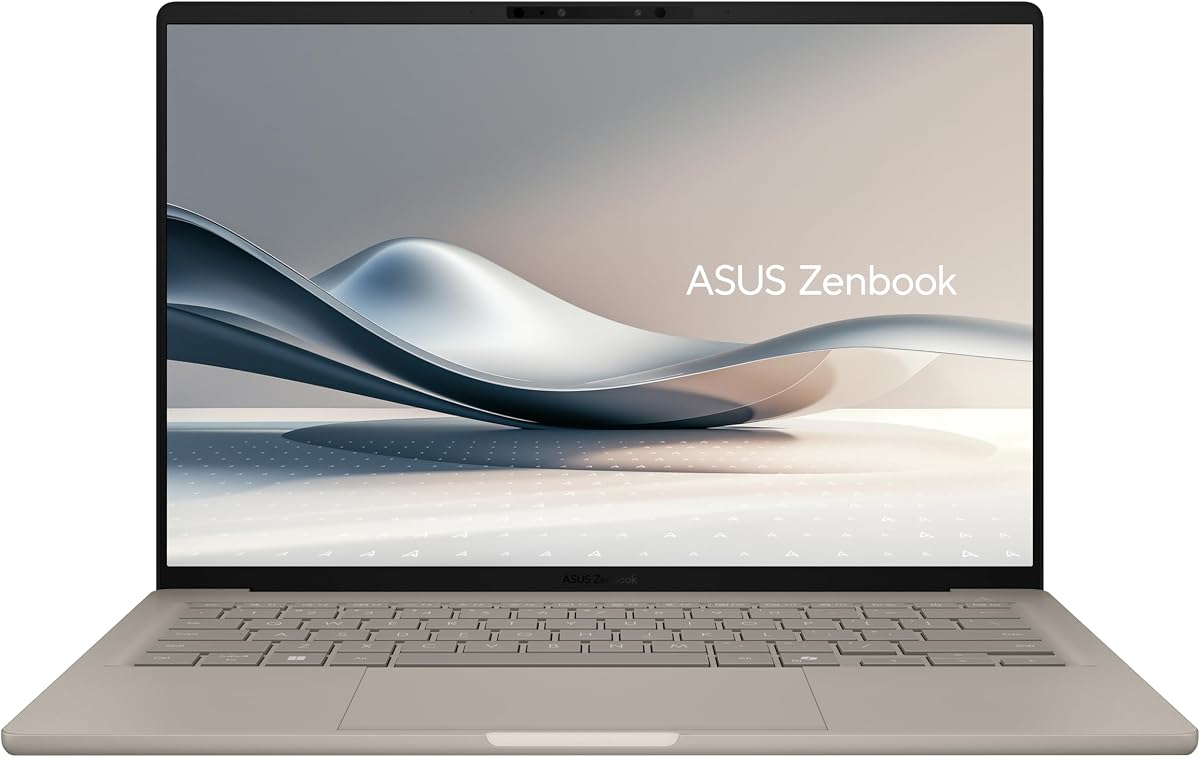
The ASUS Zenbook A14 is the ultimate lightweight laptop, weighing just 980g while delivering top-tier performance. It stands out for its unique Ceraluminum body and OLED display, offering a premium experience for those who prioritize portability.
We may earn a commission when you buy through this link, at no additional cost to you.
Equipped with the Snapdragon X processor and 16GB of RAM, it handles AI and multitasking efficiently. The 14-inch WUXGA OLED screen provides vibrant colors and deep blacks, making media consumption a true visual delight.
The battery life is exceptional, with claims of up to 32 hours on a single charge for offline video playback. This ensures that you can travel for long periods without needing to search for a power outlet.
If you are willing to invest in the best portable experience, this Zenbook is the ultimate choice. Its unique blend of materials, AI performance, and battery life sets a new standard for what a thin and light laptop can achieve.
The fusion of ceramic and aluminum creates a chassis that is lightweight yet three times stronger than standard aluminum.
The OLED panel ensures perfect blacks and high contrast for superior viewing quality in any environment.
We may earn a commission when you buy through this link, at no additional cost to you.
Selecting the right lightweight laptop requires balancing performance, battery life, and physical weight. This guide outlines key factors to consider to ensure you choose a device that fits your lifestyle.
The processor is the brain of your laptop. For basic tasks, Intel Core i3 or AMD Ryzen 3 chips are sufficient. For multitasking or AI work, look for Snapdragon X or Intel Core i5/i7 models.
Choose a processor that matches your workload to ensure smooth performance over time.
RAM determines how many apps you can run at once. 8GB is the minimum, but 16GB is recommended for heavy users. Storage should be SSD rather than eMMC for faster boot and load times.
Prioritize 16GB RAM and at least 512GB SSD for best longevity and speed.
Look for Full HD or higher resolution screens. OLED panels offer better colors but IPS panels are more durable. Brightness of 300 nits or more helps visibility in bright rooms.
A good screen reduces eye strain and improves your overall computing experience.
Battery life varies by usage. Models with Snapdragon chips often last longer than Intel equivalents. Check if the device supports fast charging to get back to work quickly.
Choose a laptop that lasts your typical work day without needing a charger.
Lightweight laptops should ideally weigh under 3 pounds for easy carrying. Check dimensions to ensure it fits your backpack. Thinner designs are more portable but may have less port selection.
Balance weight against port selection to ensure you can connect to all your needs.
Military-grade durability certifications mean the laptop can withstand shocks and temperature changes. This is crucial for students or travelers. Look for sturdy hinges and robust materials.
Invest in durability to protect your device during daily commutes or travel.
Most models come with Windows 11. Ensure the OS is genuine and updated. Some models are Copilot+ PC ready, offering future AI features that may benefit productivity.
Check that the OS supports your essential software and future updates.
Determine your budget before shopping. Higher prices usually bring better materials and processors. Consider if you need premium features or if a budget model suffices for your needs.
Aim for the best specs within your budget to maximize value and satisfaction.
Keep your laptop clean by wiping the screen with a microfiber cloth. Avoid using harsh chemicals that might damage the display. Use a protective sleeve when carrying it to prevent scratches.
Update your drivers and Windows regularly to ensure security and performance. Use the ASUS app to manage battery charging limits to extend battery health. Unplug devices when not in use to save energy.
Avoid leaving your laptop in extreme temperatures such as a hot car. This can damage the battery and internal components. Use a cooling pad if you run intensive apps for long periods to prevent overheating.
The ASUS Zenbook A14 is the lightest option, weighing just 980g. It offers a premium build and OLED display, making it ideal for frequent travelers who need maximum portability and performance.
Yes, many models like the Vivobook Go series are designed specifically for students. They are lightweight, affordable, and have enough power for coursework, research, and media consumption.
Most lightweight ASUS laptops have soldered RAM that cannot be upgraded. It is important to choose a model with enough RAM upfront, such as 16GB, to ensure future-proofing.
Snapdragon X models generally offer excellent battery life due to efficient architecture. Some claims state up to 32 hours of video playback, making them ideal for all-day usage.
Most newer models include Wi-Fi 6 or Wi-Fi 6E support for faster and more reliable internet connections. This ensures you get the best speeds from modern routers and hotspots.
Many Vivobook Go models include a physical privacy shutter for the webcam. This provides extra security during calls. Check specific specs if privacy is a primary concern for your use.
A 14-inch screen is typically the best balance of portability and usability. It fits in most bags and provides enough space for productivity. 13 or 15-inch options vary by preference.
We have reviewed ten top lightweight ASUS laptops ranging from budget-friendly options to premium models with advanced AI capabilities. Each device offers unique strengths depending on your need for storage, speed, or display quality.
Prioritize the factors that matter most to you. If you need maximum battery life, look for Snapdragon models. If you need raw speed on a budget, consider Intel or AMD Ryzen variants with high RAM.
Remember that availability and prices fluctuate. Always check the current listing before purchasing to ensure you get the specific configuration that meets your requirements. We hope this guide helps you find your perfect portable companion.