
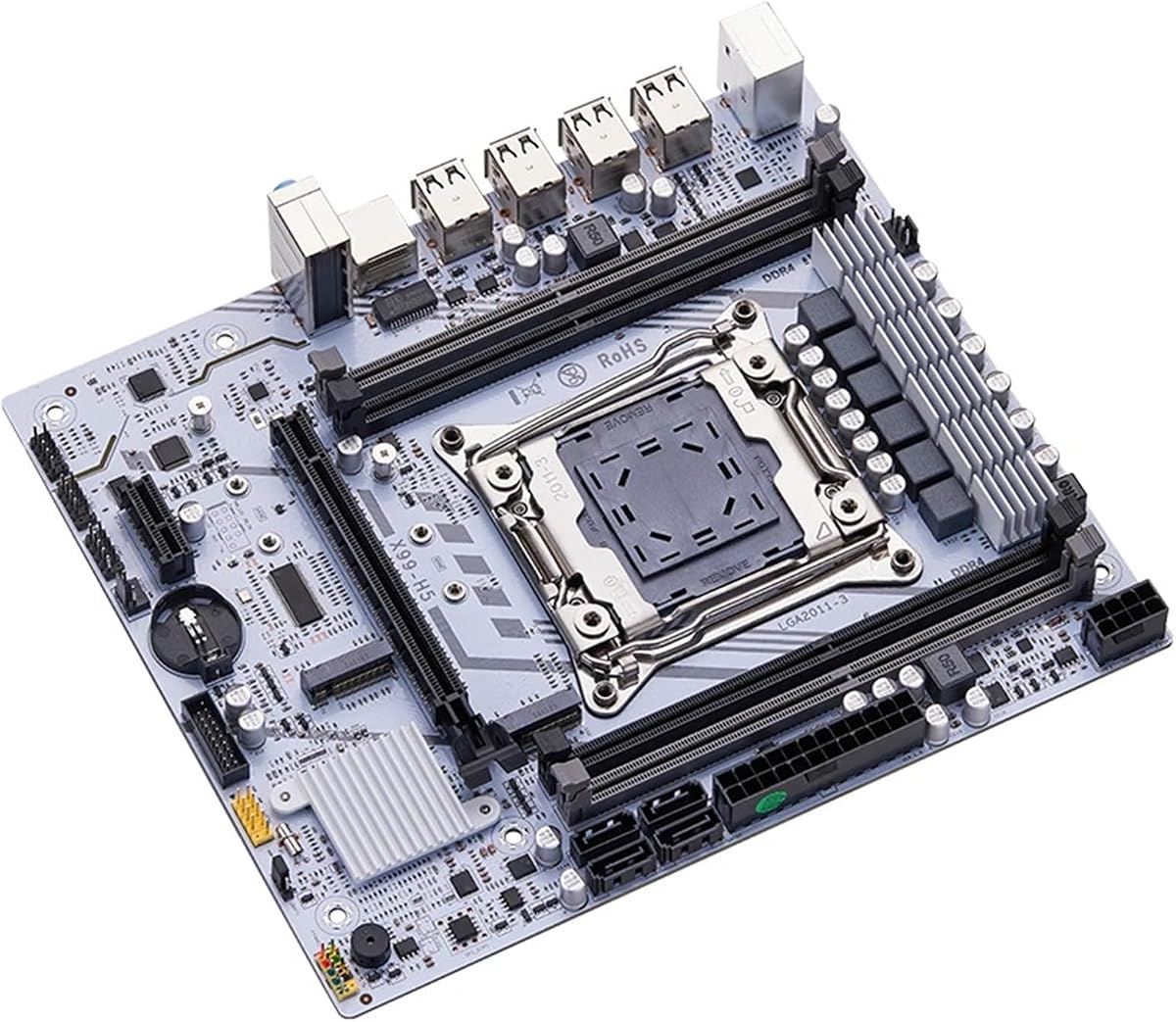
X99 LGA 2011-3 Motherboard X99 PR9-H White
3.9Editor score
Dual Channel DDR4 Slots
NVME M.2 Support
Realtek Audio Codec
This guide compares the top Lga 3 X99 Motherboard options for performance and value, helping you choose the right board for your build needs.
Finding the right Lga 3 X99 Motherboard is crucial for building a powerful workstation or gaming rig that supports high-end processors and ample memory configurations effectively.
We evaluated ten leading models based on compatibility, connectivity options, power delivery stability, and user feedback to ensure you get reliable performance for your specific tasks.
Each pick highlights unique strengths and trade-offs so you can decide quickly, but remember that availability and pricing can change frequently on retailer platforms like Amazon.
3.9Editor score

4.1Editor score

3.7Editor score
The following table offers a side-by-side look at key specifications for each board so you can quickly spot differences in memory support, storage options, and chipset features.



The ASUS X99-E WS stands out as the top choice for professionals needing reliable workstation performance with extensive connectivity options for high-end tasks.
We may earn a commission when you buy through this link, at no additional cost to you.
It offers quad-way PCIe graphics support and USB 3.1 integration which ensures you can handle demanding 3D rendering or video editing workloads without bottlenecking.
While it commands a premium price and requires a large case, the stability and expandability it provides make it worth the investment for serious creative workflows.
If you need maximum flexibility for multiple GPUs and fast storage access this board delivers professional-grade reliability that justifies its higher cost today.
Supporting four-way SLI and CrossFireX allows you to scale rendering power for complex 3D visualization and simulation tasks effectively.
With USB 3.1 onboard you get transfer speeds up to ten gigabits per second for rapid external storage and peripheral connectivity.
We may earn a commission when you buy through this link, at no additional cost to you.
The X99 PR9-H White offers an excellent entry point for builders who want X99 capabilities without breaking the bank on expensive workstation hardware.
We may earn a commission when you buy through this link, at no additional cost to you.
Its compact Micro ATX size makes it fit easily into smaller cases while still supporting up to 128 gigabytes of DDR4 memory for multitasking.
Although it has a lower rating than premium boards the included I/O shield and support for fast NVME storage make it a practical choice for budget builds.
Choose this board if you need a cost-effective solution for home servers or gaming rigs that do not require extensive expansion slots.
Supporting dual channel DDR4 up to 128GB allows you to use ECC or non-ECC memory for versatile workload handling.
The NVME M.2 slot running at PCIe 3.0 speeds delivers data transfer rates up to 3600 megabytes per second for quick loading.
We may earn a commission when you buy through this link, at no additional cost to you.
The MACHINIST X99 V9S delivers premium features like triple NVME slots and robust cooling to handle intense workloads without overheating during long sessions.
We may earn a commission when you buy through this link, at no additional cost to you.
Built around the Intel C612 chipset it ensures stable performance for Xeon E5 processors which are ideal for server and multi-threaded workstation applications.
Users should note that the battery is not included and support varies but the feature set provides exceptional value for those needing massive storage bandwidth.
This board is best suited for advanced users who want to maximize storage performance and power stability in a compact M-ATX form factor design.
With three M.2 NVME slots you can run multiple high-speed SSDs in parallel for massive storage bandwidth and rapid data access.
The 6-phase power supply combined with a VRM cooling fan helps maintain stable voltages even under heavy sustained processor loads.
We may earn a commission when you buy through this link, at no additional cost to you.
The ASUS X99-A is a classic choice for users who appreciate brand reliability and features like the OC Socket that push CPU performance further than standard boards.
We may earn a commission when you buy through this link, at no additional cost to you.
It integrates Intel Gigabit Ethernet and Crystal Sound 2 which provide a solid foundation for gaming and multimedia without needing additional expansion cards.
While it lacks the triple M.2 slots of newer models its proven stability and support for high-frequency DDR4 memory make it a dependable everyday option.
Pick this board if you prefer a well-known manufacturer and need a balanced ATX platform that supports overclocking without excessive complexity or cost.
The OC Socket feature helps drive eight-core CPUs and DDR4 performance beyond expectations by improving voltage control and signal integrity.
Crystal Sound 2 delivers immersive audio experiences with dedicated capacitors and shielding to reduce interference during gaming.
We may earn a commission when you buy through this link, at no additional cost to you.
This X99 board stands out by supporting two CPUs simultaneously which unlocks massive parallel processing power for rendering or scientific simulation tasks.
We may earn a commission when you buy through this link, at no additional cost to you.
With eight DDR4 slots you can fill up to 256 gigabytes of memory allowing for extreme multitasking and virtualization capabilities in a single machine.
Because it supports dual processors the power delivery and cooling requirements are more demanding than typical single-CPU boards so plan accordingly.
This model is ideal for specialized workstations that need maximum core counts and memory capacity without moving to enterprise-grade proprietary hardware.
Supporting two Xeon E5 CPUs allows you to double your core count for heavy multi-threaded applications like video encoding.
Eight memory slots enable massive RAM configurations that are essential for running multiple virtual machines or large datasets.
We may earn a commission when you buy through this link, at no additional cost to you.
The Tangxi X99 Gaming board focuses on compact form factors while maintaining strong power delivery and memory bandwidth for a balanced home build experience.
We may earn a commission when you buy through this link, at no additional cost to you.
Its eight-layer PCB and six-phase power design aim to provide stability even when using high-performance Xeon or i7 processors in a smaller case.
Although it has a lower rating than some competitors the inclusion of 4-channel memory support helps maintain efficient data flow for demanding applications.
Consider this option if you need a small footprint board that still supports fast memory and storage without requiring a full-size ATX chassis.
Four channel DDR4 support allows memory to operate in parallel increasing overall system bandwidth for better multitasking performance.
The six-phase power supply works with the eight-layer PCB to deliver clean power to the CPU and prevent instability during use.
We may earn a commission when you buy through this link, at no additional cost to you.
Similar to the other dual CPU model this board emphasizes high memory scalability and multi-core performance for users building dedicated rendering or compute nodes.
We may earn a commission when you buy through this link, at no additional cost to you.
It provides eight DDR4 slots and support for two Xeon E5 CPUs ensuring you can scale your system resources as your workload demands grow significantly.
The lower rating suggests that users may face challenges with setup or compatibility so thorough research is advised before committing to this specific configuration.
This board serves as a specialized component for those who prioritize core count and RAM size over brand name or advanced consumer features.
The ability to support eight memory slots and dual processors makes it scalable for growing workstation needs over time.
With standard USB and LAN ports it fits basic office and build needs without extra proprietary connectors or specialized drivers.
We may earn a commission when you buy through this link, at no additional cost to you.
This board offers unique flexibility by supporting both DDR3 and DDR4 memory which gives you more options when sourcing older or newer RAM modules.
We may earn a commission when you buy through this link, at no additional cost to you.
Dual M.2 NVME slots provide excellent storage speed and capacity for your operating system and active applications without needing extra cards.
The passive heatsink design helps maintain cooler operating temperatures while reducing noise which is ideal for quiet office or home studio environments.
Choose this board if you need the flexibility to use different memory generations while still enjoying fast NVME storage and silent operation.
Supporting both DDR3 and DDR4 allows you to repurpose existing memory investments or choose newer speeds based on availability.
The passive chipset heatsink and aluminum components help keep noise down without relying on extra fans for cooling.
We may earn a commission when you buy through this link, at no additional cost to you.
A straightforward option for those who want the basics of an X99 platform in a small case without extra bells or whistles on the board itself.
We may earn a commission when you buy through this link, at no additional cost to you.
It provides a single M.2 NVME slot and PCIe 3.0 graphics support which covers the essential needs for most gaming or workstation tasks today.
While specific technical details are limited the M-ATX form factor ensures it fits in a wide variety of mid-tower cases for easy building.
Use this board if you are building a simple machine and prioritize size and cost over advanced features or extensive expansion capabilities.
The compact layout and standard ports make it easier to build and organize cables in smaller computer cases.
PCIe 3.0 16X support ensures your graphics card runs at full speed for smooth gaming or GPU computing tasks.
We may earn a commission when you buy through this link, at no additional cost to you.
The E5 MR9A V1.0 aims for stability with a solid power supply and cooling design that helps keep temperatures low even under heavy workloads.
We may earn a commission when you buy through this link, at no additional cost to you.
It includes full USB3.0 support and NVME M.2 integration ensuring you can use modern peripherals and fast storage drives without extra adapters.
Multiple safety protections make it suitable for office and gaming builds where reliability is key to avoiding crashes during important tasks.
Select this board if you need a stable ATX platform with standard modern interfaces and are looking for a straightforward X99 solution.
Multiple safety protections help prevent damage from power spikes or overheating keeping your system safe during extended use.
USB3.0 and NVME support mean you do not need legacy adapters for current peripherals or high-speed storage drives.
We may earn a commission when you buy through this link, at no additional cost to you.
Choosing the right X99 board requires balancing CPU support memory capacity and storage options to match your specific performance goals.
Ensure the board supports the specific Intel Xeon or Core i7 processor you plan to use as X99 boards vary in supported generations.
Always check the official CPU list before buying to avoid compatibility issues with your chosen processor.
Look for boards that offer enough DIMM slots to reach your target RAM capacity whether you need 64 or 256 gigabytes.
Confirm if the board supports ECC or non-ECC memory as this impacts reliability for servers or workstations.
If you need fast boot drives check for NVME M.2 slots since PCIe 3.0 NVME offers speeds far above traditional SATA connections.
Prioritize boards with multiple M.2 slots if you plan to run a RAID array or separate OS and game drives.
High-end Xeon processors require strong VRM designs so look for boards with 6-phase or better power circuits for stability.
A solid VRM setup helps maintain stable performance during long renders or gaming sessions without thermal throttling.
Check how many PCIe x16 slots are available if you plan to use multiple graphics cards or expansion cards like capture cards.
More slots allow for better scalability in multi-GPU setups or adding specialized hardware like network cards.
Select ATX or M-ATX based on your case size as EATX boards offer more ports but need larger chassis for proper fit.
Measure your case dimensions carefully to ensure the board fits without obstructing other components or airflow.
Integrated Gigabit LAN is standard but check for onboard audio codecs if you do not plan to add a dedicated sound card.
Good integrated audio saves money and space while still delivering clear sound for gaming and media consumption.
Opt for reputable brands like ASUS for better BIOS support and warranty terms compared to generic options.
Strong support channels help resolve driver or BIOS issues quickly so your system stays stable long term.
Always install the latest BIOS update from the manufacturer website before first use to ensure compatibility with your processor and memory.
Mount the board on standoff screws to prevent short circuits and leave enough airflow space around the VRM area for cooling.
Regularly clean dust from the VRM heatsinks and fans using compressed air to maintain optimal operating temperatures over time.
Most standard X99 boards only support DDR4 but a few specialized models support both DDR3 and DDR4 memory. Always verify the memory type before buying to avoid compatibility errors.
Yes many X99 boards include at least one M.2 slot that supports NVME SSDs using PCIe lanes. Some models offer multiple slots for even faster storage performance.
X99 boards support Intel Core i7 5th and 6th gen and Xeon E5 v3 and v4 series CPUs. Always check the CPU support list to confirm your specific processor is compatible.
Most X99 boards support up to 128 gigabytes of DDR4 memory but dual CPU models can support up to 256 gigabytes or more depending on configuration.
Use a quality power supply with enough wattage to support your CPU and GPUs. X99 boards often use 24+8 pin connectors so ensure your PSU has these cables.
They offer strong multi-core performance and memory bandwidth which helps in gaming especially when paired with modern GPUs. However they may not support newer features like PCIe 4.0.
We found that the ASUS X99-E WS leads for workstation professionals needing robust expansion while the X99 PR9-H White offers the best value for budget builders.
Prioritize memory capacity and NVME support based on your specific workload to ensure your system handles large files and applications smoothly.
Prices and availability change often so always verify current stock and pricing on the product page before finalizing your purchase.