
Ximimark 12864 LCD
4.1Editor score
Integrated potentiometer for contrast
Dimmable blue backlight
Easy Arduino library support
This guide compares the top ten LCD dot matrix modules for microcontrollers, highlighting display types, driver chips, and interface options for embedded
LCD dot matrix modules are essential components for displaying text and graphics in embedded systems. They provide clear visibility and reliable performance for various electronic projects ranging from simple timers to complex control panels.
We evaluated ten popular modules based on compatibility, ease of use, and display quality. Our analysis covers graphic and character displays, different backlight options, and the drivers required for integration with common microcontrollers like Arduino and ESP32.
Each selection showcases specific strengths such as resolution, interface type, and included accessories. Please note that product availability and pricing may vary over time, so verify current stock before making your final purchase decision.
4.1Editor score
4.7Editor score

4.1Editor score
The following table provides a side-by-side comparison of all ten selected modules, detailing their display format, dimensions, and key interface specifications to help you choose the right fit.




The Ximimark 12864 module offers an affordable entry point for graphic displays. It supports a resolution of 128 by 64 dots which is sufficient for menus and simple graphics in embedded projects.
We may earn a commission when you buy through this link, at no additional cost to you.
Its integrated potentiometer allows users to adjust contrast easily without external components. The blue backlight is bright enough for most indoor lighting conditions and can be dimmed to save power.
Some users note that the viewing angle is limited compared to newer OLED panels. However, for applications where the screen faces a fixed direction, this limitation is acceptable.
This module is ideal for hobbyists needing a clear graphic display at a low cost. It works well with standard Arduino libraries making integration straightforward for beginners.
This module provides essential graphic capabilities without the high cost of color displays.
Onboard potentiometer simplifies setup by removing the need for external wiring.
We may earn a commission when you buy through this link, at no additional cost to you.
This generic 12864 module features a wide viewing angle which improves readability from different positions. It maintains high contrast for clear text and graphics even in varied lighting.
We may earn a commission when you buy through this link, at no additional cost to you.
The module comes with 1×20 pin headers pre-installed saving time on soldering. It is designed to work with boards like MEGA 2560 Nano Due and similar microcontrollers.
Documentation may be less specific than branded options requiring users to reference standard libraries. Despite this, the hardware quality remains consistent with industry standards for character and graphic displays.
It is a solid choice for projects requiring broad visibility and easy connection. The pre-installed headers make it convenient for prototyping and quick assembly tasks.
Saving soldering time with included headers makes this module ready for immediate use.
Designed to fit popular microcontroller boards without requiring custom adapters.
We may earn a commission when you buy through this link, at no additional cost to you.
This pack includes two 1602 modules allowing for multiple displays in a single build. The 16 by 2 character format is standard for many basic text display projects.
We may earn a commission when you buy through this link, at no additional cost to you.
Operating voltage is set to 5V making it compatible with most microcontroller logic levels. The parallel port interface is straightforward to wire and supports simple command sets.
The operating temperature range covers most indoor and outdoor hobby use cases. Users should note that these are parallel versions which may require more pins than I2C alternatives.
Buying two units is cost-effective for projects needing redundant displays. It is a practical choice for those requiring multiple screens without complex addressing hardware.
Having two units allows for multiple project builds or dual-screen setups.
Familiar 16 by 2 layout ensures compatibility with existing code libraries.
We may earn a commission when you buy through this link, at no additional cost to you.
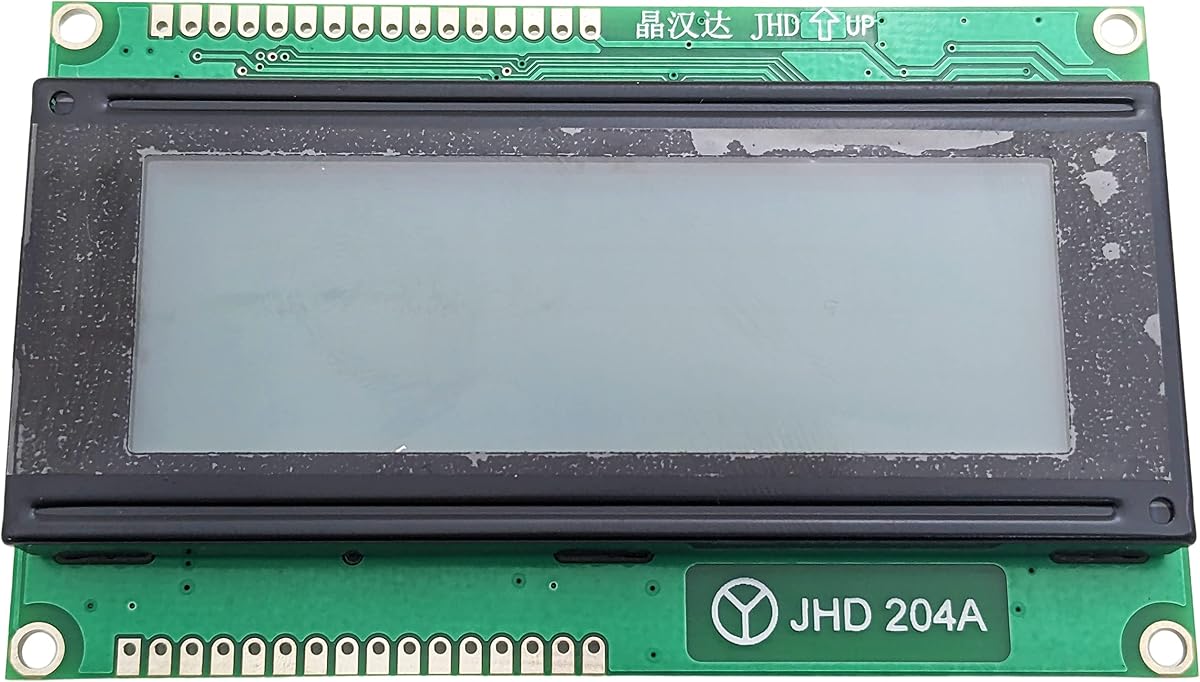
This module provides a generous 20 by 4 character display area for detailed text. It comes with a built-in driver controller simplifying the integration process.
We may earn a commission when you buy through this link, at no additional cost to you.
The reflective positive gray screen works well in well-lit environments without requiring backlight power. Its dimensions are larger than standard 1602 modules so enclosure space must be planned.
It uses the standard 5 by 7 dot matrix format for character rendering. This compatibility ensures broad support across various microcontroller libraries and example codes.
Ideal for applications needing more lines of text than typical modules. The reflective design helps reduce power consumption in battery-operated systems.
Four lines and twenty characters allow for more verbose messages.
Integrated controller removes the need for external driving circuits.
We may earn a commission when you buy through this link, at no additional cost to you.
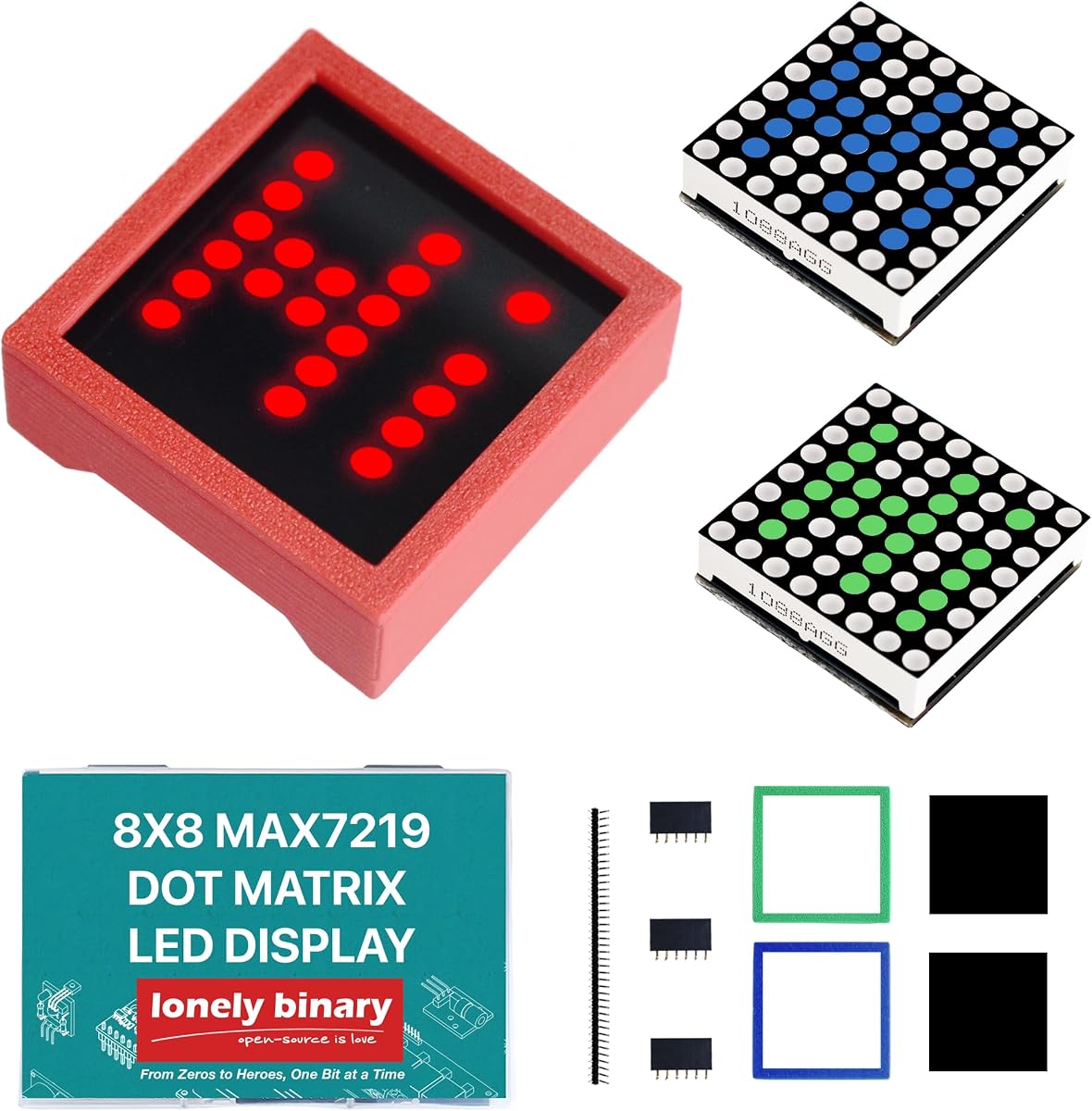
This set includes one red one green and one blue 8 by 8 matrix module. It is designed for creators who want color variety in their displays without full RGB complexity.
We may earn a commission when you buy through this link, at no additional cost to you.
Each module uses the MAX7219 driver enabling simple SPI control and daisy-chaining. The included 3D printed enclosures give a professional finish and protect the PCB from damage.
Basic soldering is required to connect headers for chaining which may challenge absolute beginners. However the result is a robust display system ready for animated text and icons.
Perfect for desktop clocks or status indicators needing distinct color cues. The variety pack allows testing multiple configurations before committing to a final build design.
Included 3D printed cases make the modules ready for finished products.
Daisy-chain support allows combining modules for larger display areas.
We may earn a commission when you buy through this link, at no additional cost to you.
This package contains four separate 8 by 8 modules that can be used independently or chained. They operate at 5V which matches most standard microcontroller boards.
We may earn a commission when you buy through this link, at no additional cost to you.
Each module includes fixing screws and mounting holes for stable installation in enclosures. The common cathode design ensures compatibility with standard MAX7219 driver libraries.
The compact size allows flexibility in layout configurations for custom projects. Users should plan their wiring carefully as chaining multiple modules requires specific pin connections.
Ideal for projects requiring modular displays spread across a panel. The inclusion of four units offers excellent value for multi-panel indicators or scrolling text.
Four independent modules allow creative arrangements for custom indicators.
Included mounting hardware ensures the display stays fixed in place.
We may earn a commission when you buy through this link, at no additional cost to you.
This board is optimized for displaying eight digits using 7-segment style LEDs. It features BCD decoding which simplifies converting numbers to display segments.
We may earn a commission when you buy through this link, at no additional cost to you.
It supports serial SPI interfaces making it easy to connect to microcontrollers. The low-power shutdown mode helps extend battery life in portable applications.
While primarily for numbers it can display some custom symbols if programmed directly. Users seeking complex graphics might prefer full dot matrices instead of digit-focused boards.
Best suited for scoreboards clocks or simple readouts. The dedicated digit control ensures clear and readable numeric output with minimal processing overhead.
Optimized layout ensures numbers are easily readable from a distance.
Shutdown mode helps save energy when the display is not active.
We may earn a commission when you buy through this link, at no additional cost to you.
The SunFounder LCD2004 provides a clear white on blue display for excellent contrast. Its 20 by 4 layout offers ample space for detailed messages and data.
We may earn a commission when you buy through this link, at no additional cost to you.
A 50K potentiometer allows adjusting contrast to suit different ambient lighting. The module measures 97 by 59 millimeters providing a robust build quality.
White text on blue background ensures characters are distinct even in bright conditions. It is fully compatible with Arduino and supports standard character library functions.
Excellent for control panels requiring large readable text. The brand reputation ensures consistent quality and reliable support for users.
White characters on blue background ensure readability in various lighting.
Integrated potentiometer allows precise control over display visibility.
We may earn a commission when you buy through this link, at no additional cost to you.
This module offers a wider 32 by 8 matrix ideal for scrolling text and animations. Each unit contains 256 LEDs providing bright and noticeable output.
We may earn a commission when you buy through this link, at no additional cost to you.
It includes all necessary parts for installation including enclosures and pin headers. The cascading design allows building even wider displays like 64×8 or larger.
Users will need to manage power carefully as the larger array draws more current. The included kits ensure all hardware is present for a smooth setup process.
Best for professional-looking displays in maker spaces or retail. The wider resolution allows for more impactful visual content on a single module.
32 pixel width allows for more complex animations and scrolling text.
Includes all necessary hardware for quick assembly and mounting.
We may earn a commission when you buy through this link, at no additional cost to you.
This two-pack offers compact modules ideal for space-constrained embedded designs. They support standard SPI control and allow daisy-chaining for extended displays.
We may earn a commission when you buy through this link, at no additional cost to you.
Each module features a slim 13mm profile allowing installation in tight enclosures. Mounting holes ensure secure placement on panels or within custom cases.
The 5-pin interface simplifies wiring compared to parallel alternatives. Users should note these are separate modules requiring headers for connection.
Great for multi-point indicator systems. The compact size and secure mounting options make it suitable for industrial or automotive applications.
Slim profile allows installation in enclosures with minimal space.
Multiple modules can be chained for flexible display configurations.
We may earn a commission when you buy through this link, at no additional cost to you.
Choosing the right module depends on your project needs including resolution power constraints and control interfaces.
Determine if you need character or graphic display. Character displays are simpler for text while graphic modules handle icons and images.
Higher resolution like 128×64 provides more visual detail but may require more complex libraries and processing power.
Check if the module uses SPI I2C or parallel interfaces. SPI is faster but uses more pins while I2C saves pins.
Ensure the driver chip supports your microcontroller such as Arduino or ESP32 to avoid compatibility issues.
Backlights improve visibility in low light but consume more power. Choose blue or green depending on your preference.
Adjustable contrast pots allow tuning the display for different environments and lighting conditions.
Measure the physical dimensions to ensure fit within your enclosure. Consider the mounting holes provided.
Modules with built-in enclosures save time and provide a professional finish for final builds.
Evaluate current draw especially for battery-powered projects. LED matrices consume more power than LCDs.
Look for modules with low-power modes or shutdown features to extend battery life.
Consider if you need single-color or multi-color options. Single color modules are often more affordable.
Multi-color packs allow for better status indication but may complicate programming if mixed.
Compare prices across vendors to find the best value. Generic brands often offer lower prices with good quality.
Check stock levels to ensure you can acquire enough units for production batches.
Look for modules with available libraries and examples. This reduces development time significantly.
Open-source support communities provide troubleshooting help if you encounter issues.
Install modules securely using provided mounting holes to prevent vibration damage. Ensure all connections are tight and insulated properly.
Avoid touching the LCD surface directly to prevent damage from oils. Use soft tools to adjust contrast knobs gently.
Store modules in dry environments away from extreme temperatures. Use protective covers if stored for long periods.
Most modules listed are compatible with Arduino boards like Uno or Mega. Check specific libraries required for the driver chip used. Many come with pre-written examples to simplify setup.
Some modules include the driver chip onboard which simplifies wiring. Others require an external driver board to function correctly. Verify the product description for details.
Many LED matrices support daisy-chaining to create wider displays. This usually involves connecting data output of one to the input of the next. Follow wiring guides carefully.
Use the onboard potentiometer to rotate and adjust contrast levels. This allows you to optimize visibility based on lighting conditions.
Most modules operate at 5V which matches standard microcontroller power rails. Ensure your power supply can handle the total current draw.
Graphic modules like 128×64 support images and icons while character modules are text-only. Check the resolution and display type before buying.
We highlighted ten top options ranging from budget-friendly character displays to premium LED matrices. Each offers distinct features suitable for different project needs.
Prioritize resolution and interface type to match your microcontroller capabilities. Consider power consumption if battery life is critical for your device.
Always check current prices and stock before purchasing. These modules provide excellent value for hobbyists and professionals alike.