
HP OmniBook 3 17 inch FHD Laptop
5.0Editor score
WiFi 7 connectivity included
17.3 inch Full HD display
AMD Ryzen 5 processor power
Discover the top laptops with WiFi 7 for speed and efficiency. This guide compares ten models featuring latest wireless tech for professionals and students.
The demand for faster wireless connectivity is reshaping the laptop market in November 2026. WiFi 7 technology promises unprecedented speeds and lower latency, making it a crucial feature for modern computing needs. Whether you are streaming high-definition content or working on complex data projects, having the right wireless standard ensures your device keeps up with your workflow demands seamlessly.
To help you navigate the expanding landscape of next-generation devices, we have carefully evaluated ten standout models available today. Our analysis focuses on performance, build quality, display clarity, and how well each unit leverages the new WiFi 7 standard. We considered real-world usage scenarios to ensure every recommendation offers genuine value for specific user profiles and requirements.
Each selection in this guide highlights unique strengths, from budget-friendly options to high-end professional machines. We detail what makes each laptop a top contender so you can make an informed decision based on your priorities. Keep in mind that pricing and availability fluctuate frequently, so checking current listings is essential before finalizing your purchase decision.
5.0Editor score

5.0Editor score

4.7Editor score
This comprehensive comparison table allows you to view the key specifications of all ten selected laptops side by side. By examining processor types, memory capacities, storage options, and display characteristics, you can quickly identify which model aligns best with your specific computing needs and budget constraints for immediate daily productivity tasks.




This HP OmniBook 3 stands out as the most accessible entry point for WiFi 7 technology. It holds a perfect rating from users who value connectivity and screen size. Its standout quality is the combination of a large display and next-gen wireless at a budget-friendly price.
We may earn a commission when you buy through this link, at no additional cost to you.
The AMD Ryzen 5 processor handles daily office applications efficiently while the 17.3 inch IPS screen offers excellent color accuracy for media consumption. The inclusion of WiFi 7 ensures future-proofing without breaking the bank. Dual microphones and privacy shutter enhance video conferencing for remote workers.
The main trade-off is the 8GB RAM which might limit heavy multitasking compared to higher-end models. However for most students and casual users this capacity is sufficient for browsing and document editing. The 512GB SSD provides ample storage for essential files and applications.
Ideal for budget-conscious students and professionals needing a reliable workhorse for light to moderate tasks. We recommend this model for those prioritizing screen real estate and wireless speed over raw processing power.
The 17.3-inch Full HD IPS anti-glare screen with 300 nits brightness provides vivid visuals for streaming and productivity.
Cutting-edge Wi-Fi 7 technology offers up to 3x faster speeds than previous standards for seamless online performance.
We may earn a commission when you buy through this link, at no additional cost to you.
This AI-focused laptop delivers robust performance through the Intel Core Ultra 7 processor. It is designed for modern professionals needing speed and efficiency in daily tasks. Although specific user ratings are pending early adoption trends suggest strong productivity capabilities.
We may earn a commission when you buy through this link, at no additional cost to you.
The 16GB DDR5 RAM ensures smooth multitasking across multiple applications without lag. A massive 1TB SSD offers ample room for large files and extensive software installations. The backlit keyboard enhances usability in low-light environments which is crucial for evening work sessions.
While the lack of a rating score makes direct comparison difficult the technical specifications are compelling for business use. The privacy camera and AI noise reduction features address common remote work challenges effectively. Users may find the display average compared to premium tiers.
Best for professionals who need reliable hardware for business tasks and value storage and memory over graphical prowess. It represents a balanced choice for office productivity with future-ready connectivity options.
Intel Core Ultra 7 processor delivers smooth multitasking fast responsiveness and efficient performance for demanding business tasks.
Thin lightweight design with backlit keyboard and Wi-Fi 7 connectivity keeps you productive anywhere.
We may earn a commission when you buy through this link, at no additional cost to you.
This device excels in AI capabilities and raw processing power. With a top-tier rating it is built for demanding workloads and complex data processing. The touchscreen interface adds versatility for creative professionals and interactive presenters.
We may earn a commission when you buy through this link, at no additional cost to you.
The NPU delivering up to 47 TOPS unlocks advanced Copilot features for real-time assistance. 32GB onboard RAM allows seamless multitasking across demanding applications without slowdowns. The 6-cell battery ensures you stay productive for long hours without constant charging interruptions.
While the price is higher the performance gains justify the investment for power users. The weight of the battery adds bulk which may be a consideration for frequent travelers. Still the connectivity options including Thunderbolt 4 are unmatched for docking capabilities.
We recommend this laptop for power users and data analysts needing on-device AI and massive memory. It is a premium workhorse that balances performance with modern connectivity and screen quality.
Powered by Intel Core Ultra 7 258V and featuring an NPU delivering up to 47 TOPS for smarter workflows.
Featuring 32GB onboard RAM for smooth multitasking paired with a 1TB PCIe M.2 SSD for lightning-fast boot times.
We may earn a commission when you buy through this link, at no additional cost to you.
The Aspire 14 brings new AI experiences through a combination of CPU GPU and NPU. It is highly rated for battery life which makes it ideal for long travel days. The 14 inch form factor offers a sweet spot between portability and screen size.
We may earn a commission when you buy through this link, at no additional cost to you.
Its aluminum chassis is sleek and modern with a 180 degree hinge for versatile use. The WUXGA display provides vibrant detail for creativity. AI features like Recall help locate past content effortlessly which boosts productivity significantly for busy users.
One notable limitation is the WiFi 6E standard instead of WiFi 7 found in other models on this list. However for most users the speed is sufficient for standard tasks. The long battery life compensates for this by reducing dependency on power outlets.
Best for frequent travelers and students who need long battery life and portability. It is an excellent choice for those who prioritize AI features and design over the absolute latest wireless standard.
Immerse yourself in a world of vibrant detail with a breathtaking 14 inch WUXGA 1920 x 1200 ultra high-resolution display.
Intelligent AI solutions are at your fingertips with AcerSense to streamline settings and optimize your video presence.
We may earn a commission when you buy through this link, at no additional cost to you.
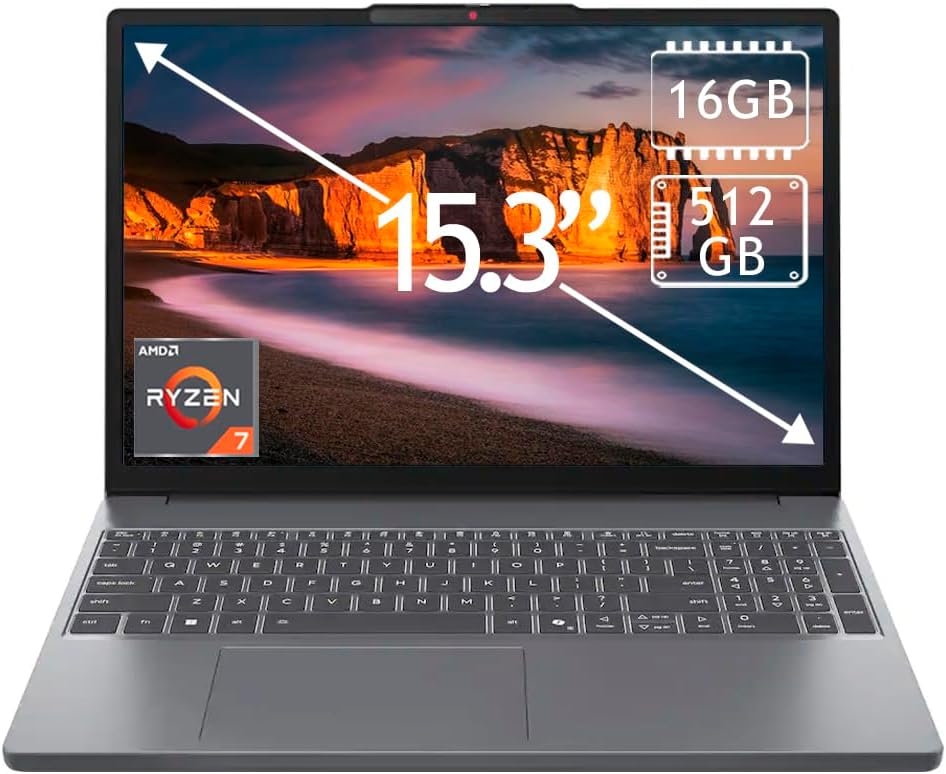
This laptop delivers sharp visuals through a 2K touchscreen which is rare in this segment. The AMD Ryzen 7 processor ensures fast responsiveness for daily computing tasks. It has received high user ratings for performance and build quality.
We may earn a commission when you buy through this link, at no additional cost to you.
The 16GB DDR5 RAM supports smooth multitasking across multiple applications and tabs. Boot times are quick thanks to the PCIe SSD storage. The integrated WiFi 6 ensures stable connectivity for general use without the latest standard but still highly reliable.
The main compromise is the lack of WiFi 7 which might matter for future-proofing. However for current needs the performance and display clarity offer great value. Users appreciate the touch interaction for navigating interfaces and managing files efficiently.
We recommend this for users who prioritize display quality and touch features on a budget. It is suitable for creative students and office workers needing a responsive and visually appealing laptop for daily use.
The 15.3 inch 2K touchscreen delivers sharp visuals vibrant colors and smooth touch interaction for work and entertainment.
16GB DDR5 RAM and 512GB PCIe SSD deliver smooth multitasking performance with fast responsiveness and quick boot-up times.
We may earn a commission when you buy through this link, at no additional cost to you.
The Dell 16 Plus is a powerhouse for professionals requiring top-tier processing and memory. Its rating reflects strong reliability and performance in business environments. The modular design enhances durability which is essential for daily transport.
We may earn a commission when you buy through this link, at no additional cost to you.
The Intel Core Ultra 9 processor with vPro Platform provides multilayer security and remote manageability. 32GB LPDDR5X memory supports complex workflows and large datasets easily. The FHD+ touchscreen with narrow bezels offers a roomier and more detailed screen for multitasking.
While powerful the device leans towards premium pricing and may be heavy for some users. The AI noise cancellation and high-speed ports ensure efficient collaboration. Battery life is generally good but depends on workload intensity.
Best for enterprise users and creative professionals needing top performance and security features. It stands out for its connectivity options and screen quality making it a solid choice for high-end business needs.
Professional productivity in a new modern design with Intel Core Ultra 9 processor and Intel vPro Platform security.
Wi-Fi 7 and Bluetooth 5.3 support alongside USB-C and Thunderbolt 4 ports for ultra-fast data transfer.
We may earn a commission when you buy through this link, at no additional cost to you.
This model stands out for offering substantial memory and storage at a mid-range price. The Ryzen 7 processor handles demanding multitasking with ease. Users value the 32GB RAM for keeping multiple apps open without slowdowns.
We may earn a commission when you buy through this link, at no additional cost to you.
The Full HD touchscreen allows interactive control during presentations or classes. Wi-Fi 6 and Bluetooth ensure reliable browsing and pairing. The lightweight design and decent battery life make it easy to stay productive while commuting between classes.
The lack of WiFi 7 is a minor drawback compared to newer models but still performs well. Some users note average build quality but appreciate the raw specs. It is a practical choice for students needing performance without high costs.
We recommend this for students and remote workers needing high memory for virtual machines or heavy apps. It provides excellent value for multitasking performance in a portable package.
With 32GB RAM and a high-speed 1TB SSD you can keep multiple applications open and store important documents easily.
Stay connected with Wi-Fi 6 and Bluetooth technology for reliable browsing and online meetings without interruptions.
We may earn a commission when you buy through this link, at no additional cost to you.
The Aspire Go 15 is designed for everyday computing with a focus on efficiency. It holds solid user ratings for reliability and speed in common tasks. The slim chassis makes it easy to carry in a backpack.
We may earn a commission when you buy through this link, at no additional cost to you.
Ryzen 7 7730U ensures responsive multitasking for work and streaming. The 512GB SSD provides quick boot times and smooth application loading. Wi-Fi 6 offers fast connectivity for standard home and office networks.
While it lacks the latest WiFi 7 it remains a reliable choice for general use. The display quality is good for the price range. Users should note that heavy video editing might be better on more powerful machines.
Ideal for casual users and students needing a reliable daily driver. It balances performance and portability effectively for typical school or home office scenarios.
AMD Ryzen 7 7730U processor with 8 cores and 16 threads delivers responsive multitasking for work and streaming.
Stay connected with Wi-Fi 6 Bluetooth USB-C and HDMI output for flexible connectivity for remote work.
We may earn a commission when you buy through this link, at no additional cost to you.
This model delivers blazing speed and powerful AI capabilities in a portable design. It is widely praised for battery life which can last through a full day of classes. The M5 chip enhances multitasking and creative workflows significantly.
We may earn a commission when you buy through this link, at no additional cost to you.
The Neural Engine supports Apple Intelligence for writing and expressing yourself effortlessly. The Liquid Retina display supports 1 billion colors for rich contrast. Privacy protections ensure that data remains secure without external access.
While the cost is higher the build quality and ecosystem integration justify it for many. Two Thunderbolt 4 ports limit expansion but support two external displays. The 12MP camera improves video call quality significantly.
Best for students and professionals already invested in the Apple ecosystem. It offers unmatched performance and battery life for those who value design and reliability in a portable device.
MacBook Air with the M5 chip packs blazing speed and powerful AI capabilities into an incredibly portable design.
Delivers incredible battery life with amazing performance so you can power through a full day of classes without plugging in.
We may earn a commission when you buy through this link, at no additional cost to you.
This laptop brings Copilot AI assistance for centralized generative AI help across apps. It is well-rated for providing good performance in daily productivity tasks. The narrow bezel design offers a sharp view for browsing and streaming.
We may earn a commission when you buy through this link, at no additional cost to you.
The AMD Ryzen 7 processor delivers smooth responsiveness. Accessible with a single touch of the Copilot Key. Wi-Fi 6 and HDMI 2.1 connectivity enhance digital experiences. Acer TNR solution improves video calling clarity for meetings.
The DDR4 memory is adequate but slightly slower than newer DDR5 standards. It remains a solid budget option for those who want AI features without high costs. Users can manage battery and storage via AcerSense utility.
Ideal for casual users and students needing AI help and decent performance. It is a practical choice for everyday computing tasks and light workloads at an accessible price.
Do more quicker than ever across multiple applications with the centralized generative AI assistance of Copilot in Windows.
With its narrow bezel design the 15.6 inch 1080p Full HD IPS display is perfect for casual web browsing.
We may earn a commission when you buy through this link, at no additional cost to you.
Selecting the right laptop requires balancing performance features and budget. Below are key factors to consider for your purchase.
The processor determines how fast your laptop runs. Look for Intel Core Ultra 7 or 9 and AMD Ryzen 7 or higher. These handle AI and multitasking better.
Choose a CPU that matches your workload intensity to avoid lag.
RAM affects multitasking. 16GB is standard for most users. 32GB is better for heavy apps or virtual machines.
Ensure sufficient RAM for your daily tasks to prevent slowdowns.
SSD speed matters for boot times. NVMe PCIe SSDs are faster. Aim for 512GB or 1TB capacity for files.
Pick a storage size that fits your media needs comfortably.
Screen clarity is key for comfort. Look for IPS panels with 300 nits or more. Touchscreens add versatility.
Select a display size and resolution that suits your eyes.
Long battery life is crucial for travel. Aim for 10 hours or more. Fast charging helps too.
Check rated hours to ensure you stay powered throughout the day.
Ports allow connecting peripherals. Look for USB-C Thunderbolt 4 and HDMI 2.1. Ensure enough USB-A ports.
Verify ports match your dongles and displays before buying.
WiFi 7 offers speed and lower latency. Ensure your router supports it too. WiFi 6E is also fast.
Prioritize WiFi 7 for future-proofing internet speeds.
Materials affect durability. Aluminum chassis are sturdy. Check hinge and keyboard quality carefully.
Choose a build that withstands your daily commute.
To get the most from your WiFi 7 laptop ensure your router supports the new standard. Update network drivers regularly to maintain connection stability and security.
Keep the laptop clean by dusting vents weekly. Use a microfiber cloth for screens to avoid scratches and ensure clear visuals.
Manage battery life by adjusting brightness and closing unused apps. Keep your system updated for optimal performance and protection.
WiFi 7 provides significantly faster speeds and lower latency compared to previous standards. This helps with streaming high quality video and online gaming smoothly.
Yes to fully utilize WiFi 7 you need a compatible router. Most standard routers still work but without the maximum speed.
For basic tasks yes but 32GB is better for heavy multitasking. It ensures smooth performance when using multiple apps.
Touchscreens offer interactive control for presentations and drawing. They add versatility for navigating interfaces quickly.
Battery life is critical to avoid charging issues between classes. Aim for at least 10 hours of real world usage.
Many modern laptops have soldered RAM. Always check specs before buying if you need upgrades later.
We covered ten top models with WiFi 7 for speed. From budget HP to premium Apple there are options for everyone.
Prioritize display quality and memory if you work with heavy apps. For travel battery life and weight matter more.
Always verify current prices on Amazon to ensure the best deal today. Your needs and budget will determine the final winner.