
Anti Slip Laptop Rubber Feet Pad Replacement for MacBook MacBook Pro 15PCS
4.4Editor score
Strong self-adhesive backing
Fits MacBook and Dell
15 pieces included
Laptop rubber feet are small but critical components that keep your device stable and cool during use. Over time they wear out or peel off causing your computer to slide on desks or overheat due to poor airflow. Replacing them is a simple fix that extends the life of your laptop and improves its performance significantly.
We compared ten top-rated replacement kits based on material quality, adhesive strength, compatibility with popular models and user feedback. Each product was evaluated for its ability to restore grip and protect the bottom case without damaging the surface. Our analysis focuses on durability and ease of installation for DIY repairs.
Each pick below highlights key features specific compatibility details and real-world performance notes to help you choose the right set for your machine. Prices and availability change frequently so check current listings before ordering to ensure you get the correct fit for your exact laptop model and serial number.
4.4Editor score
4.4Editor score

4.5Editor score
As an Amazon Associate we earn from qualifying purchases.
The table below summarizes key specifications and compatibility details for all ten replacement kits so you can quickly find the right match for your device model and size requirements.


This replacement kit stands out for its direct compatibility with HP 15-EF and related series. It scores high on user reviews for ease of use and solid grip restoration. The pre-applied adhesive saves time and ensures a clean bond without mess.
We may earn a commission when you buy through this link, at no additional cost to you.
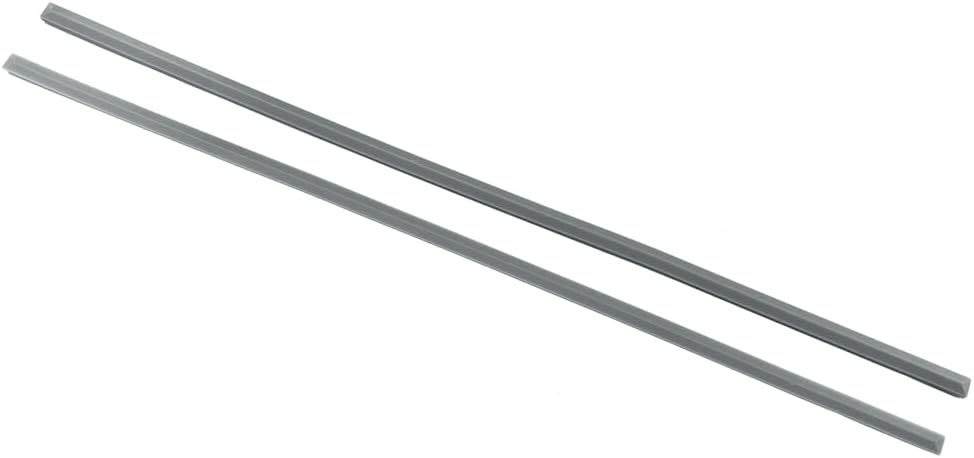
The package includes one thick and one thin strip to match original HP designs. This dual thickness helps maintain proper airflow under the chassis for better cooling. Users report that it stops sliding on desks and protects the bottom from scratches.
Installation requires cleaning old glue residue first for best results. Some users note that sizing can vary slightly so measuring your old feet is wise. The adhesive is strong but removable if you need to reposition quickly.
Buy this if you own an HP 15-DY or 15-EF laptop and want a reliable fix. It is ideal for DIYers who prefer exact fit over universal options. Always verify your model number before ordering to avoid returns.
The strips match OEM dimensions to ensure correct gap for cooling vents under the chassis.
Restoring the original height lifts the laptop to prevent overheating during heavy tasks.
We may earn a commission when you buy through this link, at no additional cost to you.
This pack offers great value with fifteen pieces suitable for laptops keyboards and more. It is a solid choice if you need bulk replacements for multiple devices. The adhesive is strong and the rubber is durable for daily use.
We may earn a commission when you buy through this link, at no additional cost to you.
The feet are slightly taller than stock which helps lift devices for better airflow. This is useful for older laptops that run hot. Users appreciate the versatility and ease of application on any flat surface.
Since these are universal they might not align perfectly with grooves on some laptops. You may need to trim them for a perfect fit. The adhesive is permanent once applied so place them carefully.
Pick this if you want an inexpensive solution for various devices. It works well for MacBooks and generic laptops. Keep extras on hand for future repairs or other gadgets like speakers.
Fifteen pieces at a low price make it ideal for households with multiple gadgets.
Use beyond laptops on speakers or coffee makers to keep them stable on surfaces.
We may earn a commission when you buy through this link, at no additional cost to you.
X-Protector offers a premium experience with thick rubber foam that grips firmly on any surface. It is ideal for protecting desks from scratches and keeping devices stable. The brand reputation adds confidence to the purchase.
We may earn a commission when you buy through this link, at no additional cost to you.
The adhesive is designed to be tenacious without damaging surfaces when removed carefully. Users love its use on subwoofers and keyboards too. The black color blends well with most devices.
These strips are universal so they might not fit narrow grooves perfectly. You may need to cut them to size. The foam is soft so avoid using on very heavy furniture as it may compress.
Buy this if you want high quality universal strips for laptops and more. It is great for protecting furniture surfaces. Trust the guarantee if you are not fully satisfied with the grip.
Thick foam rubber provides superior grip and shock absorption compared to thin plastic pads.
The soft rubber prevents scratches on wood or glass desks while keeping devices secure.
We may earn a commission when you buy through this link, at no additional cost to you.
This set is designed for HP 15-DY and similar models offering a practical repair solution. It includes one thick and one thin strip to restore original airflow gaps. The rubber material resists wear over time.
We may earn a commission when you buy through this link, at no additional cost to you.
Users report that it restores stability to sliding laptops. The adhesive is standard but effective if surfaces are clean. It is a straightforward fix for common wear issues.
Check your laptop model carefully since HP has many variations. The strips may not fit older or newer versions outside the listed range. Cleaning old glue is key for strong adhesion.
Choose this if you own a compatible HP 15 series. It is a cost effective way to extend device life. Always confirm your serial number matches the compatibility list.
Tailored dimensions ensure the strips align with grooves on HP 15 series chassis.
Quality rubber ensures the feet last long without peeling or crumbling under heat.
We may earn a commission when you buy through this link, at no additional cost to you.
This option targets Microsoft Surface Laptop Studio owners needing original grey feet. The nonskid texture helps prevent sliding on desks. The refund policy adds confidence to trying it out.
We may earn a commission when you buy through this link, at no additional cost to you.
Users note it restores balance and airflow to the device. The grey color blends with the chassis well. Adhesive strength is average but sufficient for daily use.
Check your screen size carefully as models vary by inch. The strips are precise but small errors cause fit issues. Contact seller if unsure before purchasing.
Buy this if you have a Surface Studio 14.4 and want a direct match. The refund option reduces risk. Confirm exact model to avoid returns.
Grey finish blends with Studio chassis for a seamless look without visual mismatch.
Full refund policy allows you to try the fit risk free if unsure.
We may earn a commission when you buy through this link, at no additional cost to you.
Designed for Surface Book 1 2 and 3 this set restores original silicone feet. The non slip texture keeps the laptop stable during typing. Users report good durability and fit.
We may earn a commission when you buy through this link, at no additional cost to you.
The strips match original width and length well. Adhesive is strong enough for regular use. The guarantee adds safety to the purchase decision.
Check your exact model as older versions might differ. Measurements are precise so verify before applying. Clean residue carefully for best bond.
Choose this for Surface Book devices needing OEM style repair. It is reliable for restoring stability. Confirm compatibility to ensure perfect fit.
Silicone offers flexibility and better grip compared to hard rubber on smooth surfaces.
Full refund policy ensures you can return if fit does not meet expectations.
We may earn a commission when you buy through this link, at no additional cost to you.
This kit covers a wide range of HP Envy x360 models offering broad compatibility. The strips are black and stick easily to the chassis. Users appreciate the straightforward installation process.
We may earn a commission when you buy through this link, at no additional cost to you.
They restore the original height for cooling and prevent sliding. The adhesive holds well on clean plastic surfaces. It is a practical solution for worn feet.
HP has many submodels so check your serial number to confirm fit. Remove old glue residue for best results. Measure your old strips to be safe.
Buy this if you have an Envy x360 laptop needing repair. It is a convenient fix with included adhesive. Verify model to avoid returns.
Covers many Envy 360 models so check your submodel to confirm exact fit.
Pre-applied adhesive saves time and effort during installation for DIYers.
We may earn a commission when you buy through this link, at no additional cost to you.
This grey set matches HP Envy 360 aesthetics and fits several G7 models too. It is well reviewed for durability and ease of install. The guarantee adds confidence to the purchase.
We may earn a commission when you buy through this link, at no additional cost to you.
Users report it improves airflow and stops laptop sliding. The adhesive is reliable if surfaces are prepped. Grey blend looks professional on the bottom case.
Check your model against the long list before ordering. Some Envy versions vary in size. Cleaning old glue ensures the strips stay put.
Choose this for Envy laptops needing original color match. It is solid for restoring stability. Confirm your model for best fit.
Grey finish blends with HP chassis to maintain a clean professional appearance.
Money back guarantee allows returns if the fit is not exactly right.
We may earn a commission when you buy through this link, at no additional cost to you.
Designed for Elitebook X360 G3 this set offers precise fit with double-sided adhesive. Users report it restores stability well when installed correctly. The rubber is non-slip and durable.
We may earn a commission when you buy through this link, at no additional cost to you.
The adhesive works on clean plastic and metal. Measurements are accurate for OEM grooves. It prevents overheating by lifting the bottom properly.
Clean old glue completely for the bond to hold. Check your exact model since Elitebook series vary. Contact seller if unsure about fit.
Buy this for Elitebook repairs needing exact size. It is effective for stability. Verify model before purchase to avoid issues.
Exact measurements ensure the strips sit flush in OEM grooves without sticking out.
Double-sided adhesive provides a secure bond when surface is cleaned properly.
We may earn a commission when you buy through this link, at no additional cost to you.
This generic kit offers two sets with adhesive strips for many laptop types. It is a practical solution for various devices needing basic grip. Users find it useful for quick repairs.
We may earn a commission when you buy through this link, at no additional cost to you.
The adhesive is standard and the feet are standard size. It works for most laptops but check dimensions first. It is a cost effective backup option.
Measure your old feet to ensure fit before applying. The sets are generic so custom trimming may be needed. It suits DIYers comfortable with slight adjustments.
Choose this for a versatile multi-device fix at low cost. It is good for emergencies. Verify size for best results.
Universal fit works on most standard laptop sizes with minor adjustments.
Two sets allow you to keep extras for future repairs or other devices.
We may earn a commission when you buy through this link, at no additional cost to you.
Choosing the right replacement requires matching your laptop model and considering material and adhesive quality.
The most critical step is to confirm your exact laptop model number before purchasing. Manufacturers use many similar names so check your serial or service tag for accuracy. A strip meant for HP 15-DY may not fit HP 15-EF even though they look alike. Measure your old feet to verify length width and thickness before ordering.
Always match the part number listed in your user manual to avoid returns.
Look for rubber or silicone strips that resist heat and wear over time. Cheap plastic feet can crack or peel leaving adhesive residue. Higher quality rubber maintains grip and flexibility even after years of use.
Premium materials ensure the feet stay intact under heavy laptops and high temperatures.
Strong adhesive ensures the strips stay in place without peeling off later. Pre-applied adhesive saves time but ensure it bonds well to your laptop's chassis. Some models require cleaning off old glue before new strips will stick properly.
Check if the kit includes extra adhesive strips for reinforcement if needed.
Correct thickness is vital for maintaining proper airflow under the laptop chassis. Strips that are too thin will block vents and cause overheating. Thicker strips may lift the device too high making it unstable on your desk.
Match original OEM thickness to keep cooling and stability balanced.
Select a color that matches your laptop's bottom case for a professional look. Black is common but some models like Surface Studio use grey. Mismatched colors can look distracting on the bottom cover.
Visual consistency ensures the repair does not stand out negatively.
Most kits include two strips but some offer more pieces for multiple devices. Buying extras allows you to keep replacements for future repairs or other gadgets. Universal packs are cost effective for households with several laptops.
Consider buying extra sets if you own multiple machines needing repair.
Check seller ratings and return policies before buying third-party parts. Reliable sellers offer refunds if the fit is incorrect. Avoid brands with poor reviews about adhesive failure or wrong sizes.
Choose sellers with strong customer support to resolve fit issues quickly.
Pre-applied adhesive kits simplify the process for DIY users. Ensure the backing peels off easily and strips align correctly with grooves. Some models may need glue reinforcement which adds steps.
Look for clear instructions and simple designs to save time.
Begin by powering off your laptop and unplugging it completely. Lay it on a soft cloth to avoid scratching the top cover. Turn it over to expose the bottom case where the old feet are located.
Use a plastic card or soft tool to gently lift and remove old rubber strips. Clean all residual adhesive with a damp cloth and let it dry fully. Ensure the surface is dust-free before applying new strips.
Peel the adhesive backing carefully and align the new strip with existing grooves. Press down firmly for ten seconds to ensure a strong bond. Wait twenty four hours before heavy use to let adhesive fully cure.
No special tools are usually required for most replacement kits. A plastic card or your fingernail is enough to lift old strips. Ensure you have a clean cloth for removing adhesive residue before applying new strips.
Universal strips may fit but exact OEM kits are safer for precise grooves. Measure your old feet to confirm length width and thickness. Check product compatibility lists to avoid sizing mismatches.
Quality rubber strips can last several years if adhesive holds well. Avoid dragging your laptop across rough surfaces which wears them faster. Heat exposure may reduce lifespan over time.
If adhesive fails clean the surface and apply extra glue reinforcement. Ensure the area is dry and free of oils before reattaching. Contact the seller if under warranty for replacement parts.
MacBooks need exact sizes to maintain cooling and stability. Generic strips may not align with grooves properly. Use kits made for MacBook models to ensure fit.
Ensure strips match original thickness to keep vents open. Avoid covering intake or exhaust vents during installation. Test the laptop temperature after use to confirm airflow is restored.
Yes most kits offer black rubber strips as standard. Some brands have grey for Surface models. Match your laptop's color to keep a clean look.
Check your user manual or laptop service tag for part numbers. Manufacturers list compatible parts online. Ask sellers for help verifying exact matches before buying.
We covered ten top replacement kits ranging from HP specific to universal options. Our pick for overall value is the HP 15-EF kit while the Budget Universal set suits multiple devices.
Prioritize exact compatibility and quality materials to prevent overheating or instability. Strong adhesive ensures your repair lasts longer without frequent reapplication.
Prices and availability change often so verify current listings before ordering. Always double-check your model number to avoid returns and wasted time.