
Lenovo Smartcard Wired Keyboard II-US English
4.4Editor score
Compact wired USB connection
Basic smart card support
Affordable entry level price
This guide compares the top 10 keyboards with smart card readers for secure authentication in finance, healthcare, and government sectors based on compatibility
Finding a keyboard with smart card reader integration is essential for professionals who handle sensitive data daily. These devices combine typing comfort with robust security features like built-in authentication modules. Selecting the right model ensures seamless workflow without compromising on safety or user experience during long sessions.
We analyzed ten leading models based on security standards, ergonomic design, and connectivity options. Our evaluation includes TAA compliant devices for government use and general business keyboards with ISO 7816 support. Each product was reviewed for build quality, key feedback, and the reliability of its embedded smart card reader technology.
Each pick highlights specific strengths such as mechanical switches, spill resistance, or certified compliance levels. You will see how these keyboards integrate with Windows or Linux systems for secure logons. Please note that prices fluctuate frequently, so verify current availability before making your final purchase decision.
4.4Editor score
4.6Editor score

4.6Editor score
The following table presents a side-by-side comparison of all ten selected models. It highlights key specifications like switch type, compliance standards, and special features to help you distinguish between similar options quickly.


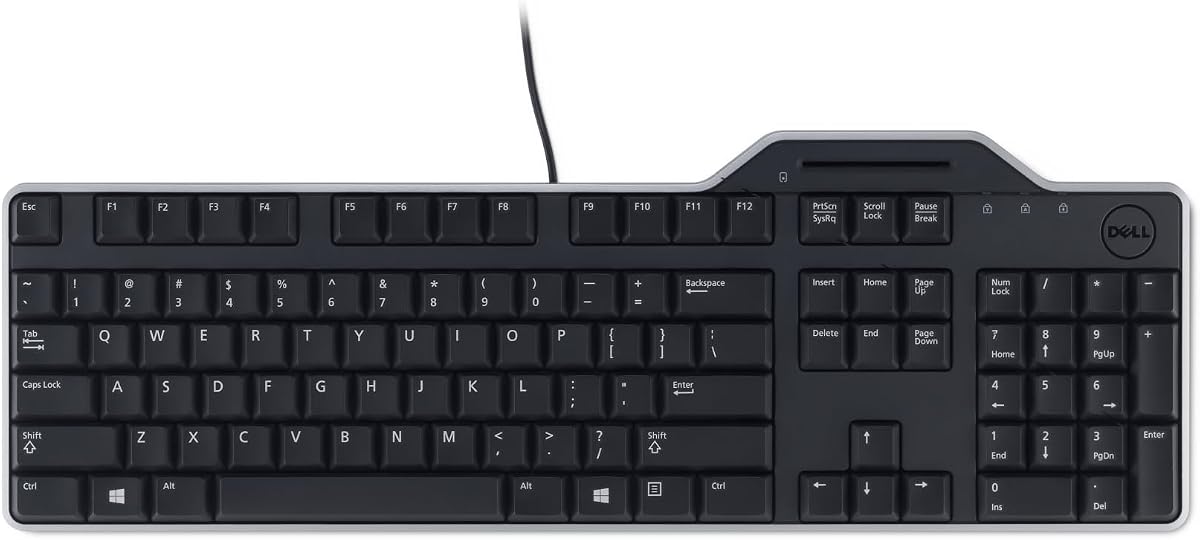
The Dell KB813 stands out as a top contender for secure work environments. It combines a standard typing experience with an integrated smartcard reader that enhances authentication without extra hardware.
We may earn a commission when you buy through this link, at no additional cost to you.
Its spill-resistant design protects against accidental liquid spills while the detachable palm rest ensures comfort during extended use. The wired USB connectivity provides fast and secure data transfers to your Dell system.
While the cable is not detachable and layout options are standard, the build quality and security features justify these trade-offs. Most users find the low-profile keys quiet and efficient.
This keyboard is ideal for businesses needing reliable authentication tools without cluttering desks. It balances security and comfort effectively for daily office tasks.
The built-in smartcard reader streamlines login processes by keeping authentication hardware directly on the typing surface for easy access.
Water-resistant construction ensures longevity in busy office settings where spills are a common risk for electronic peripherals.
We may earn a commission when you buy through this link, at no additional cost to you.
The Adesso TruForm AKB-150SB-TAA offers robust security features tailored for government and enterprise use. Its TAA compliance makes it a preferred choice for federal agencies and contractors.
We may earn a commission when you buy through this link, at no additional cost to you.
The split ergonomic design with a gently sloped shape encourages natural hand positioning which relieves joint pain. It supports multiple international standards including ISO7816 for secure web applications.
Although it may take time to adjust to the split layout and the price is higher than standard models, the health benefits and compliance are significant. The 13 hotkeys add convenience for web tasks.
This model is perfect for professionals prioritizing ergonomics and regulatory compliance. It delivers a comfortable typing experience alongside essential security functions.
Meeting TAA specifications ensures this device can be used in federal contracts where compliant sourcing is mandatory.
The split key zones and integrated palm rest work together to minimize strain during long work sessions.
We may earn a commission when you buy through this link, at no additional cost to you.
The Cherry KC 1000 is designed for secure environments requiring certified smartcard solutions. Its compact footprint and strong security protocols make it a favorite among IT administrators.
We may earn a commission when you buy through this link, at no additional cost to you.
It features secure PIN entry and supports various protocols like T=0 and T=1 for reading and writing ISO 7816 compliant smartcards. The thin design keeps the desk clutter-free.
While it lacks multimedia extras and has a simple look, the robust security and compatibility with Windows or MacOS or Linux systems are valuable. One-handed operation is convenient for quick logins.
Ideal for users needing certified security without unnecessary frills, this keyboard delivers performance and reliability. It is a solid choice for secure workstation setups.
Compliance with FIPS 201 and EMV standards ensures trusted authentication in high-security government and financial sectors.
Driver support extends across major operating systems allowing flexible deployment in mixed device environments.
We may earn a commission when you buy through this link, at no additional cost to you.
The Adesso EasyTouch 130SB brings mechanical durability to secure input devices. It features red switches that offer tactile feedback and a lifecycle rated for 50 million keystrokes.
We may earn a commission when you buy through this link, at no additional cost to you.
It includes large print keycaps for enhanced visibility and a dedicated Copilot AI hotkey for instant assistance. The smart card reader is certified to EMV 4.0 and FIPS standards.
Mechanical keys might be louder and cost more than standard models but the feedback and customization are rewarding. The large print helps users with low-light needs.
This keyboard suits tech-savvy professionals who value typing quality alongside advanced security. It bridges modern AI tools and traditional authentication seamlessly.
The dedicated Copilot hotkey allows quick access to AI tools without leaving the keyboard workflow.
Extra-large keycaps ensure characters remain readable in dim environments improving usability for diverse users.
We may earn a commission when you buy through this link, at no additional cost to you.
The Dell Keyboard Smartcard USB focuses on essential secure typing functions. It provides a straightforward solution for businesses needing card authentication without complex setups.
We may earn a commission when you buy through this link, at no additional cost to you.
Its quiet low-profile keys and spill-resistant build ensure a smooth experience in shared workspaces. The detachable palm rest adds comfort for long work hours.
Though it lacks multimedia keys or special design elements, its reliability and comfort are strong. It fits well into existing Dell ecosystems easily.
Best for users seeking a no-fuss secure keyboard, this model delivers solid performance. It prioritizes function and durability over extra features.
Designed to be a workhorse this keyboard excels at basic tasks with added security layers.
The detachable palm rest allows customization to suit different wrist support preferences for ergonomic typing.
We may earn a commission when you buy through this link, at no additional cost to you.
The Kensington KB201C is built for government and enterprise security requirements with TAA and CAC compliance. It ensures secure access and efficient data entry with standard keys.
We may earn a commission when you buy through this link, at no additional cost to you.
It offers a quiet-click experience ideal for shared offices and comes with a 3-year limited warranty for peace of mind. Compatible with Windows or Mac or Chrome OS.
While ratings are modest and aesthetics are simple, the regulatory compliance is crucial for certain sectors. The reliable USB-A connection avoids battery needs entirely.
This keyboard is essential for organizations requiring certified secure access. It provides robust protection and reliability for sensitive environments.
Meeting TAA and CAC standards makes this device eligible for federal government procurement and secure agency use.
A 3-year limited warranty from Kensington ensures long-term support and quality assurance for business deployments.
We may earn a commission when you buy through this link, at no additional cost to you.
The Lenovo Smartcard Wired Keyboard II offers a cost-effective solution for basic secure typing. It maintains a standard layout familiar to most office workers.
We may earn a commission when you buy through this link, at no additional cost to you.
With smart card support and a wired connection it ensures stable performance without battery changes. The dimensions are standard for easy integration.
It lacks extra features like multimedia keys but fits tight budgets well. Setup is straightforward without needing complex software configuration.
This model is ideal for budget-conscious teams needing basic security. It delivers functional performance for everyday secure access needs.
Provides essential card authentication at a lower cost making it accessible for small businesses or limited budgets.
The familiar US English layout reduces training time for staff transitioning from standard office keyboards.
We may earn a commission when you buy through this link, at no additional cost to you.
The HP USB Business Slim offers a sleek profile for modern office spaces. Its spill drain feature provides practical protection against accidental liquid exposure.
We may earn a commission when you buy through this link, at no additional cost to you.
Membrane switches ensure quiet operation while LED key light indicators help visibility in low light. The USB interface ensures easy connection to business PCs.
Though it lacks a wrist rest and the cable is fixed, its slim form and durability make it a practical choice for desks with limited space.
This keyboard suits professionals valuing aesthetics and basic security. It combines style with functional protection for daily use.
The low-profile design fits neatly into modern workstations without taking up excessive desk real estate.
Built-in spill drain channels liquid away from sensitive internal components extending the device lifespan.
We may earn a commission when you buy through this link, at no additional cost to you.
The Cherry Secure Board 1.0 integrates advanced NFC and RFID reading capabilities for versatile authentication. It is a robust choice for secure thin client environments.
We may earn a commission when you buy through this link, at no additional cost to you.
It supports encryption and secure mode with GS approval ensuring trusted performance. ISO compliance for reading and writing smartcards broadens its usability.
Setup may require technical knowledge and costs more than basic options but the security depth is unmatched. Ideal for high-risk environments needing strong protocols.
This keyboard is perfect for security-focused IT managers. It provides a layered approach to authentication and encryption.
Support for RF and NFC interfaces allows reading modern contactless cards and tags alongside traditional smartcards.
Built-in encryption protects sensitive data during transmission reducing risk of interception in public or shared networks.
We may earn a commission when you buy through this link, at no additional cost to you.
This OEM Dell KB813t provides a fresh take on a proven reliable model. It is new and unopened ensuring you get a unit without prior use.
We may earn a commission when you buy through this link, at no additional cost to you.
It features the familiar KB813t design with English layout and smart card reader integration. The OEM status keeps costs low while maintaining Dell quality.
While packaging is basic and design is standard, the reliability of the hardware makes it a smart choice. Ideal for bulk or cost-sensitive deployments.
This option suits buyers needing multiple units at a lower price. It brings trusted performance without premium price tags.
Purchasing OEM models can reduce costs significantly while still delivering original equipment manufacturer reliability and quality.
New unopened status ensures no prior wear and tear giving you confidence in the device longevity and performance.
We may earn a commission when you buy through this link, at no additional cost to you.
Selecting the right secure keyboard involves balancing performance with compliance needs. Use the following factors to narrow down options based on your organizational requirements.
Ensure the built-in reader supports the specific card types your organization uses such as CAC PIV or ISO 7816. Check if the device is CCID compatible so it functions with standard drivers across Windows and Linux.
Verify that the reader works seamlessly with your existing identity management software to avoid authentication issues during deployment.
Look for certifications like FIPS 201 or EMV 4.0 if your work involves federal or financial data. These certifications ensure the device meets strict security protocols for protecting sensitive information.
Prioritize models that offer encryption or secure modes to protect data transmission between the card and your computer.
If you are a government contractor check if the keyboard is TAA compliant. This ensures the product meets US trade agreement act specifications required for federal procurement.
Compliance with TAA simplifies the purchasing process for federal agencies and reduces legal or regulatory risks.
Long typing sessions require ergonomic features like split layouts or integrated palm rests. These designs reduce strain on wrists and improve posture which is vital for office workers.
Choose keyboards with quiet keys if you work in shared spaces to minimize distractions for yourself and colleagues.
Decide between mechanical or membrane switches based on your tactile preference. Mechanical keys offer better feedback and durability while membrane keys are quieter and more budget-friendly.
Ensure the layout matches your region and language such as US English or QWERTY to avoid compatibility issues with software applications.
Select models with spill-resistant designs or built-in drains to protect against accidental liquid damage. This feature is essential for office environments where drinks are near desks.
Check warranty lengths to ensure you have support for repairs or replacements should the device fail prematurely.
Most keyboards use wired USB connections which ensure stable and fast data transfers without battery dependence. Verify the cable length is sufficient for your desk setup.
Check if driver support is available for your specific operating system versions to ensure plug-and-play functionality.
Some models include multimedia hotkeys or AI assistants like Copilot to streamline workflows. These features can save time when managing multiple tasks during work hours.
Consider whether these extras are necessary for your daily tasks or if a basic model is sufficient for secure typing.
To get started connect the keyboard to your computer via USB and install any required drivers. Insert your smart card into the integrated slot until you hear a click or see a light indicator.
Keep the smart card slot clean by avoiding dust or debris that might hinder reading. Use a soft cloth to wipe the surface and avoid cleaning liquids near the card module.
Store the keyboard in a cool dry place when not in use to maintain its lifespan. Avoid leaving liquids near the device and clean spills immediately if the model is spill-resistant.
Most modern models are CCID compatible which means they work with standard OS drivers. However for specific security protocols or enterprise setups you may need to install additional middleware software provided by your organization.
Yes many options like the Cherry KC 1000 support macOS alongside Windows and Linux. Always check the product description for specific OS compatibility before purchasing.
CAC cards are primarily used by military and defense agencies while PIV cards are for federal civilian employees. Most smart card keyboards support both types as long as they follow ISO 7816 standards.
They typically cost slightly more than standard keyboards due to the added security module. However prices vary depending on certifications and build quality with budget options available under fifty dollars.
Wired models are more common because they ensure stable secure connections for authentication. Wireless options exist but may not offer the same reliability for high-security login processes.
Use compressed air to gently blow out dust from the slot without touching internal components. Avoid inserting objects that could scratch the contacts or damage the reader mechanism.
The Dell KB813 leads the list with its balance of durability and integrated security. For those needing government compliance the Adesso TruForm offers TAA approval and ergonomic design.
If budget is a primary concern the Lenovo Smartcard Wired Keyboard II delivers essential functions at a low price. High-end users may prefer the mechanical features of the Adesso EasyTouch 130SB.
Always check current prices and stock availability before buying as these factors change frequently. Ensure the model you choose meets all your security and operational requirements.