
Dexnor for Samsung Galaxy Tab A11+/A9+ Plus Case with Keyboard Ultra-Light
4.3Editor score
Built-in multi-touch trackpad
Ultra-light 1.36 lbs design
650mAh rechargeable battery
Find the perfect keyboard for Samsung A11 Tablet with our expert guide comparing top models for typing, protection, and productivity features.
Transforming your Samsung Galaxy Tab A11 into a productive workstation requires the right accessories. A quality keyboard case enhances typing efficiency and provides essential protection for your device during daily use and travel scenarios.
We evaluated ten top-rated keyboard cases specifically designed for the Samsung Galaxy Tab A11 and A9 Plus models. Our comparison focuses on build quality, typing experience, battery life, and additional features like trackpads or mouse support.
Each selection highlights unique strengths to help you match your specific needs and budget. Note that product availability and pricing may change over time, so verify current details before making your final purchase decision online.
4.3Editor score

4.6Editor score

4.5Editor score
This comprehensive comparison highlights ten distinct keyboard solutions tailored for the Samsung Galaxy Tab A11 series. Each entry details specific compatibility, key features, and unique selling points to help you make an informed decision quickly.


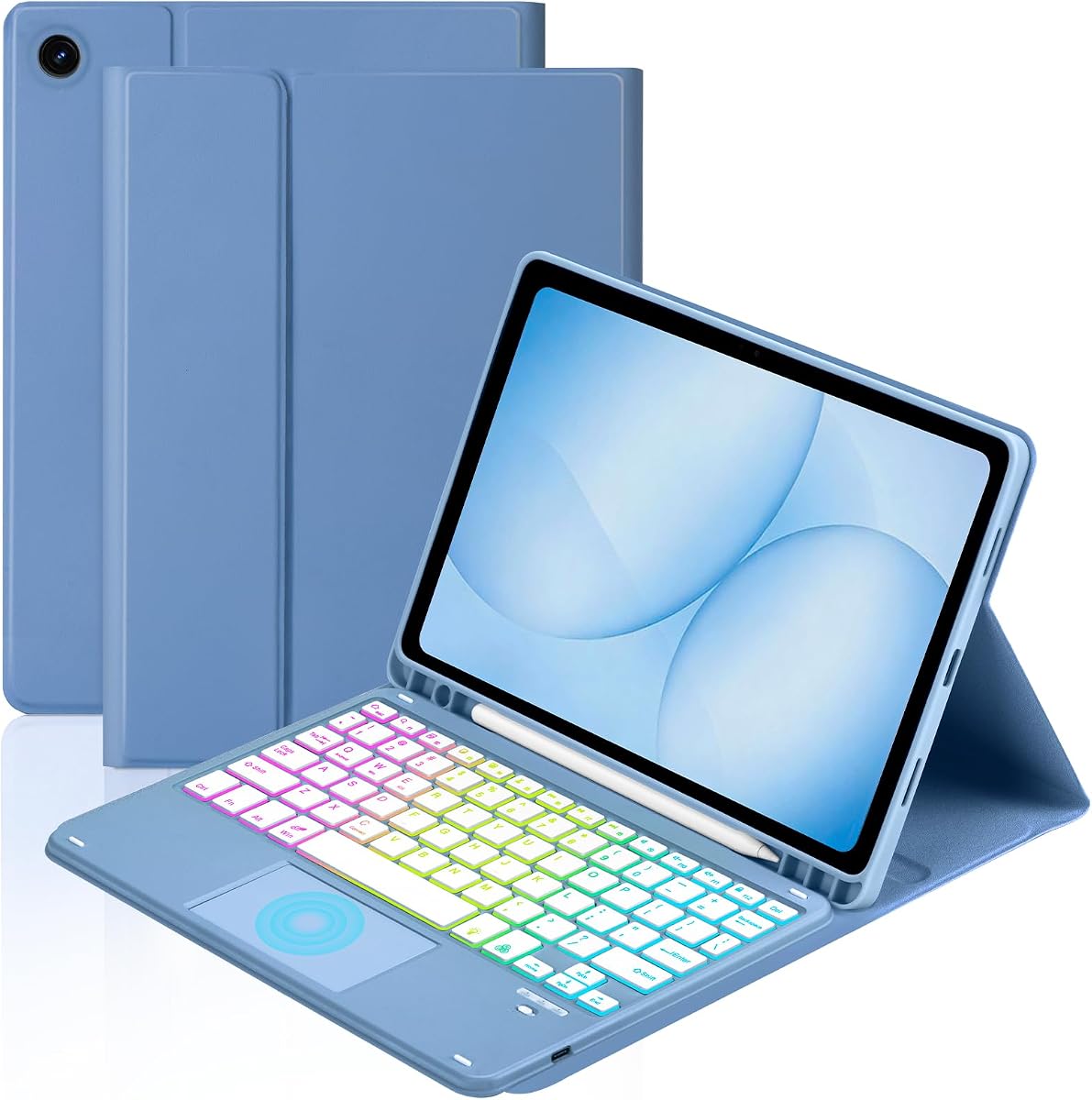


The Dexnor case transforms your Samsung Galaxy Tab A11 into a portable workstation with its ultra-light design and comprehensive laptop-like features. It scores high for usability due to its integrated multi-touch trackpad and solid magnetic support for desk or lap use.
We may earn a commission when you buy through this link, at no additional cost to you.
Its keyboard features responsive scissor-switch keys with shortcut access for brightness and volume control. The rechargeable 650mAh battery supports long work sessions, offering up to 200 hours of use without backlight or ten hours with maximum brightness.
Users should note that the tablet sits directly on the keyboard base rather than floating above it. While the viewing angle is ergonomic at 120 degrees, it does not fold around to the back when not in use.
This option suits professionals needing precise navigation and extended battery life in a light package. If you prioritize trackpad functionality and strong magnetic attachment over portability folding, this is a top-tier choice for serious productivity tasks.
The built-in trackpad supports multi-finger gestures, allowing you to navigate, edit documents, and multitask without touching the screen. You can disable it easily with FN and spacebar to prevent accidental inputs.
Designed with a 120-degree viewing angle and all-around protection, this case keeps your device safe from drops and scratches. The adjustable brightness backlight ensures comfortable typing even in low-light conditions at night.
We may earn a commission when you buy through this link, at no additional cost to you.
The TUNKARMOR case offers a slim design with a detachable magnetic keyboard that attaches securely to the case. It features full edge coverage with a honeycomb grid pattern inside for added protection and thermal management.
We may earn a commission when you buy through this link, at no additional cost to you.
You can adjust the tablet to one of three viewing angles by sliding it along anti-slip slots. This flexibility supports writing, reading, or drawing tasks comfortably. The case also includes a built-in pen holder for storage convenience.
Unlike some other models, this case does not include a separate mouse or trackpad, relying on touch or optional accessories. The auto sleep/wake function helps conserve battery life when the lid is opened or closed.
Ideal for users who value protection and modularity, this case allows you to detach the keyboard for tablet-only use. Its anti-slip design and honeycomb padding make it a reliable companion for daily transport and media consumption.
The detachable keyboard allows you to transform your tablet into a mini laptop in seconds. You can reposition or remove the keyboard entirely depending on your current activity or preference.
Inside, a honeycomb grid pattern cushions against shocks and helps prevent overheating. Full 360-degree coverage ensures your tablet is protected from all angles during accidental drops.
We may earn a commission when you buy through this link, at no additional cost to you.
This keyboard case stands out by including a rechargeable Bluetooth mouse alongside a built-in smart trackpad. It supports iOS, Windows, and Android systems, making it a versatile tool for cross-platform users.
We may earn a commission when you buy through this link, at no additional cost to you.
The detachable magnetic keyboard features a 7-color rainbow backlight with constant, breathing, or off modes. Battery efficiency is high, and it charges fully via Type-C in just two to three hours for everyday use.
Non-slip grooves on the inside allow you to adjust the viewing angle for writing or browsing. A dedicated stylus slot keeps your pen secure and organized, reducing the risk of losing it during travel.
Perfect for users needing cursor precision without sacrificing portability, this kit provides a complete input suite. The combination of mouse, trackpad, and colorful backlighting makes it ideal for both creative and productivity work.
The inclusion of a wireless mouse with multi-touch trackpad capabilities allows for desktop-grade accuracy. You can manage apps, edit documents, and navigate the web seamlessly without constant screen tapping.
With a rechargeable battery and fast Type-C charging, this keyboard maintains uptime without hassle. The energy-efficient design ensures you can work for hours before needing to recharge again.
We may earn a commission when you buy through this link, at no additional cost to you.
The Soke keyboard case is widely appreciated for its high user rating and sleek black design. It features a detachable wireless keyboard with a comfortable typing experience even in low-light environments.
We may earn a commission when you buy through this link, at no additional cost to you.
Its keyboard supports seven backlight colors that you can switch quickly with a button press. The case offers two stable viewing angles and a built-in pen holder, ensuring your stylus is always within reach.
You can switch between iOS, Android, and Windows systems easily with function keys. The auto sleep/wake function protects battery life, and the magnetic stripe detects usage status automatically.
This case is a strong choice for those prioritizing style and system compatibility. Its balanced mix of protection, lighting, and connectivity makes it a reliable everyday accessory for the Samsung Galaxy Tab A11 series.
Choose from seven backlight colors to suit your mood or environment. Switching modes is effortless, providing a comfortable typing experience even when the lights are dim or turned off.
With support for iOS, Windows, and Android, this keyboard adapts to various devices. Function keys allow quick switching, ensuring you can use it across different setups seamlessly.
We may earn a commission when you buy through this link, at no additional cost to you.
The YBING keyboard case delivers excellent value with its affordable pricing and robust feature set. It features a detachable keyboard with 7-color rainbow backlight and supports multiple viewing angles for various tasks.
We may earn a commission when you buy through this link, at no additional cost to you.
Its 360-degree rotating back cover lets you position the tablet horizontally or vertically. The 16 built-in magnets ensure the keyboard stays securely attached during use without slipping or moving unintentionally.
The case also includes a pencil holder to keep your stylus organized. While it lacks a mouse, the multi-function keys and strong protection make it a practical choice for budget-conscious buyers.
This option is best for users needing flexibility and protection without breaking the bank. The strong magnetic hold and rotation support allow for versatile usage scenarios in different settings.
Rotate the back cover fully to switch between landscape and portrait modes easily. This feature allows you to watch videos or read comfortably regardless of your tablet orientation.
With 16 powerful magnets, the keyboard adsorbs firmly to the case to prevent falls. The magnetic buckle also provides solid full-body protection against scratches and dust.
We may earn a commission when you buy through this link, at no additional cost to you.
The Harvopu case pairs a detachable multi-color backlit keyboard with a 3-Level DPI wireless mouse. It is designed for endurance, offering up to 180 hours of continuous use on a single charge.
We may earn a commission when you buy through this link, at no additional cost to you.
Its case repels stains and is easy to clean, maintaining a like-new look despite spills or daily wear. The built-in sleep mode ensures power savings, keeping your setup ready whenever you need it.
Adjusting sensitivity on the mouse allows detailed editing or fast browsing. The keyboard also features single-color and three-color backlight modes for flexibility in lighting conditions.
Best for heavy users and graphic designers, this case offers precision tools and marathon battery life. Its stain-resistant design adds practicality, making it a durable choice for work environments.
The included mouse allows instant sensitivity switching via DPI adjustment. This feature supports detailed graphic editing and smooth navigation without needing touch gestures.
With up to 180 hours of continuous use, this keyboard rarely needs recharging. The automatic sleep mode helps maintain battery life so you never miss a deadline.
We may earn a commission when you buy through this link, at no additional cost to you.
The TiMOVO case is designed for the 2026 release of the Samsung Galaxy Tab A11 Plus with a sleek black finish. It offers 7-color backlight and three adjustable viewing angles for comfortable use.
We may earn a commission when you buy through this link, at no additional cost to you.
Anti-slide grooves on the case keep the tablet stable during typing. The built-in 420mAh battery supports over 90 hours of work and up to 90 days of standby on a single charge.
It detaches easily for transport and includes full protection against bumps and dust. If the keyboard is idle for ten minutes, it enters sleep mode to conserve energy.
This model is ideal for users wanting a compact, lightweight solution with essential features. Its power-saving design and anti-slide stability make it great for daily office or home use.
A single charge provides more than 90 hours of active work time. The sleep mode activates after 10 minutes of inactivity to ensure long-term battery health.
Adjustable angles with anti-slide grooves keep your tablet from slipping during use. This design ensures a steady typing experience even when moving the setup.
We may earn a commission when you buy through this link, at no additional cost to you.
The MePadKey Touchpad Keyboard Case features a smart touchpad with 1 to 4 finger gesture support. It allows scrolling, switching apps, and taking screenshots without touching the screen.
We may earn a commission when you buy through this link, at no additional cost to you.
Its detachable keyboard offers a 7-color rainbow backlight in breathing or constant modes. Two anti-slip grooves on the shell help adjust the angle to suit reading or work preferences.
This case is great for users who rely on gestures for navigation. The built-in rechargeable battery ensures you can work for extended periods before needing to charge again.
Ideal for tech-savvy users, this case combines touch and typing efficiently. Its compact design and gesture support make it a unique option for those who prefer mouse-free control.
Use 4-finger clicks to take screenshots or 3-finger swipes to switch apps. These gestures allow smooth navigation and multitasking without needing external peripherals.
Switch between rainbow and breathing light modes for a vibrant typing experience. The 7-color backlight ensures visibility in dark environments with style.
We may earn a commission when you buy through this link, at no additional cost to you.
This variant of the MePadKey case features a 360-degree rotating cover for flexible viewing angles. It includes a touchpad keyboard with multi-finger gesture support for easy navigation.
We may earn a commission when you buy through this link, at no additional cost to you.
You can adjust the case using non-slip grooves to find a comfortable tilt for work. A built-in pencil holder keeps your stylus secure, preventing it from getting lost during travel.
The keyboard is detachable and compatible with three systems. Shortcut keys on the first row improve efficiency, allowing quick access to functions like select all or copy.
This model is best for users needing versatile orientation options and pen storage. Its rotating design and gesture support make it suitable for media consumption and light editing tasks.
Rotate the cover to adjust the angle for any task. The thickened edges protect against falls, ensuring security regardless of orientation.
The first row includes functional shortcut keys for better productivity. System switching is simple, adapting quickly to different device environments.
We may earn a commission when you buy through this link, at no additional cost to you.
The Supveco case is constructed from premium silicone and TPU for maximum durability. It features an internal honeycomb grid pattern to protect against overheating and extend the device's lifespan.
We may earn a commission when you buy through this link, at no additional cost to you.
The keyboard is detachable and magnetically secured, allowing easy repositioning. It includes backlit keys with automatic color changes and a pencil holder for added convenience.
Auto sleep/wake functionality helps preserve battery life. The magnetic closure ensures the case stays secure when closed, providing easy snap-on and snap-off access.
Ideal for users prioritizing protection and build quality, this case balances safety with functionality. Its honeycomb grid and robust material make it a top choice for long-term device care.
Flexible silicone and TPU materials guard against shocks and scratches. The honeycomb grid helps manage heat, protecting the internal components of your tablet.
Magnets secure the keyboard and case closure effortlessly. Combined with a pencil holder, this design simplifies daily handling and travel.
We may earn a commission when you buy through this link, at no additional cost to you.
Choosing the right keyboard case requires evaluating compatibility, features, and build quality. Consider these factors to find a match that aligns with your workflow and lifestyle needs.
Ensure the case is designed for your specific Samsung Galaxy Tab A11 or A9 Plus model number. Most cases listed target the SM-X230 and SM-X210 series, but checking the settings page before purchase is essential.
Verify the model number starting with SM-X in your tablet settings to avoid purchasing an incompatible accessory.
Decide if you need a built-in trackpad, a separate mouse, or just a keyboard. Some cases offer multi-touch trackpads for precise cursor control without needing extra peripherals.
Users who prefer touch gestures can skip trackpads, but those doing spreadsheets often benefit from mouse support.
Look for keyboards with adjustable backlights for low-light environments. Many options provide 7-color rainbow lighting or single-color modes with brightness levels for customization.
Backlighting ensures comfort during night work, but check if it is rechargeable or uses replaceable batteries.
Check the advertised usage hours to ensure the keyboard lasts through your daily routine. Some models offer hundreds of hours of standby, while active typing might drain the battery faster.
Prioritize options with Type-C charging for faster refills and better availability of cables.
Consider cases with full edge coverage and shock-absorbing materials like honeycomb patterns. These features protect against accidental drops and scratches during travel.
A secure clasp or magnetic closure ensures the case stays shut when you are moving around.
Evaluate the weight and foldability of the case. Some models are ultra-light and detachable, making them easier to carry than bulky all-in-one units.
Rotation support and multi-angle stands help find the best viewing position without carrying extra accessories.
If you use multiple devices, look for keyboards that support Android, Windows, and iOS. Function keys usually allow quick switching between operating system layouts.
Universal compatibility saves money by letting you reuse the keyboard across different tablets.
Some cases include a pencil holder or stylus slot to keep your pen organized. Others might offer a separate mouse for enhanced navigation control.
Check if the product includes charging cables and user guides, as some do not provide heads or tablets in the box.
To start, charge the keyboard via the provided Type-C cable until the indicator shows it is full. Then pair it with your tablet via Bluetooth or magnetic attachment depending on the model.
Adjust the viewing angles using the anti-slip grooves or rotation features. Align the tablet with the cutouts and ensure the keyboard is secure before typing to prevent slips.
Maintain the case by wiping it with a dry cloth to avoid stains. Store the keyboard in sleep mode when not in use to preserve battery life and extend its operational lifespan.
Yes, many of the listed cases are designed to fit both the Galaxy Tab A11 and A9 Plus models. Check the product description for specific model numbers like SM-X210 to confirm compatibility.
Most cases come with a built-in holder for your stylus, but the pen itself is usually not included. You will need to use your existing S Pen or purchase it separately.
Many models feature detachable magnetic keyboards that you can remove easily. This allows you to use the tablet as a standalone device without the keyboard attached.
Battery life varies by usage, but most keyboards offer 5 to 10 hours of active typing with backlight on. Some models provide standby times exceeding 90 days when inactive.
Several keyboards support multiple operating systems including iOS, Windows, and Android. You can typically switch layouts using function keys for cross-platform compatibility.
If the keyboard does not wake automatically, check the Bluetooth connection or battery level. Some models have an auto sleep/wake function that activates when you open the lid.
We reviewed ten top options ranging from budget-friendly cases to premium units with trackpads and mice. Each product offers unique benefits to enhance your Samsung Galaxy Tab A11 productivity.
Prioritize features like battery life, backlighting, and protection based on your daily needs. Whether you need a detachable design or a robust protective case, there is a fit for everyone.
Remember to check current prices and availability before purchasing to ensure you get the best deal. These models are designed to transform your tablet into a versatile workstation.