
Corsair K55 RGB PRO Membrane Wired Gaming Keyboard – Black
4.4Editor score
Six dedicated macro keys for shortcuts
IP42 dust and spill resistance
Dynamic RGB lighting zones
Detachable soft palm rest
Dedicated media control keys
Discover the top 10 keyboards for Rainbow Six Siege. This guide compares performance, switches, and features to help you choose the best keyboard for competitiv
Finding the right keyboard for Rainbow Six Siege can make a huge difference in your gameplay. You need responsive keys, durable switches, and reliable features to dominate every match. This guide highlights top options for every budget.
We compared ten leading keyboards based on switch type, build quality, and gaming features. Our analysis focuses on what matters most for tactical shooters like Rainbow Six Siege. Every pick offers unique benefits for serious gamers.
Each product section shows key specs, pros, and cons to help you decide. Prices and availability can change so check the links for the latest deals. Choose the keyboard that fits your playstyle and setup perfectly.
4.4Editor score

4.6Editor score

4.6Editor score
Here is a side-by-side comparison of all ten keyboards. Each entry highlights essential specs to help you compare features quickly. Review the table to find the best match for your needs.





The Logitech G413 TKL SE stands out as a top choice for Rainbow Six Siege players. It scores highly for build quality and reliable mechanical performance. The tactile switches offer clear feedback essential for tactical accuracy.
We may earn a commission when you buy through this link, at no additional cost to you.
Its PBT keycaps resist wear and heat much better than standard ABS caps. The tenkeyless design saves desk space for low-sensitivity mouse movement. Anti-ghosting ensures every keystroke registers during intense combat scenarios.
The main trade-off is the lack of customizable RGB lighting. It uses only white LEDs which may not suit colorful setups. However, the focus on performance and durability justifies this simplicity for many gamers.
This keyboard is ideal for players seeking a straightforward and reliable tool. It delivers the precision needed for competitive play without unnecessary features. It remains a strong recommendation for most budget-conscious gamers.
The PBT keycaps and robust aluminum case ensure the keyboard withstands heavy use. This reduces wear and extends the lifespan of your setup.
Tactile switches provide a bump when activated so you know every keypress registered. This tactile feedback improves accuracy during fast-paced gameplay.
We may earn a commission when you buy through this link, at no additional cost to you.
The Corsair K55 RGB PRO offers exceptional value for players on a tight budget. It delivers key gaming features at a very accessible price. The membrane switches work well for casual and competitive play.
We may earn a commission when you buy through this link, at no additional cost to you.
Its six dedicated macro keys let you bind useful commands quickly. The IP42 rating protects against spills which is vital for long sessions. The detachable palm rest adds comfort for extended play periods.
Users should expect a softer feel compared to mechanical keyboards. This may affect rapid fire inputs slightly. Yet the cost savings and extra features make it a compelling choice for many.
Choose this keyboard if you need a versatile tool without breaking the bank. It covers all essentials including RGB and macro support effectively. It is an excellent entry point into gaming peripherals.
The six macro keys allow quick access to common commands without software. This can streamline your workflow and improve in-game efficiency.
The IP42 rated design guards against accidental liquid spills. This protection keeps your setup safe during intense gaming marathons.
We may earn a commission when you buy through this link, at no additional cost to you.
The ASUS ROG Strix Scope II 96 delivers top-tier performance and flexibility. It supports wireless and wired connections with impressive speed. The hot-swappable switches allow easy customization for any preference.
We may earn a commission when you buy through this link, at no additional cost to you.
Its compact 96% layout retains essential keys while saving desk space. The PBT keycaps provide a durable surface for daily use. Sound-dampening features create a pleasing typing experience.
The main downside is the high price compared to budget options. It may be overkill for casual players. But serious gamers will appreciate the premium materials and wireless freedom it offers.
Invest in this keyboard if you want the best features available. It combines style, durability, and performance seamlessly. It is perfect for those seeking a versatile and elegant solution.
The tri-mode connectivity allows switching between wired and wireless seamlessly. Low latency ensures wireless performance matches wired standards.
Hot-swappable switches let you change key types without soldering. This flexibility helps tailor the keyboard to your exact needs.
We may earn a commission when you buy through this link, at no additional cost to you.
The SteelSeries Apex 3 is ideal for players needing a quiet setup. Its whisper quiet switches reduce noise during calls or recordings. The 10-zone RGB adds vibrant visuals without distraction.
We may earn a commission when you buy through this link, at no additional cost to you.
Water resistance protects against spills while the magnetic wrist rest ensures comfort. Multimedia controls let you manage audio without leaving the game. The design balances practicality with style.
It lacks mechanical switches and macro keys found elsewhere. This limits customization options for advanced users. However, the focus on comfort and silence remains strong.
This keyboard suits players who prioritize quietness and comfort. It offers essential gaming features without high costs. It is a smart choice for shared rooms or streamers.
Low friction switches operate almost silently. This reduces noise for roommates or co-streamers.
Dedicated media keys allow instant volume and playback control. You can adjust audio without interrupting gameplay.
We may earn a commission when you buy through this link, at no additional cost to you.
The Razer Ornata V3 offers a slim design with mechanical-like feedback. Its low-profile keys reduce wrist strain during long sessions. The UV-coated keycaps resist wear and fading well.
We may earn a commission when you buy through this link, at no additional cost to you.
Mecha-membrane switches provide crisp tactile clicks. The soft-touch wrist rest adds necessary support for your hands. Dedicated media keys streamline audio adjustments.
It lacks dedicated macro keys for advanced setups. The fixed switch type limits customization options. Still, the ergonomic design and solid feel make it worthwhile.
Choose this keyboard for its ergonomic benefits and sturdy build. It works well for players prioritizing comfort. It remains a reliable option for daily gaming and typing.
Low-profile keys reduce hand strain and improve posture. This ergonomic approach supports healthy long gaming sessions.
UV coating protects legends from fading over time. This ensures clarity and aesthetics remain intact longer.
We may earn a commission when you buy through this link, at no additional cost to you.
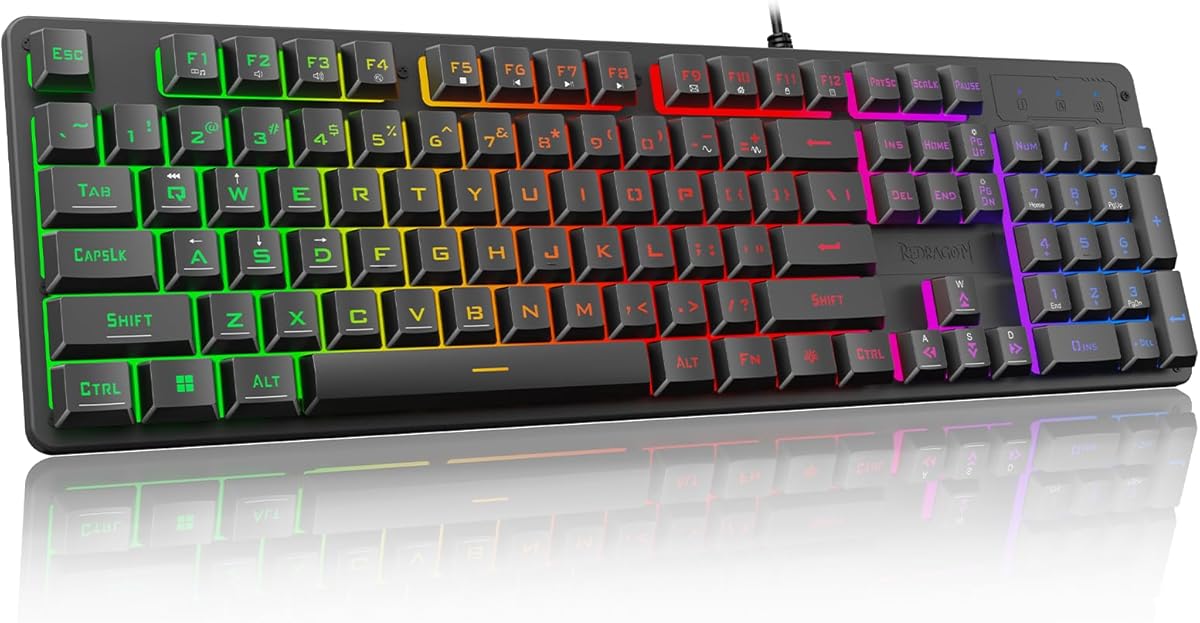
The Redragon K521 Upgrade delivers mechanical feel at a fraction of the cost. It features rainbow LED backlighting that adds vibrant visual flair. The high anti-ghosting count ensures accurate inputs.
We may earn a commission when you buy through this link, at no additional cost to you.
Its 12 multimedia keys offer great versatility. Adjustable lighting modes provide flexibility without software. The mechanical feeling switches respond quickly to your commands.
Build quality is basic compared to premium models. Software support is minimal for advanced features. Yet the raw performance and price make it compelling.
This is a great entry-level option for budget gamers. It covers essential gaming needs effectively. It is perfect for those starting their setup.
Keys mimic mechanical switches without the high cost. This offers a responsive feel for competitive gaming.
Adjustable brightness and breathing modes offer visual variety. You can customize the look to match your style.
We may earn a commission when you buy through this link, at no additional cost to you.
The AULA F75 Pro stands out for its wireless flexibility and customization. Hot-swappable switches allow you to change types easily. The multi-function knob adjusts volume or lighting instantly.
We may earn a commission when you buy through this link, at no additional cost to you.
Its tri-mode connection supports seamless switching between devices. Side printed PBT keycaps look stylish and last long. The large battery ensures extended play without interruptions.
Setup requires drivers for advanced features which adds steps. The knob can be tricky at first. Still, the features and price make it a strong contender.
Choose this if you enjoy customizing your peripherals. It offers unique features rarely found at this price. It is ideal for tech-savvy gamers.
Bluetooth 2.4GHz and USB-C connections ensure flexibility. Switch devices quickly without cables.
The side knob controls brightness and volume instantly. It adds a layer of convenience for gaming.
We may earn a commission when you buy through this link, at no additional cost to you.
The ASUS ROG Strix Scope II X offers a robust full-size design. Hot-swappable switches allow for easy customization of feel. PBT keycaps ensure durability and comfort.
We may earn a commission when you buy through this link, at no additional cost to you.
Sound-dampening foam reduces noise during rapid typing. The multi-function wheel simplifies media control. Pre-lubed switches feel smooth out of the box.
It lacks wireless options which may limit mobility. The high price might deter some buyers. However, wired reliability and build quality are excellent.
This is perfect for players who prefer stable wired setups. It delivers premium performance for competitive gaming. It is a great investment for serious users.
The 100% layout includes all keys you need. It is ideal for tasks requiring a numpad.
Sound-dampening foam minimizes typing noise. This creates a cleaner experience during sessions.
We may earn a commission when you buy through this link, at no additional cost to you.
The Razer BlackWidow V4 X features smooth yellow mechanical switches. These linear switches provide rapid inputs perfect for shooters. Six dedicated macro keys expand your command options.
We may earn a commission when you buy through this link, at no additional cost to you.
Chroma RGB lighting allows deep customization for your setup. The doubleshot keycaps resist wear on legends. A multi-function roller adds convenient media control.
ABS keycaps may develop shine faster than PBT. It is limited to wired connections. However, the performance and macro features remain strong.
Select this for quick inputs and extensive macro support. It suits players who rely on macros for strategy. It is a solid choice for RGB fans.
Linear switches eliminate tactile bumps for quick resets. This enhances speed during fast-paced combat.
Six dedicated keys allow custom bind without software. This helps streamline complex command execution.
We may earn a commission when you buy through this link, at no additional cost to you.
The Aula WIN60 HE uses magnetic sensors for unmatched precision. Rapid trigger technology allows instant actuation. Its high polling rate ensures every move registers quickly.
We may earn a commission when you buy through this link, at no additional cost to you.
The compact 60% layout saves significant desk space. This helps with low-sensitivity mouse movement. Web-based driver simplifies customization without heavy installs.
Lack of dedicated arrow keys is a trade-off. Software dependency adds complexity for beginners. Yet the performance benefits are hard to ignore.
Ideal for competitive players needing top speed. The magnetic switches offer a distinct advantage. It suits minimalists and pros looking for an edge.
Instant reset allows rapid key presses without delay. This improves accuracy during intense rapid-fire scenarios.
8000Hz polling keeps latency extremely low. Every input is registered almost instantly.
We may earn a commission when you buy through this link, at no additional cost to you.
Choosing a keyboard for Rainbow Six Siege involves weighing several technical and practical factors. This section breaks down the key elements to consider before buying.
Switches determine how keys feel and react. Tactile switches offer a bump while linear ones are smooth. For shooters like Rainbow Six Siege, tactile feedback ensures you know every key is registered.
Choose switches that match your preference for noise and feel.
Gaming keyboards must withstand intense use. Look for sturdy materials like aluminum frames and durable keycaps. PBT keycaps resist wear better than ABS over time.
A solid build ensures longevity for your investment.
Anti-ghosting prevents missed inputs during combos. N-Key Rollover allows unlimited simultaneous presses. This ensures accuracy when binding complex macros.
Always verify ghosting specs before buying.
Connectivity affects latency and setup flexibility. Wired connections offer reliability while wireless offers freedom. Ensure any wireless tech meets gaming standards.
Select based on your desk needs.
Macros help automate complex sequences. Look for dedicated keys or robust software support. Good software allows deep customization for your playstyle.
Software flexibility adds value to the device.
Layouts range from full-size to compact. Tenkeyless saves space for mouse movement while full-size includes a numpad. Consider your desk space and grip.
Choose a size that fits your workflow.
RGB lighting enhances visual appeal and usability. Per-key lighting helps distinguish key zones. Consider if aesthetics matter to your satisfaction.
Visuals should complement your setup style.
Balance your budget with essential features. Higher price usually means better build and customization. Determine what features you truly need.
Value lies in matching needs with cost.
Start by connecting the keyboard to your computer via USB. If using wireless, ensure Bluetooth or dongle pairing is successful. Test basic inputs to confirm functionality.
Clean regularly to maintain responsiveness. Use compressed air to remove dust from key switches. Wipe surface with a dry cloth to remove oils and grime.
Update firmware or software for optimal performance. Adjust lighting and macros through official driver tools. Proper care extends lifespan and ensures consistent input.
Mechanical keyboards offer faster actuation and durability. Many players prefer them for the tactile feedback. However, good technique matters most for performance.
Linear switches are favored for smoothness and speed. Tactile switches provide feedback for accuracy. Choice depends on personal preference for noise and feel.
Modern wireless tech matches wired speeds. Ensure low latency protocols are supported. Check battery life before critical matches.
Tenkeyless layouts save desk space for mouse movement. Full-size offers extra keys. Compact layouts help with low-sensitivity aiming.
Use dedicated macro keys or software bindings. Map skills or gadgets to single presses. Test thoroughly in-game to ensure correct execution.
Per-key RGB is available on high-end models. Some keyboards allow zone customization. Check product specs for full key support.
Choosing a keyboard for Rainbow Six Siege impacts precision and comfort. This guide highlighted ten excellent options ranging from budget to premium. Each delivers unique strengths tailored to tactical gameplay.
Prioritize responsiveness, durability, and ergonomics over flashiness. A quality keyboard supports long sessions without fatigue. Selecting the right switch type is essential for your style.
Verify current availability and pricing before buying. Features and prices evolve quickly in the market. Invest in a tool that elevates your competitive edge.