
BENFEI USB 3.0 Switch
4.1Editor score
4 USB 3.0 Ports
5Gbps Transfer Rate
Multiple OS Support
Extra Power Supply Slot
This guide compares the top Keyboard and Mouse Switch for 2 Computers to help you choose the best USB sharing solution for your dual PC setup today.
Finding the right Keyboard and Mouse Switch for 2 Computers can transform your workflow by allowing seamless access to peripherals across multiple machines. These devices eliminate the need for constant cable swapping and help you maintain a clean, efficient workspace while boosting overall productivity.
We evaluated ten top-rated USB switchers based on port count, data transfer speed, compatibility with operating systems, and build quality. Our analysis focuses on real-world performance, ease of setup, and reliability to ensure you select a model that meets your specific computing needs effectively.
Each pick below highlights key features, pros, cons, and ideal use cases to guide your decision. Please note that product availability and pricing may change over time, so verify current details on the retailer site before making your final purchase choice for your office.
4.1Editor score

4.6Editor score

4.3Editor score
The following table provides a side-by-side comparison of all ten products we reviewed. This overview helps you quickly identify key specifications like port types, transfer speeds, and included accessories to make an informed choice for your dual computer setup.



This USB switcher allows two computers to share two USB devices simultaneously such as a keyboard mouse printer webcam card reader or U disk. It is perfect for sharing one keyboard and mouse between two computers to boost productivity without unplugging cables.
We may earn a commission when you buy through this link, at no additional cost to you.
Equipped with USB 3.0 technology this switch supports transfer speeds up to 5Gbps and is backward compatible with USB 2.0 and 1.1. It acts as a printer splitter for two computers enabling seamless file and print sharing between PCs while maintaining reliable connectivity.
The one-button switching feature with a clear LED indicator shows which PC is active making this device intuitive and user-friendly. No software or drivers are needed ensuring a true plug-and-play experience for immediate use across various operating systems.
Compatible with Windows macOS Linux and Chrome OS this durable aluminum alloy shell provides better heat dissipation and longevity. The complete package includes the switch two USB 3.0 A-to-A cables and a user manual ideal for home office or IT environments.
Switch between two computers with a single click to share your keyboard and mouse without physical reconfiguration. This streamlines your workflow and reduces downtime when moving between work and personal systems.
Use the built-in printer splitter functionality to share a single printer between two PCs. Transfer files quickly with USB 3.0 speeds while enjoying the stability of a well-built aluminum housing.
We may earn a commission when you buy through this link, at no additional cost to you.
The BENFEI 2 in 4 out USB 3.0 switch supports two computers sharing four USB devices like keyboards mouses printers scanners and headphones. It offers convenient switching between work and personal computers with driver-free compatibility across multiple operating systems.
We may earn a commission when you buy through this link, at no additional cost to you.
With four USB 3.0 ports this switch supports up to 5Gbps data transfer speed allowing you to easily transfer data from U disks or mobile hard disks to your computer. It is also backward compatible with USB 2.0 for broader device connectivity.
The USB switcher button and LED indicator design let you switch multiple USB devices between two computers with one click while clearly showing the working status. Note that when connected it works only when using the provided BENFEI USB A to USB A cable.
This model includes an extra USB C power supply slot for high power consumption devices like HDDs or USB cameras to ensure stable performance. The 18 month unconditional warranty ensures long-time satisfaction of your purchase with friendly customer service.
At a competitive price this switch lets you share four devices across two computers without breaking the budget. It is an excellent choice for users who need basic USB switching without advanced features.
Support for Windows Mac and Linux ensures you can use this switch in any environment. The included charging cable adds value by enabling stable connections for power-hungry peripherals.
We may earn a commission when you buy through this link, at no additional cost to you.
This switcher allows two computers to share up to seven USB devices including four USB-A and three USB-C ports. It lets you connect existing peripherals like keyboards mice printers and flash drives without needing extra hubs or docks to keep your workspace neat.
We may earn a commission when you buy through this link, at no additional cost to you.
Equipped with four USB 3.2 Gen 2 ports this switch supports speeds up to 10Gbps which is faster than traditional 5Gbps switches. This allows you to transfer one gigabyte files in just 1.5 seconds to improve work efficiency without waiting.
Designed to work with both USB-C and USB-A computers this model includes a Type C converter adapter and power adapter. The included adapter ensures no extra purchases are needed for MacBooks ultrabooks desktops or older laptops to connect to the same switch.
You can quickly switch between work and personal computers with a button or external controller to improve workflow. The included power adapter and charging cable ensure stable performance for high-power devices like external hard drives without disconnects or laggy transfers.
Achieve 10Gbps transfer speeds for rapid file movement between computers. This significantly reduces wait times when working with large files or frequent data backups.
With seven ports total you can connect a wide range of devices simultaneously. The included power adapter and converters ensure compatibility and stability across diverse hardware setups.
We may earn a commission when you buy through this link, at no additional cost to you.
This switch supports two computers sharing four USB devices like keyboards mouses printers headphones and USB cameras. Switch freely between work and personal computers to boost efficiency using a dedicated controller for convenience.
We may earn a commission when you buy through this link, at no additional cost to you.
It provides one USB C port and three USB A ports to support connecting various USB devices extending more ports for two computers. With four USB 3.0 ports it supports data transfer up to 5Gbps and is backward compatible with USB 2.0.
Simple plug and play functionality works with modern operating systems like Windows macOS Chrome OS and Linux. You can hide the USB switch to tidy up the desktop and save space and then use the controller to switch devices easily.
The switch is designed with an optional USB-C power supply for high-power devices like hard disk drives and headsets. Two switching modes include a controller and button to let you switch devices freely as you like.
Use the external controller to keep your desk clean while maintaining easy access to switching functions. This is ideal for setups where the switch is hidden or hard to reach.
With both USB-A and USB-C ports you can connect a wider variety of peripherals without adapters. This future-proofs your setup for newer devices that use USB-C connectors.
We may earn a commission when you buy through this link, at no additional cost to you.
This HDMI KVM Switch allows control of two computers enabling them to share a single monitor along with keyboard and mouse. It is a complete USB and HDMI switch rolled into one compatible with various input devices and operating systems.
We may earn a commission when you buy through this link, at no additional cost to you.
It features four USB 3.0 ports with ultra-fast data transfer speeds up to 5Gbps including three USB-A ports and one USB-C port for broader device compatibility. You can seamlessly share peripherals between two computers reducing cable clutter and improving workspace efficiency.
The HDMI KVM Switch supports stunning 4K resolution at 60Hz ensuring crystal-clear visuals for your monitors. It is also HDCP 2.2 compliant allowing you to view HDCP-protected content on your monitors without interruptions for a secure multimedia experience.
Two switching options include an on-KVM switch button and a wired remote switch to keep your desk tidy. It requires no power supply or driver software for easy installation plug it in and connect all cables for seamless operation.
Combine USB and HDMI switching into one device to save space and reduce cable complexity. This model is ideal for those who need to share both peripherals and a display between two computers.
Support for 4K at 60Hz ensures you do not compromise on display quality when switching. This is essential for users who rely on sharp visuals for work or entertainment.
We may earn a commission when you buy through this link, at no additional cost to you.
The UGREEN 4 port USB sharing switch allows one button swapping between 2 computers to share 4 USB 2.0 peripheral devices. This eliminates the need for constantly swapping cables or setting up complicated network sharing software for easier management.
We may earn a commission when you buy through this link, at no additional cost to you.
This USB Switch can share USB devices such as printers scanners mouse keyboards card readers and flash drives between 2 computers. It works flawlessly with Windows 10 8 8.1 7 Vista XP Mac OS X Linux and Chrome OS systems.
You can easily switch between 2 computers with a single click on the button with LED indicating the active computer. This USB Switcher makes switching effortless and provides a stable connection for various devices.
The 2.0 sharing switch features a separate micro USB female port for optional power which optimizes compatibility with more devices like HDDs and SSDs. The device does not include a charging cable so use a standard 5V charger as needed.
For users with older peripherals that do not require high-speed data transfer this USB 2.0 switch provides a reliable and cost-effective solution. It ensures stable connectivity for printers and scanners.
The one-button swapping mechanism ensures you can toggle between computers with minimal effort. The LED light gives clear visual feedback about which computer is currently active.
We may earn a commission when you buy through this link, at no additional cost to you.
UGREEN 2 in 4 out USB 3.0 switch supports 2 computers sharing 4 USB devices like keyboards mouses U disks printers scanners USB cameras and headphones. It is convenient for switching freely between work and personal computers improving efficiency.
We may earn a commission when you buy through this link, at no additional cost to you.
With four USB 3.0 ports this switch supports up to 5Gbps data transfer speed. You can easily transfer data from U disks and mobile hard disks to computer. It is backward compatible with USB 2.0 for broader device support.
This switch selector is plug-and-play for Windows macOS Chrome OS and Linux computers. It features an extra USB C power supply port for high-power devices such as HDDs USB cameras headphones docking stations and microphones.
You can freely switch multiple USB devices between two computers with one click and clearly know the working status via LED indicators. The package includes two USB 3.0 cables for immediate setup without extra purchases.
The dedicated power port helps prevent disconnections when using devices that draw significant power. This ensures stable operation for external drives and webcams without relying solely on bus power.
Install the switch instantly without needing to download drivers or configure software. This makes it a versatile choice for multi-OS environments where simplicity is valued.
We may earn a commission when you buy through this link, at no additional cost to you.
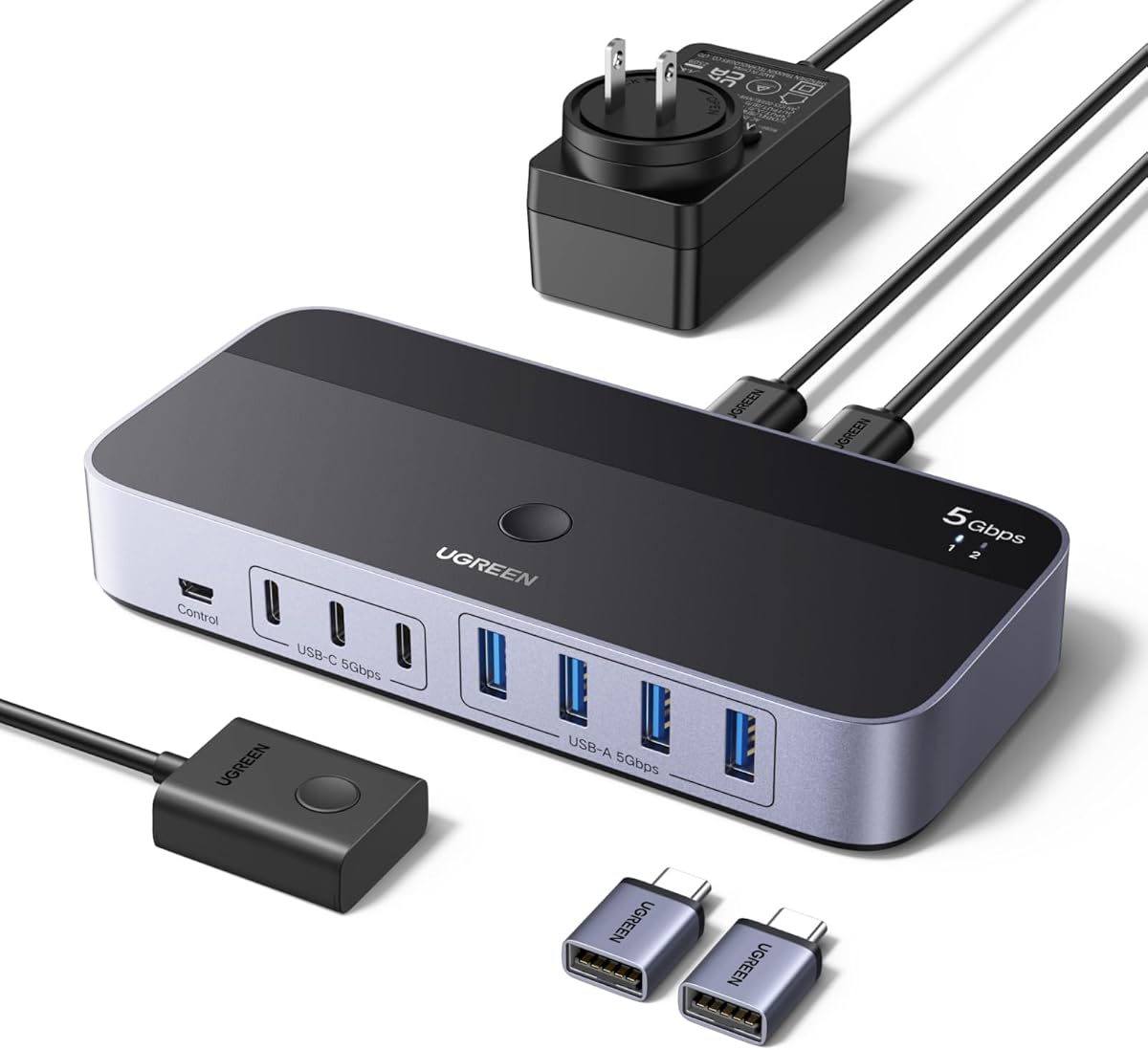
This switcher allows 2 computers to share up to 7 USB devices including 4 USB-A and 3 USB-C ports. Regardless of port type you can easily connect existing peripherals like keyboards mice printers and flash drives to keep your workspace neat.
We may earn a commission when you buy through this link, at no additional cost to you.
With four USB 3.0 ports the switch supports data transfer up to 5Gbps and is backward compatible with USB 2.0. A USB-C to USB-A adapter is pre-included for easy setup with MacBooks ultrabooks desktops and older laptops.
The switch comes with a power adapter and charging cable to ensure stable performance for high-power devices like external hard drives and printers. This means no more disconnects or laggy transfers during your daily workflow.
Quickly switch between work and personal computers with button or external controller to improve workflow. This helps boost productivity and keeps your desktop tidy while managing multiple devices across two systems seamlessly.
Support for both USB-A and USB-C means you can connect virtually any peripheral without hunting for adapters. This is especially useful for modern laptops that only have USB-C ports.
The package includes the necessary power adapter and USB-C to USB-A adapter. This convenience reduces additional costs and ensures you have everything needed for a stable connection from the start.
We may earn a commission when you buy through this link, at no additional cost to you.
This 2 in 2 out USB switch supports 2 computers sharing 2 USB devices like keyboards mouses printers webcam and more. Switch freely between work and personal laptop to boost work efficiency while maintaining a clean desk setup.
We may earn a commission when you buy through this link, at no additional cost to you.
This USB Switch can share USB devices such as printers scanners mouse keyboards card readers and flash drives between 2 computers. It works flawlessly with Windows 10 8 8.1 7 Vista XP Mac OS X Linux and Chrome OS systems.
Easily switch between two computers with the click of a button and the LED indicates which computer is in use. It also has an external desktop switch controller to keep your desktop neat clean and uncluttered.
The package includes 2 USB cables so you can start using the USB switcher right out of the box. It is powered directly from the computer's USB port without needing an AC adapter for simple plug and play use.
The external controller allows you to place the switch out of sight while maintaining easy access to the switching mechanism. This keeps your workspace professional and organized.
With two USB cables included you can connect both computers immediately. The plug-and-play nature ensures no technical expertise is required to get started quickly.
We may earn a commission when you buy through this link, at no additional cost to you.
This switcher allows 2 computers to share up to 7 USB devices including 4 USB-A and 3 USB-C ports. Regardless of port type you can easily connect existing peripherals like keyboards mice printers and flash drives to keep your workspace neat.
We may earn a commission when you buy through this link, at no additional cost to you.
With four USB 3.0 ports the switch supports data transfer up to 5Gbps and is backward compatible with USB 2.0. A USB-C to USB-A adapter is pre-included for easy setup with MacBooks ultrabooks desktops and older laptops.
The switch comes with a power adapter and charging cable to ensure stable performance for high-power devices like external hard drives and printers. This means no more disconnects or laggy transfers during your daily workflow.
Quickly switch between work and personal computers with button or external controller to improve workflow. This helps boost productivity and keeps your desktop tidy while managing multiple devices across two systems seamlessly.
With seven ports total you can connect a wide array of peripherals to both computers. This is ideal for power users who need many connections without cluttering the desk with multiple hubs.
The inclusion of power adapter and USB-C to USB-A adapter ensures you are fully equipped for any setup. This reduces the need for extra purchases and simplifies installation significantly.
We may earn a commission when you buy through this link, at no additional cost to you.
Choosing the right USB switch requires evaluating several key factors to ensure compatibility and performance for your specific workflow. This guide highlights the most important features to consider when selecting a switch for your dual computer setup.
Assess how many devices you need to connect to each computer simultaneously. Models range from 2-in-2-out to 2-in-7-out configurations allowing you to share peripherals like keyboards mice printers and drives without clutter.
Choose a switch with enough ports to cover all your essential devices to avoid future bottlenecks or the need for additional hubs.
USB 3.0 switches support speeds up to 5Gbps while USB 3.2 Gen 2 can reach 10Gbps. If you transfer large files frequently or use external drives prioritize higher-speed models to improve efficiency.
Faster data rates reduce waiting times when accessing files across computers making your workflow smoother and more productive.
Verify that the switch works with your operating systems such as Windows macOS Linux or Chrome OS. Most modern switches are driver-free and plug-and-play which simplifies setup across different environments.
A compatible switch ensures seamless integration without requiring extra software or drivers that may complicate your system.
Decide between a button switch located on the device or an external controller for convenience. Controllers allow you to hide the unit while keeping access easy which keeps your desk tidy.
External controllers offer better ergonomics if your switch is placed in a hard-to-reach location under or behind your desk.
Consider whether the switch supports external power for high-power devices like external hard drives or webcams. Some models include USB-C power ports that prevent disconnections caused by insufficient power.
An adequate power source ensures stable operation especially when multiple devices are connected and drawing significant power simultaneously.
Check if your computers use USB-A or USB-C ports. Modern switches offer mixed port support to accommodate both types without needing extra adapters.
A switch that supports both connector types provides future-proofing as newer devices increasingly rely on USB-C interfaces.
Look for durable materials such as aluminum alloy shells that dissipate heat effectively and extend the device's lifespan. A solid build reduces the risk of hardware failure over time.
A good warranty protects your investment and provides peace of mind regarding customer service support should issues arise.
If you need to share a monitor along with peripherals consider a KVM switch that includes HDMI capabilities. Standard USB switches typically do not support video transmission so verify your display needs.
A KVM switch simplifies your setup by consolidating both video and USB control into one unit saving space and cables.
Begin by connecting your peripheral devices such as keyboard mouse and printer to the output ports on the switch. Then use the included USB cables to connect the input ports to each of your two computers ensuring correct orientation for data transfer.
To switch between computers simply press the button on the device or use the external controller if included. The LED indicator will show which computer is currently active allowing you to confirm the correct connection state easily.
Regularly check that all cables are securely connected to avoid intermittent disconnects. Avoid placing the switch in areas with excessive heat or dust to maintain long-term performance and reliability for your setup.
A standard keyboard and mouse switch typically shares USB peripherals but does not support video transmission. A KVM switch includes HDMI or VGA support to share monitors as well so choose based on whether you need to share a screen.
Yes most modern USB switches are compatible with macOS Windows Linux and Chrome OS without drivers. Ensure the switch supports your operating systems before purchasing for seamless plug-and-play functionality.
Many switches work fine powered through the USB port for basic devices. However if you connect high-power peripherals like external drives adding an external power supply prevents potential disconnections or data loss.
Some models include dedicated USB-C ports or adapters to support USB-C devices. Check the specifications to confirm USB-C compatibility before purchase if your computers or peripherals require it.
Most switches feature an LED indicator that lights up to show the active computer. This visual cue helps you confirm that your peripherals are routed to the correct system before proceeding.
USB 3.0 switches typically support data transfer speeds up to 5Gbps. For faster transfers look for USB 3.2 Gen 2 models that offer speeds up to 10Gbps which can significantly reduce file copy times.
We reviewed ten top USB switches offering various configurations from basic 2-in-2-out options to advanced 7-port models with power support. The 2 in 2 Out USB 3.0 Switch stands out as our top choice for its balance of speed and build quality.
When selecting a model prioritize port count speed and power compatibility based on your specific workflow needs. Ensure that the switch supports your operating systems and includes necessary accessories for immediate use.
Prices and availability may change so verify current details and customer reviews before finalizing your purchase. Choosing the right switch will streamline your dual computer setup and enhance overall productivity in your workspace.