
Canon MegaTank G3270
4.1Editor score
Wireless print copy scan
Up to 2 years ink
Single sided printing
Square LCD display
Ink tank printers have revolutionized home and office printing by offering massive ink capacities and lower costs per page. These devices eliminate the need for frequent cartridge replacements, making them ideal for high-volume printing needs.
We evaluated ten leading models based on print speed, connectivity options, ink efficiency, and overall user satisfaction. Our comparison highlights the strengths and weaknesses of each unit to help you find the right fit for your workspace.
Each selection below showcases key specifications, real-world performance insights, and honest assessments of pros and cons. Please note that product availability and pricing can change frequently, so verify details before purchasing.
4.1Editor score

4.2Editor score

4.1Editor score
As an Amazon Associate we earn from qualifying purchases.
This side-by-side comparison table outlines the core specifications and capabilities of each ink tank printer model featured in our guide.




The Epson EcoTank ET-2803 stands out as a reliable all-in-one solution for home users needing consistent high-volume printing. With a solid 4.2 rating from buyers, it delivers on its promise of reducing ink costs significantly.
We may earn a commission when you buy through this link, at no additional cost to you.
Its unique Micro Piezo Heat Free technology ensures sharp text and vibrant colors without heating the printhead, which improves longevity. The built-in flatbed scanner and color display make document management straightforward and intuitive for daily tasks.
While the print speed is not the fastest on the market, the trade-off is acceptable given the massive ink savings and reliability. The EcoFit bottles prevent spills and make refilling simple even for first-time users.
This printer is ideal for families or small offices that prioritize cost efficiency and ease of use over raw speed. It represents a balanced choice for those switching from traditional cartridge-based systems.
Users save significantly on replacement ink due to the high-capacity tank system compared to standard cartridges.
Zero cartridge waste helps reduce environmental impact by eliminating plastic waste from disposable ink cartridges.
We may earn a commission when you buy through this link, at no additional cost to you.
The Canon MegaTank G3270 offers an accessible entry point into the ink tank market without sacrificing essential features. It comes with up to two years of ink included, which immediately offsets the initial purchase investment for most users.
We may earn a commission when you buy through this link, at no additional cost to you.
Wireless printing and scanning capabilities allow seamless integration with smartphones and computers. The simple square LCD display provides clear navigation for copying and scanning documents without overwhelming complexity.
Single-sided printing is a limitation for heavy document users, but this keeps the device compact and affordable. The build quality remains sturdy despite the lower price point, ensuring reliable operation over time.
Perfect for students or light home office users, this model delivers essential functionality at a competitive value. It remains a strong recommendation for those prioritizing upfront savings and convenience.
The small footprint fits easily on desks or shelves where space is limited in home environments.
Two years of included ink ensures users avoid immediate additional costs during typical usage periods.
We may earn a commission when you buy through this link, at no additional cost to you.
HP Smart Tank 5003 pushes the boundaries of modern ink tank printing with AI capabilities and exceptional ink longevity. Users receive up to three years of ink in the box, providing unmatched value for heavy printing needs.
We may earn a commission when you buy through this link, at no additional cost to you.
The mess-free refill system ensures that refilling the tanks is clean and straightforward. Sharp text and rich colors define the print quality, making it suitable for both professional documents and personal photos.
Although the initial investment is higher, the long-term savings on ink and maintenance justify the expense. The AI capabilities help optimize print settings automatically for consistent results without manual tweaking.
This model is best suited for users who want a future-proof solution with advanced features. It stands as a top-tier option for those seeking performance and reliability combined with cost efficiency.
AI capabilities automatically adjust settings for optimal print quality based on document content and type.
Inclusion of three years of ink in the box reduces long-term ownership costs significantly.
We may earn a commission when you buy through this link, at no additional cost to you.
The Epson EcoTank ET-2903 delivers enhanced productivity with an 11 PPM black print speed. It comes with three years of ink included, ensuring long-term reliability and reduced operational interruptions.
We may earn a commission when you buy through this link, at no additional cost to you.
The 1.44 color screen simplifies navigation and status checks without needing to connect to a computer. High-resolution printing capability ensures photos and graphics look professional and vibrant on various media types.
Zero warmup time means you can start printing immediately, which is ideal for time-sensitive tasks. The durable heat-free printhead is engineered to last the life of the printer, adding to its reliability.
This model fits users who need faster output speeds without sacrificing ink efficiency. It balances speed, quality, and cost effectively for busy home offices.
Faster print speeds allow more documents to be completed in less time for daily tasks.
The built-in printhead is designed to last, reducing maintenance costs and complexity.
We may earn a commission when you buy through this link, at no additional cost to you.
The Canon Megatank G3290 builds on previous models by adding auto 2-sided printing and a larger 2.7 touchscreen. This enhances usability and reduces paper waste for standard documents.
We may earn a commission when you buy through this link, at no additional cost to you.
Wireless connectivity allows printing from various devices seamlessly. The 2.7 color touchscreen provides a more modern and intuitive interface compared to smaller LCD screens found on entry-level models.
With up to two years of ink included, the printer maintains the cost-saving advantages of the MegaTank line. The print quality remains sharp for text and vibrant for photos.
Ideal for users needing duplex printing without manual intervention, this model is a solid step up from basic options. It balances advanced features with the ink efficiency users expect.
Auto 2-sided printing saves paper and effort by handling double-sided documents automatically.
A larger color touchscreen makes navigating settings easier and more responsive for users.
We may earn a commission when you buy through this link, at no additional cost to you.
The Epson EcoTank ET-4800 represents a higher tier in the EcoTank lineup with advanced features. It focuses on sustainability with zero cartridge waste and high capacity ink tanks.
We may earn a commission when you buy through this link, at no additional cost to you.
Unique Micro Piezo Heat Free technology produces sharp text and vibrant colors. The high-resolution flatbed scanner is suitable for digitizing documents and photos easily.
Despite the strong features, the user rating is lower than other models, possibly due to complexity or specific user expectations. However, for those valuing eco-friendly design, it remains a viable choice.
It suits users looking for a more robust solution with added environmental benefits. The reliability of the heat-free printhead is a key selling point for long-term use.
Zero cartridge waste helps reduce plastic landfill contributions and supports green initiatives.
High capacity tanks reduce the frequency of refills and maintenance tasks significantly.
We may earn a commission when you buy through this link, at no additional cost to you.
The Epson EcoTank ET-2980 is a reliable option for home users needing consistent printing. It includes up to three years of ink and utilizes EcoFit bottles for easy refilling.
We may earn a commission when you buy through this link, at no additional cost to you.
Wireless mobile printing ensures you can send documents from smartphones or tablets effortlessly. The printer requires genuine ink to ensure optimal performance and warranty coverage.
Users appreciate the reduced frequency of ink replacements and the straightforward interface. The black design fits well into various home and office decor styles.
This model is a practical choice for those who value reliability and simplicity. It provides a balanced mix of efficiency and ease of use.
EcoFit bottles simplify refilling processes and prevent messy spills for users.
Wireless connectivity allows flexible printing directly from smart devices anywhere.
We may earn a commission when you buy through this link, at no additional cost to you.
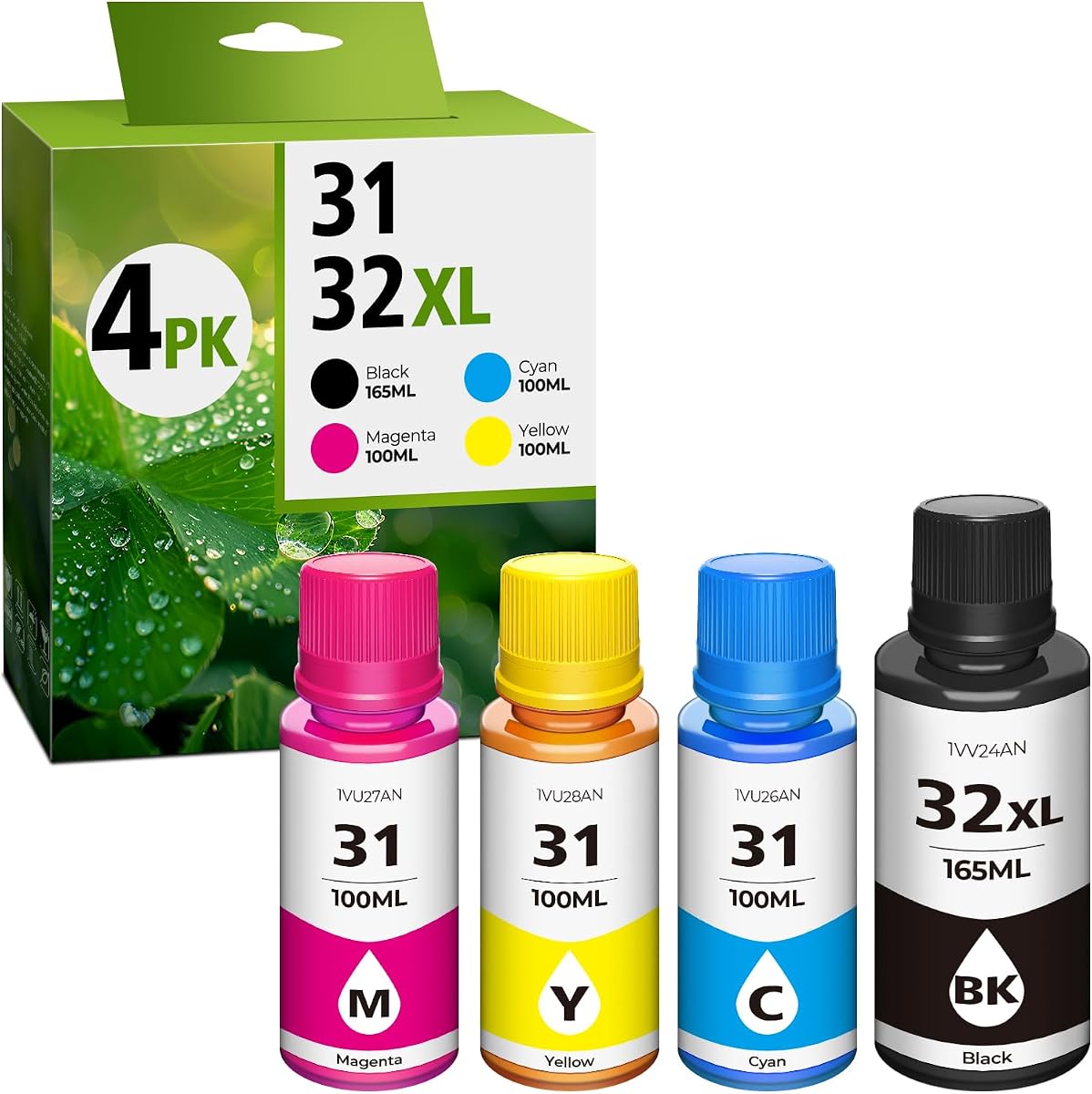
This 31 Ink 32XL set offers a compatible alternative for HP Smart Tank owners seeking lower costs. It includes 4 black bottles providing up to 9500 pages per bottle at 5 coverage coverage.
We may earn a commission when you buy through this link, at no additional cost to you.
The dye ink formulation produces vibrant colors and sharp text suitable for most standard printing tasks. Users should clean printer heads before refilling to ensure performance compatibility.
While OEM ink is recommended for some, this set provides substantial value and high yields. It is designed for seamless refilling with minimal effort and no leakage.
Ideal for budget-conscious users who want to maximize page counts, this option complements existing hardware well. It ensures you stay printing longer without frequent interruptions.
Each bottle provides high page yield to reduce refill frequency and lower costs.
Third-party options save money on replacement ink without affecting basic functionality.
We may earn a commission when you buy through this link, at no additional cost to you.
The HP Smart Tank 5003 offers AI capabilities and borderless printing for enhanced versatility. It includes up to three years of ink in the box for long-term savings.
We may earn a commission when you buy through this link, at no additional cost to you.
Mess-free refill system ensures clean and easy ink top-ups. The AI features aim to optimize print settings automatically for consistent high-quality output.
User ratings are mixed, suggesting some may find setup or software complex. However, the core printing performance remains competitive for home use.
This model is a solid choice for tech-savvy users who want advanced features. It balances modern connectivity with cost-effective ink management.
Borderless prints allow full-page photos without borders for professional look.
AI features optimize settings for consistent quality without manual intervention.
We may earn a commission when you buy through this link, at no additional cost to you.
The Epson EcoTank ET-2988 offers fast 15 PPM print speeds and auto 2-sided printing. As a renewed product, it provides a cost-effective entry into premium features.
We may earn a commission when you buy through this link, at no additional cost to you.
Three years of ink included ensures longevity and cost efficiency. The 1.44 color screen simplifies navigation and status checks for daily use.
While renewed products may come with limited warranty, they often undergo testing to ensure functionality. This model brings high-end performance to budget-conscious buyers.
It suits users needing speed and duplex printing without paying full price. It represents a high-value choice for those willing to consider renewed hardware.
15 PPM speed ensures rapid printing for time-sensitive documents efficiently.
Renewed status offers premium features at a lower price point for buyers.
We may earn a commission when you buy through this link, at no additional cost to you.
Selecting the right ink tank printer involves evaluating specific needs and features to ensure long-term satisfaction.
Check the page yield of the included ink set to estimate how long it will last. Higher capacity tanks reduce refill frequency and save costs over time.
Prioritize models with higher page yields to maximize long-term savings and minimize maintenance interruptions.
Look at pages per minute ratings for black and color prints. Faster speeds are essential for busy offices needing quick turnaround times.
Choose a speed that matches your typical document volume to avoid bottlenecks in workflow.
Wireless and mobile printing features are vital for modern workflows. Ensure support for AirPrint or manufacturer apps to print from devices easily.
Select connectivity options that integrate well with your existing devices and software ecosystem.
Review resolution details for text sharpness and color vibrancy. High DPI is important for professional presentations and photo printing.
Opt for high resolution to ensure professional output for diverse printing tasks.
Consider paper tray capacity and duplex support. Auto-duplexing reduces paper use and saves manual effort for double-sided documents.
Choose models with auto-duplex to reduce paper consumption and streamline document handling.
Factor in ink costs alongside purchase price. Ink tanks generally offer lower cost per page, but check bottle prices for replacements.
Calculate total cost of ownership to avoid hidden costs beyond initial purchase price.
Check manufacturer warranty coverage for parts and labor. Extended warranties may be worthwhile for heavy usage environments.
Prioritize warranty length to ensure protection against unexpected hardware failures.
Measure available desk or shelf space. Compact units fit smaller homes, while larger models may offer more features.
Ensure physical dimensions match your available space to avoid clutter and inconvenience.
When setting up your printer, place it on a stable surface and run the initial setup via Wi-Fi. Ensure ink tanks are filled correctly using the provided bottles without forcing them.
Regularly print test pages even if unused for weeks to keep printheads clean. Cleaning cycles can be run manually to prevent ink drying and clogging.
Use genuine ink or compatible refill kits carefully to avoid damage. Avoid mixing different ink types as this can degrade print quality and void warranties.
Most ink tank printers last several years with proper maintenance. Printheads are often designed to last the life of the device, but regular cleaning helps avoid clogs. Usage frequency significantly impacts overall lifespan and component wear.
Yes, ink tank printers generally offer lower cost per page and higher capacity. They are ideal for high-volume printing where frequent cartridge changes are inconvenient. However, upfront cost is higher than standard entry models.
Using third-party ink can save money but may void warranties on some models. Performance varies by brand and formulation. Always check compatibility before refilling to avoid potential hardware issues.
Print regularly to keep ink flowing through printheads. Use built-in cleaning cycles if the printer is idle for weeks. Keeping the printer on and in a stable environment also helps reduce drying.
Most ink tank models include scanning functions via built-in scanners or apps. Wireless scanning allows sending digital copies directly to email or storage. Check specs to confirm scanning resolution and speed.
Typically one set prints several thousand pages, often up to 10,000. Coverage percentage on paper affects actual yield. High-capacity tanks reduce refill frequency significantly compared to cartridges.
Our top picks highlight diverse strengths across speed, efficiency, and price points. The Epson EcoTank ET-2803 leads overall with balance, while the Canon G3270 offers value on a budget.
Prioritize your specific needs such as duplex printing or high speeds to narrow your choices. Ensure connectivity matches your devices to maximize convenience in daily use.
Remember to verify current prices and availability before purchasing. Ink tank printers represent a smart investment for reducing long-term printing costs significantly.