This guide compares the top HDMI Dummy Plug options for remote desktop, mining, and headless PCs to help you choose the right virtual display emulator.
As an Amazon Associate we earn from qualifying purchases. We may earn a commission when you buy through links on this page, at no additional cost to you. Read our affiliate disclosure.As an Amazon Associate we earn from qualifying purchases.Purchases through our links may earn us a commission, at no extra cost to you. Read our affiliate disclosure.
An HDMI dummy plug is a small adapter that tricks your computer into thinking a monitor is connected. This enables GPU acceleration for tasks like remote desktop, video rendering, and cryptocurrency mining without needing a physical screen.
We compared ten leading HDMI dummy plugs based on resolution support, build quality, and compatibility. Our analysis covers 4K capabilities, headless server use cases, and value for money across different user needs.
Each pick highlights specific strengths like HDR support or multi-pack value. Prices fluctuate regularly so check current listings before purchasing. These tools offer reliable virtual display solutions for modern computing setups.
Top 3 Picks for Best HDMI Dummy Plug
Best Budget
4 Pack HDMI Dummy Plug 4K HDR, Virtual Monitor EDID Emulator 4K@60Hz 2K@60Hz 1080P@120Hz, Virtual Monitor Emulator, HDMI Headless Adapter for Remote PC, Laptop, with Windows Mac OSX Linux
The following table compares all ten selected models across key specifications. Use this side-by-side view to quickly identify which model meets your resolution and compatibility needs.
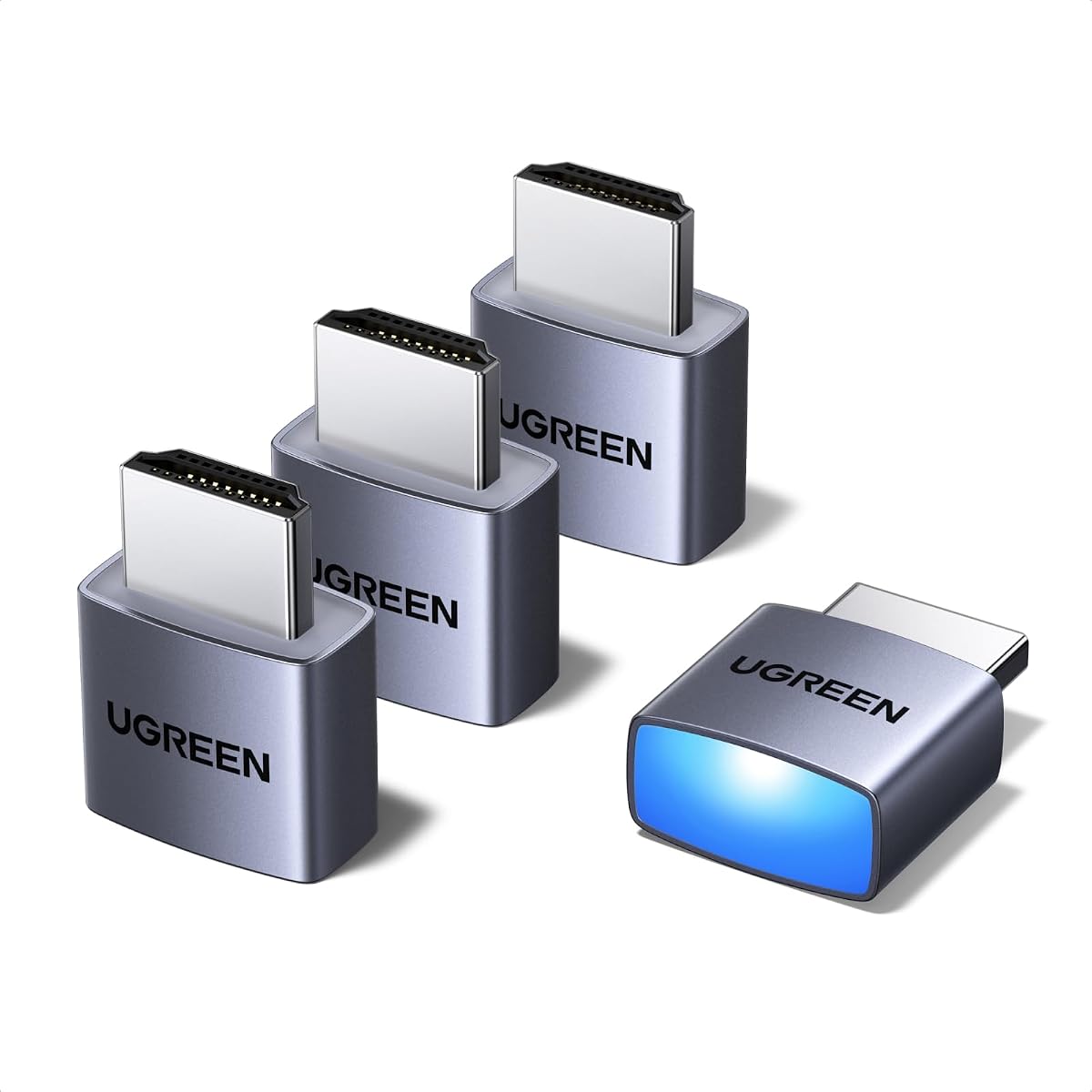
The UGREEN 4 Pack HDMI Dummy Plug delivers true 4K@60Hz HDR performance for reliable virtual display needs. Rated 4.6 stars it ensures high-performance remote desktop operations smooth video editing and efficient game development without lag. Its EDID emulator functionality activates your GPU effectively.
Pros
True 4K@60Hz HDR performance
Robust aluminum shell for heat
Wide system compatibility
Plug-and-play without drivers
Ideal for headless deployments
Cons
4K resolution limited to 4:2:0
Higher price than some packs
We may earn a commission when you buy through this link, at no additional cost to you.
Designed for headless PC deployments this model maintains system stability without the power consumption of a physical display. The sturdy aluminum shell enhances heat dissipation to prevent overheating during intensive tasks. An integrated LED light allows you to monitor connection status at a glance.
While it supports 4K resolution the output is limited to 4:2:0 chroma subsampling which may matter for color-critical work. However for most remote desktop mining or simulation tasks this trade-off remains acceptable given the robust build quality and wide OS support.
Ideal for users managing server farms colocation centers or home servers this UGREEN emulator offers excellent value in a four-pack format. The plug-and-play design requires no drivers software or power cables making deployment effortless across Windows Mac and Linux systems.
Effortless Remote Management
Activates the GPU to create a virtual display ensuring stable remote desktop operations and seamless access to headless systems.
Durable Heat Dissipation
The aluminum shell provides excellent thermal management for sustained use during intensive cryptocurrency mining or video rendering tasks.
This 4 Pack HDMI Dummy Plug offers true 4K@60Hz HDR virtual display capabilities at an attractive price point. With a 4.8-star rating it activates your GPU to create a lag-free virtual monitor for seamless remote desktop operations fluid video editing and intensive game development.
Pros
True 4K@60Hz HDR display
Industrial-grade durability
Universal cross-platform compatibility
Zero drivers or software
Smart connection monitoring
Cons
Limited documentation included
LED brightness may vary
We may earn a commission when you buy through this link, at no additional cost to you.
The aluminum armor provides industrial-grade durability that resists overheating during marathon computing tasks. A built-in status LED provides real-time connection verification blending military-grade resilience with user-friendly visual feedback for mission-critical setups.
Though documentation is minimal the plug-and-play simplicity means no drivers or external power are required. You can get operational in seconds simply connecting it to conquer remote workflows across Windows macOS and Linux systems.
Perfect for budget-conscious users needing multiple units this pack covers server farms colocation centers and home labs efficiently. The universal compatibility with NVIDIA AMD and Intel GPUs ensures it powers screen-sharing on popular platforms like RustDesk TeamViewer and Parsec.
Revolutionize Headless Deployments
Maintains 24/7 system stability while eliminating display power costs making it ideal for uninterrupted automated trading stations or mining rigs.
Versatile Multi-Screen Setup
Essential for multi-screen trading cloud gaming servers and headless Kubernetes clusters requiring reliable virtual displays without physical monitors.
This premium 4K 120Hz HDMI 2.1 dummy plug unlocks high refresh rate capabilities for demanding virtual display needs. It simulates a 4K@120Hz connection ideal for streaming games from a main PC to devices like Steam Deck or ROG Ally via Moonlight.
Pros
Supports 4K@120Hz
HDMI 2.1 compatible
8K 30Hz output
Gold plated interface
High refresh rate gaming
Cons
Higher price point
Requires HDMI 2.1 GPU
We may earn a commission when you buy through this link, at no additional cost to you.
The gold plated interface ensures stable digital signals even under high-bandwidth conditions. It tricks the GPU into thinking a monitor is attached allowing HBCC to stay active which prevents disabling when SSHing into mining rigs.
Users should note that the graphics card interface must support HDMI 2.1 to achieve 4K@120Hz refresh rates. Without this hardware requirement you will be limited to lower refresh rates or resolutions than advertised.
For professionals and gamers needing the highest fidelity virtual displays this adapter is unmatched. Whether tweaking for 4K 120Hz HDR streaming or maintaining headless gaming PCs this model delivers premium performance for serious setups.
Next-Gen Gaming Streaming
Supports 120fps Steam Link and best dongle tweaks for 4K 120Hz HDR Moonlight streaming to handheld devices seamlessly.
Premium Signal Stability
Gold plated connectors prevent signal degradation ensuring reliable detection by virtual network clients like TeamViewer and AnyDesk.
The DTech HDMI Dummy Plug offers a reliable 3-pack solution for enabling GPU accelerated tasks on headless computers. Rated 4.6 stars it emulates a high resolution up to 4K 4096×2160 display making your computer run completely without a keyboard mouse or monitor.
Pros
Up to 4K resolution
Gold plated stability
No driver needed
Compact design
Must-have for servers
Cons
No status LED
Pack count lower
We may earn a commission when you buy through this link, at no additional cost to you.
Gold plated dummy dongle ensures stable digital signals and unlocks the full potential of your graphics card. This feature is particularly valuable for game-streaming VR and using Mac Mini servers with screen sharing capabilities effectively.
While it lacks a status LED the plug-and-play functionality on Windows MAC OS Linux remains simple. It solves the Apple OSX headless display issue efficiently without needing any external power configuration or drivers.
A small low-cost virtual screen monitor emulator this DTech model is essential for server and colocation farms SOHO and home servers. It provides a stable virtual display solution that keeps your systems running smoothly at minimal cost.
High Resolution Emulation
Enables PC to run headless by simulating a 4K display for high resolution GPU accelerated remote desktop and GPGPU operations.
Apple OSX Support
Solves the native OSX headless display issue without additional software allowing seamless remote control on Mac systems.
This Headless Ghost Display Emulator is an ultra-compact low profile design that works with any graphics card having HDMI output. With a 4.6 rating it allows high resolution GPU accelerated remote desktop without configuration or external power requirements.
Pros
Ultra-compact low profile
No drivers or power
High resolution support
Set and forget design
Works with any HDMI card
Cons
Limited to 1080p
Basic feature set
We may earn a commission when you buy through this link, at no additional cost to you.
It acts as a dummy plug for use with GPU tasks such as crypto currency mining and virtual desktop environments. The no drivers no configuration no power cable approach makes it truly set and forget for stable long-term operation.
While limited to 1080p@60Hz resolution this model remains effective for basic headless needs. If you do not require 4K output this adapter provides reliable stability for remote control and remote access tasks.
Ideal for simple remote PC setups this emulator solves the headless problem efficiently. It works with Windows OSX Linux and just about everything else making it a versatile choice for older hardware or budget builds.
Ultra-Compact Design
Low profile footprint ensures it does not interfere with other ports making it perfect for tight server rack spaces.
Zero Configuration
No drivers or setup needed allows immediate use upon plugging into the HDMI port for instant virtual display creation.
This 3 Pack HDMI Dummy Plug delivers 4K@60Hz HDR capability enabling your PC to create a virtual display for efficient tasks. Rated 4.5 stars it simulates high resolution for remote control and ensures stability for cryptocurrency mining video rendering and simulation mirroring.
Pros
4K HDR support
Hot swap supported
Low power consumption
Gold-plated connection
Two year warranty
Cons
3 pack only
Limited advanced features
We may earn a commission when you buy through this link, at no additional cost to you.
The gold-plated interface guarantees complete signal transmission reducing connectivity issues during extended use. It supports hot swap functionality making it flexible to swap adapters without powering down your entire system.
Low power consumption and a two year unconditional warranty add to its appeal for cost-conscious buyers. It acts as a must-have solution for SOHO and home servers looking for reliable headless deployment.
Applicable to any discrete graphics card or notebook with HDMI output this adapter supports Windows Mac Mini OSX and Linux. It is ideal for game streaming VR and the use of Mini servers with screen sharing efficiently.
Hot Swap Capability
Allows swapping adapters without powering down the system ensuring minimal disruption during maintenance or reconfiguration tasks.
Warranty Coverage
Two year unconditional warranty provides peace of mind and responsive support if you have any questions about operation.
This 5Pack HDMI Dummy Plug offers versatile resolution support including 4K@60Hz and 1440p@120Hz options. It creates a virtual screen by simulating an active HDMI connection keeping your GPU active even without a physical monitor for tasks like mining or streaming.
Pros
High-quality construction
Full board copper pouring
Enhanced shielding
HDR display simulation
Energy-efficient design
Cons
Default 1080p
N/A rating status
We may earn a commission when you buy through this link, at no additional cost to you.
The construction features gold-plated connectors full board copper pouring and a thickened aluminum shell for enhanced electromagnetic shielding. These details ensure long-term durability and prevent solder-joint failure during continuous operation.
HDR support provides enhanced brightness and color accuracy making it suitable for color-sensitive applications like video preview and display mirroring. Peak brightness simulation up to 1015 nits adds realism to your virtual display environment.
Designed for headless setups such as mini PCs and home labs this adapter is energy-efficient and eco-friendly. It works with Raspberry Pi Jetson Nano and standard PCs providing broad compatibility for remote control and screen sharing needs.
Enhanced Durability
Full board copper pouring and new solder technology prevent common failure points ensuring stable operation for 24/7 tasks.
Color Accuracy
Supports HDR for realistic display simulation making it suitable for video editing preview and high fidelity mirroring.
This HDMI 2.1 dummy plug enables 4K@120Hz capability for modern high-performance virtual displays. It can enable the PC to enable the GPU to create a virtual display to perform tasks up to 4K@60Hz/120Hz with compatibility for 1440p@60Hz/120Hz.
Pros
High refresh rate gaming
Steam Deck compatibility
Low power consumption
No drivers needed
Win11/Win10 support
Cons
Version specific resolution limit
Requires HDMI 2.1 GPU
We may earn a commission when you buy through this link, at no additional cost to you.
The latest technology requires extremely low power and emits negligible heat ensuring stability for cryptocurrency mining video rendering and simulation mirroring. It works with win11 and supports 120fps Steam Link for handheld gaming streaming.
Attention is needed for system updates as currently the Win10 system can use 4K120HZ HDR while the Win11 system can only achieve a maximum of 4K60HZ HDR. Please note other functions remain the same as 4K120Hz.
Applicable to any discrete graphics card this dongle ensures stable digital signal for headless Raspberry Pi setups. It tricks VNC display so full resolution works better than software solutions and maintains a stable connection across platforms.
Gaming Handheld Support
Works with Steam Deck and ROG Ally for streaming from main PC allowing seamless 120fps gameplay on portable devices.
Headless Raspberry Pi
Great for headless RaspberryPi setups providing full resolution display emulation for VNC and remote access tools.
This 8P HDMI Dummy Plug offers a large batch solution with versatile resolution support including 4K@60Hz and 1440p@120Hz. It simulates an active HDMI connection keeping your GPU active for tasks like remote desktop cryptocurrency mining video rendering game streaming and VR setup.
Pros
8 pack quantity
High-quality construction
Full board copper
HDR display simulation
Energy-efficient design
Cons
Default 1440p
N/A rating status
We may earn a commission when you buy through this link, at no additional cost to you.
Construction details include gold-plated connectors full board copper pouring and a thickened aluminum shell for enhanced electromagnetic shielding. These features ensure long-term durability and prevent solder-joint failure during continuous operation.
HDR support provides enhanced brightness and color accuracy suitable for color-sensitive applications like video preview and display mirroring. Peak brightness simulation up to 1015 nits adds realism to your virtual display environment for professional needs.
Designed for headless setups such as mini PCs and home labs this adapter is energy-efficient and eco-friendly. It works with Raspberry Pi Jetson Nano and standard PCs providing broad compatibility for remote control and screen sharing needs.
Bulk Deployment Ready
Eight pack quantity makes it ideal for deploying multiple headless systems across colocation centers or enterprise server racks.
Enhanced Shielding
Thickened aluminum shell delivers outstanding durability and enhanced electromagnetic shielding ensuring stable signal over long periods.
This 5P HDMI Dummy Plug offers versatile resolution support including 4K@60Hz and 1440p@120Hz options. It creates a virtual screen by simulating an active HDMI connection keeping your GPU active even without a physical monitor for tasks like mining or streaming.
Pros
5 pack quantity
High-quality construction
Full board copper
HDR display simulation
Energy-efficient design
Cons
Default 2160p
N/A rating status
We may earn a commission when you buy through this link, at no additional cost to you.
The construction features gold-plated connectors full board copper pouring and a thickened aluminum shell for enhanced electromagnetic shielding. These details ensure long-term durability and prevent solder-joint failure during continuous operation.
HDR support provides enhanced brightness and color accuracy making it suitable for color-sensitive applications like video preview and display mirroring. Peak brightness simulation up to 1015 nits adds realism to your virtual display environment.
Designed for headless setups such as mini PCs and home labs this adapter is energy-efficient and eco-friendly. It works with Raspberry Pi Jetson Nano and standard PCs providing broad compatibility for remote control and screen sharing needs.
High-Resolution Defaults
Default resolution supports 2160p allowing seamless high fidelity virtual display creation without manual configuration.
Enhanced Shielding
Thickened aluminum shell delivers outstanding durability and enhanced electromagnetic shielding ensuring stable signal over long periods.
We may earn a commission when you buy through this link, at no additional cost to you.
Buying Guide – How to Choose the Best HDMI Dummy Plug
Selecting the right HDMI dummy plug requires understanding resolution capabilities build quality and compatibility needs. This section covers key factors to ensure you choose the right virtual display emulator.
Resolution and Refresh Rate
Check whether you need 1080p 4K@60Hz or higher refresh rates like 120Hz. Some models support 8K@30Hz or HDMI 2.1 features while others are limited to 1080p. Match the specs to your GPU capabilities.
Choose higher resolutions for video editing or mining and 120Hz for streaming to handhelds. Lower resolution models are sufficient for basic headless server use.
Build Quality and Heat Dissipation
Look for aluminum shells and gold-plated connectors for durability and better thermal management. These materials help prevent overheating during intensive 24/7 tasks like video rendering or cryptocurrency mining.
Prioritize models with metal construction over plastic ones. Good heat dissipation ensures stable operation over long periods without signal degradation.
Operating System Compatibility
Verify support for Windows Mac and Linux systems since compatibility varies across virtual display adapters. Some models solve specific issues like OSX headless display problems while others require drivers.
Ensure the adapter is plug-and-play on your OS. Avoid models that need drivers or external power sources for simplicity.
Plug-and-Play Functionality
Select a plug-and-play adapter that requires no drivers or external power. This ensures easy setup and eliminates potential configuration headaches across different platforms.
Plug-and-play designs save time and reduce complexity. You should be able to connect and start using the virtual display immediately.
Number of Units Required
Buy in packs if you need to manage multiple servers or workstations. Bulk packs offer better value per unit than individual purchases for large deployments.
Consider your total needs. A 3-pack or 4-pack is often more cost-effective than buying single units repeatedly.
EDID Emulation Features
Confirm the device supports EDID emulation to trick your GPU into detecting a monitor. This is crucial for maintaining GPU acceleration without a physical display attached.
Proper EDID emulation ensures your system remains stable. Verify it supports 4K or your target resolution for accurate virtual display detection.
Brand Reputation and Warranty
Look for reputable brands with positive ratings and clear warranty terms. Some models offer multi-year warranties while others may lack consumer protection or support.
Choose established manufacturers for reliability. A warranty adds peace of mind for long-term headless server operations.
Price and Value
Balance cost against features like HDR support or 120Hz compatibility. Budget models may suffice for basic tasks but premium adapters offer better performance for demanding workflows.
Don't overspend if you only need basic 1080p support. Invest in premium models only if you need specific features like 8K or 120Hz.
How to Use and Care for Your HDMI Dummy Plug
Simply plug the HDMI dummy plug into any available HDMI port on your computer. The operating system should recognize it immediately as a connected display allowing you to proceed with headless configuration tasks.
After connecting verify that the GPU is active and that remote access tools show the expected resolution. If the display is not detected try restarting your computer or updating GPU drivers.
Store unused adapters in a protective case to avoid physical damage. Ensure the gold-plated contacts stay clean and free from dust for consistent performance over time.
Frequently Asked Questions
What is an HDMI dummy plug used for?
An HDMI dummy plug creates a virtual display by emulating a connected monitor. This enables GPU acceleration for tasks like remote desktop mining video rendering and streaming without needing a physical screen.
Do I need drivers for a dummy plug?
Most HDMI dummy plugs are plug-and-play and do not require drivers. You simply connect the adapter to the HDMI port and the system recognizes it as a standard monitor display.
Can I use a dummy plug for remote desktop?
Yes dummy plugs are ideal for remote desktop setups. They keep the GPU active allowing full hardware acceleration for smoother remote sessions and improved performance.
Will this work with Mac systems?
Many models are compatible with macOS and solve common headless display issues. Ensure the specific adapter supports Mac OS for seamless remote control functionality.
Do dummy plugs require external power?
Most dummy plugs draw power directly from the HDMI port and require no external power. This makes them convenient and easy to set up without additional cables.
What resolution should I choose?
Choose based on your needs. 4K@60Hz is good for most tasks while 120Hz or 8K suits high-end gaming or streaming setups. Match your GPU capabilities.
How do I troubleshoot if it is not detected?
Restart your computer and ensure the GPU drivers are updated. Try a different HDMI port and check that the system recognizes the adapter in display settings.
Final Thoughts on Choosing the Best HDMI Dummy Plug
The UGREEN 4 Pack HDMI Dummy Plug 4K@60Hz stands out for its balance of performance build quality and compatibility making it our top choice. For budget needs the 4 Pack HDMI Dummy Plug 4K HDR offers excellent value with strong ratings.
Prioritize resolution capabilities and build quality when selecting an adapter. Ensure the model supports your specific GPU needs and operating system for stable headless operation.
Check current pricing and stock before purchasing as these values fluctuate regularly. Verify compatibility with your specific setup to ensure seamless integration with existing systems.