
Razer DeathAdder Essential Ergonomic Wired Gaming Mouse
4.5Editor score
6400 DPI optical sensor
5 programmable buttons
Ergonomic rubberized grip
Discover the top gaming mouse for Diablo 4 ranked by sensor precision, button count, and ergonomics to help you dominate loot hunts and high-stakes battles
Finding the right gaming mouse for Diablo 4 is essential for navigating complex skill bars and managing inventory during intense boss fights. A quality mouse offers precision tracking and customizable buttons that streamline your gameplay experience significantly.
We compared ten leading models based on sensor accuracy, programmable button layouts, ergonomic comfort, and durability ratings from verified users. Our analysis focuses on features that matter most for action RPG players who need reliability and speed.
Each selection highlights specific strengths like wireless freedom, MMO-style side buttons, or budget-friendly performance. Note that product availability and pricing fluctuate regularly, so check current listings before making your final purchasing decision today.
4.5Editor score

4.6Editor score

4.2Editor score
This side-by-side comparison highlights key specifications across all ten selected mice to help you quickly identify the best fit for your play style and budget constraints.





The Logitech G502 Hero stands out as a top contender for Diablo 4 players seeking reliability and precision. With a stellar 4.6 rating from thousands of users, this mouse delivers exceptional tracking accuracy crucial for targeting enemies in chaotic combat scenarios.
We may earn a commission when you buy through this link, at no additional cost to you.
Its HERO 25K sensor offers zero smoothing and filtering ensuring that your cursor movement translates perfectly to in-game actions. The eleven programmable buttons allow you to map skills and inventory actions directly to your thumb reducing reliance on keyboard shortcuts during intense raids.
While the adjustable weights provide a personalized feel some users might find the base weight substantial compared to lighter options. However this mass adds stability during rapid aiming movements which can be beneficial for maintaining steady aim over long sessions.
Ideal for gamers who prioritize button customization and sensor accuracy over wireless convenience the G502 Hero is a solid investment. Its robust build quality and ergonomic design ensure it remains comfortable even during extended play sessions focused on high-level dungeon crawling.
The HERO sensor tracks sub-micron movements allowing precise cursor control essential for clicking small UI elements or targeting specific enemy weak points accurately.
Eleven programmable buttons give you direct access to abilities and macros streamlining your workflow and letting you react faster to dynamic battlefield changes.
We may earn a commission when you buy through this link, at no additional cost to you.
The Razer DeathAdder Essential proves you do not need to spend a fortune to get a reliable gaming mouse for Diablo 4. Priced accessibly it maintains the iconic ergonomic shape that millions trust for comfort and performance during long gaming sessions.
We may earn a commission when you buy through this link, at no additional cost to you.
With a 6400 DPI optical sensor and five programmable buttons this mouse covers the basics efficiently. You can remap keys for essential skills or macros through Razer Synapse enhancing your gameplay without sacrificing speed or accuracy in critical moments.
Although it lacks the advanced features of higher-end models like RGB lighting or adjustable weights its mechanical switches support up to ten million clicks ensuring longevity. The ridged rubberized scroll wheel also provides tactile feedback for controlled navigation through inventory screens.
This mouse is perfect for beginners or budget-conscious gamers who want a proven ergonomic form factor. It delivers consistent performance and reliable connectivity making it a great entry point for anyone stepping into serious Diablo 4 gaming.
The right-handed contour naturally fits your hand reducing strain during extended use which is vital for marathon gaming nights or competitive ladder pushing.
Mechanical switches ensure crisp clicks and durable buttons that withstand frequent use without degradation over time.
We may earn a commission when you buy through this link, at no additional cost to you.
The Razer Naga V3 Pro represents the pinnacle of versatility for Diablo 4 enthusiasts who demand flexibility and top-tier performance. Its unique swappable side plates let you switch between layouts depending on your class or play style offering unmatched customization options.
We may earn a commission when you buy through this link, at no additional cost to you.
Featuring a Focus Pro 50K optical sensor it delivers pixel-precise tracking with zero lag essential for precise targeting in PvE or PvP scenarios. The wireless HyperSpeed connection ensures you enjoy the freedom of cable-free play without compromising on responsiveness or reliability during critical fights.
While the price point is higher than many alternatives the investment pays off in adaptability and endurance. The battery lasts up to 155 hours on HyperSpeed wireless meaning you can game for days without interruption or needing to plug in constantly.
Ideal for players who want a single mouse that adapts to different genres or who prefer wireless setups the Naga V3 Pro is a standout choice. Its build quality and advanced features make it a premium tool for serious gamers aiming to master every aspect of Diablo 4.
Swap between 2 6 or 12-button side plates to match your class loadout or switch to a streamlined FPS layout when needed.
HyperSpeed wireless technology delivers lag-free performance matching wired mice so you never miss a beat during intense combat encounters.
We may earn a commission when you buy through this link, at no additional cost to you.
The Razer Basilisk V3 offers a perfect blend of ergonomic comfort and advanced features tailored for Diablo 4 players who value customization. With eleven programmable buttons and a specialized HyperScroll tilt wheel navigating large skill bars or inventory lists becomes effortless and efficient.
We may earn a commission when you buy through this link, at no additional cost to you.
Its Focus Plus 26K DPI sensor ensures accurate tracking across various surfaces while the optical switches Gen 2 provide rapid actuation speeds ideal for quick reactions. The iconic design with a thumb rest supports long sessions without fatigue making it suitable for marathon raiding nights.
Although it relies on a wired connection this eliminates battery concerns and ensures consistent performance throughout your gameplay. The extensive Chroma RGB lighting adds visual flair and can sync with supported games to enhance immersion during your adventures in Sanctuary.
Best suited for gamers who want a highly responsive mouse with tactile feedback options the Basilisk V3 delivers consistent performance. Its mix of precision speed and comfort makes it a reliable companion for navigating complex mechanics in Diablo 4.
Switch between free-spin for fast scrolling and tactile mode for precise control when managing items or skills in menus.
Optical switches deliver zero unintended misclicks with 0.2ms actuation ensuring your commands register exactly when you need them.
We may earn a commission when you buy through this link, at no additional cost to you.
The Logitech G305 Lightspeed is an excellent choice for Diablo 4 players seeking wireless freedom without sacrificing performance. Its lightweight design and 250-hour battery life on a single AA battery make it ideal for both desktop and laptop gaming on the go.
We may earn a commission when you buy through this link, at no additional cost to you.
Equipped with the HERO sensor it provides accurate tracking up to 12000 DPI with impressive power efficiency. The 1ms report rate ensures responsive gameplay allowing you to execute moves quickly and react to enemy attacks without noticeable input lag.
While it has fewer programmable buttons than MMO-specific mice its compact size is perfect for users who prefer a simpler setup. The durable mechanical design and built-in nano receiver storage also add to its practicality for travel and everyday use.
This mouse fits well for those who prioritize mobility and battery life over extensive button layouts. Its reliable wireless connection and consistent tracking make it a solid tool for engaging in Diablo 4 adventures anywhere you play.
Enjoy up to 250 hours of continuous play on one battery extending gameplay sessions and reducing the need for frequent replacements.
Weighing only 3.4 oz this mouse offers high maneuverability and reduces wrist fatigue during extended gaming sessions.
We may earn a commission when you buy through this link, at no additional cost to you.
The Corsair Scimitar RGB Elite is engineered for players who rely heavily on keybinds and macros in Diablo 4. With seventeen fully programmable buttons and a patented key slider system it offers unparalleled flexibility for mapping complex skill rotations and inventory actions.
We may earn a commission when you buy through this link, at no additional cost to you.
Its native 18000 DPI optical sensor ensures precise tracking while the 50 million click-rated Omron switches promise long-term durability. The contoured shape and right-side finger rest provide added support helping you maintain comfort during long hours of intense gameplay and raiding.
Although the design is bulkier than standard mice this extra bulk houses the extensive button layout that MMO fans often seek. The braided cable and sturdy build quality also contribute to its resilience ensuring it withstands the wear and tear of regular use.
Best suited for dedicated MMO players or those who need maximum button access the Scimitar RGB Elite delivers robust performance. Its adjustable weight system and ergonomic features further enhance its utility for tailored gaming experiences in Sanctuary.
Reposition the 12 side buttons along a slider to match your thumb length ensuring comfortable access to all keys.
Access multiple skills and macros without reaching for the keyboard streamlining your combat flow and inventory management.
We may earn a commission when you buy through this link, at no additional cost to you.
The UtechSmart Venus Pro brings the MMO gaming experience to Diablo 4 players at an attractive price point. With sixteen fully programmable buttons and a high precision optical sensor it enables complex macro configurations and efficient key mapping for various classes.
We may earn a commission when you buy through this link, at no additional cost to you.
Its dual mode wireless technology allows switching between 2.4 GHz wireless and wired modes giving flexibility based on your needs. The rechargeable battery ensures long playtimes and the auto sleep mode helps conserve power when not in use extending usability significantly.
The ergonomic design with a grinding coating enhances grip and reduces sweat during long sessions ensuring comfort throughout your gaming marathon. While wireless performance may vary depending on the environment its cost effectiveness makes it a compelling option for budget-focused gamers.
Ideal for those transitioning to wireless MMO mice the Venus Pro offers a balance of features and affordability. It provides ample customization options and reliable tracking to help you navigate Diablo 4 mechanics with ease and precision.
Switch between wireless freedom and wired stability depending on your situation ensuring consistent performance in any setting.
Different inclination angles on thumb buttons fit your fingertips naturally making frequent macro activations more comfortable.
We may earn a commission when you buy through this link, at no additional cost to you.
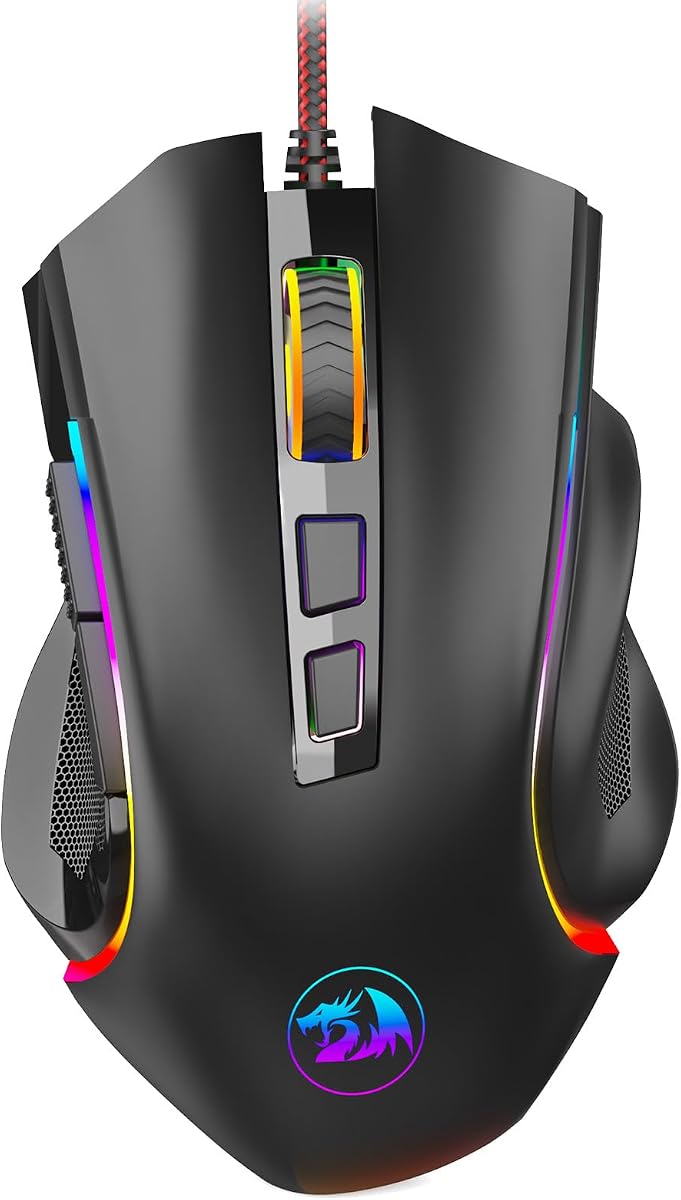
The Redragon M901K stands out with an impressive nineteen programmable buttons designed for gamers who need extensive control options. Its high DPI sensor and adjustable weight tuning allow you to customize the mouse to match your unique preferences and gameplay style.
We may earn a commission when you buy through this link, at no additional cost to you.
Featuring vibrant RGB lighting with millions of color combinations this mouse adds a visual edge to your setup. The ergonomic design and skin-friendly material ensure comfort during extended sessions while the macro editing features help streamline complex in-game actions.
Although it includes multiple removable weights adding customization it can become quite heavy which might not suit everyone. However for those who enjoy a solid feel and maximum button access it provides significant versatility for Diablo 4 challenges.
Best for players who want maximum control without spending a premium the M901K offers robust features at a competitive price. Its ability to store multiple profiles makes it easy to switch between different games or configurations effortlessly.
Remap nineteen buttons and five memory profiles to save settings for different characters or game modes easily.
Adjust eight removable 2.4g weights inside to personalize feel and stability for your specific grip style.
We may earn a commission when you buy through this link, at no additional cost to you.
The Redragon M602 has been a trusted option since 2015 for gamers looking for reliable performance at an affordable cost. With nine programmable buttons and an ergonomic design it provides essential controls without overwhelming complexity making it great for beginners or casual players.
We may earn a commission when you buy through this link, at no additional cost to you.
Its adjustable DPI up to 7200 ensures consistent tracking for everyday gaming tasks while RGB lighting modes add visual appeal to your setup. The dedicated finger positions on the ergonomic shape support comfort reducing strain during regular use over several hours.
While the sensor is not as advanced as high-end models it performs reliably for most Diablo 4 gameplay scenarios. The software allows for macro edits and light adjustments giving you basic customization options to suit your workflow.
This mouse is ideal for those who want a no-frills ergonomic experience without breaking the bank. Its proven track record and steady performance make it a safe choice for entry-level gamers entering the world of Diablo 4.
Dedicated finger positions reduce hand fatigue by supporting natural hand placement during extended gaming periods.
Edit macros and adjust speed through software to customize basic actions without needing complex configurations.
We may earn a commission when you buy through this link, at no additional cost to you.
The Corsair NIGHTSWORD introduces a unique smart weight system that adjusts the center of gravity in real time for perfect balance. This innovative feature combined with a 18000 DPI sensor ensures you get precise tracking and a comfortable feel tailored to your grip style.
We may earn a commission when you buy through this link, at no additional cost to you.
With ten fully programmable buttons you can map essential skills and macros directly to the mouse enhancing your in-game efficiency. The high-performance rubber grips inspired by pro sports equipment provide a secure hold reducing slippage during intense and fast-paced battles.
While the price is higher than entry-level options the advanced tuning capabilities and build quality justify the investment for serious gamers. The adjustable weight configurations let you fine-tune balance to reduce wrist fatigue during long raid sessions or competitive matches.
Best for players who value balance and ergonomic customization the NIGHTSWORD delivers precision and comfort. Its sensor performance and robust feature set make it a strong choice for those seeking a competitive edge in Diablo 4 gameplay.
Software automatically detects center of gravity allowing precise balance adjustments to fit your hand and grip style.
Rubber grips offer stability and comfort reducing slip and fatigue during extended gaming sessions.
We may earn a commission when you buy through this link, at no additional cost to you.
Selecting the right gaming mouse involves considering sensor accuracy button layout and comfort features that align with your preferred play style.
A high-quality sensor ensures accurate tracking and responsiveness which is vital for targeting enemies or clicking precise UI elements. Look for DPI ranges that suit your preference from lower DPI for controlled movements to higher DPI for quick scans.
Prioritize sensors with no acceleration or smoothing to maintain consistent cursor movement that matches your physical hand motions.
The number and placement of programmable buttons determine how many skills or macros you can access without moving from the mouse. Diablo 4 players often benefit from at least five to twelve buttons to map active abilities and potions.
Ensure the mouse software supports macros and profile switching to adapt button layouts for different character builds or game modes.
An ergonomic shape reduces strain on your hand and wrist during long gaming sessions. Consider whether you prefer a contoured grip or a symmetrical design based on your hand size and natural grip style.
Features like rubberized textures or thumb rests can further enhance comfort and stability during intense gameplay moments.
Wireless mice offer freedom from cables but require attention to battery life and latency. Modern wireless tech like Lightspeed or HyperSpeed matches wired performance so choose based on your setup preferences.
Wired mice provide uninterrupted power and consistent connection without worrying about recharging which is ideal for stationary setups.
A mouse built with durable mechanical switches and sturdy construction will withstand heavy use over time. Look for ratings indicating click endurance to ensure longevity.
Robust materials and braided cables also reduce wear and tear from daily gaming activities ensuring reliable performance.
Adjustable weights let you customize the mouse feel and balance to match your preference for light agility or heavier stability. This can affect aiming control and wrist fatigue.
Test different weights if possible to find a configuration that feels comfortable for extended use.
While primarily cosmetic RGB lighting can help personalize your setup and sometimes sync with games for immersive effects. Consider if visual customization matters to your gaming environment.
Choose models with customizable zones to coordinate lighting with your other peripherals for a cohesive look.
Determine how much you are willing to invest before selecting a mouse as prices vary widely based on features and brand. Many budget models offer solid performance while premium ones provide advanced customization.
Balance cost against features you truly need to avoid overspending on capabilities you won’t use.
Start by installing the manufacturer’s software to configure button assignments and sensitivity settings. Map essential skills or macros to frequently used buttons to reduce reliance on keyboard shortcuts during gameplay.
Adjust DPI levels to match your mousepad size and your preferred aiming speed. If available enable hardware profiles to switch settings between games without reopening software each session.
Regularly clean the mouse surface and scroll wheel to remove dust and residue that can affect grip or tracking. Store it in a dry place and avoid bending the cable excessively to maintain longevity.
Yes DPI affects how fast your cursor moves on screen. A suitable DPI helps with precise targeting and menu navigation. Higher DPI can be useful for large displays or quick reactions but adjust based on personal comfort.
Most players benefit from at least five to ten buttons to map skills potions and inventory actions. MMO-style mice with more buttons offer greater flexibility but can be complex for those preferring simplicity.
Modern wireless mice with low-latency technology perform nearly identical to wired models. If battery life and connection stability are assured wireless mice provide freedom without sacrificing responsiveness during fights.
Top-tier sensors like HERO Focus Pro or Pixart PMW series offer precise tracking without acceleration. Look for optical sensors with high DPI ranges and fast polling rates for reliable performance.
Technically any mouse works but gaming mice provide better ergonomics and programmable buttons suited for action RPGs. This enhances control and comfort during long sessions.
Use a microfiber cloth and mild cleaner to wipe surfaces gently. Avoid spraying liquids directly into the unit and clean scroll wheel grooves with compressed air to remove debris.
We reviewed ten top mice offering features from precision sensors and adjustable weights to customizable button layouts. The Logitech G502 Hero leads for overall versatility while budget-friendly options like the Razer DeathAdder Essential deliver solid performance.
Prioritize ergonomics sensor accuracy and programmability to match your class and play style. Choosing a mouse that feels comfortable and provides quick access to skills will enhance your gameplay significantly.
Prices and availability change often so check current listings before purchasing. Finding the right tool ensures you stay focused on the action and enjoy your adventures in Sanctuary fully.