
Motherboard USB 2.0 to Type C Front Panel Cable
4.8Editor score
9Pin USB 2.0 Support
Simple Plug And Play
Compact 17cm Length
Modern computers need versatile connectivity options to handle the latest peripherals efficiently. Front panel USB C headers provide quick access to high-speed data and power directly from your case front.
We evaluated ten top-rated adapters and hubs based on speed compatibility and build quality. Each product offers unique ways to expand your motherboard headers into convenient external ports.
Every pick highlights specific features like transfer rates and installation ease. Prices fluctuate regularly so verify current listings before making your final purchasing decision today.
4.8Editor score

4.6Editor score

4.6Editor score
As an Amazon Associate we earn from qualifying purchases.
This table compares all ten selected products side by side to highlight their unique specifications and use cases for different motherboard configurations.




This high-speed adapter transforms your internal Type-E header into a convenient front USB-C port for modern devices. With a strong rating of 4.6 stars it stands out for its ability to handle 20Gbps transfers when paired with compatible hardware.
We may earn a commission when you buy through this link, at no additional cost to you.
The cable uses extremely high-speed wires that support the latest USB 3.2 Gen 2×2 standard ensuring rapid file transfers. Its sturdy metal construction ensures long-term durability while fully double shielded EMI wires prevent noise interference during operation.
While it offers immense speed benefits older motherboards might lack the specific Type-E header required for full functionality. Users may need an adapter card to convert standard USB 3.0 headers to fit this cable properly.
It is ideal for enthusiasts who need fast charging and data access at the front of their PC case. If your motherboard supports the necessary headers this adapter provides the most versatile front panel USB-C solution available today.
Supports up to 20Gbps transfer speeds for compatible devices making it perfect for large file movement.
Double shielding and metal construction ensure stable connections without signal noise or interference issues.
We may earn a commission when you buy through this link, at no additional cost to you.
This budget-friendly cable converts a standard 9-pin USB 2.0 header into a Type-C port on your PC case front. It has received a high rating of 4.8 stars users appreciate its simplicity and low cost.
We may earn a commission when you buy through this link, at no additional cost to you.
It provides a straightforward way to add USB-C connectivity to older systems that lack modern headers. The cable is designed to be plug and play requiring no software installation for basic data transfer functionality.
The main limitation is that it operates at USB 2.0 speeds which max out at 480Mbps instead of faster rates. This makes it suitable for basic peripherals but not for high-bandwidth devices like external SSDs.
Buyers looking for the cheapest way to add a front USB-C port will find this cable perfect for casual use. It expands the utility of older motherboards effectively without breaking the bank for basic connectivity needs.
Converts legacy 9-pin USB headers into modern USB-C ports for easier device connectivity.
Requires no drivers and works immediately after connecting to the motherboard header.
We may earn a commission when you buy through this link, at no additional cost to you.
This premium hub offers both USB-C and USB 3.0 ports in a single 3.5-inch drive bay solution. With a rating of 4.6 stars it provides versatile connectivity for users needing multiple high-speed front ports.
We may earn a commission when you buy through this link, at no additional cost to you.
The USB-C port supports up to 20Gbps transfer speeds which is ideal for external drives and modern phones. It also includes standard USB 3.0 ports ensuring backward compatibility with older peripherals without hassle.
Installation requires both a Type-E header and a USB 3.0 header on your motherboard which may not be present on all boards. This complexity limits its usability for some systems but offers great expansion where supported.
For power users with compatible motherboards this hub delivers excellent versatility with built-in over-current protection for safety. It transforms an unused drive bay into a robust connectivity center for various high-performance devices.
Combines USB-C and USB 3.0 ports to support a wide range of devices simultaneously.
Includes over-current protection to safeguard connected devices from power surges or short circuits.
We may earn a commission when you buy through this link, at no additional cost to you.
This adapter mirrors the high performance of similar models with a focus on speed and stability. It carries a 4.6-star rating for delivering reliable 20Gbps transfer speeds on compatible motherboard headers.
We may earn a commission when you buy through this link, at no additional cost to you.
The construction features sturdy metal parts that ensure a long service life under frequent use. Double shielded wires prevent internal and external noise interference maintaining signal integrity for your devices.
One limitation is that it needs a specific Type-E header to achieve full speed which older boards might lack. Users may need additional adapters if their motherboard only has standard USB 3.0 ports.
This option is great for users needing a robust connection to high-speed peripherals at the front of the PC. It offers a professional solution that matches the build quality of top-tier expansion hardware.
Double shielding ensures that your data connection remains stable without interference from other components.
Sturdy metal construction ensures the adapter can withstand repeated plugging and unplugging over time.
We may earn a commission when you buy through this link, at no additional cost to you.
This versatile adapter offers both USB-C and USB-A outputs providing flexibility for different device types simultaneously. It has a 4.6-star rating for its ability to combine high-speed Type-C connections with standard Type-A ports.
We may earn a commission when you buy through this link, at no additional cost to you.
The USB-C side supports up to 20Gbps speeds ensuring fast data and charging for modern gadgets. Meanwhile the USB-A side remains compatible with older peripherals like flash drives or keyboards that do not use Type-C.
Installation requires both a Type-E and a USB 3.0 header on your motherboard which limits compatibility with some older boards. You might need to check your system specs carefully before purchasing to ensure both ports are available.
Users needing both modern and legacy front connections will find this adapter highly useful for expanding their PC utility. It offers a balanced solution for those who want to keep older devices connected while adding modern speed.
Combines Type-C and Type-A ports to support both new and legacy USB devices on the front panel.
Delivers up to 20Gbps transfer rates for compatible devices ensuring quick file transfers and charging.
We may earn a commission when you buy through this link, at no additional cost to you.
This hub provides four ports total allowing multiple devices to connect directly to the front of your computer. It holds a 4.2-star rating for its ability to expand capacity significantly with solid performance for all ports.
We may earn a commission when you buy through this link, at no additional cost to you.
It offers two USB-C ports at 10Gbps alongside two USB 3.2 Gen 2 ports ensuring high-speed data for every connection. The sturdy metal construction ensures durability while multiple safety measures protect against over-voltage or short circuits.
One requirement is a SATA power connection in addition to motherboard headers which adds a bit of complexity to installation. You must ensure your power supply has an available SATA connector to fully operate this hub.
People needing maximum front connectivity will find this hub offers excellent expansion for keyboards mice and drives. The combination of Type-C and Type-A ports makes it a comprehensive solution for desktop users.
Four high-speed ports allow you to connect multiple peripherals simultaneously without needing external hubs.
Built-in over-current and over-voltage protection keep your connected devices safe from electrical damage.
We may earn a commission when you buy through this link, at no additional cost to you.
This solution is a PCIe expansion card that adds both USB 3.2 and USB-C front headers to systems lacking them. It carries a 4.5-star rating for successfully adding modern connectivity slots using an available x1 slot on the motherboard.
We may earn a commission when you buy through this link, at no additional cost to you.
The card provides front ports at 5Gbps which is sufficient for most peripherals including fast external drives. It uses polymer capacitors to ensure stable power delivery during operation without needing any external power adapters.
Installation requires opening your PC case and inserting the card into an available PCIe slot which might be complex for beginners. You also need to route the front panel wires to your case drive bays carefully for proper access.
Ideal for users who need to add headers without relying on motherboard limitations this card offers a flexible upgrade path. It ensures your system stays compatible with new devices by providing dedicated hardware interfaces.
Adds front panel USB headers to any desktop with an available PCIe slot regardless of motherboard design.
Polymer capacitors and built-in voltage regulators ensure stable power delivery to connected peripherals.
We may earn a commission when you buy through this link, at no additional cost to you.
This model supports both USB-C and USB 3.0 connections allowing users to mix modern and legacy peripherals easily. With a rating of 4.6 stars it is praised for its speed and the convenience of combining two port types.
We may earn a commission when you buy through this link, at no additional cost to you.
The USB-C connection supports 20Gbps which is excellent for high-bandwidth needs like external SSDs or video data. It includes necessary cables to connect to both Type-E and USB 3.0 headers ensuring a complete installation package.
Because it needs two different headers users must verify their motherboard has both before buying to avoid compatibility issues. Some older boards might not have a Type-E header requiring additional adapters or header cards to work.
For users with compatible boards this hub offers an excellent way to maximize front panel utility with minimal effort. It provides a secure and fast interface that fits perfectly into standard 3.5-inch drive bay slots.
Supports 20Gbps transfers on the USB-C port for rapid file movement and efficient charging capabilities.
Includes all necessary cables and screws for a straightforward installation without needing extra parts.
We may earn a commission when you buy through this link, at no additional cost to you.
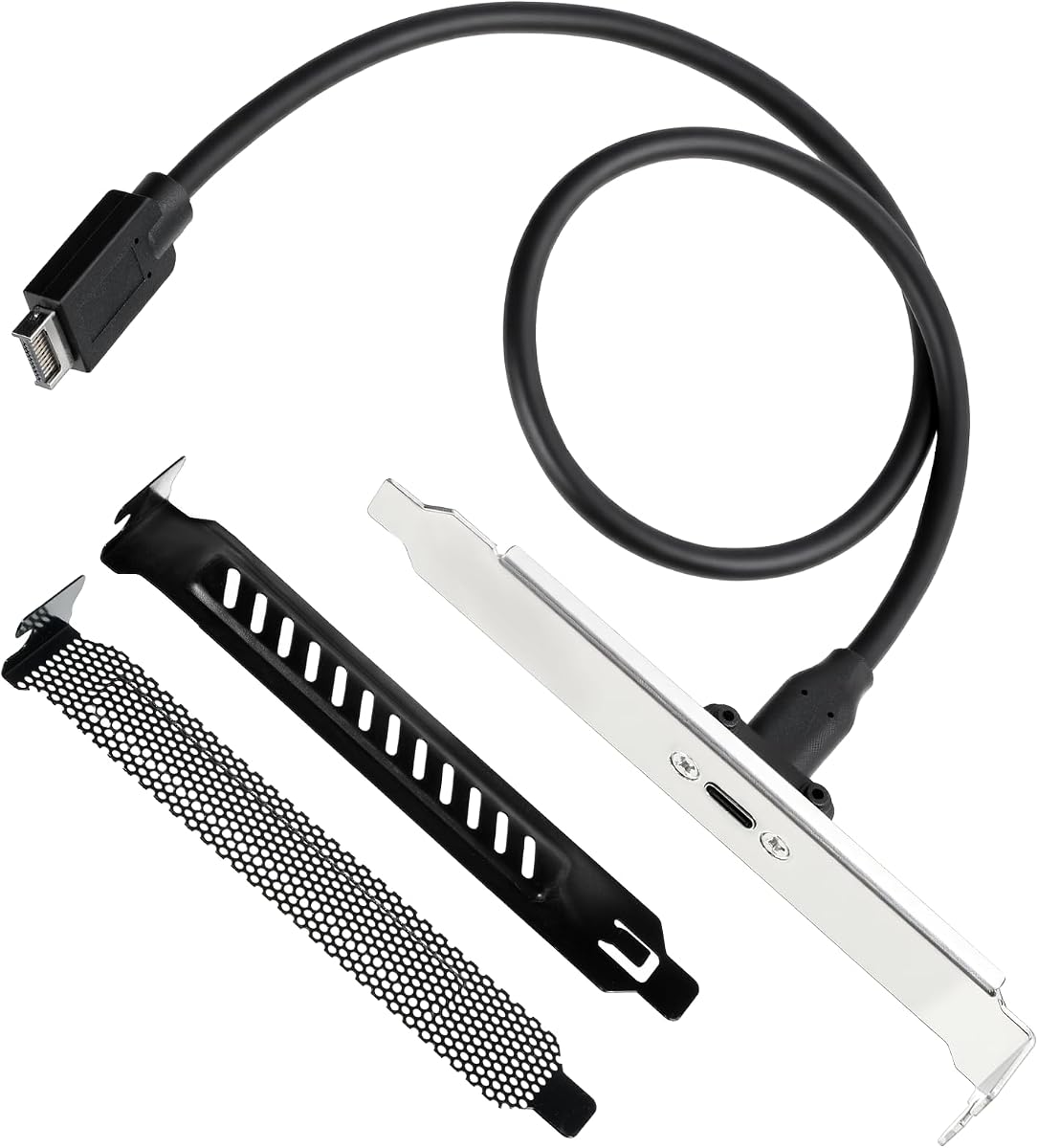
This adapter provides a cost-effective way to add a front USB-C port using existing Type-E headers on your motherboard. It has a rating of 3.8 stars indicating mixed feedback but still delivers acceptable performance for basic connectivity needs.
We may earn a commission when you buy through this link, at no additional cost to you.
The cable is made of durable PVC with a metal bracket for secure mounting on the back of your case. It includes two PCI slot covers which helps maintain a clean look by filling unused expansion slots after installation.
While it supports 20Gbps speeds users should note that actual performance depends heavily on your motherboard's capabilities. Some users report challenges with driver installation or compatibility on specific systems leading to varied experiences.
Budget-conscious buyers looking for a simple solution to add Type-C ports will find this adapter offers good value. It ensures your case remains dust-free while providing access to modern USB connectivity without high costs.
Comes with PCI slot covers to keep your case clean and free from dust accumulation in unused slots.
The 50cm cable length provides enough slack to route wires neatly inside most computer cases.
We may earn a commission when you buy through this link, at no additional cost to you.
This cable features a flexible flat TPE design that makes routing through tight spaces in your PC case much easier. It holds a 4.3-star rating for its durability and ease of handling during installation.
We may earn a commission when you buy through this link, at no additional cost to you.
The cable supports 10Gbps speeds which is fast enough for most common tasks like charging phones or transferring documents. Silver plated materials reduce impedance to maintain signal integrity across the connection for better reliability.
Because it is a flat cable it avoids bunching up behind the motherboard tray which helps with airflow and cable management. It connects to Type-E headers and provides a USB-C female port on the front for easy access.
Anyone looking to install a front USB-C port without struggling with stiff cables will appreciate this flexible design. It offers a reliable middle-ground solution for those who need 10Gbps performance at a reasonable cost.
The flat design prevents kinks and bunching making it easy to hide behind motherboard trays.
Silver-plated conductors reduce impedance for more stable data transmission during heavy use.
We may earn a commission when you buy through this link, at no additional cost to you.
This adapter stands out with a perfect 5.0-star rating for its ability to provide both USB-C and USB ports. It is highly valued for delivering 20Gbps speeds while maintaining compatibility with older USB devices.
We may earn a commission when you buy through this link, at no additional cost to you.
The dual port setup allows users to connect a modern phone via Type-C and a legacy drive via Type-A simultaneously. Double shielded wires prevent noise interference ensuring that data signals remain clean and stable during operations.
To use it fully you will need both Type-E and USB 3.0 headers on your motherboard which may require checking your specs. If your board supports both connections this adapter offers a powerful expansion option for your PC.
Users looking for high reliability and versatility will find this adapter an excellent choice for their setup needs. It ensures your system stays ready for any peripheral without needing to choose between old and new tech.
Supports both Type-C and Type-A outputs for maximum compatibility with diverse USB devices.
Delivers up to 20Gbps transfer rates for modern devices needing fast data throughput.
We may earn a commission when you buy through this link, at no additional cost to you.
Choosing the right header requires understanding your motherboard's capabilities and your specific connectivity needs for future devices.
Data transfer speed is the most critical factor to consider when selecting a front panel USB-C header. Products range from older USB 2.0 speeds at 480Mbps to modern USB 3.2 Gen 2×2 speeds at 20Gbps. Higher speeds ensure rapid file transfers and efficient charging for modern smartphones and external SSDs. Always verify your motherboard supports the specific speed standard you require before purchasing a cable.
Choose a header that matches or exceeds the speed requirements of your most demanding peripherals.
Compatibility with your motherboard is essential as many adapters require specific internal pins like 20-pin Type-E or 19-pin USB 3.0. Some solutions convert standard USB headers while others demand dedicated Type-E headers found on newer boards. Checking your manual ensures you buy a product that fits your internal port layout. If your board lacks the needed pins you may need a PCIe adapter card or header converter.
Always confirm your motherboard has the exact internal header pins required for your chosen product.
The number and type of ports on the adapter matter for your daily usage habits. Some cables offer a single USB-C port while others provide hubs with multiple Type-A and Type-C options. Multi-port hubs allow you to connect multiple devices like a keyboard and mouse simultaneously from the front panel. Consider how many devices you typically connect before buying to avoid clutter or insufficient capacity.
Select a configuration that supports all your favorite front-accessible peripherals simultaneously.
Build quality impacts the longevity of the connection inside your computer case. Look for sturdy metal brackets that secure the adapter to the back panel and prevent it from moving around. Cables should feature double shielding to protect against electromagnetic interference which ensures stable data transmission. High-quality TPE or PVC insulation resists breaking over time when bent inside a cramped chassis.
Prioritize metal brackets and shielded cables for reliable long-term performance and signal integrity.
Some products require only plugging a cable into the motherboard while others need full PCIe expansion cards. Simpler cables often come as plug-and-play solutions needing no drivers for basic USB connectivity. Complex hubs or cards might require screwing into drive bays and routing additional power cables. Decide how much effort you are willing to invest in installation before making your selection.
Opt for plug-and-play cables if you want the quickest and easiest setup experience.
Certain high-performance hubs need external power like a 15-pin SATA connection to drive multiple high-speed devices. Standard cables usually draw power directly from the motherboard headers which is convenient for single devices. If you plan to use a hub for several drives ensure your power supply has an available SATA connector. Without proper power the USB-C ports may not provide enough energy for charging heavy devices.
Check if your choice requires extra power cables before committing to purchase for full functionality.
Cable length determines how neatly you can route wires from the motherboard to the front of the case. Shorter cables save space but may struggle to reach the front panel in larger towers. Longer cables offer flexibility but can clutter the interior if not managed properly. Flat cables are particularly useful for tight spaces as they lay flat against the motherboard tray.
Ensure the cable length fits your case size to maintain clean cable management inside.
Safety mechanisms like over-current and short-circuit protection protect your sensitive devices from power surges. Many premium hubs include these features to prevent electrical damage to your phone or storage drives. Look for mentions of protection circuits in the product details to ensure safe daily operation. These small additions provide peace of mind when connecting expensive peripherals to your PC.
Choose products with built-in safety protections to keep your devices safe from electrical issues.
To install most adapters start by powering down your computer and removing the side panel to access the motherboard. Locate the internal USB headers near the bottom edge of your board and plug in the cable connectors carefully. Secure the bracket to the back of your case with screws provided in the package for stability.
After closing your case and powering on verify that your operating system detects the new ports automatically. Most USB headers require no drivers so you can plug in your device immediately to test connectivity. If it does not appear check your BIOS settings to ensure internal USB ports are enabled.
To maintain performance keep the area around the adapter free of dust and debris by cleaning regularly with compressed air. Avoid bending the cables sharply inside the case as this can damage internal wires over time. If you use external devices frequently handle the front port with care to prevent physical wear on the connector.
Not all motherboards support front panel USB-C headers natively. Many older boards only have 19-pin USB 3.0 headers while newer ones use 20-pin Type-E headers. You must check your manual or manufacturer website to confirm which headers your board has before buying. If your board lacks the needed headers you can often use adapters or expansion cards to add them.
Type-E headers are a 20-pin internal connector designed specifically for USB 3.2 Gen 2×2 speeds. Type-A headers are standard 19-pin connectors found on most motherboards for USB 3.0 Gen 1. Type-E supports much faster data transfer rates up to 20Gbps compared to 5Gbps for standard Type-A. Many adapters exist to bridge these differences if your board only has the older standard.
Yes you can use these adapters for charging devices provided the adapter supports data and power transfer. Most modern USB-C adapters deliver standard power output which works for phones and tablets. Ensure the adapter connects properly to the motherboard header to maintain stable voltage. Some hubs require extra SATA power for charging high-demand devices like laptops.
Generally you do not need drivers to install a USB-C header as they work as plug-and-play hardware. Operating systems like Windows and Linux will automatically recognize the new ports upon connection. However some expansion cards or specific chipsets may require drivers for full functionality. Always check the product specifications to confirm if software installation is needed for your system.
If your USB-C port is not showing up check your BIOS settings to ensure internal USB ports are enabled. Verify that the cable is properly connected to both the motherboard header and front panel bracket. If your motherboard uses a Type-E header ensure it is actually supported by your specific model. Sometimes restarting the computer or updating chipset drivers resolves detection issues.
Check your case manual to see if it has a 3.5-inch drive bay available for mounting internal hubs. Some slim or compact cases may lack this space requiring you to mount the adapter elsewhere. If your case has a front USB-C opening you can use cables to connect the hub directly there. Ensure there is enough room behind the motherboard tray to route the necessary cables.
We reviewed ten top-rated front panel USB C headers to help you find the perfect match for your system. The GRAUGEAR models led the pack with their balance of speed and build quality while budget options offered accessible upgrades for older PCs.
Prioritize your motherboard compatibility and desired speed before buying to ensure the adapter works seamlessly with your setup. Whether you need a single port cable or a full hub with multiple connections there is a solution for every desktop tower.
Remember that prices and stock levels change frequently so checking the latest listings is smart before finalizing your order. This guide serves as a resource to simplify your search for reliable front panel connectivity solutions.