
10Gb/s SFP+ Fiber Port Ethernet Adapter
4.3Editor score
Intel 82599ES controller
10Gbps SFP+ port
Windows Server compatible
This guide compares the top 10 fiber optic network interface cards for performance, compatibility, and value to help you choose the right Ethernet adapter.
Fiber optic network interface cards provide high speed connectivity for modern servers and desktops. They enable data transfer rates far beyond traditional copper solutions while reducing electromagnetic interference risks.
We evaluated ten top rated cards based on chipset quality, port speed, and system compatibility. Our analysis covers enterprise server options and affordable desktop adapters for various networking needs.
Each pick highlights key strengths and ideal use cases for specific environments. Prices fluctuate frequently so verify current listings before purchasing to ensure you get the best available value today.
4.3Editor score

5.0Editor score

4.9Editor score
The following table provides a side-by-side view of all ten reviewed cards including their chipset, port speed, and primary use cases to help you compare quickly.


This StarTech card ranks first for its robust Intel I350 chipset and reliable dual port design. It achieves a perfect rating from users who need stable gigabit fiber connectivity for servers or desktop workstations.
We may earn a commission when you buy through this link, at no additional cost to you.
The open SFP slots allow you to choose modules based on distance and fiber type which offers flexibility copper branded alternatives. Link aggregation and IPv6 support ensure it fits modern enterprise networks without hassle.
While it caps at one gigabit per port the thermal design and low profile bracket make it suitable for small form factor systems. The trade-off in raw speed is acceptable for general server management tasks.
IT administrators managing virtualized environments will find the VT-c and SR-IOV support essential for performance. We recommend this card for users needing enterprise grade reliability at a reasonable price point.
You can use SFP modules or direct attach copper cables depending on your cabling infrastructure and distance requirements.
Advanced virtualization support ensures virtual machines can utilize network resources efficiently without bottlenecking the host system.
We may earn a commission when you buy through this link, at no additional cost to you.
This LinksTek adapter offers incredible value by delivering ten gigabit speeds at a fraction of the cost of branded alternatives. It is ideal for NAS builders and gamers who need fast local storage access without overspending.
We may earn a commission when you buy through this link, at no additional cost to you.
The Intel 82599ES controller ensures stable performance even under heavy load which is crucial for 4K streaming or large file transfers. Its compatibility with most operating systems makes it versatile for home labs and small offices.
Users should note that driver installation is necessary on newer Windows versions but the process is straightforward. The single port design limits future expansion but it is sufficient for most desktop and NAS use cases.
For those seeking maximum speed on a tight budget this card is the clear choice. It provides the reliability needed for 10GbE networks while keeping costs low for entry-level fiber users.
The adapter supports iSCSI and FCoE protocols which accelerate storage access for network attached storage devices significantly.
Support for Linux BSD and Windows Server ensures it fits diverse infrastructure setups without requiring specific hardware changes.
We may earn a commission when you buy through this link, at no additional cost to you.
Asus brings its reputation for quality hardware to networking with this card offering robust ten gigabit performance. The standout feature is the high quality heatsink which maintains optimal temperatures during extended high load sessions.
We may earn a commission when you buy through this link, at no additional cost to you.
Built-in QoS technology helps prioritize gaming or streaming traffic which can improve user experience on shared networks. It supports both fiber modules and direct attach copper giving you flexibility in cabling choices.
While it performs well the driver support is not as extensive as Intel solutions which might limit server choices. It is best suited for desktop environments where thermal management and stability are priorities.
Users looking for a reliable branded card with effective cooling will appreciate this model. It balances performance and build quality well for home offices and small enterprise setups.
The stylish aluminum heatsink prevents overheating which ensures sustained performance during heavy file transfers or virtualization tasks.
Built-in QoS automatically boosts bandwidth for critical streams ensuring smooth performance for applications that need low latency.
We may earn a commission when you buy through this link, at no additional cost to you.
This 10Gtek card is a compelling alternative to branded Intel cards offering similar performance with better pricing. It features the original Intel 82599EN controller which is trusted for stability in server environments.
We may earn a commission when you buy through this link, at no additional cost to you.
The single port design keeps costs down while still delivering full ten gigabit throughput for local area network needs. It works well with VMware and Linux systems making it ideal for virtualized setups.
Users should be aware that Windows 11 requires specific driver setup which may take time to configure correctly. The three year warranty provides peace of mind for those concerned about long term reliability.
For IT professionals seeking enterprise features without the enterprise price tag this is a smart buy. It handles heavy workloads and virtualization tasks with ease for small to medium businesses.
I/O virtualization support ensures virtual machines can access network bandwidth efficiently without causing system bottlenecks.
A three year warranty and lifetime technology support give buyers confidence in the card durability and ongoing usability.
We may earn a commission when you buy through this link, at no additional cost to you.
This card stands out for using a modern Realtek RTL8127 controller and PCIe Gen4 interface which provides better bandwidth efficiency. It is a great choice for newer desktops that need to keep PCIe lanes available for other cards.
We may earn a commission when you buy through this link, at no additional cost to you.
The exclusive RealWoW technology enhances stability and diagnostics which helps maintain reliable data transmission over time. A simple QR code on the card allows quick driver access reducing setup time for new users.
Linux users should note the kernel limit which may require updates on very new distributions but most stable releases work fine. It lacks support for some legacy systems like FreeBSD but covers modern Windows and Linux needs.
For users needing future proof connectivity without using many PCIe lanes this is an excellent option. It balances cost and modern performance effectively for home labs and workstation upgrades.
RealWoW technology significantly boosts transmission stability and allows wake-up functions to manage power efficiently.
The Gen4 x1 design works in x1 x4 x8 and x16 slots allowing it to fit into various motherboard configurations easily.
We may earn a commission when you buy through this link, at no additional cost to you.
This card is praised for rejecting vendor lock-in on the SFP+ cage allowing any compliant optics to work without issues. It is a favorite for Proxmox and TrueNAS users who want hassle-free setup without extra drivers.
We may earn a commission when you buy through this link, at no additional cost to you.
The Intel 82599EN silicon provides the same throughput as expensive branded cards but at a much lower cost point. It supports jumbo frames and checksum offload which improves efficiency on high speed transfers.
Passive cooling means it runs warm so case airflow is important especially in small enclosures. Adding a small fan can silence any noise in quiet builds but the performance remains consistent.
For server enthusiasts and home lab admins who value freedom of hardware choice this is the top pick. It removes the frustration of proprietary optics while delivering reliable ten gigabit performance.
Unlike branded cards this adapter accepts third-party DAC and fiber optics saving you money on cable purchases.
Plug and play detection on popular NAS platforms simplifies installation and reduces technical barriers for users.
We may earn a commission when you buy through this link, at no additional cost to you.
This Mellanox card represents the high end of consumer available networking with fifty gigabit total throughput via dual twenty five gigabit ports. It supports RDMA which is critical for latency sensitive storage and virtualization tasks.
We may earn a commission when you buy through this link, at no additional cost to you.
The ability to run overlay networks like VXLAN and NVGRE makes it suitable for modern cloud and software defined environments. It delivers enterprise features that are otherwise reserved for more expensive server solutions.
Users must ensure they have a PCIe x8 slot available which limits compatibility with some smaller motherboards. The cost is higher than standard ten gigabit cards but the performance per dollar remains excellent.
For data centers or power users needing maximum speed on a single card this is the premier choice. It future proofs your setup with high bandwidth and advanced features needed for complex networks.
RDMA over RoCE allows direct memory access for data transfers which drastically reduces CPU usage during heavy loads.
Support for VXLAN and NVGRE enables flexible network configurations essential for virtualized cloud infrastructures.
We may earn a commission when you buy through this link, at no additional cost to you.
This card is a great option for beginners because it comes with a multimode optical module included in the package. It removes the need to source compatible parts separately which simplifies the initial setup process.
We may earn a commission when you buy through this link, at no additional cost to you.
The Intel 82599EN chip ensures stable throughput and low consumption which is important for workstations that run continuously. Gold plated fingers on the connector help prevent oxidation and ensure reliable physical connections over time.
Users should ensure they have a PCIe X1 slot available as this design is optimized for minimal slot usage. While branded options exist this is a cost effective way to test ten gigabit fiber in your system.
For those starting a network upgrade who need a ready to run solution this card is a smart start. It balances ease of use with proven performance at an accessible price point.
Including a multimode optical module in the box means you can install and test connectivity immediately.
Gold-plated fingers prevent hardware faults and disconnection issues which extend the lifespan of the card.
We may earn a commission when you buy through this link, at no additional cost to you.
This TP-Link adapter offers ten gigabit speeds using standard copper Ethernet instead of fiber modules which simplifies infrastructure changes. It is ideal for users who want to upgrade to 10GbE without replacing existing cabling.
We may earn a commission when you buy through this link, at no additional cost to you.
The 10GBase-T technology ensures it negotiates down to lower speeds on older switches which maintains backward compatibility across your network. Included CAT6A cable ensures you meet the performance requirements for ten gigabit speeds right out of the box.
While it is not a fiber card it serves a similar purpose for local area networking. The trade-off is higher heat and power consumption but convenience makes it a popular choice for desktop users.
For home users and small offices wanting maximum speed without optical expertise this is the best option. It delivers reliable performance and includes necessary accessories for immediate use.
Using 10GBase-T allows you to use common copper cables rather than specialized fiber optics or modules.
The adapter automatically adjusts speed to match existing switches ensuring a smooth upgrade path for mixed networks.
We may earn a commission when you buy through this link, at no additional cost to you.
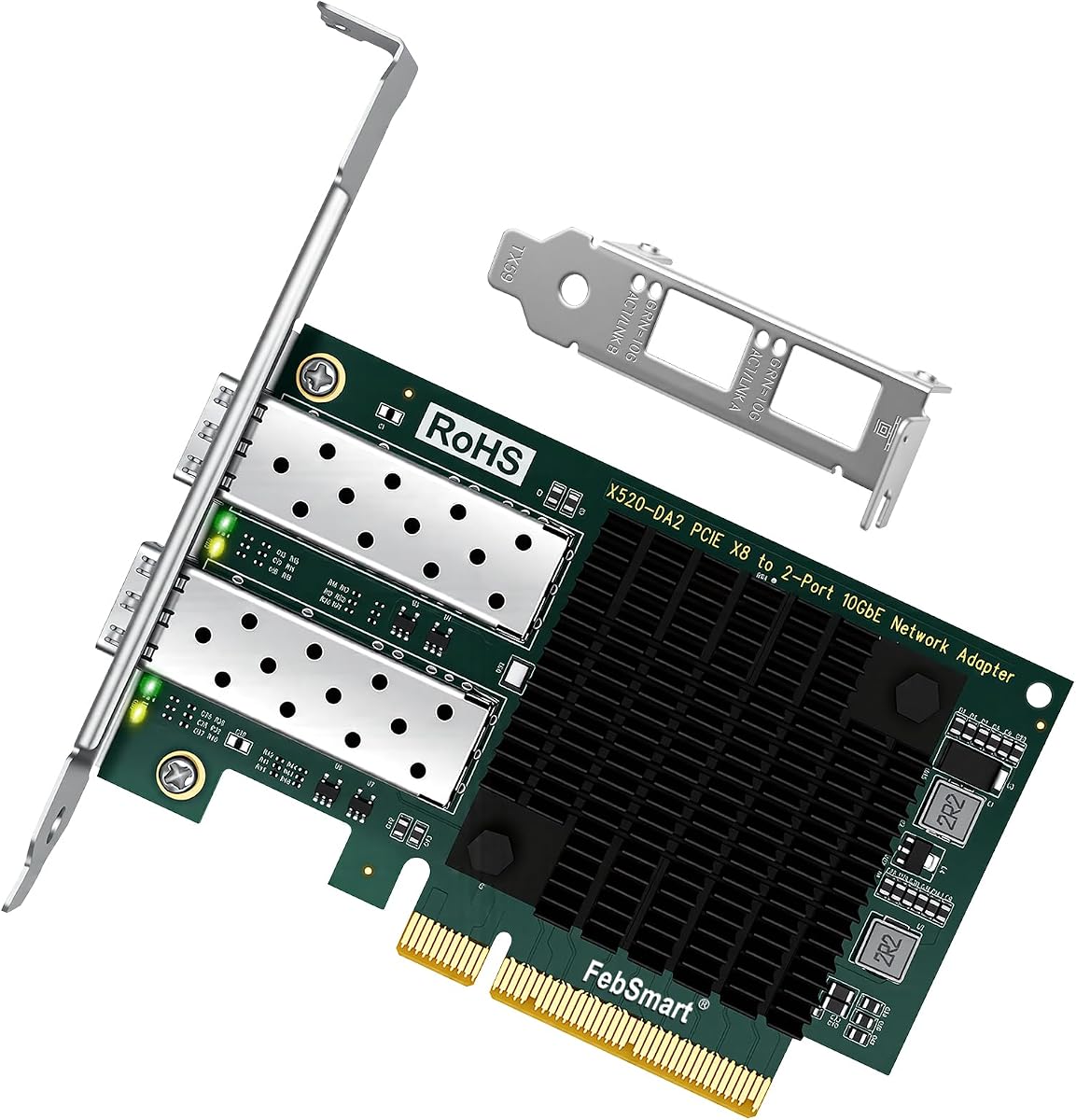
This dual port adapter offers twice the bandwidth potential by allowing two independent ten gigabit connections on one card. It is perfect for users needing redundant links or aggregated traffic for high throughput servers.
We may earn a commission when you buy through this link, at no additional cost to you.
Powered by the trusted Intel 82599ES controller it maintains low latency and high stability even under sustained load. The PCIe 2.0 x8 interface provides enough bandwidth to support full speed on both ports simultaneously.
Users must ensure their motherboard has a free PCIe x8 or x16 slot as this card requires significant physical space. The dual port design makes it a versatile choice for advanced networking scenarios.
For users needing multi-link reliability or balanced loads this is an effective solution. It combines proven Intel performance with the flexibility of dual port configurations for demanding setups.
Two independent SFP+ ports allow for link aggregation or redundant connections without buying multiple cards.
The Intel 82599ES is a well tested chipset known for stability in demanding storage and virtualization environments.
We may earn a commission when you buy through this link, at no additional cost to you.
Selecting the right fiber optic network interface card involves understanding your speed needs chipset compatibility and physical slot constraints.
Choose a card that meets your network switch capacity and storage needs. Ten gigabit cards suit most home and small office upgrades while twenty five gigabit options serve high density server workloads.
Prioritize cards that match your switch ports to ensure full data transfer speeds.
Intel chipsets offer the broadest driver support across Windows Server and Linux environments. Realtek or Mellanox cards offer cost or performance benefits but check OS support first.
Confirm driver availability for your operating system version to avoid installation issues.
Check your motherboard for available PCIe slots. Single lane cards fit in x1 slots while dual port options often require x8 or x16 physical connections.
Ensure you have enough physical space for full height brackets in your chassis.
SFP+ cards accept both fiber optics and copper cables. Fiber is ideal for long distances while Direct Attach Copper is cost effective for short server rack connections.
Decide on your cabling type before buying to select the right modules.
Server and VM users should look for SR-IOV and VT-c features which allow virtual machines to bypass the hypervisor for network access.
These features reduce CPU overhead and improve VM performance in virtualized environments.
Some branded cards reject third-party optical modules. Open compatible cards save money by allowing you to choose cheaper or specialized optics.
Read product details to ensure third-party SFP modules are accepted.
High speed cards generate heat and passive heatsinks require adequate case airflow. Active cooling or small fans may be needed for silent builds.
Check reviews for thermal performance before purchasing.
Windows 11 and Linux kernels evolve quickly so confirm driver support. Server OS support is generally more stable than consumer OS support.
Always check manufacturer support pages before finalizing a purchase.
Start by verifying your system supports the required PCIe slot and OS driver version. Install the card carefully by matching the slot alignment and securing it with screws to prevent connection issues.
After installation download the latest drivers from the manufacturer website. Enable VLAN or QoS settings if your application requires traffic prioritization for gaming or storage.
Regularly inspect fiber connectors for dust or damage as small debris can degrade signal quality. Keep the card area free of dust to maintain cooling performance over long term usage.
Fiber optic cards typically use SFP modules and fiber cables or Direct Attach Copper cables. The card supports both but you must purchase the correct module for your distance needs.
Yes most cards work on desktop PCs provided there is a free PCIe slot and power. Check your case size for bracket compatibility.
A ten gigabit switch is required for full ten gigabit speeds. The cards can negotiate down to one gigabit on older switches but will not reach full speed.
SFP handles one gigabit while SFP+ handles ten gigabit. Both use similar connectors but SFP+ modules are required for ten gigabit performance.
Most Intel based cards are fully compatible with VMware ESXi. Realtek and Mellanox cards may require specific driver packs but support virtualization features.
Yes they work well for NAS units needing fast local transfer. Ensure your NAS supports PCIe add-ons or use an external PCIe enclosure.
Our top picks include the StarTech 2-Port GbE SFP Network Card for stability and the 10Gb/s SFP+ Fiber Port Ethernet Adapter for budget ten gigabit value.
When choosing prioritize chipset compatibility with your OS and slot availability in your case. Open vendor lock-in cards save money on long term module purchases.
Prices change frequently so review current listings before buying. Check that drivers are available for your specific operating system version.