
Dell Wired Mouse MS116
4.6Editor score
Plug and play
Reliable wired connection
Affordable price point
Discover the top external mouse for Dell laptop users. This guide compares wireless and wired options for comfort, performance, and compatibility with your
Finding the right external mouse for Dell laptop devices is crucial for enhancing productivity and comfort during long work sessions. Whether you need precise tracking for creative tasks or silent operation for office environments, the right peripheral can transform your workflow significantly.
We have carefully evaluated ten top-rated mice based on connectivity options, battery life, ergonomics, and compatibility with Dell systems. Each product offers unique features designed to meet different user needs ranging from budget-friendly basics to premium performance models.
Each pick in this guide highlights key strengths and potential trade-offs to help you make an informed decision. Prices and availability may change over time so please verify current details before purchasing to ensure you get the best value for your specific requirements.
4.6Editor score

4.9Editor score

4.6Editor score
This comparison table provides a side by side overview of all ten featured mice highlighting their key specifications and unique selling points for quick reference.






This Dell Advanced Wireless Compact Mouse stands out as the top choice for users seeking a premium external mouse for Dell laptop setups. With a near perfect rating it delivers exceptional performance through its versatile connectivity options and impressive battery life that lasts up to three years on a single set of batteries.
We may earn a commission when you buy through this link, at no additional cost to you.
The dual mode connectivity allows you to switch between 2.4GHz wireless and Bluetooth 5.0 effortlessly giving you flexibility across multiple devices. Microsoft Swift Pair support means you can connect instantly to Windows laptops without digging through settings menus. The adjustable DPI ranges from 1000 to 4000 ensuring precise tracking on high resolution screens while seven programmable buttons enhance productivity.
While the price is higher than basic models the value comes from the durability and advanced features like Dell Display and Peripheral Manager which optimizes performance across your workspace. The one year advanced exchange service provides peace of mind if any issues arise within the warranty period making it a reliable long term investment.
If you need a robust wireless mouse that integrates seamlessly with your Dell ecosystem this model is the clear winner. It balances performance convenience and battery efficiency better than any other option on our list making it ideal for professionals and daily users alike.
Microsoft Swift Pair enables instant Bluetooth connection to Windows laptops without manual configuration in system settings.
Dell Display and Peripheral Manager software allows you to customize button functions and track performance across devices.
We may earn a commission when you buy through this link, at no additional cost to you.
The Dell Wireless Gaming Mouse MS5120W offers high performance features at an accessible price point making it suitable for both gaming and professional use. Its 4000 DPI sensor ensures smooth cursor movement across large displays while seven intuitive buttons provide quick access to essential functions without needing keyboard shortcuts.
We may earn a commission when you buy through this link, at no additional cost to you.
Connectivity is handled through dual mode wireless options including 2.4GHz and Bluetooth 5.0 allowing you to pair with almost any PC including Windows Mac Chrome Linux and Android systems. The battery lasts up to 36 months reducing maintenance frequency and Dell Advanced Exchange Service ensures rapid replacement if faults occur within three years.
Although marketed towards gamers the mouse excels at general productivity tasks thanks to its customizable buttons and Dell Peripheral Manager software. However users seeking purely office focused aesthetics might find the gaming inspired look less suitable. The balance of features and performance makes it a strong contender for versatile computing needs.
Choose this mouse if you want responsive tracking and flexibility across operating systems without breaking the bank. It bridges the gap between gaming peripherals and everyday work mice effectively delivering reliable performance for diverse computing scenarios.
Compatible with Windows Mac Chrome Linux and Android systems for maximum flexibility across your devices.
Extended 36 month battery life minimizes interruptions and reduces the need for frequent battery replacements.
We may earn a commission when you buy through this link, at no additional cost to you.
For users prioritizing simplicity and affordability the Dell Wired Mouse MS116 delivers exactly what is needed without unnecessary extras. At an extremely low price point it offers a reliable wired connection that eliminates battery concerns and connectivity issues common with wireless models.
We may earn a commission when you buy through this link, at no additional cost to you.
This mouse is designed for plug and play functionality requiring no drivers or setup procedures. Just connect it to your USB port and start working immediately. While it lacks advanced features like adjustable DPI or programmable buttons it provides solid tracking for everyday tasks like browsing and document editing.
The main limitation is the wired connection which can restrict movement and create desk clutter. However for stationary workstations this is rarely a significant issue. The durability and cost effectiveness make it an excellent choice for budget constrained environments or secondary setups.
If you need a no fuss mouse that works reliably with your Dell laptop this model is the best value option available. It strips away complexity to focus on fundamental performance ensuring you get the job done efficiently.
Plug and play design requires no drivers or configuration allowing immediate use upon connection.
Wired power means no batteries to replace or charge ensuring consistent availability for tasks.
We may earn a commission when you buy through this link, at no additional cost to you.
The VssoPlor Wireless Mouse combines a sleek slim design with reliable wireless performance making it ideal for portable setups. Its black and gold finish adds a touch of style while the lightweight build ensures easy transport for travel or commuting between work locations.
We may earn a commission when you buy through this link, at no additional cost to you.
Powered by 2.4GHz wireless technology it maintains a stable connection up to ten meters away from your laptop. Intelligent sleep mode activates after five minutes of inactivity to conserve battery life ensuring you rarely need to worry about power depletion during normal usage.
While it lacks advanced features like adjustable DPI or Bluetooth connectivity it fulfills basic navigation needs efficiently. The quiet click mechanism is particularly appreciated in shared spaces where noise could be disruptive. The USB receiver stores inside the mouse to prevent loss when not in use.
Choose this mouse if you want an affordable stylish option that prioritizes portability and quiet operation. It serves as a practical daily driver for casual users who do not need specialized performance features.
Automatically enters sleep mode after five minutes to extend battery life without manual intervention.
Slim profile and internal receiver storage make it easy to carry in bags for on the go work.
We may earn a commission when you buy through this link, at no additional cost to you.
The Logitech M510 is a full size ambidextrous mouse designed for comfort during extended use. Its contoured shape with soft rubber grips supports natural hand positioning reducing strain during long work sessions on Dell laptops or any PC setup.
We may earn a commission when you buy through this link, at no additional cost to you.
A standout feature is the side to side scrolling wheel which allows horizontal navigation through documents spreadsheets and web pages with a simple flick. Back and forward buttons can be programmed for custom shortcuts enhancing productivity beyond standard navigation needs.
Battery life is exceptional with up to two years of usage on a single set of batteries. The Logitech Unifying receiver stays plugged into your laptop and supports multiple devices on one connection simplifying your desktop setup. Software is needed for advanced features but basic functions work immediately.
This mouse is ideal for professionals who value ergonomics and unique navigation features. While it is larger than slim models the comfort and functionality justify the size for users seeking a premium experience.
Side to side scroll wheel enables effortless navigation through wide spreadsheets and long documents.
Unifying receiver allows multiple compatible devices to share a single USB port connection.
We may earn a commission when you buy through this link, at no additional cost to you.
The Logitech M185 is a compact ambidextrous mouse suitable for small to medium hands and tight workspaces. Its design supports both left and right handed users equally providing comfort without requiring specific orientation for daily use.
We may earn a commission when you buy through this link, at no additional cost to you.
A nano USB receiver plugs into your laptop and stays in place allowing you to move around without worrying about losing it. Battery life lasts up to one year thanks to smart sleep mode that conserves power when the mouse is idle.
This model uses certified post consumer recycled plastic reducing environmental impact without compromising performance. It is slightly smaller than full size mice making it ideal for travel or limited desk real estate. Productivity studies show users with this mouse work significantly faster than those using touchpads.
Choose this mouse if you need a reliable portable option that fits comfortably in your bag. It balances simplicity and durability making it perfect for students or professionals on the go.
Compact footprint works well on small desks and in cramped travel environments.
Plastic parts include significant recycled content helping reduce environmental footprint.
We may earn a commission when you buy through this link, at no additional cost to you.
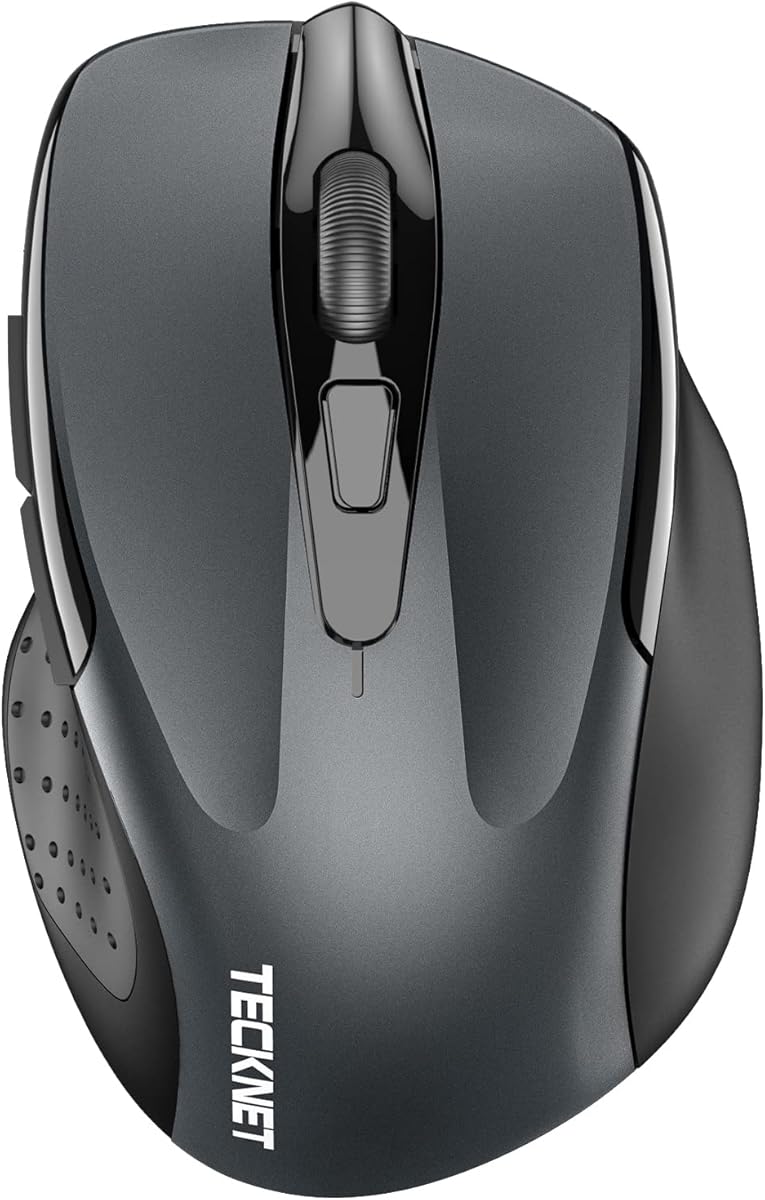
This TECKNET compact mouse features a vibrant mint green finish that adds personality to your setup. It is designed for small to medium sized hands ensuring optimal comfort for users who prefer smaller peripherals over full size options.
We may earn a commission when you buy through this link, at no additional cost to you.
Connectivity uses 2.4GHz wireless technology reaching up to forty nine feet for reliable performance. Three DPI levels let you adjust sensitivity based on your tasks while soft click buttons minimize noise in quiet environments like libraries or shared offices.
The USB receiver stores inside the back compartment to prevent loss when traveling. Battery life extends up to fifteen months on one AA battery ensuring long term usability without frequent replacements. A lifetime support warranty adds value beyond the hardware itself.
If you want a colorful functional mouse that doesn't sacrifice performance this model is a great choice. It is particularly appealing for younger users or those who want their peripherals to reflect their style.
Unique mint green finish stands out from standard black or grey peripherals.
Single AA battery supports up to fifteen months of regular usage.
We may earn a commission when you buy through this link, at no additional cost to you.
The Logitech M330 Silent Plus uses SilentTouch Technology to reduce clicking sounds by over ninety percent creating a peaceful working environment. It is built for right handed users with contoured plastic grips that support long term comfort during intensive tasks.
We may earn a commission when you buy through this link, at no additional cost to you.
Battery life reaches up to eighteen months with automatic sleep mode reducing the frequency of replacements. Optical tracking ensures high precision on most surfaces while the USB receiver works seamlessly across Windows macOS ChromeOS and Linux systems.
While the clicks are significantly quieter some side buttons may not be silent. The mouse also includes recycled plastic components reducing environmental impact. It is ideal for shared offices or late night work sessions where noise could disturb others.
Choose this mouse if noise reduction is your primary priority. It delivers reliable performance without the constant tapping sound typical of standard mice making it perfect for quiet environments.
SilentTouch technology reduces click volume by over ninety percent for a peaceful workspace.
Compatible with major operating systems including Windows Mac Chrome and Linux for versatility.
We may earn a commission when you buy through this link, at no additional cost to you.
This TECKNET mouse allows connection to two devices simultaneously via Bluetooth or USB A switching between them with a simple button slide. It supports Bluetooth 5.0 providing stable connectivity and seamless transitions between your Dell laptop and tablet.
We may earn a commission when you buy through this link, at no additional cost to you.
Six adjustable DPI levels up to 4800 let you customize sensitivity for detailed design work or fast browsing. The silent design ensures whisper quiet clicks ideal for quiet environments though side buttons may not be fully silent. Compatibility extends across Windows macOS Chrome and Linux.
Battery life is extended through automatic sleep technology preserving power during inactivity. Users report consistent performance across different surfaces making it versatile for various workspace setups. Support coverage provides additional reassurance for long term usage.
Choose this mouse if you frequently switch between multiple devices and need customizable sensitivity. Its dual connection capability saves desk space while maintaining high performance for professional tasks.
Switch between two connected devices instantly with a simple slide of the button.
Six DPI levels allow precise control tailored to different tasks and surfaces.
We may earn a commission when you buy through this link, at no additional cost to you.
This TECKNET mouse eliminates disposable batteries with a rechargeable design that charges fully in just 1.5 to 2 hours. A full charge supports up to three months of use assuming two hours of daily usage reducing waste and ongoing battery costs.
We may earn a commission when you buy through this link, at no additional cost to you.
Like other models in the series it supports Bluetooth 5.0 and USB A connections with seamless device switching. Six adjustable DPI levels reach 4800 for precise tracking while silent clicks maintain a quiet environment for focused work in shared spaces.
The connection may become unstable when battery is low serving as a prompt to recharge promptly. Despite this minor limitation the convenience of USB charging outweighs the inconvenience for most users seeking eco friendly peripherals.
Choose this mouse if you want to reduce electronic waste without sacrificing performance. It combines modern convenience with environmental responsibility making it a smart choice for daily use.
Rechargeable battery design eliminates need for disposable AA or AAA batteries.
Full charge takes less than two hours providing quick turnaround for power needs.
We may earn a commission when you buy through this link, at no additional cost to you.
Selecting the right external mouse requires understanding key factors that impact your daily workflow and comfort.
Wireless mice use either Bluetooth or USB receivers to connect to your Dell laptop. Bluetooth saves a USB port while receivers offer more stable connections with lower latency. Choose based on your available ports and need for portability.
Consider wireless freedom versus connection stability when deciding between Bluetooth and USB receiver options.
Ergonomic mice are shaped to support natural hand positioning reducing strain during long work sessions. Compact mice are better for travel but may lack comfort for extended use. Ensure the mouse fits your hand size and preferred grip style.
Prioritize a design that supports your hand shape to prevent discomfort and repetitive strain injuries.
Battery powered mice may require AA or AAA batteries that need periodic replacement. Rechargeable models eliminate this need but require regular charging. Check expected battery life to minimize maintenance interruptions during work hours.
Evaluate how often you are willing to replace batteries or charge your device based on usage patterns.
DPI measures sensor sensitivity with higher values allowing faster cursor movement across large screens. Adjustable DPI lets you switch between precise and fast tracking depending on the task. Look for mice with adjustable settings if you work on high resolution displays.
Choose a DPI range that matches your screen size and workflow requirements for optimal control.
Additional buttons can be programmed for shortcuts or macros enhancing productivity in specific applications. Standard mice have left right clicks and a scroll wheel while advanced models offer more programmable options. Decide if extra buttons are necessary for your typical tasks.
Programmed buttons save time and reduce repetitive keyboard usage for complex workflows.
While most mice work with Windows check compatibility with other systems you may use like Mac or Linux. Some advanced features may require specific drivers that are not available on all platforms. Ensure seamless integration with your primary OS.
Verify system compatibility before purchasing to avoid feature limitations or setup issues.
Durable mice withstand daily wear and tear better than cheaper alternatives. Check warranty terms to understand what coverage is available if defects arise. Premium models often include longer warranties and replacement services.
Invest in quality build and warranty support to ensure long term reliability.
Silent clicks are valuable for quiet environments while side scrolling helps navigate wide documents. Rechargeable options reduce waste and dual connectivity adds flexibility. Identify which special features match your specific work habits and needs.
Select additional features that provide tangible benefits to your daily tasks rather than marketing add-ons.
To start using your new mouse connect it to your Dell laptop via Bluetooth or USB receiver. Most modern devices recognize the peripheral immediately without requiring additional drivers. If the mouse has a power switch ensure it is turned on before attempting to pair.
Clean the sensor on the underside regularly using a soft cloth to remove dust and debris that may affect tracking. For wireless models replace or charge batteries as needed to maintain consistent performance and avoid connection drops during critical tasks.
Store the mouse in a protective case when traveling to prevent damage to buttons or scroll wheels. Adjust DPI settings to match your workspace size ensuring comfortable cursor movement without excessive hand movement. Regular updates to driver software can improve compatibility and features.
Yes most external mice are compatible with all Dell laptops that have USB or Bluetooth ports. Some advanced features may require software support specific to the operating system. Check compatibility details if you use Mac or Linux systems for optimal performance.
To connect turn on the mouse and switch to Bluetooth mode if available. Go to your laptop's Bluetooth settings and select the mouse from available devices. For USB receivers plug the nano receiver into an available USB port and allow automatic driver installation.
For general use a DPI between 1000 and 2000 provides a good balance of speed and precision. Higher DPI settings are useful for high resolution screens or fast tracking needs. Adjust based on personal preference and screen size for comfortable cursor control.
Yes gaming mice often have programmable buttons and high DPI that can enhance productivity workflows. They may be heavier or designed for performance gaming but function well for office tasks. Choose based on comfort and feature needs rather than marketing categories.
Battery powered mice last from six months to three years depending on usage and battery type. Rechargeable models last months on a single charge. Check product specs for exact estimates as sleep modes significantly extend battery longevity.
Cursor jumping is often caused by dirt on the sensor or unstable wireless connections. Clean the underside of the mouse with a soft cloth and move it closer to the receiver if using wireless. Ensure surfaces are even and non reflective for better tracking.
Modern silent mice maintain the same responsiveness as regular ones without the loud clicking sound. The mechanism dampens sound rather than reducing sensor speed. Look for models with positive reviews on click quality to ensure performance is not compromised.
We reviewed ten excellent options for external mice tailored to Dell laptop users ranging from budget picks to premium models. The Dell Advanced Wireless Compact Mouse leads with its long battery life and versatile connectivity while the wired MS116 offers affordability and simplicity.
Prioritize ergonomics and connectivity based on your specific workflow needs. If you spend hours working comfort should be your top priority. For travelers compact wireless models offer portability without sacrificing functionality for daily tasks.
Prices and availability change frequently so verify current details before purchasing. Check for any ongoing deals or bundle offers that may enhance value. The right mouse can significantly improve your productivity and comfort for years to come.