
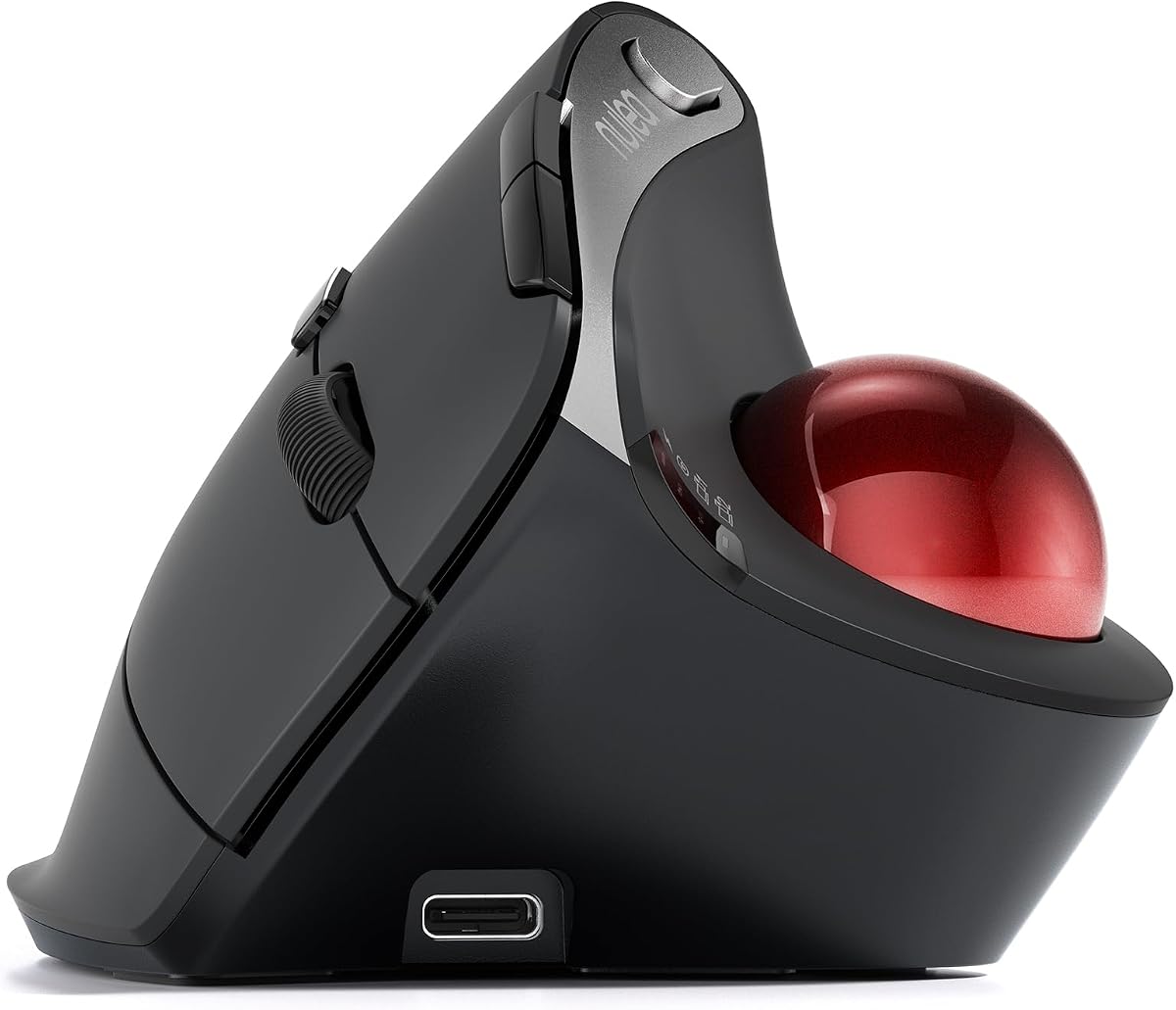
Nulea M501
4.4Editor score
Affordable price point
Rechargeable battery
Multi-device connection
This comprehensive guide compares the top 10 ergonomic trackball mice for October 2026, evaluating design, comfort, and features to help you find the perfect
Finding the right ergonomic trackball mouse can transform your daily computing experience by reducing strain and improving comfort. These devices allow you to control the cursor with a thumb-controlled ball, minimizing wrist movement and promoting better posture throughout your workday.
We have carefully evaluated ten top-rated models based on ergonomic design, connectivity options, battery life, and user feedback. Our comparison covers a wide range of preferences, from budget-friendly options to advanced premium models designed for heavy-duty professional use.
Each pick highlights specific strengths and ideal use cases to help you make an informed decision for your setup. Please note that product availability and pricing may change frequently, so verify current details before making your final purchase choice.
4.4Editor score
4.5Editor score

4.4Editor score
This side-by-side comparison highlights the key specifications and features of each model to help you quickly identify the right fit for your needs.




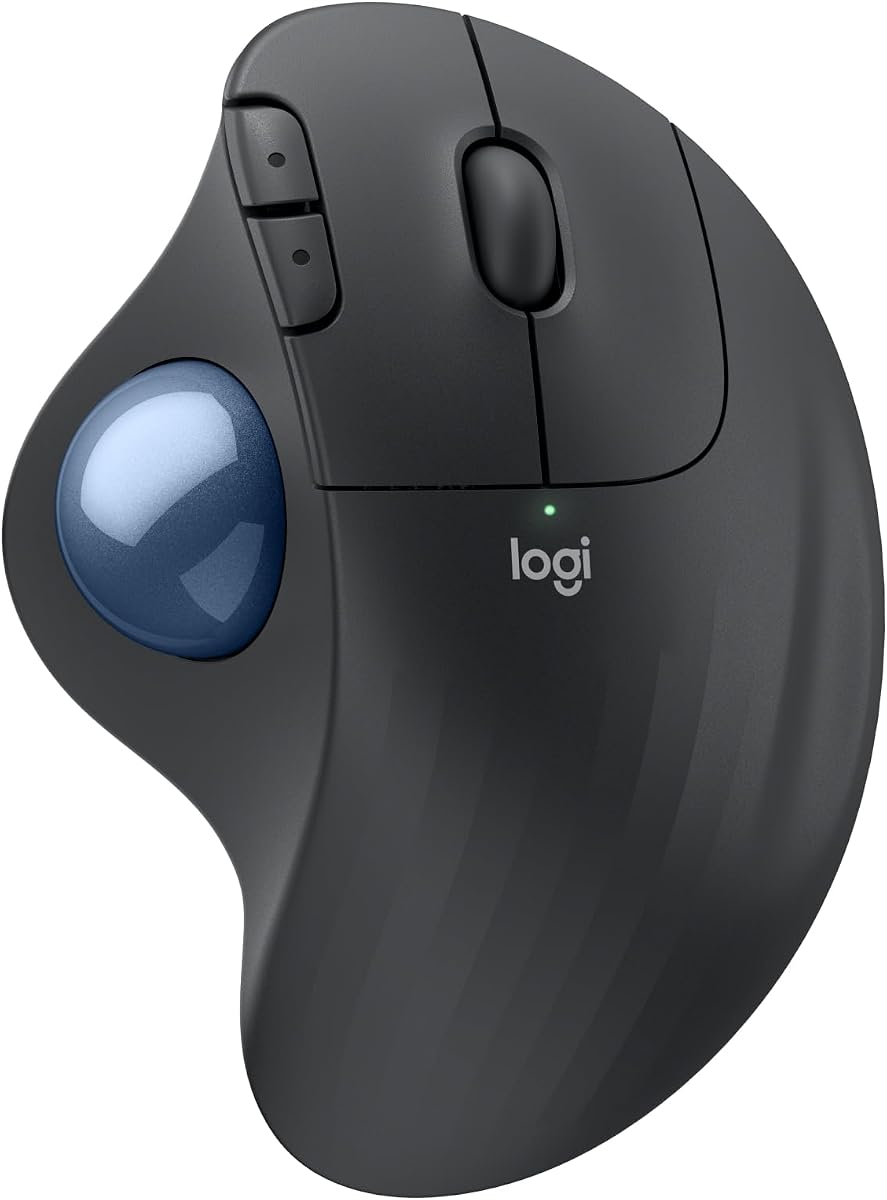
The Logitech Ergo M575S stands out as a top choice for users seeking comfort and reliability. With a 4.5-star rating, it delivers smooth thumb control and reduced muscle strain, making it ideal for all-day use.
We may earn a commission when you buy through this link, at no additional cost to you.
Its ergonomic shape aligns the forearm naturally, and the quiet click feature ensures no distractions in shared environments. The Logi Options+ app allows easy cursor speed adjustments and shortcut customization for enhanced productivity.
While it requires AA batteries and lacks macro programming, these trade-offs are minor compared to its comfort benefits. The included recycled plastic construction also aligns with modern sustainability preferences.
This mouse is best suited for office workers and general users prioritizing ergonomics. We recommend it for anyone looking to reduce wrist strain without sacrificing performance or ease of use.
The sculpted design supports the hand and realigns the forearm to reduce strain and improve posture throughout the day.
Connect via Bluetooth or the included Logi Bolt USB receiver for flexible setup on multiple devices.
We may earn a commission when you buy through this link, at no additional cost to you.
The Nulea M501 offers exceptional value with a 4.4-star rating, making it a favorite for budget-conscious users. It features a smooth thumb trackball and ergonomic design to reduce muscle stress during extended work hours.
We may earn a commission when you buy through this link, at no additional cost to you.
Its rechargeable battery eliminates the need for disposable cells, and adjustable DPI levels provide precision for various tasks. The mouse supports Bluetooth and USB dongle connections for seamless switching between devices.
Though buttons are not programmable and dongle storage is internal, these limitations do not detract from its core performance. The elegant curved shape ensures comfort and steady cursor movement for office and design work.
This model is ideal for students or casual users wanting ergonomic benefits without high costs. We recommend it for anyone looking for a reliable, affordable trackball mouse with essential features.
A built-in rechargeable battery allows you to avoid frequent replacements and ensures long-lasting use.
Connect up to three devices via Bluetooth or USB receiver for improved efficiency and multi-device workflows.
We may earn a commission when you buy through this link, at no additional cost to you.
This black variant of the Logitech Ergo M575S holds an impressive 4.6-star rating, appealing to users seeking reliable ergonomics. It features improved forearm posture design and a long battery life for hassle-free daily operation.
We may earn a commission when you buy through this link, at no additional cost to you.
The thumb control trackball saves space and reduces hand movement, ideal for small desks or tight workspaces. Its simple connectivity ensures quick setup and smooth cursor control across various surfaces.
While it lacks advanced customization, the focus on posture and battery efficiency makes it a strong choice for general users. The sleek black design fits well into professional office environments.
We recommend this mouse for those prioritizing ergonomic posture and minimal maintenance. It is perfect for anyone needing a dependable, comfortable trackball for daily computing tasks.
The ergonomic shape supports your hand and realigns your forearm to a better posture throughout the day.
Move your cursor without moving your hand, making it ideal for small or space-saving setups.
We may earn a commission when you buy through this link, at no additional cost to you.
The Logitech MX Ergo S is a premium choice with a 4.4-star rating, offering advanced features for professionals. It includes a 20-degree tilt to reduce muscle strain by 27% and supports up to 120 days of use on a full charge.
We may earn a commission when you buy through this link, at no additional cost to you.
Its six customizable buttons and Logi Options+ app enable extensive productivity shortcuts, while USB-C charging provides quick power. The soft rubber grip and sculpted design ensure comfort for medium to large hands.
While the price is higher and it may not fit smaller hands well, the ergonomic benefits and customization justify the investment. The recycled plastic materials also reflect a commitment to sustainability.
We recommend this mouse for power users and designers needing precision and comfort. It is ideal for anyone willing to invest in a high-end trackball for long-term ergonomic health.
Switch between speed and high-precision tracking at the tap of a button for enhanced control during tasks.
Enjoy up to 24 hours of use from a 1-minute charge, ensuring minimal downtime during busy workdays.
We may earn a commission when you buy through this link, at no additional cost to you.
TECKNET wireless trackball mouse boasts a 4.5-star rating and is specially designed for larger hands, reducing strain by up to 50% with its 16-degree vertical angle. It features a 500mAh rechargeable battery and silent click technology for comfortable use.
We may earn a commission when you buy through this link, at no additional cost to you.
With three device connections and adjustable DPI levels, this mouse supports flexible workflows across multiple screens. The 34-foot wireless range ensures strong signal and lag-free operation for most office environments.
While users recommend a break-in period to adjust to the design, the ergonomic benefits quickly outweigh any initial learning curve. The silent operation makes it suitable for shared workspaces or quiet home offices.
We recommend this mouse for users with larger hands seeking comfort and efficiency. It is perfect for anyone needing a versatile, ergonomic trackball with strong connectivity and silent performance.
The vertical angle promotes better forearm posture and reduces muscle strain by up to 50% for all-day comfort.
Pair with up to three devices via Bluetooth or 2.4G and switch instantly with a tap of a button.
We may earn a commission when you buy through this link, at no additional cost to you.
The Nulea M506 holds a remarkable 4.7-star rating, praised for its 54-degree vertical design that keeps wrists and forearms relaxed. Its detachable trackball allows easy cleaning to maintain smooth performance over time.
We may earn a commission when you buy through this link, at no additional cost to you.
With up to 21 days of battery life and four adjustable DPI levels, this mouse supports both precision and speed. The textured palm surface ensures a steady grip for office and creative tasks.
While it has a larger footprint and limited programmability, the ergonomic focus and high rating make it a standout choice. The one-click operation streamlines workflows for frequent users.
We recommend this mouse for users seeking a vertical ergonomic solution with strong reliability. It is ideal for anyone wanting a comfortable, long-lasting trackball with easy maintenance.
The vertical structure keeps wrists and forearms in natural relaxed positions for extended comfort during work.
The trackball is removable for quick cleaning to ensure precise cursor control all the time.
We may earn a commission when you buy through this link, at no additional cost to you.
The Nulea Wireless Ergonomic Vertical Trackball Mouse offers a 65-degree ergonomic angle for relaxed wrists, earning a 4.3-star rating. Its infinite scroll wheel automatically switches between precise and fast modes based on scrolling speed for effortless navigation.
We may earn a commission when you buy through this link, at no additional cost to you.
Silent control on every button and scroll wheel ensures noise-free operation, perfect for shared spaces. Multi-device connection via Bluetooth or USB receiver supports seamless switching between up to three devices.
While the scroll mechanism may take time to master and the rating is slightly lower, the comfort and silent features remain appealing. The wave-textured surface offers a comfortable grip for long hours at the desk.
We recommend this mouse for users valuing silent operation and infinite scroll convenience. It is ideal for anyone needing a vertical ergonomic mouse for long-duration work without noise distractions.
The advanced scroll wheel switches between precise and fast modes based on scrolling speed for effortless navigation through long pages.
Experience a completely noise-free operation from the trackball to every button and scroll wheel for total focus.
We may earn a commission when you buy through this link, at no additional cost to you.
The Nulea 21.7 Tilt Trackball Mouse features a 21.7-degree tilt stand for a more natural wrist position, supported by a 4.4-star rating. Silent control on all buttons ensures a quiet work environment, while four adjustable DPI levels offer flexibility for various tasks.
We may earn a commission when you buy through this link, at no additional cost to you.
Its multi-device connection supports seamless switching between PCs, Macs, and tablets. The elevated design fits your palm precisely for a comfortable grip during long hours at the desk.
Although buttons are not programmable and color choices are limited, the tilt design and silent operation provide significant ergonomic benefits. The elegant curved shape enhances productivity with added comfort.
We recommend this mouse for users seeking a tilted ergonomic solution with quiet performance. It is perfect for anyone wanting a comfortable trackball for shared workspaces without noise distractions.
The 21.7-degree tilt stand delivers a more natural wrist position for a comfortable and effortless grip during use.
From the trackball to every button and scroll wheel, experience a completely noise-free operation for total focus.
We may earn a commission when you buy through this link, at no additional cost to you.
The Logitech Ergo M575 for Business is a 4.4-star rated model designed for enterprise-scale deployment with Logitech Sync for remote monitoring. It reduces muscle activity by 25% and offers an 18-month battery life for consistent, long-term use.
We may earn a commission when you buy through this link, at no additional cost to you.
Designed with Logi Ergo Lab experts, it keeps hands relaxed and supports personalization via Logi Options+ app for time-saving shortcuts. The smooth tracking ensures precision across surfaces without requiring hand movement.
While some features are tailored for business deployment, the ergonomic comfort and battery life benefit individual users too. The recycled plastic construction reflects sustainability values for modern workplaces.
We recommend this mouse for businesses or professionals needing reliable ergonomic support. It is ideal for anyone wanting a durable, long-lasting trackball with strong remote management capabilities.
Ideal to deploy at scale for employees, with remote deployment and monitoring via Logitech Sync for IT efficiency.
The comfortable sculpted ergonomic shape reduces muscle activity by 25% and promotes better forearm posture for longer comfort.
We may earn a commission when you buy through this link, at no additional cost to you.
The Logitech MX Ergo S Rechargeable holds a 4.5-star rating and offers USB-C fast charging, delivering 24 hours of use from just one minute of charging. It includes six programmable buttons and a 20-degree tilt to reduce muscle strain by 27%.
We may earn a commission when you buy through this link, at no additional cost to you.
Its encrypted dongle support ensures secure wireless connectivity, while the Logi Options+ app enables time-saving shortcuts and smart actions. The contoured design with soft rubber grip suits medium to large hands for all-day comfort.
While the cable is not included and the price is premium, the advanced features and battery efficiency justify the cost. The sustainable design with recycled materials adds value for eco-conscious users.
We recommend this mouse for power users needing quick charging and extensive customization. It is ideal for anyone seeking a high-end, secure, and comfortable trackball for professional workflows.
Enjoy up to 24 hours of use from a 1-minute charge, ensuring minimal downtime during busy workdays.
Switch between speed and high-precision tracking at the touch of a button for enhanced control during tasks.
We may earn a commission when you buy through this link, at no additional cost to you.
Choosing the right ergonomic trackball mouse requires balancing features, design, and your specific work needs.
Look for mice with angled or sculpted shapes that promote a natural wrist and forearm position. A good ergonomic design should reduce muscle strain and support long hours of use without fatigue.
Prioritize models with comfortable grips and appropriate size for your hand dimensions to ensure sustained comfort.
Ensure the mouse supports your preferred connection method, such as Bluetooth or USB receiver. Multi-device connectivity allows seamless switching between computers or tablets for increased productivity.
Verify compatibility with your operating system to avoid driver issues and ensure stable wireless performance.
Consider whether you prefer a rechargeable or replaceable battery. Rechargeable models often provide convenience, while AA battery models may offer longer runtime on a single charge.
Check charging times and usage hours per charge to align with your daily work demands and avoid frequent interruptions.
Adjustable DPI settings allow you to customize cursor speed for different tasks, from detailed editing to quick navigation. Smooth tracking across various surfaces is essential for consistent performance.
Choose a model with multiple DPI levels to adapt to your changing workflow needs without reconfiguration.
Programmable buttons can enhance productivity by allowing shortcuts for common actions like copy-paste or app switching. Not all trackballs offer this feature, so review button customization options carefully.
If you use many shortcuts, prioritize a model with app support for button programming and macro creation.
High-quality materials ensure the mouse withstands daily use without wear affecting performance. Look for reputable brands with warranty support and positive user feedback regarding longevity.
Durability is key for long-term investment, so choose models designed for professional environments if you work daily.
Quiet click mechanisms are valuable in shared spaces or during video calls. Some models offer silent operation for all buttons, reducing distractions and maintaining focus.
If noise is a concern, select a mouse explicitly marketed as silent or quiet to ensure a peaceful work environment.
Balance your budget with the features you need most. Basic models can provide solid ergonomics, while premium options offer advanced customization and charging capabilities.
Invest in a mouse that fits your financial range while meeting essential ergonomic and productivity requirements for best value.
Place the mouse on a flat, stable surface and adjust your wrist to rest comfortably without strain. Let your thumb control the trackball while your hand remains stationary to minimize movement.
Clean the trackball regularly by removing it from its cage and wiping both the ball and housing to maintain smooth operation. Dust and debris can cause tracking issues over time.
Update firmware and driver software periodically to ensure optimal performance and compatibility with your system. Regular maintenance extends the lifespan of your ergonomic trackball mouse.
Ergonomic trackball mice are input devices designed to reduce wrist and forearm strain by using a stationary thumb-controlled ball to move the cursor. They promote better posture and are ideal for users with wrist discomfort or limited desk space.
Yes, trackball mice can help alleviate carpal tunnel symptoms by reducing wrist movement and keeping the forearm in a neutral position. Many ergonomic models are specifically designed to minimize muscle strain and prevent repetitive stress injuries.
Most users adapt to trackball mice within a few days to two weeks as they get used to thumb control. Practice and adjusting cursor speed settings can ease the transition from traditional mice for new users.
The best DPI depends on personal preference and screen resolution. Higher DPI allows faster cursor movement, while lower DPI offers more precision for detailed work, so adjusting settings to suit your tasks is recommended.
Many modern trackball mice support Bluetooth connectivity, allowing them to connect to tablets and smartphones seamlessly. Check the product specifications to confirm compatibility with your specific tablet model and operating system.
To clean a trackball mouse, eject the ball from its housing and wipe both the ball and the internal sensors with a soft cloth. Remove dust and residue to ensure smooth tracking and prevent performance issues over time.
Trackball mice are often better for ergonomics and reducing wrist strain compared to traditional mice. They also save desk space and work well in tight environments, making them ideal for users seeking comfort and efficiency.
Many trackball mice work on various surfaces including glass due to their internal ball mechanism. However, performance may vary depending on the sensor type, so testing on your specific surface is advisable.
The Logitech Ergo M575S, Nulea M501, and Logitech MX Ergo S lead this roundup with strong ergonomics, battery life, and features suited for different needs and budgets.
Prioritize your personal comfort preferences, required connectivity, and budget when selecting a trackball mouse. Choosing a model with the right ergonomic design can significantly improve your daily work experience.
Always verify current product details and pricing before purchasing to ensure the best deal. Your ideal ergonomic trackball mouse will balance comfort, functionality, and value for your unique setup.