
Arteck Split Ergonomic Keyboard with Palm Rest, 2.4G USB Wireless Keyboard
4.3Editor score
Split ergonomic design layout
Soft cushioned wrist rest
6 months battery life
Programmers spend countless hours typing code, making comfort and posture critical for productivity. An ergonomic keyboard helps align wrists and forearms naturally to reduce strain and fatigue over long work sessions.
We evaluated ten leading ergonomic keyboards based on split design, adjustability, build quality, and user feedback. Our analysis covers wireless and wired options ranging from budget-friendly to premium professional models.
Each pick highlights key features, pros, cons, and ideal user scenarios to help you decide. Prices and availability change frequently, so verify current details before making your final purchase decision.
4.3Editor score

4.4Editor score

4.1Editor score
As an Amazon Associate we earn from qualifying purchases.
This side-by-side comparison highlights key specs across all ten ergonomic keyboards to help you find the right fit for your workspace and typing style.




The Logitech Ergo K860 stands out as a top choice for programmers seeking comfort without sacrificing layout familiarity. Its curved split design and sloping frame promote a natural typing posture that reduces muscle strain on wrists and forearms during long coding sessions.
We may earn a commission when you buy through this link, at no additional cost to you.
Users appreciate the pillowed wrist rest with memory foam which offers 54 percent more support than standard keyboards. The scoop-shaped Perfect match fingertip curves for fluid typing while the adjustable tilt legs let you fine-tune angles between zero and seven degrees for seated or standing work.
Although it uses membrane switches rather than mechanical ones the quiet operation and tactile feedback are generally satisfying for extended use. The main trade-off is its weight and lack of mechanical durability but the ergonomic benefits and build quality justify the investment for most developers.
We recommend the K860 for teams or individuals prioritizing ergonomic health and comfort. It connects via Bluetooth or USB and integrates well with Logitech Options software for shortcut customization making it a versatile tool for modern programming workflows.
The split keyframe and sloping design align wrists and forearms naturally lowering muscle strain and promoting healthier typing postures throughout the day.
Memory foam wrist rest with curved contour provides substantial support reducing wrist bending and increasing comfort during extended typing periods.
We may earn a commission when you buy through this link, at no additional cost to you.
The KINESIS Freestyle2 offers unmatched adjustability with its separate key modules that can rotate and separate up to nine inches. This flexibility allows programmers to customize hand wrist and forearm positions precisely for their body type and workspace preferences.
We may earn a commission when you buy through this link, at no additional cost to you.
It comes pre-assembled with VIP3 tenting accessory enabling five to fifteen degrees of tenting to keep forearms neutral and wrists supported. The standard Windows layout includes hotkeys and a numeric pad without needing special drivers making it easy to integrate into existing setups.
The membrane key switches are designed with low activation force to reduce finger fatigue and impact over time. While the tenting and tether add initial setup complexity the ergonomic improvements and durability make it a strong candidate for professionals prone to strain.
Choose the Freestyle2 if you want granular control over keyboard geometry. Its modular design supports diverse body sizes and typing styles ensuring a natural posture that can reduce long-term injury risks.
Rotatable and separable key modules allow you to position hands and wrists in a natural relaxed posture tailored to your specific body type.
VIP3 tenting accessory provides adjustable angles with cushioned palm supports keeping forearms neutral and reducing wrist strain during typing.
We may earn a commission when you buy through this link, at no additional cost to you.
The Logitech Wave Keys delivers ergonomic benefits in a compact form factor ideal for smaller desks or portable workspaces. Its wavy design places hands wrists and forearms in a natural typing position helping to reduce strain without taking up excessive desk space.
We may earn a commission when you buy through this link, at no additional cost to you.
A cushioned palm rest with memory foam provides ample wrist support throughout the day ensuring comfort during long coding sessions. It connects via Bluetooth or Logi Bolt receiver and features Easy-Switch to toggle between up to three devices like laptops tablets and phones.
Although it lacks a numeric keypad which may affect data entry workflows the ergonomic certification and battery life make it a practical choice for developers focusing on comfort. The lightweight design and sustainable materials also appeal to environmentally conscious users.
Opt for the Wave Keys if you value portability and ergonomics in a smaller package. Its seamless multi-device connectivity and quiet keys make it a versatile companion for coding on multiple machines.
Wavy compact shape places hands and wrists in a natural position while saving desk space and improving posture over long typing sessions.
Easy-Switch and Bluetooth Bolt connection allow seamless switching between laptop tablet and phone supporting flexible workflows across devices.
We may earn a commission when you buy through this link, at no additional cost to you.
The Arteck Split Ergonomic Keyboard offers an affordable entry into ergonomic typing with a split design that positions wrists and forearms in a relaxed natural posture. Its cushioned wrist and palm rest provide comfort making it suitable for extended use without breaking the bank.
We may earn a commission when you buy through this link, at no additional cost to you.
Setup is straightforward with a nano USB receiver stored in the keyboard for quick connection. The rechargeable lithium battery lasts up to six months on a single charge based on daily use providing reliable operation without frequent recharging interruptions.
While it lacks advanced features like tenting or programmable keys the keyboard delivers solid ergonomics and comfort at a budget price. The trade-off is minimal adjustability and basic key feedback but this works well for casual developers seeking posture improvement.
Consider the Arteck if you need an ergonomic upgrade without spending heavily. Its simple design and long battery life make it a practical choice for home offices or secondary workstations.
Split design and cushioned rest promote natural wrist positioning at a budget-friendly price point making ergonomics accessible to more users.
Nano USB receiver and six month battery life ensure reliable wireless performance without constant charging or software requirements.
We may earn a commission when you buy through this link, at no additional cost to you.
The ProtoArc EK01 Plus combines full-size ergonomics with convenient backlighting ideal for programmers working in varied lighting conditions. Its curved split frame and scooped keys reduce wrist strain while the soft white LED backlight offers adjustable brightness levels for visibility.
We may earn a commission when you buy through this link, at no additional cost to you.
It supports seamless switching between three devices via Bluetooth and 2.4G USB connectivity making it easy to manage multiple machines. The upgraded 2000mAh battery delivers significantly longer operation with up to 100 days of use when backlight is turned off.
Users benefit from a cushioned wrist rest providing 54 percent more support and four adjustable tilt feet for customized angles. The main limitation is that backlighting consumes power reducing runtime but the flexibility and full-size layout suit extensive typing tasks.
Choose the EK01 Plus if you need ergonomic comfort with low-light usability. Its robust battery and multi-device support make it a strong option for developers managing laptops and desktops simultaneously.
Three brightness levels allow visibility in low light while conserving battery when turned off extending overall operation time significantly.
2000mAh rechargeable battery delivers up to 100 days runtime with backlight off providing reliable wireless performance without frequent charges.
We may earn a commission when you buy through this link, at no additional cost to you.
The Logitech Ergo K860 Business variant targets IT departments needing secure scalable ergonomic solutions with high-performance wireless connections. It features Logi Bolt technology with fully encrypted secure connections ensuring safe data transmission for professional environments.
We may earn a commission when you buy through this link, at no additional cost to you.
Certified in over 100 countries it supports remote mass deployment and management tools designed for IT pros. The ergonomic design reduces muscle strain and supports posture just like the consumer version while maintaining a full-size layout with numeric keypad.
With two-year battery life and connectivity to up to three devices it balances comfort with productivity. While the price is higher the enterprise security and deployment features make it ideal for organizations prioritizing safety and user health.
Select the Business K860 for corporate settings requiring secure ergonomic tools. Its deployment features and comfort design ensure long-term usability and reduced strain for staff members.
Logi Bolt wireless technology provides fully encrypted secure connections ideal for protecting sensitive data in professional and IT environments.
Certified globally and designed for remote mass deployment making it easy for IT departments to manage and configure across large teams.
We may earn a commission when you buy through this link, at no additional cost to you.
The KINESIS Advantage360 delivers a premium ergonomic experience with contoured split key wells concave shape and thumb keys designed to increase comfort and productivity. Its quiet mechanical switches provide tactile feedback with low activation force making it suitable for long coding sessions.
We may earn a commission when you buy through this link, at no additional cost to you.
You can separate modules up to ten inches and adjust tenting heights to fit any body type. The keyboard supports Bluetooth and wireless linking with firmware updates allowing power users to reconfigure layouts via GitHub or web GUI tools.
Although it requires separate purchase of premium palm pads the build quality and programmability justify the cost for serious developers. Its durability rated at 50 million presses ensures longevity and consistent performance under heavy use.
Invest in the Advantage360 if you demand the highest ergonomic comfort and customization. Its mechanical switches and programmable layout support advanced workflows and reduce strain for professional programmers.
Patented concave key wells and integrated palm supports position hands naturally reducing strain and enhancing typing comfort over time.
Fully programmable layout allows power users to redefine shortcuts and key functions through GitHub or web-based configuration tools easily.
We may earn a commission when you buy through this link, at no additional cost to you.
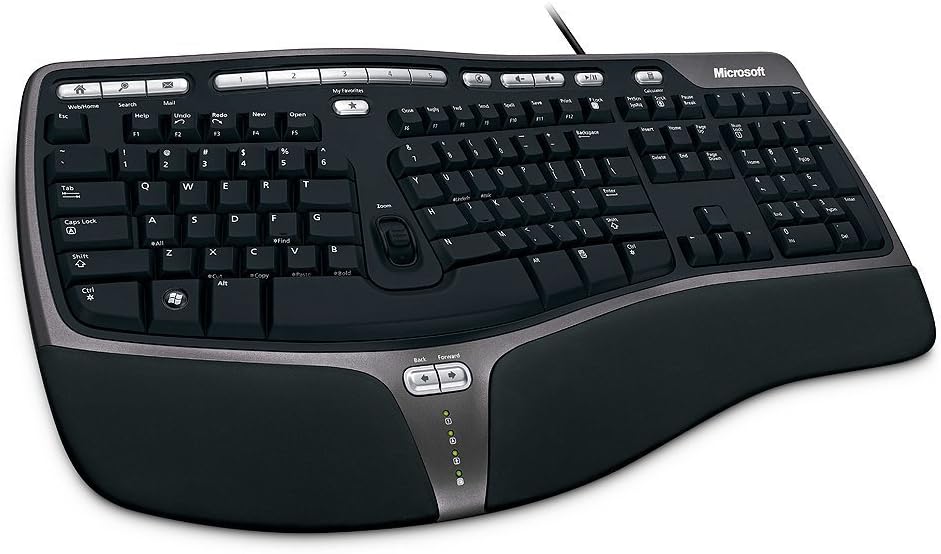
The Microsoft Wired Natural Ergonomic Keyboard 4000 remains a staple for professionals seeking reliable ergonomics without wireless complexity. Its split design encourages natural hand wrist and forearm positions while a cushioned palm rest promotes neutral wrist alignment.
We may earn a commission when you buy through this link, at no additional cost to you.
A palm lift feature maintains a relaxed natural angle reducing strain and the media keys allow easy control for video and audio files. The wired connection ensures stable performance without battery concerns making it ideal for stationary workspaces.
While the design is older and lacks modern wireless features its durability and ergonomic effectiveness are well proven over years. The trade-off includes limited portability and outdated aesthetics but functionality remains robust for everyday typing.
Choose this model if you prefer dependable wired ergonomics and simple operation. It suits desktop programmers who value comfort and stability over wireless flexibility.
Split ergonomic layout encourages relaxed hand forearm and wrist alignment reducing muscle strain during long typing or coding sessions.
Cushioned palm rest with palm lift maintains a neutral wrist angle promoting healthier posture and reducing fatigue over time.
We may earn a commission when you buy through this link, at no additional cost to you.
The Microsoft Natural Keyboard Elite brings ergonomic comfort with a classic design that supports relaxed hand and wrist positions. Its enhanced F-key commands allow customizable shortcuts and dedicated multimedia controls offer convenient access to music and video files.
We may earn a commission when you buy through this link, at no additional cost to you.
It connects via USB or PS/2 ports providing flexibility with older systems and delivers consistent performance without battery needs. The white finish and comfortable layout remain popular among users who prefer traditional keyboard ergonomics and media integration.
While it lacks modern wireless capabilities and sleek aesthetics its ergonomics and control features serve well for daily tasks. The trade-off is connectivity limitations and bulkier design but functionality and comfort hold steady.
Select the Elite if you need reliable multimedia access and ergonomic comfort. It fits well in traditional office settings and suits developers who prefer wired stability.
Enhanced F-key commands enable customizable shortcuts improving workflow efficiency and allowing quick access to common commands.
Dedicated media keys provide easy control over music and video enhancing productivity and workflow convenience while typing.
We may earn a commission when you buy through this link, at no additional cost to you.
The Microsoft Natural Ergonomic Keyboard 4000 for Business delivers ergonomic comfort with a split design that promotes natural hand wrist and forearm positions. Its plush integrated palm rest improves support while the improved number pad places common numeric functions where they are needed most.
We may earn a commission when you buy through this link, at no additional cost to you.
Taskbar Favorites allow easy access to programs with hotkeys and media keys simplify control for multimedia tasks. The keyboard supports IntelliType Pro software for customization though Mac users may need additional setup to enable all features.
While it is wired and requires occasional software configuration its ergonomic benefits and business-focused features make it a solid choice for offices. The trade-off includes older connectivity and extra steps for Mac integration but comfort remains high.
Use this model in business environments prioritizing ergonomics and efficiency. Its taskbar shortcuts and enhanced number pad support productivity in professional workstations.
Common numeric functions repositioned above pad for easier access improving efficiency during data entry and numerical tasks.
Taskbar Favorites keys let you quickly access programs and windows with one press streamlining workflow and multitasking.
We may earn a commission when you buy through this link, at no additional cost to you.
Selecting the right ergonomic keyboard requires evaluating split design, wrist support, key switches, and connectivity. These factors determine comfort and productivity during long coding sessions.
A split design reduces wrist rotation by aligning hands in a natural shoulder-width position. Look for adjustable separation and tenting angles to customize forearm posture. Adjustable legs allow tilting for better wrist alignment whether seated or standing.
Prioritize keyboards with modular splits and tenting options to tailor ergonomics to your body type and workspace setup.
Memory foam or cushioned wrist rests provide consistent support reducing pressure on the carpal tunnel area. Check for contoured designs that match wrist curvature. High-density foam maintains shape over time to prevent flattening under prolonged use.
Choose a keyboard with integrated cushioned palm support for sustained comfort during extended typing.
Mechanical switches offer tactile feedback and durability but may be louder. Membrane switches are quieter and cheaper but softer. Low-force keys reduce finger fatigue and impact strain especially for heavy typists coding all day.
Select low-force or mechanical switches based on your sensitivity and noise tolerance for long sessions.
Wireless connections via Bluetooth or USB receiver provide flexibility but depend on battery life. Wired options ensure stable connection without power concerns. Multi-device switching is valuable if you work across laptops and desktops.
Decide between wireless flexibility and wired stability based on your setup and charging convenience.
Full-size layouts include numeric keypads essential for data entry. Compact models save desk space but may lack media keys. Enhanced function keys allow shortcut customization for improved workflow efficiency.
Balance size and key availability with your workflow requirements and desk space limitations.
Look for keyboards rated for high keypress counts and robust construction. A solid warranty protects your investment against defects. Brands with tech support ensure help if issues arise during use.
Invest in keyboards with proven durability and strong warranty coverage for long-term reliability.
Heavier keyboards offer stability but reduce mobility for travel. Lightweight options are easier to transport but may shift on the desk. Consider portability if you move between offices or home setups regularly.
Choose weight based on whether your workspace is fixed or requires frequent relocation.
Software tools allow mapping keys and creating shortcuts tailored to programming tasks. Open-source configurability enables advanced users to optimize layouts. Compatibility with your OS and system security standards matters for enterprise settings.
Verify software support and customization options match your OS and workflow customization needs.
Begin by positioning the keyboard so your elbows are at a ninety-degree angle and wrists remain straight while typing. Adjust tilt and tenting legs to reduce forearm strain and maintain neutral alignment during sessions.
Clean keys regularly using compressed air to remove dust and debris that may affect key switches. Wipe surfaces with a microfiber cloth and avoid harsh chemicals that can damage plastics or finishes.
Store the keyboard in a dry environment when not in use and disconnect wireless receivers securely. Monitor battery levels periodically to avoid sudden shutdowns and replace rechargeable batteries as needed to maintain performance.
Split keyboards reduce wrist strain by allowing hands to stay shoulder-width apart which promotes natural forearm alignment. This design helps prevent repetitive stress injuries common during long coding sessions.
Many users report improved speed after adjusting to ergonomic layouts due to reduced fatigue and better posture. However speed gains depend on individual adaptation time and comfort preferences with the device.
Replace a keyboard when key switches lose tactile feedback or wrist rests become compressed. Regular maintenance extends life but most models remain functional for several years of heavy use.
Ergonomic designs promote neutral wrist positions reducing pressure on the carpal tunnel. While not a cure they help manage symptoms when combined with proper posture and stretching exercises.
Most ergonomic keyboards work with Windows macOS and Linux without special drivers. Verify Bluetooth or USB connectivity and software tools compatibility before purchase to avoid setup issues.
Wireless ergonomic keyboards offer flexible setup with Bluetooth or receivers but depend on battery life. Choose models with long battery and stable connections for uninterrupted productivity.
Our top picks highlight keyboards balancing ergonomics features and affordability for various needs. Logitech Ergo K860 leads with comfort while Arteck offers budget-friendly ergonomic value.
Prioritize split design, wrist support, and key switch type based on your typing habits and workspace setup to reduce strain effectively. Customizable options enhance workflow efficiency and long-term health.
Check current pricing and availability as costs fluctuate based on promotions or model updates. Investing in quality ergonomic gear now can prevent discomfort and boost productivity for years ahead.