
Gigabit Dual NIC with Intel 82576 Chip
4.5Editor score
Intel 82576 Controller
Dual RJ45 Gigabit Ports
Wide OS Compatibility
This guide compares the top Dual RJ45 Port Network Card options for servers and workstations, evaluating performance, compatibility, and value for your
Finding the right dual RJ45 port network card is essential for expanding your server or workstation connectivity. These cards provide reliable high-speed Ethernet connections, enabling better bandwidth management and redundancy for critical tasks.
We compared ten real products based on controller chips, compatibility, and build quality. Each selection offers distinct advantages, from budget-friendly gigabit options to premium ten-gigabit adapters designed for demanding data center environments.
Each pick shows key specifications and real-world performance notes to help you decide. Prices and availability change frequently, so verify current details before purchasing to ensure you get the best value for your network upgrade today.
4.5Editor score

4.6Editor score

4.1Editor score
This side-by-side comparison highlights the core differences between each model. We focus on controller type, supported speeds, operating system compatibility, and included brackets to help you identify the right fit for your hardware.



This 2.5GBase-T dual port server network card stands out with its Intel I226-V chipset, offering improved stability over the previous I225-V model. With a 4.6 rating, it delivers reliable 2.5Gbps, 1Gbps, and 100Mbps speeds suitable for modern networks. The card supports Windows 10, 11, Linux, and VMware environments, making it versatile for diverse setups.
We may earn a commission when you buy through this link, at no additional cost to you.
Key strengths include its improved error rates for better data packet stability over longer cable lengths. The card also enhances transmission accuracy and reduces active power consumption, making it more energy-efficient. It fits X1, X4, X8, and X16 PCIe slots, offering flexible deployment options for desktops and servers.
Trade-offs exist, such as the need to verify motherboard compatibility and BIOS settings before purchase. Users must ensure the NIC interface is enabled to avoid installation issues. While the performance is robust, the PCIe X1 width might limit throughput in extremely high-demand scenarios compared to X8 options.
This card is ideal for users upgrading from 1Gbps to 2.5Gbps without changing cabling. It works well for home labs, small businesses, and workstations needing reliable connectivity. We recommend it for those prioritizing energy efficiency and stability in a cost-effective dual-port solution.
The I226-V chipset reduces error rates significantly compared to older models, ensuring consistent network performance over longer distances.
Reduced active power consumption helps lower overall energy costs, making it a greener choice for 24/7 server operations.
We may earn a commission when you buy through this link, at no additional cost to you.
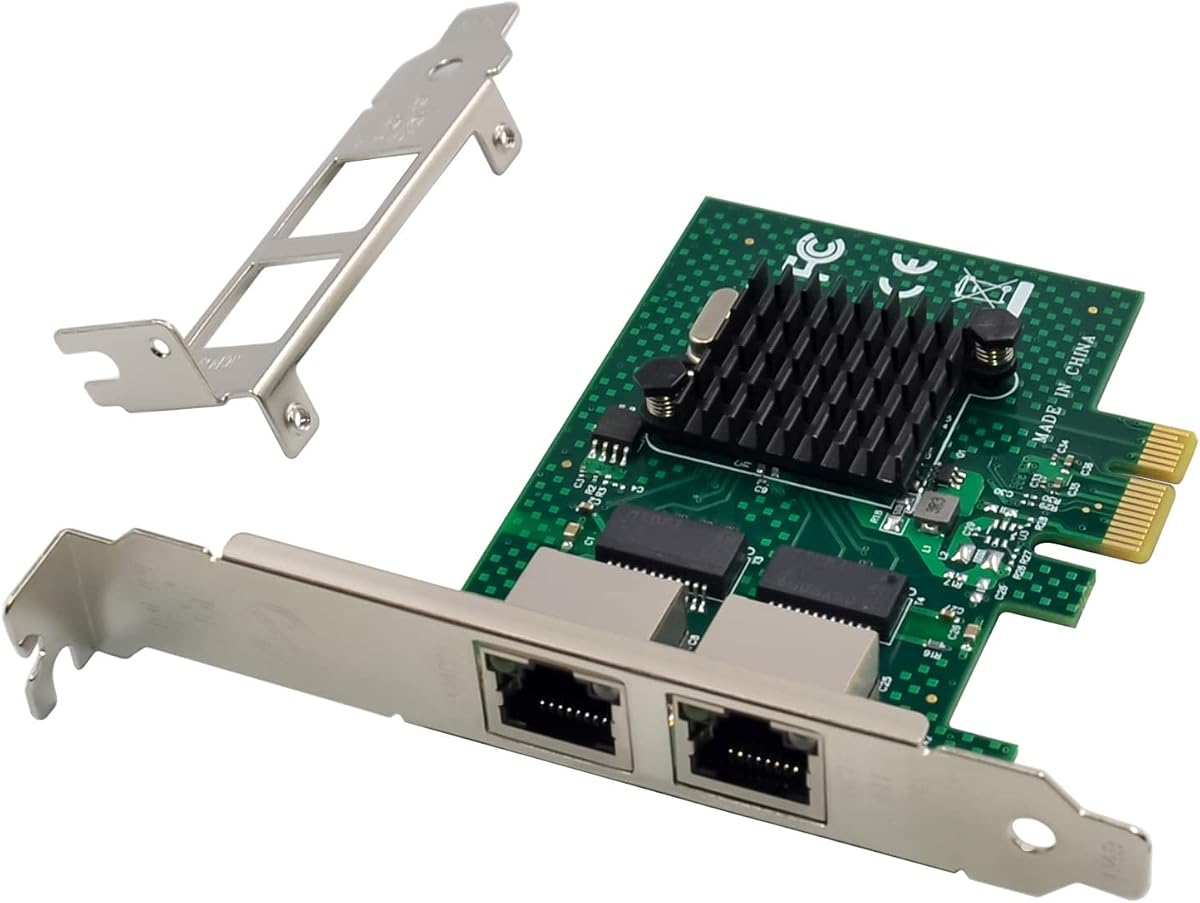
This Gigabit Dual NIC features the Intel 82576 controller, providing a budget-friendly option for standard Ethernet needs. With a 4.5 rating, it offers reliable 1Gbps and 100Mbps speeds, making it perfect for basic server expansions or home use. The card supports Quality-of-Service technology to prioritize traffic efficiently.
We may earn a commission when you buy through this link, at no additional cost to you.
Its strengths include wide operating system compatibility, covering Windows 7 through 11, various Linux distributions, and VMware ESXi 5/6. The package includes both low profile and full-height brackets for easy installation in standard or slim cases. Users appreciate the straightforward driver download via QR code or Intel website.
Notable trade-offs are the lack of support for VMware ESXi 7.0 and above, which limits enterprise virtualization options. The PCIe X1 lane may not saturate speeds under heavy concurrent loads compared to X8 cards. However, for typical gigabit traffic, this limitation is rarely noticeable.
This card is best suited for small offices or enthusiasts needing affordable dual-port connectivity. It fits well in legacy systems or budget builds where 10G is unnecessary. We recommend it for those seeking reliable gigabit Ethernet without breaking the bank.
The integrated QoS technology helps streamline online experiences by prioritizing critical network traffic effectively.
Included standard and slim brackets make it easy to install in various server rack sizes or compact desktop cases.
We may earn a commission when you buy through this link, at no additional cost to you.
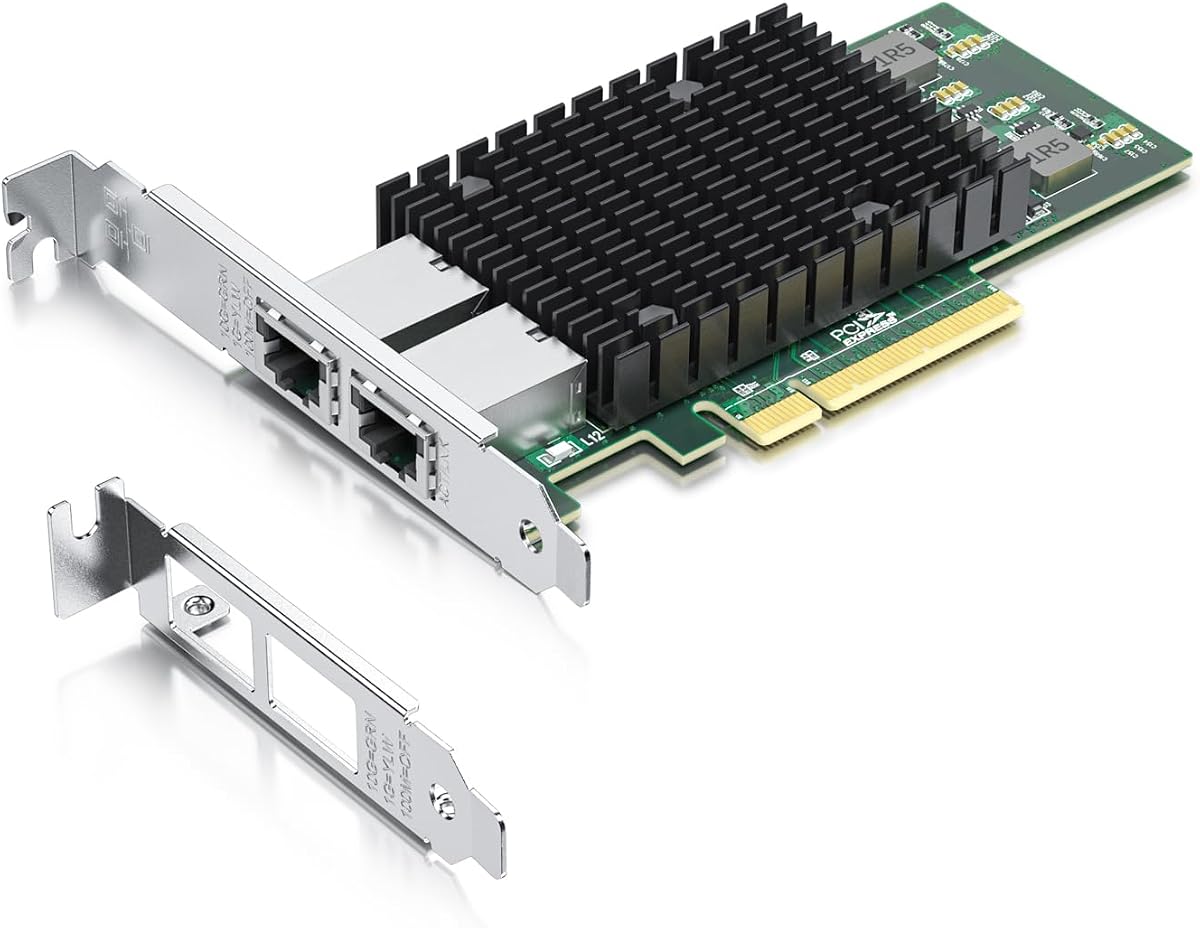
The 10Gtek 10Gb dual RJ45 port network card offers robust performance with its original Intel X540 controller. Rated 4.1, it delivers up to 10Gbps speeds via dual copper RJ45 ports, meeting demands of data center environments. It supports Windows, Linux, and ESX/ESXi servers for versatile server deployment.
We may earn a commission when you buy through this link, at no additional cost to you.
Key strengths include intelligent offloads for server stability and support for storage protocols like iSCSI and FCoE. The PCIe 2.1 X8 interface fits both X8 and X16 slots, providing high bandwidth for demanding tasks. A low profile bracket ensures compatibility with smaller form factors or compact cases.
Trade-offs involve manual setup requirements for Windows 11, which users must address before use. Hot swapping is not supported, requiring a system shutdown for installation or removal. Additionally, cable length limits (Cat6 up to 55m) must be considered for optimal performance.
This card is ideal for power users and professionals requiring fast file transfers and reliable server connectivity. It suits those needing a direct upgrade to 10GbE without fiber optics. We recommend it for server racks or workstations prioritizing throughput and hardware stability.
Dual 10Gbps ports allow for significantly faster file transfers and network backups in high-demand data centers.
Support for iSCSI and FCoE enables flexible storage area network configurations using standard copper cabling.
We may earn a commission when you buy through this link, at no additional cost to you.
This dual-port PCIe gigabit network card utilizes the Intel 82575/82576 chipset for stable 1000M connectivity. Rated 4.4, it offers broad operating system support including DOS and older Windows Server versions. The alloy heat sink helps maintain safe operating temperatures during heavy network loads.
We may earn a commission when you buy through this link, at no additional cost to you.
Strengths include support for IPMI pass-through, iSCSI boot, and PXE remote boot, making it useful for enterprise environments. VLAN filtering and network management protocols are included for advanced configuration. The card fits standard and low-profile slots easily.
Trade-offs involve the lack of support for VMware ESXi 7.0 or above, limiting virtualization compatibility. The Intel 82575/82576 is an older family compared to newer chips, which may impact long-term driver updates. However, for legacy systems, it remains a solid choice.
This card is best for users needing reliable gigabit connectivity in older servers or specific industrial PCs. It fits well for PXE boot environments and budget builds. We recommend it for those requiring broad OS support without needing modern 10G speeds.
Supports DOS and older Windows Server versions, ensuring it works with legacy hardware that needs network upgrades.
Built-in SNMP and RMON support allow for detailed network monitoring and management in professional setups.
We may earn a commission when you buy through this link, at no additional cost to you.
The 10Gtek Gigabit Ethernet PCIe RJ45 network adapter features the Intel 82576 controller for stable performance. Rated 4.4, it offers a direct comparison to the Intel E1G42ET. Dual copper RJ45 ports allow connections up to 100m, meeting standard data center demands effectively.
We may earn a commission when you buy through this link, at no additional cost to you.
Strengths include intelligent offloads that improve server stability and support for Windows and Linux servers. The package includes a low profile bracket for easy installation in small form factor cases. A 3-year warranty and lifetime technology support add value for long-term reliability.
Trade-offs involve limited support for VMware ESXi 7.0 or above, which affects virtualization environments. The PCIe X1 lane limits overall bandwidth compared to X8 options, though it suffices for gigabit needs. Hot swapping is not supported for this model.
This adapter is ideal for budget-conscious users needing dual gigabit ports for servers or workstations. It fits well in compact cases and supports common OS platforms. We recommend it for those seeking reliable Intel-based connectivity without expensive features.
As a direct alternative to the Intel E1G42ET, it ensures drivers and performance match familiar Intel standards.
The included low profile bracket allows installation in slim desktop cases where standard cards won't fit.
We may earn a commission when you buy through this link, at no additional cost to you.
The VIMIN 10G PCI-E network card leverages the Intel X540-T2 chipset for reliable 10Gbps speeds. Rated 4.5, it delivers dual RJ45 ports ideal for high-speed data transmission in servers and high-end devices. It supports Windows, Linux, and VMware for flexible environment integration.
We may earn a commission when you buy through this link, at no additional cost to you.
Strengths include flexible PCIe x8 and x16 compatibility and a choice of standard and slim brackets for diverse server heights. The built-in heat sink maintains optimal temperature levels during heavy usage. The well-designed gold finger interface helps ensure consistent network performance.
Trade-offs involve lack of support for 2.5Gbps or 5Gbps speeds, forcing 1Gbps operation if paired with such devices. This limitation might be problematic for mixed-speed networks. Additionally, high heat generation requires good case airflow for stability.
This card is ideal for users upgrading to 10Gbps Ethernet without fiber. It suits workstations and servers needing robust connectivity. We recommend it for those requiring stable 10G performance with flexible bracket options for various chassis types.
An integrated heat sink helps manage thermal output during continuous data transfers, maintaining device stability.
Available with both standard and slim brackets to fit standard server racks and low-profile workstation cases easily.
We may earn a commission when you buy through this link, at no additional cost to you.
The Gigaplus X540-T2 10Gb Ethernet adapter offers ultra-high speed connectivity with its X540 controller. Rated 4.6, it boosts Ethernet speeds up to 10Gb/s while preventing packet loss. Two independent Ethernet ports support both PCIe X8 and X16 slots for high bandwidth.
We may earn a commission when you buy through this link, at no additional cost to you.
Strengths include a QR code for driver installation and wide OS compatibility covering Windows Server, Linux, and VMware. The package provides both standard and low-profile brackets for diverse applications. Lifetime technical support ensures assistance throughout the product lifecycle.
Trade-offs involve PCIe ports only, excluding legacy PCI slots for older hardware. Windows 11 support requires proper driver setup as noted in the main pictures. It requires specific PCIe slots, limiting use in very old tower cases without X8 or X16 slots.
This card is ideal for professionals needing reliable 10G networking without fiber optics. It suits data centers and home labs prioritizing stability. We recommend it for users needing a straightforward, high-speed upgrade for their existing infrastructure.
Advanced controller technology effectively prevents packet loss during heavy network usage, ensuring consistent throughput.
Each card includes lifetime technical support to help users resolve issues quickly and maintain system uptime.
We may earn a commission when you buy through this link, at no additional cost to you.
The H!Fiber 10Gb PCI-E network card features the Intel X540-BT2 controller for reliable 10GbE performance. Rated 4.5, it supports Cat6a cables for simplified transition to 10GbE. Dual RJ45 copper ports offer high data rates up to 10Gbps for demanding network loads.
We may earn a commission when you buy through this link, at no additional cost to you.
Strengths include quality-of-service technology for streamlined online experiences and wide OS compatibility. The package includes both low profile and full-height brackets for flexible installation. A 3-year warranty and lifetime technology support ensure long-term reliability for users.
Trade-offs involve incompatibility with 2.5Gbps or 5Gbps speeds, limiting mixed-speed setups. Windows 11 requires correct driver setup before use, adding a step for users. The chipset is similar to the X540-T2 but may lack newer feature sets found in modern chips.
This card is ideal for users needing copper-based 10G connections for servers and workstations. It fits well in cases requiring both bracket types. We recommend it for those prioritizing Intel-based stability with robust warranty support.
Integrated QoS helps manage network traffic efficiently, prioritizing critical data for smooth online experiences.
Both low profile and full-height brackets ensure compatibility with standard and slim computer or server cases.
We may earn a commission when you buy through this link, at no additional cost to you.
This dual-port PCIe X4 gigabit network card uses the Intel 82576 chipset for reliable connectivity. Rated 4.5, it supports SR-IOV for efficient virtualization tasks. The alloy heat sink ensures normal operating temperatures during heavy loads for stable operation.
We may earn a commission when you buy through this link, at no additional cost to you.
Strengths include PCIe X4 lane width for better throughput than X1 cards. It supports IPMI pass-through, VLAN filtering, and PXE remote boot for advanced configurations. A broad OS list includes FreeBSD and various Windows Server versions.
Trade-offs include lack of support for VMware ESXi 7.0 or above, limiting modern virtualization. Gigabit speeds may bottleneck 10G networks. However, for specific legacy tasks or lower bandwidth needs, it remains effective.
This card is best for virtualization environments needing SR-IOV on a budget. It fits well in systems requiring X4 bandwidth. We recommend it for users prioritizing virtualization features over raw speed.
SR-IOV capability allows efficient resource sharing in virtualized environments for better host performance.
X4 lane width provides more bandwidth than X1, reducing latency in concurrent connection scenarios.
We may earn a commission when you buy through this link, at no additional cost to you.
The Dual-Port PCIe Gigabit Ethernet server adapter features the NetXtreme BCM5720-2P chipset for broad compatibility. Rated 4.6, it supports PCIe v1.X and v2.X interfaces for flexible slot use. It fits diverse applications including cloud and machine learning clusters.
We may earn a commission when you buy through this link, at no additional cost to you.
Strengths include compatibility with many Linux and Windows server versions plus VMware ESXi 5 through 8. The low-profile bracket supports standard and slim cases. A 180-day warranty includes friendly customer service and refunds without returns if problems persist.
Trade-offs involve limited to PCIe v1.X and v2.X, which may not fit newer hardware slots. Gigabit speed is standard but not future-proof for 10G needs. However, it covers enterprise requirements well for standard LANs.
This adapter is ideal for enterprise data centers and cloud server builds needing broad support. It fits well for NVMe disaggregation and database servers. We recommend it for users needing a reliable, vendor-agnostic gigabit solution.
Designed for cloud and machine learning clusters, this card supports high-demand server environments efficiently.
If issues can not be solved, the vendor provides a refund without requiring a product return, reducing hassle.
We may earn a commission when you buy through this link, at no additional cost to you.
Selecting the right dual RJ45 port network card requires evaluating several technical factors. This guide helps you understand what specifications matter most for your specific network needs.
The controller chipset determines the card's speed, stability, and compatibility. Intel chipsets like X540 or 82576 are widely trusted for their reliability across servers and workstations. Newer chips like I226-V offer improved stability and lower power consumption compared to older generations.
Always choose a card with a reputable chipset to ensure driver support and long-term performance.
Determine if you need Gigabit (1Gbps), 2.5Gbps, or 10Gbps speeds. Most servers require 10Gbps for fast data transfers, but home users may suffice with 1Gbps or 2.5Gbps options. Ensure your cables and switches support the intended speed to avoid bottlenecks.
Selecting the correct speed tier avoids overspending while meeting current infrastructure needs effectively.
Verify that the card supports your operating system, including Windows Server, Linux, or VMware. Some cards lack drivers for newer systems like Windows 11 or ESXi 7.0. Check manufacturer documentation for confirmed compatibility lists before purchase.
Confirm OS support ensures the card works immediately without complex manual driver configuration.
Check your motherboard's available PCIe slots and their widths. Cards using X8 lanes need specific slots for full bandwidth, while X1 cards fit almost anywhere but limit throughput. Ensure physical clearance for the card and any included brackets in your chassis.
Matching the card to available slots prevents installation issues and ensures expected performance.
Standard servers use full-height brackets, but small form factor PCs need low-profile options. Many packages include both, but verify before buying to avoid needing separate adapters. This flexibility allows installation in both desktop towers and rackmount cases.
Choosing the correct bracket ensures a secure fit and avoids damage during installation or removal.
Look for cards with at least a one-year warranty and responsive customer support. Brands offering lifetime technical support or money-back guarantees add value for business deployments. Reliable support can resolve driver or compatibility issues quickly.
Strong warranty terms protect your investment and reduce downtime during troubleshooting or failures.
Advanced features like SR-IOV, VLAN filtering, and iSCSI boot enhance virtualization and storage capabilities. Not all cards include these, so assess if they match your server roles or cloud tasks. Features like PXE remote boot are vital for IT administrators.
Prioritize features that align with your specific network roles for optimized performance.
Dual RJ45 ports support copper cabling like Cat5e or Cat6. Note that 10Gbps speeds over Cat6 are limited to 55 meters, whereas Cat6A reaches 100 meters. Verify your cable infrastructure supports the required speed and distance to maintain reliability.
Proper cabling ensures stable high-speed connections without signal degradation over distance.
Before installation, shut down your computer and disconnect power to avoid electrical damage. Open the case and locate an available PCIe slot matching the card's requirements. Insert the card firmly into the slot and secure it with a screw on the bracket.
After powering on, download and install drivers from the manufacturer or Intel website. Ensure your operating system recognizes the new hardware via Device Manager or network settings. Configure IP addresses and connection modes according to your network requirements.
Maintain the card by keeping your computer case clean and free of dust. Ensure adequate airflow around the card to prevent overheating during heavy data transfers. Periodically check for firmware updates to maintain security and compatibility with newer systems.
The primary difference lies in data transfer speed. A 10Gbps card offers ten times faster speeds than a 1Gbps card, which is crucial for large file transfers, virtualization, and server environments. However, 10Gbps cards typically cost more and require compatible switches and Cat6A cabling for full speed.
Yes, most cards require specific drivers to function correctly with your operating system. Many cards provide drivers on a QR code or manufacturer website. Ensure you download the latest version matching your OS to avoid compatibility issues after installation.
Many cards support VMware ESXi and ESX, but compatibility varies by chipset and version. Check the product details for specific VMware support, noting that some older cards do not support ESXi 7.0 or above. Verify OS compatibility before purchase for virtualization use.
These cards use standard Cat5e, Cat6, or Cat6A Ethernet cables with RJ45 connectors. Cat6A is recommended for 10Gbps connections over longer distances up to 100 meters. Ensure your cabling matches the required speed tier for optimal network performance.
Check the card's required PCIe width (X1, X4, X8, or X16) and your motherboard's available slots. X1 cards fit almost any slot, but X8 or X16 cards need wider slots for full bandwidth. Ensure physical clearance in your case for the card and bracket.
Yes, 10Gbps over Cat6 is limited to 55 meters, requiring Cat6A for full 100-meter distances. Additionally, some cards do not support 2.5Gbps or 5Gbps speeds, falling back to 1Gbps in mixed-speed networks. Check the product notes for specific speed limitations.
Our top picks include the 2.5GBase-T Server Network Card for overall value, the Gigabit Dual NIC for budget needs, and the 10Gtek 10Gb Card for premium performance. Each offers unique strengths depending on your speed and compatibility requirements.
Prioritize controller chipsets and OS compatibility to ensure long-term reliability. Consider PCIe slot availability and bracket types to match your hardware constraints. Selecting the right card ensures stable connectivity and avoids future bottlenecks.
Prices and availability change frequently, so always check current listings before purchasing. Verify warranty terms and customer support policies to ensure peace of mind. With the right dual RJ45 port network card, you can upgrade your network infrastructure confidently.