
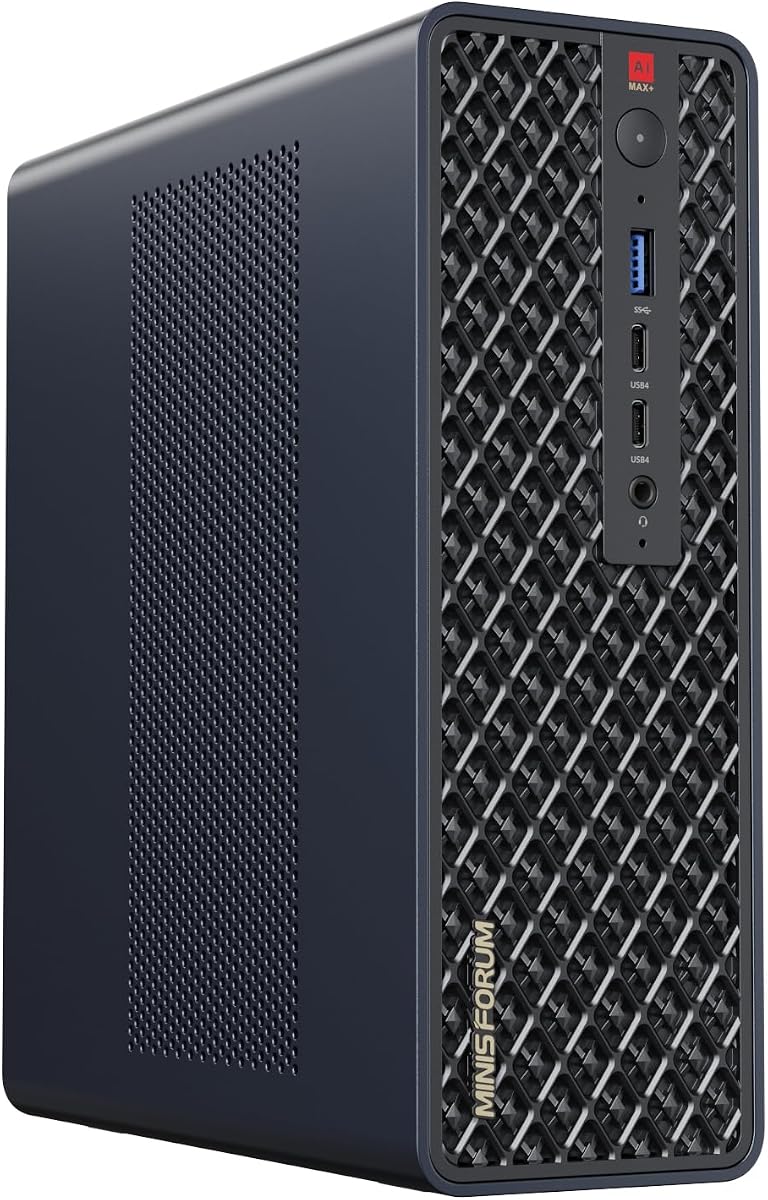
MINISFORUM MS-S1 MAX Mini AI Workstation PC
4.5Editor score
128GB Unified Memory
AMD Ryzen AI Max+ 395
Dual Unit Cluster Support
Discover the top dual GPU AI setups for 2026 comparing high-performance workstations and GPUs for local LLMs and machine learning tasks.
Building a powerful dual GPU AI setup is essential for developers and researchers running local large language models. These systems combine massive VRAM and high compute power to handle complex inference and training tasks efficiently.
We evaluated ten leading systems ranging from compact mini PCs to enterprise-grade servers. Our comparison focuses on VRAM capacity, memory bandwidth, CPU integration, and software compatibility to help you find the right tool.
Each pick highlights specific strengths for different budgets and workloads. Prices and availability change frequently so check the linked product pages for the latest deals and current specifications before making your final decision.
4.5Editor score

4.8Editor score

4.9Editor score
This table provides a side-by-side look at the specifications of the top ten dual GPU AI setups available today. Compare VRAM, processor types, and key features to find the system that fits your workflow.


This unique card combines two Arc Pro B60 GPUs into a single PCB delivering 48GB of VRAM. It ranks highly for those needing to run 70B class models locally without buying multiple cards or using cloud services.
We may earn a commission when you buy through this link, at no additional cost to you.
The 48GB memory pool allows you to load heavy quantized models like DeepSeek R1 Q70B directly. Each GPU provides 197 TOPS and the combined setup ensures high concurrency for multi turn dialogues and complex workloads.
You need a motherboard that supports PCIe lane bifurcation to get full bandwidth. The card also runs cool with a blower fan design which is ideal for dense server airflow environments during long inference sessions.
If you want a consumer friendly way to deploy large language models locally this card is a top choice. It offers significant performance per dollar compared to traditional multi GPU setups while maintaining stable reliability.
The 48GB memory allows you to run 70B class quantized models entirely on one card without external dependencies.
Each chip is recognized separately by the system allowing flexible task assignment and parallel processing capabilities.
We may earn a commission when you buy through this link, at no additional cost to you.
This workstation is a prebuilt powerhouse featuring dual RTX PRO 6000 Blackwell GPUs and a 96GB VRAM pool. It is designed for professionals who need a turnkey solution for enterprise scale AI and high performance computing.
We may earn a commission when you buy through this link, at no additional cost to you.
The AMD Ryzen 9 9950X processor ensures that the GPUs never wait for data. With 256GB of DDR5 RAM and 8TB of NVMe storage you can handle massive datasets and complex training pipelines without bottlenecks.
Liquid cooling keeps the system stable under sustained loads which is crucial for intensive AI workloads. The unit comes ready with Windows 11 Pro and all necessary drivers so you can start working immediately.
For organizations needing a reliable high end setup without building it themselves this machine is excellent. It delivers unmatched performance for local LLM deployment and advanced data science tasks in a single box.
Dual RTX PRO 6000 GPUs provide 96GB of VRAM for handling large models and complex simulations locally.
Custom built with custom cable management and full testing ensures reliability for mission critical workflows.
We may earn a commission when you buy through this link, at no additional cost to you.
This workstation pairs dual GeForce RTX 5090 GPUs with a high core count AMD Ryzen 9 9950X processor. It is built for those who want the latest consumer hardware optimized for local AI and machine learning tasks.
We may earn a commission when you buy through this link, at no additional cost to you.
With 64GB of GDDR7 memory per card you gain significant speed over previous generations. The 256GB system RAM and 8TB NVMe RAID setup ensure that you can store and process huge datasets locally.
The liquid cooling system keeps temperatures in check even when running intense simulations. This allows for sustained performance without throttling during long training sessions or complex inference workloads.
If you need a high performance desktop for generative AI and deep learning this system is a strong contender. It balances raw power with system stability and comes fully tested and ready to deploy.
Dual RTX 5090 GPUs with GDDR7 memory offer unmatched throughput for local large language model inference.
8TB of RAID NVMe SSDs provide fast access to large training datasets and reduce data ingestion times.
We may earn a commission when you buy through this link, at no additional cost to you.
The NVIDIA DGX Spark brings supercomputer performance to your desktop with the GB10 Grace Blackwell chip. This system enables enterprise scale AI right where you need it without needing a full data center rack.
We may earn a commission when you buy through this link, at no additional cost to you.
It features 128GB of unified memory which allows the CPU and GPU to access data seamlessly. This design supports local model fine tuning and inference for large models up to 200 billion parameters at FP4.
The integration with the NVIDIA AI software stack makes it easy to develop locally and deploy anywhere. It is perfect for innovators who want to prototype faster and test new ideas with high fidelity.
For those needing a compact high power solution this desktop supercomputer is ideal. It delivers exceptional ROI for increased productivity and allows you to experiment with large models securely.
128GB of unified memory eliminates data transfer bottlenecks between CPU and GPU for faster AI workflows.
Built for seamless integration with NVIDIA AI software stack for local development and cloud deployment.
We may earn a commission when you buy through this link, at no additional cost to you.
This is a high density 4U GPU server designed for HPC clusters and advanced LLM AI systems. It supports up to eight RTX PRO 6000 Blackwell GPUs providing 768GB of combined vRAM for large scale work.
We may earn a commission when you buy through this link, at no additional cost to you.
The system features dual AMD EPYC 9965 processors delivering 192 Zen 5c cores. This massive compute power handles multi-threaded processing and data ingestion pipelines with ease to ensure rapid analytics.
It supports extensive storage expansion with hot-swap M.2 and U.2 NVMe SSDs for ZFS RAID functions. The toolless design simplifies maintenance while the IT management software provides advanced control over resources.
For data centers needing high density GPU deployment this server is the definitive choice. It balances performance and manageability to support mission critical AI infrastructure and large model training.
Housing up to 8 GPUs with 768GB vRAM allows for training massive models locally in a compact rack.
Supports up to 15 NICs including 200GbE for ultra low latency and high bandwidth networking needs.
We may earn a commission when you buy through this link, at no additional cost to you.
Designed specifically for PIX4Dsurvey this workstation combines a powerful Threadripper CPU with a high end RTX 5090. It is built for demanding geospatial tasks that require immense processing power and memory bandwidth.
We may earn a commission when you buy through this link, at no additional cost to you.
The 128GB ECC Reg DDR5 memory ensures data integrity which is crucial for scientific and professional workloads. With 4TB of NVMe storage you can store large survey datasets and maps locally.
Networking is robust with 10GbE LAN support allowing fast data transfer to and from storage arrays. The system includes a high efficiency PSU and liquid cooling to maintain stability under heavy loads.
If you work in geospatial AI or large scale data processing this machine is tailored for your needs. It provides the specific hardware configuration needed to run specialized software efficiently.
Designed specifically for PIX4Dsurvey workflows to accelerate mapping and modeling tasks significantly.
128GB of ECC RAM ensures data integrity for critical scientific and engineering computations.
We may earn a commission when you buy through this link, at no additional cost to you.
This workstation delivers 288GB of VRAM through triple RTX PRO 6000 GPUs making it a powerhouse for CAD and deep learning. It is designed for engineering workflows that require multi-million polygon assemblies and complex physics simulations.
We may earn a commission when you buy through this link, at no additional cost to you.
The 192 core AMD EPYC processor supports massive multi-threaded tasks. With 768GB of RAM you can handle large datasets and real-time data ingestion without slowing down the rest of the system.
Storage speeds are blistering with Gen5 NVMe SSDs paired with the powerful CPUs. The system arrives with Windows 11 Pro and is fully tested to ensure reliability for mission critical work.
For professionals in engineering or generative design this setup offers unmatched capabilities. It combines enterprise class performance with desktop accessibility for serious technical workflows.
Three RTX PRO 6000 GPUs provide 288GB VRAM for complex simulations and large model training.
768GB of DDR5 ECC RDIMM allows for handling large datasets and complex assemblies effortlessly.
We may earn a commission when you buy through this link, at no additional cost to you.
This mini PC offers a surprisingly powerful configuration with 128GB of LPDDR5x memory. It enables running local LLMs and multimodal models by maximizing the memory pool for AI tasks at a low cost.
We may earn a commission when you buy through this link, at no additional cost to you.
Two units can be configured as a cluster to run even larger models like the 235B Q4. This cluster support allows you to scale performance without buying a single expensive high end workstation.
The compact chassis features aerospace grade aluminum alloy cooling and a 320W power supply. It fits easily on a desk or rack and supports dual 10GbE LAN for fast network data transfers.
If you are on a budget but need serious AI capability this mini PC is a top choice. It provides flexible expansion and cluster options that allow you to grow your setup over time.
Two units can cascade to run large models like DeepSeek R1 671B Q4 locally with high efficiency.
128GB shared memory eliminates VRAM bottlenecks allowing smoother data transfer for AI workloads.
We may earn a commission when you buy through this link, at no additional cost to you.
This Max-Q Edition GPU packs 96GB of GDDR7 ECC memory into a 300 Watt card. It is engineered to eliminate VRAM bottlenecks for hosting heavy open-source LLMs locally without subscription costs.
We may earn a commission when you buy through this link, at no additional cost to you.
The Blackwell architecture delivers up to 3511 TOPS of AI performance which is substantial for local pipelines. It handles complex simulations and massive datasets with ease while capping power consumption.
The 512-bit bus width provides massive memory bandwidth for fast data access. It fits into standard desktops and supports multi-GPU scaling for research labs needing high throughput.
For teams scaling intelligence rapidly this GPU is a vital component of any setup. It offers unmatched thermal management and reliability for demanding research and content creation tasks.
96GB of GDDR7 ECC memory eliminates bottlenecks for local inference of large generative AI models.
Max-Q design delivers 3511 TOPS while capping power at 300W for efficient thermal management.
We may earn a commission when you buy through this link, at no additional cost to you.
This mini workstation features AMD's latest Zen 5 architecture and Radeon 8060S graphics. It supports five 8K video outputs and dual 10G LAN ports which are ideal for high performance computing and trading tasks.
We may earn a commission when you buy through this link, at no additional cost to you.
The 128GB of LPDDR5 RAM ensures ample memory for multitasking and complex timelines in video editing. It includes a PCIe x16 slot for future upgrades and supports RAID for flexible storage expansion.
The cooling system uses phase change technology and dual centrifugal fans to keep noise low. It ensures stable operation even at peak power loads thanks to efficient thermal management.
If you need a small machine for digital signage or high throughput computing this unit is perfect. It balances power and portability while supporting professional workflows and large data processing.
Five video outputs including HDMI and USB4 support multiple displays for high productivity.
Dual 10G LAN ports allow for high bandwidth network connections for fast data transfer.
We may earn a commission when you buy through this link, at no additional cost to you.
Choosing the right dual GPU AI setup requires understanding specific hardware capabilities and your intended workflow. This guide explains the key factors to consider before buying a system for local AI.
VRAM is the most critical factor for running large language models locally. Models like Llama 3 70B require around 48GB of VRAM for quantized inference. Ensure your total GPU memory meets these minimums to avoid offloading to system RAM.
Prioritize cards with 48GB or more VRAM for running large 70B class models efficiently.
Memory bandwidth determines how fast the GPU can access data. GDDR7 offers significantly higher bandwidth than GDDR6 which accelerates token generation rates. Higher bandwidth is essential for real-time chat and interactive inference.
Look for newer generation GPUs with GDDR7 to maximize inference speed and reduce latency.
The CPU must keep up with the GPUs to prevent bottlenecks. A high core count processor like a Ryzen 9 or EPYC ensures that data feeds the GPUs continuously. This is especially important for complex pipelines.
Select systems with 16 or more CPU cores to support parallel data processing.
NVMe SSDs are essential for quick dataset loading. Gen5 NVMe drives offer speeds up to 10000 MB/s which helps ingest large training data quickly. RAID configurations provide redundancy and speed.
Choose systems with 4TB or more NVMe storage for fast access to large datasets.
Dual GPU setups draw significant power. Ensure the PSU is rated for the total TDP of all components. A 1600W supply is recommended for high-end consumer dual GPU systems to avoid instability.
Verify the power supply wattage supports the combined TDP of your GPUs.
Sustained AI workloads generate heat. Liquid cooling is more effective than air for maintaining boost clocks. Look for systems with robust cooling to prevent thermal throttling during long sessions.
Opt for liquid cooled workstations for consistent performance under heavy loads.
Hardware must support your target software stack. NVIDIA cards work with all CUDA and cuDNN libraries. Intel and AMD cards have open source support via PyTorch. Ensure compatibility with your model tools.
Check that the GPU drivers support your chosen LLM framework like vLLM or IPEX.
Future proofing is vital. Systems with extra PCIe slots allow adding more GPUs. Cluster support in mini PCs lets you scale compute power by adding more units instead of replacing one.
Consider systems with PCIe x16 slots or cluster support for scaling.
Install the latest drivers and ensure your BIOS supports PCIe lane bifurcation for multi GPU systems. Proper configuration ensures both GPUs are recognized and utilized effectively.
Run system stress tests before starting heavy inference workloads. Monitor temperatures and fan speeds to ensure cooling solutions are functioning correctly under load.
Keep your software stack updated to benefit from performance optimizations. Regularly clean dust from fans and vents to maintain airflow efficiency over time.
You need approximately 48GB of VRAM to run Llama 3 70B quantized locally. This ensures the entire model fits in GPU memory without relying on slower system RAM.
Yes but software support varies. PyTorch supports heterogeneous setups but performance may differ. NVIDIA cards generally offer better compatibility for parallel tasks.
Yes. Without bifurcation a dual GPU card may run at reduced bandwidth. Check your motherboard manual for x8 x8 lane splitting support to get full speed.
RTX PRO 6000 has more VRAM for stability and ECC support. RTX 5090 offers more raw speed but less memory for large models. Choose based on your model size.
Use GPUs with higher memory bandwidth like GDDR7. Also ensure your CPU cores are sufficient to handle prompt processing and token generation pipelines efficiently.
Modern mini PCs with unified memory can run models up to 32B parameters locally. For larger models look for cluster support to distribute the load across multiple units.
We reviewed ten options ranging from budget mini PCs to enterprise servers. The MINISFORUM MS-S1 MAX offers the best value while the WEELIAO card delivers unmatched single card performance.
Prioritize VRAM capacity and memory bandwidth for your specific model sizes. A balanced CPU and cooling solution ensures your setup runs smoothly during long workloads.
Prices and stock change often. Check the current listings to confirm availability and the latest pricing before you place your order.