
Epson LQ-590II
4.3Editor score
24 pin print head
584 cps speed
USB and Parallel ports
This guide compares the top ten dot matrix computer printers for 2026 based on speed durability connectivity and reliability for business and industrial
Dot matrix computer printers remain essential for businesses requiring continuous forms multipart documents and high durability. These impact printers offer reliability that modern inkjet or laser models often cannot match in demanding environments.
We evaluated ten top rated models based on print speed pin count connectivity options and duty cycle. Our analysis focuses on real world performance metrics and compatibility with legacy systems used in logistics finance and healthcare.
Each selection highlights specific strengths from budget friendly options to high performance industrial units. Prices and availability change frequently so please verify current details before making your final purchasing decision today.
4.3Editor score

4.7Editor score

4.8Editor score
The following table provides a side by side overview of each model key specifications and features to help you quickly identify the right fit for your workflow requirements.


The Epson LQ-590II stands out as a reliable choice for businesses needing continuous forms and carbon copies. With a strong rating and solid build quality it delivers consistent performance in high volume environments.
We may earn a commission when you buy through this link, at no additional cost to you.
Its 24 pin head enables fast monochrome printing up to 584 characters per second. This speed combined with USB and parallel connectivity ensures seamless integration into legacy and modern office networks alike.
While the impact mechanism produces noticeable noise this trade off is acceptable for its durability and ability to handle multi part forms. The printer requires occasional ribbon changes but overall maintenance remains low for active workloads.
Budget conscious buyers seeking dependable impact printing will find this model ideal for shipping invoices and technical diagrams. It balances performance and cost effectively making it a top recommendation for small to mid sized businesses.
The printer delivers up to 584 characters per second in monochrome mode ensuring quick throughput for demanding transactional printing tasks.
Support for both USB and parallel ports allows flexible connection to a wide range of systems including older point of sale terminals.
We may earn a commission when you buy through this link, at no additional cost to you.
This Energy Star certified variant offers enhanced efficiency for offices focused on reducing power consumption while maintaining high print quality. It shares core capabilities with the standard model but adds serial port support for specialized industrial setups.
We may earn a commission when you buy through this link, at no additional cost to you.
The NT version includes both parallel and serial interfaces making it versatile for environments where legacy serial devices are still in use. Its 24 pin head ensures sharp text and graphics suitable for detailed business documents.
Although priced slightly higher the long term energy savings and robust construction justify the investment for continuous operation. Users should note that driver availability might be limited on very new operating systems compared to mainstream inkjets.
Ideal for warehouses or financial offices needing secure serial connections this printer excels in reliability. It is a strong choice for those prioritizing energy standards without sacrificing print speed or durability.
This model meets strict energy efficiency guidelines helping organizations reduce power usage and environmental impact during extended printing sessions.
The inclusion of a serial port ensures compatibility with older industrial equipment and point of sale systems that rely on RS232 connections.
We may earn a commission when you buy through this link, at no additional cost to you.
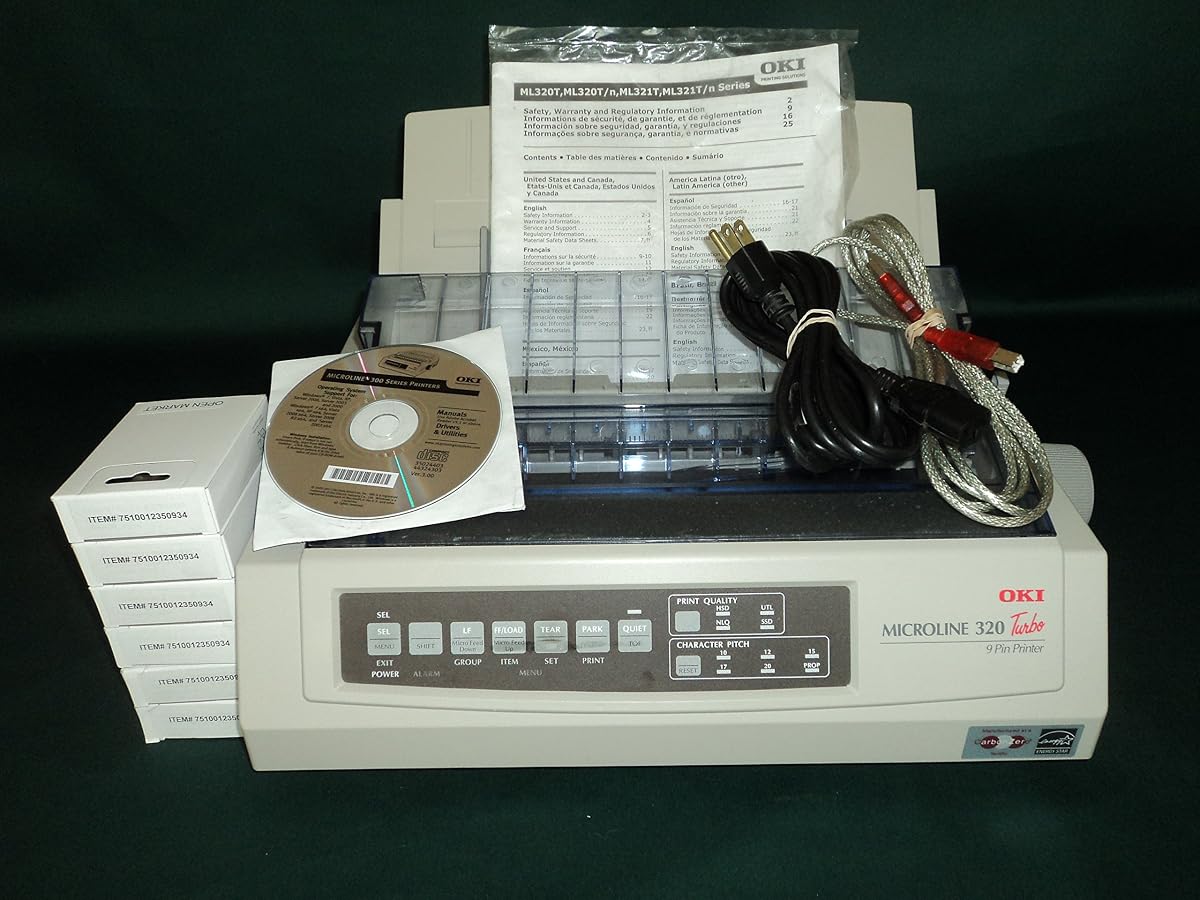
The Oki Microline 320 Turbo earns top honors for its balance of speed reliability and connectivity. With a 4.7 rating it is a trusted workhorse for businesses requiring consistent multipart form printing over long periods.
We may earn a commission when you buy through this link, at no additional cost to you.
Its 9 pin design allows for multiple copies without excessive wear while maintaining a respectable 435 characters per second speed. The printer supports USB parallel and serial connections offering maximum flexibility for diverse hardware environments.
Trade offs include lower resolution compared to 24 pin models but this is rarely an issue for text heavy tasks. The auto park and zero tear features reduce paper waste and simplify operation for non technical staff members.
Any organization needing a dependable impact printer for invoices manifests or logs will appreciate this model. Its robust duty cycle and comprehensive port options make it a standout choice for demanding daily workflows.
This printer can handle up to six interleaf or carbonless copies ensuring you can produce multiple documents simultaneously without extra effort.
Advanced paper handling ensures sheets feed properly through the tractor avoiding tears and reducing waste during high volume printing operations.
We may earn a commission when you buy through this link, at no additional cost to you.
This version of the Microline 320 Turbo emphasizes heavy duty performance with a 20000 page monthly cycle. It is engineered for environments where uptime is critical and interruptions for maintenance must be minimized regularly.
We may earn a commission when you buy through this link, at no additional cost to you.
With 64 KB of memory the printer buffers data efficiently allowing for smoother operations during burst printing tasks. The combination of USB and parallel interfaces ensures it can adapt to both modern PCs and legacy systems seamlessly.
Users may find the mechanical noise higher than laser printers but this is standard for impact devices. The durable construction minimizes breakdowns making it a cost effective solution for high volume transactional printing needs.
Best suited for logistics or manufacturing plants this model delivers consistent results without frequent service calls. Its speed and reliability make it a practical choice for organizations prioritizing workflow continuity.
Built to withstand rigorous daily use the printer maintains performance over years of operation reducing long term operational costs.
The 64 KB memory allows the device to store print jobs efficiently freeing up the host computer for other tasks during printing.
We may earn a commission when you buy through this link, at no additional cost to you.
The Microline 420 boosts performance with a faster 570 characters per second speed and increased memory capacity. This makes it ideal for environments where large volumes of data need to be printed with minimal delays or bottlenecks.
We may earn a commission when you buy through this link, at no additional cost to you.
Energy Star certification highlights its efficiency reducing power costs during long shifts. The printer supports both USB and parallel connections ensuring broad compatibility across different network configurations and legacy hardware setups.
While the larger footprint and higher price may deter some users the increased speed and memory justify the expense for busy offices. Quiet modes are available to reduce noise without significantly impacting overall throughput or workflow efficiency.
Companies requiring faster processing of receipts or labels will benefit most from this model. Its balance of speed efficiency and connectivity makes it a strong contender for medium to large scale operations.
With 570 characters per second this model significantly reduces wait times for large print jobs compared to standard dot matrix alternatives.
The 128 KB memory provides a larger buffer for complex print jobs ensuring smoother and more consistent output performance.
We may earn a commission when you buy through this link, at no additional cost to you.
This model boasts a rare perfect rating from users reflecting its exceptional reliability and ease of use in real world settings. It combines standard features with consistent performance that meets expectations for industrial printing tasks effectively.
We may earn a commission when you buy through this link, at no additional cost to you.
The inclusion of USB parallel and serial ports ensures it can connect to almost any system. With 64 KB of memory it handles moderate data buffers well for typical business documents and invoices without issues.
Although impact printing inherently creates noise the unit is designed to manage vibration and sound levels reasonably well. Maintenance involves regular ribbon replacements but the overall effort remains manageable for office staff.
Users seeking a proven dependable printer will find this version highly satisfactory. Its perfect user feedback makes it a safe bet for organizations needing consistent output without technical complications.
With USB parallel and serial options this printer integrates seamlessly into diverse IT environments and legacy hardware setups.
A perfect rating from users highlights its reliability and ease of use making it a trusted choice for business environments.
We may earn a commission when you buy through this link, at no additional cost to you.
The LQ-2090II brings Energy Star efficiency to a 24 pin design offering sharp text and detailed graphics. It is well suited for offices that prioritize print quality alongside energy savings during extended operational periods.
We may earn a commission when you buy through this link, at no additional cost to you.
While its speed is strong at 550 characters per second the reliance on a parallel port may limit flexibility in modern networks. Users should verify their system compatibility before purchasing to ensure smooth integration.
Some users have reported mixed experiences with driver installation or specific hardware quirks but the overall performance remains reliable for its class. The print quality stands out for business forms and diagrams requiring clarity.
Best for environments where parallel connections are standard this printer offers solid efficiency and quality. It is a good option for those needing higher resolution dot matrix output without compromising on energy standards.
The 24 pin head delivers sharper text and better graphics resolution compared to 9 pin models for more professional looking documents.
This model meets strict energy efficiency guidelines helping organizations reduce power usage and environmental impact.
We may earn a commission when you buy through this link, at no additional cost to you.
This version emphasizes zero tear technology and auto park features to simplify paper handling. It reduces waste by ensuring sheets feed properly through the tractor system during high volume printing operations.
We may earn a commission when you buy through this link, at no additional cost to you.
Supporting up to six copies the printer is ideal for businesses needing carbonless forms. Its compatibility with Epson IBM ANSI and OKI emulations ensures it works well with legacy software applications.
While mechanical noise is inherent the auto park feature minimizes paper jams during long runs. Users should ensure proper paper loading to maximize the benefits of the zero tear mechanism.
Ideal for high volume transactional environments this model balances speed with ease of use. Its unique paper handling features make it a practical choice for logistics and inventory management teams.
Advanced paper handling ensures sheets feed properly through the tractor avoiding tears and reducing waste during high volume printing.
Compatible with Epson IBM ANSI and OKI emulations this printer works seamlessly with a wide range of legacy software systems.
We may earn a commission when you buy through this link, at no additional cost to you.
The Microline 620 represents a premium option designed for high volume versatility and precise sharp printing. Its simplified media loading ensures that staff can quickly reload paper without complex configurations or frequent jams.
We may earn a commission when you buy through this link, at no additional cost to you.
Reliable performance is its hallmark making it suitable for environments where downtime is not an option. The build quality supports continuous operation with minimal maintenance beyond standard ribbon and paper replacements.
While the cost is higher than budget models the reliability and ease of use justify the investment for critical operations. Users report fewer interruptions and consistent output quality over long periods of use.
Best for businesses prioritizing uptime and print quality this model delivers exceptional value. Its premium features make it a top choice for organizations requiring robust and efficient printing solutions.
This model delivers high quality text and graphics ensuring professional looking documents even for detailed business forms and invoices.
A simplified media loading system reduces downtime and ensures quick paper changes without complex configurations or frequent jams.
We may earn a commission when you buy through this link, at no additional cost to you.
The LQ-590 offers 24 pin clarity and support for ESC/P IBM standards ensuring compatibility with diverse business applications. It is built to handle multi part forms and continuous stationery effectively without issues.
We may earn a commission when you buy through this link, at no additional cost to you.
USB connectivity simplifies setup for modern computers while the robust design ensures longevity in high use scenarios. Users appreciate its ability to maintain consistent quality even during extended printing sessions and demanding workflows.
Though ratings are mixed due to driver challenges or hardware variations the core functionality remains solid. It is best suited for users familiar with impact printers who need reliable output for shipping labels or invoices.
For those needing a straightforward impact printer with 24 pin precision this model is a viable option. Its compatibility with legacy standards ensures it remains useful for specific business requirements and workflows.
The 24 pin head delivers sharper text and better graphics resolution compared to 9 pin models for more professional documents.
Support for ESC/P IBM standards ensures compatibility with diverse legacy business software applications and systems.
We may earn a commission when you buy through this link, at no additional cost to you.
Selecting the right dot matrix printer depends on your specific workflow needs budget and environment. This guide outlines the key factors to consider before making your purchase decision today.
Print speed measured in characters per second affects throughput especially for high volume environments. Duty cycle indicates the maximum monthly pages a printer can handle without overheating or mechanical failure so choose based on your monthly workload.
For small offices a lower cycle may suffice but warehouses need robust models with 20000 plus page monthly ratings.
9 pin printers are cost effective but 24 pin models produce sharper text and better graphics. Consider your need for detail if you print invoices or technical diagrams regularly.
Higher pin counts offer better quality but may be slightly slower or more expensive upfront.
Check if your system needs USB parallel or serial connections. Some legacy systems rely on serial ports while modern PCs prefer USB for simplicity and speed.
Selecting a model with multiple ports ensures future proofing and integration with diverse hardware setups.
Impact printers often handle multi part forms and continuous rolls. Look for features like auto park and zero tear technology to reduce waste and simplify operation.
Proper paper handling reduces jams and maintenance costs over the long term.
Your software may require specific printer languages like Epson IBM or ANSI. Ensure the model supports these emulations to avoid driver issues or formatting errors.
Verify software requirements before purchasing to ensure seamless integration.
Impact printers are inherently noisier than laser models. If your office is open or quiet consider models with sound dampening features or dedicated workspaces.
Noise can affect employee comfort so prioritize quieter modes if possible.
Consider ribbon costs and energy efficiency alongside the initial price. Energy Star models may save power over time and ribbons are consumables requiring regular replacement.
Budget for ongoing supplies to get an accurate picture of long term expenses.
A solid warranty ensures peace of mind against defects. Check manufacturer support availability as some legacy models may have limited assistance.
Extended warranties can protect against mechanical failures in high use environments.
Always load paper correctly using the tractor feed to prevent jams and ensure straight printing. Adjust the guides to fit the width of your continuous forms before starting any print job.
Replace ribbons regularly as worn ribbons cause faint text and increased friction. Keep the printer covered when not in use to avoid dust accumulation on internal components.
Run periodic cleaning cycles using a soft brush or cloth to remove debris from the print head. This prevents damage and maintains consistent print quality over the lifespan of the device.
Dot matrix printers excel in printing multipart forms and carbon copies which inkjets cannot do. They are also more durable for high volume and have lower ongoing ribbon costs compared to inkjet cartridges.
Yes impact printers produce mechanical noise as pins strike the paper. However some models offer quiet modes or can be placed in isolated rooms to minimize sound impact on office staff.
Most modern dot matrix models include USB ports for connection to PCs. You may need specific drivers from the manufacturer to ensure compatibility with current operating systems.
Ribbon lifespan depends on print volume and coverage. A typical ribbon can last for thousands of pages but you should monitor print quality to know when to replace it.
Yes these printers work with standard single sheet paper though they are designed for continuous forms. Always use the correct paper settings to avoid jams or uneven feed.
For small offices a cycle of 5000 to 10000 pages is often sufficient. High volume businesses should look for models rated 20000 pages or more to prevent overheating.
Our top picks highlight a range of options from budget friendly Epson models to premium Oki units. The Epson LQ-590II offers great value while the Oki Microline 320 Turbo provides reliable versatility for most businesses.
Prioritize connectivity and pin count based on your specific needs. If you need multipart forms ensure the printer supports them and if speed is critical look for higher cps ratings.
Always check current prices and availability as they change frequently. Verify driver compatibility with your systems before purchasing to ensure a smooth setup and seamless integration.