
Digital Calendar 10.1 Touchscreen
4.4Editor score
No subscription fees
Weekly meal manager
Expandable storage
Discover the top digital touchscreen organizers for families. This guide compares features, sync capabilities, and design to help you choose the perfect smart
Finding the right digital touchscreen organizer transforms how your household manages daily life. These smart devices replace cluttered paper planners with sleek displays that sync schedules, chores, and photos seamlessly.
We evaluated ten leading models based on screen quality, synchronization options, and user-friendly interfaces. Our comparison highlights which devices offer the best balance of functionality and ease of use for modern families.
Each pick showcases unique strengths from budget-friendly options to premium smart hubs. Keep in mind that availability and specific model features may change over time so verify details before purchasing.
4.4Editor score

4.4Editor score

4.6Editor score
The following table provides a side-by-side comparison of the top ten digital touchscreen organizers available this month.


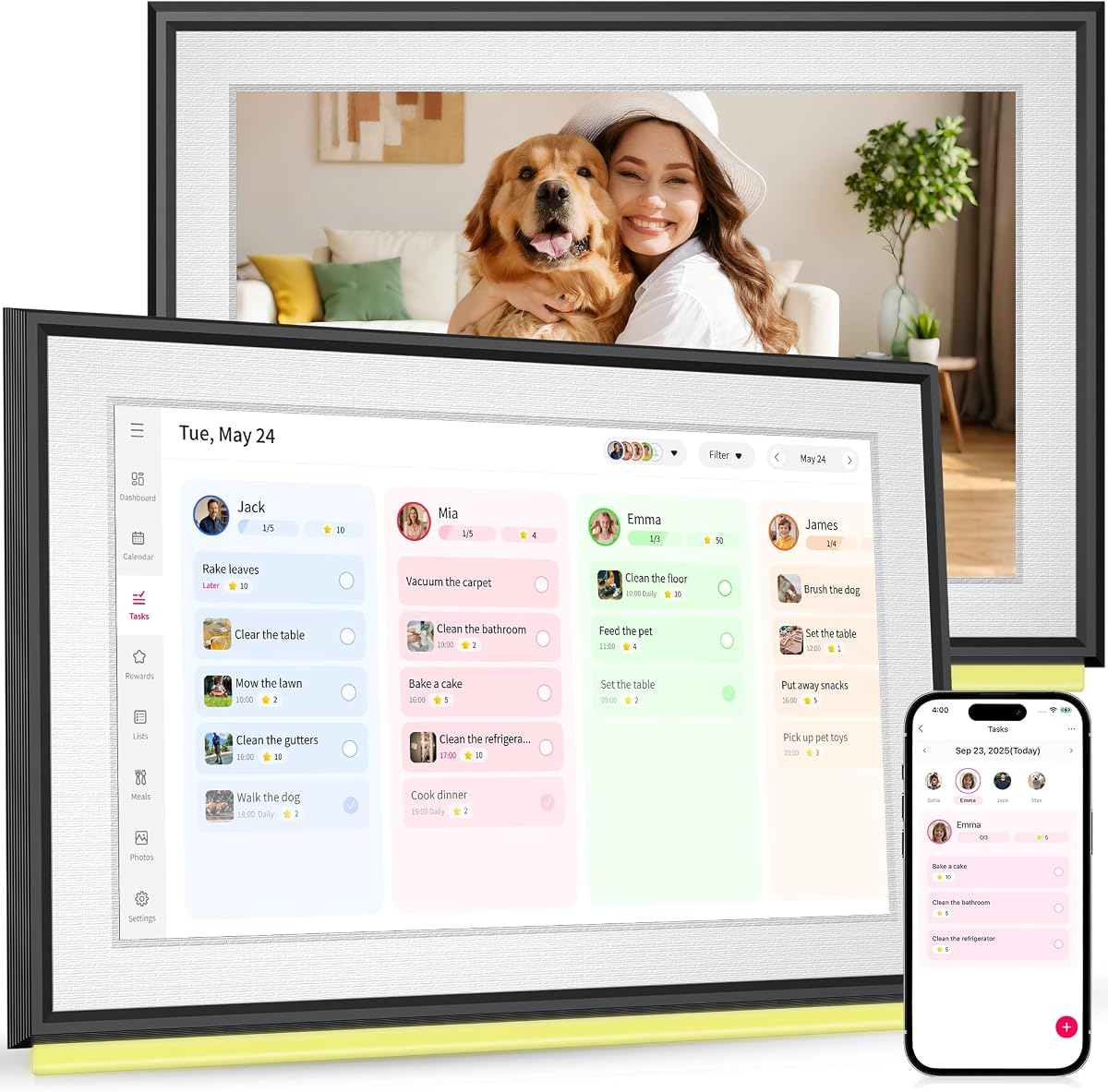

This 15.6 inch digital calendar stands out as a comprehensive family command center. It integrates scheduling and photo display into one sleek unit with a high resolution touchscreen.
We may earn a commission when you buy through this link, at no additional cost to you.
Its real-time sync capabilities allow multiple family members to edit schedules on Google or Outlook simultaneously. The interactive chore chart turns daily tasks into a gamified experience for kids.
While the display is vibrant and the mounting hardware is robust, some users may find the initial software setup slightly complex. However the benefits of unified household management outweigh this minor hurdle.
Families seeking a central hub for all their organizing needs will find this device invaluable. It balances functionality with aesthetics making it a top recommendation for busy households.
The device acts as a central hub coordinating calendars and meal plans effortlessly.
AI restoration technology ensures old photos look vibrant when displayed on the screen.
We may earn a commission when you buy through this link, at no additional cost to you.
The Skylight Calendar offers a premium experience with a focus on user-friendly design. Its 15.4 inch screen is bright and responsive ideal for checking schedules at a glance.
We may earn a commission when you buy through this link, at no additional cost to you.
A standout feature is the Disney mode which adds animations and avatars to engage children. This makes tracking chores and events fun rather than a chore for young family members.
However access to the best features requires a subscription which may not suit every budget. Additionally the price is higher than many competing models on the market.
For families who value design and child engagement the Skylight Calendar is a strong contender. It provides a polished look and smooth operation that fits well in modern kitchens.
Kids are more likely to use the planner with fun characters and animations included.
The sleek white finish blends seamlessly with various interior design styles.
We may earn a commission when you buy through this link, at no additional cost to you.
This compact 10.1 inch organizer offers exceptional value without hidden fees. It provides core features like chore lists and meal planning directly out of the box.
We may earn a commission when you buy through this link, at no additional cost to you.
The weekly meal manager helps reduce decision fatigue by displaying menus and generating grocery lists. This functionality is particularly useful for busy parents managing household logistics daily.
While the screen is smaller than premium models it remains clear and responsive for daily tasks. The interface is straightforward which makes it easy for all family members to use quickly.
Budget-conscious shoppers looking for a functional digital planner will appreciate this model. It delivers essential organizing tools in a convenient form factor at an accessible price.
Users get a full suite of organizing tools without ongoing monthly subscription costs.
Visual meal planning features help streamline dinner decisions and shopping trips.
We may earn a commission when you buy through this link, at no additional cost to you.
This model emphasizes task management with robust to-do list capabilities. It syncs effortlessly with major calendar apps to keep everyone aligned on daily activities.
We may earn a commission when you buy through this link, at no additional cost to you.
The AI powered imports feature simplifies setting up recurring events or recurring tasks quickly. Users can focus on managing their day rather than spending time on data entry.
The 1080P resolution ensures text is crisp and easy to read even from a distance. However the smaller screen means you must prioritize which tasks are displayed at any moment.
Individuals or families focused on productivity and task completion will find this device helpful. It serves as a functional desk or wall companion for staying organized.
Automated import features reduce the manual effort required to set up schedules.
Sharp display quality ensures all text and images are clearly visible.
We may earn a commission when you buy through this link, at no additional cost to you.
This 15.6 inch planner boasts a perfect rating due to its reliable performance. It combines scheduling with weather updates to keep your household prepared for the day.
We may earn a commission when you buy through this link, at no additional cost to you.
Color coding tasks helps distinguish between different family members activities at a glance. The energy saving sleep mode ensures the device remains fresh when not in active use.
Some users might need to consult the manual to fully utilize all smart features. Additionally placing it on a desk may require purchasing a stand depending on your layout.
Families seeking a reliable no fee organizer with weather insights will love this unit. Its high rating reflects a solid experience for those needing daily household coordination.
Always know the forecast alongside your schedule to plan activities accordingly.
Visual cues make it easy to identify who is doing what instantly.
We may earn a commission when you buy through this link, at no additional cost to you.
This planner excels at connecting distant family members through remote photo sharing. Grandparents can view updates instantly which strengthens bonds across distances effortlessly.
We may earn a commission when you buy through this link, at no additional cost to you.
Beyond photos it includes storage for recipes making the kitchen a functional command center. The minimalist design ensures it blends into the home environment without distraction.
The touch screen is responsive and the setup via the app is straightforward for most users. However relying on the app for some features might inconvenience those who prefer direct control.
Those prioritizing family connection and photo management will find this device rewarding. It keeps memories front and center while serving a practical planning role.
Keep loved ones updated with real-time photo access from anywhere.
Keep favorite recipes handy on the wall for easy cooking reference.
We may earn a commission when you buy through this link, at no additional cost to you.
The massive 21.5 inch screen provides an immersive viewing experience for the whole family. It functions as a full Android device allowing access to third-party apps and widgets.
We may earn a commission when you buy through this link, at no additional cost to you.
Built-in Google Gemini voice assistant lets you set reminders or check weather without touching the screen. This integration enhances convenience for smart home control directly from the wall.
While powerful the interface can be complex for less tech-savvy users. The higher price reflects the advanced features and larger hardware components included in the package.
Tech enthusiasts who want a smart hub rather than just a calendar will enjoy this option. It offers unparalleled flexibility and screen real estate for a modern home.
Download any compatible app to customize the dashboard exactly how you want.
Hands-free control makes managing tasks easy while cooking or cleaning.
We may earn a commission when you buy through this link, at no additional cost to you.
This versatile calendar comes with a sturdy stand making it ready for desk placement. The anti glare coating ensures comfortable viewing under various lighting conditions throughout the day.
We may earn a commission when you buy through this link, at no additional cost to you.
Switching between calendar and Android modes allows you to customize the experience. This dual functionality adds utility beyond simple scheduling for a well-rounded tool.
The price is competitive given the included stand but still higher than basic organizers. Users might find the app support limited compared to fully open Android systems.
Anyone needing a desktop organizer with smart capabilities will find this model robust. It bridges the gap between a simple calendar and a smart media player.
Ready out of the box to sit on your counter or desk without extra purchase.
Reduces reflections so you can view the screen comfortably in bright rooms.
We may earn a commission when you buy through this link, at no additional cost to you.
This calendar focuses on detailed daily agendas and monthly views for thorough planning. The free mobile app syncs seamlessly ensuring your schedules are consistent across devices.
We may earn a commission when you buy through this link, at no additional cost to you.
Regular software updates have improved features like rewards and meals to enhance functionality. The photo frame mode keeps your home feeling warm when the calendar is idle.
Note that wall mounting hardware is not included which may limit placement options. Users may also find the initial setup requires some patience to configure fully.
Those who prefer desktop organization over wall mounting will appreciate this model's focus. It offers solid features for families needing detailed task management.
Get a clear picture of your entire day with organized visual agendas.
Manage tasks from anywhere using the included companion application.
We may earn a commission when you buy through this link, at no additional cost to you.
This large 21.5 inch display ensures visibility from across the room. It offers significant customization options including theme changes and font size adjustments for readability.
We may earn a commission when you buy through this link, at no additional cost to you.
The chore rewards system is effective for building positive habits in children. A 1920x1080P IPS screen provides crisp visuals and wide viewing angles for everyone.
Menu navigation can feel complex due to the sheer number of options available. This might be overwhelming for users seeking a simple plug-and-play experience.
Families needing high customization and a large display will find this device useful. It offers flexibility to tailor the look and feel to specific household needs.
Change the look of your interface to match your kitchen decor.
Increase text size for better readability for all family members.
We may earn a commission when you buy through this link, at no additional cost to you.
Choosing the right organizer requires evaluating screen size features and connectivity to fit your lifestyle.
The display is your primary interface so choose a size that fits your wall or desk. Larger screens like 21.5 inches offer better visibility for the whole family but take up more space. Look for HD or 1080P resolution to ensure text and images remain crisp and clear.
Seamless sync with apps like Google Calendar or Outlook is crucial for keeping schedules up to date. Ensure the device supports the platforms your family uses regularly to avoid manual updates. Real-time updates help prevent missed appointments and ensure everyone stays aligned.
If you have children look for models with interactive chore charts and reward systems. Gamified tasks can motivate kids to complete daily routines without constant reminders. Check if the app allows for easy task assignment and progress tracking.
Many organizers come with optional premium plans but core features should ideally be free. Avoid devices that lock essential functions like calendar sync behind a paywall. Always check what is included out of the box before committing to a purchase.
Most models double as digital photo frames when not in use. Look for devices that allow easy photo uploads via an app to display cherished memories. A good photo frame mode adds warmth to your home and justifies the investment.
Consider where you plan to place the device whether on a wall or desk. Some models come with mounting hardware or stands while others require separate purchases. Verify the mounting options align with your intended location for easy access.
Meal planning features can streamline grocery shopping and dinner decisions. Look for devices that allow you to input weekly menus and generate shopping lists. This functionality helps reduce daily stress and keeps family meals organized.
Premium models may offer voice assistants or smart home controls. If you use smart lights or thermostats check if the device can control them directly. Integration adds convenience by consolidating multiple smart controls into one screen.
Start by connecting your device to your home Wi-Fi network and logging into your calendar accounts. Follow the on-screen prompts to sync existing events from Google or Outlook. This initial setup ensures your schedule is up to date from the start.
Regularly update the software to access new features and security patches. Most devices check for updates automatically but you can manually verify in the settings menu. Updates often bring improvements to syncing and user interface performance.
Clean the screen gently with a soft dry cloth to avoid scratches. Avoid using harsh chemicals or abrasive materials that could damage the touchscreen coating. Keeping the surface clean ensures touch sensitivity remains responsive for daily use.
Most models offer core features like calendar sync and task management without a subscription. However some devices have optional premium plans that unlock advanced customization or animations. Always check the product description to confirm what is included for free.
Yes most digital organizers allow you to link multiple accounts like Google Outlook and iCloud. This allows you to view family and personal schedules on one screen. You can usually choose to view them separately or combined based on your preference.
The device will still display stored data like current schedules and photos when offline. However real-time syncing with cloud accounts will pause until the connection is restored. Once reconnected the device will update to reflect any new changes.
The interfaces are designed to be intuitive and accessible for children of various ages. Most models include kid-friendly features like simple chore marking or colorful displays. Parents can set up tasks remotely so kids can interact with them directly.
Typically you use a companion mobile app to select and upload photos to the device. These photos are synced to the organizer and display in a slideshow during idle times. The process usually takes only a few taps to transfer your memories.
While most screens are resistant to accidental splashes they are not waterproof. It is best to avoid placing the device directly under a sink or in a humid area. A small spill can usually be wiped off quickly without damage.
Many modern organizers allow theme changes to match your home decor or preferences. Look for options to change colors fonts or background images in the settings. This flexibility helps the device feel more integrated into your living space.
We have reviewed ten top models that offer a range of features for every budget. The 15.6 Digital Calendar leads as a robust all-rounder while the 10.1 models offer great value for smaller spaces.
Prioritize features that match your family habits such as chore rewards or meal planning. A device is only useful if it simplifies your routine rather than complicating it.
Remember to check current availability and details before buying as models evolve frequently. Invest in a tool that grows with your household needs for long-term organization.