
SANSUI 24 Inch Curved 160Hz Gaming Monitor
4.4Editor score
160Hz Refresh Rate
1500R Curved VA Panel
FreeSync Compatible
Finding the right curved 160Hz gaming monitor can transform your setup. These displays offer smooth motion and immersive fields of view that flat panels cannot match. Whether you play competitive shooters or explore open worlds, the right curve and refresh rate matter. We review the best options available today to help you choose wisely.
We evaluated each monitor based on refresh rate consistency, response time accuracy, and color performance. Our analysis includes panel types, connectivity options, and ergonomic adjustments. We also considered build quality and warranty support to ensure long-term satisfaction. This list covers ten real models selected for their performance and value in the current market.
Each pick highlights key strengths and potential trade-offs so you know what to expect. Look for features like adaptive sync, HDR support, and stand adjustability. Remember that availability and stock levels change frequently. Always verify current specifications and terms before purchasing to ensure you get the exact model you want for your setup.
4.4Editor score
4.5Editor score

4.6Editor score
As an Amazon Associate we earn from qualifying purchases.
This side-by-side comparison highlights key specs across all ten models so you can quickly identify differences in size, resolution, and features.






The SANSUI 24 Inch Curved 160Hz Gaming Monitor offers exceptional value for budget-conscious gamers. With a 4.4 user rating, it delivers smooth motion and immersive curves at an accessible entry level. This monitor prioritizes core gaming features like high refresh rates and adaptive sync while keeping costs low.
We may earn a commission when you buy through this link, at no additional cost to you.
Its 160Hz refresh rate ensures fluid visuals in fast-paced titles. The 1500R curve wraps around your vision to reduce distortion. FreeSync compatibility helps prevent tearing. The VA panel provides strong contrast for deep blacks. Multiple game modes tailor the image for FPS or movie viewing.
Trade-offs include limited stand tilt and no integrated audio. You will need external speakers and a wall mount for ergonomic flexibility. These compromises help maintain the low price point. For basic setups, the performance remains solid and reliable.
Buyers seeking an affordable curved 160Hz option should consider this model. It suits entry-level builds or secondary screens. The warranty support adds peace of mind. Overall it balances cost and performance well for casual to mid-tier gaming.
The 1500R curvature matches natural eye focus to reduce strain during long sessions.
Built-in game tools like crosshair and timers enhance focus during competitive play.
We may earn a commission when you buy through this link, at no additional cost to you.
This 27 Inch SANSUI Curved 160Hz Gaming Monitor expands the screen real estate for immersive play. It maintains the same high refresh rate benefits as smaller models. Users appreciate the larger viewing area for multitasking and open-world games. The 4.4 rating reflects reliable performance at a competitive price.
We may earn a commission when you buy through this link, at no additional cost to you.
The 160Hz refresh rate supports fluid motion without stutter. Black level adjustment helps reveal shadow details. FreeSync reduces screen tearing. HDR mode works via HDMI for enhanced visuals. The VA panel offers strong contrast. Anti-flicker and low blue light features reduce strain during long use.
It lacks built-in speakers and has minimal ergonomic adjustment. You may need a separate audio solution. The stand only tilts. These limitations are common in budget monitors. The larger size makes it stand out in this category.
Gamers wanting more space without paying premium prices should look here. It fits mid-range PCs well. The warranty includes technical support. Overall it balances screen size and performance for casual enthusiasts.
The 27 inch size fills peripheral vision more than smaller displays for deeper immersion.
Black level adjustment and crosshair tools help spot enemies in dark scenes.
We may earn a commission when you buy through this link, at no additional cost to you.
The SANSUI 24 Inch Curved Gaming Monitor earns a 4.5 user rating. It offers fast refresh rates and smooth motion at an entry price. This model emphasizes reliability and color coverage. It stands out for its high customer satisfaction among budget curved monitors. The fast VA panel supports crisp visuals.
We may earn a commission when you buy through this link, at no additional cost to you.
160Hz refresh rate ensures smooth gameplay. MPRT 1ms response time reduces blur. DCI-P3 coverage adds vibrant colors. FreeSync prevents tearing. Flicker-free tech protects your eyes. The wide viewing angle keeps colors consistent. Tilt adjustment provides basic ergonomic comfort.
It has no speakers and relies on HDMI or DP ports for audio. The stand is fixed aside from tilt. These are standard trade-offs. The price reflects minimal features. Still performance remains strong for the price.
Buyers valuing color accuracy and smooth motion should consider this. It suits budget gaming setups well. The warranty offers 30 day replacement. Overall it is a solid pick for entry-level gamers.
DCI-P3 97 percent coverage delivers vibrant shades that stand out from standard sRGB displays.
Flicker-free and blue light reduction help minimize strain during extended gaming hours.
We may earn a commission when you buy through this link, at no additional cost to you.
The CRUA 32 Inch 4K UHD Curved Gaming Monitor delivers high resolution visuals. A 4.3 user rating indicates solid performance in this category. The 160Hz refresh rate matches 4K clarity for smooth motion. Built-in speakers reduce cable clutter. It is ideal for content creation and immersive play.
We may earn a commission when you buy through this link, at no additional cost to you.
4K resolution offers breathtaking clarity and detail. The 1500R curve enhances immersion. FreeSync reduces screen tearing. 120 percent sRGB supports color work. HDMI 2.1 enables next-gen console support. Wall mount ready stands offer flexible placement options.
4K at 160Hz demands powerful hardware. You need a capable GPU to drive full performance. The price reflects this capability. Speakers may not match dedicated audio. Still it is a strong all-rounder.
Gamers seeking 4K immersion should consider this model. It fits high-end PCs or consoles. The warranty adds confidence. Overall it balances resolution and refresh rate well for premium users.
HDMI 2.1 support allows next-gen consoles to reach full refresh rates at 4K.
Built-in speakers and color accuracy support both gaming and creative workflows.
We may earn a commission when you buy through this link, at no additional cost to you.
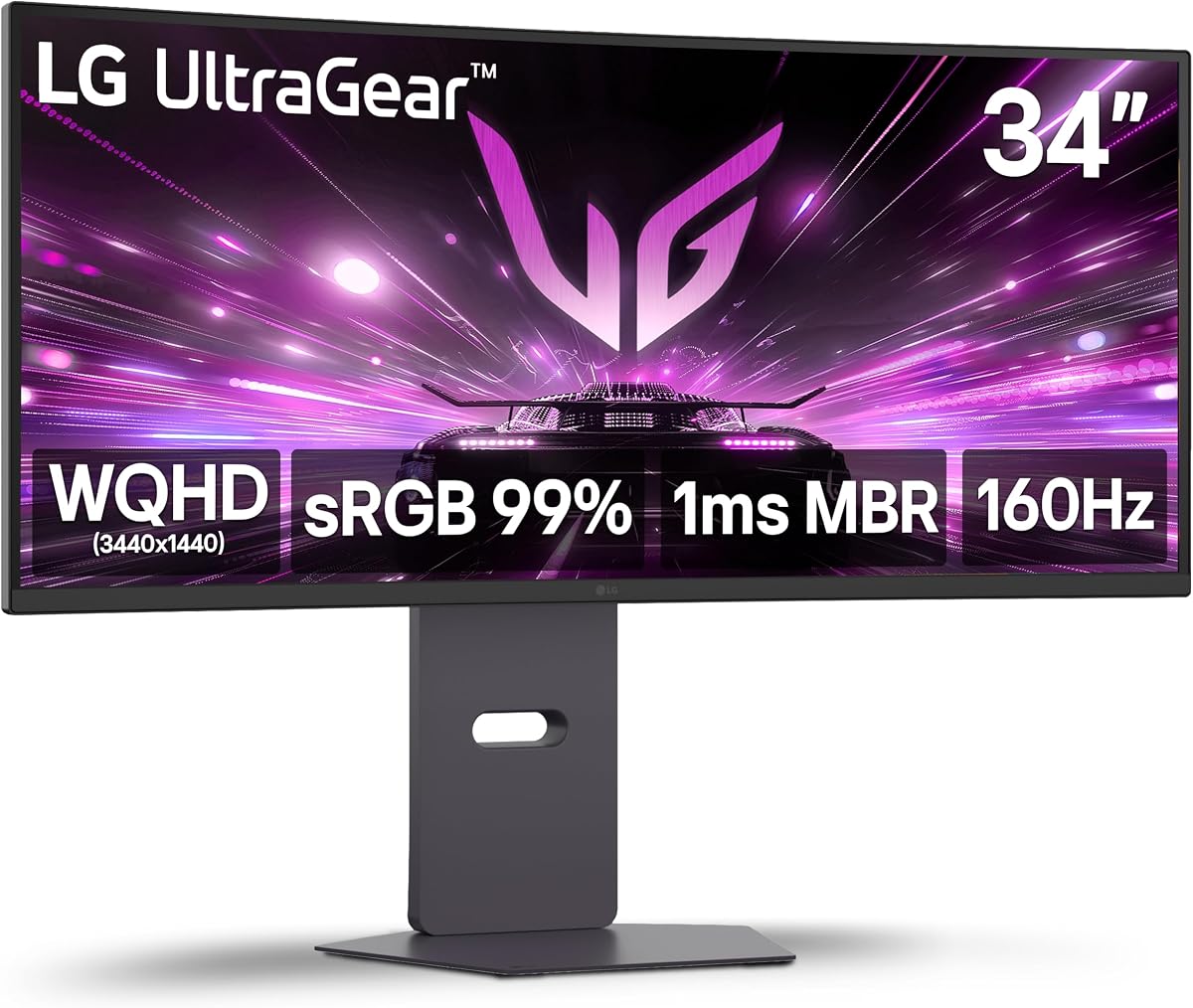
The LG 34G600A-B earns Editor's Choice for balancing features and performance. A 4.5 user rating reflects strong satisfaction. This 34-inch Ultragear monitor offers ultrawide immersion with smooth 160Hz motion. Its premium stand and audio quality set it apart. It suits competitive gamers and creatives.
We may earn a commission when you buy through this link, at no additional cost to you.
WQHD resolution expands field of view significantly. 1800R curvature deepens immersion. MBR minimizes motion blur. HDR10 enhances contrast. FreeSync Premium reduces tearing. The stand offers height swivel and tilt. Built-in stereo speakers deliver decent sound.
The price is higher than entry models. The ultrawide size requires desk space. Still the ergonomic features justify the cost. You gain flexibility without mounting hardware. Performance remains solid.
Buyers seeking premium features should prioritize this model. It fits well in advanced setups. The warranty adds reliability. Overall it delivers best overall value for performance and usability.
The 34-inch 21 by 9 format provides 30 percent more screen space for multitasking.
Adjustable height and swivel reduce neck strain during long play sessions.
We may earn a commission when you buy through this link, at no additional cost to you.
This renewed LG 34G600A-B offers premium features at a lower cost. A 5.0 user rating shows buyers are satisfied. It delivers the same ultrawide performance and adjustability as new units. The value proposition is strong for budget-conscious premium seekers. Refresh rate remains smooth.
We may earn a commission when you buy through this link, at no additional cost to you.
WQHD and 160Hz combine for fluid visuals. MBR reduces blur. FreeSync Premium works well. The stand offers full adjustment. Built-in speakers help save desk space. Renewed units are inspected for quality. You avoid full premium pricing.
Renewed means used condition with testing. Warranty terms may differ from new items. Still the savings are meaningful. The unit functions like a new display. Many users report no issues.
Buyers seeking premium ergonomics without full price should choose this. It suits mid-tier budgets well. The rating suggests reliability. Overall it offers best value for high-end features.
Renewed units provide near-new performance at a lower price for savvy shoppers.
Inspection processes ensure the display meets functional standards before shipping.
We may earn a commission when you buy through this link, at no additional cost to you.
The Samsung 32 Inch Odyssey G55C delivers deep immersive visuals with a 1000R curve. A 4.4 user rating reflects satisfaction with its performance. It offers QHD clarity and smooth 165Hz refresh rates. The deep curve wraps around your vision. It is suited for open-world titles and media.
We may earn a commission when you buy through this link, at no additional cost to you.
1000R curvature creates a theater-like field of view. QHD provides sharp detail. HDR10 enhances contrast. Eye Saver Mode reduces blue light. FreeSync reduces tearing. The design focuses on immersion and comfort during long play sessions.
The deep curve makes wall mounting harder. It needs specific VESA arms. The price is higher than flat panels. You gain immersion at some cost. Still it is a unique pick.
Buyers wanting maximum wrap-around view should consider this. It suits dedicated gaming rooms. The warranty adds confidence. Overall it is a top choice for curve depth and detail.
The 1000R curve fills peripheral vision to mimic real-world focus.
Eye Saver Mode and flicker reduction help maintain focus during extended sessions.
We may earn a commission when you buy through this link, at no additional cost to you.
The Sceptre 34-inch Curved Ultrawide Monitor offers WQHD immersion at a competitive price. A 4.2 user rating indicates decent performance. It supports high refresh rates up to 180Hz. The ultrawide layout expands field of view. Built-in speakers save desk space.
We may earn a commission when you buy through this link, at no additional cost to you.
180Hz refresh rate delivers fluid motion. 99 percent sRGB provides vibrant color. 1ms response time reduces blur. Dual DP ports support multiple PCs. The R1500 curve enhances immersion. Speakers offer basic audio without extra gear.
The rating suggests some variability in units. Stand adjustments are basic. These are common at this price. The high refresh rate stands out. It remains a strong option.
Gamers seeking ultrawide speed without spending premium should look here. It suits mid-range builds. The warranty helps. Overall it balances features and affordability well.
The 180Hz capability ensures ultra-smooth motion for fast-paced competitive games.
99 percent sRGB coverage delivers vibrant shades for gaming and media.
We may earn a commission when you buy through this link, at no additional cost to you.
The Alienware 34 Curved Gaming Monitor leads with a 4.6 user rating. It combines 180Hz smoothness with premium build quality. This model is a top pick for high-end setups. It offers WQHD clarity and deep curves. It suits those seeking reliability and performance.
We may earn a commission when you buy through this link, at no additional cost to you.
180Hz refresh rate ensures ultra-smooth transitions. 1ms response time reduces ghosting. DisplayHDR 400 enhances contrast. VESA AdaptiveSync reduces tearing. Low blue light hardware reduces strain. WQHD resolution provides sharp detail. The design is iconic.
The price is higher than average. Stand adjustability is limited. These are trade-offs for build quality. The warranty offers confidence. Performance remains consistent across use cases.
Buyers seeking top-tier performance should choose this model. It fits high-end builds well. The rating is best-in-class. Overall it delivers premium reliability and speed.
High-end construction ensures long durability and reliable performance.
180Hz refresh rate delivers ultra-smooth visuals for competitive gaming.
We may earn a commission when you buy through this link, at no additional cost to you.
The AOC 34 Inch Curved Gaming Monitor tops refresh rates with 200Hz capability. A 4.5 user rating shows strong satisfaction. It offers WQHD clarity and fast response times. The ergonomic stand adds flexibility. It suits competitive gamers who value speed.
We may earn a commission when you buy through this link, at no additional cost to you.
200Hz refresh rate provides ultra-smooth visuals. 0.3ms response time minimizes blur. Adaptive-Sync reduces tearing. HDR Ready enhances contrast. The stand offers height tilt and swivel. Multiple ports support versatile setups.
200Hz needs powerful hardware to fully utilize. The price is higher. Still it is a speed leader. Adjustability is strong for ergonomics. It balances performance well.
Buyers seeking maximum refresh rate should consider this. It fits advanced PC builds. The warranty adds confidence. Overall it delivers high speed and usability.
The 200Hz refresh rate sets a high bar for motion fluidity.
Adjustable stand reduces strain during long gaming sessions.
We may earn a commission when you buy through this link, at no additional cost to you.
Choosing the right curved 160Hz gaming monitor involves balancing size resolution refresh rate and features.
Screen size affects immersion while resolution determines clarity. Smaller models offer 24 to 27 inch sizes with 1080p which keep costs low. Larger models span 32 to 34 inches with QHD or WQHD which provide sharper images. If you play fast-paced games 1080p on a smaller screen keeps performance high. If you prefer cinematic play choose 34 inch WQHD for more detail and space.
Pick size based on desk space and viewing distance. Resolution should match your GPU's ability to drive frame rates smoothly.
A 160Hz refresh rate reduces motion blur for smoother gameplay. Response time should be under 2ms to minimize ghosting. Look for MPRT or GtG metrics to compare speed. Higher refresh rates like 180Hz or 200Hz are beneficial for competitive titles. Ensure your system can output those frame rates to see full benefit.
Prioritize high refresh and low response for fast games. Match them to your hardware to avoid bottlenecks.
VA panels deliver strong contrast for deep blacks. Curvature ranges from 1800R to 1000R. A 1500R curve offers good immersion without extreme distortion. 1000R wraps tighter but may limit mounting. A curved design fills peripheral vision and reduces eye strain during long sessions.
Select a curve that fits your desk and comfort. VA panels work best for dark room gaming.
FreeSync and G-Sync reduce screen tearing. FreeSync works with AMD GPUs while G-Sync with NVIDIA. Some models support both. Adaptive sync ensures the monitor matches your GPU output rate. This reduces stutter and visual artifacts during action.
Choose a monitor with adaptive sync that matches your GPU brand. It enhances fluid motion without extra cost.
A good stand offers tilt height and swivel adjustments. Look for VESA mount compatibility for wall arms. Fixed stands save cost but limit comfort. Adjustability reduces neck strain during long play. Consider your seating position when selecting height range.
Prioritize adjustable stands or VESA support for health. Comfort improves focus and session length.
HDMI and DisplayPort enable full refresh rates. Ensure your chosen port supports 160Hz. HDMI 2.1 adds console compatibility. Multiple ports allow multi-device setups. Audio jacks provide basic sound without speakers. Check your device outputs before buying to avoid limits.
Verify port versions match your GPU or console. It ensures you reach full refresh and clarity.
HDR10 expands contrast and color depth. 99 percent sRGB ensures accurate visuals. Some models support DisplayHDR certification. Good color coverage benefits content creation. If you stream or edit check these specs. For pure gaming HDR adds visual richness.
Look for HDR and color specs if you value visual fidelity. It enhances both gaming and media.
Warranty terms vary by brand. Some offer 30 day money-back and lifetime support. Others provide one-year quality warranties. Technical support can resolve setup issues quickly. Check replacement policies for peace of mind. A strong warranty reduces long-term risk.
Select brands with reliable support policies. Good terms protect your investment over time.
Use DisplayPort or HDMI 2.1 cables to ensure full 160Hz refresh. Match your graphics settings to the monitor's native resolution. Enable adaptive sync in system panels to reduce tearing. Adjust brightness and contrast to fit ambient lighting conditions.
Set your stand tilt and height to keep the screen level with your eyes. This reduces neck strain and improves posture. Use VESA mounts if you prefer wall or arm placement. Keep the stand base clear to avoid accidental bumps.
Clean the panel with a microfiber cloth and mild solution. Avoid harsh chemicals or abrasive tools that scratch the surface. Let the monitor cool before cleaning. Regular dust removal keeps ports and vents clear for long life.
Most curved 160Hz models support FreeSync but not all. Check the product details for adaptive sync specs. Some support both FreeSync and G-Sync. Ensure your GPU matches the supported type to avoid issues.
Yes you can run a 160Hz monitor at lower rates like 144Hz or 120Hz. The monitor will scale the refresh rate to match your PC output. This is useful if your hardware cannot sustain 160Hz. You will still get smooth motion.
A 1000R curve wraps tighter for deeper immersion. It fills peripheral vision more but may limit mounting options. 1500R balances immersion with practicality. Choose based on your seating and desk size.
HDR support on budget and mid-range monitors is basic. It enhances contrast in supported content but is not as bright as premium panels. Enable HDR via the OSD menu for best effect. It works best for movies and games with HDR content.
Some models include built-in speakers but others do not. Built-in audio saves cable clutter but may lack clarity. Check the product specs before purchase. If you need audio external speakers are often better.
160Hz provides smooth motion for most games. Higher rates like 180Hz or 200Hz benefit competitive play. Match the refresh rate to your GPU output. If your system outputs more you can use higher rates.
Curved monitors reduce eye strain and increase focus by matching natural vision. They help with multitasking on ultrawide sizes. Some find them ideal for coding or design work. Choose based on your workflow and comfort.
Use the OSD menu to reset image and system settings to factory. Look for a reset or default option in the menu. This clears custom modes. It can resolve display issues after firmware updates.
We reviewed ten curved 160Hz monitors across entry and premium segments. The SANSUI 24 models deliver solid budget performance. The LG 34G600A-B offers top features. The Alienware 34 leads in rating and build. Each model fits different budgets and setups.
Prioritize size refresh rate and adaptive sync based on your needs. Choose a stand that supports comfort and posture. Match the monitor to your PC or console outputs. Good ergonomics improve long-term play.
Check current availability and terms before finalizing your purchase. Prices and stock change often. Select the model that fits your priorities and budget. This guide helps you find a reliable monitor that lasts.