
Lenovo 2026 Chromebook 14
5.0Editor score
8-Core MediaTek Kompanio 540
14 Inch WUXGA Touchscreen
Lightweight 2.99 Lbs Build
Chromebooks for AI represent the latest evolution in lightweight computing, blending cloud efficiency with on-device intelligence. These devices leverage Google Gemini to streamline tasks like writing, image editing, and video calls without needing heavy local hardware.
We compared ten leading models based on processor power, memory, storage, and specific AI features like Magic Eraser and handwriting conversion. Our analysis focuses on real-world performance for students and professionals who need reliable tools for modern workflows.
Each pick highlights unique strengths such as battery life, display quality, or specific AI Pro bonuses. Prices and availability change frequently, so verify current deals before purchasing to ensure you get the best value for your specific needs.
5.0Editor score

4.9Editor score

As an Amazon Associate we earn from qualifying purchases.
The following table provides a side-by-side comparison of all ten models evaluated in this guide. It highlights key specifications including processor type, memory capacity, storage options, and display characteristics to help you quickly identify the best fit for your workflow.


The Acer Chromebook Plus 514 stands out as the top choice for users seeking powerful AI features in a portable laptop. With a 4.9 rating, it offers a robust combination of hardware and software capabilities tailored for modern productivity tasks.
We may earn a commission when you buy through this link, at no additional cost to you.
Its Intel Core i3-1315U processor ensures smooth multitasking while the 8GB LPDDR5 memory supports seamless switching between apps. The built-in Gemini AI tools enhance creativity by converting handwriting to text and simplifying complex content.
While the 256GB SSD is adequate for cloud-first workflows, users relying heavily on local files might find it limiting. However, the inclusion of 5TB of cloud storage for 12 months mitigates this concern for most students and professionals.
We recommend this model for anyone prioritizing connectivity and AI integration. Its Wi-Fi 7 support future-proofs your device, and the anti-glare display makes it suitable for long work sessions in various lighting conditions.
The Gemini AI suite transforms routine tasks like summarizing emails and generating content, saving significant time for users focused on creative projects.
Wi-Fi 7 ensures you can connect to the fastest networks available, reducing latency during video calls and large file transfers.
We may earn a commission when you buy through this link, at no additional cost to you.
The ASUS Chromebook Plus CX34 offers an entry point into the AI enhanced Chromebook market at a competitive price. It brings essential Google AI tools to users who need reliable performance for everyday school or office tasks.
We may earn a commission when you buy through this link, at no additional cost to you.
Its Intel Core i3-1215U processor handles web browsing and document editing with ease. The 8GB RAM ensures that you can keep multiple tabs open without slowdowns, making it a solid choice for multitasking environments.
The UFS storage is a cost-saving measure that may result in slower boot times compared to PCIe SSDs. However, for cloud-centric users, this difference is often negligible in daily usage scenarios.
This model is ideal for students who need access to AI writing and design tools without breaking the bank. The included 2TB storage plan adds value, making it a practical choice for those on a tight budget.
Users can reimagine photos and generate unique backgrounds directly within Chrome, streamlining the creative process for presentations and projects.
Built-in noise cancellation and lighting enhancement ensure you look and sound professional during virtual meetings or classes.
We may earn a commission when you buy through this link, at no additional cost to you.
The Acer Chromebook Plus 515 is designed for users who prefer a larger workspace for their AI enhanced tasks. The 15.6-inch display provides ample room for multitasking while the touch functionality adds versatility to navigation.
We may earn a commission when you buy through this link, at no additional cost to you.
Powered by the Intel Core i3-1305U, this device delivers efficient performance for everyday computing. The LPDDR5X memory ensures quick data access, which is crucial when running AI tools that require rapid processing of visual or textual data.
While the larger screen is beneficial for productivity, it does add weight compared to smaller 14-inch models. This trade-off is acceptable for users who prioritize screen real estate over ultra-portability in their daily commute.
We suggest this model for professionals or students who need a dedicated device for detailed work. The inclusion of Google AI Pro tools allows for advanced text and image manipulation directly within the browser environment.
The 15.6 inch screen allows for side by side viewing of documents and reference materials, improving efficiency during research tasks.
Wi-Fi 6E ensures stable and fast internet connections, which is vital for cloud based AI tools that rely on quick data transmission.
We may earn a commission when you buy through this link, at no additional cost to you.
The Acer Chromebook Plus Spin 714 represents the premium end of the Chromebook spectrum with its 2-in-1 functionality. The Intel Core Ultra 5 processor introduces dedicated AI acceleration features that enhance local performance.
We may earn a commission when you buy through this link, at no additional cost to you.
Its 14-inch WUXGA touchscreen offers vibrant visuals and precise input options. The antimicrobial Gorilla Glass protects the display while allowing for clean interaction during collaborative sessions or shared device usage.
Although specific ratings are not available, the hardware specifications suggest high potential for performance. The inclusion of Thunderbolt 4 ports ensures that you can connect to high speed external displays and storage easily.
This device is best suited for users who need a versatile machine for presentations and note-taking. The 2-in-1 form factor allows you to switch between laptop and tablet modes seamlessly to suit different working environments.
The Core Ultra processor includes a dedicated NPU to handle AI tasks more efficiently, reducing the load on the main CPU.
Thunderbolt 4 support allows for rapid data transfer and multi-monitor setups without the need for a separate docking station.
We may earn a commission when you buy through this link, at no additional cost to you.
This version of the Acer Chromebook Plus 514 stands out due to its generous 512GB SSD storage capacity. It provides ample space for offline apps and files while maintaining a portable form factor for daily travel.
We may earn a commission when you buy through this link, at no additional cost to you.
The Intel Core i3-N355 processor ensures smooth performance for daily tasks. Combined with 8GB LPDDR5X memory, it handles multitasking well, making it suitable for students and professionals who work with multiple applications simultaneously.
The device meets MIL-STD 810H military standards which indicates high durability against drops and spills. This feature is particularly useful for field work or environments where equipment might face rough handling conditions.
We recommend this model for users who need reliable local storage and durability. The Quick Insert key simplifies content creation, and the included AI Pro trial offers significant value for creative workflows.
The Quick Insert key allows you to generate high resolution images with a single press, speeding up visual content creation.
Military grade durability ensures the device can withstand daily wear and tear, making it a long term investment for demanding users.
We may earn a commission when you buy through this link, at no additional cost to you.
The Lenovo 2026 Chromebook 14 is a top contender for budget conscious students who need a reliable device for online classes. Its 5.0 rating reflects high satisfaction among users who value portability and clarity.
We may earn a commission when you buy through this link, at no additional cost to you.
Powered by an 8-core MediaTek Kompanio 540 processor, it delivers efficient performance for web browsing and streaming. The 14-inch WUXGA touchscreen provides a crisp display for textbooks and educational videos.
The 64GB storage and 4GB RAM are limiting factors for heavy multitasking or local file storage. However, since ChromeOS relies heavily on cloud storage, this configuration is sufficient for most basic educational needs.
We recommend this model for K12 students or light users who prioritize battery life and audio quality. The Waves MaxxAudio speakers ensure clear sound for lectures, and the lightweight build fits easily into backpacks.
The laptop is tailored for academic use with features like a privacy shutter and clear HD camera for secure virtual classes.
The long-lasting battery allows students to use the device throughout the school day without needing to carry a charger.
We may earn a commission when you buy through this link, at no additional cost to you.
This model mirrors the fifth entry but highlights specific benefits for creative professionals who need a secure, cloud-first device. The 512GB SSD ensures you have enough space for design assets and local project files.
We may earn a commission when you buy through this link, at no additional cost to you.
The inclusion of AI tools like Gemini and Adobe integrations enhances the creative process. You can generate images or optimize text without leaving the browser, which streamlines the workflow significantly.
The backlit keyboard and connectivity options make it suitable for work in various environments. Support for external monitors allows you to extend your workspace when you have access to a desk setup.
We suggest this device for freelancers or remote workers who need reliability and speed. The fast charge technology and long battery life ensure that you can work without interruptions during long travel.
Integrated AI tools help with organizing creative drafts and optimizing materials, reducing the time spent on routine editing tasks.
Multiple USB and HDMI ports allow for easy connection to peripherals and displays, making it adaptable for different work setups.
We may earn a commission when you buy through this link, at no additional cost to you.
The Acer Chromebook Plus 514 offers a balanced mix of performance and features suitable for everyday tasks. The Intel Core 3 N355 processor provides reliable speed for browsing and cloud applications.
We may earn a commission when you buy through this link, at no additional cost to you.
Its 512GB SSD is a significant advantage over models with smaller storage, allowing for more offline access to apps and files. The 14-inch WUXGA touchscreen delivers sharp visuals and responsive touch input.
While it lacks the advanced AI chips found in premium models, it still supports standard Google AI tools for basic productivity. This makes it a solid choice for general users who do not require heavy local processing.
We recommend this model for users seeking a dependable daily driver. The Wi-Fi 6E support ensures fast internet speeds, and the durable build quality protects against daily wear and tear.
The Core 3 processor handles everyday computing tasks efficiently, ensuring a smooth experience for web browsing and document editing.
The touchscreen interface allows for intuitive navigation and interaction with web content, enhancing the overall user experience.
We may earn a commission when you buy through this link, at no additional cost to you.
This AMD-powered variant of the Chromebook Plus 514 offers excellent battery life and durability. The Ryzen 3 7320C processor delivers efficient performance for daily tasks while maintaining a cool operating temperature.
We may earn a commission when you buy through this link, at no additional cost to you.
The spill-resistant keyboard and MIL-STD durability make it a robust choice for students and field workers. The AI enhanced webcam ensures you look your best during calls by automatically adjusting lighting and reducing noise.
Storage is limited to 128GB, which may require reliance on cloud services for most files. However, the generous cloud storage offer with purchase offsets this limitation for users who are comfortable with online storage.
We suggest this model for those who need a reliable and durable machine. The long battery life ensures you can work all day without charging, and the AI tools enhance your productivity significantly.
With up to 12 hours of battery life, this device can handle a full day of work or school without needing a power outlet.
The AI enhanced camera tools automatically adjust lighting and blur backgrounds, ensuring professional quality during virtual meetings.
We may earn a commission when you buy through this link, at no additional cost to you.
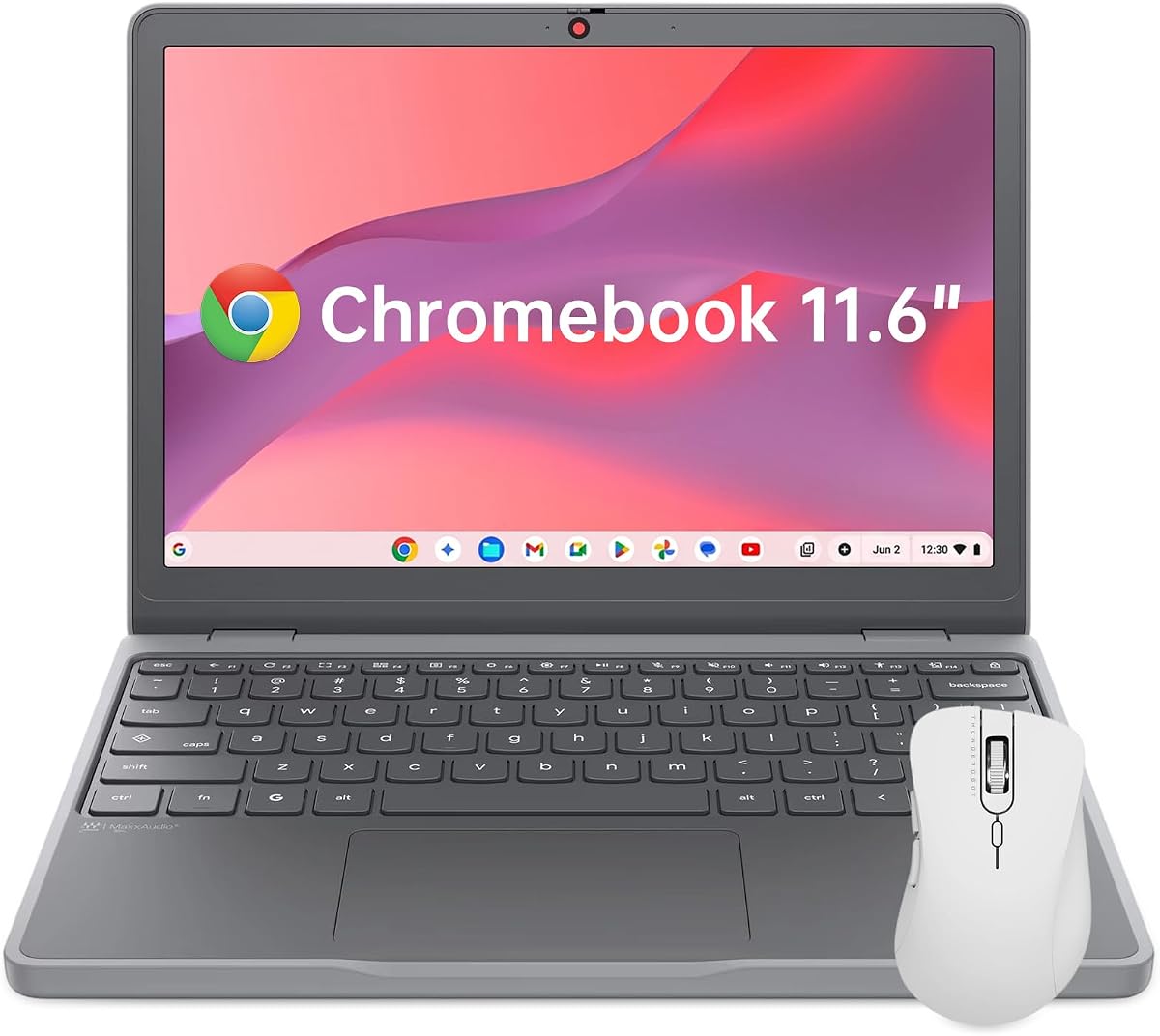
The Lenovo Chromebook 11.6 is designed for maximum portability and convenience. Its compact size and low weight make it easy to carry in any bag, perfect for frequent travelers or students.
We may earn a commission when you buy through this link, at no additional cost to you.
The 11.6-inch HD display is suitable for basic tasks and reading. The TÜV Rheinland Low Blue Light certification helps reduce eye fatigue during long study sessions which is a thoughtful feature for health.
While the screen and processing power are limited, the device serves well as a secondary machine or for light browsing. The integrated security chip ensures your data remains protected from unauthorized access.
We recommend this model for those who prioritize portability above all else. It is an excellent travel companion for checking emails or reading documents, but may be cramped for extensive work.
The Low Blue Light certification helps protect your eyes during extended use, making it suitable for long reading or work sessions.
The integrated H1 Security Chip protects your personal data securely, giving you peace of mind when using public networks.
We may earn a commission when you buy through this link, at no additional cost to you.
Selecting the right Chromebook for AI involves evaluating several key factors including processor capability, memory, and specific software features that enhance productivity.
When choosing a Chromebook for AI, look for at least an Intel Core i3 or AMD Ryzen 3 processor. Newer models with Intel Core Ultra processors offer dedicated AI engines that speed up local tasks.
A stronger processor ensures that you can run multiple tabs and AI tools without lag or freezing issues.
Aim for 8GB of RAM for a smooth experience with modern web apps and AI tools. This capacity allows you to switch between applications efficiently without slowdowns.
Less than 8GB may result in slower performance when multitasking or using AI image generation tools.
Prioritize models with SSD storage over eMMC or UFS for faster boot times and application loading. 256GB is the sweet spot, but 512GB is better if you work offline frequently.
Cloud storage bonuses often compensate for lower local storage, so check if the device includes extra Google One plans.
Look for IPS panels with at least 1080p resolution and good brightness for comfortable viewing. Touchscreens are valuable for AI tools that involve handwriting conversion or photo editing.
A high quality display reduces eye strain during long work sessions and improves the accuracy of touch interactions.
Ensure the device offers at least 10 hours of battery life to last through a full work or school day. Efficient processors and large battery capacities contribute to this longevity.
Long battery life is crucial for mobile professionals who may not have access to power outlets for extended periods.
Check if the laptop includes specific Google AI Pro features like Magic Eraser, handwriting conversion, or video call enhancements. Some models come with free trials that provide immediate value.
Models with newer processors often have better integration with generative AI tools that run on the cloud or locally.
Wi-Fi 6E or Wi-Fi 7 support ensures fast internet speeds which are necessary for cloud based AI tools. Multiple USB-C ports allow for flexible connection to peripherals.
Good connectivity ensures that you can use the device effectively in various network environments without frustration.
MIL-STD durability ratings and spill resistant keyboards are important for students and field workers. These features protect the investment from accidental damage.
A sturdy build ensures that the device remains reliable over time even in demanding environments.
To maximize AI benefits, ensure your ChromeOS is up to date and your account is linked to Google One. This allows seamless access to features like AI writing assistance and image editing directly within your browser apps.
Maintain your device by keeping it cool and avoiding direct sunlight. Regularly clear the cache and manage storage to ensure optimal performance. Use cloud storage for heavy files to free up local space.
Protect your privacy by managing camera and microphone permissions carefully. Use the physical privacy shutter when not in video calls and avoid sharing sensitive data on public Wi-Fi networks.
Most AI features on Chromebooks rely on cloud processing for advanced capabilities like image generation. However, basic tools like text conversion can work offline. Always check specific feature requirements for your model.
The trial offers 12 months of access to advanced Gemini features and cloud storage. You must redeem it during setup and ensure your account is eligible. After the trial, a subscription may be required.
Yes, they are suitable for document creation, web management, and communication tasks. For heavy local processing like video rendering, a more powerful Windows or macOS laptop may be necessary.
No, most Chromebooks have soldered RAM that cannot be upgraded. It is important to choose a model with sufficient RAM for your needs at the time of purchase.
Once the AUE date passes, the device stops receiving security updates. While the laptop may still function, it becomes vulnerable to risks. Consider replacing the device or using it on isolated networks.
Intel Core Ultra processors offer dedicated neural processing units for local AI. For most cloud based tasks, standard Core i3 or Ryzen 3 processors perform well and are more budget friendly.
We found that the Acer Chromebook Plus 514 offers the best balance of features and performance for most users. The Lenovo 2026 Chromebook provides an excellent budget option for students who need reliability.
Prioritize memory and processor power if you plan to use AI tools frequently. Storage is less critical if you rely on cloud services, but ensure you have enough physical space for offline needs.
Prices for these models fluctuate often due to seasonal sales and promotions. Always check the current price and verify any active AI Pro trial offers before making your final purchase decision.