
ASRock 970A-G/3.1
4.2Editor score
Supports AM3 and AM3+ processors
Includes M.2 and SATA3 ports
Affordable price for feature rich
This guide compares ten top-rated Asrock AM3 motherboards to help you find the perfect motherboard for your budget and gaming or professional computing needs.
Finding the right Asrock AM3 motherboard can be challenging given the variety of chipsets and features available. These boards support powerful AMD processors and offer reliable performance for gaming and work.
We have analyzed ten models based on user feedback and technical specifications to bring you this comprehensive list. Our comparison covers everything from budget options to high-end performance boards.
Each pick highlights key strengths and potential drawbacks to help you make an informed decision quickly. Please note that product availability and pricing may change over time.
4.2Editor score

4.3Editor score

5.0Editor score
This side-by-side comparison highlights the key specifications and unique features of each model to help you choose the best fit for your system build.




This ASRock 760GM-HDV board offers a balance of cost and performance for budget-conscious builders looking for reliability. With a 4.3 rating it is known for stable operation with older AMD CPUs.
We may earn a commission when you buy through this link, at no additional cost to you.
It supports Socket AM3+ and AM3 processors including powerful 8-Core options up to 125W. The solid capacitor design ensures durability and consistent power delivery for your system components.
While it lacks modern USB3.0 or SATA3 ports the board handles standard tasks efficiently. Its MicroATX size fits well in smaller cases without sacrificing essential functionality for basic builds.
Anyone needing a dependable board for office work or legacy gaming should consider this model. It provides the necessary foundation for a functional AMD AM3 system at an accessible price.
The use of solid capacitors in the power section helps extend the lifespan of the motherboard under load.
Supporting up to 125W allows for the use of high-performance Phenom II and Athlon processors without overheating issues.
We may earn a commission when you buy through this link, at no additional cost to you.
The ASRock 970A-G/3.1 stands out as a budget-friendly option that still includes modern features like M.2 and USB3.1. It has earned a 4.2 rating from users who appreciate its value.
We may earn a commission when you buy through this link, at no additional cost to you.
This ATX board supports AM3+ and AM3 CPUs and offers SATA3 connectivity for fast storage. The inclusion of a M.2 port allows for even faster SSD speeds if your drive supports it.
While the M.2 slot runs at PCIe 2.0 speeds it is still a significant upgrade over older SATA standards. The USB3.1 Type-C port adds versatility for modern peripherals and devices.
If you want a versatile board that bridges the gap between old and new technologies this is an excellent choice. It offers enough features to upgrade older systems without breaking the bank.
With both SATA3 and M.2 ports you can mix traditional drives with fast NVMe or SATA SSDs effectively.
The addition of USB3.1 and USB3.0 ensures you have enough speed for external drives and peripherals.
We may earn a commission when you buy through this link, at no additional cost to you.
The ASRock 890FX Deluxe4 is a powerhouse board designed for users who need maximum expansion and performance. It has achieved a perfect 5.0 rating reflecting its robust engineering and reliability.
We may earn a commission when you buy through this link, at no additional cost to you.
Featuring the AMD 890FX chipset this board supports Quad CrossFireX and SLI configurations for serious graphics performance. It includes six SATA3 ports allowing for extensive storage expansion options.
This board is ideal for enthusiasts who want to push their systems to the limit with multiple GPUs. The IEEE 1394 ports also make it a rare find for legacy device connectivity.
If you are building a high-performance PC that requires lots of expansion slots and ports this model is the one to get. It delivers premium features that older chipsets simply cannot match.
With support for Quad SLI and CrossFireX you can maximize your gaming frame rates with multiple GPUs.
The 890FX chipset provides ample bandwidth for multiple graphics cards and other PCIe expansion devices.
We may earn a commission when you buy through this link, at no additional cost to you.
The ASRock 970M PRO3 delivers high-end features in a smaller MicroATX package that fits better in tight spaces. It is a strong option for those who need performance without a full-sized board.
We may earn a commission when you buy through this link, at no additional cost to you.
Despite its smaller size it supports the AMD 970 chipset which enables Quad CrossFireX for multiple graphics cards. This makes it unique for compact gaming builds that still want graphical power.
You get the benefits of SATA3 and USB3.0 connectivity which was rare for MicroATX boards at the time. It is a great way to upgrade an older system without moving to a huge tower case.
If space is a priority but you still need performance this board is a smart compromise. It balances size and capability effectively for budget gaming systems.
The MicroATX form factor allows you to build a powerful gaming PC that fits on a desk easily.
Supporting Quad CrossFireX in a small board is impressive for building a scalable graphics solution.
We may earn a commission when you buy through this link, at no additional cost to you.
The ASRock 970 EXTREME3 is tailored for users who need a lot of SATA ports for storage arrays. It uses the reliable SB950 Southbridge to provide consistent performance for data drives.
We may earn a commission when you buy through this link, at no additional cost to you.
With five SATA3 ports and one eSATA3 port this board offers more storage options than many competitors. This is perfect for media servers or workstations that require many hard drives.
The ATX form factor ensures you have enough room for all your cables and components. It supports a wide range of AM3+ processors making it versatile for various CPU upgrades.
For anyone building a PC focused on storage capacity this model is an excellent choice. It simplifies cabling and connectivity for multiple drives in a single system.
The five SATA3 ports allow you to connect multiple high-speed SSDs without needing a controller card.
The eSATA3 port gives you a fast way to connect external hard drives for backups.
We may earn a commission when you buy through this link, at no additional cost to you.
The ASRock 960GM-VGS3 FX provides a basic but reliable foundation for budget-friendly builds. It has solid capacitors and supports high-end CPUs which is great for value seekers.
We may earn a commission when you buy through this link, at no additional cost to you.
It supports 8-Core CPUs up to 125W which ensures you can run powerful processors without worrying about power limits. The 5.1 CH HD Audio codec also provides decent sound for basic needs.
The XFast 555 suite includes app charger and memory boost features that can help optimize your system performance. This makes it a fun choice for users who want a bit of extra tuning.
If you are looking for a no-nonsense board that handles basic tasks well this is a solid pick. It keeps costs down while still offering essential features for everyday computing.
Supporting 8-Core CPUs means you can upgrade your processor later without replacing the motherboard.
The Realtek ALC662 codec provides clear sound for movies and music without needing a separate card.
We may earn a commission when you buy through this link, at no additional cost to you.
The ASRock 880GXH/USB3 offers a unique mix of integrated graphics and modern connectivity for budget systems. It supports ATI Hybrid CrossFireX which allows adding a low-end card to boost performance.
We may earn a commission when you buy through this link, at no additional cost to you.
It features the Radeon HD4250 graphics which is decent for office work and media playback up to Full HD 1080p. The HDMI and DVI ports give you flexibility in monitor connections.
The inclusion of USB3.0 is a significant upgrade over other boards of this era allowing for faster external storage transfers. This makes it a versatile choice for basic users who need some speed.
If you want a simple PC that can handle videos and light tasks without a dedicated GPU this board works well. It offers good value for entry-level builds that do not need heavy gaming.
The integrated Radeon graphics allow you to build a PC without needing a separate graphics card.
Full HD support ensures you can watch Blu-ray or HD content smoothly on any monitor.
We may earn a commission when you buy through this link, at no additional cost to you.
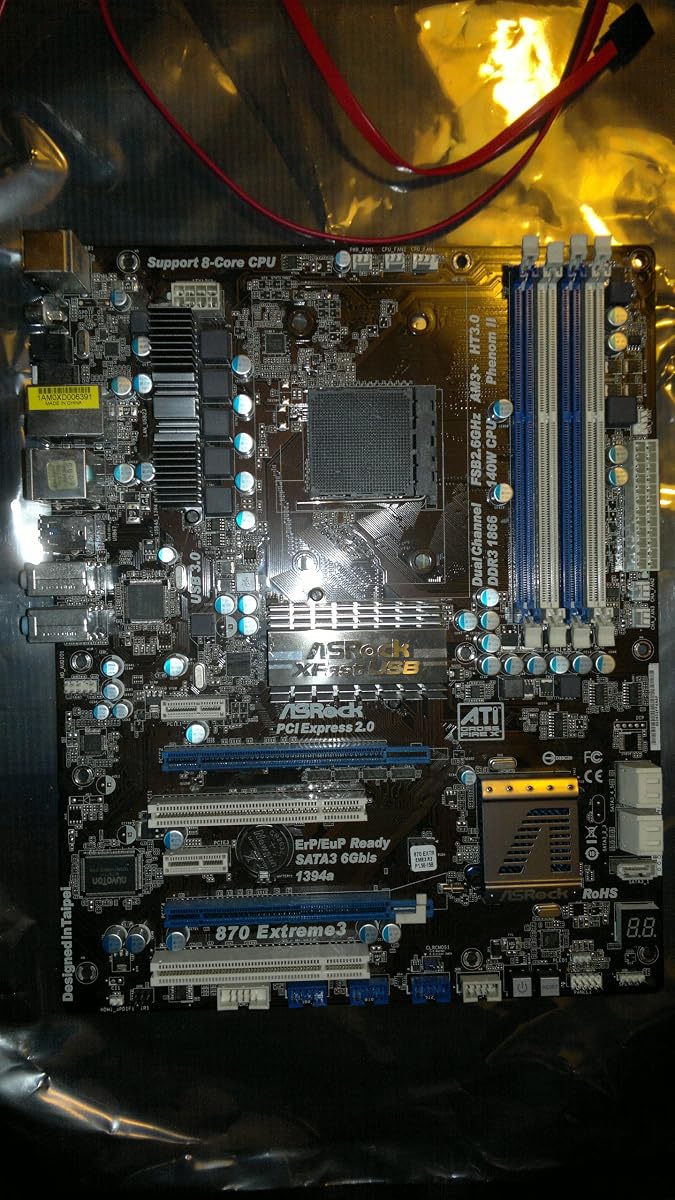
The ASRock 870 EXTREME3 R2.0 is a well-balanced board for users who want solid performance without breaking the bank. It includes the reliable SB850 Southbridge which supports native SATA3 without third-party chips.
We may earn a commission when you buy through this link, at no additional cost to you.
With five SATA3 ports and support for Quad CrossFireX this board offers good expansion options for storage and graphics. The 7.1 audio codec provides clear sound for gaming and multimedia.
It also includes IEEE 1394 ports which are useful for older camcorders or professional audio interfaces. This makes it a strong choice for hobbyists who need legacy connectivity.
If you need a mid-range board that supports plenty of drives and graphics options this is a smart choice. It bridges the gap between basic and high-end features effectively.
The SB850 chipset provides native SATA3 support which is faster and more stable than external controllers.
IEEE 1394 ports are rare these days but very useful for older professional hardware or cameras.
We may earn a commission when you buy through this link, at no additional cost to you.
The ASRock 990FX EXTREME3 is designed for extreme gaming and workloads that require multiple GPUs. It supports Quad SLI and CrossFireX which allows you to link up to four graphics cards together.
We may earn a commission when you buy through this link, at no additional cost to you.
It features a robust power section capable of handling up to 140W CPUs ensuring stability for high-end processors. The chipset provides ample bandwidth for all three PCIe slots to run effectively.
This board is ideal for users who want to push their systems to the absolute limit. The multiple USB ports and connectivity options make it suitable for complex setups with many peripherals.
If you are a hardcore enthusiast building a multi-GPU workstation this is one of the few options available. It offers a level of expandability that modern budget boards simply do not provide.
With support for Quad SLI you can drastically increase rendering and gaming performance with multiple GPUs.
The power design ensures that high-wattage CPUs get clean and stable power even under heavy load.
We may earn a commission when you buy through this link, at no additional cost to you.
The ASRock 970DE3/U3S3 offers a solid balance of features for users who want stability without the cost of high-end boards. It uses the AMD 770 Northbridge which is known for reliability.
We may earn a commission when you buy through this link, at no additional cost to you.
It includes a PCIe 3.0 x16 slot which is a great feature for utilizing newer graphics cards. This gives you better bandwidth for graphics compared to older PCIe 2.0 boards.
With a mix of SATA3 and SATA2 ports you have plenty of room for storage drives. The board supports a wide range of AM3+ CPUs making it versatile for upgrades.
If you are looking for a steady board that supports new GPUs and older CPUs this is a good fit. It offers a reliable foundation for a gaming or office PC.
The PCIe 3.0 slot ensures compatibility with newer graphics cards that require higher bandwidth.
Having both SATA3 and SATA2 ports allows you to mix modern SSDs with older mechanical drives.
We may earn a commission when you buy through this link, at no additional cost to you.
Choosing the right motherboard involves looking at chipsets power delivery and connectivity features to match your specific needs.
Ensure the board supports the specific AM3 or AM3+ socket you need for your processor. Some boards only support AM3 while others support both.
Check the TDP limit to confirm it can handle your intended CPU wattage without instability issues.
Chipsets like 990FX and 970 offer better multi-GPU support and expansion slots than 760G or 770.
Choose a chipset that offers the level of PCIe lanes and features required for your build goals.
Look for boards that support the amount of DDR3 RAM you plan to use and the speeds your CPU supports.
Most AM3 boards support up to 32GB or 64GB which is sufficient for most legacy systems today.
SATA3 ports are essential if you plan to use modern SSDs for faster boot and load times.
M.2 support on select models offers an even faster storage option for system drives.
USB3.0 and USB3.1 ports provide faster transfer speeds for external drives and peripherals.
Check the number of PCIe slots needed for your graphics cards and add-on cards.
MicroATX boards fit smaller cases but ATX boards offer more room for expansion and cooling.
Verify your case supports the chosen form factor to avoid installation issues.
Solid capacitors and robust VRMs ensure stability especially when using high-wattage CPUs or overclocking.
A good power design reduces the risk of system crashes and extends the board's lifespan.
Quality audio codecs provide better sound for gaming and media without needing a sound card.
Gigabit Ethernet is standard but check for additional network ports if you need them for servers.
When installing your motherboard make sure the power is off and you are grounded to avoid static damage.
Install the CPU gently and apply thermal paste evenly before attaching your cooler securely to the board.
Keep your motherboard dust free by cleaning it with compressed air regularly to maintain good airflow.
Generally no an AM3 motherboard will not support AM3+ CPUs. However many AM3+ boards support AM3 CPUs without issues. Always check the QVL list for compatibility.
Most AM3 motherboards will run Windows 10 without issues but you may need to find drivers manually. Some boards may lack drivers for newer OS versions so check support pages.
Not all boards include SATA3 ports. Some use older SATA2 speeds which are slower than modern SSDs require. Check the chipset features to confirm SATA3 availability.
Many high-end models like 990FX and 970 support CrossFireX or SLI. Budget boards usually only support one graphics card or have limited multi-GPU support.
Most AM3 boards support up to 32GB or 64GB of DDR3 RAM. Check the specific board specs to confirm the maximum supported capacity for your model.
Yes most of these boards allow for basic CPU overclocking via BIOS settings. The 990FX and 970 models generally offer more advanced features and options for this.
Yes newer graphics cards fit into PCIe x16 slots on these boards. However performance may be limited by older PCIe 2.0 standards on some models.
You can update the BIOS using the ASRock Instant Flash tool via USB drive. Download the latest BIOS from the product page and follow the instructions carefully.
Choosing the right AM3 motherboard depends on your specific needs for power performance and budget constraints.
Prioritize models that offer SATA3 and USB3.0 support if you want faster storage and peripherals for your system.
Always double check current pricing and availability before making your final purchase decision today.