
Samsung 49 Odyssey OLED G9
4.3Editor score
QD-OLED Panel Technology
0.03ms Response Time
144Hz Refresh Rate
Selecting the right display for simulation racing transforms a standard setup into a fully immersive cockpit experience. A wide panel wraps around your vision, mimicking real track views. This guide explores ten top contenders designed for high fidelity and responsiveness on the virtual track.
We evaluated these monitors based on panel technology, refresh rates, response times, and curvature suitability for racing simulations. Each entry offers unique strengths in color accuracy, multitasking capabilities, and overall visual fidelity. Our analysis highlights which models deliver the most engaging competitive edge for serious sim racers.
Every pick includes detailed breakdowns of connectivity, ergonomics, and specific gaming features like adaptive sync. While prices fluctuate across retailers, this list remains focused on performance and value. Expect to find everything from budget-friendly entry points to premium OLED experiences for your racing rig.
4.3Editor score

4.6Editor score
4.1Editor score
As an Amazon Associate we earn from qualifying purchases.
This side-by-side comparison highlights key specifications across all ten monitors to help you find the perfect match for your sim racing setup.





The Raywego 49 Inch Curved Ultrawide Gaming Monitor earns our Editor's Choice for its exceptional balance of performance and immersion. With a DQHD 165Hz refresh rate and 1500R curvature, it delivers smooth, tear-free visuals perfect for high-speed racing simulations.
We may earn a commission when you buy through this link, at no additional cost to you.
Its VA panel provides deep contrast and 127% sRGB color coverage, ensuring that track details stand out vividly. The 1ms response time reduces motion blur, while Adaptive Sync keeps gameplay fluid on compatible systems.
While the stand adjustment could be more flexible, the VESA mount option solves this for custom setups. The PIP and PBP modes also enable seamless multitasking during pit stops or telemetry monitoring.
Racers seeking an immersive, high-refresh experience at a competitive value will find this monitor an ideal foundation for their cockpit.
The 1500R curve wraps your vision, reducing eye strain and keeping track edges within peripheral view.
Compatible with Adaptive Sync to eliminate screen tearing and stuttering during fast-paced racing moments.
We may earn a commission when you buy through this link, at no additional cost to you.
Samsung's 49 Odyssey OLED G9 redefines premium sim racing with its QD-OLED panel, delivering true blacks and near-instant response times. The 0.03ms reaction time ensures every turn is rendered with pixel-perfect precision.
We may earn a commission when you buy through this link, at no additional cost to you.
Its DUAL QHD resolution and vibrant color spectrum make environments feel alive, while the thermal modulation system protects brightness consistency during long sessions. G-Sync compatibility further guarantees smooth, tear-free gameplay.
Static elements like dashboards may pose a slight burn-in risk, but built-in screen savers mitigate this over time. The ergonomic stand allows easy height and tilt adjustments for optimal viewing.
For racers prioritizing visual fidelity and speed, this OLED powerhouse offers an unmatched competitive edge on the track.
True blacks reveal hidden track details without pixel light bleed, enhancing visibility in shadowed corners.
Algorithms control brightness to reduce heat, maintaining consistent performance during extended racing sessions.
We may earn a commission when you buy through this link, at no additional cost to you.
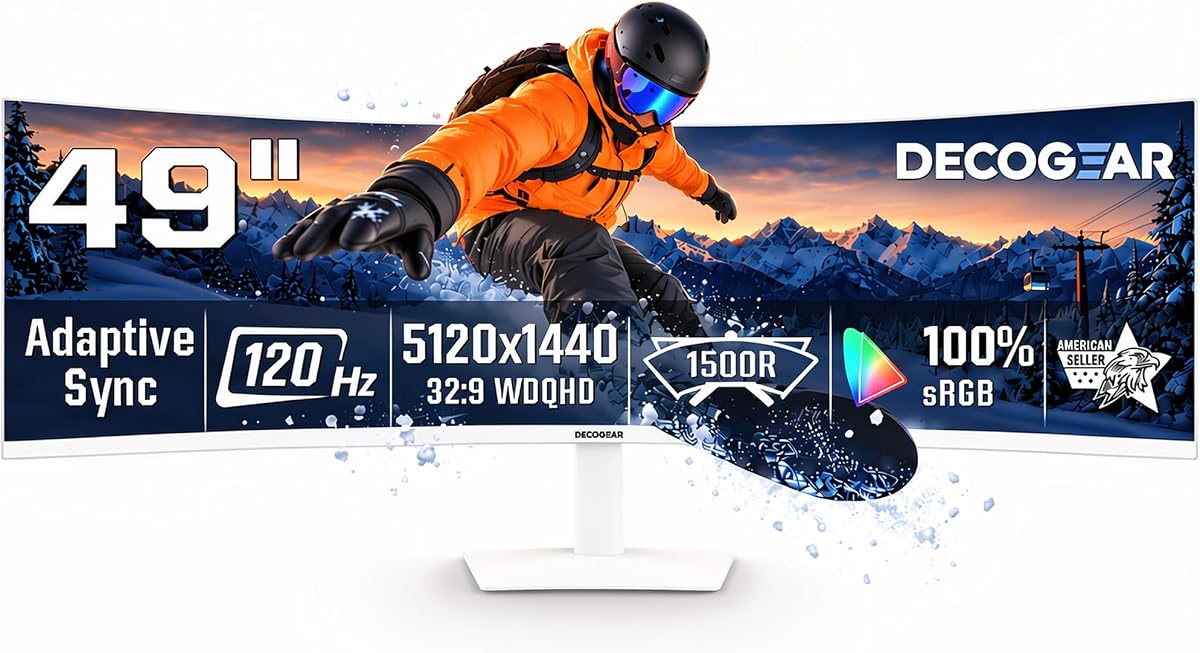
The Deco Gear 49 Super Ultrawide Curved Monitor brings entry-level accessibility to wide racing displays. Its 120Hz refresh rate and 1ms MPRT motion rate provide smooth visuals without breaking the bank.
We may earn a commission when you buy through this link, at no additional cost to you.
Featuring 65W USB-C power delivery, it simplifies laptop setups with single-cable connectivity. The built-in speakers and KVM support also enhance multitasking, letting you run telemetry software alongside your game.
Though not as fast as higher-end models, its contrast and color accuracy remain impressive for the price. Adjustable tilt and height settings ensure comfortable viewing during marathon sessions.
Entry-level racers and home-office users alike will appreciate its versatile performance and value-packed feature set.
USB-C carries video, data, and power for clean, clutter-free workstation setups.
Integrated speakers provide immediate sound without extra peripherals for quick testing or streaming.
We may earn a commission when you buy through this link, at no additional cost to you.
INNOCN's 49 Curved Monitor offers a well-rounded mix of immersion and productivity. Its 120Hz rate and 1800R curve create an engaging visual field, while 99% sRGB coverage ensures accurate color rendering.
We may earn a commission when you buy through this link, at no additional cost to you.
Adaptive-Sync and HDR 400 support bring fluid motion and enhanced dynamic range to racing titles. The USB-C port delivers 65W power, reducing cable clutter in mixed-use setups.
While peak brightness is moderate, the 3000:1 contrast still delivers deep shadows. Dual QHD resolution enhances clarity across track textures and reflections.
Users balancing gaming and creative work will find this monitor a reliable, feature-rich centerpiece for their workspace.
Enhanced depth in every detail helps identify road signs and track markers more clearly.
Height, tilt, and swivel adjustments reduce fatigue during extended sim racing sessions.
We may earn a commission when you buy through this link, at no additional cost to you.
The Samsung 49 Odyssey G9 Series is built for competitive racers seeking the fastest possible response. A 240Hz refresh rate and 1ms GtG response eliminate lag, ensuring every turn registers instantly.
We may earn a commission when you buy through this link, at no additional cost to you.
Its 1000R curve wraps tightly around your vision for maximum immersion, while DisplayHDR 1000 delivers stunning brightness for track details. CoreSync technology projects on-screen colors into your room to deepen immersion.
FreeSync Premium Pro ensures smooth performance across varying frame rates. The hexa stand and VESA support offer flexible ergonomic positioning.
Racers prioritizing speed and immersion will find this model an unbeatable choice for high-performance simulation.
Ultra-smooth action keeps motion blur minimal, critical for precise cornering and overtaking.
Syncs ambient lighting with on-screen colors to extend visual engagement beyond the monitor.
We may earn a commission when you buy through this link, at no additional cost to you.
The 2025 edition of the SAMSUNG 49-inch Odyssey G9 refines the flagship experience with improved ergonomics and auto-switching. A 144Hz refresh rate and 1ms response time deliver fluid, blur-free racing visuals.
We may earn a commission when you buy through this link, at no additional cost to you.
DisplayHDR 600 enhances contrast in dark scenes, while AMD FreeSync Premium Pro prevents tearing. Auto Source Switch+ detects connected devices instantly, reducing setup friction.
The ergonomic stand tilts and adjusts height for comfortable viewing angles. Picture-in-Picture mode allows multitasking without interrupting gameplay.
This balanced model suits racers seeking reliability and convenience without sacrificing core immersion features.
Detects power-on signals and switches inputs automatically for faster access to racing titles.
Use Picture-in-Picture to view telemetry or chat without leaving your main racing screen.
We may earn a commission when you buy through this link, at no additional cost to you.
CRUA's 49 DQHD delivers strong performance for racers focused on smooth motion. Its 165Hz refresh rate and AMD FreeSync eliminate tearing, while the 1500R curve enhances immersion.
We may earn a commission when you buy through this link, at no additional cost to you.
With 120% sRGB color coverage and 3000:1 contrast, visuals remain vivid even in dim conditions. Eye-care features like low blue light reduce strain during long sessions.
Lack of built-in speakers requires external audio, but HDMI 2.1 and DP 1.4 connectivity options cover all modern devices. Wall-mount support adds setup flexibility.
Ideal for users prioritizing smooth gameplay and color accuracy on a budget-friendly chassis.
Low blue light and flicker-free tech protect vision during extended sim racing sessions.
Wall-mount compatibility enables clean desk setups for maximum cockpit space.
We may earn a commission when you buy through this link, at no additional cost to you.
The ASUS ROG XG49VQ offers a proven curved experience with 144Hz smoothness and FreeSync 2 HDR. Its 1800R curvature wraps your field of vision for enhanced engagement.
We may earn a commission when you buy through this link, at no additional cost to you.
DFHD resolution provides wider coverage than standard Full HD, while DisplayHDR 400 ensures cinematic color. ASUS Eye Care technology reduces fatigue through flicker-free backlighting.
Included GamePlus and GameVisual overlays enhance customization. A three-month Adobe Creative Cloud subscription adds creative value.
This model remains a solid choice for users seeking ergonomic comfort and familiar reliability.
Exclusive overlays adjust contrast and brightness to optimize visibility for racing environments.
Minimizes flicker and blue light to reduce strain during marathon sim sessions.
We may earn a commission when you buy through this link, at no additional cost to you.
The Z-Edge 5K 49 Inch delivers blistering 240Hz refresh rates at a compelling price. Its 1800R curvature and 1ms response ensure precise, smooth gameplay for competitive sims.
We may earn a commission when you buy through this link, at no additional cost to you.
99% sRGB color coverage and Delta E less than two guarantee accurate visuals. HDMI 2.1 and DisplayPort connectivity support next-gen consoles and PCs alike.
Built-in speakers and PBP modes expand multitasking capabilities. The curved design eases eye strain during long play.
Racers seeking high-speed performance without premium pricing will find this model a powerful contender.
Ultra-fast refresh minimizes motion blur, enabling sharper reaction to track hazards.
Delta E less than two ensures faithful color reproduction for consistent visuals.
We may earn a commission when you buy through this link, at no additional cost to you.
Samsung's 49 Odyssey G93SC combines OLED brilliance with 240Hz performance. The QD-OLED panel delivers true blacks and vibrant colors unmatched by traditional LCD panels.
We may earn a commission when you buy through this link, at no additional cost to you.
Near-instant 0.03ms response time and G-Sync support ensure flawless motion. HDR True Black 400 deepens shadow detail for atmospheric immersion.
Its premium metal finish and slim 4.5mm profile elevate aesthetics. Auto Source Switch+ keeps you in the action instantly.
This model stands as a top-tier option for racers demanding absolute visual and performance excellence.
Near-instantaneous pixel transitions eliminate ghosting entirely, critical for high-speed racing.
Infinite contrast reveals hidden details in tunnels or night tracks without washout.
We may earn a commission when you buy through this link, at no additional cost to you.
Selecting the right monitor involves balancing resolution, refresh rate, curvature, and panel technology to match your racing goals.
High refresh rates like 144Hz or 240Hz deliver smoother motion, crucial for fast-paced racing. Look for response times under 2ms to avoid ghosting during sharp turns.
Prioritize models with 144Hz or higher refresh rates and 1ms or less response times for competitive performance.
VA panels offer deep contrast, while OLED provides true blacks and perfect color uniformity. Color gamut coverage like sRGB ensures accurate track visuals.
Choose OLED for premium contrast or VA for balanced cost and depth with solid color accuracy.
Lower curvature numbers like 1000R wrap tightly around your vision, enhancing peripheral awareness. 1500R or 1800R offers a gentler curve suitable for mixed-use.
Select tighter curvature for pure immersion or moderate curvature for comfort during multitasking.
DQHD (5120×1440) delivers sharper track details compared to DFHD. Higher resolution ensures textures and signage appear crisp.
Opt for DQHD or 5K2K resolutions to maximize visual clarity on wide displays.
HDMI 2.1 and DisplayPort 1.4 support high bandwidth for refresh rates and resolutions. USB-C simplifies single-cable connections for laptops.
Ensure your monitor has HDMI 2.1 or DP 1.4 to avoid performance bottlenecks.
FreeSync Premium Pro or G-Sync eliminates screen tearing by syncing refresh rates with your GPU. This ensures smooth gameplay across varying frame rates.
Verify Adaptive Sync compatibility with your graphics card to prevent visual artifacts.
Height, tilt, and swivel adjustments reduce neck strain during long sessions. VESA mount compatibility adds flexibility for custom cockpit setups.
Prioritize stands with full ergonomic adjustability or VESA support for custom mounting.
Features like HDR, PIP/PBP modes, and built-in speakers enhance multitasking and immersion. Look for extras that suit your workflow and racing environment.
Consider supplementary features like Picture-in-Picture or HDR support for a richer experience.
Calibrate display settings using HDR or color profiles to ensure accurate track colors and contrast. Adjust brightness to match your room's ambient light, reducing eye strain during night racing sessions.
Position the monitor so its center aligns with your seated eye level. Use a VESA mount if the stand limits height or tilt. Ensure your seating distance matches the monitor's width for full immersion.
Clean the screen using a soft, dry microfiber cloth to avoid scratching. Avoid spraying liquid directly onto the panel. Use screen savers or dark modes when idle to protect OLED or VA panels from burn-in.
A refresh rate of 144Hz or higher is ideal for sim racing, as it ensures smooth motion and reduces motion blur. Higher rates like 240Hz further improve precision in competitive scenarios. This helps racers react faster to track changes and maintain control.
OLED panels are worth it for their true blacks and instant response time, enhancing immersion in night races or dark corners. However, they come at a premium price and may risk burn-in with static dashboards. For most, VA offers strong contrast at lower cost.
Lower curvature values like 1000R wrap the screen tightly around your field of view, improving peripheral awareness and immersion. Moderately curved 1500R or 1800R displays offer a balance between immersion and multitasking comfort. Choose based on your cockpit setup.
For high-resolution, high-refresh racing monitors, HDMI 2.1 and DisplayPort 1.4 are essential to handle the bandwidth needed for 144Hz or 240Hz without compression. These ports ensure crisp visuals and smooth performance. Check your GPU compatibility before purchasing.
Adaptive Sync technologies like FreeSync Premium Pro or G-Sync synchronize your monitor's refresh rate with your GPU's output, eliminating screen tearing and stuttering. This ensures fluid gameplay even when frame rates fluctuate. It is critical for competitive sim racing.
Yes, ultrawide monitors excel at multitasking thanks to Picture-in-Picture and split-screen modes that let you monitor telemetry while racing. Their width also supports having multiple windows open side by side. This enhances productivity during setup or analysis.
From the versatile Raywego to the premium Samsung OLED models, each option delivers unique strengths for sim racing enthusiasts. The list balances budget value with high-speed performance and immersive design tailored to cockpit setups.
Prioritize features that match your racing goals such as refresh rate for competition or color fidelity for realism. Consider ergonomics and connectivity to ensure a comfortable, functional setup for long sessions.
Always verify current availability and features before purchasing since specs and pricing vary by retailer. This guide provides a solid foundation for selecting the perfect monitor to elevate your virtual racing experience.