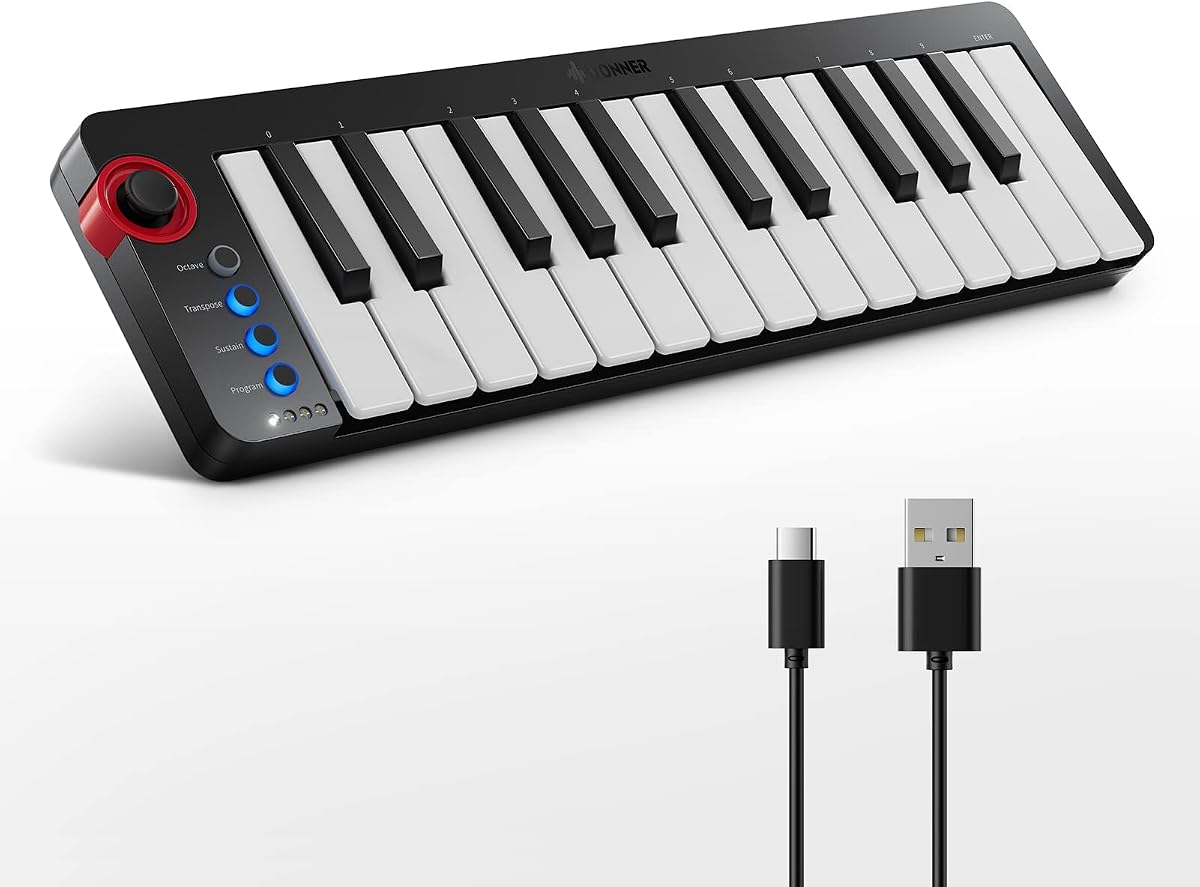
Donner Mini MIDI Keyboard N-25
4.1Editor score
40 Teaching Courses Included
Light-Up Rocker Buttons
USB MIDI Compatibility
This guide compares the top 25 key MIDI controllers for producers and musicians in October 2026, focusing on features, compatibility, and value for money.
Choosing the right MIDI controller can transform your music production workflow. A good 25 key model offers portability without sacrificing essential controls for synthesizers and drum machines.
We evaluated ten leading models based on build quality, key action, software integration, and overall versatility. Each product was analyzed to ensure it meets modern production standards for home studios.
Each pick highlights specific strengths like pad response or DAW mapping. Please note that prices and availability may change frequently, so always check current listings before purchasing.
4.1Editor score

4.6Editor score

4.6Editor score
This side-by-side comparison highlights the core specifications of each model to help you decide which controller fits your specific production needs and budget constraints.


The Akai Professional MPK Mini MK3 stands out as a top choice for producers needing a compact yet powerful tool. It holds a strong rating from users who appreciate its balance of portability and functionality in modern workflows.
We may earn a commission when you buy through this link, at no additional cost to you.
Its 8 backlit MPC-style pads allow for expressive drum programming while the 4-way thumbstick provides dynamic pitch and modulation control. This combination ensures you can manipulate sounds intuitively without relying solely on mouse clicks.
While the keys are mini-sized which may take adjustment for some players the velocity sensitivity allows for nuanced performances. The inclusion of Native Kontrol Standard support makes it ideal for those using Native Instruments software.
This controller is best for songwriters and beat makers who want a reliable desktop companion. Its versatility across various DAWs ensures you can integrate it smoothly into any production environment for consistent results.
The dedicated layout supports seamless mapping to major digital audio workstations for efficient track control.
Built-in arpeggiator and programmable knobs let you sculpt sounds in real time without stopping your flow.
We may earn a commission when you buy through this link, at no additional cost to you.
The Akai Professional LPK25 is designed for those who prioritize simplicity and portability above all else. Users praise its straightforward design that allows for instant connection to Mac or PC systems without drivers.
We may earn a commission when you buy through this link, at no additional cost to you.
It features responsive mini keys and dedicated octave buttons that expand your range effectively. The built-in arpeggiator adds creative flair to melodies and bass lines without requiring complex software configuration.
The lack of drum pads means it is less suited for beat making but perfect for melodic composition. Its sleek profile fits easily into backpacks making it an ideal travel companion for musicians.
Choose this model if you need a basic input device for composing ideas on the go. Its compatibility with almost every DAW ensures you can record your performances immediately after plugging in.
USB power and plug-and-play compatibility ensure minimal setup time for instant music creation sessions.
Programmable preset slots let you recall custom mappings for different virtual instruments quickly.
We may earn a commission when you buy through this link, at no additional cost to you.
The Arturia MiniLab 3 offers a sophisticated approach to compact MIDI control with a focus on fluid workflow. It stands out for its premium build quality and responsive velocity-sensitive keys that feel great to play.
We may earn a commission when you buy through this link, at no additional cost to you.
Unique among its peers it includes four faders that provide excellent control over mixing and automation tasks. The layout allows you to mute tracks and adjust parameters without reaching for your mouse constantly.
While it carries a slightly higher price point the included software suite adds significant value for new producers. The white design is a stylish choice that complements modern studio setups effectively.
This controller suits producers who want tactile fader control in a small footprint. Its adaptability to various styles ensures it works well for electronic music as well as traditional composition.
The included faders give you precise control over track levels and automation curves during sessions.
Comprehensive software bundle provides access to a wide range of virtual instruments and effects.
We may earn a commission when you buy through this link, at no additional cost to you.
The Novation Launchkey Mini 25 MK4 redefines what a compact controller can do with advanced features like FSR pads and Scale Mode. It offers a professional experience that rivals much larger units in the market.
We may earn a commission when you buy through this link, at no additional cost to you.
The 16 responsive FSR pads are perfect for finger drumming and clip launching in Ableton Live. Combined with Scale Mode it ensures you never hit a wrong note making it accessible for beginners too.
It comes with a robust bundle including Ableton Live Lite and sounds from renowned developers. This completeness makes it an all-in-one solution for getting started with professional production immediately.
Ideal for producers seeking deep integration with modern DAWs this model delivers reliability and power. Its advanced features justify the premium price for those who need precise control over their creative process.
Scale and chord modes let you create complex melodies and harmonies without deep music theory knowledge.
Force sensitive pads provide a unique tactile response for more expressive drum programming and triggers.
We may earn a commission when you buy through this link, at no additional cost to you.
The Donner Mini MIDI Keyboard N-25 offers an incredible entry point for those new to music production. It combines basic functionality with unique learning tools that help users understand music theory through interaction.
We may earn a commission when you buy through this link, at no additional cost to you.
With 40 entertaining teaching courses built in it guides you from beginner to advanced concepts easily. The light-up buttons add visual feedback which is fun and helpful for keeping rhythm and timing.
While the build is simpler than premium models it handles daily recording tasks well. Its compatibility with various DAWs ensures you can plug in and start creating music without extra configuration.
This is the perfect gift for anyone looking to explore music without a large investment. Its educational focus makes it stand out among standard controllers by adding real value beyond just note input.
40 engaging lessons cover arrangement essentials to help unleash your creativity quickly and effectively.
Light-up buttons provide a fun visual display of your playing to enhance the learning experience.
We may earn a commission when you buy through this link, at no additional cost to you.
The Rhymo 25-Key portable MIDI keyboard brings modern connectivity options like USB-C and Bluetooth MIDI to a compact device. This allows for seamless integration with tablets and laptops without needing extra adapters.
We may earn a commission when you buy through this link, at no additional cost to you.
Its X-Y joystick offers dynamic control over pitch and modulation while the loop function adds creative flexibility. The velocity-sensitive keyboard ensures dynamic playing for both beginners and experienced producers alike.
This controller supports up to 10 octaves via transpose buttons giving you melodic flexibility within a small frame. Its class-compliant nature means you can start using it immediately on various systems.
Choose this model for on-the-go production where modern ports are essential. Its versatility and wireless capabilities make it a strong contender for travelers and mobile creatives.
Bluetooth MIDI and USB-C port allow connections to multiple devices without messy cabling.
Full level mode and clear LED indicators provide visual feedback and enhanced playing dynamics.
We may earn a commission when you buy through this link, at no additional cost to you.
The M-VAVE K5 distinguishes itself with wireless capabilities allowing you to compose without cables cluttering your desk. The built-in battery supports around 16 hours of use which is ideal for long sessions away from outlets.
We may earn a commission when you buy through this link, at no additional cost to you.
Its 8 RGB backlit pads and 8 assignable rotary encoders provide extensive control over your software instruments. Touch sensitive stripes on the top offer intuitive pitch and modulation adjustments during live performance.
While Bluetooth can occasionally introduce latency it remains a valid choice for recording where real-time timing is flexible. The included software bundle adds value for users starting their production journey.
This controller is perfect for those who prioritize freedom of movement in their studio setup. Its comprehensive feature set makes it a strong option for beat makers needing wireless reliability.
Built-in 2000 mAh battery supports about 16 hours of continuous use for extended work.
Capacitive touch stripes provide intuitive pitch bending and modulation for expressive performances.
We may earn a commission when you buy through this link, at no additional cost to you.
The Akai Professional MPK Mini Play MK3 is unique because it functions as a standalone keyboard without needing a computer. Its built-in speaker and internal sounds allow you to create music anywhere instantly.
We may earn a commission when you buy through this link, at no additional cost to you.
You get 100 internal drum and instrument sounds which are accessible via the OLED display for easy browsing. The controller also functions as a USB MIDI controller when connected to your DAW for advanced production.
While the internal sounds are fun they are limited compared to full software instruments. However the flexibility to work offline makes it a valuable tool for sketching ideas on the go.
This model is best for travelers who need a self-contained music creation tool. Its dual functionality ensures you can enjoy standalone creativity while still integrating into your professional workflow.
Built-in speaker and standalone mode allow you to compose without needing a computer connection.
OLED display helps you navigate sounds and settings quickly during live or offline sessions.
We may earn a commission when you buy through this link, at no additional cost to you.
The Akai Professional MPK Mini MK3 in Black is the standard version of one of the market's most popular controllers. It offers the same robust feature set as the white version but with a classic aesthetic.
We may earn a commission when you buy through this link, at no additional cost to you.
Users rely on its 8 MPC-style pads and thumbstick for precise control over virtual instruments and samples. The NKS integration ensures seamless browsing and control of Native Instruments sound libraries.
Its consistency across software environments makes it a reliable choice for collaborative projects. The included software bundle provides everything needed to start producing professional quality music immediately.
Choose this model if you want a proven tool with broad community support. Its comprehensive capabilities ensure it remains relevant for various production styles and requirements effectively.
Widely adopted by producers ensuring compatibility with tutorials and shared project files online.
Includes over 1500 sounds and MPC Beats for immediate production capability without extra cost.
We may earn a commission when you buy through this link, at no additional cost to you.
The Akai APC Key 25 MK2 is designed specifically for users deeply invested in Ableton Live workflows. Its dedicated controls for clip launching and mixing make it a streamlined tool for live performance and production.
We may earn a commission when you buy through this link, at no additional cost to you.
The 5×8 RGB pad matrix provides visual feedback for launching clips which is crucial for building tracks dynamically. Directional arrow buttons let you navigate large groups of clips quickly without losing focus.
While it may feel specialized compared to generic controllers its integration with Live is unmatched. Pre-mapped controls mean you can start controlling tracks immediately after setup without manual mapping.
This controller is perfect for producers looking to move from studio to stage seamlessly. Its specific design ensures you have direct access to essential functions during critical performance moments.
40 RGB pads provide color feedback to trigger loops and samples accurately during live sets.
Directional arrows allow fast navigation through clips and scenes for efficient arrangement.
We may earn a commission when you buy through this link, at no additional cost to you.
Selecting the right controller depends on your specific production needs, budget, and software environment.
Mini keys are essential for portability but may feel less realistic to pianists. Velocity sensitivity allows for dynamic playing which is crucial for expressive performances.
Look for velocity-sensitive keys to ensure your dynamics translate into the software accurately.
Drum pads should be responsive and ideally backlit for visual clarity in low light. MPC-style pads are preferred for beat makers who need precise control.
Ensure pads have velocity sensitivity to control drum intensity and expression effectively.
Check if the controller is pre-mapped for your preferred DAW to save setup time. Native Kontrol Standard support is beneficial if you use Native Instruments plugins.
Prioritize controllers with dedicated software bundles to get started with production immediately.
USB-C is becoming the standard for modern devices offering better data transfer. Bluetooth MIDI allows wireless connections which reduces cable clutter.
Choose a model with the connectivity that matches your devices to ensure smooth operation.
Prices vary significantly based on feature set and build quality. Budget models may lack advanced features but are perfect for beginners learning the basics.
Determine your essential needs before buying to avoid overspending on features you will not use.
A durable chassis ensures the controller survives travel and daily use without issues. Weight matters if you plan to transport it frequently to different locations.
Invest in a sturdy model that withstands regular handling to ensure longevity of your investment.
Faders and knobs allow you to control mix levels and synth parameters directly on the device. Pitch wheels and modulation sticks add expressive elements to your performance.
Select controllers with the control surface you need to maximize your creative options in software.
Always connect your controller via USB before launching your DAW software to ensure recognition. Install any specific drivers if required though most modern devices are class-compliant.
Keep the device away from direct sunlight and extreme temperatures to protect the keys and electronics. Regularly clean the keys and pads with a soft dry cloth to remove dust.
Use high-quality cables to prevent signal dropouts during recording sessions. If using Bluetooth ensure your device is updated to maintain stable wireless connections.
Most controllers require a computer to function fully unless they have built-in sounds like the MPK Mini Play MK3. You can also connect to mobile devices using adapters for on-the-go use.
Mini keys are compact and portable which makes them easier to transport but may feel smaller for those used to standard keys. They are suitable for learning basic chords and melodies.
Yes, many modern controllers support USB OTG or Bluetooth MIDI for use with phones and tablets. Ensure your device supports MIDI protocols for seamless integration with music apps.
A MIDI keyboard sends data to control software instruments while a synthesizer generates sound internally. Most 25 key controllers are MIDI keyboards that rely on external software for sound.
Most controllers come pre-mapped but you can customize them using the manufacturer's editor software. Access your DAW's preferences to assign knobs and faders to specific track parameters.
Yes, controllers with USB MIDI compatibility work seamlessly with GarageBand on Mac and iOS. They are automatically recognized as audio input devices for recording tracks.
We reviewed ten controllers ranging from budget-friendly options to professional models for advanced workflows. The Akai MPK Mini MK3 and Novation Launchkey Mini offer the best balance for most users.
Prioritize features like pad sensitivity and DAW integration to ensure you get the most value. Understanding your specific needs helps narrow down the vast choices available in the market.
Always check current pricing and availability as deals change frequently. Investing in a quality controller is a significant step toward improving your music production experience.