
10Gtek 10Gb Dual RJ45 Port Network Card
4.1Editor score
Intel X540 Controller Chipset
Dual RJ45 Ethernet Ports
Supports Windows and Linux OS
This guide compares the top 10GB Ethernet Cards for speed and reliability, helping you choose the right adapter for gaming, NAS, or servers.
Upgrading your network connectivity is essential for modern computing demands. A 10GB Ethernet Card allows your desktop or server to handle massive data transfers with ease. Whether you manage a home lab or run a business server, speed matters.
We have evaluated the leading models available this month based on performance and compatibility. Our team analyzed chipset efficiency, build quality, and user feedback to curate this list. You will find options ranging from budget-friendly to enterprise-grade solutions.
Each pick highlights specific strengths to match your unique networking needs. Prices and availability can shift quickly, so check the latest deals before buying. Use this guide to make an informed decision for your infrastructure upgrade today.
4.1Editor score

4.2Editor score

4.6Editor score
Here is a side-by-side look at the key specifications and features of every product we reviewed. This table helps you quickly compare chipsets, port counts, and compatibility before making a final selection.




The TP-Link TX401 stands out as a top choice for users seeking reliable 10G speeds without complexity. It delivers consistent performance and includes necessary accessories for immediate setup. Users appreciate the ease of installation and robust build quality.
We may earn a commission when you buy through this link, at no additional cost to you.
Its 10GBase-T technology ensures smooth data transmission for both local and internet tasks. The included CAT6A cable guarantees you are ready to run at full speed from day one. Low latency features make it suitable for gaming and real-time applications.
While it lacks a dual port configuration, the single port design keeps costs manageable and installation simple. The heat output is manageable for most cases but ventilation helps. This balance makes it an excellent entry point into 10G networking.
Ideal for home labs and offices needing a quick upgrade to faster throughput. You get solid support and a warranty that backs the hardware reliability. For most single user setups, this card offers the best value and performance combination.
Drivers are built into most modern systems reducing setup time significantly.
Getting a rated CAT6A cable saves money and ensures full speed performance.
We may earn a commission when you buy through this link, at no additional cost to you.
The 10Gtek card offers a compelling budget option with dual ports for redundancy or link aggregation. It uses a proven Intel controller that maintains stability under load. This makes it a strong candidate for small servers and NAS builds.
We may earn a commission when you buy through this link, at no additional cost to you.
Dual copper ports allow flexible connectivity options without needing extra hardware. The Intel X540 controller is known for handling heavy data transfers reliably. It supports various server OS versions making it versatile for different environments.
You might need to manually configure settings on Windows 11 which adds a step. Hot swapping is not supported so you must power down for changes. These minor limitations do not affect daily usage but are worth noting for advanced users.
This card fits those needing enterprise features at a consumer price. The warranty coverage provides peace of mind for long term deployments. If you need dual connections on a budget this model delivers great value.
Connect to two switches or enable teaming for increased bandwidth and redundancy.
Built on trusted hardware ensuring consistent performance across different OS platforms.
We may earn a commission when you buy through this link, at no additional cost to you.
Synology adapters are purpose built to work flawlessly with their NAS systems. This dual port model delivers stable high speed connections that integrate directly with DSM. It is the top choice for Synology users needing speed.
We may earn a commission when you buy through this link, at no additional cost to you.
The dual ports allow link aggregation or failover configurations for maximum uptime. Users report consistent performance with minimal configuration required after installation. The five year warranty shows the manufacturer confidence in the hardware durability.
It is more expensive than generic cards but offers specific optimization for Synology DSM. Compatibility outside Synology is limited so check your system requirements first. If you own a Synology NAS this is the safest premium choice available.
For those investing in high end storage this adapter ensures the network does not bottleneck performance. It provides professional grade reliability and support. Choose this if you want a hassle free experience within the Synology ecosystem.
Designed specifically to maximize storage performance on Synology platforms.
Five year warranty covers hardware failures ensuring long term investment security.
We may earn a commission when you buy through this link, at no additional cost to you.
Asus delivers a solid 10G card with built in QoS features to prioritize traffic. It supports a wide range of speeds ensuring it works with older and newer devices. This makes it great for mixed networks where traffic management is key.
We may earn a commission when you buy through this link, at no additional cost to you.
QoS helps prevent congestion by prioritizing critical data like gaming or video calls. The hardware handles bandwidth demanding tasks with ease and provides consistent throughput. Compatibility is strong with both Windows and Linux distributions.
It costs slightly more than some alternatives but the QoS adds real value. Only one port is provided which might limit advanced configurations. However for most home and small office users this is not a major issue.
Choose this card if traffic management and reliability are your top priorities. It offers a good balance of features and ease of use. The build quality meets expectations for a branded network solution.
QoS ensures important packets get bandwidth first for a smooth experience.
Works with most current operating systems and network standards easily.
We may earn a commission when you buy through this link, at no additional cost to you.
VIMIN offers a high quality dual port card using the reliable Intel X540-T2. It supports standard 10G speeds and comes with both standard and slim brackets. The heat sink helps maintain stability during long term heavy usage.
We may earn a commission when you buy through this link, at no additional cost to you.
Dual ports allow for failover or combined bandwidth which is rare at this price. The physical build is sturdy and the gold finger interface reduces connection risks. Users appreciate the included options for different case sizes.
Note that it does not support 5G speeds which might affect some networks. Setup on certain systems may require manual driver installation. These are minor points compared to the overall value and reliability offered.
This card is a great middle ground between budget and enterprise features. It works well with servers and virtualization environments. If you need dual ports and stability without breaking the bank consider this model.
Heat sink and gold plating ensure the card stays cool and connects securely.
Slim and standard brackets fit most server and desktop tower cases.
We may earn a commission when you buy through this link, at no additional cost to you.
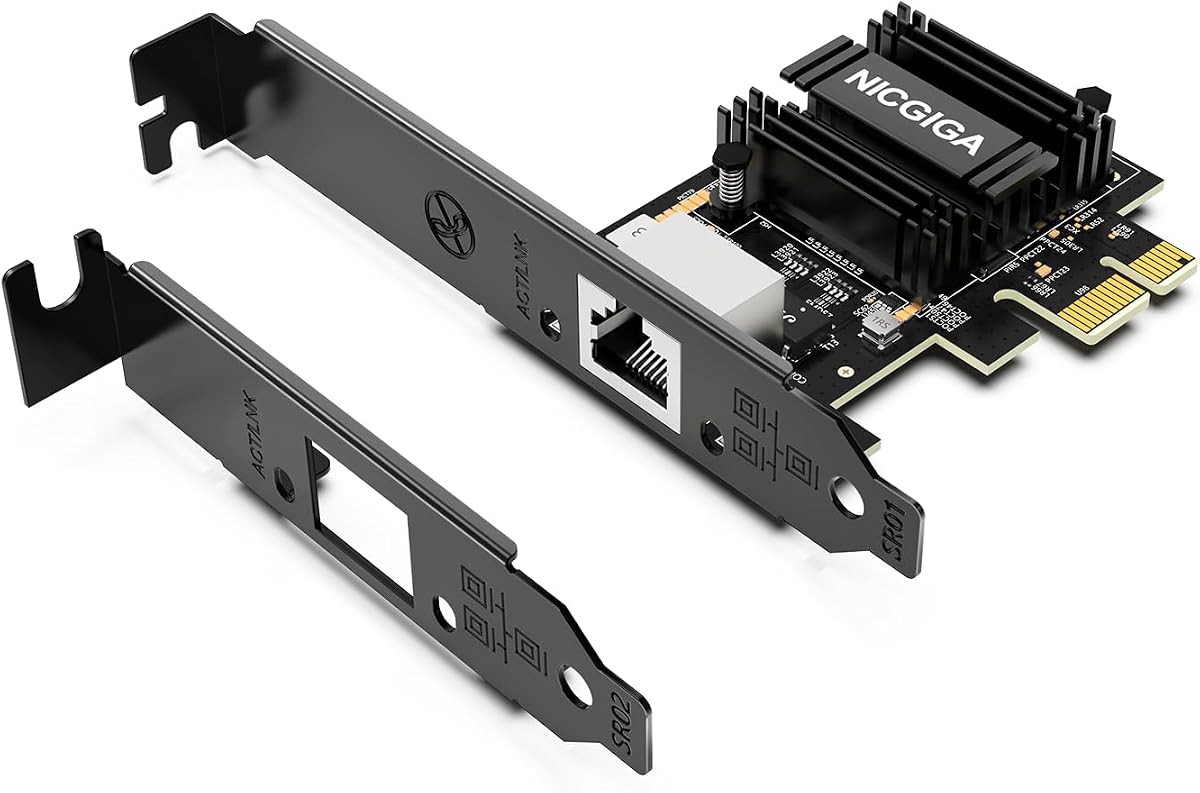
NICGIGA utilizes the latest PCIe 4.0 x1 interface to fit compact builds easily. It runs cooler than older chips and supports multi-gig auto-negotiation. This makes it perfect for Mini PCs or cases with limited slot space.
We may earn a commission when you buy through this link, at no additional cost to you.
The Realtek RTL8127 chip provides stable speeds for storage and streaming. It saves power which is great for systems that run continuously. Wake on LAN support helps with remote management tasks effectively.
Older Linux kernels might need manual driver updates which adds a slight hurdle. It only has one port so redundancy is not an option. But for single user workstations this efficiency and size are key benefits.
Select this if space and power efficiency matter most to you. It bridges the gap for small builds needing 10G speeds. The performance is solid and the footprint is minimal for most cases.
Uses a single lane slot to leave room for other expansion cards.
Lower consumption reduces heat and keeps system energy use down.
We may earn a commission when you buy through this link, at no additional cost to you.
VunLink features the Realtek RTL8127AT which supports the latest multi-gig speeds. It fits into compact systems and offers efficient power use for home labs. The card integrates well with modern Windows and Linux environments easily.
We may earn a commission when you buy through this link, at no additional cost to you.
Automatic negotiation ensures you get the best speed possible from connected devices. The thermal design helps avoid overheating during heavy file transfers. Brackets included allow for flexible installation in various chassis types.
As with many new cards some older systems might need driver attention. It does not offer dual ports but the single line is robust and reliable. This model is well suited for modern single user upgrades.
Choose this for a balance of modern tech and simplicity. It works well for NAS and general desktop upgrades. The low heat and efficient design make it a quiet addition to your system.
Supports 2.5G and 5G links automatically for flexible network scaling.
Cooler operation ensures stability during long duration data transfers.
We may earn a commission when you buy through this link, at no additional cost to you.
This Asus card uses an SFP+ cage to support fiber optic connections for long distances. It is a great choice when copper cables are not viable for your network layout. The aluminum heatsink keeps the card cool under load.
We may earn a commission when you buy through this link, at no additional cost to you.
Fiber allows for longer runs without signal loss which is useful in large setups. The card supports auto prioritization to keep critical data flowing smoothly. It works well for specialized networking scenarios needing optical connections.
You will need to buy SFP transceivers separately which adds to the cost. It takes up an x4 slot which might limit other expansion options. These factors are manageable if your setup specifically requires fiber optics.
Select this when you need distance or electrical isolation for your network. It provides a reliable path for 10G speed over fiber. The build quality supports long term use in active environments well.
Use SFP modules to connect over longer distances than copper allows.
Aluminum heatsink prevents thermal throttling during peak activity.
We may earn a commission when you buy through this link, at no additional cost to you.
TRENDnet offers a compliant adapter that meets government standards for secure installations. It supports modern operating systems and works well for public sector projects. The build quality is consistent with their reliable reputation.
We may earn a commission when you buy through this link, at no additional cost to you.
It can utilize 2.5G speeds over existing Cat5e cabling which helps upgrade costs. This flexibility makes it useful for mixed environment networks needing a quick boost. The warranty coverage adds peace of mind for critical uses.
It is more expensive than basic adapters but the compliance adds value. Only one port is available which limits redundancy for advanced setups. But for regulated environments this card fits strict requirements well.
Choose this if compliance and reliability are your top priorities. It is a solid choice for offices needing government approved hardware. The support and warranty ensure you are covered for the long term.
NDAA and TAA compliance ensures use in government and secure facilities.
Supports 2.5G over Cat5e to maximize existing infrastructure investment.
We may earn a commission when you buy through this link, at no additional cost to you.
This USB-C adapter brings 10G speeds to laptops without internal slots. It fits well with modern Macs and Windows laptops needing fast network access. The aluminum housing helps manage heat effectively during use.
We may earn a commission when you buy through this link, at no additional cost to you.
Plug and play works on most systems making it great for travel. It allows large backups and media workflows without cables running through ports. Users appreciate the compact and silent design for office environments.
Real-world speeds vary depending on the USB port quality. A 20Gbps USB-C port is recommended for best results. This is a trade-off for external convenience compared to internal cards.
Select this if you need a portable solution for fast network access. It is ideal for mobile workstations and thin clients. While speeds vary the flexibility and build quality are strong.
Ideal for laptops that cannot accept internal expansion cards easily.
Silent cooling prevents overheating in compact or enclosed desk spaces.
We may earn a commission when you buy through this link, at no additional cost to you.
Selecting the right 10GB Ethernet Card depends on your hardware and goals. This guide breaks down the key factors to consider for a successful upgrade.
The chipset determines stability and speed performance. Intel chips like X540 are known for server reliability while Realtek offers efficient modern solutions for home use. Check compatibility with your OS before buying to ensure drivers work correctly.
Always verify the controller supports your intended use case.
Decide if you need one or two ports. Dual ports allow link aggregation for higher throughput or failover for backup. Single port cards are simpler and cost less for basic upgrades.
Match port needs to your network topology.
Check your motherboard for PCIe slots. x1 slots fit compact cards while x4 or x16 allow for full bandwidth. Ensure you have enough physical space and clearance for the card.
Confirm the slot type matches the adapter requirements.
Windows support is common but Linux requires specific drivers. Some cards need manual setup for newer OS versions like Windows 11. Check vendor support pages for driver availability.
Ensure drivers exist for your current OS.
10G speeds usually require Cat6A cabling for 100 meters. Some cards support lower speeds on older cables. Ensure your existing network has rated cables to match your purchase.
Match cable ratings to card capabilities.
Network cards can fail so warranty length matters. Brands like Synology offer five years while others offer three or two. Strong support channels help resolve driver issues quickly.
Prioritize brands with reliable support.
Some controllers run hotter than others. If you have a small case ensure the card has a heatsink or low power design. Good ventilation prevents throttling.
Check power consumption for your PSU.
Prices vary by features and brand. Budget cards work well for basic tasks while premium ones offer better warranties. Balance your budget with needed features.
Avoid overpaying for unused capabilities.
Install the card by powering off your PC and connecting it to a PCIe slot. Secure it with screws and attach a Cat6A cable to the port. Power on and let the OS install drivers automatically.
Update firmware and drivers regularly to maintain performance. Monitor temperatures to ensure cooling is sufficient. If speeds drop check the cable quality and switch settings.
For redundancy set up link aggregation if using dual ports. Adjust QoS settings to prioritize critical apps. Keep the area around the port clean to ensure good contact.
Yes Cat6A cables are recommended for full 10G speeds over long distances. Some cards work with Cat6 for shorter runs. Without proper cabling you may see reduced performance.
Most modern cards support Windows 11. Some older models may need manual driver installation. Check the vendor site for Windows 11 specific guides.
Laptops without internal PCIe slots need external USB adapters. Cards that plug into desktop slots will not fit standard laptops. Use USB-C models for portable systems.
The card will auto-negotiate to 1G if the switch does not support 10G. You will not get 10G speeds until your hardware supports it. Check your switch capabilities first.
It is worth it if you transfer large files or use local storage. It helps with NAS access and local backups. For browsing it may not be noticeable.
Open network settings and check link speed. It should show 10Gbps if everything is set up right. If not check cables and drivers for errors.
We reviewed ten top options ranging from budget to premium. The TP-Link TX401 offers great overall value while Synology leads for NAS integration. Select based on your specific hardware and needs.
Prioritize chipset stability and OS support for the best experience. Ensure your cables and switches match the card's capabilities to realize full speeds.
Prices and stock change often so verify current deals before purchasing. This guide provides a strong starting point for your network upgrade.