
8Bitdo M30 Wired Controller
4.2Editor score
Officially licensed for Xbox
USB-C wired connection
Three profile switch button
This guide compares the top 10 fightpads for PC to help you find the best controller for fighting games based on features and performance.
Finding the right fightpad for PC can dramatically improve your gameplay experience. A good controller offers precise inputs, durable buttons, and ergonomic comfort for long sessions. Whether you play casually or competitively, the right gear matters.
We compared ten top-rated fightpads available for PC users this year. Our analysis focused on build quality, button responsiveness, layout options, and platform compatibility. Each entry offers unique strengths for different player preferences and budgets.
Each pick highlights key features and potential trade-offs to consider. Prices and availability can change quickly so check current listings before buying. This guide helps you navigate options to select the perfect fightpad for your setup.
4.2Editor score

4.1Editor score

4.2Editor score
This table provides a side-by-side comparison of all ten fightpads to help you evaluate specs and features quickly.
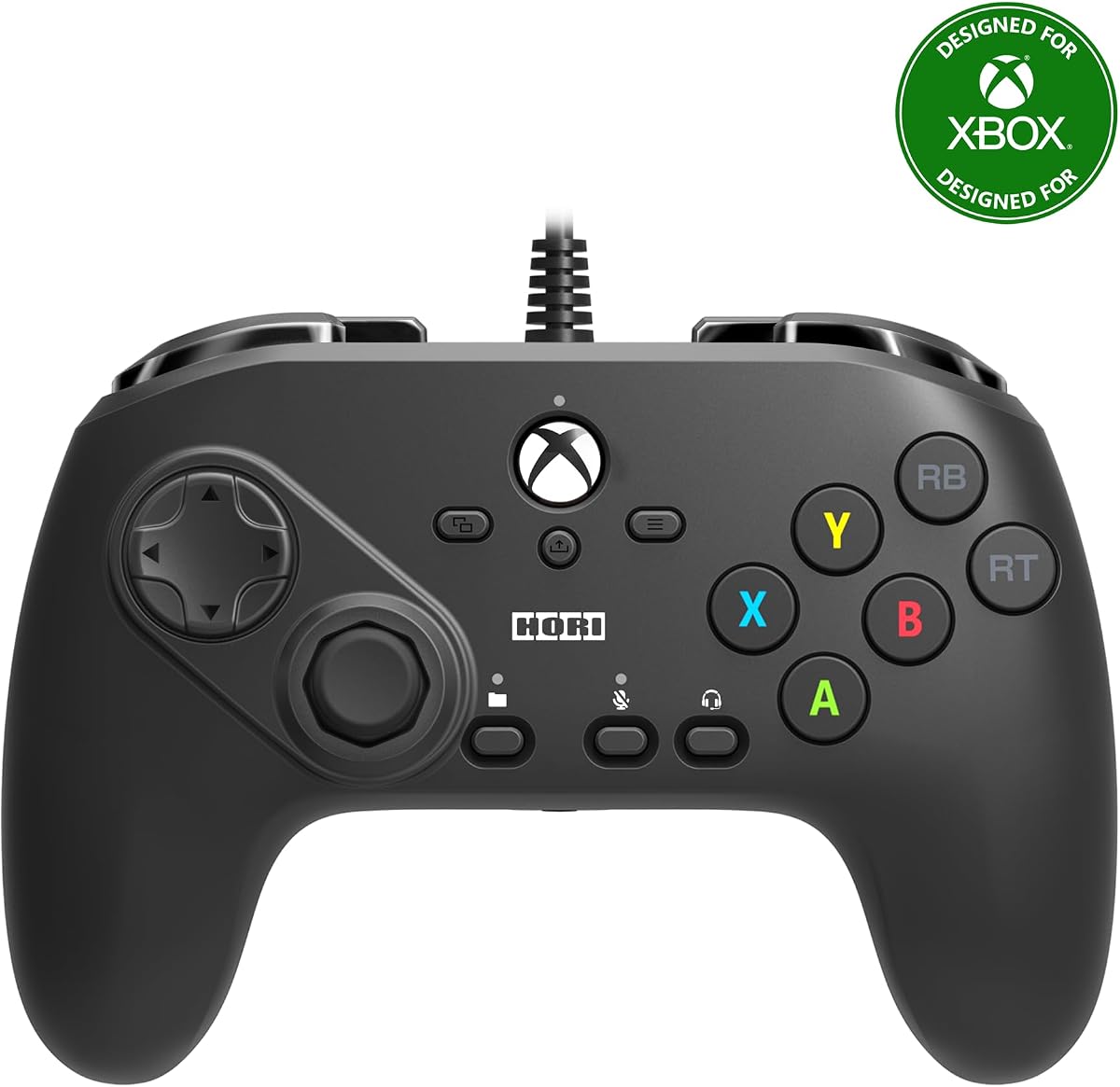


The HORI Fighting Commander OCTA is a top-tier fightpad designed for serious gamers. It holds a strong 4.1 rating from users who value precision. Its standout quality is the tournament-grade build with Micro Switch buttons for fast actuation.
We may earn a commission when you buy through this link, at no additional cost to you.
Its Micro Switch buttons ensure crisp inputs without debounce delays. The Short Throw Analog Stick with 8-way gate boosts execution speed. You can adjust D-Pad sensitivity and use the companion app for deeper customization across PS4 PS5 and PC.
Some users find the price higher than generic controllers. The wired connection limits mobility compared to wireless options. These trade-offs are acceptable for competitive play where reliability and input accuracy take priority over convenience.
Competitive players seeking a reliable and versatile pad should buy this. It balances build quality and features well for both console and PC. The official Sony license ensures compatibility confidence and long-term support for your setup.
The Micro Switch buttons deliver consistent tactile feedback and reduce wear over time compared to standard membrane switches used in many controllers.
The companion app lets you tweak settings like D-Pad sensitivity and save profiles to adapt the fightpad to different games or personal playstyles.
We may earn a commission when you buy through this link, at no additional cost to you.
This version targets Xbox Series X|S users who also play on PC. It shares core features with the PlayStation variant but focuses on Microsoft compatibility. Users report decent performance though ratings are slightly lower than the PS version.
We may earn a commission when you buy through this link, at no additional cost to you.
It features a six-button layout with Micro Switch buttons for fast inputs. The adjustable d-pad helps tailor sensitivity to your style. You can save up to four profiles and switch between them easily using the profile button.
Ratings suggest some users find it less refined than competitors. Platform compatibility is narrower than multi-system models. Still it offers solid value for Xbox-focused players wanting official licensed hardware without extra cost.
Xbox Series X|S players looking for a dedicated fightpad should consider this. The official Microsoft license ensures seamless integration. Just verify PC compatibility matches your needs before purchasing for optimal results.
Saving up to four profiles allows quick switching between different game setups or playstyles without needing to reset settings manually each session.
The six-button layout is tailored for fighting games giving you direct access to essential commands without complex button combinations during intense matches.
We may earn a commission when you buy through this link, at no additional cost to you.
The 8Bitdo M30 offers excellent value for budget-conscious buyers. It carries an official Xbox license and supports Windows systems. With a 4.2 rating it delivers reliable performance without premium costs.
We may earn a commission when you buy through this link, at no additional cost to you.
Its USB-C wired connection ensures virtually lag-free input for fighting games. The six-button layout with switches mimics classic arcade controllers. You can switch between three profiles instantly using the dedicated button.
It lacks advanced features like hot-swappable switches or OLED screens. The build feels sturdy but less premium than higher-end pads. This is acceptable given its affordable price point and strong core functionality.
Casual players or those new to fighting games should buy this. It provides a solid foundation without overspending. The official license ensures compatibility while keeping costs low for entry-level competitive play.
The six-button layout pays homage to classic arcade cabinets offering a familiar experience for veterans of retro fighting games on modern PCs.
Using a USB-C wired connection eliminates wireless latency risks ensuring consistent input timing during critical moments in competitive matches.
We may earn a commission when you buy through this link, at no additional cost to you.
The DOYOKY Leverless Controller brings arcade-style precision to PC. With a 4.4 rating it appeals to competitive players wanting customization. Its hitbox-style layout and hot-swappable switches offer flexibility rare at this price.
We may earn a commission when you buy through this link, at no additional cost to you.
The OLED screen shows inputs SOCD settings and Turbo status at a glance. Web-based customization lets you adjust settings without installing software. Hot-swappable switches allow tuning the feel without soldering or tools.
The hitbox style may take time to learn if you prefer sticks. It lacks official console licenses so compatibility relies on input modes. These are minor trade-offs for the customization freedom and tournament features.
Players seeking maximum control depth and repairability should buy this. The browser-based tools and OLED display modernize the arcade experience. Verify input modes match your PC setup before use.
Web-based customization without software installation streamlines setup for tournaments ensuring compliance while maintaining full control over button mappings.
Hot-swappable switches mean you can replace worn components easily extending the life of the controller without needing advanced repair skills.
We may earn a commission when you buy through this link, at no additional cost to you.
The Akko FUNBOX leads with Hall Effect switches for zero wear. Rated 4.2 by competitive users it delivers lightning-fast response. The Rapid Trigger and 8000Hz polling set new standards for PC fighting game hardware.
We may earn a commission when you buy through this link, at no additional cost to you.
Hall Effect switches eliminate friction so they never wear out. Rapid Trigger lets you adjust actuation depth from 0.1mm to 2.8mm. The full-color LCD acts as a control hub for mode switching and animations.
The higher cost may deter casual players. The depth of features like SOCD modes can be complex to configure initially. These trade-offs suit serious competitors needing every millisecond advantage in play.
Pro players wanting cutting-edge tech should buy this. The durable switches and rapid response offer long-term value. Browser-based customization keeps it flexible across platforms without extra software.
Hall Effect switches use magnetic contactless design eliminating physical friction so the controller maintains consistent performance without degradation.
Rapid Trigger ensures every key press registers instantly giving you a decisive edge in high-speed combos where timing matters most.
We may earn a commission when you buy through this link, at no additional cost to you.
This edition targets PC gamers with a specialized focus. It mirrors the OCTA design but adapts for PC use. With a 3.8 rating it offers solid components though feedback varies on ergonomics.
We may earn a commission when you buy through this link, at no additional cost to you.
Microswitch buttons ensure durability and accuracy for long sessions. The analog slide pad helps navigate in-game lobbies smoothly. Official Bandai Namco licensing ensures quality for Tekken players using Windows.
Some users find it less comfortable than console versions. Platform compatibility is narrower than cross-system options. Still it provides a dedicated solution for PC-centric competitive players.
PC-only players wanting official licensed hardware should consider this. The analog slide adds utility beyond standard controls. Verify comfort matches your preferences before committing to this specialized model.
The Windows PC focus ensures compatibility and driver support are optimized for PC titles without console-specific limitations.
The analog slide pad offers smooth navigation in lobbies menus and character selection screens without interrupting gameplay flow.
We may earn a commission when you buy through this link, at no additional cost to you.
This wireless model adds mobility to the OCTA line. It retains tournament-grade components while supporting Windows 11/10. With a 3.6 rating it balances features with convenience for versatile setups.
We may earn a commission when you buy through this link, at no additional cost to you.
Programable rear buttons expand input options without relearning layouts. The swappable D-pad lets you choose your preferred shape. USB-C charging ensures secure connections during gameplay sessions.
The higher price reflects added tech and convenience. Battery life depends on usage frequency. These trade-offs suit players prioritizing freedom over strict competitive latency limits.
Casual players wanting flexibility should buy this. The wireless setup reduces clutter on your desk. Ensure your PC supports the wireless adapter before purchasing.
Swappable D-pads and rear buttons let you customize ergonomics to suit your hand shape and playstyle without buying multiple units.
Eliminating cables provides a cleaner desk setup and more comfortable seating arrangements during long gaming sessions.
We may earn a commission when you buy through this link, at no additional cost to you.
This renewed unit offers access to premium features at lower cost. It retains the core OCTA layout and official license. Without public rating data availability and condition vary by seller.
We may earn a commission when you buy through this link, at no additional cost to you.
The eight-button layout provides direct access for fighting games. Programmable macros allow custom combos. The touchpad offers unique navigation options for supported titles.
Renewed items carry some risk regarding wear and warranty. Seller reliability impacts the experience. This suits budget buyers comfortable with refurbished gear.
Those wanting OEM quality on a budget should consider this. Verify seller ratings and return policies before purchasing. It provides a cost-effective entry into licensed fightpad gear.
Programmable macros let you automate complex combos simplifying execution and allowing you to focus on strategy during matches.
Buying renewed reduces cost significantly while still offering official licensing and core features of the tournament-grade original model.
We may earn a commission when you buy through this link, at no additional cost to you.
The Logitech G F310 is a versatile gamepad. It scores a 4.4 rating for reliability. While not a dedicated fightpad its layout suits casual fighting games well.
We may earn a commission when you buy through this link, at no additional cost to you.
Profiler software enables programming keyboard commands for unsupported titles. The floating D-pad improves directional input responsiveness. The six-foot cord offers comfortable distance from your monitor.
It lacks specialized fightpad features like micro switches. Build materials are basic but durable for average use. This works well for budget or retro gaming setups.
Casual players or retro fans should buy this. The familiar layout eases the learning curve. Check software requirements if you plan to use profiler features.
Its broad game support lets it work with titles from older systems to modern PC releases without needing complex driver updates.
The floating D-pad rests on multiple switches for responsive directional changes compared to traditional pivot-based D-pads.
We may earn a commission when you buy through this link, at no additional cost to you.
The HORI Fighting Stick Mini brings arcade sticks to PC in a portable form. With a 4.2 rating it balances size and build quality. Its compact design suits small desks or travel.
We may earn a commission when you buy through this link, at no additional cost to you.
The classic 8-button layout with V-cut joystick housing ensures precise inputs. The 8ft cable provides flexible positioning. Official Sony licensing guarantees compatibility across supported platforms.
The smaller base may lack stability during intense combos. Some players prefer full-size sticks. Still its portability makes it ideal for versatile setups.
Players wanting a compact stick solution should buy this. Verify space requirements and cable management needs. It offers a practical mix of arcade style and convenience.
Its compact lightweight design lets you carry the stick to friends homes or LAN events easily without sacrificing build quality.
The V-cut housing design supports the joystick smoothly improving directional accuracy and reducing effort during rapid inputs.
We may earn a commission when you buy through this link, at no additional cost to you.
Selecting the right fightpad requires evaluating features against your play style and budget. Consider these factors to make an informed choice.
Fightpads typically use six or eight-button layouts for fighting games. Micro Switch buttons offer faster actuation and durability compared to standard membrane switches. Choose a layout that matches your preferred game mechanics.
Prioritize buttons with proven durability like Micro Switches for competitive play.
Ensure the fightpad supports your PC operating system and game titles. Official licenses from Sony Microsoft or Bandai Namco guarantee better compatibility and fewer driver issues.
Verify Windows support explicitly if console compatibility is secondary to your needs.
Wired fightpads provide consistent latency-free input essential for competitive matches. Wireless options add convenience but may introduce lag or battery dependency depending on the technology used.
Choose wired for competitive play and wireless for casual flexibility.
Look for adjustable D-Pads swappable components or companion apps that let you tweak settings. Advanced models offer hot-swappable switches to change tactile feel without soldering tools.
Customization tools help tailor the controller to your exact input preferences.
A sturdy base and high-quality materials ensure the fightpad withstands intense play. Rubber feet prevent sliding and reinforced ports extend cable longevity during daily use.
Invest in models with reinforced connectors and stable bases for long-term use.
The controller should fit comfortably in your hands during extended sessions. Weight and shape affect fatigue levels and swappable parts allow adjusting the feel to suit your grip.
Test ergonomics if possible before purchasing to avoid discomfort.
Budget models offer core functionality while premium options include advanced features like Hall Effect switches or OLED displays. Balance cost against the features you truly need for your games.
Assess if premium features justify the cost for your play level.
Companion software enables profile management and mapping customization. Some units use browser-based drivers eliminating installation steps. Reliable support ensures long-term usability.
Check for available software tools before buying to enable deep customization.
Connect the fightpad to your PC using a USB cable or wireless receiver. Install any required software from the manufacturer's website to unlock full customization features and update firmware.
Use companion software to map buttons and adjust settings like D-Pad sensitivity. Save multiple profiles to switch between games or playstyles without changing hardware manually.
Keep the fightpad clean by wiping buttons and D-Pads with a soft cloth. Avoid liquids and store in a dry place to prevent corrosion or wear on internal components.
Fightpads offer optimized layouts with dedicated buttons for essential moves reducing input complexity. Standard gamepads may work but lack the speed and precision needed for competitive fighting titles.
Micro Switch buttons provide faster actuation and higher durability than standard membrane switches. They reduce input lag and withstand millions of presses ensuring consistent performance over time.
Most modern fightpads support plug-and-play on Windows 10 and 11. Additional software may be needed for full customization but core functionality usually works without installation.
Many console fightpads work on PC via USB but verify system compatibility. Officially licensed models often include PC drivers or support XInput for seamless integration.
SOCD stands for Simultaneous Opposite Cardinal Direction. It ensures the controller prioritizes a single input when opposite directions are pressed preventing ambiguous signals in games.
Turn off the device and disconnect cables before cleaning. Use compressed air to remove dust and a slightly damp microfiber cloth for surfaces avoiding liquids near internal components.
Wired models are preferred for competitive play to eliminate latency. Wireless options have improved but may still introduce minor delays depending on connection quality and battery life.
Hot-swappable switches let you replace buttons without soldering. This allows customizing tactile feel or repairing worn components easily extending the controller lifespan.
We reviewed ten fightpads offering diverse features for every player. The HORI OCTA and Akko FUNBOX stand out for competitive needs while budget models like 8Bitdo provide great value.
Prioritize input accuracy build durability and platform compatibility when selecting. Choose wired models for reliability and consider hot-swappable switches for long-term flexibility.
Check current prices and availability before purchasing to ensure you get the best deal. Your ideal fightpad depends on your play style and budget so weigh features carefully.