
ASRock Intel Arc A380 Challenger ITX
4.3Editor score
Compact 2-slot ITX design
6GB GDDR6 memory
AV1 Hardware Encode support
This guide compares the top GPUs for Small Form Factor Sff PC builds, evaluating performance, size, and compatibility to help you choose the right graphics
Finding the right GPU for Small Form Factor Sff PC builds requires balancing performance with physical constraints. You need a card that fits tightly inside compact cases while delivering smooth gaming or professional workloads without overheating.
We compared ten leading graphics cards designed for mini-ITX and slim chassis. Our analysis focuses on dimensions, power draw, cooling solutions, and real-world compatibility to ensure your build remains stable and quiet under load.
Each pick highlights specific strengths like low-profile designs or advanced architecture. Prices fluctuate frequently, so verify current listings before buying. This list helps you navigate the crowded market of SFF compatible graphics hardware efficiently.
4.3Editor score

4.3Editor score

4.8Editor score
This side-by-side comparison highlights key specifications for every card listed. Use it to quickly identify which model fits your case dimensions and power supply constraints while meeting your performance goals.


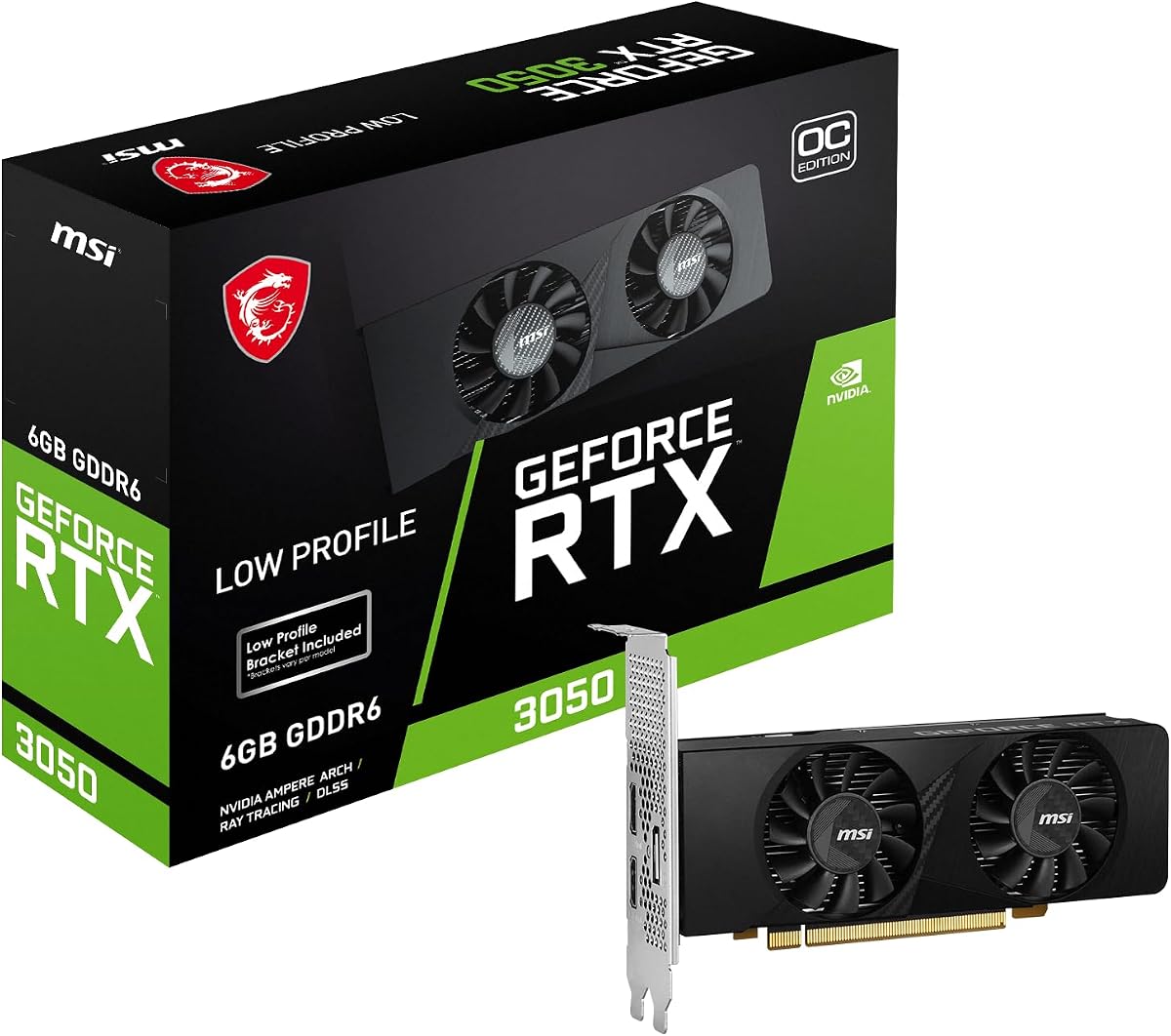


This card offers a powerful balance for SFF builds. It scores well on performance and physical size. The low profile form factor makes it ideal for tight spaces.
We may earn a commission when you buy through this link, at no additional cost to you.
Powered by the NV Ampere architecture, it delivers smooth gaming with DLSS support. The 6GB GDDR6 memory ensures decent throughput for modern titles at 1080p.
Its slim design measures only 6.65 inches long, fitting most mini-ITX cases. However, thermal management depends on your case airflow. Ensure adequate intake to prevent throttling.
Buy this if you need reliable gaming power in a small box. It is a strong contender for users prioritizing size and performance equally.
The slim dimensions allow installation in cases with limited height clearance.
Supports 8K output via HDMI 2.1 for future-proof multimedia setups.
We may earn a commission when you buy through this link, at no additional cost to you.
This MSI card is a dependable choice for small form factor enthusiasts. It brings Ampere efficiency to compact builds with a solid boost clock speed.
We may earn a commission when you buy through this link, at no additional cost to you.
The 6GB GDDR6 memory handles everyday gaming well. MSI’s custom PCB ensures stable power delivery even in restricted thermal environments.
While powerful, it struggles with heavy ray tracing at high resolutions. It is best suited for esports titles and casual AAA gaming at 1080p.
Choose this if you prefer a trusted brand with a compact footprint. It fits well into tight chassis without sacrificing core performance.
Factory overclocked core delivers better frame rates than reference models.
Multiple HDMI outputs allow for multi-monitor setups in small spaces.
We may earn a commission when you buy through this link, at no additional cost to you.
This card brings Blackwell architecture into small chassis with ease. Its GDDR7 memory ensures bandwidth exceeds previous generations significantly.
We may earn a commission when you buy through this link, at no additional cost to you.
The 2.5-slot design fits many SFF cases while maintaining excellent cooling. Axial-tech fans keep noise levels low under heavy loads.
You get ample VRAM for 1440p or 4K gaming. The only trade-off is power consumption, so check your PSU capacity before purchasing.
Buy this for top-tier performance without bulk. It is perfect for builders demanding the best graphics in a portable package.
Powered by NVIDIA Blackwell for superior efficiency and AI features.
Phase-change thermal pads reduce temperatures for sustained performance.
We may earn a commission when you buy through this link, at no additional cost to you.
This card is designed for professional workflows in compact spaces. Its single slot design maximizes internal space for other components.
We may earn a commission when you buy through this link, at no additional cost to you.
With 768 CUDA cores, it handles modeling and video rendering efficiently. The 50W power draw ensures stability without a high wattage PSU.
Gaming performance is secondary here, but it handles basic titles well. Its strength lies in business and creative applications rather than high frame rates.
Select this for office workstations or media editing hubs. It excels where reliability and low profile fit are priorities over raw gaming speed.
Certified drivers ensure stability for professional rendering and modeling tasks.
Only consumes 50W, reducing heat and electricity usage significantly.
We may earn a commission when you buy through this link, at no additional cost to you.
This card offers great value for budget-conscious SFF builders. It supports AV1 encoding which is rare at this price tier.
We may earn a commission when you buy through this link, at no additional cost to you.
The 0dB Silent mode means it runs noiselessly during light tasks. Its 2-slot ITX design fits easily into mini cases.
Performance is decent for esports and indie titles. However, ensure your system supports ReBAR before installing for best results.
Buy this if you need a cheap, compact solution. It is ideal for entry-level gaming or media streaming PCs.
Fan stops completely at low temps for zero noise operation.
AV1 hardware encoding accelerates video creation workflows significantly.
We may earn a commission when you buy through this link, at no additional cost to you.
This variant features a dual fan system for improved cooling. The low profile design ensures it fits most small chassis without issues.
We may earn a commission when you buy through this link, at no additional cost to you.
MSI Center software allows real-time monitoring and tweaking. It provides a solid gaming experience for 1080p titles.
The dual HDMI 2.1 ports offer flexible connectivity. However, VRAM may bottleneck high texture settings on modern games.
Choose this for a quiet, reliable SFF build. It is great for office users who occasionally game.
Two fans ensure quiet operation even under sustained load.
Multiple HDMI ports allow connecting multiple high-res monitors easily.
We may earn a commission when you buy through this link, at no additional cost to you.
This card combines Blackwell architecture with robust SFF cooling. Its 12GB GDDR7 memory ensures it handles 1440p and 4K well.
We may earn a commission when you buy through this link, at no additional cost to you.
WINDFORCE cooling keeps temperatures low despite the compact size. It is a top choice for enthusiasts seeking high FPS.
Ensure your case supports the dimensions properly. This model is best for users willing to invest in premium hardware.
Buy this for serious gaming in a small case. It offers desktop-grade performance in a portable form factor.
WINDFORCE system uses unique blades for better airflow in small cases.
GDDR7 memory offers significantly higher bandwidth than GDDR6 cards.
We may earn a commission when you buy through this link, at no additional cost to you.
This card brings the latest Blackwell architecture to smaller cases. Its 8GB GDDR7 memory provides strong performance for gaming.
We may earn a commission when you buy through this link, at no additional cost to you.
TORX Fan 5.0 technology ensures stable airflow. The cooling solution is optimized to prevent hotspots in tight enclosures.
It is well-suited for users looking for high frame rates without a full-size card. The price reflects its premium positioning.
Choose this for a balance of size and power. It is perfect for high-end SFF gaming builds.
Newest NVIDIA architecture delivers better ray tracing and AI features.
TORX Fan 5.0 stabilizes airflow for quieter and cooler operation.
We may earn a commission when you buy through this link, at no additional cost to you.
This card is a reliable option for professional multi-monitor setups. It draws only 50W, making it easy to install without extra power cables.
We may earn a commission when you buy through this link, at no additional cost to you.
Its low profile bracket ensures it fits in any office chassis. It supports four 4K displays for enhanced productivity.
Gaming performance is limited due to older memory technology. It remains a solid choice for CAD and office tasks.
Select this for stable work environments. It prioritizes efficiency and connectivity over raw gaming performance.
50W power draw allows operation without additional connectors.
Supports up to four 4K screens simultaneously for multitasking.
We may earn a commission when you buy through this link, at no additional cost to you.
This card stands out for its massive 16GB VRAM. It ensures longevity for texture-heavy gaming and creative workloads.
We may earn a commission when you buy through this link, at no additional cost to you.
Axial-tech fans provide excellent airflow while maintaining a compact footprint. 0dB Technology ensures silence during light gaming sessions.
It is slightly thicker than single-slot options, so verify case height. Its cooling efficiency makes it suitable for high-performance SFF systems.
Buy this if VRAM is your priority. It is ideal for 1440p gamers who want a small system.
16GB VRAM handles high-resolution textures and complex rendering tasks.
0dB Technology stops fans when the GPU is idle or lightly loaded.
We may earn a commission when you buy through this link, at no additional cost to you.
Selecting a GPU for SFF requires careful planning. You must balance performance with physical dimensions and power constraints to ensure compatibility.
Always measure your case length and height before buying. SFF cases often restrict GPU length to under 7 inches. Low profile brackets are essential for tight builds.
Verify dimensions match your case specs to avoid assembly issues.
Small cases usually pair with lower wattage PSUs. Aim for GPUs under 100W if you have a 300W supply. Check if external power connectors are required.
Low power cards reduce heat and simplify cabling.
Dual fan cards fit better than single blower models. Ensure your case has intake fans to prevent heat buildup. Thermal throttling is common in cramped enclosures.
Choose cards with efficient airflow designs like Axial-tech fans.
Modern titles demand at least 8GB of memory. For 1440p or 4K, 12GB or more is recommended. VRAM bottlenecks performance in texture-heavy games.
Select higher VRAM options for future-proofing.
Ensure the card has enough HDMI or DisplayPort outputs. Multi-monitor setups require multiple ports. HDMI 2.1 supports higher refresh rates.
Check ports match your monitor inputs for seamless connection.
Newer architectures like Blackwell or RDNA offer better efficiency. They deliver higher frame rates per watt. Look for features like DLSS or XeSS.
Prioritize modern architecture for longevity and performance.
Single slot cards fit more easily than 2.5-slot ones. If using 2.5-slot, verify motherboard spacing. Wider cards may block other ports.
Slimmer designs maximize internal airflow and component access.
SFF specific cards often carry a premium. Decide if the compact form factor justifies the cost. Older models can offer better value.
Balance budget constraints with your performance needs.
Install your GPU carefully to avoid bending pins. Use a static-safe mat and ground yourself before touching components. Secure the card firmly to the case.
Maintain airflow by cleaning dust filters regularly. Overheating causes throttling in tight cases. Use compressed air every three months.
Update drivers frequently for stability. Use software like MSI Center or GPU Tweak to monitor temperatures. Adjust fan curves for optimal noise.
Not every GPU fits; you must verify dimensions against your case. Low profile and compact designs are required for mini-ITX. Standard full-size cards will not fit.
Some low power models do not need extra cables. Higher performance GPUs usually require a 6-pin or 8-pin connector. Check PSU wattage carefully.
Not necessarily; they often run hotter due to less airflow. However, some models use specialized fans for silence. Proper case intake is critical for noise.
DLSS is supported on NVIDIA RTX cards. AMD cards use FSR instead. Always check architecture compatibility before buying. Not all models include these features.
Look for SFX or SFX-L power supplies. Ensure they have enough connectors for your chosen GPU. Higher wattage is needed for powerful SFF graphics cards.
Yes, SFF cards fit in standard cases too. They just occupy less space. This makes them ideal for dual GPU setups or large motherboard spacing.
Yes, due to limited airflow. High thermal density requires good case ventilation. Use high-quality thermal paste and monitor temps closely.
ASUS and MSI offer strong SFF options. Check for specific SFF labels on product pages. Brands like GIGABYTE also have dedicated SFF series.
The top picks offer excellent performance across budgets. From budget ITX cards to premium Blackwell options, there is something for every build.
Prioritize dimensions and power requirements first. A perfect GPU is useless if it does not fit or your PSU cannot support it.
Always check current listings for availability. SFF hardware stock can vary widely. Verify compatibility before finalizing your purchase.