This guide compares the top barcode scanners for iPad to help you choose the best wireless 1D or 2D reader for retail, inventory, and library workflows.
As an Amazon Associate we earn from qualifying purchases. We may earn a commission when you buy through links on this page, at no additional cost to you. Read our affiliate disclosure.As an Amazon Associate we earn from qualifying purchases.Purchases through our links may earn us a commission, at no extra cost to you. Read our affiliate disclosure.
Finding the right barcode scanner for iPad can transform your workflow whether you manage inventory in a warehouse or check out customers at a retail counter. Modern tablets demand reliable wireless connectivity and robust scanning engines to handle everything from printed labels to digital screens on mobile devices.
We evaluated ten top-rated models based on connection stability, scan speed, battery life, and compatibility with iOS apps. Each entry balances performance with portability ensuring you get accurate reads on damaged codes without frustrating setup issues or frequent recharges during busy shifts.
Each product pick highlights key strengths real-world trade-offs and ideal use cases to help you decide quickly. Prices and availability change frequently so verify current details before purchase to ensure the model you select fits your specific budget and operational needs today.
Top 3 Picks for Best Barcode Scanner for iPad
Best Budget
Bluetooth 1D&2D Barcode Scanner, 3-in-1 Bluetooth & USB Wired & 2.4G Wireless QR Barcode Reader, PDF417 Data Matrix Handheld Bar Code Scanner Work with Windows, Android, iOS (TM-10B)
Top 10 Best Barcode Scanner for iPad in 2026 Compared
The table below provides a side-by-side comparison of all ten reviewed scanners highlighting their primary connection types, code support, battery capacity, and distinctive features to help you identify the right tool for your iPad workflow.
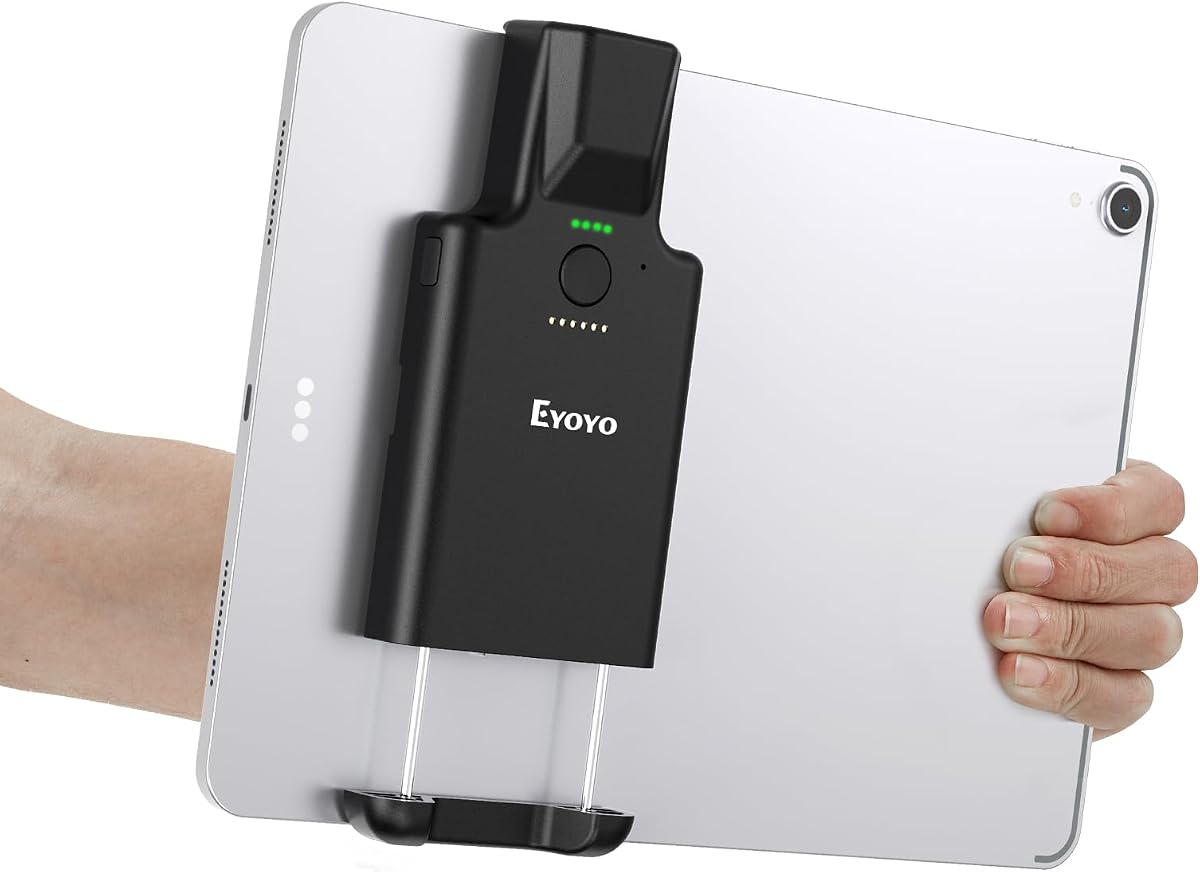
Eyoyo 1D 2D Portable Bluetooth Barcode Scanner Compatible with iPad Tablet
Advanced 2D CMOS technology
Up to 30 hours scan time
Fits 5.7 to 7.1 inch
Three scan buttons ergonomic
The Eyoyo 1D 2D Portable Bluetooth Barcode Scanner tops our list due to its exceptional compatibility with iPads and robust 2D scanning capabilities. With a 4.9 rating this model delivers reliable performance for inventory management retail checkout and library workflows where precision matters most.
Pros
Superior 2D code scanning ability
Long battery life supports full shifts
Clip design secures iPad securely
Silent modes for library use
Strong connectivity with iOS
Cons
No 2.4G wireless option
Clip limits larger tablet models
We may earn a commission when you buy through this link, at no additional cost to you.
Its advanced CMOS imaging technology handles damaged curved and digital barcodes with ease. The 3000mAh battery provides up to 30 hours of continuous scanning so you can work through long shifts without interruption. The retractable clip holds your iPad steady freeing both hands for scanning tasks.
While it lacks 2.4G wireless it maintains stable Bluetooth and USB wired connections. The clip range fits most iPads but may not support larger Pro models beyond 11 inches. For most users this limitation is minor compared to the ergonomic benefits it provides.
Ideal for mobile workers who need an all-in-one device that pairs well with iOS apps this scanner balances portability with professional performance. We recommend it for teams managing physical and digital codes on iPads daily.
Secure Clip Design for Hands-Free Use
The vertical retractable clip adjusts to hold iPads firmly allowing users to scan without balancing the device on a desk or holding it manually.
Extended Battery Life for Continuous Operations
With a massive 3000mAh capacity the scanner supports days of light use or a full work week on a single charge reducing downtime significantly.
Bluetooth 1D&2D Barcode Scanner, 3-in-1 Bluetooth & USB Wired & 2.4G Wireless QR Barcode Reader, PDF417 Data Matrix Handheld Bar Code Scanner Work with Windows, Android, iOS (TM-10B)
Decodes 1D and 2D codes
2600mAh battery capacity
Up to 9 hours continuous scan
70m 2.4G wireless range
The PecuMecu TM-10B offers impressive value as a budget-friendly option that still supports both 1D and 2D barcodes. Its three-in-one connection system gives users flexibility to switch between Bluetooth 2.4G and wired modes depending on their environment and device setup needs.
Pros
Supports both 1D and 2D codes
Triple connection modes for flexibility
Fast 350 scans per second
Strong offline storage capacity
Affordable price for features
Cons
Bluetooth range slightly shorter
Not compatible with Square POS
We may earn a commission when you buy through this link, at no additional cost to you.
With a 2600mAh battery this scanner provides up to nine hours of continuous use and over two months of standby time. The 350 scans per second speed ensures quick throughput in high-volume settings like warehouses or retail stores where time is critical.
Offline storage allows saving up to 130,000 barcodes if connectivity is lost during remote tasks. While the Bluetooth range is shorter than 2.4G mode the inclusion of wireless options keeps productivity high even when devices are not in close proximity.
We recommend this model for small businesses or individuals seeking capable 2D scanning without paying premium prices. It works well with iPads and other iOS devices for general inventory and asset tracking tasks.
Versatile Connectivity Options
Three connection modes let users adapt to different devices and signal conditions ensuring consistent performance whether in office or field environments.
High-Speed Scanning for Efficiency
Fast decode speeds reduce wait times during busy periods helping teams complete tasks quicker while maintaining accuracy across all barcode types.
Inateck 1D Bluetooth Barcode Scanner, 2600mAh Battery, 115FT Range, BCST-70
115ft Bluetooth connection range
2600mAh battery capacity
180 days standby time
Durable TPU protective case
The Inateck BCST-70 stands out as a premium 1D Bluetooth scanner designed for large environments where range and durability are non-negotiable. Its 115-foot connection range ensures reliable pairing even across large warehouses or between floors of a retail store without signal loss.
Pros
Industry-leading connection range
Longest standby battery life
Rugged build with TPU case
Easy plug-and-play setup
Strong performance on damaged codes
Cons
1D scanning only not 2D
Higher price point than budget
We may earn a commission when you buy through this link, at no additional cost to you.
Battery performance is exceptional with 180 days of standby time reducing the frequency of charging cycles. The external TPU protective case absorbs impacts from drops up to six feet protecting the internal components during tough daily operations in demanding conditions.
While it lacks 2D scanning support this device excels at handling 1D barcodes with high accuracy even under dim or strong lighting conditions. Simple deployment allows users to connect and start scanning within seconds making it ideal for teams with minimal training time.
This model suits large-scale logistics or retail chains needing dependable long-range connectivity and robust construction. For users focused on 1D tasks it delivers professional reliability that justifies the premium investment over budget alternatives.
Extended Wireless Range
With over 115 feet of range users can move freely throughout large facilities without staying tethered to a base station for reliable connectivity.
Rugged Construction for Harsh Environments
The thick TPU case and internal consolidation treatments ensure the scanner withstands frequent drops and impacts maintaining performance over years of use.
NETUM Bluetooth Barcode Scanner, Support 2.4G Wireless & Bluetooth & Wired
2600mAh battery capacity
1D and stacked barcodes
200,000 scan capacity
Auto-sensing scanning mode
The NETUM Bluetooth Barcode Scanner offers excellent flexibility with support for 2.4G wireless Bluetooth and wired connections. This versatility makes it adaptable to various iPad setups and other devices ensuring you can switch modes when one connection type becomes unstable or unavailable.
Pros
Multiple wireless connection types
High offline storage capacity
Strong recognition on damaged codes
Programmable configuration options
Compatible with many systems
Cons
Not compatible with Square POS
Storage mode requires manual setup
We may earn a commission when you buy through this link, at no additional cost to you.
Its 2600mAh battery supports up to 200,000 continuous scans on a full charge providing days of reliable operation without interruption. The scanner stores up to 100,000 codes offline so data is not lost if you move out of range during remote tasks.
The CCD sensor reads 1D and stacked barcodes from paper screens or even through glass surfaces. Programmable settings let you add prefixes suffixes or modify keys to fit specific workflows though it does not support Square POS systems which limits some use cases.
This scanner is ideal for environments needing robust wireless options and offline data retention. We recommend it for inventory teams working across multiple zones where connection reliability might vary between Bluetooth and 2.4G networks.
Triple Connection Versatility
Support for three wireless types ensures uninterrupted workflow whether Bluetooth is optimal or 2.4G provides better range in crowded environments.
Offline Data Retention
Large internal storage prevents data loss during connectivity issues allowing users to upload scanned codes once they return to range.
The Eyoyo Mini is the lightest scanner on our list weighing just 35 grams making it perfect for users who prioritize portability above all. Its pocket-sized design fits easily in pockets or small bags reducing hand fatigue during extended scanning sessions across warehouses or stores.
Pros
Extremely lightweight and compact
Silent vibration for quiet spaces
Long standby with auto-off
Multiple configuration options
Wide device compatibility
Cons
Only scans 1D codes
Shorter battery runtime than others
We may earn a commission when you buy through this link, at no additional cost to you.
Battery life is modest with eight hours of continuous use but the auto-off feature extends standby to ten days when scanning around 1,000 barcodes daily. The silent vibration mode allows discreet scanning in libraries or hospitals without audible beeps disturbing the environment.
While it only supports 1D barcodes it handles common types like UPC EAN and Code 39 reliably even on damaged or reflective surfaces. Configuration options allow adding custom prefixes and keys to tailor outputs for specific inventory or order management software.
Best for light-duty or mobile tasks where space is tight this scanner balances size with necessary functionality. We recommend it for individuals doing occasional inventory checks who want a lightweight tool that connects seamlessly to iPads.
Ultra-Lightweight Pocket Design
Weighing only 35 grams this scanner minimizes hand strain during long shifts making it ideal for frequent users moving around a facility.
Silent Vibration Mode
Quiet operation protects noise-sensitive environments like libraries and hospitals by using vibration instead of sound to confirm successful scans.
NetumScan Desktop Barcode Scanner, USB QR Code Reader
USB connection only
Omnidirectional scanning
Hands-free operation
IP54 dust protection
The NetumScan Desktop Barcode Scanner offers a unique hands-free solution for stationary workstations where employees scan many items rapidly. Its omnidirectional design reads barcodes from any angle without manual triggers allowing continuous throughput during checkout or packaging tasks.
Pros
Hands-free omnidirectional scanning
Smart auto-sensing trigger
Stable anti-slip base
Fast scan speeds
No software installation needed
Cons
Not portable without power
Only USB wired connection
We may earn a commission when you buy through this link, at no additional cost to you.
Auto-sensing technology detects items as they enter the scanning window improving efficiency and reducing physical interaction. The anti-slip base and anti-shock design protect the unit from falls while the IP54 rating keeps dust from interfering with performance over time.
Though it is limited to USB wired connections it plugs and plays with iPads using compatible cables or docks making setup quick. The scan speed and durability make it ideal for high-volume retail counters or packing stations needing consistent reliability.
We recommend this for fixed locations rather than mobile workflows. It excels where speed and reduced labor are priorities and users benefit from a dedicated scanning station that minimizes hand movement fatigue.
Efficient Hands-Free Workflow
Omnidirectional scanning eliminates the need to align or trigger manually speeding up processes for high-volume tasks like checkout or shipping.
Durable Stable Base Design
The anti-slip base and anti-shock construction ensure the scanner remains stable and protected from accidental drops during busy work periods.
NetumScan Bluetooth Barcode Scanner with Charging Dock
1200mAh battery capacity
Charging dock included
Silent vibration mode
Pocket-sized ergonomic grip
The NetumScan U820 combines a portable 2D scanner with an integrated charging dock providing a convenient all-in-one solution for mobile users. The dock serves as both a charging station and data receiver keeping your scanner ready without needing to manage separate cables.
Pros
Integrated fast-charging dock
Pocket-sized portable design
Silent vibration for quiet work
2D QR code support
Optimized for iPad iOS
Cons
Smaller battery than competitors
Lower user rating average
We may earn a commission when you buy through this link, at no additional cost to you.
With a 1200mAh battery it supports extended work shifts and charges fully in four hours. Silent vibration mode allows discreet scanning in quiet environments and the ergonomic grip reduces fatigue during long days of inventory or order fulfillment tasks.
It handles both 1D and 2D codes from paper and screens making it versatile for modern retail workflows. While battery capacity is smaller than larger models the dock ensures quick recharging keeps downtime minimal during operations.
We recommend this model for small retail shops or FBA sellers needing portable scanning with reliable power management. The dock adds value by simplifying charging workflows and ensuring the device is always ready to pair with your iPad.
Integrated Charging Dock Benefits
The base unit handles charging and data receiving allowing users to keep the scanner topped up without managing separate power cables.
Ergonomic Pocket Fit
Compact and lightweight design lets users carry the scanner comfortably in pockets ensuring mobility during warehouse or floor scanning tasks.
NetumScan Bluetooth Barcode Scanner with Charging Doc
1200mAh battery capacity
Dual-button smart control
2m drop protection
Global shutter CMOS sensor
The NetumScan U830 improves on previous models with a dual-button control system preventing accidental power-offs during intense work periods. This design refinement ensures reliability when you need continuous scanning without interruptions or needing to restart the device mid-shift.
Pros
Dual-button prevents accidental off
Strong drop protection rating
Fast global shutter scanning
Silent vibration modes
Includes charging data dock
Cons
Battery smaller than large models
Dock adds extra desk space
We may earn a commission when you buy through this link, at no additional cost to you.
With a 2-meter drop protection rating this scanner withstands impacts on concrete floors making it robust for warehouse environments. The global shutter CMOS sensor captures 1D and 2D codes instantly on paper or screens even if they are smudged or distorted.
Like other models it includes a charging dock that simplifies power management. Battery life is moderate but the fast charging and dock integration keep uptime high. Silent vibration options also make it suitable for quiet libraries or hospital settings.
We recommend this model for teams needing rugged reliable scanning with smart control features. The dual-button design and drop resistance add durability that suits high-intensity retail or logistics operations demanding consistent performance.
Smart Dual-Button Control
Separate power and scan buttons prevent accidental shutdowns ensuring uninterrupted workflow during busy inventory or checkout sessions.
Robust Drop Protection
Built to survive drops onto concrete the scanner stays operational even in rugged environments where equipment often takes physical abuse.
Bluetooth Wireless Handheld Barcode Scanner with Base 2.4G Wireless+USB Wired 1D 2D Barcode Scanner QR PDF417 Data Matrix UPC Rechargeable Bar Code Scanner for Laptops/PC/Android/Apple iOS
50,000 offline storage
110g lightweight weight
2.4G plus Bluetooth
Base included
This Bluetooth Wireless Handheld Scanner offers a base unit and offline storage to keep costs low while maintaining decent performance for general tasks. Its 110-gram weight makes it comfortable for extended use and the ergonomic shape reduces hand fatigue during repetitive scanning.
Pros
Includes stand base unit
50,000 code offline storage
Lightweight ergonomic design
Supports both 1D and 2D
Multiple connection options
Cons
Lower overall user rating
Base adds bulk to setup
We may earn a commission when you buy through this link, at no additional cost to you.
With 50,000 code offline storage users can capture data even when disconnected and upload later. It supports both 1D and 2D codes with reliable decoding speeds making it adaptable for various inventory or order processing workflows using iPads or other devices.
The base provides a convenient resting spot and charging point though it does add some desk footprint. Connection options include Bluetooth and 2.4G ensuring compatibility across different network environments without requiring complex software installation.
Best for small teams or startups needing affordable 2D scanning with offline capability this model balances features and cost. While user ratings are lower it remains a practical choice for budget-conscious buyers needing basic functionality.
Offline Storage Capability
The 50,000 code memory allows capturing data during connectivity issues ensuring no sales or inventory information is lost unexpectedly.
Included Base Station
The provided base offers a stable resting place and charging hub simplifying workflow for users at fixed workstations or desks.
KUIIYER Bluetooth Barcode Scanner, 2D QR 1D Wireless Bar Code Reader
2000mAh battery capacity
800×600 CMOS sensor
IP54 dust waterproof rating
24-month warranty
The KUIIYER Bluetooth Barcode Scanner stands out for its robust warranty and durability features including IP54 dust and water resistance. Its high-resolution CMOS sensor captures 1D and 2D codes with precision and the included auxiliary light improves performance in dark or low-light environments.
Pros
24-month warranty coverage
IP54 dust and waterproof
High-resolution CMOS sensor
2000mAh battery size
Auxiliary light included
Cons
Shorter drop rating than others
Auxiliary light may drain battery
We may earn a commission when you buy through this link, at no additional cost to you.
Battery capacity is solid at 2000mAh supporting extended continuous use. The scanner handles fuzzy curved and damaged barcodes reliably and offers offline storage for over 50,000 codes. With 24-month coverage it provides peace of mind for businesses needing dependable long-term hardware.
While the drop rating is slightly lower than rugged models the waterproofing adds value for warehouse or shipping areas with exposure to debris. The wireless options and iPad compatibility ensure it works seamlessly across iOS inventory and retail apps.
We recommend this scanner for teams needing protection against moisture and dust plus strong warranty support. It suits logistics or retail environments where hardware might face tough conditions and users need reliable performance for complex barcode tasks.
IP54 Weatherproof Protection
Dust and water resistance allows use in demanding warehouse or shipping areas where debris and moisture might otherwise damage standard scanners.
Extended Warranty Support
The 24-month warranty provides assurance and customer support ensuring buyers feel confident investing in this device for long-term daily use.
We may earn a commission when you buy through this link, at no additional cost to you.
Buying Guide – How to Choose the Best Barcode Scanner for iPad
Selecting the right barcode scanner for iPad requires weighing key factors that impact daily workflow efficiency and device compatibility.
Scanning Technology Type
Determine whether you need 1D laser CCD scanners or 2D imaging cameras. 2D scanners read QR codes digital screens and damaged barcodes making them essential for modern retail and mobile coupon scanning.
Choose 2D imaging technology if your workflow involves digital codes from smartphones or complex 2D formats.
Connection Options
Bluetooth 2.4G wireless and wired USB connections each have strengths. Bluetooth offers mobility with fewer cables while 2.4G provides stable performance in congested wireless environments.
Prioritize dual connectivity options to maintain flexibility when one connection type fails due to interference.
Battery Life and Capacity
Battery capacity affects shift endurance and recharging frequency. Look for 2000mAh or higher capacities for all-day operations without frequent interruptions.
Consider standby time as well since it indicates how long the scanner lasts when idle in storage.
Durability and Drop Protection
Warehouse and field work demand rugged builds. Models with TPU cases and drop protection above two meters withstand accidental impacts better than standard plastic units.
Check IP ratings for dust and water resistance if your scanner will face harsh or wet environments.
Offline Storage Capability
If your work area has poor connectivity offline storage prevents data loss. Some models save up to 130,000 codes for later upload ensuring no sales or inventory data is lost.
Prioritize scanners with large internal memory if you move frequently between zones with inconsistent networks.
iOS and App Compatibility
Ensure the scanner supports iOS or iPadOS and works with your inventory or POS software. Some devices offer plug-and-play HID mode eliminating the need for complex drivers.
Verify compatibility notes especially for Square or Shopify systems which may restrict certain models.
Ergonomics and Form Factor
Lightweight pocket-sized scanners reduce hand fatigue during long shifts. Consider clip designs for iPad-specific use cases that secure the device while scanning.
Look for vibration modes if you need quiet operation in libraries or customer-facing retail environments.
Warranty and Support
Longer warranties like 24-month coverage provide confidence for business investments. Check customer support responsiveness especially for setup and pairing issues.
Select brands offering clear return policies to ensure easy replacement if issues arise early.
How to Use and Care for Your Barcode Scanner for iPad
To begin pairing connect your scanner to iPad via Bluetooth by enabling discovery mode on the scanner and selecting it from iPad settings. If using USB follow manufacturer cables to confirm your iPad supports the needed adapter for wired input.
Once connected open your inventory or POS app and test scanning a standard barcode. Adjust sound and vibration modes using configuration barcodes from the manual to suit your environment needs.
Store the scanner in a dry clean place away from direct heat or moisture. Clean the lens regularly with a soft cloth to avoid debris affecting scan accuracy during daily operations.
Frequently Asked Questions
Can barcode scanners read QR codes from phone screens?
Yes 2D imaging scanners can read QR codes from phone screens and computer monitors. Ensure the scanner supports 2D codes and you adjust distance and angle for clear capture on glossy displays.
Do barcode scanners work with iPad without extra cables?
Many Bluetooth models connect directly without cables using iOS Bluetooth pairing. Some USB scanners may require a Lightning or USB-C adapter depending on your iPad model and connection standards.
What battery life is typical for iPad barcode scanners?
Most models offer eight to thirty hours of continuous scanning per charge. Standby time varies widely with premium units lasting months on a single charge when inactive.
How do I check if a scanner supports my POS app?
Check manufacturer compatibility notes and look for HID or iOS support. Test pairing with your app to ensure barcode inputs register correctly before purchasing large quantities.
Are barcode scanners durable enough for warehouse use?
Rugged scanners with TPU cases and drop protection survive warehouse drops. Verify IP ratings and drop height specs to ensure the model matches your physical environment.
What is offline storage in a barcode scanner?
Offline storage saves scanned barcodes internally when disconnected. You upload the stored data once reconnected to avoid losing sales or inventory counts during network outages.
Do barcode scanners require special apps on iPad?
Most act as keyboard inputs requiring no extra apps. Some inventory systems may have proprietary apps that integrate directly with supported scanner features and modes.
How often should I charge the barcode scanner?
Recharge when battery indicators show low levels typically every few days. Regular full charges help maintain long-term battery health and avoid unexpected downtime.
Final Thoughts on Choosing the Best Barcode Scanner for iPad
We found the Eyoyo 1D 2D Portable, PecuMecu TM-10B, and Inateck BCST-70 leading our rankings for overall performance budget value and premium durability. Each offers unique strengths tailored to different iPad workflow needs.
Prioritize connection type battery capacity and 2D support based on whether you scan paper labels or digital screens. Rugged models suit warehouses while compact ones fit retail or library environments.
Prices and availability fluctuate frequently so verify current details before purchase to ensure the model you select fits your budget and operational needs today.
This comprehensive guide compares the top digital signs for car windows available in October 2026, evaluating features, brightness, and ease of use for drivers