
ARESGAME AGV Series 500W
4.4Editor score
80 Plus Bronze Certified
5 Year Warranty Included
Quiet 120mm Fan
This guide compares the best cheap power supply for gaming PC options available in October 2026 focusing on efficiency reliability and performance ratings.
Finding a cheap power supply for gaming PC does not mean compromising on safety or stability. You need reliable voltage delivery and proper protection circuits to protect your expensive components from surges or shutdowns during intense gaming sessions.
We evaluated ten top rated models based on efficiency certifications build quality and connector availability. Each unit meets modern standards like ATX 12V 2.3 or ATX 3.1 ensuring compatibility with current GPUs and CPUs without unnecessary spending.
Every pick below highlights key features pros and cons to help you choose confidently. Prices fluctuate often so check the latest deals before purchasing. Your system deserves clean power regardless of budget constraints.
4.4Editor score

4.6Editor score

4.6Editor score
This side by side comparison highlights key specs for each unit including wattage efficiency rating and warranty coverage. Use this table to quickly identify which model fits your build needs and budget constraints.



The Segotep 650W ATX Power Supply delivers reliable performance with an 80 Plus Gold rating. Its high efficiency reduces heat and energy bills while maintaining stable voltage across loads.
We may earn a commission when you buy through this link, at no additional cost to you.
It features global voltage adaptation which simplifies international shipping or travel. The single 12V output ensures consistent power for demanding graphics cards during gaming spikes without voltage drops.
Cables are non modular which adds slight clutter but improves airflow. The four PCI-E connectors support multiple GPU setups though most gamers need only one or two for typical builds.
Buy this if you want gold efficiency without premium costs. It fits mid range gaming rigs perfectly and offers peace of mind with reliable power delivery under stress.
Gold certification means less wasted electricity and lower heat output inside your case which improves overall system longevity.
Voltage adaptation lets you use this unit worldwide without needing a separate converter or risking hardware damage.
We may earn a commission when you buy through this link, at no additional cost to you.
ARESGAME AGV Series 500W Power Supply offers essential features for budget builds. Its Bronze rating ensures decent efficiency while keeping costs low for entry level gamers.
We may earn a commission when you buy through this link, at no additional cost to you.
The unit includes full protection features like over voltage and short circuit protection to safeguard components. The fan runs quietly ensuring noise does not distract from gameplay.
Non modular cables can limit airflow slightly but black coloring keeps things neat. The 5 year warranty adds confidence for long term reliability on a tight budget.
Choose this if you need a reliable budget option. It supports standard GPUs and fits small cases well without breaking the bank.
The 120mm fan ensures low noise levels even under load so your gaming experience stays uninterrupted.
Multiple safety features protect against electrical surges and shorts which are critical for budget PC builds.
We may earn a commission when you buy through this link, at no additional cost to you.
The CORSAIR RM750e supports ATX 3.1 standards ensuring compatibility with next gen GPUs. Fully modular cables reduce clutter for better airflow and aesthetics.
We may earn a commission when you buy through this link, at no additional cost to you.
A rifle bearing fan stays quiet even under heavy loads thanks to a custom curve. High temperature capacitors ensure steady performance across temperature changes.
It wakes fast from sleep modes and handles GPU power spikes smoothly. The build quality justifies the cost for those seeking future proofing.
Buy this if you want modern standards and quiet performance. It suits high end builds needing stable power without compromising noise levels.
ATX 3.1 compliance means support for future transient power spikes from modern graphics cards without failure.
The fan curve keeps noise low while maintaining cooling so you focus on games not hardware hum.
We may earn a commission when you buy through this link, at no additional cost to you.
This unit delivers 1000W with ATX 3.1 support for high end multi GPU setups. The dual color cable helps verify connections easily during build.
We may earn a commission when you buy through this link, at no additional cost to you.
RGB lighting allows customization to match your system aesthetic. The silent fan ensures low noise while 105C capacitors boost reliability for intense gaming sessions.
It includes a tester and cable management tools for easier installation. The long warranty adds confidence for a high cost unit.
Choose this if you need power for professional workstations or high end gaming. It handles spikes well and stays cool under stress.
The dual color connector design helps you quickly confirm GPU power is seated correctly before booting.
Comes with a tester and ties to simplify cable management without extra purchases.
We may earn a commission when you buy through this link, at no additional cost to you.
Thermaltake SMART 600W delivers reliable power for standard gaming rigs. Active PFC improves efficiency and compatibility with global power systems.
We may earn a commission when you buy through this link, at no additional cost to you.
Multiple protection features guard against voltage surges and overheating. The 12V rail ensures stable power for CPU and GPU during high load gaming.
It lacks modern transient spike support but works well for mid range builds. The price makes it accessible for budget focused builders.
Buy this for basic gaming setups needing stability. It balances performance and cost without sacrificing safety features.
PFC reduces power waste and ensures compatibility across different voltage regions.
Over power and short circuit protections prevent damage during electrical fluctuations.
We may earn a commission when you buy through this link, at no additional cost to you.
Segotep GM850 includes native 12VHPWR support for modern GPUs without adapters. Fully modular design keeps cable management clean inside the case.
We may earn a commission when you buy through this link, at no additional cost to you.
Flat white cables improve airflow and look great. DC-DC structure ensures stable power delivery during spikes critical for high end graphics cards.
It meets ATX 3.1 standards for reliability. The build quality exceeds typical budget options in this price range.
Choose this for modern GPU builds needing clean power. It balances price with critical features for next gen gaming.
Native support eliminates need for unsafe adapter cables when powering new GPUs.
Resonance assist ensures consistent voltage even when GPU load fluctuates rapidly.
We may earn a commission when you buy through this link, at no additional cost to you.
GAMEMAX RGB-850-SE offers lighting sync to match your system aesthetics. It delivers 850W with Gold efficiency and low noise operation.
We may earn a commission when you buy through this link, at no additional cost to you.
The 140mm fan ensures heat dissipation without sound. Japanese capacitors boost reliability for long term use.
It supports GPU power excursions well. Modular cables simplify routing inside the case.
Buy this if aesthetics matter alongside performance. It fits colorful builds without compromising on power delivery.
RGB sync lets you match case fans and motherboard for cohesive look.
Japanese capacitors ensure stable voltage over years of regular use.
We may earn a commission when you buy through this link, at no additional cost to you.
MSI MAG A650BE is a compact unit ideal for smaller cases. Semi modular design simplifies cable management for a clean look.
We may earn a commission when you buy through this link, at no additional cost to you.
Active PFC ensures efficiency while the fan keeps noise low. DC-DC circuit design provides stable power output.
Industrial protection features ensure safety during use. The 5 year warranty adds confidence.
Choose this for small form factor builds. It balances size with reliable power for mid range components.
Small footprint fits tightly packed cases without sacrificing cooling.
DC-DC design ensures consistent voltage for sensitive components.
We may earn a commission when you buy through this link, at no additional cost to you.
MSI MAG A650BN is a non modular compact unit. It runs quietly and includes protection features for safety.
We may earn a commission when you buy through this link, at no additional cost to you.
Active PFC improves efficiency. The low noise fan ensures you focus on gaming.
It lacks flexibility for cable routing but keeps the build simple. Suitable for budget small cases.
Buy this for basic compact builds. It delivers stable power without extra cost.
Fixed cables mean no setup time for connectors.
Fan noise remains low even under load.
We may earn a commission when you buy through this link, at no additional cost to you.
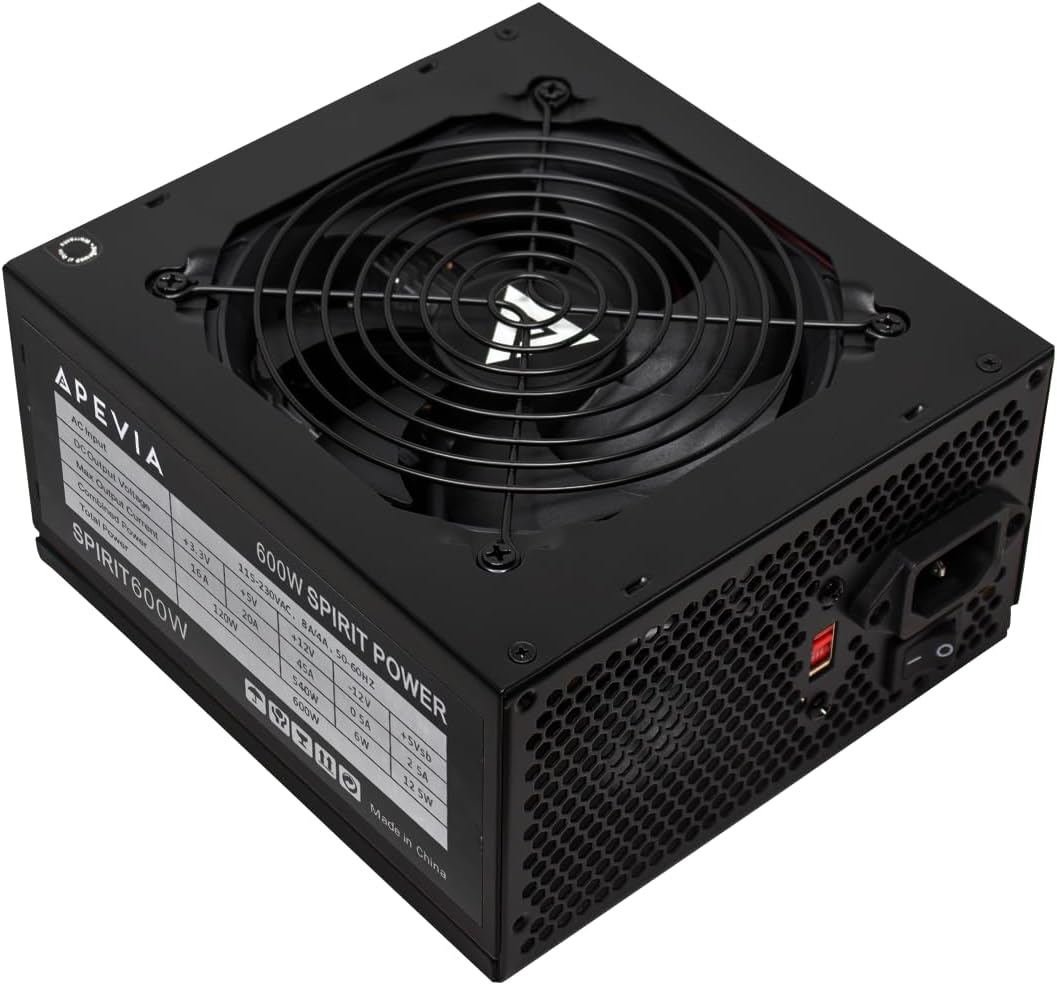
Apevia SPIRIT600W offers basic protection at a low price. Split connectors adapt to different board requirements.
We may earn a commission when you buy through this link, at no additional cost to you.
Safety features protect against common electrical issues. The thermal controlled fan manages heat efficiently.
It lacks modern standards but works for older systems. Good for tight budgets.
Choose this for older builds or rentals. It covers essentials without complex features.
Split connectors adapt to various motherboard and GPU needs.
Fan adjusts speed based on heat to reduce noise.
We may earn a commission when you buy through this link, at no additional cost to you.
Selecting a budget PSU requires balancing efficiency wattage and safety features. This guide helps you prioritize critical specs to avoid hardware damage.
Determine total system power needs by adding CPU and GPU TDP. Ensure 20 percent headroom for peak loads.
Aim for a unit matching your GPU recommendation plus margin to prevent shutdowns.
80 Plus Bronze Gold or higher reduces wasted electricity and heat. Higher tiers cost more but save money long term.
Choose Bronze or Gold for best balance between cost and efficiency.
Fully modular allows only needed cables reducing clutter. Semi modular fixes essential cables.
Non modular is cheaper but harder to manage in tight cases.
ATX 3.0 or 3.1 supports modern GPU spikes and native cables. Older units lack these features.
Look for compliance labels if using recent graphics cards.
Safety protections like OVP OCP and SCP prevent hardware damage during surges or faults.
Ensure unit lists all standard protections before purchasing.
Longer warranty indicates manufacturer confidence. Aim for 5 years minimum on budget units.
Read terms to know what damage is covered under warranty.
Low noise fans ensure quiet operation. Larger fans often move air better at lower RPM.
Check dB ratings and fan size when selecting a unit.
Japanese capacitors last longer and perform better at heat. Check component lists for reliability.
Prioritize units listing high quality parts for safety.
Install the PSU with the fan facing intake or exhaust based on your case design. Secure it tightly with all screws to prevent vibration noise.
Connect all power cables firmly to CPU motherboard and GPU. Verify 12V connectors are fully seated to avoid loose connections.
Keep vents clear and clean dust monthly to prevent overheating. Proper airflow extends lifespan and maintains performance.
Yes if it meets modern efficiency standards and includes protection circuits. Avoid no name brands lacking safety certifications. Choose trusted manufacturers with warranty support to ensure reliability.
Most mid range builds need 600W to 750W. High end multi GPU setups may require 850W or more. Calculate GPU and CPU total plus margin to be safe.
Modular cables simplify management but add cost. Semi modular offers a middle ground. Non modular is acceptable if you have space and patience.
Gold means less wasted electricity but Bronze also works well. Choose based on electricity costs and heat tolerance. Gold is ideal for high usage.
Only if wattage matches and it supports ATX standards. New GPUs need specific power delivery. Check connector requirements carefully before connecting.
Quality units last 5 to 10 years. Regular cleaning and stable voltage help longevity. Warranty terms also indicate expected lifespan.
Spikes are sudden short power surges from GPUs. ATX 3.0 units handle them better. Ensure your PSU supports modern standards.
Major retailers like Amazon offer competitive prices and warranties. Check return policies and product reviews before buying. Ensure seller is authorized.
These ten picks deliver reliable power without overspending. From budget 500W units to future proof ATX 3.1 models there is something for every need.
Prioritize safety features wattage headroom and efficiency. A stable PSU protects your investment better than saving extra dollars.
Prices fluctuate daily so verify current deals before checkout. Use our guide to build a gaming rig that runs cool and stays safe.