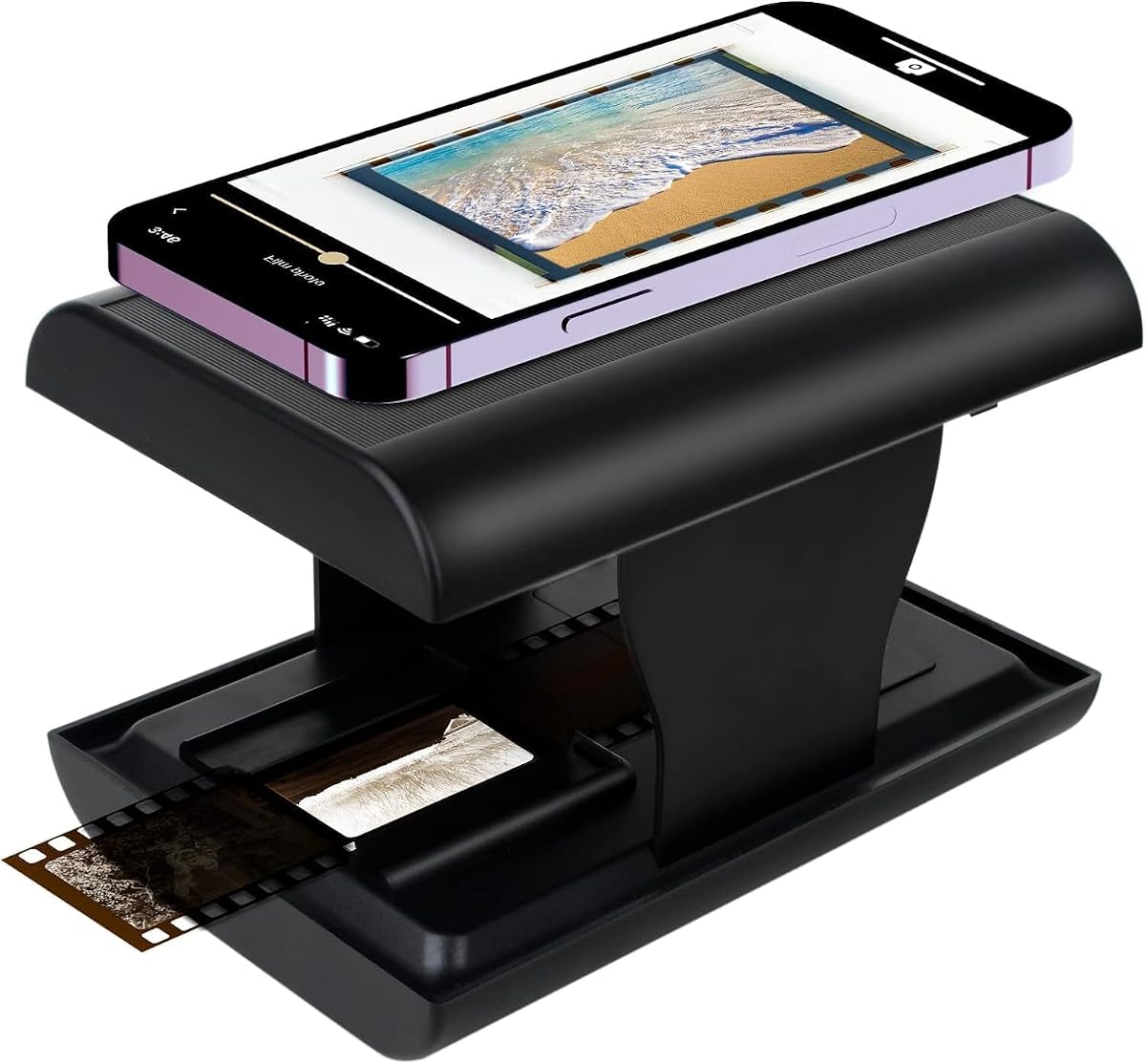
TCNEWCL 35mm Negative Slide Scanner
4.3Editor score
Foldable design for travel
Smartphone compatible scanning
Built-in LED backlight
Preserving memories requires the right tools to digitize old film. A quality black and white negative scanner ensures clarity and color accuracy for your archived photos.
We evaluated ten leading scanners based on resolution, ease of use, and format support. Our analysis covers portable options and desktop units for every budget and need.
Each pick highlights key features and performance. Prices and availability change frequently so verify current details before purchasing your preferred model today.
4.3Editor score

4.3Editor score

4.3Editor score
As an Amazon Associate we earn from qualifying purchases.
Compare the key specifications and features of the top ten black and white negative scanners to find the perfect match for your digitization needs.


The BEONEGLOBAL ClearScan MINI offers a balanced solution for digitizing film. Its 16MP CMOS sensor captures high detail and the ergonomic design simplifies operation.
We may earn a commission when you buy through this link, at no additional cost to you.
Users benefit from on device editing controls allowing adjustments to brightness and color before saving. The front facing buttons ensure comfortable use without awkward hand positions.
While the LCD is small at 2.31 inches it provides sufficient preview for quick checks. The lack of included SD card requires a separate purchase for immediate storage.
This scanner suits families seeking a portable and straightforward tool to preserve memories. Its speed and clarity make it a strong top contender for general use.
The dedicated 1/3 CMOS sensor ensures true to life color accuracy and clarity for your negatives.
Adjust brightness and color directly on the scanner before saving for more control over your final images.
We may earn a commission when you buy through this link, at no additional cost to you.
The KODAK Slide N Scan Max delivers professional grade results with its 13MP sensor and 22MP interpolation. It supports a wide range of film formats effortlessly.
We may earn a commission when you buy through this link, at no additional cost to you.
Its streamlined tray reduces the need for constant repositioning making the digitization process more efficient. Direct SD saving enhances portability by removing computer dependencies.
The one touch editing simplifies resizing and converting though some users may find menus complex. The higher cost reflects the superior build and resolution capabilities.
Ideal for archivists needing versatility and detail this scanner handles both color and B&W negatives effectively. It stands out for comprehensive archiving needs.
Accommodates 135mm 110mm and 126mm formats easily handling both slides and negatives for complete archiving.
Capture detailed images up to 4208×3120 resolution ensuring large crisp digital files for your memories.
We may earn a commission when you buy through this link, at no additional cost to you.
The TCNEWCL scanner is a cost effective way to digitize memories using your smartphone. Its foldable design makes it easy to store or take on trips.
We may earn a commission when you buy through this link, at no additional cost to you.
Operation involves placing the film in the shell and holding the phone lens over the hole. The LED backlight ensures proper illumination for clear captures.
The main limitation is the dependency on your phone camera resolution quality. However for casual users this offers a functional low cost solution for quick sharing.
This device suits families wanting an affordable tool for parents and kids. It revives old memories with minimal effort and expense.
Fold the scanner up to the size of a small box for convenient storage and travel.
Use your existing smartphone camera and free app to capture edit and share your scanned images.
We may earn a commission when you buy through this link, at no additional cost to you.
The Magnasonic scanner offers exceptional 24MP resolution and a large 5 inch display for easy viewing. Its support for Super 8 film adds unique versatility.
We may earn a commission when you buy through this link, at no additional cost to you.
Users can view scans directly on the device or use HDMI to connect to a TV. This makes sharing memories with family a seamless and interactive experience.
The lack of included HDMI and SD cables means additional purchases are required for full functionality. Otherwise the interface is simple and drivers are unnecessary.
Perfect for households wanting a standalone display unit this scanner preserves memories effectively. Its high resolution ensures detailed digital copies.
View film and scanned images on the 5 inch screen or connect to a TV using the HDMI cable.
Convert Super 8 film negatives and slides into digital JPEG files easily without complex software.
We may earn a commission when you buy through this link, at no additional cost to you.
This product entry currently shows no available data. Further verification is needed to confirm its specifications or relevance.
We may earn a commission when you buy through this link, at no additional cost to you.
Pros include potential new model features if available. Checking the listing directly is advised.
Cons involve the lack of information for comparison. It is difficult to recommend without details.
Users should check the Amazon page for updated info before considering purchase.
Check the Amazon product page for the latest specifications and details.
We may earn a commission when you buy through this link, at no additional cost to you.
The Memory Vault Box scanner is designed for home use with simple buttons and a preview screen. Its enhancement technology helps restore faded memories effectively.
We may earn a commission when you buy through this link, at no additional cost to you.
It includes a slide holder and brush to get started immediately. The lack of SD card and lower rating suggest careful verification before purchase.
The restore feature is a key benefit for older photos. However users should confirm clarity expectations based on reviews.
Suitable for casual digitization this scanner provides a straightforward path to preserving family history. Its simplicity makes it accessible for beginners.
Enhancement technology improves brightness and color to bring old negatives back to life digitally.
We may earn a commission when you buy through this link, at no additional cost to you.
The HP scanner features a large 5 inch all-angle touchscreen for easy editing and preview. Its gallery mode turns the device into a picture frame.
We may earn a commission when you buy through this link, at no additional cost to you.
Powered by USB-C it offers versatile connectivity. The CMOS sensor captures detailed images with 22MP interpolation for superior clarity.
The cost may be a factor for budget buyers. However the user experience and frame feature add significant value.
Ideal for tech savvy users this scanner simplifies digitization with high touch controls and frame options. It is a modern solution for memory preservation.
Preview and edit images directly on the device using the 5 inch all-angle LCD touch screen.
Turn the scanner into a vibrant picture frame to display your favorite scanned moments.
We may earn a commission when you buy through this link, at no additional cost to you.
Choosing the right scanner requires considering resolution format support and ease of use.
Higher resolution ensures fine details in your negatives are captured clearly. Look for scanners with at least 13MP for detailed digital files.
Prioritize models with quality sensors to maintain image sharpness during digitization.
Ensure the scanner supports the specific film types you own such as 35mm 126 or Super 8. Versatility saves the need for multiple devices.
Check for included holders to handle various film formats effortlessly.
Editing features like brightness adjustment and rotation streamline your workflow. These tools allow corrections before saving the final file.
Look for intuitive interfaces that simplify these edits for all users.
USB or USB-C power offers flexibility for portability and desk use. Check if the device runs on an adapter or direct connection.
Consider models that save directly to SD cards to remove computer dependency.
A large screen allows you to view scans immediately. Larger displays help ensure quality before finalizing saves.
Look for models with HDMI if you want to share on larger screens.
Scanning speed affects efficiency when handling large archives. Look for models that process images in seconds per sheet.
Simple tray loading mechanisms reduce frustration and improve workflow.
Portable scanners allow you to digitize anywhere. Foldable or lightweight designs are ideal for travel or small spaces.
Consider weight and storage size when choosing for mobility.
Balance the cost with features you will actually use. Premium models offer more options but may not be necessary for basic needs.
Evaluate the total cost including any required accessories.
Start by cleaning the film and scanner glass with a soft brush to avoid dust marks. Proper preparation ensures the clearest possible scan.
Load your film or slides into the correct tray. Press the scan button and wait for the preview image to appear.
After saving use the SD card to transfer images to your computer or share online. Keep the device in a dry place to extend its life.
A resolution of at least 13MP is recommended for detailed scans. This ensures fine details are captured clearly in your digital files.
Many modern scanners allow saving directly to SD cards. This means you can digitize without needing a computer nearby.
Yes most scanners handle both color and black and white negatives. Ensure the model supports the specific film type you own.
Use a soft brush or microfiber cloth to remove dust before scanning. Regular cleaning prevents smudges on your scanned images.
Most units support 35mm and 126 formats. Check specifications for older types like 110 or Super 8.
Yes many scanners include slide holders. This allows you to digitize both negatives and slides with one device.
Save files to an SD card or transfer to your computer. Cloud storage is also an option for long term preservation.
The BEONEGLOBAL ClearScan MINI and Magnasonic models offer excellent balance of resolution and features.
Prioritize compatibility with your film types and the ease of use that matches your comfort level.
Prices vary so check current listings for the best deal on your chosen model today.