
Ergonomic Mouse & Keyboard Tray Under Desk
4.4Editor score
Fits desks up to 2.76 inches thick
Includes anti-slip back baffle for security
Compact 20 x 11.8 inch platform size
Discover the best clamp on keyboard tray options for 2026. We compare top models for ergonomics, size, and ease of installation.
Finding the right clamp on keyboard tray can transform your workspace. It frees up valuable desk space and promotes better posture for long work sessions.
We compared ten top-rated models based on build quality, adjustability, and user feedback. Each product offers unique features to suit different desk types.
Our picks highlight key benefits and potential trade-offs to help you decide. Prices fluctuate regularly, so check current offers before purchasing.
4.4Editor score

4.4Editor score

4.3Editor score
This side-by-side comparison highlights key specifications across all ten selected models to help you identify the best fit for your workspace needs.


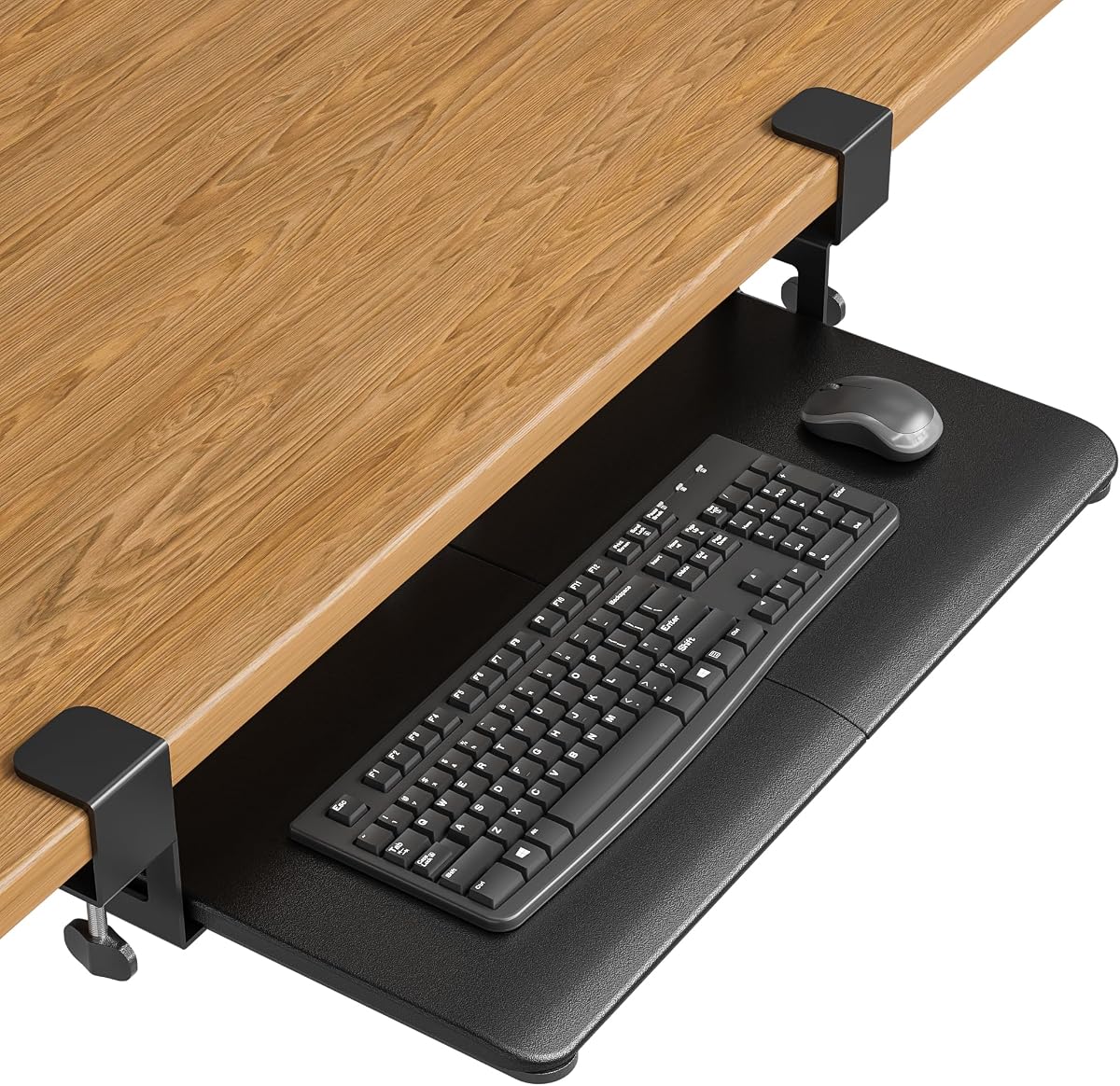


The VIVO MOUNT-KB05E is a standout choice for anyone seeking a reliable clamp on keyboard tray. With a solid 4.4 rating from users, it offers a straightforward solution to reclaim desk space while improving comfort.
We may earn a commission when you buy through this link, at no additional cost to you.
Its design allows you to slide the tray in and out effortlessly. The sturdy C-clamps ensure it stays secure without damaging your desk. This model holds up to 11 lbs, accommodating most standard keyboards and mice.
While it lacks complex adjustments, its fixed ergonomic angle works well for most users. The only trade-off is the requirement for flat desks without beveled edges, which limits compatibility for some modern furniture styles.
This model is perfect for home office users with standard desks. If you want a no-fuss upgrade to your setup, this tray delivers consistent performance and value.
By moving your keyboard below the desktop, you free up room for monitors and documents, creating a cleaner workspace.
The C-clamps are adjustable and provide a tight grip, ensuring the tray does not shift during intense typing sessions.
We may earn a commission when you buy through this link, at no additional cost to you.
This VIVO model stands out for its high degree of adjustability. It addresses a common pain point: desk thickness limitations. With support for desks up to 3.4 inches, it works where others fail.
We may earn a commission when you buy through this link, at no additional cost to you.
The tray splits into keyboard and mouse sections, allowing you to position them independently for better ergonomics. Five height adjustment points let you customize the angle to match your chair and posture needs.
However, the split design means assembly is slightly more involved. It also requires careful measurement of your desk width to ensure the clamp spacing fits correctly. Not ideal for tight spaces.
Ideal for users with deep or thick desks who need customization. If you struggle with wrist pain or desk depth, this adjustable solution offers a tailored fit.
The five height set points ensure you can align the tray with your elbow height for optimal typing comfort.
Separating the mouse area from the keyboard allows natural shoulder positioning, reducing strain on your arms.
We may earn a commission when you buy through this link, at no additional cost to you.
The rotating feature of this VIVO tray adds unique versatility. A single clamp allows the entire tray to pivot 360 degrees, making it easy to tuck away when not in use.
We may earn a commission when you buy through this link, at no additional cost to you.
This flexibility is useful in shared offices or for people who need to switch between writing on the desk and typing. The compact size ensures it does not intrude on your workspace.
While versatile, some users report minor wobbling due to the single-point mounting. It is stable for typing but not designed for heavy leaning. Keep weight limits in mind.
Choose this if you prioritize space flexibility over rock-solid rigidity. It is an excellent choice for multi-functional desks where you need to clear space quickly.
Rotate the tray out of the way when you need more desk space for paperwork or large objects.
When done typing, pivot the tray underneath the desktop to keep your workspace uncluttered.
We may earn a commission when you buy through this link, at no additional cost to you.
This model delivers strong performance at a budget-friendly price. It features a solid slide mechanism and generous surface area for keyboard and mouse. The anti-slip baffle keeps your gear secure.
We may earn a commission when you buy through this link, at no additional cost to you.
Installation is straightforward with all necessary hardware included. The upgraded slide mechanism ensures smooth operation daily. It supports desks up to 2.76 inches, which is rare for lower-priced options.
The width is slightly smaller than full 27 inch trays, so check your keyboard size. However, it works well for most compact setups. It prioritizes function and ease of installation.
Best for budget-conscious shoppers or renters. If you need a reliable tray without spending much, this model offers great ergonomics and utility.
The baffle at the back prevents your keyboard from sliding off during intense typing or gaming.
Its heavy-duty clamps work on desks thicker than most budget trays can handle.
We may earn a commission when you buy through this link, at no additional cost to you.
The VIVO Premium model is designed for serious ergonomics. It offers nine tilt settings ranging from positive to negative angles, allowing you to find the perfect wrist position.
We may earn a commission when you buy through this link, at no additional cost to you.
Its swivel clamps rotate 90 degrees independently, making it ideal for corner desks or complex setups. The side brackets adjust height for clearance under your desk. This flexibility is unmatched.
The trade-off is the need for significant desk width. Ensure you have 34 inches of clearance from clamp to clamp. The build quality justifies the higher cost with durability.
Choose this for premium ergonomic needs. If you have chronic wrist pain or a corner desk, this tray offers the control you need for comfort.
With nine distinct angles, you can fine-tune the tray to keep your wrists in a neutral position.
The independently rotating clamps allow for custom placement on L-shaped workstations.
We may earn a commission when you buy through this link, at no additional cost to you.
This tray is specifically engineered for L-shaped workstations. The swiveling C-clamps allow secure attachment even at awkward angles. It provides a clean solution for corner desks.
We may earn a commission when you buy through this link, at no additional cost to you.
It holds up to 11 lbs and allows the tray to slide in and out. This helps keep the workspace tidy and protects your desk surface from wear. Assembly is simple with provided instructions.
Note that it supports desks up to 1.25 inches. If your desk is thicker, consider another model. It lacks tilt adjustment, relying on a fixed ergonomic angle.
Ideal for anyone with a corner setup. If your main challenge is fitting a tray into an L-shape, this model simplifies the process.
The clamps adjust to fit the inner corner of your desk, providing stability where standard trays fail.
Slide the tray under the desk when not using it to maximize available workspace area.
We may earn a commission when you buy through this link, at no additional cost to you.
This tray combines ergonomics with storage. The 17 inch pencil drawer keeps small accessories organized while maintaining a clean workspace. It holds up to 11 lbs including the drawer.
We may earn a commission when you buy through this link, at no additional cost to you.
When extended, it reaches 18.5 inches. It slides smoothly for quick access. The C-clamps attach without damage to the desk surface. It helps reduce clutter under your monitor.
Be aware that the drawer adds depth. Check clearance under your desk before buying. If your desk has limited height, this might restrict movement.
Perfect for home offices needing extra organization. If you lose pencils or pens often, this integrated storage is a practical upgrade.
Keep essentials like pens and notepads in the drawer to keep your desk top free for work.
The tray extends outward so you can access it while keeping your keyboard neatly stored.
We may earn a commission when you buy through this link, at no additional cost to you.
The BONTEC tray provides a no-drill installation option that protects your desk. It is designed to fit desks up to 1.97 inches thick with reliable C-clamp security.
We may earn a commission when you buy through this link, at no additional cost to you.
The pull-out mechanism is smooth and allows quick access to your keyboard. It holds up to 11 lbs, ensuring stability during typing. Protective pads ensure your desk stays scratch-free.
Check your desk width before buying. It requires 31.3 inches minimum. If your desk is too narrow, installation may be impossible. Also avoid beveled edges.
Best for renters or those avoiding damage. If you need a clean, temporary setup, this tray offers ease of use and reliability.
Integrated pads on the clamps prevent any marks or scratches during installation and daily use.
Install without drilling holes, preserving your desk's condition for future moves or changes.
We may earn a commission when you buy through this link, at no additional cost to you.
This VIVO extender is highly versatile. It can serve as a keyboard tray, a printer stand, or extra storage. It supports up to 44 lbs, far exceeding typical keyboard trays.
We may earn a commission when you buy through this link, at no additional cost to you.
It folds 90 degrees out of the way when not needed. This foldable design is great for flexible office setups. The K-shaped brackets provide rigid support.
Be mindful that it lacks a pull-out slide mechanism. It is a platform rather than a sliding tray. Ensure you need the extra surface area before choosing this.
Choose this if you need a multipurpose platform. If you want one tool for multiple functions, this extender offers unmatched utility.
Press release levers to fold the platform flat, clearing desk space instantly when not in use.
The reinforced brackets handle heavy equipment like printers, not just keyboards.
We may earn a commission when you buy through this link, at no additional cost to you.
The Mount-It! tray offers a lifetime warranty and US-based support. This peace of mind sets it apart in a crowded market. It features a robust slide-out design for easy access.
We may earn a commission when you buy through this link, at no additional cost to you.
It supports desks up to 2.2 inches thick, fitting most standard office furniture. The platform is ample for full-size keyboards and mouse movement. It aligns wrists neutrally.
While the price is higher, the warranty makes it a sound long-term investment. Just ensure your desk is solid and not glass. Avoid lipped edges.
Ideal for those wanting security. If you value customer support and warranty protection, this model offers strong reassurance alongside solid ergonomics.
Enjoy long-term protection with a lifetime warranty that covers product defects and performance.
The tray height helps align your wrists and elbows naturally, reducing strain over time.
We may earn a commission when you buy through this link, at no additional cost to you.
Choosing the right clamp on keyboard tray involves measuring your desk and understanding your ergonomic needs. This guide outlines key factors to consider.
Check how thick your desk is. Most trays fit up to 1.5 inches but some go to 3.5 inches. Measure your edge carefully before buying.
Ensure your tray clamps match your desk thickness to avoid installation failure.
Measure the space from clamp to clamp. Trays often require 30 to 35 inches of clear width. If your desk is narrow, look for compact options.
Confirm your desk has enough width before purchasing to avoid fit issues.
Clamp trays work best on flat, unobstructed edges. Avoid desks with beveled, rounded, or lipped edges unless specified. Some models include pads for flat surfaces.
Verify your desk edge type to ensure secure attachment.
Look for sturdy metal or reinforced plastic platforms. Most hold 11 lbs or more, sufficient for keyboards and mice. Heavy materials add stability.
Choose a tray with enough load capacity for your gear.
Consider height or tilt adjustments. Some trays offer multiple angle settings. Others slide only. Decide based on your comfort needs.
Prioritize adjustability if you experience wrist pain.
Most use C-clamps without drilling. This is ideal for renters. Check if mounting hardware is included and easy to use.
Choose no-drill options for non-permanent setups.
Under-desk trays save space but reduce legroom. Ensure clearance under the desk is enough. Rotating or folding options offer more flexibility.
Measure leg space before installing to avoid crowding.
Check the warranty length. Some offer lifetime coverage. US-based support can help with assembly issues. Good service matters long-term.
Look for models with strong warranty terms for peace of mind.
Install the tray by attaching clamps to a flat desk edge. Ensure pads face the desk surface. Tighten securely to avoid wobbling.
Adjust the slide or tilt settings for comfort. Test the movement before daily use. If it feels tight, lubricate the rails with a dry lubricant.
Clean the tray with a damp cloth regularly. Avoid harsh chemicals that damage the finish. Check clamp tightness monthly to prevent loosening.
It is an under-desk platform attached via clamps. It frees desk space by holding your keyboard and mouse below the main surface.
Measure desk thickness and width from edge to edge. Ensure the tray fits your thickness and allows clearance for the clamps.
Most are not compatible with glass. Clamps require solid surfaces. Use a solid or wooden desk for secure attachment.
Yes, it lowers typing height for a neutral posture. This reduces wrist strain. Adjust the height to match your elbows.
Most require no tools beyond included hardware. C-clamps usually tighten by hand. Check instructions for specific steps.
Check width and extension. Some trays are too narrow. Split keyboards need wider platforms or adjustable trays for proper fit.
Ensure enough height for your legs. Typically 3 to 4 inches below the desk is needed for comfortable sitting.
Most slide smoothly without noise. If it squeaks, clean the rails and apply lubricant. Ensure clamps are tightened properly.
We reviewed ten top models, highlighting strengths like adjustability and build quality. Our picks cover various desk types and needs.
Prioritize compatibility and ergonomics. Choose a tray that fits your desk thickness and improves your posture for daily use.
Prices and stock change often. Check current offers before buying to get the best value for your workspace setup.