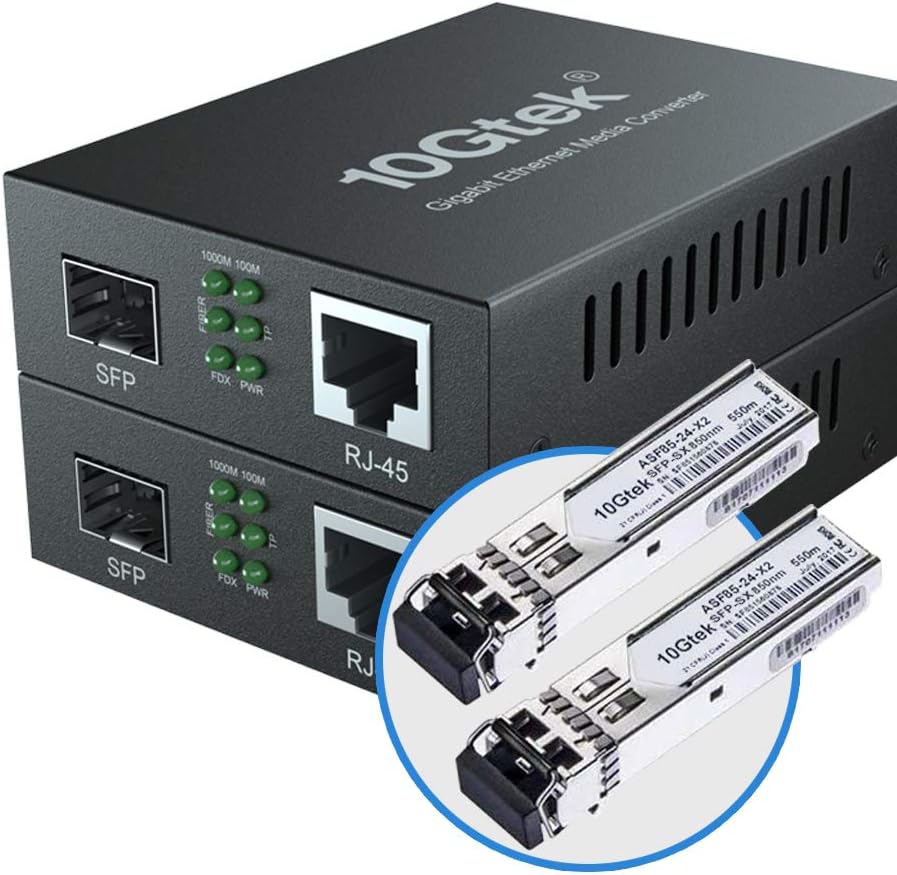
10Gtek Gigabit Ethernet Media Converter
4.7Editor score
SFP MMF 850-nm Module Included
Dual LC Fiber Port Support
Auto-Negotiation RJ45 Port
This guide compares the top Ethernet Fiber Media Converter options for extending networks with reliable fiber optics and copper connections.
Modern networks often require extending connections beyond the limits of copper cables. An Ethernet Fiber Media Converter allows you to bridge this gap by translating signals between fiber optic and copper Ethernet standards seamlessly.
We have evaluated ten top-rated models based on performance, compatibility, build quality, and user feedback. Each option offers unique advantages for different scenarios ranging from budget setups to enterprise deployments.
Our picks highlight key specifications and real-world usage insights to help you choose wisely. Note that pricing and availability change frequently so verify current details before purchasing.
4.7Editor score

4.9Editor score

5.0Editor score
The following table provides a side-by-side look at the core specifications of each model. This helps you quickly identify which unit fits your specific network needs and budget constraints.


This dual-pack unit delivers reliable gigabit performance for short to medium distances. It holds a strong rating due to its affordability and ready-to-use configuration.
We may earn a commission when you buy through this link, at no additional cost to you.
Key strengths include the inclusion of SFP MMF 850-nm modules which saves extra sourcing costs. The RJ45 port auto-negotiates speeds ensuring compatibility with various network devices.
The primary trade-off is the multimode limitation which restricts usage to shorter ranges like within a single building. This is acceptable for most small office setups.
Ideal for users needing to extend networks across rooms without major infrastructure changes. The UL certification adds trust in its power safety and durability.
Modules ship with the converter ensuring you can connect fiber immediately without buying separate transceivers.
Its small form factor allows placement in tight spaces such as server racks or office desks.
We may earn a commission when you buy through this link, at no additional cost to you.
Omada offers a flexible solution compatible with single and multi-mode fiber types. It earns high marks for versatility and ease of integration into diverse networks.
We may earn a commission when you buy through this link, at no additional cost to you.
The Hot-Swappable FX Port lets users change modules to adjust distances from 550m to 12.4 miles as needed. Auto-negotiation ensures smooth connection to 10/100/1000 Base-T Ethernet.
A downside is that modules are not included requiring separate purchase. However this keeps base costs lower while offering customization freedom.
Perfect for network administrators needing distance flexibility without replacing hardware. Its plug-and-play design reduces configuration time significantly.
Support for both single and multi-mode fiber allows reuse of existing cabling without rewiring.
No software installation or complex configuration is required for basic operation.
We may earn a commission when you buy through this link, at no additional cost to you.
This bidirectional set optimizes fiber usage by sending and receiving data over a single strand. It is rated well for its completeness including SFP transceivers.
We may earn a commission when you buy through this link, at no additional cost to you.
The Bidi design reduces fiber strand requirements which is critical in scarce fiber environments. LED indicators allow quick monitoring of TX and RX links.
Bidirectional units can be trickier to configure than standard duplex pairs. Users must ensure wavelength matching on both ends.
Best for dense cabling environments where fiber strand count is limited. The included accessories minimize extra costs for initial deployment.
Using one fiber strand for both directions halves the cabling needed for the link.
Wide power supply voltage range ensures operation across different electrical standards.
We may earn a commission when you buy through this link, at no additional cost to you.
For high bandwidth needs this unit handles speeds up to 10 gigabits per second. It is praised for its versatile RJ45 port that auto-adapts to multiple speeds.
We may earn a commission when you buy through this link, at no additional cost to you.
The SFP+ slot allows choice of SR LR or 10G-T modules to suit distance needs. DIP switches give control over flow control and speed settings.
Cost is higher than standard gigabit options but justified for 10G readiness. Users should ensure compatible SFP+ modules are purchased.
Best for data centers or servers needing 10G links. Its future-proofing makes it a smart long-term investment.
Auto adapt feature supports 100M 1G 2.5G 5G and 10G Base-T without manual switch changes.
LED indicators show config status and link health for easier troubleshooting.
We may earn a commission when you buy through this link, at no additional cost to you.
This single-mode pack provides reliable gigabit connections over distances up to 20km. It scores high for its build quality and UL certification.
We may earn a commission when you buy through this link, at no additional cost to you.
The SC dual fiber design ensures stable links in industrial environments. Auto-negotiation RJ45 ports work with standard network gear without issues.
SC connectors are less common than LC requiring specific patch cables. But they are robust for harsh conditions.
Ideal for campus networks or factories needing long distance reliability. The dual pack simplifies bidirectional setup.
SC connectors are known for their mechanical strength and stability in demanding environments.
Single-mode fiber supports distances up to 20km enabling wide area network links.
We may earn a commission when you buy through this link, at no additional cost to you.
This pair includes built-in SFP modules making it plug and play for 20km links. It earns top ratings for its all-in-one convenience and high stability.
We may earn a commission when you buy through this link, at no additional cost to you.
Built-in LX modules ensure alignment and performance without separate sourcing. Real HD LEDs provide clear status for network activity monitoring.
Single-mode fiber may not be in all locations but it enables longer ranges. Housing is simple but effective for indoor use.
Perfect for users wanting a complete ready-to-deploy kit. U.S. based support adds confidence for business deployments.
Modules are fitted and matched ensuring no compatibility issues out of the box.
Local technical support is available for quick resolution of any setup issues.
We may earn a commission when you buy through this link, at no additional cost to you.
This unit ships with an LC SFP module pre-installed for immediate 20km use. It is known for robust performance and ease of setup.
We may earn a commission when you buy through this link, at no additional cost to you.
Link Fault Pass-Through helps upstream switches detect fiber breaks quickly. The auto-sensing copper port handles 10 100 or 1000 Mbps speeds.
Fixed modules reduce customization but ensure factory matched performance. Temperature range supports both indoor and mildly harsh conditions.
Great for simple point-to-point links where ease of use matters. Wall mount accessories simplify mounting options.
This feature ensures network switches detect fiber breaks automatically preventing dead port issues.
Wall mount ears and clips are provided for flexible installation options.
We may earn a commission when you buy through this link, at no additional cost to you.
This model is ideal for government or strict procurement environments due to TAA compliance. It holds strong ratings for reliability and lab-tested integration.
We may earn a commission when you buy through this link, at no additional cost to you.
The open SFP slot allows any MSA compliant module for distance flexibility. VLAN pass-through ensures tagged traffic is preserved across the link.
Modules are not included raising initial cost but offering customization. Support is comprehensive with free lifetime assistance.
Best for enterprise or public sector deployments needing compliance. Its flexibility and reliability make it a top choice.
Meets TAA standards for government procurement ensuring eligibility for public contracts.
Supports IEEE 802.1q tags allowing VLANs to pass through unmodified.
We may earn a commission when you buy through this link, at no additional cost to you.
This multimode unit comes with a pre-installed SX module ready for 550m links. It is praised for compatibility across all fiber grades from OM1 to OM5.
We may earn a commission when you buy through this link, at no additional cost to you.
The included Cat6 patch cable and wall ears make it ready right out of box. Four DIP switches offer control over link fault and broadcast storm settings.
Distance is limited to 550m depending on grade but is sufficient for most buildings. The module alignment ensures optical performance out of box.
Best for offices needing quick deployment with minimal cabling prep. Included accessories reduce total cost of ownership.
Works across OM1 OM2 OM3 OM4 and OM5 allowing use of existing multimode runs.
Patch cable adapters and mounting hardware are supplied to save extra purchases.
We may earn a commission when you buy through this link, at no additional cost to you.
This unit earns a perfect rating for its robust feature set and reliability in critical networks. It is designed for IT pros needing high uptime and remote visibility.
We may earn a commission when you buy through this link, at no additional cost to you.
Advanced features include remote monitor status and link-loss forwarding for proactive management. The open SFP slot ensures flexibility in transceiver choice.
Cost is high compared to consumer units but justified for enterprise needs. TAA compliance adds value for government projects.
Best for mission-critical deployments in server rooms or data centers. Its features ensure maximum uptime and manageable network links.
Remote monitor status allows admins to check device health from a central location.
Ensures link faults are propagated upstream reducing troubleshooting time.
We may earn a commission when you buy through this link, at no additional cost to you.
Choosing the right converter involves evaluating several technical factors to ensure compatibility with your existing infrastructure and future needs.
Converters are built for either Single Mode or Multi Mode fiber. Single Mode reaches longer distances up to 20km or more whereas Multi Mode is suited for shorter indoor runs up to 550m. Verify your cabling type before buying.
Always match the converter to your existing fiber plant to avoid costly cabling replacements.
Common connectors include LC SC and ST. Most modern devices use LC connectors but older infrastructure might rely on SC. Ensure your patch cables match the converter ports or plan for adapters.
Check physical connector types on your fiber runs to guarantee a direct connection without adapters.
Most converters offer Gigabit speeds but some support 10G or multi-gigabit for future proofing. Ensure the RJ45 port auto negotiates to match your devices which switch speeds.
Choose a model that supports your current and future network speeds to avoid bottlenecks.
Some units come with SFP modules pre-installed while others require separate purchase. Included modules save time and ensure factory alignment but add cost. Evaluate if you prefer convenience or flexibility.
Pre-installed modules simplify deployment but separate modules offer more customization.
Determine the max distance needed between endpoints. Single Mode handles 20km+ while Multi Mode typically tops out at 550m. Exceeding distance limits will result in signal loss.
Calculate total cable length accurately to select a converter that covers the distance.
Advanced models offer features like Link Fault Pass-Through VLAN tagging or remote monitoring. These aid in troubleshooting and network management especially in enterprise environments.
Look for features that match your need for network visibility and fault detection.
Prices vary significantly between consumer and enterprise grade units. Consider warranty terms and technical support availability which can be crucial for business continuity and long-term value.
Higher upfront costs often pay off through better reliability and support.
Consider where the converter will be mounted. Desktop wall or rack mount options exist. Operating temperature and humidity ranges also affect suitability for industrial or outdoor applications.
Ensure the device can physically fit and survive the intended environment.
Connect the RJ45 Ethernet port to your switch or router using a Cat5e cable. Ensure the link LED lights up to confirm copper connectivity.
Insert the fiber patch cable into the SFP port or LC SC port. Avoid touching the fiber ends to prevent dust contamination.
Secure the device in a well ventilated area and avoid blocking ventilation slots. Regularly check LEDs for status changes indicating link health.
No you must match the fiber type to the converter. Single Mode converters require Single Mode fiber and Multi Mode converters require Multi Mode fiber. Connector types must also match.
Multi Mode converters typically support up to 550 meters. Single Mode converters can reach up to 20 kilometers or more depending on the SFP module used.
Some models include SFP modules while others require separate purchase. Always check product details to see if modules are included before buying.
Multimode converters usually support multiple grades like OM1 through OM5. Single Mode units generally work with OS1 or OS2 fiber standards.
Advanced enterprise models offer remote monitor status features. Basic units rely on local LED indicators for monitoring link health.
Many modern units support VLAN pass-through preserving 802.1Q tags. Check specs for VLAN support if you use tagged networks.
Most converters use 5V DC power adapters included in the box. Ensure the power supply matches the voltage and current specs.
Our top picks include budget friendly options and high-performance units tailored to different needs. Each converter offers distinct advantages whether you need long distance or quick setup.
Prioritize fiber type compatibility and distance requirements to avoid mismatches. Consider included modules and support options for long-term reliability.
Verify current availability and pricing before purchasing to ensure you get the best value for your specific network setup.