
StarTech USB-A 3.0 to HDMI Converter
4.5Editor score
1080p60 video output
Windows driver required
Lightweight travel-friendly design
This guide compares the top ten flash drive to HDMI adapter models for seamless video output across laptops and desktops in 2026.
Choosing the right flash drive to HDMI adapter can transform your workspace by enabling external displays for enhanced productivity. These devices bridge the gap between limited USB ports and high-definition monitors, allowing users to extend their desktop or mirror screens effortlessly. Whether you are working from home or presenting in a conference room, having the correct adapter ensures smooth visual output without the need for complex internal hardware upgrades.
We evaluated ten leading models based on compatibility, resolution support, driver requirements, and overall build quality. Each adapter was assessed for its ability to handle various operating systems including Windows, macOS, and ChromeOS. Our analysis focused on real-world performance metrics such as refresh rates, cable durability, and ease of setup to provide you with a reliable ranking for your specific needs.
Each pick in this list highlights key strengths and potential limitations to help you make an informed decision. You will find options ranging from budget-friendly single-output adapters to premium multi-monitor solutions. Please note that availability and specifications may change over time, so verify current details before purchasing to ensure the best match for your current computer setup and display requirements.
4.5Editor score

4.1Editor score

4.4Editor score
The following comparison table outlines the key specifications and features of the top ten flash drive to HDMI adapters available today. Use this side-by-side view to quickly identify which model meets your specific resolution, compatibility, and port requirements.





The Reborn USB to HDMI Adapter stands out as a top contender for those seeking a reliable connection between USB ports and HDMI displays. With a solid rating from users, this adapter offers a practical solution for expanding screen real estate without significant hardware changes. It is particularly well-suited for laptops that lack native HDMI outputs but still require external monitor connectivity for work or entertainment.
We may earn a commission when you buy through this link, at no additional cost to you.
Its primary strength lies in its ability to deliver Full HD 1080P resolution at 60Hz, ensuring smooth video playback and responsive cursor movement during productivity tasks. The adapter supports both mirror and extended display modes, giving users the flexibility to duplicate their screen for presentations or extend their desktop for multitasking. The compact form factor makes it an ideal companion for professionals who travel frequently and need to set up temporary workstations quickly.
While the driver installation process is straightforward, it is important to note that it requires a restart and cannot be used in BIOS mode. Users should also be aware that if previous drivers for similar adapters are installed, they may need to be uninstalled to avoid conflicts. Despite these minor setup steps, the long-term reliability and stable performance make it a worthwhile investment for most users seeking an external display solution.
This adapter is an excellent choice for small business owners, students, and remote workers who need an affordable and effective way to connect to larger screens. If you prioritize ease of use and consistent performance over advanced features like 4K support, the Reborn adapter delivers excellent value. We recommend it for anyone looking to enhance their workspace setup with minimal technical complexity.
The adapter transforms a single USB port into a full external display output, allowing seamless integration with existing monitors or TVs.
Its small size and high-quality materials ensure it can withstand frequent travel and daily handling without compromising performance.
We may earn a commission when you buy through this link, at no additional cost to you.
StarTech is a well-known name in the industry for reliable connectivity solutions, and this USB to HDMI converter continues that tradition. It is designed specifically for Windows environments, offering a robust way to extend your desktop without adding bulk to your setup. The 4.5 rating reflects its consistent performance and durability, making it a trusted choice for professionals who rely on their equipment daily.
We may earn a commission when you buy through this link, at no additional cost to you.
This converter supports 1080p video at 60Hz, which is sufficient for most office tasks, video conferencing, and media consumption. It is USB bus-powered, meaning it draws power directly from your computer's USB port without needing an extra adapter or cable. The compact design and short cable length make it easy to pack in a laptop bag, ensuring you are ready for any meeting or presentation on the go.
The requirement for administrator rights to install drivers may be a hurdle for some users in restricted corporate environments. However, once set up, the adapter provides a stable connection that minimizes flickering or signal drops. It is important to note that it does not support macOS or Linux, so compatibility should be verified before purchasing if you use multiple operating systems.
For IT professionals and business users working exclusively on Windows machines, this adapter is a premium choice that balances performance with portability. Its enterprise-grade certification and reliable performance make it suitable for office workstation setups where uptime is critical. If you need a no-fuss solution that integrates smoothly into a Windows ecosystem, this model is highly recommended.
Add an extra HDMI monitor to your laptop or desktop to expand your workspace and boost productivity effortlessly.
The lightweight and compact structure ensures it fits easily in travel bags without adding significant weight or bulk.
We may earn a commission when you buy through this link, at no additional cost to you.
The BENFEI USB C to HDMI Adapter offers impressive performance at an entry-level price point, making it a standout budget option. It supports resolutions up to 4K at 60Hz, providing sharp and clear visuals for high-definition monitors and projectors. This adapter is ideal for users with modern laptops, tablets, or smartphones that feature USB-C ports, bridging the gap to HDMI displays without compromising quality.
We may earn a commission when you buy through this link, at no additional cost to you.
Its compact design allows it to be tucked into a pocket or laptop sleeve, ensuring it is always ready when needed for a presentation or movie night. The internal IC chip converts digital signals efficiently, resulting in stable video output with minimal latency. It works seamlessly with a wide range of devices, including MacBooks, iPads, and various Windows laptops, enhancing its versatility for mixed-device environments.
While it supports high resolutions, users should ensure their device supports USB-C DP Alt mode for the adapter to function correctly. Additionally, it is designed for USB-C ports, so older laptops with only USB-A will require a different solution. However, given the current market trends toward USB-C adoption, this limitation is increasingly less of an issue for most new users.
If you are looking for an affordable way to connect your modern device to a large screen, this adapter delivers exceptional value. Its broad compatibility and support for 4K resolution make it a versatile choice for both professional and personal use. We recommend it for students, content creators, and home users seeking high-quality video output without a steep price tag.
Experience stunning visual clarity with support for 4K resolution, perfect for high-definition monitors and projectors.
Its lightweight design makes it easy to carry in a bag or pocket, ready for presentations anytime and anywhere.
We may earn a commission when you buy through this link, at no additional cost to you.
This USB to HDMI adapter provides a practical solution for users needing to connect multiple monitors to their desktop or laptop. It supports resolutions up to 1920×1080 and works with both Windows and macOS systems, offering flexibility across different operating environments. The ability to hot-plug means you can connect or disconnect the adapter without rebooting your computer, which is convenient for dynamic work setups.
We may earn a commission when you buy through this link, at no additional cost to you.
One of its key features is the extensive warranty coverage, which includes a 12-month unconditional return period and a 36-month warranty. This suggests confidence in the product's durability and long-term performance. The driver installation process is straightforward, and once installed, the adapter can be used repeatedly without needing to reinstall, saving time for regular users.
While it has a slightly lower rating compared to top-tier models, it remains a reliable choice for those prioritizing warranty and cost-effectiveness. It is important to note that drivers must be installed on the computer to enable full functionality, which may take a few minutes to set up initially. Despite this, the adapter offers a stable connection for extended or mirrored display modes.
This adapter is suitable for users who need a dependable way to extend their workspace without breaking the bank. Its long warranty period provides peace of mind for those concerned about longevity or potential defects. If you are looking for a balanced option that combines compatibility with robust after-sales support, this model is worth considering for your setup.
The adapter allows you to synchronize two monitors or expand the desktop to improve workflow efficiency significantly.
With a 36-month warranty, this adapter offers substantial protection and support for long-term usage and reliability.
We may earn a commission when you buy through this link, at no additional cost to you.
The WAVLINK adapter is a powerful tool for users who require extensive multi-monitor setups for productivity-intensive tasks. It supports connecting up to six monitors on PCs, allowing for expansive workspace configurations that are essential for trading, programming, or graphic design. The DisplayLink certification ensures stable performance and compatibility across a wide range of systems, including Windows and macOS.
We may earn a commission when you buy through this link, at no additional cost to you.
This adapter is versatile in its connectivity, supporting USB-C, USB-A, and Thunderbolt ports to accommodate different devices. The inclusion of microphone in and earphone outputs adds convenience for video conferencing or streaming tasks without needing separate audio hardware. It also supports a variety of operating systems, making it ideal for mixed environments where both Mac and PC users coexist.
While it offers significant flexibility, it requires the installation of the DisplayLink driver to function correctly, which adds a step to the setup process. The price point is higher than basic adapters, reflecting its advanced capabilities and broader compatibility. However, for professional setups that demand reliability and multiple display outputs, the investment is justified by the enhanced productivity it enables.
If you need to manage multiple screens simultaneously, this adapter provides a robust and reliable solution. Its broad system support and multi-monitor capabilities make it a top choice for professionals in demanding fields. We recommend it for users who prioritize flexibility and performance in their workstation setup over basic single-monitor connectivity.
Connect up to six monitors to maximize workspace and handle complex tasks with enhanced visual organization.
Built-in audio inputs and outputs streamline your setup by integrating sound management directly into the adapter.
We may earn a commission when you buy through this link, at no additional cost to you.
This adapter stands out for its ability to connect two HDMI monitors simultaneously, providing a dual-monitor solution for enhanced multitasking. It supports a 4K resolution at 30Hz on one port and 1080p at 60Hz on the other, offering a balance of high-definition and smooth video playback. The high rating reflects its reliability and suitability for professional environments where display flexibility is crucial.
We may earn a commission when you buy through this link, at no additional cost to you.
Designed specifically for Windows systems, it ensures optimized performance within that ecosystem, though it does not support macOS or Linux. The included support for audio through HDMI ensures that sound is transmitted correctly without needing additional cables. Its sturdy construction and 3-year warranty provide confidence in its durability and long-term usability for daily workloads.
As with many high-performance adapters, it requires driver installation, which necessitates administrator rights on the computer. This may be a minor hurdle in some corporate settings but ensures that the system is fully optimized for the hardware. Despite this, the seamless connectivity and dual-monitor support make it a strong contender for power users who need multiple screens.
For professionals who require a dual-monitor setup to boost productivity, this adapter offers a reliable and efficient solution. Its support for high resolutions and solid warranty make it a smart investment for workstation upgrades. If you prioritize having multiple screens for complex tasks, this model is an excellent choice to enhance your workflow capabilities.
Extend your desktop to two monitors simultaneously to manage multiple applications and increase productivity effectively.
Support for 4K resolution ensures crisp visuals for detailed work and high-quality video playback on large screens.
We may earn a commission when you buy through this link, at no additional cost to you.
This adapter is designed for users who value certified quality and reliability in their display connections. The DisplayLink certification ensures it meets specific performance standards, resulting in a stable and smooth video experience. Its automatic driver installation simplifies setup significantly, reducing the time and effort required to get up and running quickly.
We may earn a commission when you buy through this link, at no additional cost to you.
It supports resolutions up to 1920×1200 and includes 5.1ch audio support, making it suitable for multimedia tasks and presentations. The compact design allows it to be easily carried in a bag, and its bus-powered nature means no extra power supply is needed. This makes it a convenient choice for travelers and remote workers who need quick and reliable connections.
While the price may be higher than some competitors, the convenience of auto-installation and certified performance justifies the cost for many users. It works well with both laptops and desktops, providing a seamless extension of the display without requiring complex configurations. The HDCP 1.4 support ensures compatibility with protected content, which is essential for media consumption.
For users seeking a reliable and easy-to-set-up adapter that delivers consistent performance, this model is a top choice. Its certified quality and automatic setup features make it particularly appealing for those who prefer a hassle-free experience. We recommend it for professionals and regular users who want a dependable display solution without technical complications.
DisplayLink certification guarantees a stable connection and high-quality video output for demanding professional tasks.
Automatic driver installation ensures you can start using the adapter immediately without manual configuration steps.
We may earn a commission when you buy through this link, at no additional cost to you.
The Kinhaly adapter is specifically designed for users with devices that feature USB-C ports, offering a plug-and-play experience without the need for drivers. It supports 4K video at 60Hz, providing crisp visuals for presentations, movies, or gaming on larger screens. A standout feature is the included charging port, which allows you to charge your device while using the HDMI output, eliminating the need for separate charging solutions.
We may earn a commission when you buy through this link, at no additional cost to you.
Its design prioritizes durability with a nylon braided cable and aluminum alloy casing, ensuring it can withstand daily use and travel. The compact and lightweight form factor makes it easy to carry in a bag or pocket, ready for any situation where a connection to a TV or projector is needed. It supports a wide range of devices including iPhones, iPads, and various Android devices.
One limitation to note is that it may not work with certain apps that have HDMI video copyright protection. This is common with streaming services but does not affect general file playback or productivity tasks. For most users looking to share content from their mobile devices to a TV, this adapter provides a seamless and high-quality solution.
If you frequently connect your phone or tablet to larger screens for entertainment or work, this adapter is a practical and efficient tool. The ability to charge while outputting video adds a layer of convenience that is often missing in other adapters. We recommend it for mobile users who want a reliable and feature-rich connection solution.
Keep your device powered during use with a built-in charging port, ensuring uninterrupted sessions.
A braided cable and aluminum casing provide excellent protection against wear and tear during travel.
We may earn a commission when you buy through this link, at no additional cost to you.
This adapter is designed to provide high-quality video output with support for 1080P at 60Hz and even 3D displays for compatible setups. It works with both Windows and macOS systems, ensuring broad compatibility for most users. The driver runs locally without internet access, addressing privacy concerns for those who are cautious about data usage during setup.
We may earn a commission when you buy through this link, at no additional cost to you.
It supports seamless switching between extended and mirror modes, making it versatile for presentations and multitasking. The setup process is designed to be intuitive, with on-screen prompts guiding users through the driver installation. Once configured, it offers a stable connection that minimizes lag, making it suitable for both professional and entertainment purposes.
While it does require driver installation, this is a standard requirement for USB video adapters to ensure optimal performance. It is important to check that your operating system version is supported, as older versions like Windows 8 or 8.1 may not work. For users with modern systems, it provides a reliable and efficient way to connect to external displays.
If you need an adapter that offers both performance and privacy, this model is a strong candidate. Its support for 3D and high refresh rates makes it a good choice for users who want more than just basic video output. We recommend it for those looking for a versatile solution that balances features with ease of use.
Enjoy lag-free video playback with support for high refresh rates and consistent output during gaming and movies.
Local driver execution ensures your data remains private during the installation and operation process.
We may earn a commission when you buy through this link, at no additional cost to you.
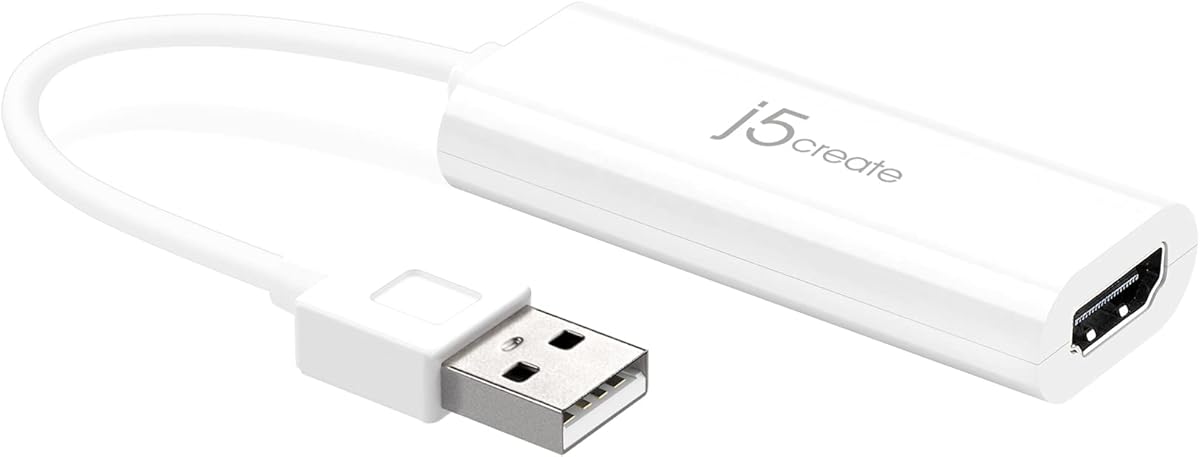
The j5create adapter is an excellent tool for users who need to add an external monitor without complex internal hardware changes. It allows for hot-swapping, meaning you can add or remove monitors without rebooting your system, which is a significant time-saver. The adapter supports high-resolution 1080P output, making it suitable for various professional fields that require detailed visual work.
We may earn a commission when you buy through this link, at no additional cost to you.
Its design focuses on multitasking, enabling users to manage multiple windows and applications across screens efficiently. Whether you are working in finance, healthcare, or design, the ability to view multiple spreadsheets or documents simultaneously can boost productivity. The driver installation is straightforward, and once set up, the adapter provides reliable performance for daily tasks.
While it requires driver installation, this is a one-time setup that ensures smooth operation. It is not optimized for gaming due to potential latency, but for office work and presentations, it is highly effective. The ability to use it with USB 3.0 ports ensures consistent data transfer rates and stable video output for long durations.
For professionals who need a reliable way to expand their workspace without technical hassle, this adapter is a solid choice. Its focus on multitasking and ease of use makes it particularly suitable for office environments. We recommend it for users who value productivity and seamless integration into their existing computer setup.
Add or remove external monitors without rebooting, keeping your workflow uninterrupted and efficient.
Designed to help you manage multiple applications and windows easily for enhanced work efficiency.
We may earn a commission when you buy through this link, at no additional cost to you.
Selecting the right adapter involves considering compatibility, resolution support, and build quality to ensure it meets your specific needs.
Check whether your computer has USB-A or USB-C ports. Some adapters are specific to one type, while others support both. Ensuring compatibility with your device's ports is essential before purchasing.
Verify your computer's port type to match the adapter's connector for successful connectivity.
Different adapters support varying resolutions such as 1080P, 4K, or higher. Consider your monitor's capabilities to ensure you get clear visuals without signal issues. Higher refresh rates provide smoother video for multimedia.
Match the adapter's resolution support with your display for optimal visual quality.
Ensure the adapter is compatible with your OS, whether Windows, macOS, or ChromeOS. Some models are limited to Windows only while others support multiple systems. Check system requirements on the product page to avoid compatibility issues.
Confirm OS compatibility to ensure the adapter works seamlessly with your computer.
Some adapters require manual driver installation to function correctly, which adds a setup step. Others offer plug-and-play functionality which saves time but might be less common. Consider your comfort with installing drivers when selecting a model.
Decide if you prefer plug-and-play or are willing to install drivers for functionality.
Look for adapters made with durable materials like aluminum or braided cables. A sturdy build ensures longevity and better heat dissipation during extended use. This is especially important for frequent travelers or heavy daily users.
Prioritize robust materials for a longer lifespan and better performance during use.
If you plan to travel with the adapter, choose a compact and lightweight model. A smaller size makes it easier to carry in a laptop bag or pocket. Portability is key for professionals who work from different locations.
Select a lightweight design if you need to carry the adapter regularly.
Decide if you need to connect a single monitor or multiple displays. Some adapters support only one output, while others allow dual or multi-monitor setups. Your workspace needs dictate whether you require a basic or advanced model.
Choose the adapter based on whether you need single or multi-monitor support.
Check the warranty period offered by the manufacturer. Longer warranties provide better protection against defects and indicate product confidence. Customer service availability can also be crucial for resolving technical issues quickly.
Look for extended warranties and support options for peace of mind.
Begin by connecting the adapter to an available USB port on your computer and plugging an HDMI cable into the adapter and your display. Power on the monitor to start signal transmission immediately.
If driver installation is required, follow the on-screen prompts or download the specific software from the manufacturer's website. Restart your computer if prompted to finalize the setup process.
Store the adapter in a protective case when not in use to prevent physical damage. Keep it away from extreme temperatures to maintain optimal internal component health.
Many models require specific driver installation to function correctly, though some offer plug-and-play convenience. It depends on the manufacturer and the specific chipset used. Always check product descriptions for system requirements before purchasing.
Some advanced adapters support dual or multi-monitor setups, but most basic models support only one display. You may need additional adapters or hubs for multiple connections. Verify product specs to ensure your desired setup is supported.
Not all adapters are compatible with macOS so you must verify OS support on the product page. Many models support Mac systems but some are limited to Windows only. Ensure the specific model you choose explicitly mentions macOS compatibility.
Certain adapters support 4K resolution at varying refresh rates while others are limited to 1080P. Check the technical specifications to see if 4K output is available. Ensure your monitor and computer also support 4K for proper output.
Installation usually involves connecting the adapter, opening the removable disk or downloading the software, and running the installer. Follow on-screen instructions carefully and restart the computer when prompted. Some drivers install automatically upon connection depending on the model.
Most USB to HDMI adapters are designed for office and multimedia use rather than high-performance gaming. They may introduce slight latency which affects gameplay. It is recommended to use native HDMI outputs for gaming when possible.
Choosing the right adapter depends on your specific needs whether you need portability high resolution or multi-monitor support. The models highlighted in this guide offer a variety of features to suit different use cases and budgets.
Prioritize compatibility with your operating system and computer ports to ensure a seamless connection experience. Consider warranty and build quality to protect your investment over the long term for reliable performance.
Always check current availability and compatibility details before purchasing to confirm the best fit for your setup. Prices and stock change frequently so staying updated ensures you get the most current version of your chosen adapter.