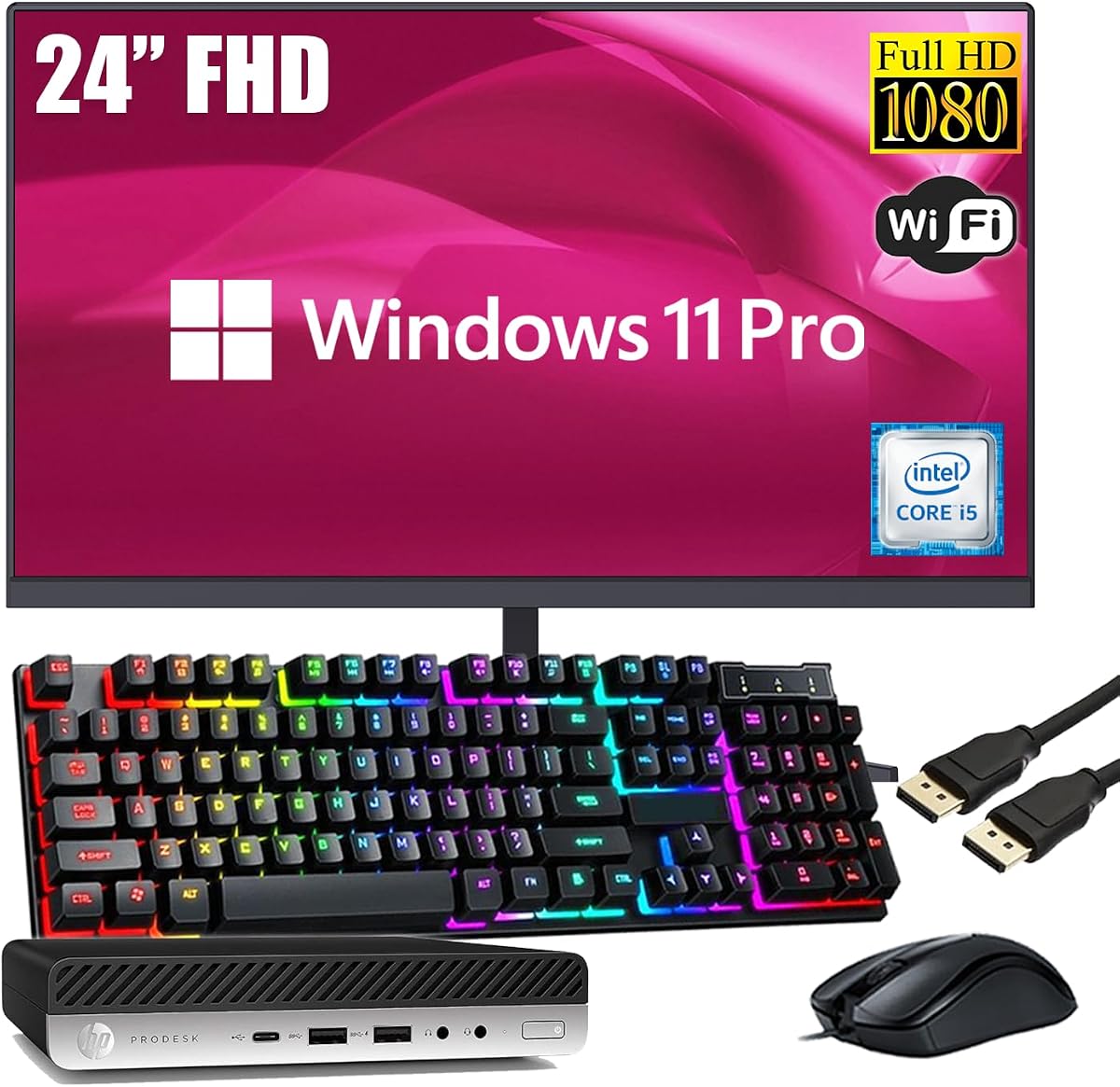
HP ProDesk 600 G4 Mini Desktop Computer with 24" Monitor
4.2Editor score
Compact mini desktop design
Includes 24 inch monitor
Fast SSD storage
Choosing the right desktop computer for kids involves balancing performance with ease of use. Young learners need reliable systems that handle educational apps, creativity tools, and casual gaming without lagging during important moments.
We evaluated ten top models based on processor power, memory capacity, storage type, and overall build quality. Our selection includes all-in-one designs for simplicity and traditional towers for expandability across different household needs.
Each pick highlights key strengths and potential trade-offs to help you decide quickly. Prices and availability change often so verify current listings before purchasing to ensure you get the best value for your family setup.
4.2Editor score

4.2Editor score

4.3Editor score
As an Amazon Associate we earn from qualifying purchases.
The following table provides a side-by-side overview of all ten models considered in this guide. It highlights core specifications such as processor type, memory, storage, and display size to help you compare options efficiently.


This Lenovo all-in-one desktop offers a compelling mix of performance and simplicity ideal for young users. With a 4.2 star rating from verified buyers, it delivers smooth operation for schoolwork and casual entertainment.
We may earn a commission when you buy through this link, at no additional cost to you.
The inclusion of 16GB RAM ensures that children can keep multiple browser tabs and educational apps open without slowdowns. The 256GB PCIe SSD provides fast boot times and responsive app launches which kids appreciate.
While the lack of a touchscreen may limit some creative tools the high quality IPS display offers excellent color accuracy for media consumption. The wireless peripherals reduce cable clutter making it safer for younger environments.
Families seeking a reliable main computer for homework and browsing will find this model highly suitable. Its straightforward setup and clean design make it a top choice for modern home offices.
The all-in-one form factor eliminates the need for a separate tower reducing clutter on desks and shelves.
With 16GB RAM and an SSD this system handles multitasking smoothly for multiple users or heavy applications.
We may earn a commission when you buy through this link, at no additional cost to you.
This Lenovo model stands out with its powerful Intel Core i3-N305 octa-core processor and massive 512GB storage. It is rated 4.3 stars making it a robust option for demanding tasks and creativity.
We may earn a commission when you buy through this link, at no additional cost to you.
The 512GB PCIe SSD offers ample space for storing large projects, media libraries, and games without needing external drives. Its borderless display provides an immersive viewing experience that enhances learning and entertainment.
While the price reflects its premium build and specs it offers long-term value due to its speed and capacity. The sleek design fits well in stylish home offices without compromising on functionality or performance.
Parents who want a future-proof computer that can handle growth in software needs should consider this model. It balances professional-grade features with a user-friendly interface suitable for children and adults alike.
The three-sided borderless design with high color accuracy makes watching videos and reading content more enjoyable.
With over half a terabyte of storage users can keep files organized without worrying about running out of space.
We may earn a commission when you buy through this link, at no additional cost to you.
This HP ProDesk bundle combines a mini desktop with a 24-inch monitor at a budget-friendly price. It holds a 4.2 star rating and offers essential performance for everyday educational tasks and browsing.
We may earn a commission when you buy through this link, at no additional cost to you.
The 256GB SSD ensures quick start-ups and responsive performance despite having 8GB RAM. Its compact form factor saves valuable desk space making it ideal for smaller rooms or shared study areas.
The renewed condition means it has been tested for functionality but buyers should verify warranty terms upon purchase. It offers exceptional value for families needing a reliable system without high-end gaming requirements.
For basic computing needs like homework research and video calls this system delivers dependable performance. It remains a top choice for parents prioritizing cost-effectiveness alongside functional reliability.
The mini desktop design occupies minimal desk space while maintaining full computing power for daily tasks.
With solid state storage technology users can start working or studying immediately without long waiting periods.
We may earn a commission when you buy through this link, at no additional cost to you.
This HP model is designed for families needing robust multitasking capabilities with a fun aesthetic appeal. It scores 3.8 stars and features 16GB RAM for smooth handling of multiple applications simultaneously.
We may earn a commission when you buy through this link, at no additional cost to you.
The inclusion of RGB keyboard and mouse adds a playful element that appeals to younger users who enjoy personalization. A 24-inch monitor and webcam ensure readiness for video calls and online learning from day one.
While the renewed status may lead to slight variations in included components the core performance remains strong. Parents looking for a system that balances utility with a youthful design will find this attractive.
It handles daily tasks and streaming with ease making it suitable for both schoolwork and home entertainment. The high RAM ensures that even with several apps open performance stays consistent.
The RGB accessories add personality to the workspace making technology feel more engaging for children.
With a built-in webcam and speakers video conferencing is seamless without extra hardware purchases.
We may earn a commission when you buy through this link, at no additional cost to you.
This HP Elite desktop offers a generous 1TB storage alongside 16GB RAM for handling large file collections and multitasking. It holds a 3.5 star rating from users noting its reliable performance for school projects and storage.
We may earn a commission when you buy through this link, at no additional cost to you.
The 1TB HDD provides plenty of space for storing videos, photos, and educational files without needing external drives. An RGB keyboard and mouse set the tone for a fun yet functional workspace suitable for kids.
While the hard drive may be slower than an SSD the volume of storage it offers is a significant plus for families with large media libraries. The system runs Windows 11 smoothly supporting current educational software.
Families prioritizing storage space over speed will appreciate this model. It serves as a solid workhorse for daily computing needs with enough power to handle modern web browsing and applications.
With one terabyte of space users can save thousands of documents and media files without deleting anything.
Windows 11 ensures compatibility with the latest applications and security updates for safe computing.
We may earn a commission when you buy through this link, at no additional cost to you.
This Dell OptiPlex boasts an impressive 2TB storage capacity allowing for extensive media and data libraries. With a 3.6 star rating it offers consistent performance for multitasking and storage-heavy applications.
We may earn a commission when you buy through this link, at no additional cost to you.
The combination of 16GB RAM and 2TB HDD ensures that users can keep many programs open while storing massive amounts of data. This makes it ideal for households with many digital photos and videos.
While the processor is from an older generation it remains sufficient for general computing tasks and educational software. The 22-inch LED monitor provides a crisp viewing area for productivity and entertainment.
Families needing maximum storage without breaking the bank will find this option compelling. It balances capacity with enough speed for everyday use making it a practical choice for home offices.
Two terabytes of space allows unlimited storage of files and media without constant cleanup or external drives.
Despite being older generation the processor handles daily tasks reliably without lag for standard applications.
We may earn a commission when you buy through this link, at no additional cost to you.
This HP all-in-one impresses with a high 4.5 star rating and an innovative 8-in-1 docking hub for connectivity. It features a crisp 21.5-inch display and a compact white design that suits modern homes.
We may earn a commission when you buy through this link, at no additional cost to you.
The inclusion of a docking hub simplifies connections for peripherals like printers or extra drives which is helpful for parents managing multiple devices. The SSD ensures quick start-ups and efficient task handling.
While 8GB RAM may limit heavy multitasking it suffices for web browsing and typical school applications. The adjustable stand allows for comfortable viewing angles making it ergonomic for kids of different heights.
Families needing a stylish and functional computer for light work will find this model excellent. Its connectivity options and user-friendly design make it a standout choice for home offices and study areas.
The 8-in-1 docking hub simplifies connections allowing easy access to multiple peripherals without adapter clutter.
The stand tilts to find comfortable viewing angles reducing strain during long study or gaming sessions.
We may earn a commission when you buy through this link, at no additional cost to you.
This Dell OptiPlex model provides a stable foundation for productivity with its Quad-Core i5 processor and Windows 11 Pro. It holds a 3.6 star rating and offers essential connectivity for schoolwork and daily tasks.
We may earn a commission when you buy through this link, at no additional cost to you.
The inclusion of WiFi allows for flexible placement of the computer without needing Ethernet cables. While the screen is modest the included RGB keyboard adds a touch of fun to the workspace environment.
The use of DDR3 RAM and HDD means speeds will not match modern SSD systems but it remains reliable for basic use. It is a good option for households needing a functional machine at a low price.
Parents seeking a dependable computer for research and writing will find this model capable. Its Pro version offers extra management features useful for securing a home network environment effectively.
Windows 11 Pro provides advanced security and management features ideal for securing a family computer network.
Built-in WiFi support ensures you can place the computer anywhere with internet access without extra setup.
We may earn a commission when you buy through this link, at no additional cost to you.
This Lenovo IdeaCentre features a fast 512GB SSD ensuring quick boot times and responsive performance. It is rated 4.3 stars by users praising its modern design and efficient operation for school and business.
We may earn a commission when you buy through this link, at no additional cost to you.
With 8GB DDR4 RAM it handles daily tasks smoothly although heavy multitasking may slow it down. The 23.8-inch IPS display delivers sharp visuals for media consumption and creative work alike.
The compact all-in-one design saves space and reduces cable clutter making it a neat addition to any desk. Its HD camera and speakers facilitate clear video calls for remote learning or family connections.
Families wanting a neat and efficient computer for homework will find this model ideal. Its speed and modern look make it a practical tool for everyday use and media streaming.
The large SSD ensures fast boot times and quick loading of apps improving overall user experience and productivity.
High quality audio and camera features make this system excellent for streaming videos and video calls.
We may earn a commission when you buy through this link, at no additional cost to you.
This Dell package offers a straightforward solution for basic computing needs at a budget-friendly price. It holds a 3.8 star rating and includes essentials like WiFi and an optical drive for legacy media.
We may earn a commission when you buy through this link, at no additional cost to you.
The 19-inch LCD screen is compact and suitable for small study areas though it lacks modern refresh rates. Its Quad Core i5 processor ensures it can handle daily tasks without lag for typical students.
Inclusion of a DVD drive allows for reading discs which can be useful for educational materials or music. The Pro version of Windows adds extra management tools for parents controlling access and security.
Families needing a simple and reliable computer for reading and writing will find this useful. It offers essential functionality without extra costs making it a sensible option for tight budgets.
The DVD drive allows reading physical media which is helpful for specific educational software and music discs.
Low price point makes this an accessible choice for families needing a reliable machine without overspending.
We may earn a commission when you buy through this link, at no additional cost to you.
Selecting the right desktop for a child requires balancing technical specs with ease of use. Here are the key factors to consider when evaluating models for home or school use.
The processor is the brain of the computer and determines how fast tasks are completed. For children focusing on basic schoolwork and browsing an Intel Core i3 or i5 provides sufficient power. Look for at least 4 cores to ensure the system can handle multiple tabs without freezing.
A faster processor improves video calls and smooth gameplay so prioritize models with modern architecture. Avoid very old generations if the budget allows as they may struggle with recent software updates.
RAM allows the computer to run multiple programs simultaneously. 8GB is the minimum for smooth browsing but 16GB is highly recommended for multitasking. If your child uses heavy apps like video editors ensure the system has at least 16GB.
More RAM prevents lag when switching between tasks and ensures a better experience over time. Choose systems that support expansion if you plan to add more memory later.
Storage type impacts boot speed and file access. Solid State Drives are significantly faster than traditional hard drives and boot the system in seconds. Aim for at least 256GB SSD storage to ensure responsive performance and enough space.
HDDs offer more space for the price but slow down overall speed. If budget is tight prioritize SSDs for the main drive and use external drives for bulk storage.
Children spend hours looking at screens so resolution and size matter for health and comfort. A 24-inch Full HD monitor provides a good balance of space and clarity for educational apps. IPS panels offer better viewing angles and color accuracy.
Ensure the screen has an anti-glare coating to reduce eye strain during long sessions. Avoid smaller screens under 19 inches as they can limit productivity and increase visual fatigue.
Ports and wireless options determine how easily you can connect peripherals and printers. Look for systems with USB-C, USB-A and Ethernet ports to support various devices. WiFi 6 support ensures stable internet for remote learning without lag.
Bluetooth support is useful for wireless headphones and mice reducing desk clutter. Always check the port count to ensure you have enough inputs for your family's daily needs.
The operating system defines the interface and security features available. Windows 11 is the current standard offering improved security and tools for productivity. Ensure the system supports updates for years to remain safe from threats.
Familiar systems help children adapt quickly to homework platforms and school tools. Choose models with genuine licenses to avoid security risks associated with modified software.
Kids may interact with devices aggressively so build quality is essential. All-in-one designs reduce the risk of knocking over towers but ensure the stand is sturdy. Look for materials that can handle regular use without scratching.
Cable management features help keep desks tidy and safe from tripping. Choose designs that fit your desk space and are easy to clean with a damp cloth.
Prices vary widely based on specs and brand reputation. Budget models may save money upfront but lack future-proofing features like fast storage or large RAM. Set a limit but prioritize performance over aesthetics.
Renewed options can offer savings without sacrificing quality if they come with warranties. Compare total value including included accessories like keyboards to avoid hidden costs later.
Start by positioning the computer in a well-lit area to reduce eye strain. Ensure the monitor is at eye level to encourage good posture during study sessions. Connect all peripherals securely to avoid accidental disconnections.
Regularly clean the screen and keyboard using a microfiber cloth and mild cleaner. Dust buildup can clog vents and cause overheating so use compressed air monthly to keep it clean. Avoid spills near the system to prevent electrical damage.
Keep software updated to maintain security and performance. Enable automatic updates for the operating system and antivirus tools. Monitor usage with parental controls to ensure safe browsing habits are maintained.
A 24-inch monitor is typically ideal as it offers enough screen real estate for split-screen homework without being too large for a desk. Ensure it has a resolution of 1080p for clarity.
Yes 8GB is sufficient for basic web browsing and word processing. However for heavy multitasking or video editing 16GB is recommended to prevent slowdowns.
Most bundles include a keyboard and mouse but ensure they are comfortable for small hands. Wired options are often more durable than wireless ones for children.
Yes SSDs boot faster and handle apps more efficiently which keeps children engaged. HDDs are cheaper but slower making them less ideal for quick tasks.
Basic models can run casual games well but for high-performance gaming check for dedicated graphics. Most all-in-ones rely on integrated graphics which handle light titles.
Install reputable antivirus software and use parental controls to manage web access. Regular updates and strong passwords are essential for keeping the system safe from threats.
We reviewed ten options ranging from budget bundles to premium all-in-one systems suitable for various needs. The Lenovo 24 All-in-One and HP ProDesk Mini offer strong value with performance features.
Prioritize models with SSDs and at least 16GB RAM to ensure longevity and smooth performance. Look for ergonomic designs and durable builds to accommodate active users in home environments.
Always check current prices and warranty terms before purchasing to ensure you get the best deal. Availability may vary so compare options carefully based on your specific requirements and budget.