
Dell Latitude 5520
4.1Editor score
Intel i7-1165G7 Processor
32GB RAM Configuration
1TB NVMe SSD Storage
Finding the right business laptop can be challenging with so many options available. Dell Latitude laptops are known for their durability and professional features. This guide helps you navigate the current market to find the perfect device for your needs.
We have compared ten top models based on performance, build quality, and user ratings. Each product offers unique strengths for different workflows. Our analysis ensures you see the full picture before making a purchase decision today.
Every pick highlights key specs and ideal use cases for clarity. Note that prices and availability change frequently. Always verify current details on the product page before finalizing your order to get the best deal possible.
4.1Editor score

5.0Editor score

5.0Editor score
As an Amazon Associate we earn from qualifying purchases.
The following table provides a side-by-side view of all ten models. Compare key specifications like processor type, memory size, and storage capacity to identify the best fit for your professional workflow needs.


The Dell Pro 16 stands out as the top choice for modern professionals. It earned a perfect 5.0 rating due to its balanced performance and reliability. This device is engineered for AI and mobility, making it suitable for long workdays.
We may earn a commission when you buy through this link, at no additional cost to you.
Its Intel Core 5 processor handles multitasking with ease while 16GB of DDR5 RAM ensures smooth operations. The 16-inch display offers ample screen real estate for complex tasks. Connectivity options like Thunderbolt 4 allow for flexible peripheral setups.
While it is robust, the weight might be noticeable during travel compared to smaller units. Some memory upgrades are handled by third parties which may affect warranty specifics. These trade-offs are acceptable given the performance gains provided.
Buy this laptop if you need a reliable machine for software engineering or data analysis. It supports demanding workflows without the bulk of a desktop. For those seeking a top-tier general business laptop this model delivers exceptional value.
Features a 55Wh battery with rapid charging to support uninterrupted productivity. It also passes rigorous MIL-STD 810H tests for field environments.
The narrow border display maximizes workspace and reduces eye strain with anti-glare coating. You can connect up to three external 4K monitors via HDMI or Thunderbolt.
We may earn a commission when you buy through this link, at no additional cost to you.
This Latitude 5520 model offers incredible value for those needing raw specs on a budget. It holds a 4.1 rating reflecting its utility as a renewed business machine. The high RAM and storage make it ideal for heavy data handling.
We may earn a commission when you buy through this link, at no additional cost to you.
With 32GB of RAM you can run multiple virtual machines or large spreadsheets without lag. The 1TB NVMe SSD provides fast data access for large projects. It supports Thunderbolt connectivity which is rare at this price point.
The screen resolution is limited to HD which might not suit creative work. Being a renewed product means it has been resealed for upgrades rather than brand new. This is acceptable if you prioritize performance over perfect aesthetics.
Choose this if you need power for engineering or financial modeling without high costs. It handles multitasking better than many newer entry-level models. Ensure you check the renewed condition details before buying to manage expectations.
The 32GB RAM configuration allows seamless switching between many applications. This is excellent for users who keep dozens of browser tabs open.
A 1TB NVMe SSD ensures you have room for archives and large files. It significantly reduces load times for heavy business applications.
We may earn a commission when you buy through this link, at no additional cost to you.
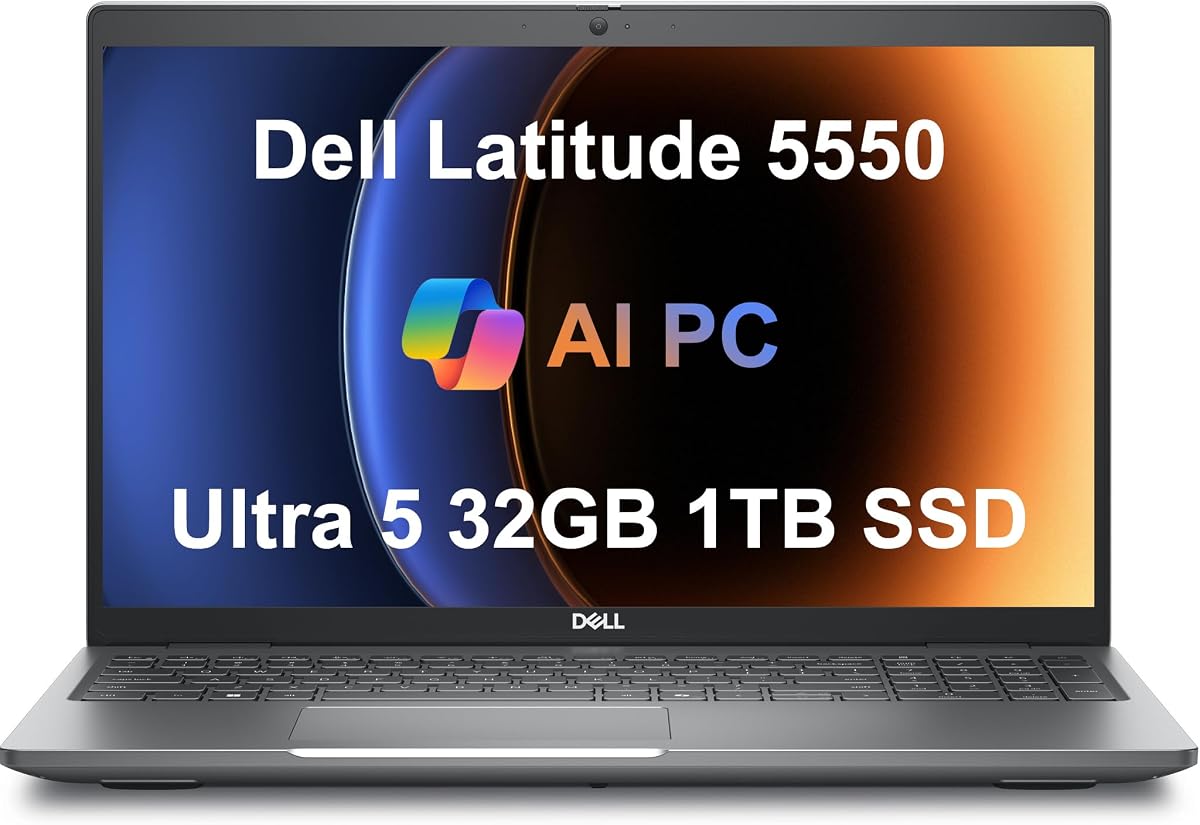
The Latitude 5550 is the direct successor to the 3550 with significant upgrades. It scores a 4.3 for its premium build and performance features. This model is designed for professionals who need speed and mobility combined.
We may earn a commission when you buy through this link, at no additional cost to you.
It features the Ultra 5 processor which improves efficiency over previous generations. The 32GB DDR5 RAM handles multitasking effortlessly while the dual SSD setup organizes system and storage separately. This improves overall stability and file management.
The high price might be a barrier for smaller businesses. Separating drives adds complexity for maintenance. These factors are minor when considering the superior performance and privacy features like the IR camera.
This is the ideal choice for designers and programmers needing robust power. It supports up to two external 4K monitors for expanded workspaces. If you value reliability and speed this machine is a strong investment.
The HD webcam includes a privacy shutter for enhanced security during calls. Facial recognition login ensures secure access to your data.
Dual 512GB SSDs separate the system from storage for better performance. This setup helps keep the system stable under heavy loads.
We may earn a commission when you buy through this link, at no additional cost to you.
This compact model brings powerful AI capabilities to a portable frame. It holds a 4.6 rating for its balance of size and performance. It is built for hybrid workers who need a lightweight device for travel.
We may earn a commission when you buy through this link, at no additional cost to you.
Powered by an Intel Core Ultra 7 processor it supports AI workflows efficiently. The 32GB of DDR5 RAM ensures smooth performance for demanding apps. The 14-inch display offers sharp visuals with 400 nits brightness.
The small screen may not suit users who need extensive multitasking windows. It supports up to three external monitors but docking is needed for some. These are acceptable trade-offs for the portability benefits it offers.
It suits administrative staff who need reliable daily productivity. The ExpressCharge technology reduces downtime during busy days. If you want a modern business AI PC this model is highly recommended.
Built-in AI capabilities assist with tasks like document creation and data analysis. This integrates well with Windows 11 Pro Copilot features.
Includes Wi-Fi 6E and Bluetooth 5.3 for fast connections. This ensures reliable performance for video calls without lag.
We may earn a commission when you buy through this link, at no additional cost to you.
The Next Gen Latitude 3550 is a powerful business laptop for general productivity. It has a 4.1 rating indicating solid performance for office work. The 16-inch screen provides great value for media and spreadsheets.
We may earn a commission when you buy through this link, at no additional cost to you.
It uses an i5-120U processor that handles daily tasks reliably. 16GB of DDR5 RAM ensures smooth app switching. The NVMe SSD offers lightning-fast responsiveness for booting up and opening files quickly.
The storage might fill up if you store large media files. The CPU is mid-tier so it may struggle with heavy rendering. These limits are acceptable for standard business and educational workflows.
This laptop is ideal for students and small business owners. It supports video conferencing and remote learning effectively. For those needing a versatile machine without high cost this is a great pick.
The 16-inch FHD+ display increases brightness and contrast for clarity. It supports better visual tasks without eye strain.
Wi-Fi 6E ensures stable connections for video calls. Backlit keyboard helps with typing in low-light office settings.
We may earn a commission when you buy through this link, at no additional cost to you.
This model is designed for hybrid professionals who travel constantly. It earns a 4.9 rating for its exceptional mobility and efficiency. The weight is just 2.72 lbs making it easy to carry in a bag.
We may earn a commission when you buy through this link, at no additional cost to you.
Powered by the Ultra 5 processor it boosts battery life by 8% over previous gen. The 16GB 6400MHz RAM offers rapid app loads. Studio Effects provide automatic framing and noise suppression for calls.
The small screen limits multitasking with multiple windows. There are fewer ports so you may need dongles for external drives. These are minor issues given the portability and performance balance.
Buy this if you need a reliable travel companion. It handles daily office tasks and web work efficiently. For executives who move between sites this is a top contender.
At just 2.72 lbs it is ideal for business travel and dynamic work. ExpressCharge technology ensures rapid power top-ups during transit.
AI driven Windows Studio Effects improve meeting quality. Dual Thunderbolt 4 support allows for versatile external setups.
We may earn a commission when you buy through this link, at no additional cost to you.
This touchscreen variant brings enhanced interaction to a compact form. It holds a perfect 5.0 rating for its premium specs and build. The Core Ultra 7 processor offers exceptional speed for demanding workflows.
We may earn a commission when you buy through this link, at no additional cost to you.
With 32GB of DDR5 RAM it handles heavy multitasking smoothly. The touchscreen display offers vibrant colors for an immersive experience. It supports AI enhanced workflows for better responsiveness.
The smaller screen is less ideal for wide spreadsheets. The cost is higher than non-touch models. These trade-offs are justified by the premium performance and interaction style.
This is great for professionals needing a portable power house. It is ideal for presentations and interactive content. If you want a premium touch experience this model fits well.
The Full HD Touchscreen delivers vibrant colors for an interactive experience. This is useful for presentations and creative tasks on the go.
The Ultra 7 processor supports Intel AI Boost for speed. It improves efficiency for business applications and multitasking.
We may earn a commission when you buy through this link, at no additional cost to you.
This notebook is powered by the newer Ultra 7 processor. It focuses on fast efficient performance for multitasking. The design is clean with gray finish for professional environments.
We may earn a commission when you buy through this link, at no additional cost to you.
It beats older i7 chips in efficiency and speed. The Windows 11 Pro ensures advanced security and tools. This setup is ideal for remote work and enterprise environments.
The lack of rating makes it hard to gauge reliability yet. 16GB RAM is standard and may be limiting for heavy apps. It is a solid choice if you want the latest CPU tech.
Pick this if you need a modern AI business machine. It suits education and enterprise environments well. Verify warranty details before purchase to ensure coverage.
The Ultra 7 processor with 12 cores delivers efficient performance. This supports smooth operation for daily business tasks.
Windows 11 Pro offers advanced management features. This ensures data protection for professional use.
We may earn a commission when you buy through this link, at no additional cost to you.
This business laptop offers a compelling mix of performance and storage. It features a 15.6-inch display for comfort. The 12-core processor ensures efficient running of complex tasks.
We may earn a commission when you buy through this link, at no additional cost to you.
It includes 1TB of SSD storage for ample space. The fingerprint reader adds a layer of security. Windows 11 Pro provides streamlined computing for business needs.
The lack of rating may be due to limited reviews. The design is basic which is fine for internal use. It is a solid option for those needing storage.
Ideal for users needing large file storage on a budget. It handles daily workloads smoothly. For office deployment this model offers good specs.
The 1TB SSD provides enough space for photos and videos. This ensures no need to manage storage constantly.
The fingerprint reader helps maintain secure login access. This adds convenience for authorized users.
We may earn a commission when you buy through this link, at no additional cost to you.
This laptop is designed for everyday business use. It holds a 4.5 rating for its reliability. The build is tested to meet military standards for durability.
We may earn a commission when you buy through this link, at no additional cost to you.
It features an i3 processor which is efficient for basic tasks. The 16GB DDR5 memory helps with multitasking. Intelligent audio reduces noise during calls.
The CPU is not suitable for heavy processing. The display is standard which may limit creative work. These are acceptable for general office duties.
Choose this if you need a simple reliable machine. It is ideal for administrative staff and students. For basic productivity tasks this model fits the bill.
Tested to meet MIL-STD-810H standards for reliability. This ensures it can handle frequent handling.
Intelligent audio helps reduce background noise. This keeps virtual meetings clear throughout the day.
We may earn a commission when you buy through this link, at no additional cost to you.
Selecting the right business laptop involves balancing performance with portability. Consider your primary use cases to make an informed choice.
The processor determines how well the laptop handles tasks. Look for Intel Ultra or Core i5/i7 for speed. AI Boost features help with productivity.
Choose a higher tier processor for heavy workloads.
RAM affects multitasking ability. 16GB is standard for business while 32GB helps with heavy apps. DDR5 offers faster speeds than DDR4.
Opt for 32GB if you run virtual machines often.
SSD speed is critical for boot times. 512GB is enough for basics but 1TB is better for files. NVMe drives are faster than standard SSDs.
Ensure the drive supports upgrades for future needs.
A bright anti-glare screen reduces eye strain. 1920×1080 is standard while 1920×1200 offers more space. Touchscreens add interaction for presentations.
Select a display with good brightness for travel.
Ports like Thunderbolt 4 allow external monitors. Ethernet helps with stable wired connections. Wi-Fi 6E ensures reliable wireless performance.
Verify you have the necessary ports for peripherals.
MIL-STD ratings ensure resistance to drops. This is vital for field work. A strong chassis protects internal parts.
Choose a durable unit if you travel often.
Look for models with ExpressCharge tech. This reduces downtime. Aim for all-day life for travel.
Check hours to ensure it fits your schedule.
Windows 11 Pro offers security tools. It is standard for business. BitLocker protects data from theft.
Ensure the OS fits your enterprise needs.
Keep the screen clean with a microfiber cloth to maintain clarity. Avoid harsh chemicals on the display. Regular cleaning prevents scratches and smudges.
Use a surge protector to protect the power system. This prevents damage from power spikes. It also extends the lifespan of the battery.
Update Windows regularly to get security patches. This ensures your data stays protected. Rebooting helps clear memory caches for speed.
The Dell Latitude 5350 is engineered for all day use and offers improved battery life. It features ExpressCharge technology to reduce downtime. This makes it ideal for travel.
Yes many models support up to three external 4K monitors. You can use HDMI or Thunderbolt 4. This expands workspace without a docking station.
Yes models with 32GB RAM and Ultra processors are suitable. They handle multitasking and heavy apps. The build quality supports long coding sessions.
Warranty varies by model but often includes one year. Some have three year upgrades for memory. Check the product details for specifics.
Many models support upgrades but some require resealed units. Check the specs before buying. Third party upgrades may be included.
Yes most models come with Windows 11 Pro. It includes enterprise features like BitLocker. This ensures security for business users.
The top picks range from budget-friendly to high-performance machines. Each offers unique strengths for different workflows. Consider your specific needs before deciding.
Prioritize battery life and display quality for daily use. If you need power choose models with 32GB RAM. Portability is key for frequent travelers.
Always check current prices on the product pages. Availability may change as new models arrive. This ensures you get the best deal possible.