
TP-Link Nano AC600
4.5Editor score
Compact nano design
Dual band support
Easy plug and play
This guide compares the top 5GHz WiFi dongles for desktops and laptops, evaluating speed, range, and compatibility to help you choose the best adapter.
Finding a reliable 5GHz WiFi dongle is essential for modern computing needs. These adapters bring high-speed wireless connectivity to desktops and laptops lacking built-in support, ensuring smooth streaming and gaming experiences without frustrating lag or dropped signals.
We evaluated ten top-rated models based on speed performance, range capabilities, and ease of use. Our analysis focused on real-world usability, driver support, and antenna design to identify which adapters deliver consistent performance across different environments and operating systems.
Each pick highlights specific strengths like budget-friendly pricing or advanced WiFi 6 features. While ratings reflect current user feedback, availability and pricing may change over time. Always verify compatibility with your router and device before making your final purchasing decision for your setup.
4.5Editor score

4.4Editor score

4.1Editor score
The following table provides a quick side-by-side comparison of the ten featured adapters, highlighting key specifications like speed ratings, antenna types, and compatibility to help you narrow down your choices efficiently.


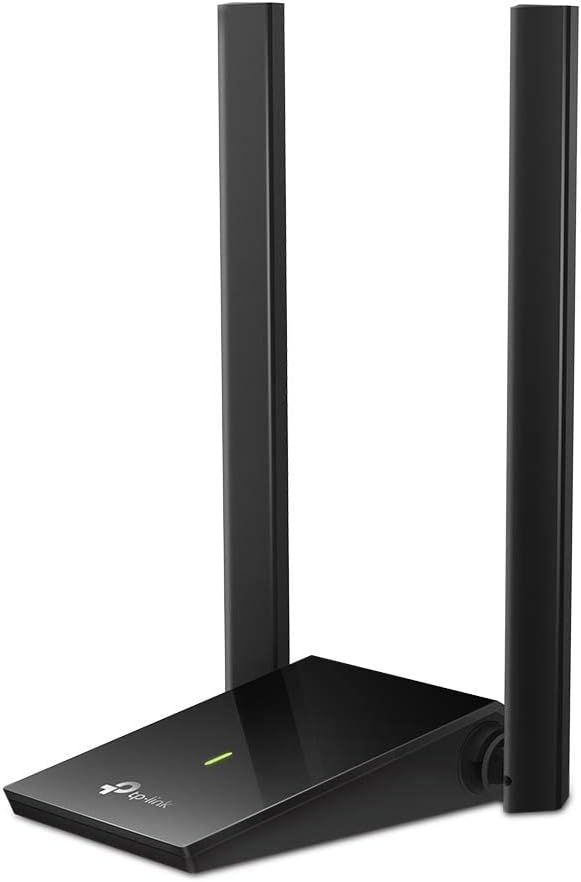


This TP-Link AC1300 adapter stands out as a top choice for users needing reliable dual band connectivity. With solid ratings and strong user feedback, it delivers consistent performance for streaming and browsing tasks without dropping connections frequently.
We may earn a commission when you buy through this link, at no additional cost to you.
The MU-MIMO technology ensures efficient data transmission to multiple devices simultaneously reducing latency during peak usage times. Its USB 3.0 interface provides faster data transfer rates compared to older USB 2.0 ports ensuring the adapter keeps up with modern network speeds.
While the compact size makes it ideal for laptops it can sometimes struggle with signal penetration through thick walls compared to larger models. However the included drivers and straightforward setup make it accessible even for non technical users setting it up quickly.
This adapter is perfect for desktop owners or laptop users seeking an affordable upgrade to dual band WiFi. If you want a balance of speed and portability without breaking the bank this AC1300 model is highly recommended for most home networks.
Beamforming and MU-MIMO work together to direct signals precisely to your devices improving stability and speed across the network.
The mini size allows you to leave it plugged in without blocking adjacent USB ports or getting caught on cables accidentally.
We may earn a commission when you buy through this link, at no additional cost to you.
For users seeking a simple plug and play solution without compromising on connectivity this Nano AC600 is an excellent entry level choice. Its high rating reflects strong satisfaction among buyers who value convenience and basic performance for everyday tasks.
We may earn a commission when you buy through this link, at no additional cost to you.
The miniature design means it stays hidden when plugged in and does not obstruct neighboring ports which is great for laptops with limited space. Dual band support allows you to switch to the 5GHz band for faster speeds when your router is nearby.
The lack of an external antenna may limit range compared to larger adapters but it works well in open spaces or near routers. Installation is straightforward with supported operating systems automatically recognizing the device after the initial driver setup.
This adapter is ideal for casual users or students who need to connect to WiFi without spending much money. If portability and low cost are your main priorities this Nano model delivers reliable performance for browsing and streaming.
The tiny profile ensures it fits seamlessly into crowded USB hubs making it perfect for travel or desktop setups.
Users can choose between 2.4GHz for range or 5GHz for speed depending on their specific network needs and distance.
We may earn a commission when you buy through this link, at no additional cost to you.
The BrosTrend AX1800 brings WiFi 6 capabilities to desktops offering significantly faster speeds and better efficiency than older standards. With robust build quality and included accessories it is designed for users who demand high performance from their network hardware.
We may earn a commission when you buy through this link, at no additional cost to you.
Its dual high gain antennas help penetrate walls and floors effectively ensuring a stable connection even when the router is far away. The included USB 3.0 extension cable allows you to place the adapter in a location with the best possible signal reception.
While it offers premium features it requires a compatible router to fully utilize WiFi 6 benefits and is limited to certain operating systems. However for power users needing low latency and high throughput for gaming or large file transfers it stands out.
This adapter is recommended for tech enthusiasts or professionals who need the fastest possible wireless speeds. If you have the right router and need maximum performance the AX1800 delivers reliable results for demanding network tasks.
OFDMA and MU-MIMO technologies enable smoother performance with multiple connected devices reducing congestion and latency.
The 3.3-foot extension cable gives you the freedom to position the adapter for optimal signal strength without moving your PC.
We may earn a commission when you buy through this link, at no additional cost to you.
The TP-Link AC600 offers a solid balance of range and speed for everyday users who need a reliable connection. Its adjustable antenna allows you to orient the signal for better reception in rooms where WiFi might be weaker.
We may earn a commission when you buy through this link, at no additional cost to you.
With speeds up to 433Mbps on the 5GHz band it handles streaming and general web browsing comfortably. The long range design helps maintain a stable signal even when the router is located in a different room or on a different floor.
Users should note that this model supports Windows only so Mac users will need to look elsewhere. While setup requires driver installation it is straightforward and ensures the hardware functions correctly with your system.
This adapter is a great choice for desktop users needing to extend their network range without complex configurations. If you run Windows and want a dependable connection with good coverage it is a solid pick.
Rotating the antenna helps maximize signal strength in your specific room layout reducing dead zones effectively.
The high gain design ensures you stay connected even when moving further away from your main router source.
We may earn a commission when you buy through this link, at no additional cost to you.
The Nineplus 1300Mbps adapter is designed for users needing strong signal reception and high speed data transfer. With two external antennas it provides better stability and range compared to models with built-in internal antennas.
We may earn a commission when you buy through this link, at no additional cost to you.
Operating on USB 3.0 ensures that the adapter can handle fast data rates without bottlenecking the connection speed. This makes it suitable for gaming and streaming applications where consistent bandwidth is critical for performance.
The requirement for Windows systems limits its appeal for Mac users but for PC owners it offers robust connectivity options. Online technical support is available which can help resolve any setup issues quickly if they arise.
This adapter is ideal for desktops where portability is less important than performance and signal strength. If you need a reliable connection with strong antennas for your Windows PC this model delivers good value.
Two high gain antennas work together to improve signal capture reducing dropouts and maintaining a steady connection.
Using USB 3.0 ensures maximum throughput allowing the adapter to deliver speeds it is rated for efficiently.
We may earn a commission when you buy through this link, at no additional cost to you.
The UGREEN AX900 offers a modern approach to wireless connectivity with built-in drivers that save time during setup. This convenience is a major plus for users who want to get online quickly without hunting for installation discs.
We may earn a commission when you buy through this link, at no additional cost to you.
It supports WiFi 6 technology which provides better efficiency and lower latency compared to older adapters. The dual band connection allows you to utilize the faster 5GHz band for high priority tasks while keeping 2.4GHz for other devices.
Keep in mind that this adapter is limited to Windows 10 and 11 systems which may not suit all users. Additionally the range is recommended to be within 30 feet for optimal performance which might limit placement options.
This adapter is perfect for modern Windows PCs where simplicity and speed are key priorities. If you want the latest WiFi technology without complex configuration this model is a strong candidate.
Drivers included on the device mean you can plug and play without needing a separate download or CD installation.
Utilizing the AX standard improves network efficiency especially in crowded environments with many connected devices.
We may earn a commission when you buy through this link, at no additional cost to you.
The Tenda U11Pro features a powerful 6dBi high gain antenna designed to capture signals in environments with interference. This makes it a strong contender for users struggling with weak WiFi in specific areas of their home or office.
We may earn a commission when you buy through this link, at no additional cost to you.
Support for AP mode allows you to share your desktop's internet connection with other devices turning your PC into a hotspot. Preloaded drivers ensure that setup is quick and does not require extra steps for most Windows systems.
While it is compatible with Windows 7 through 11 the requirement for manual driver setup on older systems might be a hurdle. However for modern setups it provides excellent range and speed at a competitive price point.
This adapter is ideal for users needing to boost signal strength or create a mobile hotspot easily. If range and versatility are your main concerns this model offers great performance for the cost.
The 6dBi antenna rotates in multiple directions to help you find the optimal signal reception angle easily.
Use your PC to create a WiFi network for up to eight devices sharing your internet connection effectively.
We may earn a commission when you buy through this link, at no additional cost to you.
This TP-Link AC1300 Dual adapter is optimized for desktop use with dual antennas that significantly improve signal range and quality. The design allows for flexible deployment ensuring you can get the best signal possible without moving the computer.
We may earn a commission when you buy through this link, at no additional cost to you.
With speeds up to 867Mbps on 5GHz it provides plenty of bandwidth for high definition streaming and large file downloads. The USB 3.0 port ensures that data transfer rates keep pace with the adapter's wireless performance capabilities.
While the design is robust and offers great performance it may block adjacent ports on smaller laptops due to its size. However for desktop setups this is often a non-issue and the performance gains are well worth the space.
This adapter is perfect for desktop users who want a reliable high speed connection with strong signal capabilities. If you need range and speed for gaming or streaming this model delivers consistent results.
Two high gain antennas work together to maximize signal strength and stability across your home network.
The desktop style and adjustable antennas let you orient the device for the best possible reception spot.
We may earn a commission when you buy through this link, at no additional cost to you.
The UGREEN AX1800 combines modern WiFi 6 speed with advanced WPA3 security encryption for safer browsing. This attention to security makes it a great choice for users concerned about data privacy and network protection.
We may earn a commission when you buy through this link, at no additional cost to you.
Its USB 3.0 interface supports rapid data transfers ensuring you get the maximum possible performance from the wireless connection. The built-in driver simplifies installation process meaning you can start using the adapter immediately after plugging it in.
The device includes ventilation holes to manage heat dissipation ensuring it remains stable during long use sessions. However like many modern adapters it is limited to Windows 10 and 11 systems which limits broader compatibility.
This adapter is ideal for secure environments where speed and safety are both priorities. If you need high performance and strong encryption for your Windows PC this model is a solid option.
Modern WPA3 security keeps your data safe from potential threats while you browse or stream online.
Ventilation holes help dissipate heat keeping the adapter cool and reliable even during heavy use.
We may earn a commission when you buy through this link, at no additional cost to you.
The BrosTrend AX900 Mini brings WiFi 6 technology into a tiny footprint that is ideal for laptops or small workspaces. Its compact design ensures it does not get in the way while still providing modern connectivity standards.
We may earn a commission when you buy through this link, at no additional cost to you.
Despite using USB 2.0 the adapter offers fast speeds suitable for streaming and browsing tasks. Preloaded drivers make setup straightforward allowing you to connect to your network quickly without extra configuration steps.
The USB 2.0 limit means it may not reach the absolute peak speeds of USB 3.0 adapters but it is sufficient for most tasks. This makes it a great choice for users who prioritize size and simplicity over maximum throughput.
This adapter is perfect for travelers or laptop users needing a reliable WiFi 6 upgrade in a small package. If portability and ease of use are your main goals this model is a great pick.
The tiny size allows it to fit in tight spaces without blocking other ports on your laptop.
Even in a small package it supports OFDMA and MU-MIMO for efficient multi-device network performance.
We may earn a commission when you buy through this link, at no additional cost to you.
Choosing the right adapter requires considering several factors like speed, range, and system compatibility. This guide outlines key aspects to help you find a model that fits your specific setup and needs.
Modern adapters support standards like AC or AX (WiFi 6) which offer faster speeds and better efficiency. For high bandwidth tasks like 4K streaming or gaming look for models with AC1300 or AX ratings.
Higher speeds on the 5GHz band ensure smooth performance when your router is close by without interference.
External high-gain antennas generally provide better range and signal strength than internal ones. If you need to connect from another room a dongle with an external adjustable antenna is recommended.
Fixed or tiny antennas work best for small apartments or when the adapter is near the router source.
USB 3.0 ports allow for faster data transfer and reduced latency compared to USB 2.0. Ensure your computer has a USB 3.0 port to fully utilize high speed adapters.
Check port availability and size to ensure the adapter does not block neighboring ports on your laptop.
Most adapters support Windows but Mac and Linux support varies by model. Always check the manufacturer list to ensure compatibility with your specific OS version.
Models with built-in drivers save time during setup and avoid the need for manual downloads or CDs.
The range is determined by the antenna gain and the environment you use it in. Look for models with high gain antennas if you need to connect through walls or over long distances.
Placement plays a key role so consider models with flexible positioning or included extension cables.
Newer adapters support modern encryption like WPA3 which provides better security for your data. Ensure the adapter supports the latest standards to protect your network from unauthorized access.
Check for features like secure browsing modes if you are concerned about online privacy.
Some models offer AP mode allowing you to share your PC internet as a hotspot. This is useful for connecting multiple devices to your desktop network.
Evaluate if you need extra features like beamforming or MU-MIMO for better efficiency in crowded networks.
Start by installing any necessary drivers from the manufacturer's website if they are not built-in. Most modern adapters install automatically on supported systems but verifying drivers ensures optimal performance.
Once installed plug the adapter into a USB port ideally USB 3.0 for the best speed. If possible use an extension cable to place the adapter near your router or in a spot with the best signal reception.
Keep the adapter clean and free of dust by occasionally wiping it with a soft dry cloth. Avoid bending the antenna excessively to prevent internal wire damage and maintain consistent signal quality.
Many modern adapters come with built-in drivers so you can plug them in and start using them right away. However some models require you to download the latest drivers from the manufacturer's website to ensure full functionality and compatibility with your OS.
The 5GHz band offers faster speeds and less interference from other household devices compared to 2.4GHz. While 2.4GHz has better range 5GHz is better for high bandwidth tasks like streaming video or gaming without lag.
Yes most adapters are designed to be portable and work well with laptops. However some larger desktop models might block other USB ports so compact designs are often preferred for mobile use.
Not all adapters support macOS. Some models like certain TP-Link adapters work with Mac but others only support Windows. Always check the product description to confirm Mac compatibility before purchasing.
Connection range depends on the adapter's antenna strength and obstacles in your home. Models with external antennas typically reach further and can penetrate walls better than those with built-in antennas.
Slow speeds might be due to your router or internet plan rather than the adapter itself. Ensure your router supports dual band and consider using the 5GHz band if available for faster local speeds.
We reviewed ten top adapters including standout options like the TP-Link AC1300 for value and the BrosTrend AX1800 for high performance. Each model offers distinct advantages depending on your needs for range speed or portability.
Prioritize models that support your operating system and offer the speed necessary for your daily tasks. If you need high speeds and range consider models with external antennas and USB 3.0 ports.
Prices and availability can change so check current listings and reviews before finalizing your purchase. Ensure the adapter you choose aligns with your router capabilities to get the most out of your upgrade.