
Tomee 16MB Memory Card
4.7Editor score
251 blocks of storage
Simple plug and play
Full GameCube compatibility
This guide compares the top GameCube Memory Card options for saving data on Nintendo GameCube and Wii RVL-001 consoles with detailed specs and reviews.
Preserving your game progress is essential for any retro gaming enthusiast. A reliable GameCube Memory Card ensures your saves remain safe across sessions without corruption or loss during power outages.
We evaluated ten third-party memory cards based on storage capacity, compatibility, build quality, and user feedback. Each option offers unique features like multi-area switching or enhanced speed for different gaming needs.
Every selection includes detailed specifications and pros and cons to help you choose the right fit. Prices may fluctuate over time, so check current listings before making your final purchase decision today.
4.7Editor score

4.7Editor score

4.8Editor score
The following table provides a side-by-side comparison of all ten products. It highlights key specifications such as storage blocks, compatibility, and unique features to help you decide quickly.
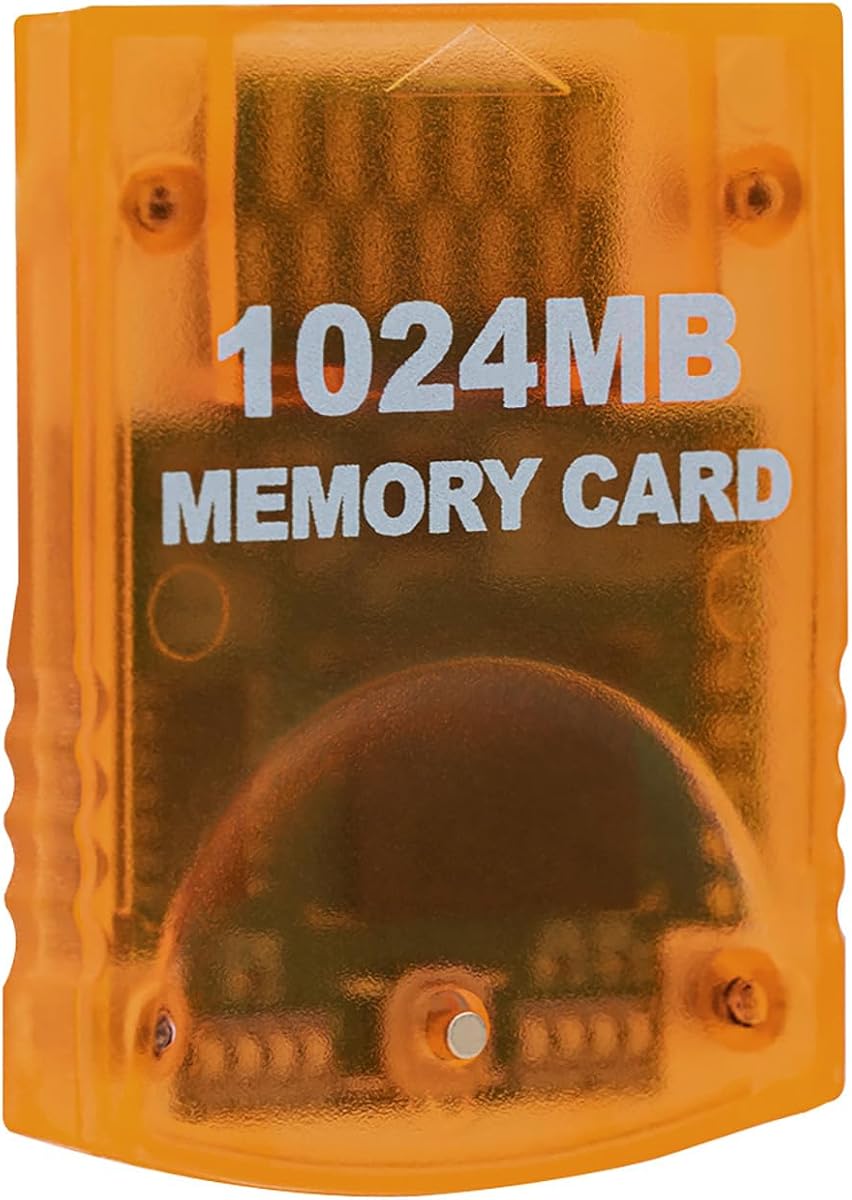


This Tolesum card offers an impressive 1024MB storage capacity divided into eight independent areas. It stands out for its genuine uncompressed block count which ensures compatibility with demanding titles.
We may earn a commission when you buy through this link, at no additional cost to you.
The design includes indicator lights to show which storage area is currently active. Users appreciate the ability to switch areas with a simple button press without needing complex menus.
While it is a third-party product it maintains high reliability standards. The only minor limitation is the need to power down the console before inserting or removing the card.
This card is perfect for collectors who need to save multiple game states. It provides the best balance of capacity and ease of use for GameCube enthusiasts.
The 16344 block count is real uncompressed storage ensuring no data loss or corruption during save processes.
Dividing storage into eight areas helps organize saves by game or project without deleting previous progress.
We may earn a commission when you buy through this link, at no additional cost to you.
The Tomee 16MB card is an excellent choice for budget conscious gamers. It provides standard 251 blocks of memory which is sufficient for many classic titles.
We may earn a commission when you buy through this link, at no additional cost to you.
It features a straightforward design that works instantly without setup. Users can easily load, save, copy, and delete game data with minimal effort.
While it lacks large capacity it is very dependable for casual play. The high rating reflects consistent performance across different console models.
This card is ideal for single game saves or casual players. It offers the best value for those needing basic functionality without extra cost.
Ideal for players who only need to save one or two games at a time without paying for excess space.
Fully compatible with GameCube games that have save options ensuring seamless integration with your existing setup.
We may earn a commission when you buy through this link, at no additional cost to you.
The MAYFLASH 512MB card earns the top rating among all reviewed products. It combines a sleek blue design with robust storage for serious collectors.
We may earn a commission when you buy through this link, at no additional cost to you.
Its speed ensures quick saves and loads without lag during gameplay. The four distinct storage areas allow for better organization of multiple game files.
Users report high satisfaction with the durability and ease of use. The build quality exceeds expectations for a third-party accessory in this category.
This card is perfect for enthusiasts who value quality and speed. It is the premium choice for those wanting the best experience possible.
Engineered for quick data processing to minimize wait times during save operations and improve gameplay flow.
Four sections provide ample room to categorize saves by game or save file type effectively.
We may earn a commission when you buy through this link, at no additional cost to you.
Mcbazel offers a massive 1024MB capacity split into eight parts for flexible use. It is designed for those who need to store hundreds of game files.
We may earn a commission when you buy through this link, at no additional cost to you.
The high speed performance ensures smooth data transfer during save processes. Users find it efficient for managing large collections of saves across different titles.
It is a third-party product that meets standard compatibility requirements. The design allows easy switching between memory parts for organized storage.
This card is recommended for heavy users needing extensive space. It provides a reliable solution for preserving progress on large game libraries.
Switching between eight parts allows users to isolate specific games or save files easily without confusion.
High speed processing reduces wait times when saving progress in intensive game titles.
We may earn a commission when you buy through this link, at no additional cost to you.
Tolesum 512MB card provides a balanced option with four data areas. It features non-compressed blocks which ensure stability for game saves.
We may earn a commission when you buy through this link, at no additional cost to you.
The blue design matches well with Wii consoles and looks clean. Users find the plug and play nature convenient for immediate use.
It offers solid performance for casual gamers who need more space. The non-compressed nature prevents errors with titles that require specific block counts.
This card is suitable for players wanting a middle ground. It combines reliability with reasonable capacity for everyday gaming needs.
Real blocks ensure that games requiring exact memory counts work without errors or corruption.
Four sections allow users to switch storage areas quickly without complex setup or tools.
We may earn a commission when you buy through this link, at no additional cost to you.
This black card offers basic but reliable storage for game saves. It is built to be crash proof and shock resistant for durability.
We may earn a commission when you buy through this link, at no additional cost to you.
Users appreciate the universal compatibility with both GC and Wii models. It ensures saves remain safe during power outages or unexpected drops.
The 251 block capacity is enough for standard game progress. The high-speed design prevents lag during save operations for seamless play.
This card is recommended for casual gamers needing protection. It offers a practical solution for those prioritizing durability over space.
Engineered to prevent data loss during sudden power failures or physical accidents.
Works with both original GameCube and compatible Wii models for broad accessibility.
We may earn a commission when you buy through this link, at no additional cost to you.
Tomee continues to offer reliable 16MB storage for GameCube users. It allows storing levels, characters, and top scores with ease.
We may earn a commission when you buy through this link, at no additional cost to you.
The design is simple and fits snugly into the console slot. Users find copying and deleting saves straightforward without any learning curve.
It maintains high ratings due to consistent quality and durability. The compact size makes it a perfect replacement for older cards.
This card is ideal for single save needs. It offers a dependable and simple solution for preserving your progress.
Users can easily copy, save, and delete files without complicated interfaces.
Consistent reliability ensures your saves are not lost unexpectedly.
We may earn a commission when you buy through this link, at no additional cost to you.
This pink card offers a unique look with dual bank storage. It provides 256MB split into two independent sections for better organization.
We may earn a commission when you buy through this link, at no additional cost to you.
High speed performance ensures seamless gameplay during save times. Users enjoy the quick data transfer that reduces interruptions during play.
It is designed for safe operation with power off requirements. This helps keep files intact and prevents data corruption risks.
This card is best for players wanting style and speed. It offers a reliable dual bank system for casual to moderate storage needs.
Two independent sections let you separate saves into different categories easily.
Optimized for quick writes so you can get back to the game fast.
We may earn a commission when you buy through this link, at no additional cost to you.
This standard card uses flash memory to store game progress effectively. It provides 251 blocks which is the classic capacity for GameCube.
We may earn a commission when you buy through this link, at no additional cost to you.
Users can store their game and settings without complex setup. The design fits standard slots and works with most games seamlessly.
It maintains a high rating for consistent performance over time. The simple interface makes it accessible for any user.
This card is perfect for traditionalists. It offers a reliable and standard solution for saving your game data.
Flash memory ensures long-term data retention without power dependency.
Stores not only game progress but also important settings files for your system.
We may earn a commission when you buy through this link, at no additional cost to you.
This adapter lets you use standard Micro SD cards for storage. It is unique because it supports up to 512GB capacity.
We may earn a commission when you buy through this link, at no additional cost to you.
It requires homebrew software like Swiss or Xeno to function properly. Users find it great for loading lists and saving large amounts of data.
The transparent look is sleek and modern. It runs on any version of the console but needs specific software to load games.
This adapter is best for modded consoles. It offers massive storage for those who need to store many game files.
Supports up to 512GB SD cards for huge storage possibilities.
Automatically loads game lists when used with compatible homebrew apps.
We may earn a commission when you buy through this link, at no additional cost to you.
Selecting the right memory card requires understanding storage needs and console compatibility. This guide breaks down the key factors to consider for your setup.
Storage capacity is measured in blocks or megabytes. Standard cards offer 251 blocks while third-party options can go up to 16344 blocks. Higher capacity is essential for collectors who play many different games.
Choose higher capacity if you play multiple titles frequently. Lower capacity is fine for single game preservation.
Not all Wii models support memory cards. The RVL-001 launch edition has the slot but newer models do not. Check your console model number before purchasing to ensure it fits.
Verify that your console model supports physical cards to avoid compatibility issues.
Some cards claim high block counts but use compression. This can lead to errors with games that require exact block sizes. Always look for products that specify real uncompressed blocks.
Prioritize uncompressed cards to ensure your save data remains compatible and valid.
Third-party products vary in quality. Look for brands with positive user feedback and reliable customer support. Reputation can be a good indicator of long-term durability.
Select a brand with a track record of reliability for better peace of mind.
Some cards have multiple storage areas with indicator lights. Others are simple single blocks. Consider if you need to switch between different save sets often.
Choose a design that matches your organizational needs and aesthetic preferences.
Cards should ideally have crash-proof features to protect against power outages. Always insert or remove the card when the console is off to prevent data corruption.
Prioritize cards with safety features to protect your hard-earned game progress.
Many third-party sellers offer warranties on their products. Check the warranty length and customer support responsiveness before buying. Good support can help if the card fails.
Select a product with a strong warranty to ensure you are covered if issues arise.
Prices vary based on capacity and features. Higher capacity cards cost more. Determine how much you need before spending extra for features you may not use.
Balance your budget with your actual storage requirements to get the best value.
Always ensure your console is completely powered off before inserting or removing the memory card. This simple habit prevents data corruption and protects the card's internal circuitry from electrical damage.
If your card has multiple storage areas, use the front button to switch between them. Check the indicator lights to confirm which area is active before starting your game.
Store your cards in a dry, cool place away from direct sunlight. Dust can enter the connector slots so keep them covered when not in use to maintain clean connections.
Only original Wii models with model number RVL-001 support GameCube Memory Cards. Later revisions like Family Edition or Mini removed the slots entirely. Always check your console bottom to confirm compatibility.
Yes, reputable third-party cards are safe if they are uncompressed. Many gamers use them because official cards are hard to find. Check reviews to ensure reliability before buying.
A standard 251 block card can hold multiple save files depending on game size. Most games require only 1 or 2 blocks per save. You can often fit several games on one card.
Yes, consoles allow you to copy saves from one card to another. Go to the game memory screen and select copy. This helps free up space without losing data.
Third-party cards combine multiple 128MB sections into one unit. They use a button to switch between areas. This effectively creates a larger card with multiple storage zones.
Removing a card during a save operation can corrupt your data. Always wait for the save process to finish completely before turning off or removing the card. Safe practices keep your files intact.
Classic games for GameCube rely on physical memory cards for saves. Modern digital copies on other platforms use internal storage. You need a physical card for disc-based games.
Uncompressed cards will state they offer real blocks without compression. Check product descriptions carefully for this specific wording. Compressed cards may lose compatibility with some titles.
Choosing the right GameCube Memory Card depends on your specific storage needs and console model. Whether you need a simple 16MB card or a massive 1024MB solution there is an option for you.
Prioritize uncompressed storage and verified compatibility to ensure your game saves remain safe. Third-party cards offer great value but always check reviews for reliability.
Prices and availability change frequently so review current listings before purchasing. Protect your progress with a high-quality card today.