
Presentation Clicker with Volume Control
4.3Editor score
Volume control buttons
Three hundred foot range
Pocket friendly design
This comprehensive guide compares the top ten laser pointers for presentations to help you find the best wireless clicker for your professional or educational
Finding the right laser pointer for presentations is essential for keeping your audience engaged. A good device offers clear visibility, reliable connectivity, and intuitive controls to enhance your delivery.
We evaluated ten top-rated models based on range, battery life, compatibility, and build quality. Each option was reviewed for performance in real-world classroom and conference scenarios.
Each pick highlights key strengths and ideal use cases. Prices and availability may vary over time, so checking the latest details before purchasing is always recommended for the best value.
4.3Editor score

4.6Editor score

4.6Editor score
This side-by-side comparison highlights the key specifications and unique features of each model to help you decide which fits your presentation style best.


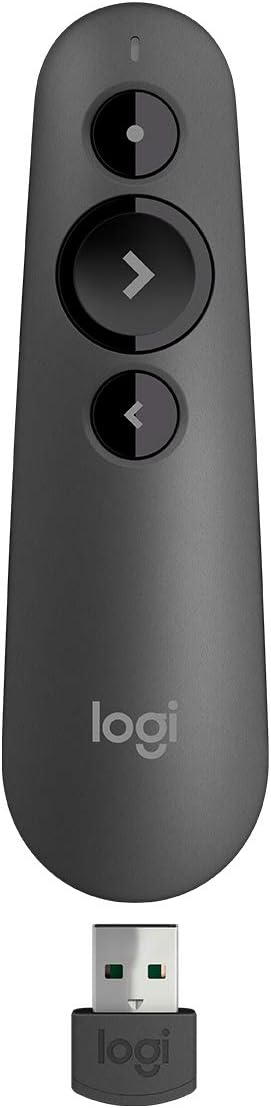


This presenter stands out with its bright green laser that remains visible even on modern screens. It scores high for reliability and ease of use in classroom environments.
We may earn a commission when you buy through this link, at no additional cost to you.
The USB-C rechargeable battery eliminates the need for disposable cells. Its magnetic receiver snaps securely into the body preventing loss during busy teaching days.
While it lacks deep software customization, the hardware buttons cover all essential navigation needs. The only minor drawback is relying on USB-C for charging.
Educators seeking a dependable tool with clear visibility should choose this model. It combines modern charging convenience with solid presentation control features.
The green beam cuts through ambient light better than red alternatives ensuring your audience follows your points clearly.
USB-C charging reduces waste from batteries and keeps the device ready for daily use with a quick one-hour charge.
We may earn a commission when you buy through this link, at no additional cost to you.
The R400 is a long-standing favorite for simple presentations. Its straightforward design ensures you can start speaking without technical interruptions or complex pairing.
We may earn a commission when you buy through this link, at no additional cost to you.
It offers a solid fifty-foot range which suits small to medium rooms well. The receiver docks neatly inside the unit so you never forget it.
However, its range is shorter than modern competitors and it uses traditional red lasers. This might limit use in large lecture halls.
Choose this for small meetings where basic reliability matters most. It remains a solid entry-level option for those who value simplicity.
The touch keys are easy to feel and use allowing you to control slides without looking down at the device.
The built-in docking bay stores the USB receiver securely preventing loss when you are packing up after a session.
We may earn a commission when you buy through this link, at no additional cost to you.
This clicker offers impressive range and extra features like volume control at a budget friendly price. It works well for general slide navigation needs.
We may earn a commission when you buy through this link, at no additional cost to you.
The one hundred-foot range lets you move freely around large rooms. The magnetic storage keeps the USB receiver safe during transport.
Its red laser is less effective on bright screens so it is best for projection use. Build quality is decent but not premium.
Budget conscious users who need long range will appreciate this tool. It balances cost and function effectively for basic presentations.
With up to one hundred feet of wireless control you can engage your audience from anywhere in the room.
Dedicated volume buttons let you adjust audio levels without reaching for your computer during key moments.
We may earn a commission when you buy through this link, at no additional cost to you.
The R800 is ideal for speakers who need strict time control. Its LCD timer and vibration alerts help you stay on schedule without watching a clock.
We may earn a commission when you buy through this link, at no additional cost to you.
The green laser provides excellent visibility and the range supports movement across large auditoriums. Build quality feels robust and professional.
It is more expensive than basic models and relies on batteries. However the time management features justify the cost for professionals.
Select this for high-stakes presentations where timing is critical. It combines premium feel with practical tools for confident delivery.
The silent vibrating alerts notify you of remaining time without distracting your audience or disrupting your flow.
The powerful green beam is visible even on bright displays and in well-lit conference rooms.
We may earn a commission when you buy through this link, at no additional cost to you.
This model offers both Bluetooth and USB connections making it versatile for modern devices like tablets and laptops. It integrates well with Logitech software.
We may earn a commission when you buy through this link, at no additional cost to you.
The battery lasts up to twelve months and the app allows button customization. It is a solid choice for mixed tech environments.
Its red laser is less visible on screens and you must install software for full features. This adds steps for some users.
Mobile presenters and Mac users will value the dual connectivity. It offers flexibility and long battery life for frequent speakers.
Connect via USB for instant start or Bluetooth for devices without USB ports giving you flexibility on the go.
The Logitech Presentation App lets you set timers and customize buttons to match your specific workflow needs.
We may earn a commission when you buy through this link, at no additional cost to you.
This clicker delivers massive range and useful controls at a minimal cost. It is perfect for users who need a reliable tool without spending much.
We may earn a commission when you buy through this link, at no additional cost to you.
The three hundred-foot range is exceptional and the pocket clip ensures you never misplace it. Volume control adds a practical touch for media slides.
The build feels less premium and the red laser struggles on screens. But for basic needs it offers great utility per dollar.
Budget buyers and large venue users should consider this option. It provides surprising performance for a low price point.
With three hundred feet of range you can roam large halls and still maintain full control of your slides.
The attached clip keeps the clicker accessible on your pocket or notebook for quick access during events.
We may earn a commission when you buy through this link, at no additional cost to you.
The N95 combines a bright green laser with flexible button remapping via software. It supports both USB-A and USB-C receivers for broad device compatibility.
We may earn a commission when you buy through this link, at no additional cost to you.
The lithium battery charges quickly and lasts weeks of use. Buttons can be remapped to fit unique workflow needs efficiently.
You must install software to remap buttons which adds setup time. The design is also bulkier than slim alternatives.
Tech savvy users wanting green visibility and custom controls will like this. It is a versatile tool for modern classrooms.
Remap button functions via the Norwii app to suit your specific navigation habits or presentation software requirements.
The green pointer is brighter than red models ensuring visibility even in well-lit rooms with standard projectors.
We may earn a commission when you buy through this link, at no additional cost to you.
This remote solves the receiver issue with a combined USB-A and USB-C plug. It fits comfortably in hand and works across many operating systems.
We may earn a commission when you buy through this link, at no additional cost to you.
Its ergonomic design prevents hand fatigue and the plug-in receiver is easy to carry. Linux users find it particularly useful for basic needs.
The range is moderate and it lacks advanced features like timers. It is a functional tool for standard office tasks.
Users with mixed laptop types who want a simple tool will appreciate this. It bridges the gap between old and new ports.
The combined USB connector means you do not need different dongles for Mac and PC devices.
The rubberized ergonomic handle ensures a secure comfortable hold during long presentation sessions.
We may earn a commission when you buy through this link, at no additional cost to you.
This clicker uses a dual connector receiver for both USB-A and USB-C ports. Its lightweight design makes it easy to carry in any bag.
We may earn a commission when you buy through this link, at no additional cost to you.
The magnetic slot keeps the receiver secure and volume controls add media support. It weighs only fifty-five grams for ultimate portability.
It needs two batteries and uses a standard red laser. These are minor trade-offs for its flexible connection features.
Mac and mixed device users should find this receiver design very convenient. It simplifies setup for diverse technical environments.
The receiver features both USB-A and USB-C connectors so it works with legacy PCs and modern Macs alike.
Weighing just fifty-five grams this clicker fits easily in your pocket without adding bulk to your gear.
We may earn a commission when you buy through this link, at no additional cost to you.
This clicker emphasizes simplicity and light weight at just thirty-eight grams. Its ergonomic buttons provide good tactile feedback for control.
We may earn a commission when you buy through this link, at no additional cost to you.
It uses a single AAA battery and has no driver requirements. The compact form fits easily in any pocket or laptop bag.
It lacks advanced features like timers or green lasers. But for straightforward slide control it is efficient and portable.
Frequent travelers or casual presenters will enjoy this minimalist design. It offers essential tools in a tiny package.
The sleek dark gray buttons and black body offer a modern look that fits professional environments.
A single AAA battery powers the device for up to two months of typical use saving on battery costs.
We may earn a commission when you buy through this link, at no additional cost to you.
Choosing the right presenter requires balancing visibility range and battery life. Use these factors to match a device to your specific environment.
Green lasers are generally brighter and more visible than red ones especially on LCD screens or in bright rooms. If you present often on modern displays prioritize a green pointer to ensure your audience can follow your points clearly.
For simple dark room projections red lasers remain a cost effective and sufficient option. Choose green if you need maximum visibility across varied lighting conditions.
Range determines how freely you can move during your talk. Models offer ranges from fifty feet to over three hundred feet. For small meeting rooms fifty feet may suffice but large lecture halls demand longer reach.
Always check the stated range limit to avoid signal dropouts mid-presentation. Ensure the device supports your room size to maintain audience engagement throughout.
Presenters use either disposable AAA batteries or rechargeable options. Rechargeable units save money and reduce waste long-term though they require occasional charging. AAA models are convenient for users who want to swap cells instantly.
Consider your presentation frequency when choosing. Heavy daily users benefit from rechargeable types while occasional speakers may prefer the convenience of disposables.
Modern laptops often feature USB-C ports only while older systems use USB-A. Dual connectors or adapters ensure the receiver works with your device. Avoid models that limit you to one port type unless you own adapters.
Select a receiver that fits your current laptop ports to avoid carrying extra dongles. Compatibility ensures you can start immediately without hardware delays.
Some models allow button remapping via PC software to fit your workflow. This is helpful if you prefer specific shortcuts for navigation or volume control. Others work strictly out of the box with fixed functions.
If you need custom shortcuts ensure the device supports driver software. Standard plug-and-play models work better if you want simplicity and fast setup.
A presenter that feels comfortable in your hand reduces fatigue during long sessions. Look for rubberized grips and balanced weight. Compact devices are easier to pocket but ensure buttons are large enough for quick access.
Test the shape if possible or check reviews on grip comfort. A well designed device lets you focus on your talk rather than fiddling with controls.
Additional controls like volume or hyperlink buttons add versatility for media rich presentations. Timers and vibration alerts help manage time effectively. Consider which extras align with your speaking style and content.
Advanced features increase value but also cost. Decide if you need media controls or time management tools before investing in higher tier models.
Robust construction ensures the device survives travel and frequent drops. Metal or high quality plastic housings last longer than brittle alternatives. Check warranty terms to understand long-term support.
Choose a model with reliable build quality if you present daily or travel often. A sturdy unit protects your investment and ensures consistent performance over time.
Always keep the laser away from eyes and ensure it points at screens or boards. Avoid pointing it directly at faces to prevent discomfort or injury during your talk.
Store the USB receiver inside the presenter when not in use to avoid losing it. Use magnetic slots or internal docks to keep the dongle secure with the device.
Clean the body with a soft cloth and avoid moisture to preserve button function. Replace or recharge batteries before presentations to prevent unexpected power loss during talks.
Yes green lasers are generally brighter and more visible especially on LCD screens and in bright rooms. They ensure your audience can follow your points clearly. Red lasers remain effective for dark room projections.
Most presenters work plug-and-play without any software installation. You simply plug the USB receiver into your computer and start presenting. Some models offer optional apps for button customization or timers.
The distance depends on the wireless range of your presenter. Most models offer between fifty and three hundred feet. Choose a model that matches your room size to avoid signal dropouts mid-talk.
Rechargeable clickers save money on batteries over time and reduce waste. They are ideal for daily presenters who want to avoid searching for batteries before every session.
Many models support Bluetooth connection allowing use with tablets and laptops lacking USB ports. Check compatibility with your specific device before purchasing to ensure seamless integration.
Store the USB receiver in the built-in dock or magnetic slot on the presenter when not in use. This keeps it attached to the device and prevents misplacement during transport.
These ten models cover a wide range of needs from budget tools to premium time-managing devices. Whether you need a green laser for visibility or a rechargeable unit for convenience there is a fit for you.
Prioritize factors like range and laser color that match your typical room and audience. Ensure compatibility with your computers to prevent technical issues during critical speaking moments.
Prices and stock may change frequently so review current listings before deciding. With the right tool your presentations will be smoother and more impactful for your audience.