
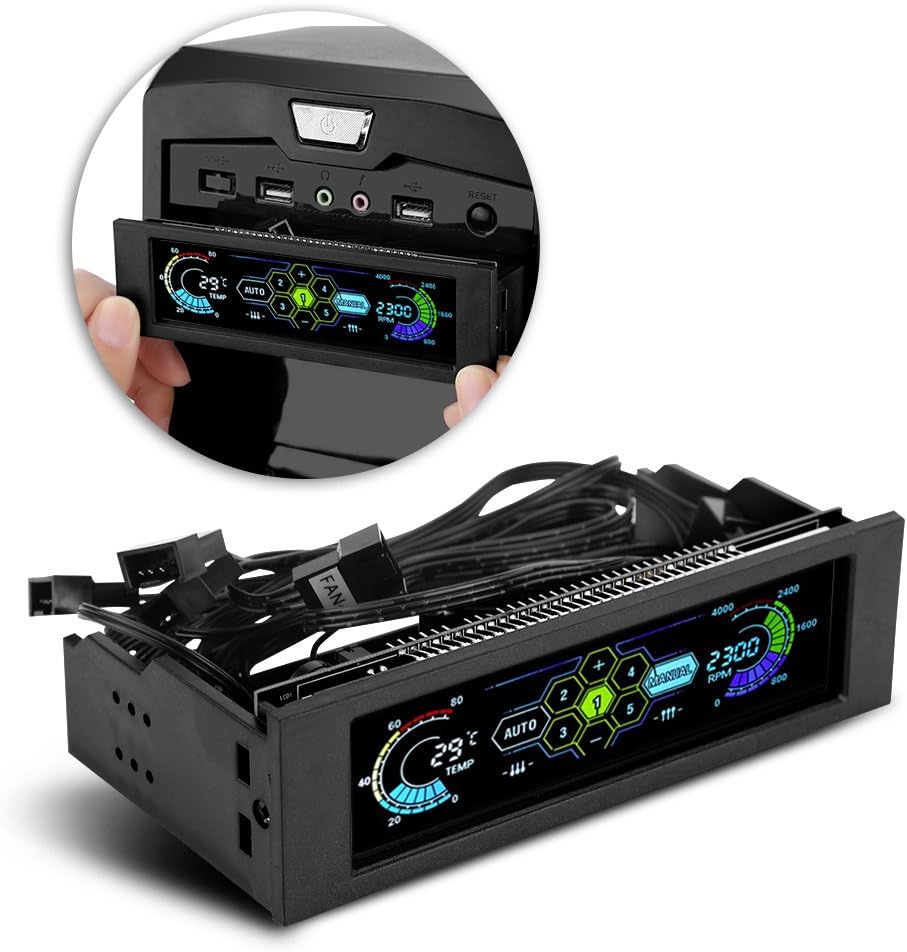
SaiDian 1Pcs 5.25 inch Fan Speed Controller Computer Temperature Sensor LCD Date Time Display PC Bay Front Panel
3.9Editor score
Controls three fan groups
LCD shows temperature
Fan jam alarm included
This guide compares the top 10 Front Panel Fan Controller options to help you find the best cooling solution for your PC build.
Finding the right Front Panel Fan Controller can transform your computing experience by optimizing cooling and reducing noise levels significantly.
We compared ten leading models based on features like LCD displays, PWM support, channel counts, and reliability to build this curated list.
Each pick highlights key strengths and potential trade-offs to help you choose wisely, though prices and availability may change over time.
3.9Editor score

5.0Editor score

4.2Editor score
The following table provides a side-by-side view of the ten selected Front Panel Fan Controller units, highlighting their unique specifications and capabilities.


The STW‑6041 stands out as a top choice for anyone seeking a reliable Front Panel Fan Controller with detailed monitoring capabilities and robust construction.
We may earn a commission when you buy through this link, at no additional cost to you.
It features a wide LCD screen that displays four sets of fan speeds and temperatures simultaneously, offering comprehensive insight into your system performance.
While it only controls four fans, this is often sufficient for standard builds, and its alarm system provides peace of mind against overheating.
Buyers seeking a balance of clarity and reliability will find this unit an excellent upgrade for their PC case.
The wide LCD screen clearly shows fan speeds and temperatures, helping you track system health at a glance.
Constructed with aluminum alloy and high-spec capacitors, this controller is designed to withstand high temperatures over long periods.
We may earn a commission when you buy through this link, at no additional cost to you.
This unit offers significant flexibility with its ability to control five fans independently, making it a strong contender for larger cooling setups.
We may earn a commission when you buy through this link, at no additional cost to you.
The big LCD screen provides essential data like temperature, fan speed, and hard disk state, ensuring you are always aware of system conditions.
Setting the alarm temperature between forty and ninety degrees allows customization based on your specific hardware needs and tolerance.
It is a great option for users who need extra fan ports and want detailed monitoring through a clear interface.
Managing five fans independently gives you precise control over airflow, which is crucial for complex workstation or gaming builds.
The ability to set your own alarm temperature range ensures that your specific hardware is protected according to its thermal limits.
We may earn a commission when you buy through this link, at no additional cost to you.
The SaiDian controller provides an entry-level solution for those looking to add basic monitoring to their PC without spending a lot of money.
We may earn a commission when you buy through this link, at no additional cost to you.
It includes essential features like a fan jam alarm and temperature display, though it covers only three groups of fans compared to others.
While the rating is lower, it serves its purpose well for simple cases where advanced features are not strictly necessary.
Users on a tight budget who need a basic fan controller will find this model a reasonable starting point.
This unit delivers essential monitoring functions at a low price point, making it accessible for budget-conscious builders.
Even at this price, it includes a fan jam alarm to alert you if a fan stops turning due to failure or obstruction.
We may earn a commission when you buy through this link, at no additional cost to you.
Designed for enthusiasts, this controller offers six channels and an RGB LCD screen that adds a premium visual element to any PC build.
We may earn a commission when you buy through this link, at no additional cost to you.
It includes six temperature sensors to monitor various areas of your system, providing granular control over cooling performance across multiple zones.
Support for two Lumi LED strips allows further customization, aligning the controller with modern aesthetic preferences for case lighting.
Those willing to invest in high-end features will appreciate the detailed control and stylish design of this Thermaltake model.
With six sensors, you can track temperatures in different parts of your case, enabling targeted cooling strategies for better efficiency.
The RGB LCD screen and LED strip compatibility ensure the controller looks as good as it performs, fitting seamlessly into themed builds.
We may earn a commission when you buy through this link, at no additional cost to you.
The Ejoyous controller combines solid build quality with essential features like a four-channel layout and automatic temperature regulation for reliable cooling.
We may earn a commission when you buy through this link, at no additional cost to you.
Its PWM circuitry allows precise fan speed adjustments, reducing noise while maintaining adequate airflow when temperatures rise.
A double safety function includes an acoustic alarm for high temperatures and fan standstill detection, offering comprehensive protection.
This unit is suitable for users who want a balance of performance and safety features in a standard 5.25-inch bay.
PWM support ensures that fans run quietly at low speeds and ramp up efficiently only when needed, optimizing energy and noise.
Monitoring both temperature thresholds and fan operation status provides robust protection against hardware damage and system failures.
We may earn a commission when you buy through this link, at no additional cost to you.
This ARCTIC unit is unique in offering ten ports for individual PWM control, making it ideal for complex setups requiring extensive airflow management.
We may earn a commission when you buy through this link, at no additional cost to you.
Unlike traditional bay controllers, it connects directly to your system with driver support for both Windows and Linux, offering software-based monitoring and control.
Each port delivers up to two amps, ensuring powerful fans receive sufficient current without compromising performance across multiple devices.
Users looking to eliminate cable chaos and manage many fans through software will find this solution highly efficient and versatile.
With ten ports, you can connect a large number of fans, perfect for workstation builds with multiple heatsinks and chassis fans.
Driver support allows you to manage fan curves and monitor speeds from your OS, removing the need for physical knobs or displays.
We may earn a commission when you buy through this link, at no additional cost to you.
The Noctua NA-FC1 is a compact manual controller designed for users who prefer direct control without the complexity of digital displays or software.
We may earn a commission when you buy through this link, at no additional cost to you.
It features a 'No stop' mode that prevents fans from dropping below 300 RPM, avoiding potential BIOS errors during system startup.
The included 3-way splitter allows control of up to three fans simultaneously, making it a versatile tool for specific cooling zones.
With a six-year warranty, this controller is built for longevity and offers a premium experience in a simple, plug-and-play package.
The No stop mode ensures fans always spin above a minimum threshold, which helps maintain stability with BIOS fan checks.
A six-year warranty from Noctua reflects confidence in their build quality and provides extra peace of mind for buyers.
We may earn a commission when you buy through this link, at no additional cost to you.
This Delinx controller supports a wide voltage range and offers both automatic and manual modes, giving users flexibility in how they manage cooling.
We may earn a commission when you buy through this link, at no additional cost to you.
A digital display shows temperature or fan speed up to 50,000 RPM, while power-off memory ensures settings are retained after shutdown.
Built-in protection against over-voltage and reverse polarity adds safety, making it suitable not only for PCs but also for other electronics.
The included USB-C kit makes installation easier for those without standard PC power connectors, expanding its use to various projects.
Support for 5V to 30V inputs allows the controller to work in different environments beyond standard PC cases.
Hysteresis settings prevent fan speed fluctuations due to minor temperature changes, ensuring smoother operation and longer fan life.
We may earn a commission when you buy through this link, at no additional cost to you.
This 4-channel controller offers standard features like an LCD display and alarm system, providing basic monitoring for typical PC cooling needs.
We may earn a commission when you buy through this link, at no additional cost to you.
It supports PWM circuits to reduce noise and includes high-spec capacitors for longevity, making it a practical choice for general use.
While the rating is lower, it remains a functional option for users who want a straightforward panel controller without advanced customization.
It is suitable for those who need to control four fans and monitor temperatures simply without complex setup or software integration.
The LCD screen offers a quick way to check fan speeds and temperatures without opening your computer case or using software.
PWM technology helps keep fan noise low during idle periods, contributing to a quieter overall computing environment.
We may earn a commission when you buy through this link, at no additional cost to you.
Similar to other models, this unit controls five fan groups and provides a large LCD screen for monitoring temperature and speed data.
We may earn a commission when you buy through this link, at no additional cost to you.
It includes an alarm system that activates if a fan breaks down, ensuring you are notified promptly of any cooling failures.
The ability to set alarm temperatures between forty and ninety degrees allows some flexibility in managing thermal safety thresholds.
For users who need to manage more than four fans on a budget, this controller offers basic but functional capabilities for monitoring and control.
Managing five separate groups of fans helps in balancing airflow in larger cases with multiple exhaust and intake points.
Immediate alerts for fan failure help prevent overheating issues caused by a single failed component disrupting the cooling chain.
We may earn a commission when you buy through this link, at no additional cost to you.
Selecting the right Front Panel Fan Controller involves evaluating key features to ensure compatibility and performance with your specific PC setup.
The number of channels determines how many fans you can control independently. Choose a controller with at least as many channels as you have fans.
More channels allow for better customization of airflow zones within your case.
LCD displays provide real-time temperature and speed readings, while simpler models may lack this feature. Decide if you need detailed monitoring or just control.
Clear displays make it easier to adjust settings without opening the case.
PWM (Pulse Width Modulation) support ensures precise speed control and reduced noise. Always verify that the controller supports the PWM standard of your fans.
This feature is essential for maintaining quiet operation at low speeds.
Multiple sensors allow monitoring of different areas in your PC, such as CPU and GPU zones. More sensors provide better insight into thermal conditions.
Accurate sensor data improves automatic temperature control reliability.
Alarms alert you when temperatures get too high or fans stop working. This safety feature can prevent hardware damage in case of cooling failure.
Always check that the alarm system is functional and audible.
Aluminum alloy panels and high-quality capacitors ensure durability and stability. A robust build protects the controller from electrical issues over time.
Solid construction also ensures the unit fits securely in your drive bay.
Check voltage ratings and connector types to ensure the controller works with your fans and power supply. Most models support 5V and 12V fans.
Incorrect voltage can damage fans or the controller itself.
Controllers are typically designed for 5.25-inch optical drive bays. Ensure your case has an available slot for installation.
Some models offer magnetic or adhesive mounting for flexible placement.
First, identify your available 5.25-inch bay in the case and remove the drive bracket. This ensures the controller fits properly and is accessible.
Connect the controller to a 12V power source from your power supply unit, then plug fan headers into the appropriate ports. Secure all cables to avoid short circuits.
Adjust fan speeds using the knobs or software settings. Monitor temperatures and set alarms to keep your hardware safe and your system quiet.
PWM controllers use pulse width modulation to vary fan speed more precisely, while DC controllers adjust voltage directly. PWM is generally quieter and more efficient for modern fans.
Most controllers support between three to six fans, though some advanced models offer ten or more. Always check the maximum current rating to avoid overloading.
Most models are hardware-based and work without software, using physical knobs or buttons. However, some modern controllers offer optional software integration for detailed control.
Installation requires an available 5.25-inch drive bay. If your case lacks this space, you may need to remove an optical drive or use a different mounting solution.
Check for blocked airflow, failed fans, or high temperatures. Adjust the alarm threshold if necessary, but investigate the root cause to prevent hardware damage.
Yes, by allowing you to set lower speeds when temperatures are low, controllers significantly reduce noise. PWM support further smooths operation to minimize high-frequency noise.
Most PC fans operate at 12V, but some may use 5V or 24V. Check the fan labels or manufacturer specifications to ensure compatibility with the controller.
The STW‑6041 and Thermaltake models stand out for their reliability and premium features, while options like the SaiDian offer affordable entry points.
Prioritize PWM support and sufficient channels for your build needs to ensure effective cooling and quiet operation.
Prices and availability may change, so review current listings before purchasing to confirm that the model still meets your requirements.