
Logitech M240 Compact Silent Bluetooth Wireless Mouse
4.4Editor score
Silent click technology
Long battery life
Compact travel design
This guide compares the top external mice for MacBook Neo users, evaluating wireless connectivity, ergonomic design, battery life, and compatibility to help
Finding the right external mouse for your MacBook Neo can significantly enhance your daily productivity and comfort. With so many options available, it is essential to consider factors like connectivity, design, and battery performance to match your specific needs.
We have carefully evaluated ten standout models based on their wireless capabilities, ergonomic features, and seamless integration with macOS systems. Our comparison focuses on real-world usability to ensure you get a reliable tool for work or leisure.
Each selection in this guide highlights key strengths and potential trade-offs to help you make an informed decision. Keep in mind that prices and availability may fluctuate, so checking current listings is always recommended before purchasing.
4.4Editor score

4.6Editor score

4.4Editor score
This side-by-side comparison highlights the unique specifications and features of each top-rated mouse to help you identify the model that best fits your specific usage patterns and aesthetic preferences.






The Logitech M240 stands out as an affordable option for MacBook Neo users seeking a reliable wireless mouse. With a 4.4 rating, it delivers consistent performance through silent clicks and seamless Bluetooth connectivity.
We may earn a commission when you buy through this link, at no additional cost to you.
Its standout feature is the 90 percent reduced click noise which makes it ideal for shared offices or quiet environments. The 18-month battery life ensures you rarely need to worry about power interruptions during daily tasks.
While it lacks advanced customization features, the ergonomic shape fits comfortably in most hands for extended use. The lack of a USB dongle simplifies travel but requires Bluetooth capability on your device.
This mouse is perfect for students or professionals who need a no-frills tool that respects noise levels and budget. It offers exceptional value by combining durability with essential wireless functionality.
The silent click technology reduces distraction significantly compared to standard mice.
Its small size allows it to slip easily into laptop bags without bulk.
We may earn a commission when you buy through this link, at no additional cost to you.
The Pebble 2 brings modern style and smart tech to your workspace with its minimalist round design. Rated 4.5, it excels at switching between three devices effortlessly using Bluetooth connectivity.
We may earn a commission when you buy through this link, at no additional cost to you.
You can personalize the middle button via the Logi Options app to create shortcuts for your favorite apps. The 90 percent noise reduction ensures a quiet experience while the recycled plastic supports sustainability.
Its slim profile may feel less supportive for users with larger hands during long sessions. Battery life is impressive at two years but the lack of a USB-C cable might inconvenience some users.
This mouse suits creatives or hybrid workers who juggle multiple devices and value aesthetics. It balances eco-conscious design with practical functionality for a versatile daily driver.
Switch between your phone tablet and laptop instantly without re-pairing.
Over half of the plastic parts are made from post-consumer recycled materials.
We may earn a commission when you buy through this link, at no additional cost to you.
Designed for travelers, the Mobi Fold is an ultra-thin mouse that unfolds for use and folds to save space. With a 4.2 rating, it offers 4K DPI tracking and a unique power-saving folding mechanism.
We may earn a commission when you buy through this link, at no additional cost to you.
The adaptive touch scrolling allows for hyper-fast navigation which is great for browsing long documents. A one-minute charge provides up to 22 hours of use making it convenient for on-the-go scenarios.
While the foldable design is innovative, it may be less durable than solid-body mice over time. The price is higher than standard options but justified by its portability and charging speed.
This model is ideal for digital nomads or frequent flyers who need a compact input device. It combines modern convenience with enough performance to handle demanding tasks efficiently.
Simply fold the mouse to power it off and unfold to turn it on.
4K DPI tracking ensures accurate cursor control on various surfaces.
We may earn a commission when you buy through this link, at no additional cost to you.
The Satechi Slim EX delivers a premium feel with its anodized aluminum shell and precision-machined wheel. Rated 4.6, it offers versatile connectivity with two Bluetooth channels and a 2.4GHz USB-C receiver.
We may earn a commission when you buy through this link, at no additional cost to you.
Its removable battery provides up to three months of continuous use which reduces downtime significantly. The discreet click switches ensure calm control making it suitable for focused work environments.
While the build quality is exceptional, the price point is higher than plastic alternatives. The limited color options might not appeal to those seeking vibrant aesthetics for their setup.
This mouse is perfect for users who prioritize build quality and reliable multi-device connectivity. It elevates your workspace with a professional look while delivering consistent performance.
Switch between two Bluetooth devices and a wired USB-C receiver seamlessly.
Aluminum construction ensures durability and a sleek aesthetic over time.
We may earn a commission when you buy through this link, at no additional cost to you.
This versatile Bluetooth mouse supports both 5.2 and 2.4G modes ensuring broad compatibility across devices. With a 4.3 rating, it offers three adjustable DPI settings to tailor speed to your specific workflow needs.
We may earn a commission when you buy through this link, at no additional cost to you.
The auto energy-saving sleep mode helps extend battery life when the device is idle for eight minutes. The ergonomic coating provides a comfortable grip for everyday tasks without breaking the bank.
Performance may vary compared to premium brands but it serves well for casual or light professional use. The skin-like touch feeling adds a touch of comfort to an otherwise standard design.
It is an ideal choice for budget-conscious users who need a reliable mouse for general tasks. Its dual-mode flexibility ensures it works whether you prefer Bluetooth or a physical USB receiver.
Switch between Bluetooth and 2.4G USB receiver modes effortlessly on the device.
Adjust DPI between 800 and 1600 to match your screen resolution and preference.
We may earn a commission when you buy through this link, at no additional cost to you.
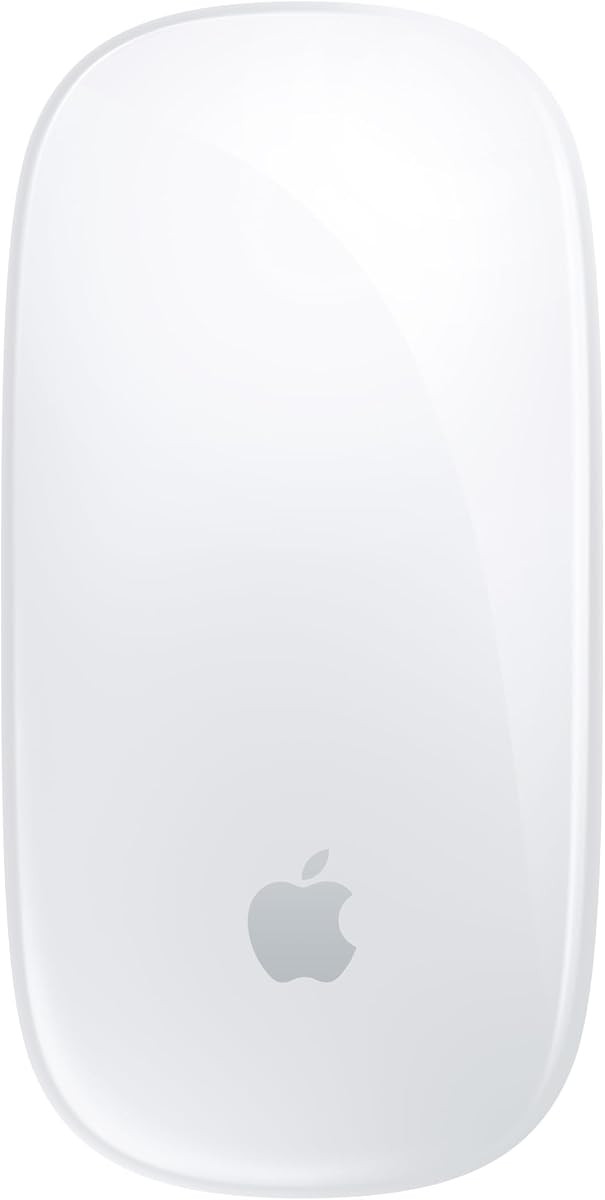
The Apple Magic Mouse integrates directly with macOS offering a seamless experience with its Multi-Touch surface. Rated 4.4, it supports intuitive gestures like swiping and scrolling without needing separate drivers.
We may earn a commission when you buy through this link, at no additional cost to you.
It pairs automatically with your Mac and charges via a built-in USB-C cable which is included in the box. The optimized foot design allows it to glide smoothly across desks with minimal friction.
However the battery location on the bottom means you cannot use it while charging in the traditional sense. The lack of extra buttons may limit productivity for power users compared to specialized mice.
This mouse is best suited for Mac loyalists who value design harmony and gesture controls. Its native integration provides a unified experience that few third-party devices can match effectively.
Use multi-touch gestures to navigate quickly without reaching for keyboard shortcuts.
The foot design ensures frictionless movement on various smooth desk surfaces.
We may earn a commission when you buy through this link, at no additional cost to you.
The POP Mouse brings a fresh modern design to your workspace with customizable Action Buttons for quick access. With a 4.6 rating, it allows you to switch between work social and break modes instantly.
We may earn a commission when you buy through this link, at no additional cost to you.
Silent Touch Technology removes 90 percent of click noise ensuring a quiet environment for focused tasks. The lightweight contoured design fits snugly in your palm making it comfortable for daily use.
While it supports up to three devices, the battery relies on AA cells rather than a USB-C port. The small size might not suit users with larger hands who prefer more substantial support.
This model is perfect for users who want to express their style while maintaining productivity features. Its balance of form and function makes it a standout choice for creative professionals.
Action buttons let you toggle between work apps or entertainment modes seamlessly.
Enjoy the satisfying feel of a click without the disruptive noise in shared spaces.
We may earn a commission when you buy through this link, at no additional cost to you.
Designed to mirror the slim profile of your iPad this mouse is compact and easy to carry everywhere. Rated 4.7, it offers silent operation and accurate tracking even on uneven surfaces like beds.
We may earn a commission when you buy through this link, at no additional cost to you.
The 18-month battery life ensures you rarely need to replace batteries which adds to its convenience. Soft rounded sides provide a comfortable grip making it suitable for all-day use without fatigue.
Its flat shape may lack the wrist support found in bulkier ergonomic models. While this is great for travel, it might feel less supportive during intensive long-form tasks for some users.
This mouse is ideal for travelers or those who prioritize minimalism and portability in their tech. It delivers reliable performance in a package that fits effortlessly into any mobile office setup.
The rubber scroll wheel glides silently providing a quiet navigation experience.
Track accurately on various surfaces without needing a mouse pad.
We may earn a commission when you buy through this link, at no additional cost to you.
The MX Master 4 for Mac is engineered for power users needing precise control and ergonomic support. Rated 4.4, it features a Haptic Sense Panel and MagSpeed scrolling for rapid navigation through large documents.
We may earn a commission when you buy through this link, at no additional cost to you.
Customizable buttons and an Actions Ring adapt to different apps placing tools at your cursor instantly. The thumb scroll wheel and natural tilt reduce hand stress making it suitable for extended work sessions.
Its premium price tag and heavier weight may not suit those seeking a lightweight travel mouse. However the advanced features offer productivity gains that justify the cost for professionals daily.
This mouse is the top choice for creatives and developers who rely on complex workflows. Its ability to streamline tasks through customization makes it a powerful investment for serious users.
Scroll up to 1000 lines per second with precision stopping on a pixel.
The natural tilt and thumb wheel reduce hand strain during long work hours.
We may earn a commission when you buy through this link, at no additional cost to you.
The Satechi M1 features a sleek aluminum finish that complements modern laptops beautifully. Rated 4.4, it uses a built-in lithium-ion battery which eliminates the need for disposable power sources.
We may earn a commission when you buy through this link, at no additional cost to you.
High-precision optical sensors deliver accurate tracking at 1200 DPI ensuring fast and smooth navigation. The USB-C rechargeable port offers a convenient way to keep your mouse powered without constant battery changes.
Its Bluetooth 4.2 connectivity is stable but older than the 5.0 versions found in some competitors. Also it is not recommended for very old Mac devices which limits compatibility for legacy systems.
This mouse is perfect for users who want a minimalist design and sustainable power options. It provides a reliable and stylish addition to any contemporary workspace setup.
Recharge quickly with the included USB-C cable for eco-friendly power usage.
Ensure a reliable connection within a 32-foot range for smooth operation.
We may earn a commission when you buy through this link, at no additional cost to you.
Selecting the right external mouse involves evaluating connectivity options design comfort and battery life to ensure it meets your specific workflow requirements.
Modern mice often support Bluetooth 5.0 or higher for stable connections, while some offer 2.4GHz USB receivers for lower latency. Consider which protocol your MacBook Neo supports and whether you prefer a dongle or direct pairing.
For seamless integration, Bluetooth is often preferred, but a USB receiver can be more reliable in environments with high wireless interference.
An ergonomic shape reduces strain on your wrist and hand during long sessions. Look for a mouse that fits the natural curve of your hand and offers a comfortable grip texture.
If you have larger hands, avoid overly compact models that force your fingers into unnatural positions.
Battery life varies widely between rechargeable and replaceable models. Long-lasting options can last months on a single charge while others may require frequent replacements.
Consider your usage intensity and how often you are willing to charge or replace batteries.
Some mice offer infinite scrolling for rapid navigation through large documents while others provide tactile clicks for precise line-by-line scrolling.
Choose a wheel type that matches how you typically browse content in your daily workflow.
Materials like aluminum offer durability and a premium feel but may be heavier than plastic alternatives. Consider how you value aesthetics versus weight when making your selection.
Higher quality build often correlates with better longevity and resistance to wear over time.
Many modern mice allow you to switch between up to three devices, making them versatile for hybrid work. Ensure the switch mechanism is intuitive and easy to use.
This feature is particularly valuable if you frequently move between a laptop and a tablet.
Software support can enhance productivity by allowing you to map buttons to specific commands or shortcuts. Check if the manufacturer provides a user-friendly app for customization.
This can significantly speed up repetitive tasks if you use complex workflows.
Prices vary significantly from budget-friendly options to premium models with advanced features. Determine which features are essential for your needs to avoid overpaying.
A balance of cost and performance often yields the best value for most users.
To set up your new mouse, simply enable Bluetooth on your MacBook Neo and follow the pairing instructions provided in the manual. If using a USB receiver, plug it into an available port and wait for the system to recognize the device.
Regularly clean the surface of your mouse with a soft dry cloth to remove dust and oils that can affect tracking accuracy. For mice with removable batteries, ensure the contacts are clean to maintain a steady power connection.
Adjust your settings through the macOS System Preferences to customize the scroll speed or button actions to your preference. This optimization ensures the mouse works seamlessly with your specific workflow and comfort needs.
Yes, most of the listed mice are designed to work seamlessly with macOS Ventura and Sonoma. They support standard Bluetooth protocols and driver-free connectivity that modern Mac operating systems require.
No, Bluetooth mice connect directly to your MacBook Neo without a dongle. However, models offering 2.4GHz connectivity include a USB receiver for environments where Bluetooth might be less stable.
Absolutely, most modern wireless mice are platform agnostic and work on both Windows and macOS. You may need to install specific software to customize buttons fully on macOS.
Battery life ranges from a few weeks to over a year depending on the model and usage. Rechargeable models usually offer up to a month or more per charge while AA batteries can last longer.
Yes, ergonomic mice can significantly reduce wrist strain during long work sessions. They promote a natural hand position which helps prevent repetitive strain injuries over time.
Some rechargeable mice allow you to use them while charging via a USB-C cable. However, others may need to be turned off or disconnected during the charging process to function correctly.
Choosing the right mouse for your MacBook Neo depends on balancing features like connectivity, design, and battery life against your specific needs. Whether you prioritize silence, ergonomics, or premium materials, there is a model that fits.
Focus on what matters most for your daily workflow, such as multi-device switching or long battery life, to narrow down your options. Investing in the right tool can enhance productivity and comfort significantly.
Remember to check current prices and availability before making your purchase since these can change frequently. This ensures you get the best value and model for your setup today.