
BNC to HDMI Converter
4.7Editor score
480I to 1080P
Low heat generation
ABS material build
This guide compares the top 10 coax to HDMI converters for connecting old devices to modern TVs with detailed specs and user ratings.
Finding the right coax to HDMI converter helps you connect older gaming consoles and VCRs to modern flat screens easily. These devices bridge the gap between legacy analog signals and digital displays without losing too much quality.
We analyzed ten popular models based on compatibility, signal stability, and ease of use. Our list includes options for security cameras, retro gaming, and general home entertainment setups that need reliable conversion.
Each pick shows key specs and real user feedback to help you choose wisely. Prices and availability change frequently so please check the current listings before making your final purchase decision today.
4.7Editor score

4.3Editor score

4.4Editor score
This side by side comparison highlights the key differences between each model to help you find the exact match for your setup.

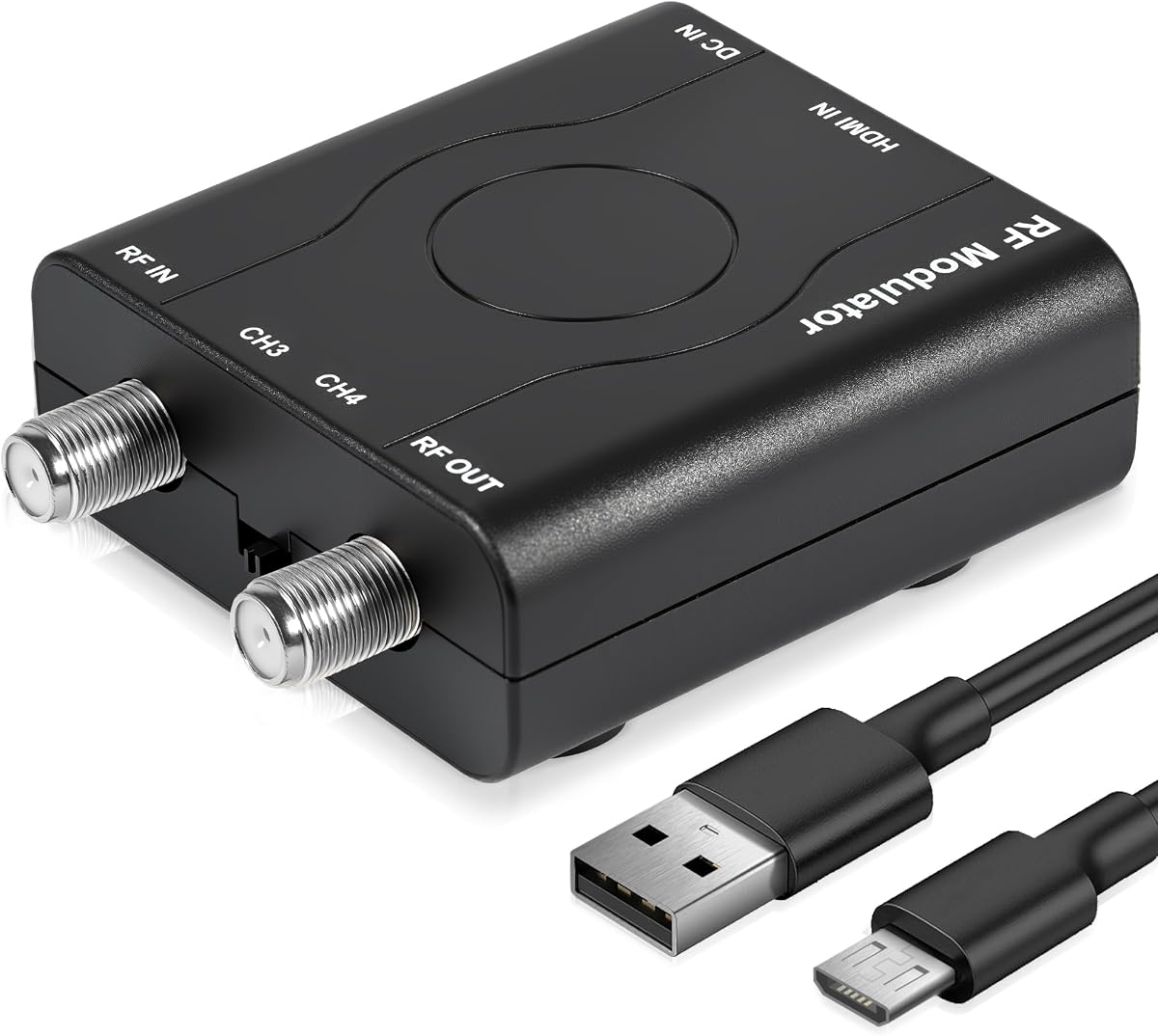


This modulator is a top pick for connecting modern HDMI sources to older RF TVs easily. It has a solid rating and offers plug and play convenience without needing drivers.
We may earn a commission when you buy through this link, at no additional cost to you.
It supports NTSC format on channels three and four with stable PLL control for consistent output. The included HDMI cable makes it ready to use right out of the box.
Keep in mind it only works one way and cannot convert RF back to HDMI for your needs. This limitation is acceptable if you only need to send signals to an analog TV.
Buyers with game consoles or DVD players looking for a simple solution will appreciate this reliable device. It fits well into home setups where coax inputs are still available.
It works with most streaming sticks and consoles so you can connect Fire TV or Xbox easily.
The built in PLL control ensures the RF signal stays steady without flickering or noise.
We may earn a commission when you buy through this link, at no additional cost to you.
This demodulator is designed to bring old gaming consoles like Atari 2600 to modern HDTVs easily. It has features like a remote control and support for many vintage devices.
We may earn a commission when you buy through this link, at no additional cost to you.
It can handle both PAL and NTSC signals which helps with international retro consoles. The remote adds convenience for channel selection and timing functions during use.
However the user rating is lower than others which suggests some setup quirks might occur. Be prepared to spend extra time configuring it for best results with specific devices.
Enthusiasts who collect vintage gaming gear will find this useful for displaying classic games on HD screens. It is a niche choice for those needing specific analog support.
It connects with devices like Atari 2600 and Magnavox Odyssey so old games play on new TVs.
The remote lets you set timers and change channels without touching the main unit manually.
We may earn a commission when you buy through this link, at no additional cost to you.
This converter is an excellent budget option for security cameras using BNC coax outputs. It has a high rating and handles video optimization well for clear monitoring.
We may earn a commission when you buy through this link, at no additional cost to you.
It uses 3D compensation for motion and color which makes analog footage look sharper on HDMI displays. The device runs cool and can operate continuously without overheating issues.
Note it only accepts BNC inputs not RF so it will not work with antenna TVs directly. This tradeoff is fine for CCTV setups that need clear monitor viewing.
Homeowners with security DVRs looking for a simple monitor connection will find this very practical. It is reliable for surveillance tasks and very affordable compared to others.
Motion and color optimization makes camera feeds clearer for detailed security monitoring tasks.
Low heat design allows twenty four hour use for cameras without risking overheating damage.
We may earn a commission when you buy through this link, at no additional cost to you.
This modulator is designed for home entertainment needs with HDCP 1.4 support for encrypted content. It has solid durability and handles high input resolutions well.
We may earn a commission when you buy through this link, at no additional cost to you.
It supports multiple input resolutions up to 1080P and outputs NTSC on channels three and four. The ABS construction ensures the device lasts long under daily use conditions.
Keep in mind that it does not include an HDMI cable so you must source one separately. This is a small inconvenience but acceptable for the build quality provided.
Gamers or media lovers wanting to stream to an older TV will appreciate this stable choice. It keeps signal quality high while adapting to older coax input TVs.
HDCP 1.4 support means protected streaming content will pass through without errors.
Molded ABS housing protects the inside parts for consistent performance over time.
We may earn a commission when you buy through this link, at no additional cost to you.
This model stands out with a perfect user rating and includes all cables needed for setup. It is designed for stable signal distribution across multiple TVs easily.
We may earn a commission when you buy through this link, at no additional cost to you.
It supports a wide range of HDMI devices and provides reliable transmission through existing coax cabling. The complete kit means you can start using it right away without extra purchases.
While channel options are fixed the stability of the signal is very high for consistent viewing. This reliability makes it a safe bet for classroom or hotel environments too.
Users needing to share video across different rooms will find this adapter very effective for tasks. It simplifies distribution without needing complex wiring setups.
You can use splitters to share the signal across different TVs using existing coax wiring.
Includes power adapter and HDMI cable so you have everything needed for immediate use.
We may earn a commission when you buy through this link, at no additional cost to you.
This adapter is great for tight spaces and has a perfect user rating for reliability. It handles HDMI to analog conversion with stable PLL processing.
We may earn a commission when you buy through this link, at no additional cost to you.
The compact size allows for flexible placement behind TVs or in small equipment racks. It supports 1080P input and outputs fixed channels for easy TV tuning.
It only works one way which means you cannot use it to receive signals back from RF. This design keeps costs low and setup simple for users who only need output.
If you need a discreet converter for a home theater setup this model works very well. It fits easily into tight spots without cluttering the entertainment center.
The molded ABS shell is small enough to hide behind your TV easily.
Outputs on channel three or four so you can tune your TV manually once.
We may earn a commission when you buy through this link, at no additional cost to you.
This modulator is versatile with USB power capability which simplifies power connections easily. It has a good rating and includes clear instructions for quick use.
We may earn a commission when you buy through this link, at no additional cost to you.
It supports standard NTSC output on channels three and four with reliable PLL control. The ABS material housing ensures durability for daily use in homes.
It does not support RF to HDMI conversion so keep it in mind for your setup needs. For one way conversion to older TVs this model offers solid performance at a low cost.
Those needing a simple and reliable converter for occasional use will find this helpful. It fits well for temporary setups or specific older TV connections.
The included USB power cable lets you connect from a port without wall adapters.
Built-in PLL control ensures the RF output stays stable for consistent video quality.
We may earn a commission when you buy through this link, at no additional cost to you.
This converter allows dual outputs which is rare and helps with recording setups using capture cards. It converts HDMI to both RCA and RF signals for versatile connection.
We may earn a commission when you buy through this link, at no additional cost to you.
You can connect a capture card to record content while watching on a coax TV at same time. It supports long distance transmission so you can move content to other rooms.
Some users find the wiring slightly complex compared to single output units so plan accordingly. This feature comes with added convenience for those who need recording and viewing.
Content creators wanting to archive old gaming sessions will find this unit very useful for tasks. It bridges modern sources to recording hardware without needing new capture cards.
You can plug an RCA capture card in while using coax for TV watching.
Coax allows longer cable runs so you can send signals to distant rooms.
We may earn a commission when you buy through this link, at no additional cost to you.
This premium converter supports high resolution security cameras and has a rugged metal housing. It is designed for continuous surveillance use without overheating or signal loss.
We may earn a commission when you buy through this link, at no additional cost to you.
It handles formats like TVI CVI and AHD which makes it versatile for mixed camera systems. The loop out feature lets you view on HDMI and send to DVR simultaneously.
The price is higher than basic units but this matches the quality and features provided. It is best for professional setups needing reliable 24/7 performance.
Businesses or serious security users wanting to upgrade monitors without replacing cameras will benefit. It saves cost by letting old cameras work with new modern displays.
Supports up to 8MP input so high end security cameras stay sharp.
Metal housing dissipates heat for continuous daily operation in stores.
We may earn a commission when you buy through this link, at no additional cost to you.
This modulator offers a standard solution for connecting HDMI sources to local CATV systems. It has a perfect rating and supports HDCP 1.4 for reliable encrypted content.
We may earn a commission when you buy through this link, at no additional cost to you.
It features 1080P PLL control and works with PCs and game consoles easily. The durable ABS build ensures it lasts long for consistent performance in homes.
It does not include cables so you need to source HDMI and coax cables separately. This keeps the unit lightweight but adds a small step to setup.
Users who need a standard converter for basic TV viewing will find this reliable. It fits well into existing CATV setups without requiring complex configurations.
Works with local CATV so your content can be viewed on coax TVs.
HDCP 1.4 support ensures streaming services will play without black screens.
We may earn a commission when you buy through this link, at no additional cost to you.
Selecting the right converter depends on your specific setup and source devices.
Most converters only work one way from HDMI to coax not the reverse. Check your needs to ensure the device sends signals correctly.
Always confirm it supports HDMI input to coax output if connecting modern to older.
Decide if you need RF coax or BNC inputs for your cameras or legacy gear. These types are not interchangeable without adapters.
Choose RF for antenna TVs and BNC for security cameras to match your ports.
Ensure the unit supports your source resolution like 1080P or 720P for best quality. Higher input helps maintain sharpness on the output.
Look for PLL control to stabilize high input resolutions for smooth playback.
Most RF modulators output fixed channels like three or four which must be tuned on TV. Some models offer more channel options for flexibility.
Pick one with fixed channels for simplicity or adjustable for more room.
Some kits include HDMI cables and power adapters while others require you to buy them. This affects the total cost and setup speed for your needs.
Check what is in the box to avoid extra shopping before starting setup.
ABS plastic builds are common and affordable while metal housings offer better heat dissipation. Metal is better for continuous 24/7 use.
For cameras or daily use choose metal or high quality ABS to prevent overheating.
Remote included models let you change channels or power settings easily from a distance. Others require manual buttons on the device for changes.
Consider a remote if you need easy access to settings without reaching.
Some units offer dual outputs like RCA and RF for recording or multiple screens. These extra ports add value for specific use cases.
Use dual output if you need to record video while watching on a TV.
First connect the power adapter to the converter and plug it into a wall outlet for stable energy. Ensure the unit is off before connecting any video cables to avoid damage.
Next plug your HDMI source like a console into the HDMI port and your coax cable to the RF out. Set your TV to channel three or four to receive the signal.
Keep the device in a well ventilated area to prevent heat buildup over time. Dust off the vents regularly to maintain optimal performance for years.
Yes these converters are made specifically to bridge old RF TVs with modern HDMI sources. They convert digital signals to analog so older displays can show the content correctly.
No this is one way from HDMI to coax and does not take antenna signals as input. It is for sending HDMI output to older TVs not receiving antenna channels.
Most of these units are plug and play and do not need any drivers or software installed. You just connect cables and power to start using it with your TV.
Blurry images can happen if the TV is set to wrong channel or input source. Try adjusting antenna fine tuning on your TV for better clarity of the signal.
If the converter has a BNC input it works for cameras but RF models will not. Check the input type to match your camera cable connector correctly.
Most units support standard stereo audio only not surround formats like Dolby Digital. They compress audio to fit analog standards for older TV speakers.
Our top picks include reliable options for gaming security and general use with good user ratings. Each offers stable performance and ease of use for different needs.
Prioritize signal stability and input type to match your setup before buying a unit. This ensures you get clear video without needing extra adapters or fixes.
Prices change often so please verify current availability and details before finalizing your purchase today.