
Anker Prime Charging Station 200W 6-Port
4.6Editor score
100W per USB-C port support
Compact GaN desktop design
Advanced temperature monitoring system
Discover the top charging station for multiple devices in October 2026. This guide compares power output, port types, safety features, and design to help you
Modern homes and offices are filled with gadgets that need constant power. A reliable charging station for multiple devices keeps your space tidy while ensuring every phone, tablet, and laptop stays powered up efficiently throughout the day.
We evaluated ten leading models based on port variety, total wattage, safety certifications, and build quality. Our analysis focuses on how well each unit handles simultaneous charging without slowing down or overheating during extended use.
Each pick highlights specific strengths like GaN technology or retractable cables. Note that availability and stock levels change frequently so check current listings before making your final decision for your unique setup needs.
4.6Editor score

4.5Editor score

4.3Editor score
This side-by-side comparison highlights the key specifications and strengths of each model to help you find the perfect match for your device ecosystem and charging habits.




This unit stands out as a powerful hub for tech-heavy environments. With 420W output and ten ports it handles laptops and phones simultaneously. Its solid build and included accessories make it a top choice for home or office.
We may earn a commission when you buy through this link, at no additional cost to you.
The dual 65W GaN ports deliver fast charging for laptops. Five USB-C and five USB-A ports cover legacy and modern needs. The wider center slots hold tablets with cases securely upright for easy access.
Cable length is limited which may restrict placement options. The bulky design requires significant desk space. However these trade-offs are acceptable given the high power and organization benefits it provides.
Ideal for families or offices needing one solution for many devices. Its safety features protect against overvoltage and overheating. This charging station keeps your tech ready and your space tidy.
Delivers up to 420W total output to power laptops and phones at once without significant slowdowns.
One-piece slots and included cables reduce clutter while keeping devices stable during charging sessions.
We may earn a commission when you buy through this link, at no additional cost to you.
This model offers the highest power output in the comparison. It charges laptops and phones simultaneously with minimal speed loss. Its robust build and full accessory set make it ideal for demanding power users.
We may earn a commission when you buy through this link, at no additional cost to you.
Each USB-C port delivers up to 120W for rapid laptop charging. The five USB-A ports handle smaller devices efficiently. Wide center slots accommodate tablets with cases without falling over.
The unit is large and costly compared to simpler options. It may be overkill for basic needs. However its power and reliability justify the investment for heavy duty daily use.
Best for households or offices needing maximum charging speed and capacity. It keeps all devices powered safely. This station eliminates outlet hunting and keeps your desk organized and efficient.
750W total output with 120W per USB-C port ensures even high performance laptops charge quickly.
Flame retardant ABS one-piece slots prevent wobble and increase longevity in busy environments.
We may earn a commission when you buy through this link, at no additional cost to you.
Anker delivers premium quality with this GaN charger. It fits neatly on desks while powering six devices including laptops. Its safety systems and brand reputation make it a top pick for discerning users.
We may earn a commission when you buy through this link, at no additional cost to you.
Each USB-C port supports up to 100W for fast laptop charging. The compact design saves space without sacrificing power. Built-in temperature monitoring helps protect devices during extended use.
It offers fewer ports than larger units at a higher price. This suits those prioritizing size and brand. The trade-offs are worth it for a clean and reliable charging experience.
Perfect for professionals seeking a tidy and powerful desktop hub. It ensures all devices stay charged efficiently. This station combines style performance and safety in one compact package.
Advanced GaN technology allows high wattage in a smaller form factor than traditional chargers.
Proprietary system continuously monitors temperature to prevent overheating and protect connected devices.
We may earn a commission when you buy through this link, at no additional cost to you.
This charger balances cost and functionality well for basic needs. Its small size makes it easy to pack for travel. It handles phones and tablets efficiently without taking up much space.
We may earn a commission when you buy through this link, at no additional cost to you.
Six ports offer flexibility for multiple devices at once. The detachable cord adds convenience for storage. Built-in circuit management guards against common electrical risks during charging.
It lacks the power for high performance laptops. The output is limited to mobile devices. For budget conscious users this remains a practical solution for everyday electronics.
Ideal for travelers or small households with fewer devices. It keeps essentials charged without clutter. This station provides reliable performance at a very accessible price point.
Lightweight design and small footprint allow easy packing in bags for on the go charging.
Delivers reliable multi-device charging at a lower cost compared to high wattage alternatives.
We may earn a commission when you buy through this link, at no additional cost to you.
This unit excels for wireless users in the Apple ecosystem. It charges phones watches and earbuds without cables. The stand design allows easy viewing while keeping devices powered up.
We may earn a commission when you buy through this link, at no additional cost to you.
Certified fast charging for Apple Watch reduces wait times. The adjustable angle supports StandBy mode comfortably. Wireless pads align easily with MagSafe compatible phones.
It only works with compatible devices limiting broader utility. Wireless speeds are slower than wired options. Still it offers unmatched convenience for those invested in Apple tech.
Best for Apple users wanting a cable free nightstand solution. It simplifies daily charging routines. This station brings modern wireless tech to your desk or bedside table.
Eliminates cable clutter by supporting wireless charging for phones and earbuds simultaneously.
Official certification enables fast charging for Apple Watch Series 10 and older models.
We may earn a commission when you buy through this link, at no additional cost to you.
This unit combines USB charging with AC outlets for versatility. It protects connected gear from surges while powering laptops and phones. The sturdy build ensures it stays put on any desk.
We may earn a commission when you buy through this link, at no additional cost to you.
Three AC outlets plug into existing wall sockets directly. The USB-C port supports up to 100W for fast device charging. Advanced safety systems monitor for electrical faults constantly.
The weight is higher which aids stability but reduces portability. USB-C speed is capped at 100W. However the surge protection adds vital safety for expensive electronics.
Ideal for offices or home desks needing both AC and USB power. It safeguards your gear while charging efficiently. This station is a reliable power center for workspaces.
300J surge protection helps shield devices from sudden voltage spikes during storms.
Combines AC outlets and USB ports to eliminate need for multiple chargers on one desk.
We may earn a commission when you buy through this link, at no additional cost to you.
This charger suits those needing a simple USB-A solution. It includes enough cables to connect multiple devices easily. The dividers help organize phones and tablets on a shelf or desk.
We may earn a commission when you buy through this link, at no additional cost to you.
Five ports allow five devices to charge at once. Smart detection adjusts current to suit each device. A power switch gives a quick visual cue for status.
The USB-A ports limit speed for modern devices. Dividers can be less sturdy than solid slots. For basic needs this offers value without extra features or complexity.
Best for guests or older devices needing simple charging. It reduces outlet clutter effectively. This station provides reliable performance for everyday use cases.
Includes seven cables covering common connector types to simplify setup right out of the box.
Automatically detects device needs and adjusts voltage to optimize charging time safely.
We may earn a commission when you buy through this link, at no additional cost to you.
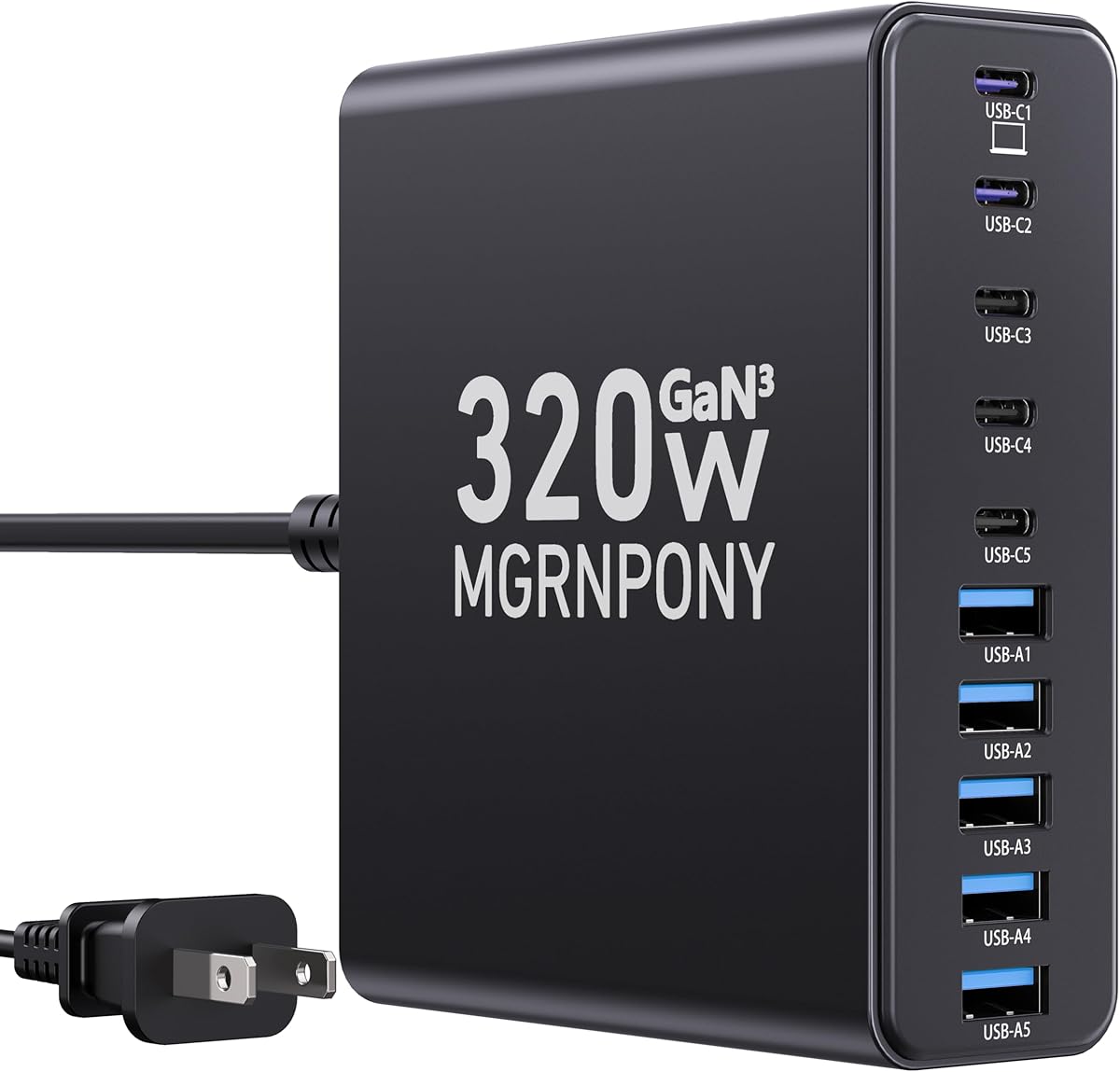
This GaN charger offers strong power for its price. It supports laptops and phones with 65W USB-C ports. The IceShield system provides reliable protection against common electrical hazards.
We may earn a commission when you buy through this link, at no additional cost to you.
Five USB-C and five USB-A ports handle mixed needs. The unit is small enough for travel bags. It avoids slowdowns when many ports are used simultaneously.
Cable management is not built into the design. Users must manage cords separately. Still it delivers solid performance and value for tech enthusiasts on a budget.
Best for travelers wanting high power without bulk. It simplifies multiple chargers into one unit. This station keeps your devices charged and safe anywhere you go.
GaN III technology enables higher efficiency and cooler operation than standard silicon chargers.
Lightweight and compact design fits easily in bags for charging on the go.
We may earn a commission when you buy through this link, at no additional cost to you.
This station solves cable clutter with retractable cords. It powers up to eight devices simultaneously from one unit. The cables stay tidy when not in use to reduce visual noise.
We may earn a commission when you buy through this link, at no additional cost to you.
GaN tech delivers faster charging in a small box. The retractable cords extend to 80cm for flexibility. It supports both USB-C and Lightning connectors for broad compatibility.
Cable length may limit reach for distant outlets. Retractable mechanisms add mechanical complexity over time. For neatness this remains a standout solution for organized charging needs.
Ideal for home offices needing tidy cable management. It reduces clutter while keeping devices powered. This station merges practicality with modern charging technology.
Retractable cords keep wires off your desk when not in use to maintain a clean look.
Supports up to eight devices simultaneously using a mix of port types and cables.
We may earn a commission when you buy through this link, at no additional cost to you.
This model prioritizes durability with a solid housing. It delivers 300W output for laptops and phones together. The anti-slip pads keep it stable on smooth surfaces.
We may earn a commission when you buy through this link, at no additional cost to you.
Dual 65W ports power laptops while others charge phones. The housing resists disassembly for long term use. Safety features protect against overheat and overload risks.
Internal components are fixed reducing repairability. No AC outlets limit plug-in options. However for USB-only setups this offers reliable power and long life.
Best for users needing a durable laptop and phone station. It provides steady power for daily work. This charger keeps your desk organized and safe over time.
Solid one-piece construction prevents loose parts and improves overall lifespan in busy areas.
Two 65W USB-C ports allow simultaneous charging of two laptops with full speed.
We may earn a commission when you buy through this link, at no additional cost to you.
Selecting the right charging station requires considering your specific devices and how much power they demand.
Total wattage determines how many devices you can charge at full speed. For laptops look for at least 65W per USB-C port plus extra headroom for phones and tablets. Higher totals like 300W or more ensure no slowdowns during peak use.
Aim for 200W or above if you plan to charge multiple laptops and phones simultaneously without delay.
Check that the unit has the right mix of USB-C and USB-A ports for your current gadgets. Modern devices prefer USB-C with Power Delivery for fast charging while older ones still use USB-A. Ensure you have enough ports for all devices you own.
Look for at least 4 to 6 ports with a balance of USB-C for power and USB-A for accessories.
GaN or Gallium Nitride technology enables smaller and more efficient chargers. These units run cooler and provide higher wattage in a compact footprint. If space is limited on your desk GaN should be a priority.
GaN chargers are generally more reliable and smaller than traditional silicon based charging stations.
Safety features like over current over voltage and temperature protection are vital to protect expensive electronics. Look for units that explicitly mention flame retardant materials and multiple protection layers. Certified products reduce fire and damage risks.
Always choose chargers that include over-temperature over-current and over-voltage protection systems for peace of mind.
Many units now include a bundle of mixed cables to simplify setup. Check if cables match your devices such as USB-C to C or USB-C to Lightning. Having cables included saves extra purchases and ensures compatibility.
Prioritize models that come with a diverse cable kit matching your phones and tablets.
Solid one-piece housings are more durable than those with removable dividers that can break or wobble. Anti-slip pads keep the unit stable on smooth surfaces. Good ventilation helps maintain safe internal temperatures.
Choose sturdy builds with flame retardant materials and non-slip pads for long term reliability.
Consider the physical size and weight of the unit before buying. Large stations may take up too much desk space. If you travel often look for lightweight and compact designs with detachable power cords.
Select a size that fits your workspace and meets your portability needs for home or travel use.
Established brands often provide better reliability and customer support. A good warranty period indicates manufacturer confidence in build quality. Check reviews for consistent performance and safety over time.
Choose brands with proven track records and at least a 12 to 24 month warranty for support.
Place your charging station on a flat stable surface away from direct sunlight and moisture. Ensure there is adequate ventilation around the unit to prevent overheating during long charging sessions.
Connect the power cord to a reliable wall outlet before plugging in devices. Organize cables neatly to avoid tangling and strain on the ports. Use only the included cables for best compatibility and safety.
Unplug the station during thunderstorms or if you notice unusual heat or odors. Clean the exterior gently with a dry cloth to remove dust. Regularly inspect ports for debris or damage to maintain safe operation.
Yes but you must check the USB-C port wattage. Look for stations with at least 65W per USB-C port to power most laptops efficiently. Higher wattage units like 100W per port offer faster laptop charging speeds.
Most modern units include safety systems like overcharge and overheat protection. These features make overnight charging generally safe. Always use certified chargers from reputable brands to ensure electrical safety during long periods.
Some units reduce output per port when all ports are active. Higher wattage models minimize this effect. Always check the total output versus per port ratings to understand speed changes during full load.
USB-C supports faster charging and Power Delivery for laptops and modern phones. USB-A is older and generally slower. Choose a mix based on your device ecosystem but favor USB-C for new electronics.
Yes but you may need to buy compatible cables separately. Included cables ensure optimal performance but third party certified cables also work. Match connector types to your devices to avoid charging issues.
Yes GaN technology is more efficient and generates less heat. This allows smaller designs and better safety. GaN units are often preferred for travel and dense multi-device setups due to lower thermal output.
Most stations handle between five to ten devices simultaneously. High-end models can power multiple laptops and several phones at once. Choose based on your total device count to avoid overloading the unit.
The top picks for November 2026 include the Zobirez 420W model for its high power and the Anker Prime for its compact quality. Both deliver reliable performance for different needs and budgets.
Prioritize total wattage and safety features to protect your investments. Select a station that fits your devices and desk space while providing room for future tech additions.
Prices and availability change frequently so review current listings before purchasing. Check that your selected unit supports all your devices to ensure seamless charging every day.