
HUANUO Laptop Desk Mount
4.5Editor score
Removable tray for monitors
240 cooling holes included
Integrated cable management
This guide compares the top laptop tray desk mount options for ergonomic setups, featuring detailed reviews of ten highly rated models to help you choose
Finding the right laptop tray desk mount can transform your workspace into a ergonomic efficient station. These devices elevate your screen to eye level, reducing strain and freeing up valuable desk space for your keyboard and mouse.
We evaluated ten highly rated products based on adjustability, build quality, and compatibility. Our analysis covers dual-use models that support both laptops and monitors, ensuring you find a versatile solution that fits your specific workflow needs.
Each selection highlights unique features like ventilation, cable management, and mounting options. Remember that product details and availability can change, so always verify the latest specifications and current listings before making your final purchase decision.
4.5Editor score

4.5Editor score

4.6Editor score
The following table provides a side-by-side comparison of all ten selected laptop tray desk mounts. Each entry highlights key specifications such as compatibility, mounting options, and unique features to help you quickly identify the best fit for your workspace.
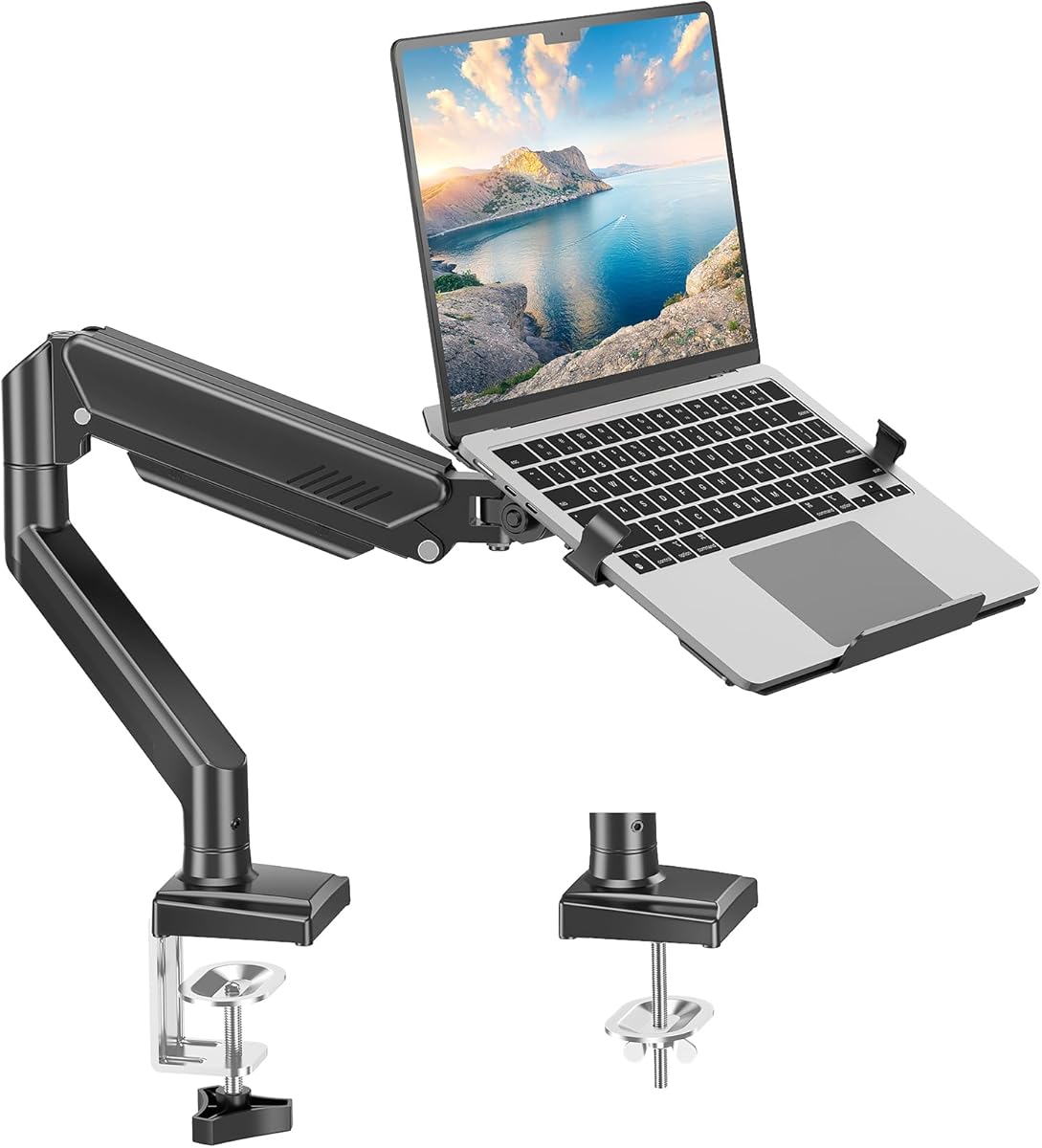


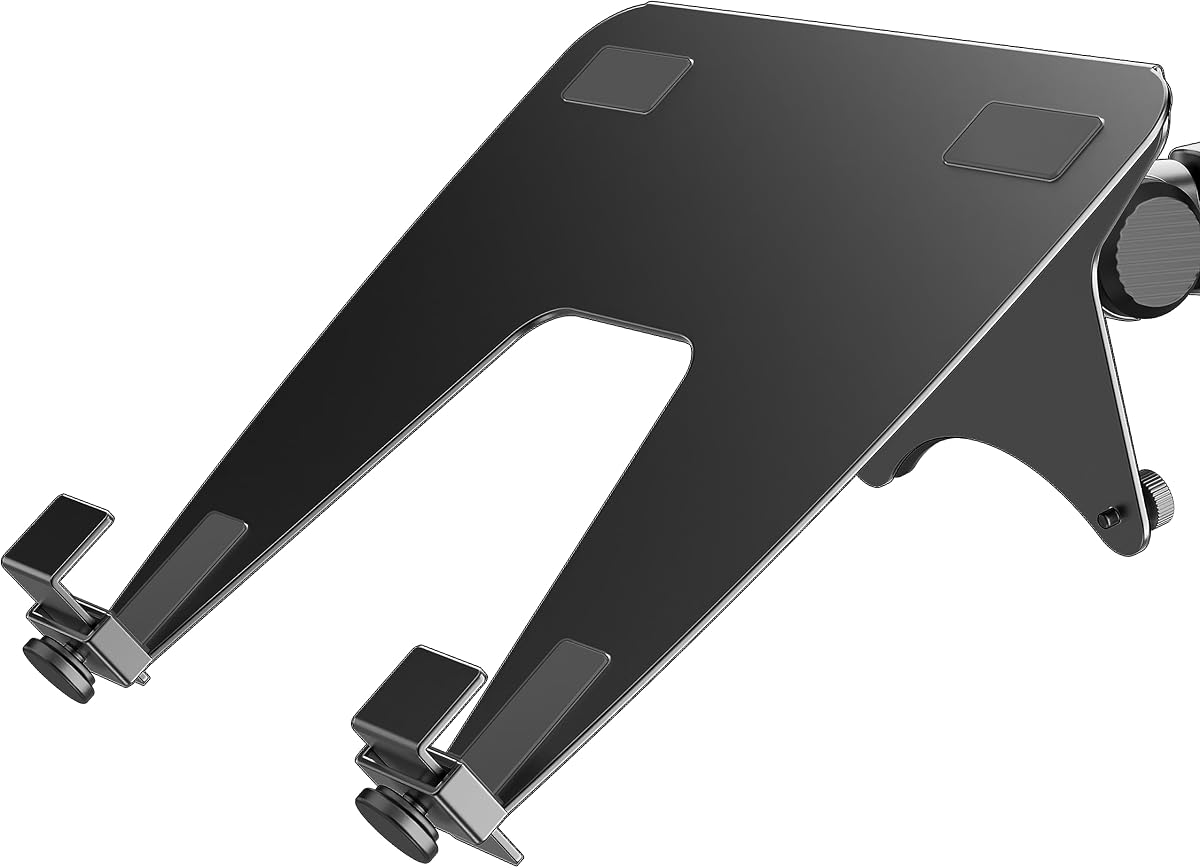
The WALI Adjustable Laptop Desk Mount is a robust solution for users seeking a stable, adaptable workstation upgrade. It holds up to 22 pounds and accommodates laptops up to 17 inches with ease, ensuring even larger devices remain secure during use.
We may earn a commission when you buy through this link, at no additional cost to you.
Its dual mounting options allow for flexible installation on various desk thicknesses, while the ventilated tray ensures your device stays cool. The mount allows extensive height and tilt adjustments, helping you maintain a comfortable posture throughout the day.
While the detachable mounting plates are functional, they require careful handling to ensure stability. Additionally, the detachable cable clips may not feel as permanent as integrated guides found on other models.
If you need a reliable, heavy-duty stand that supports both laptops and monitors with significant adjustment range, this is a top contender. Its ability to handle weight and provide cooling makes it ideal for long work sessions.
Ventilation holes on the tray absorb cooling air from the laptop fan, preventing overheating during extended use.
The mount includes both C-clamp and grommet options, fitting most standard desk thicknesses securely without tools.
We may earn a commission when you buy through this link, at no additional cost to you.
The MOUNT PRO Laptop Arm Mount offers excellent versatility with its 2-in-1 design. You can easily switch between a laptop tray and a monitor mount by removing the tray, making it a flexible choice for changing workstation needs.
We may earn a commission when you buy through this link, at no additional cost to you.
Its aluminum arm is sturdy and provides full motion adjustments, including tilt, swivel, and rotation. The built-in cable management keeps your workspace tidy, while the anti-slip pads ensure your laptop stays secure during daily tasks.
However, note that the mount does not support certain curved screens due to its design. Also, while the tray rotates, users should avoid turning it vertical when a laptop is attached to maintain safety.
This model is perfect for users who want the option to upgrade to a monitor later. Its solid construction and versatile mounting features make it a practical investment for any office setup.
Simply remove the tray to accommodate monitors from 13 to 32 inches with standard VESA patterns.
Six anti-slip pads and clever latches lock your laptop in place, preventing slips or falls.
We may earn a commission when you buy through this link, at no additional cost to you.
The VIVO Single Laptop Notebook Desk Mount is a highly rated option known for its stability and full range of motion. It accommodates laptops up to 17 inches and even supports ultrawide monitors up to 38 inches when the tray is removed.
We may earn a commission when you buy through this link, at no additional cost to you.
Its adjustable arm allows for extensive tilt, swivel, and rotation, ensuring you can find the perfect viewing angle. The drill-free mounting options make installation simple, keeping your desk surface intact while providing a stable platform.
While the installation process is straightforward for most, ensuring the correct grommet hole size is crucial for stability. Some users might find the cable clips detachable rather than integrated, which requires careful management.
For those seeking a dependable, versatile mount that can grow with their tech needs, this VIVO stand is an excellent choice. Its support for heavy devices and wide compatibility make it a long-term solution.
When used without the tray, this mount supports ultrawide screens up to 38 inches for immersive viewing.
Detachable cable clips on the arms and center pole help keep your cords clean and organized.
We may earn a commission when you buy through this link, at no additional cost to you.
The HUANUO Adjustable Monitor Arm combines monitor support with a ventilated laptop tray for a unified workspace solution. It supports monitors from 13 to 32 inches and includes a breathable tray that helps avoid overheating during heavy tasks.
We may earn a commission when you buy through this link, at no additional cost to you.
With a 16-inch extension arm and flexible adjustments, you can position your screen exactly where you need it. The integrated cable management keeps wires out of sight, contributing to a clean and professional-looking desk setup.
Installation is straightforward, but the clamp works best on wooden desks, and tightening screws is essential for stability. Users should follow the manual carefully to ensure the arm holds securely without wobbling.
This mount is ideal for those who want to keep their desk clutter-free while maintaining a flexible display position. Its combination of cooling features and cable management makes it a smart pick for organized offices.
The ventilated tray design features a breathable bottom to help your laptop stay cool while in use.
Cable clips allow you to keep wires neat and organized, reducing visual clutter on your workspace.
We may earn a commission when you buy through this link, at no additional cost to you.
The HUANUO Laptop Desk Mount is a budget-friendly option that doesn't compromise on essential features. Its ventilated tray includes 240 holes to maximize airflow, keeping your laptop cool even during long gaming or work sessions.
We may earn a commission when you buy through this link, at no additional cost to you.
By removing the tray, you can adapt this mount to support monitors from 15 to 32 inches. The 22-lb weight capacity ensures stability for heavier devices, and the cable management clips keep your workspace tidy.
While the build is solid, some plastic components like cable clips might require careful handling. However, its easy installation and adaptability make it a great entry-level choice for ergonomic setups.
If you are looking for an affordable yet effective way to elevate your workspace, this HUANUO mount delivers excellent value. Its focus on cooling and flexibility makes it suitable for students and professionals alike.
The tray includes 240 holes designed to maximize airflow and effectively prevent your laptop from overheating.
This design helps avoid neck and eye strain by allowing you to position your screen at eye level.
We may earn a commission when you buy through this link, at no additional cost to you.
The HUANUO 2 in 1 Function Laptop Mount stands out with its ability to support monitors up to 34 inches. It features a removable tray for laptops up to 17 inches, making it one of the most versatile options on the market.
We may earn a commission when you buy through this link, at no additional cost to you.
With a maximum extension of 18.1 inches, it offers generous flexibility for positioning your display. The quick setup process includes pre-assembled components, allowing you to get started without complicated assembly steps.
While its versatility is a strength, the mount requires ample desk space to utilize its full range of motion. Users should ensure their workspace can accommodate the extended arm for optimal comfort.
This mount is perfect for power users who need to switch between laptops and large monitors seamlessly. Its robust design and high weight capacity make it suitable for demanding office environments.
This mount accommodates monitors ranging from 13 to 34 inches with standard VESA patterns for broad flexibility.
The tray includes anti-slip pads and Velcro straps to prevent unwanted movement of your laptop during use.
We may earn a commission when you buy through this link, at no additional cost to you.
The VIVO Black Clamp-on Rotating Laptop Tray offers a unique solution by mounting your laptop under the desk. This frees up valuable surface area, allowing you to use your full desktop for keyboard and mouse movements.
We may earn a commission when you buy through this link, at no additional cost to you.
Its 360-degree rotation gives you ultimate flexibility to pivot the laptop out of the way when not in use. The solid C-clamp attaches securely to desks up to 2 inches thick without causing any damage to the surface.
Note that you need sufficient clearance around the clamp to allow for full rotation, and the tray must be placed under the desk to work properly. This design suits those who prefer a minimalist top-of-desk look.
If you want to clear your desk completely while keeping your laptop accessible, this mount is an innovative choice. Its discreet storage capability and rotation feature make it ideal for compact workspaces.
Rotate the tray under the desk for discreet storage when you need more desk space for other items.
Mounting below the desk creates ergonomic typing angles that can reduce strain on your wrists.
We may earn a commission when you buy through this link, at no additional cost to you.
The monTEK 2-in-1 Laptop & Monitor Desk Mount is built with durable steel and aluminum for a premium feel. It supports curved screens up to 32 inches, making it one of the few options that can handle modern curved displays.
We may earn a commission when you buy through this link, at no additional cost to you.
Its fully adjustable arm allows for tilt, swivel, and rotation to find the most comfortable ergonomic posture. The detachable tray features hollow metal construction for excellent heat dissipation, ensuring your device stays cool.
While the build quality is exceptional, the price reflects this premium positioning. Additionally, the installation involves multiple steps to ensure the clamps and mounts are secure on your specific desk material.
For users who demand top-tier build quality and curved screen compatibility, this mount is a standout choice. Its versatility and premium features make it worth the investment for high-end workstations.
This mount accommodates curved screens up to 32 inches, ensuring compatibility with modern display designs.
Constructed from durable steel and aluminum, this mount offers exceptional sturdiness and a sleek aesthetic.
We may earn a commission when you buy through this link, at no additional cost to you.
The Suptek Single Laptop Notebook Desk Mount provides an affordable way to elevate your laptop and monitor. It supports laptops up to 17 inches and monitors up to 27 inches, fitting a wide range of devices comfortably.
We may earn a commission when you buy through this link, at no additional cost to you.
Its arm is fully adjustable with 180-degree swivel and 360-degree rotation, allowing for diverse viewing angles. The installation is quick, typically taking about 10 minutes, and includes all necessary accessories for clamp or grommet mounting.
While the weight capacity is lower than some premium models, it is sufficient for most standard laptops. The basic build materials keep costs down but may not feel as robust as heavier alloys.
If you are on a budget but still need ergonomic adjustments, this Suptek mount offers solid value. Its quick setup and broad compatibility make it a practical choice for home offices and dorms.
All hardware and instructions are included, allowing most users to complete assembly in about 10 minutes.
Positioning your screen at the optimal height helps relieve pain in your eyes, shoulders, and neck.
We may earn a commission when you buy through this link, at no additional cost to you.
The ergounion Laptop Tray for Monitor Arm is designed to transform any compatible VESA mount into a high-performance workstation. It supports heavy gaming laptops up to 17.3 inches and holds up to 28.6 pounds securely.
We may earn a commission when you buy through this link, at no additional cost to you.
Its hollow U-shaped design helps dissipate heat, while the 30-degree ergonomic angle supports comfortable typing. The bottom-edge clips ensure all ports remain accessible, avoiding common obstructions found on other trays.
Since this is a tray-only accessory, you must already own a compatible VESA mount to use it. While not a full mount itself, it offers a heavy-duty solution for users upgrading their existing setup.
If you have a sturdy arm and need to support a very heavy laptop without adding weight to your desk, this tray is the best option. Its industrial-grade build ensures safety and durability for your most demanding devices.
Crafted from alloy steel, this tray supports laptops up to 28.6 lbs, ideal for high-performance gaming devices.
The design uses bottom-edge clips instead of side clamps, ensuring 100% accessibility to all laptop ports.
We may earn a commission when you buy through this link, at no additional cost to you.
Selecting the right laptop tray desk mount requires understanding your specific needs and workspace constraints. This guide covers essential factors to ensure you find a model that provides both comfort and stability.
Always check that the mount supports your laptop's screen size and weight. Most standard mounts support laptops up to 17 inches and weigh under 22 pounds, but heavy gaming laptops may require specialized heavy-duty options.
Ensure the weight capacity of the arm and tray exceeds your device's weight to prevent sagging or instability.
Most mounts offer C-clamp and grommet options. C-clamps are ideal for solid desks, while grommets fit desks with pre-drilled holes. Check your desk's thickness limits to ensure a secure fit.
If your desk has a thick edge or lip, a C-clamp might not fit. Ensure the desk thickness matches the mount's specifications.
Look for a mount that offers height, tilt, and swivel adjustments. Full 360-degree rotation allows you to share your screen easily, while tilting helps reduce glare during viewing.
The longer the arm extension, the more flexibility you have in placing the screen away from the edge of your desk.
A ventilated tray with holes or mesh helps prevent your laptop from overheating. This is especially important if you run heavy applications or games for long periods.
Trays with bottom lips or slots allow for better airflow compared to solid plastic surfaces.
Aluminum or steel arms provide better stability than plastic ones. A robust build ensures the mount does not wobble when typing or adjusting the screen.
Check for reinforced joints and screws that can be tightened securely to maintain the position over time.
Integrated cable clips or channels help keep your workspace tidy. Without proper management, power and data cables can become tangled or hang loosely.
Cables should be routed along the arm to minimize visible clutter on your desk surface.
Some mounts allow you to remove the laptop tray and use a VESA adapter for a monitor. This versatility is valuable if you plan to switch to a desktop setup later.
Check if the mount includes a VESA adapter kit if you intend to use it for monitors.
Consider the clearance needed for movement. Some rotating trays require a specific range of motion space beneath the desk or behind the monitor.
Ensure the mount does not obstruct other desk accessories or reduce your working area significantly.
Begin by securely attaching the mount to your desk using the provided C-clamp or grommet base. Ensure the clamp is tightened firmly so it does not shift during use.
Position your laptop on the tray or your monitor on the VESA plate, adjusting the arm to bring the screen to eye level. Secure the device using any anti-slip pads or clamps provided.
Regularly tighten the arm joints and check cables to prevent sagging. Wipe the tray and arm with a dry cloth to remove dust, which helps maintain the mount's appearance and longevity.
Most mounts in this guide accommodate laptops up to 17 inches, though some support up to 18 inches. Always verify the tray dimensions before purchasing to ensure your laptop fits securely.
Generally, C-clamps require a solid, flat surface like wood or metal to grip securely. Glass tops may crack or slip under the pressure of a clamp, so these mounts are not recommended for glass desks.
Some mounts specifically support curved screens up to 32 inches, while others do not. Check the product specifications to confirm if the mount supports the curvature radius of your monitor.
Use a mount with a ventilated tray that has holes or mesh for airflow. Elevating the laptop allows air to circulate around the device, reducing heat buildup during intensive tasks.
Check the maximum desk thickness listed in the product specs. If your desk exceeds this limit, consider using a grommet mount or adding a solid spacer to the clamp for stability.
Many laptop mounts are convertible. They allow you to remove the tray and attach a VESA adapter to use a monitor instead. Verify if the mount includes or supports a VESA kit.
We have reviewed ten of the best laptop tray desk mounts available in November 2026. Each option offers unique benefits, from budget-friendly models to heavy-duty mounts designed for demanding workstations.
Prioritize features like weight capacity, ventilation, and adjustability based on your specific needs. A high-quality mount can significantly improve your posture and workspace organization.
Remember to check current specifications and pricing before purchasing as models may update. With the right choice, you can transform your desk into a comfortable and efficient professional workspace.